
The Access Request, Done Properly: Five Questions, One Record
Monday, 09:10, at Redbrook Engineering. Dana has been on the desk for seven months and has just opened ticket 4418, which reads, in full: "Hi, Jess starts in the drawing office today, can you set her up with the same access as Sam? Thanks, Kieran." Dana opens Sam's account in the directory to see what "the same as Sam" means and finds forty-one group memberships. Sam has been at Redbrook for nine years. He can see the payroll share from a project he helped with, and the board papers folder from the time he minuted a meeting. He can also see the whole of a folder called OLD DO NOT USE that the drawing office uses daily, and a mailbox for a product line that was discontinued before Dana was hired. Jess, by Dana's count, needs four things. The ticket does not say which four, because nobody asked.
An access request is a ticket asking that a person be able to reach something they currently cannot. That might be a shared folder, a mailbox, an application, a role inside an application, a system they will administer. Done properly, it answers five questions before anyone touches a permission: what, for whom, why, for how long, and who approves. The ticket then becomes the permanent record of who granted what, when, on whose say-so and until when. That is the record every later question about that access will need. This article is part of our Access & Permission Requests series. It is about the request itself. The articles after it take the approval, the pressure for more than is needed, the shared-folder tangle, the review and the measuring.
It covers why "the same as Sam" is the wrong question. Then come the five questions in turn and the form that asks exactly those five. Next is the request that arrives sideways, by chat, phone or corridor. The ticket as the permanent record and the loop that every grant goes round follow. A short war story and the access request form to copy come last, in that order.
Why "The Same as Sam" Is the Wrong Question
"Make me like Sam" is the commonest access request there is. It is wrong because it copies a person's history instead of describing a person's job. Sam's forty-one groups are not a role. They are a sediment, laid down one request at a time over nine years, in which nothing was ever removed because nothing ever expired. Copying them gives Jess the drawing office's folders, which she needs. It also gives her the payroll share, which she does not need, and the discontinued product mailbox, which nobody needs. The request looks like a shortcut and is in fact an instruction to grant everything anyone has ever asked for on Sam's behalf, without reading the list.
The manager who writes it is not being careless; he is answering the only question he knows how to answer. Kieran does not know what the drawing office's folders are called in the directory. He does not know which group gives edit rights to the project register, or that Sam can see payroll. He knows that Sam can do the job and Jess will do the same job. "Like Sam" is a sensible description of the work from where Kieran sits. The desk's job is to translate it into resources, not to refuse it. The translation is the request done properly. (The refusal is the request done badly, and it comes back by phone.)
The honest version of "like Sam" exists. It is a role profile: a written list of the access a particular job needs, agreed in advance by the people who own those resources. That way, a new starter in that job gets the list and nothing else. Where the desk has one for the drawing office, Jess's request becomes "drawing office profile, start today". In that case, the five questions are already answered. Profiles are the subject of Role Profiles and Standard Kits. This article is about the request that arrives when there is no profile, or when the person needs something the profile does not cover. Most access requests are of that kind. Profiles cover the start; the rest of a career is exceptions.
The Five Questions, and Why Each One Exists
A request answers five questions, and each one exists because something goes wrong when it is missing. "What" names the resource so that the desk grants the right thing. "For whom" names the person so that the right account changes. "Why" describes the task so that the owner can judge whether the access fits it and the desk can offer less if less will do. "For how long" sets an end, so that the access can be removed without anyone having to remember. "Who approves" names the person whose say-so the grant rests on, so that the desk is carrying out a decision rather than making one. Five questions, five failures avoided, and the table below sets them beside the answers a desk usually gets.
| Question | The answer that arrives | The answer the desk needs | What goes wrong without it |
|---|---|---|---|
| What | "The finance stuff", "the same as Sam" | The resource by name and the level: the Finance Reporting folder, edit; the invoicing application, the approver role | The desk guesses, and guesses wide |
| For whom | "Jess", "the new starter" | The account name, and whether it is for the requester or someone else | The wrong Jess, or a grant to the manager who asked on her behalf |
| Why | "She needs it", "to do her job" | The task in one sentence: "she will raise purchase orders for the drawing office" | Nobody can tell whether read-only would have done |
| For how long | Nothing; permanence is assumed | "While in this role", "until the audit closes on the 30th", "for the project" | The access outlives the need, and the need was three weeks |
| Who approves | "My manager said it's fine" | The owner of the resource, by name, answering in the ticket | The desk has approved it by default, and the desk owns nothing |
Notice that none of the five is a technical question. A manager can answer all of them without knowing what a group is. A desk that asks them in plain words will get plain answers. The technical translation, from "the Finance Reporting folder, edit" to the right group in the directory, is the desk's work and stays with the desk. Requesters are asked what they need and why. They are never asked how it should be done.
What: Naming the Resource Precisely
"What" is the question the desk most often answers on the requester's behalf, and the one it most often gets wrong. "The finance stuff" might be a shared folder, a reporting application, a mailbox, or all three. A desk that picks one has guessed. Ask for the resource as the requester sees it, by the name on the screen. Ask for the level in the three words everyone understands: read, edit, or manage. Read is looking. Edit is changing. Manage is deciding who else can look and change, and it is the level almost nobody needs and many people are given.
One request can name several resources. Each should be on its own line, with its own level, because each may have a different owner and a different answer. "Finance Reporting folder, read; invoicing application, raise orders; finance team mailbox, send as" is three decisions, not one, and the ticket should show three. Where the resource is something the requester cannot name because they have never seen it, the desk asks what they will be doing. In that case, the desk names the resource for them in the ticket, in words, before touching anything. "I read this as the Finance Reporting folder with read access; tell me if that is wrong" is a sentence that has saved more wrong grants than any policy. The requester corrects it or confirms it, and either way the ticket now says what is being asked for.
For Whom and Why: The Person and the Task
"For whom" matters because a third of access requests are made on someone else's behalf, by a manager, an assistant or a colleague. The account that changes must be the one that needs it. Record the account, not just the first name; Redbrook has two people called Jess and the drawing office has hired one of them. Where a manager asks on behalf of their whole team, the request names each person. That is because the review in a year will need to ask about each person, and "the team" will have changed by then.
"Why" is the question requesters resent and the one that most protects them. The task, in one sentence, lets the owner decide quickly ("she will raise purchase orders" is a yes in seconds; "she needs finance access" is a conversation). It also lets the desk propose a smaller grant when a smaller grant will do the job. That is the whole of Least Privilege Under Pressure. The task also protects the requester, because when the access is questioned a year later, the ticket says why they had it, in their manager's words. That way, nobody has to reconstruct a reason. Ask for one sentence. A request form that asks for a business case will get a paragraph, and a paragraph is harder to approve than a sentence.
Do not ask why in a way that sounds like doubt. "What will you be doing with it?" is a planning question; "why do you need that?" is an accusation, and the difference is the whole of the requester's day. The desk is not deciding whether the person deserves the access. It is collecting the one sentence the owner needs to decide, and the words should say so.
For How Long: The Expiry That Makes Removal Possible
"For how long" is the question that almost no request form asks and the one whose absence creates Sam. Access that has no end date is removed only when somebody remembers. Nobody remembers, because the person who granted it has moved on, the person who approved it has forgotten and the person who has it has no reason to raise the subject. Access with an end date is removed when the date arrives, by a reminder, by a review, or by the ticket that was left open until then. The end date is the only thing that makes removal a routine instead of an act of memory.
Three answers cover nearly every request. "While in this role" is the right answer for access that belongs to the job. It means the access is reviewed when the role changes and removed when the person leaves. It is permanent only in the sense that the role is. "Until a date" is the right answer for a project, a cover arrangement, an audit or a handover. The date goes in the ticket where the review can find it. "For this one task" is the right answer for the one-off, the report someone needs to pull once, the folder someone needs to check for a day. It means the access is removed when the task is confirmed done, usually within the week. A request that cannot pick one of the three is usually a request that has not yet decided what it is for.
When the requester says "permanent", ask which of the three they mean. They nearly always mean "while in this role". The difference between that and permanent is the difference between access that is reviewed and access that is Sam's. I have never met a requester who objected to "while in this role" once it was explained. I have met many who objected to being asked, on the grounds that nobody had ever asked before. That is the problem, not the question.
Who Approves: The Owner, Not the Desk
"Who approves" is the question that moves the decision from the desk to the person who should make it. The answer is the resource owner: the person responsible for the folder, the mailbox or the application, who knows what is in it and who should see it. The requester's line manager can confirm that the person does the job; only the owner can say whether the job needs this resource. Finance owns the finance share. The head of the drawing office owns the drawing office folders. The application's business owner, not the desk that installed it, owns its roles. When a request names a resource whose owner nobody can name, the desk has found a resource that needs an owner before it needs a new member.
The desk approves nothing, and should say so plainly. That is because a desk that approves by default has become the owner of everything and the authority for none of it. The technician's role is to route the request to the owner, record the answer, and act on it. How to find the owners, keep a deputy for each, and stop the approval stalling on a person who is on leave is the subject of the next article, Approval Workflows That Do Not Stall. Here it is enough that the request names who will be asked, and that the answer arrives in the ticket under the approver's own name.
A request for access the requester's own manager owns is the easy case, and the common one. The manager asking for Jess to have the drawing office folders is the owner of those folders, and his request is the approval. Write that down; "requested and approved by Kieran, as owner of the drawing office share" is one line that answers the fifth question. The hard case is the manager asking for a resource somebody else owns. In that case, "my manager said it's fine" is a statement about the job and not about the resource. The owner still has to be asked.
The Form That Asks Exactly That
A form that asks the five questions in plain words gets five answers. A form that asks "describe your request" gets "the same as Sam". The form is not bureaucracy; it is the conversation Dana would otherwise have by e-mail over two days, asked once, in the order the desk needs. The craft of a form people will finish, with the fewest fields that still work, is in A Request Form People Will Finish. Applied to access, it means five fields with plain labels, a free-text line for each resource, three choices for duration and a box for the approver, and nothing else. Every extra field costs a completed form.
Give the access request its own form, separate from the general "something is broken" one. That is because the questions are different and a requester reporting a printer does not want to be asked how long they need it for. If you run QuerySolv, a department can have a form of its own that lands in the same queue as everything else. That way, the access form asks its five questions and the ticket arrives already shaped. In any tool, the test is whether a manager with no technical knowledge can fill it in from memory in under five minutes and whether the desk can act on it without replying. If either fails, the form is asking the wrong things, or too many of them.
Put the "same as" trap on the form itself. A line that says "If you want to ask for 'the same as a colleague', list instead what that colleague does that this person will also do" turns the shortcut into the five answers without an argument. Most managers, shown the line, write three or four tasks, and three or four tasks are something the desk can translate. The form has done Dana's translation for her, which is the only reason to have a form at all.
Remember: no grant without a ticket, and no ticket without the five answers: what, for whom, why, for how long, who approves. If one is missing, ask for it before touching a permission. In that case, write the answer in the ticket in the words it was given.
The Request That Arrives Sideways
Most access requests do not arrive on the form. They arrive as a chat message, a phone call, a line in a corridor or a forwarded e-mail with "can you sort this?" at the top. The desk's job is to convert them, not to refuse them. "Please use the form" to a manager who has just asked a favour in the corridor is a sentence that makes an enemy of the form. "I'll log that now; I need to know what she'll be doing with it and how long for" is a sentence that gets the five answers in the corridor and the ticket written at the desk. The manager learns what the form asks by being asked it. The form is the fast path. The conversation is the fallback. Both end in the same ticket.
The sideways request is also where secrets try to get into tickets, and the desk has to stop them at the door. A manager who forwards an e-mail thread "for context" has sometimes forwarded a password, a salary, a personal matter about the person being set up, or the reason the previous person left. The ticket keeps what the request needs, which is the five answers, and nothing from the thread that is not one of them. What belongs in a ticket and what never does is the subject of What Not to Write in a Ticket. An access ticket is read by everyone who ever reviews that access. Write it for them.
The request that arrives during an outage, or at four on a Friday, or from someone senior enough that the technician is not sure how to say "which folder?", still gets the five questions. It still gets logged first. The pressure to skip the questions is the subject of a later article in this series; the rule here is simpler. A grant made without a ticket is invisible, and invisible access is never reviewed and never removed. Fast is fine. Unrecorded is not.
The Ticket as the Permanent Record
The ticket is the only record of the grant that will exist in a year. It should be written as if a stranger will read it then, because a stranger will. The review, the leaver audit, the auditor, the next technician, the person who asks "why can Jess see this?" will all come to the ticket. The ticket has to answer without anyone's memory. Six things go in it. First is the resource as granted, by its real name in the directory or the application, not the requester's name for it. Next come the account it was granted to, the level, and the date. Then comes the approver, in the approver's own words, in the ticket. Last is the end, whether a date, a role or a task. "Done, as requested" is not a record. It is a claim that a record once existed.
Keep the grant and the request together on one ticket. That way, the "what" the requester asked for sits beside the "what" the desk did, and a difference between them is visible. If Kieran asked for "the finance stuff" and Dana granted read access to one folder, the ticket shows both and shows why. That is the least-privilege conversation recorded where it can be found. Where a request names several resources with several owners, some desks open one ticket per resource and link them. That way, each approval sits on the ticket for the thing it approves and the slow one does not hold the fast ones. In that setup, the parent ticket closes when the last child does. QuerySolv keeps a complete event history on every ticket, as many tools do. So the approver's reply, the change and the close are already in order without anyone building a separate log. In any tool, the test is the stranger: open the ticket cold and say who granted what to whom, when, why and until when, without a phone call.
Never put a credential in the ticket. An access ticket often involves a new account or a reset. The temptation is to write the temporary password in an internal note "so the requester can see it". Internal notes are internal to the desk, not secret, and they survive for as long as the ticket does. The credential goes to the person by a channel that does not persist, and the ticket says that it was sent and how. The ticket is a record of access. It must never be a route to it.
The Loop Every Grant Goes Round
The five questions are the first stop on a loop, and the picture below draws the whole of it. A request states what, for whom, why and for how long. It goes to the resource owner, who approves it in writing. The desk grants the least that does the job, time-boxed. The grant is recorded on the ticket. The record feeds a review, at expiry or each quarter, where the owner answers keep or remove. Keep sends the access back round as a renewed request. Remove closes the ticket with a note that says why. Nothing leaves the loop without passing the review, and the review can only see what the record shows. That is why the record is the step that cannot be skipped.
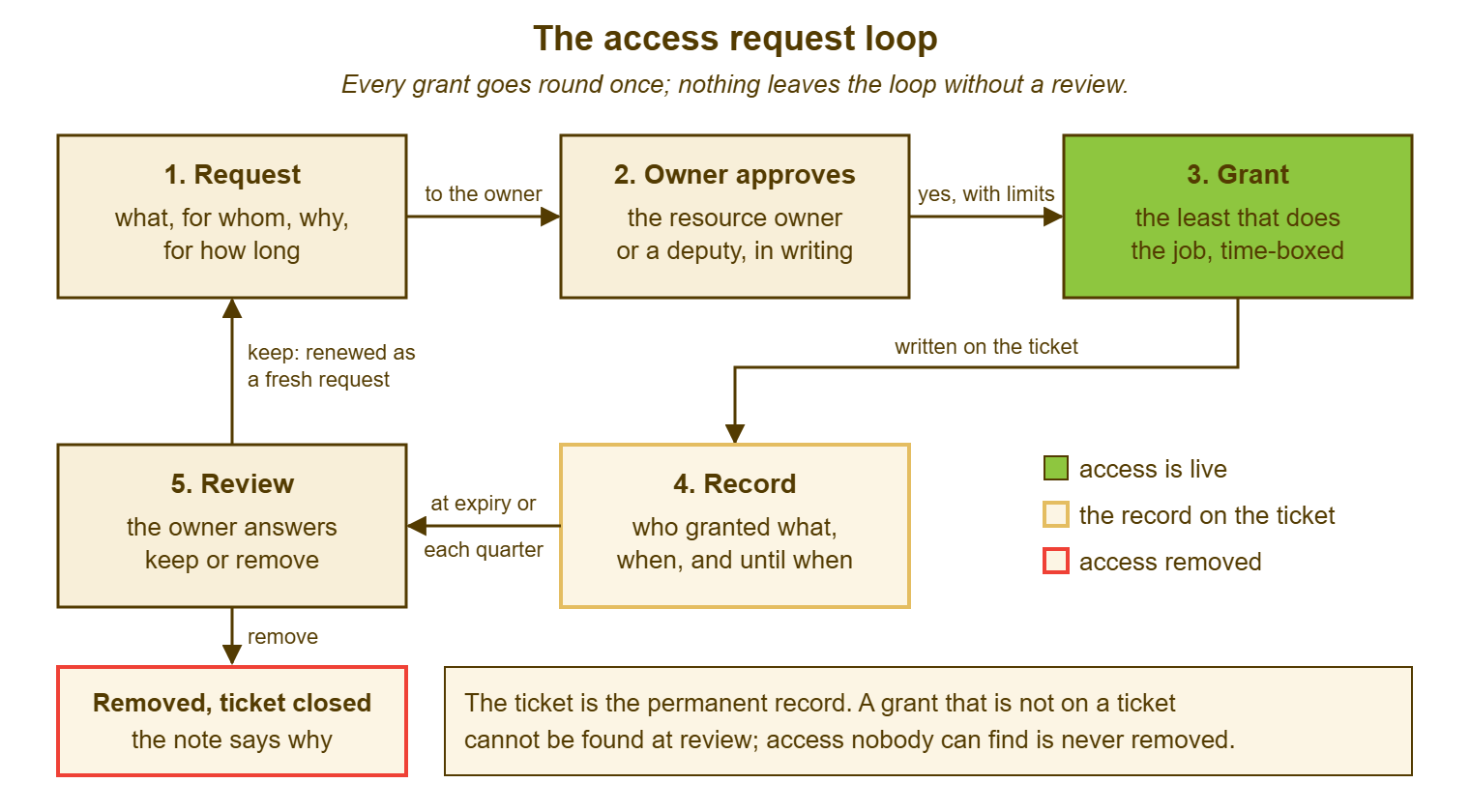
Each box on the loop is one article in this series. The request is this one. The approval and its stalls are the second. The grant, and the pressure to make it bigger than the job, is the third. The tangle that forms when the loop is skipped for shared folders is the fourth. The review is the fifth, and the measuring of the whole loop is the sixth. A desk that has only this article has the first box, and the first box is where most of the trouble is prevented. Sam's forty-one groups were forty-one requests that never asked "for how long".
A Short War Story: The Payroll Share at Tollgate Foods
At Tollgate Foods, a payroll clerk called Marcus was asked to cover for a colleague, Jo, during her maternity leave. His manager sent the desk a ticket reading "please give Marcus the same access as Jo for the next six months". A technician called Ben carried it out in twenty minutes by copying Jo's group memberships. Jo had, from a cost-review project two years earlier, membership of a group that could read the directors' remuneration folder. Nobody had removed that membership because nobody had been asked to. Marcus, finding the folder, mentioned a figure from it in the canteen. A grievance followed. HR spent about thirty hours on it. The desk spent a further twelve establishing how Marcus had come to have the access at all. That was because ticket 2207 said "same as Jo" and the only other record was Jo's own history, which went back nine years. The access Marcus had actually needed was two folders and one application role. The request, asked properly, would have taken Ben the same twenty minutes to carry out. A request copied from a person copies everything that person was ever given, and the ticket that says "same as" has recorded nothing except whose history it copied.
The Access Request Form
The form below is the one Dana drew up after ticket 4418. It is in two halves. The top is what the requester fills in, in plain words. The bottom is what the desk writes when the grant is made. That way, the one ticket carries both the ask and the answer. Put the requester's half on the web form with the same labels, and keep the desk's half as the note the technician completes before closing. Where the request names more than one resource, the requester adds a line per resource, and the desk's half is completed once per line. The "same as" line is deliberate; leave it in.
ACCESS REQUEST — ONE PER PERSON
Requested by: ______________   For (if different): ______________   Account: ______________
Date needed: ____________      Requester's manager: ______________

WHAT (one line per resource; level = read / edit / manage, or the role name)
  1. ______________________________________   level: __________
  2. ______________________________________   level: __________
  3. ______________________________________   level: __________
  If you were going to write "the same as a colleague", list instead what that
  colleague does that this person will also do:
  ______________________________________________________________________

WHY (one sentence: the task this person will do with it)
  ______________________________________________________________________

FOR HOW LONG (tick one)
  [ ] while in this role        [ ] until date: ____________
  [ ] for this one task, then remove

WHO APPROVES (the owner of each resource; the desk will ask them)
  Resource 1 owner: ______________   2: ______________   3: ______________

---------------------------------------------------------------------------
DESK USE — COMPLETE BEFORE CLOSING
  Granted (exact group / folder / role name):  ______________________________
  To account: ______________   Level: __________   On: ____________   By: __________
  Approved by: ______________ (in the ticket, in their own words)   On: ____________
  Ends: ____________ / while in role / on task done     Review date set:  [ ]
  Requester told what was granted and until when:  [ ]
  Differs from what was asked?  [ ] no   [ ] yes, because: ____________________
  No credential written anywhere in this ticket:  [ ]
Dana sent the form to Kieran at 09:25 with a note saying she could not safely copy Sam, and why, in one sentence about payroll. He filled it in over coffee: the drawing office share, edit; the project register, edit; the drawing office mailbox, send as; the plotter queue, use. While in role, approved by himself as owner of all four. Jess had her access by ten. The ticket said exactly what she had and why. Sam, for the first time in nine years, had somebody wondering aloud why he could see payroll. That question is the fifth article in this series, and it starts with a ticket that can answer it.
Frequently Asked Questions
The manager is also the owner of the resource. Do we still need a separate approval?
What if nobody knows who owns the resource?
Requesters say the form is too much for "a quick folder". Is it?
Can we grant first and get the approval afterwards when the requester is in a hurry?
Should the request ticket stay open until the access expires?
How much detail should the "why" have?
From the QuerySolv team: we build self-hosted help desk software for Windows. QuerySolv runs as one Windows service on your own network. It takes requests by web form, e-mail, live chat, social messages and REST API. It is licensed once per installation rather than per agent per month. The free trial runs the full product for 30 days.