The Easy Calm to Your Request Storm TM
Self-hosted help desk software for Windows®The support desk you install once, own outright, and run with the AI you choose.
 Download Installer with Free Trial
30-day trial with every Professional Edition feature and unlimited agents.
A complete help desk in a single Windows service
QuerySolv gives you a public request portal, an agent workspace, e-mail, live-chat and social DM intake, SLA tracking, a knowledge base, optional AI drafting, a REST API and failover clustering. All of it is served by one Windows service, on a machine you already own, inside your own network.
No web server, no PHP, Java or Node runtime, no container platform and no vendor cloud.
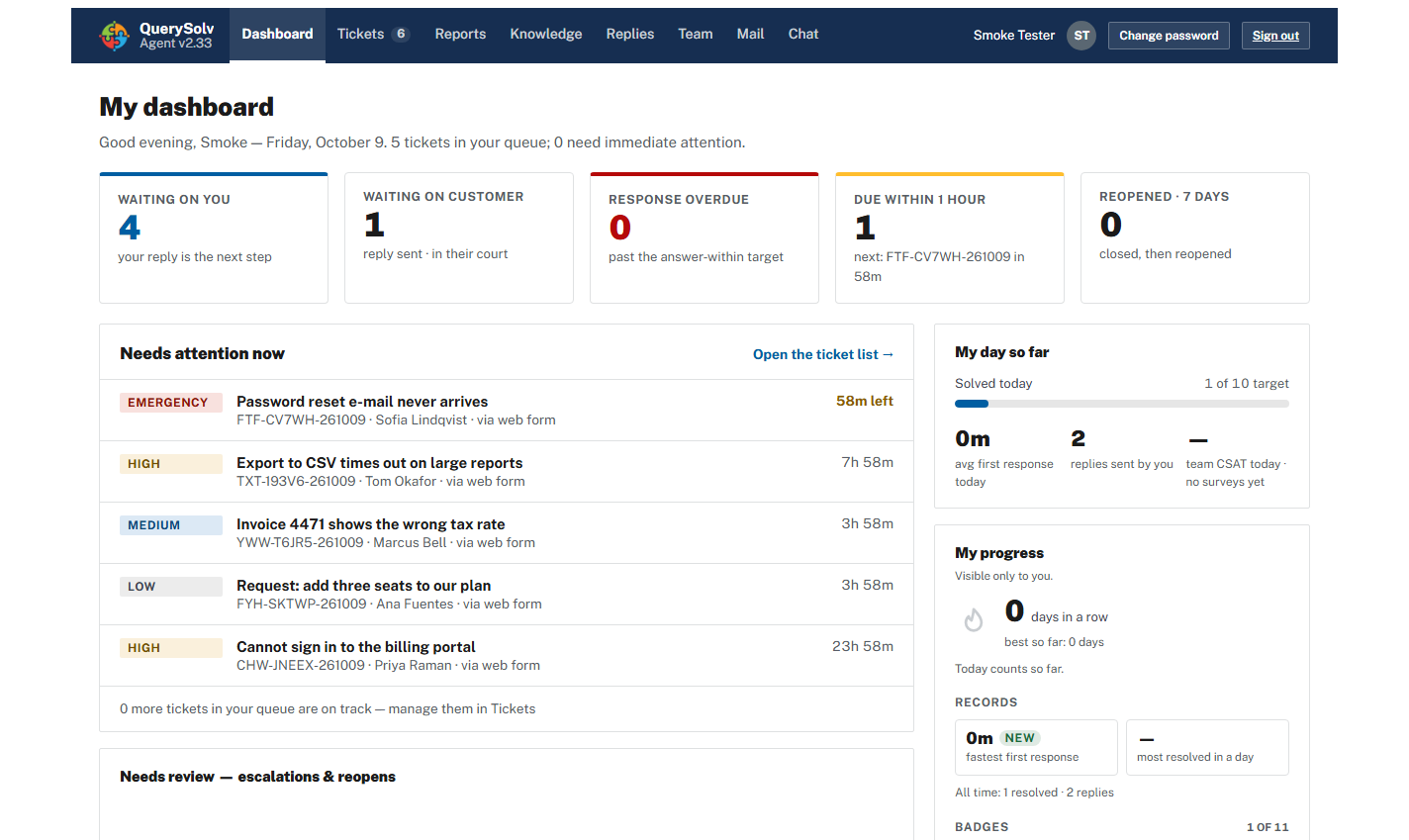
The agent dashboard. Every agent starts the day knowing what is waiting, what is late and what is due within the hour.
Sound familiar?
If one of these is why you are reading, the right-hand column links to the pages with the details.
| The help desk you have | QuerySolv |
|---|---|
| The bill arrives every month, per agent, for as long as you use it, so the engineer who sees only ten tickets this month has to go without an account. | Licensed per installation, paid once, with no expiry. The edition sets how many agents can sign in. Licensing › |
| Self-hosting meant a web server, a runtime and a database server to install, patch and keep in step. | One Windows service with every page, script and font compiled in. SQLite is built in, and a backup is three things. One service › |
| The self-hosted edition you ran was closed to new customers, withdrawn, or left to trail the cloud release. | Installed on your server and licensed to you with no expiry. There is no vendor cloud to migrate you to. On-premises › |
| Your security team asked where the ticket data goes, and the answer was a region picker. | Inside your network. Webhooks and API events carry ticket metadata, never message bodies, notes or attachments. Security › |
| AI arrived as a fee per resolution, or a pack of sessions that runs out. | Your provider and your key, or a local model. QuerySolv meters nothing, and an agent reviews every draft. AI on your terms › |
| Customers needed an account, a password and a modern browser just to ask a question. | No accounts. Customers raise a request and follow it to the end from any browser, however old or locked down. The portal › |
Buy it once. Stop renting your help desk by the head.
Most help desks bill per agent, per month, for as long as you use them. The meter never stops, which is why the engineer who sees ten tickets a month so often ends up without an account. QuerySolv is licensed per installation. The edition sets how many agents can sign in, you pay for it once, and the license does not expire.
For scale: a cloud ITSM plan listed at $99 per agent per month, with a $29 AI add-on, costs a ten-agent team $15,360 a year (list prices checked September 2026). Then it costs that again the next year.
- One perpetual license per installation
- No per-agent-per-month subscription
- No metered AI resolutions
- No surcharge for keeping your data in your own country
- Free edition for two agents
One service. No stack to babysit.
The usual price of self-hosting a help desk is a weekend of web-server, PHP and MySQL wrangling, then years of keeping their versions in step. QuerySolv ships as a single self-contained application with every page, stylesheet, script and font included. Start the service and it creates its own database.
There is no web root to secure, no runtime to patch, and no search engine to feed. Backing it up means copying three things.
- One Windows service and one desktop control panel
- No web server, PHP, Java, Node or Docker
- SQLite built in. MySQL/MariaDB or SQL Server if you prefer.
- Windows Server 2008 to 2025, Windows 7 to 11
- Three things to back up, and nothing else
It can't be retired out from under you.
Self-hosted editions of help desks keep getting closed to new customers, withdrawn, or left to trail the cloud release by months. The announcement tends to arrive with a migration deadline and a bigger bill. QuerySolv has no vendor cloud to migrate you to. It is installed on your server and licensed to you with no expiry, so no decision made elsewhere can switch it off.
- Software, interfaces and data all sit inside your network
- Nothing in the path of a request runs on anyone else's servers
- Collects e-mail and social messages without exposing your server to the internet
Your tickets stay inside your walls
Data sovereignty by construction, not by region selection. Webhooks and API events carry ticket metadata, never message bodies, notes or attachments. Stored secrets are encrypted, and the manual ships a 16-point hardening checklist.
AI on your terms, metered by nobody
Draft replies with Claude, ChatGPT, Grok, any HTTP endpoint or a local model, grounded in your own knowledge base. An agent reviews every draft before it goes anywhere. Or run with no AI at all.
A portal that works on any machine
To raise a request and follow it to the end, a customer needs no account and no password, and any browser will do, however old or locked down.
What's in the box
Five ways in, one queue
The web form, e-mail, live chat, social direct messages (X, Messenger and Instagram) and the REST API all create the same kind of ticket.
E-mail that behaves
Each department has its own mailbox and sender. Replies thread onto the right ticket, and screening rules keep junk out while holding anything doubtful for a person to review.
A browser workspace with nothing to roll out
Tabbed tickets, drag-to-merge, full-text search across whole conversations, predefined replies and internal notes. Keyboard-operable and screen-reader aware, built to the WCAG 2.2 AA accessibility baseline that EN 301 549 and Section 508 build on.
A knowledge base with search built in
Public, agents-only and draft articles, indexed by the service itself. There is no separate search engine to run.
Departments that are really separate
Each has its own form, custom fields, mailbox, SLA rules and per-agent permissions, so IT, facilities and HR can share one installation.
Made for the Windows shop you already run
Active Directory sign-in, SQL Server support, signed webhooks, and Windows Server Failover Clustering.
If you run the support team
Administrators install QuerySolv. Support managers live in it. Once the service is up, this is what it tells you.
Live chat, social channels, the SLA engine, the REST API, webhooks, Active Directory sign-in and AI start at the Professional edition, and clustering needs the High Availability edition. The editions are set out below.
What it doesn't do
You should hear this from us before you install it, not after.
- It is a help desk, not an ITSM platform. There is no asset inventory, CMDB, change management or telephony.
- The server side is Windows only. Requesters use any browser, and agents any current one.
Straight answers to the questions you are about to ask
Does it only run on Windows?
The server side does. The service and its control panel are native Windows programs, for Windows Server 2008 through 2025 and Windows 7 through 11. Requesters use any browser and agents any current one. If your servers have to be Linux, QuerySolv is not your tool, and we would rather say so here than on the support line.
Will it grow past two agents?
Free allows two active agents; Professional and High Availability keys carry the number you license, two or more, and moving up means installing a new key with nothing reinstalled. The database can be SQLite, MySQL/MariaDB or SQL Server (choose before you take real tickets: there is no migration tool between them), and the High Availability edition runs as a Windows Server Failover Clustering resource.
Does the AI see my tickets?
AI is off until you enable it. If you enable a hosted provider, a draft request sends that ticket's conversation, including internal notes, and the requester's name. The local-command hook can keep it on the server. Either way an agent reads the draft and decides; no draft is sent automatically.
What happens when the trial ends?
After 30 days without a key the service stops serving until one is installed. Install a key from the control panel, restart the service, and it carries on with everything it had: nothing is reinstalled and no data moves. If it is not for you, remove the service and you are done.
Three editions, one license per installation
Professional
2 or more agents, as your key carriesEvery feature except clustering.
High Availability
2 or more agents, as your key carriesEverything in Professional, plus high availability as a Windows failover-cluster resource.
Free
2 active agentsThe core help desk: portal, agent workspace, e-mail intake, tickets, departments, permissions, reports and knowledge base.
Compare editions feature by feature › See how it compares with the alternatives ›
Built for the desk you actually run
The same installation, described from eight seats. Pick the one that sounds like yours.
From the helpdesk topic library
A hundred series of plain-English articles on running a support desk, written for the administrator who was handed the queue. A few places to start:
Try it on a spare machine this afternoon
Download the installer and start the service. It runs for 30 days with every Professional edition feature and unlimited agents. If it is not for you, remove the service and you are done.
Download Installer with Free Trial
Runs on Windows Server 2008 to 2025 and Windows 7 to 11. Needs an administrator session to install. Serves HTTPS on port 443 by default.