
Warranty and Device History at a Glance on Every Ticket
Monday, 09:05, at Redbrook Engineering. Ticket 7734 from Hana, a designer: "Workstation shows no picture, fans running, tried two monitors." Lukas reads it, recognises a dead graphics card, and has a choice to make before he picks up a screwdriver. He can open the case and fit the spare card from the cupboard, forty minutes, Hana working by lunch. He can raise a warranty claim, if the machine has any warranty left, and wait for the maker's part. Or he can move Hana to a spare workstation and deal with hers later. The right answer depends on two facts: when the warranty ends and what has gone wrong with this machine before. He has neither. The screwdriver is right there. The facts are in a folder somebody else owns.
A hardware ticket's at-a-glance facts are the two or three things a technician needs to see before deciding what to do with a faulty device. They are whether the maker will fix it for free and how often it has failed already. As a third, there is how old it is relative to when the organisation would replace it anyway. This article is part of our Asset Data Inside Tickets series. And it is about getting those facts in front of the technician in the first thirty seconds of a ticket, without an asset system. That way the repair-or-swap call is a decision and not a reflex. The identifier and the inventory sheet it depends on are built in Linking Devices Without an Asset System. This article assumes you have a tag and a sheet, however thin.
It covers the two facts and why these two. Next come where the warranty fact comes from and how to keep it, then where the history fact comes from and what "clean" means. We cover the thirty-second decision as a table, then how to surface the facts without an asset module, with a picture. Next come the third fact, age against the refresh line, and what to tell the requester once the decision is made. A short war story follows, then the device card to copy.
The Two Facts, and Why These Two
The warranty fact decides what the fix costs and who does it. Inside cover, a failed part is the maker's problem. The desk reports the fault with the serial number and a part or an engineer arrives, at no charge, in a day or three. Outside cover, the same failure is the organisation's problem. That means a quote, an approval, a purchase and the desk's own hands, or a decision not to bother. The two paths cost different amounts, take different times, and, crucially, close each other off. A technician who opens a covered machine and fits their own part has usually ended the claim before it was made. The warranty fact has to come first because it is the fact that the first action can destroy.
The history fact decides whether this fix is worth making at all. A device on its first fault deserves a repair. A device on its fourth fault in a year has already cost the desk more hours than a replacement would. The fourth repair is a bet that this time will be different, placed by someone who has lost the same bet three times. The history fact is in the queue already, in every ticket that carried the device's tag. And it is the cheapest diagnostic the desk owns. It is also the one most desks never look at, because each ticket arrives as a first. Nobody searches for what they do not expect to find.
These two and not twenty, because twenty facts are a report and two are a glance. A desk with an asset system can show the technician the device's purchase order, its software list, its last ten patches and its network port. In my experience the technician reads none of it, because none of it changes the next thing they do. Warranty and history change the next thing they do. Age, the third fact, changes it too, and gets a section of its own below. Everything else can wait for the technician to want it.
Where the Warranty Fact Comes From
The warranty end is a date, and it comes from two places that should agree. The first is arithmetic: the purchase date on the invoice plus the term the organisation bought. For business equipment, that term is commonly one to five years and is written on the quote the device was bought from. The second is the maker's own lookup, a page where a serial number is typed and the cover end date is read back. Most makers provide this, and it is the authority when the two disagree. It knows about extensions, registrations and the quiet way some makers start the clock from the ship date rather than the invoice. Record the date, not the term. "Three years" is a fact about the purchase; "ends on" a date is a fact about today, and only the second can be sorted.
Write it into the inventory sheet's warranty-end column when the device is bought. That is the one moment the invoice, the quote and the serial are all in the same hands. A desk that leaves the column blank intending to fill it later fills it later for the devices that break. That happens one at a time, in the middle of the ticket, which is the worst possible time. Fifteen minutes at purchase saves a search per fault for the life of the device. The life of the device is the one period during which nobody will have those fifteen minutes.
Refresh the date when something changes it. That could be an extension bought at year two. Or it could be a whole-unit replacement under warranty that arrives with a new serial and sometimes a new clock. Or it could be a device transferred in from an acquired company with cover of its own. Each is a ticket, or should be. And each ticket ends with the row updated, which is the habit described in Keeping Asset Data Honest. And when the column is blank or doubtful at the moment of a fault, look it up before touching the device. Five minutes with a serial number is the cheapest insurance the desk will ever buy, and the only kind that works after the fact.
Where the History Fact Comes From
The history fact is a search. It is the ticket list filtered by the device's tag, read for the count in the last twelve months and the subjects of the last three. It is free if the tag is on the tickets and impossible if it is not, which is the whole argument of this series in one sentence. Count tickets about the device's hardware and behaviour, not every ticket that mentions it. A password reset raised from this machine is not a fault on it. Then read the three subjects together, because three different symptoms on one machine are often one failing part described by three people. The technician who reads "slow", "froze" and "blue screen" in a row sees a disk where each alone was a nuisance.
Decide what "clean" means and write it down. Most small desks settle on this: zero or one hardware ticket in a rolling year is clean. Two is a note; three or more is a repeat. A repeat changes the decision regardless of warranty. The number is yours to set from your own swap time, as discussed under the swap decision in Why the Ticket Needs to Know the Device. But it must be a number, applied the same way to every device. A threshold applied by feel is applied differently every time, and in the direction of one more repair.
The history fact has an edge the warranty fact does not: it includes the device's past under other people. A workstation that has had three owners has three requesters' worth of history. And a search by any one of them finds a third of it. The tag finds all of it, which is the only reason to search by tag rather than by the name already on the ticket. (The name on the ticket is right there. It is also the wrong question.)
The Thirty-Second Decision
With the two facts and the age in front of them, the technician's decision is a lookup in a table they could draw from memory. The point of writing it down is that the whole desk draws the same one. Six rows cover nearly every hardware fault a small desk sees. The "swap" in the table means moving the requester to a spare device today and dealing with the faulty one at leisure. "Retire" means the faulty one is not coming back into service, whatever is wrong with it.
| Warranty | History (last 12 months) | Age against the refresh line | Decision | Why |
|---|---|---|---|---|
| In cover | Clean (0 or 1) | Under | Claim the repair; loan a spare if the wait is more than a day | Free, and the device will probably hold |
| In cover | Repeat (3 or more) | Under | Claim the repair, swap the requester to a spare now, put the tag on the watch list; ask the maker for whole-unit replacement | The maker pays, but the requester should not live with a fourth fault |
| Out of cover | Clean | Under | Repair if the part and the fitting cost less than about half a swap in hours; otherwise swap and repair at leisure or retire | A cheap part on a sound machine is worth an hour |
| Out of cover | Repeat | Under | Swap and retire | The desk has already spent more than a swap costs on this device |
| Any | Any | Past the line | Swap and retire; spend nothing on it | Repair buys months of a thing already scheduled to go |
| Unknown | Any | Any | Stop; find the warranty fact first, then use the row above | Opening a covered device can end the claim |
Read the last row first, always. "Unknown" is the state most desks are in on most devices. The correct response to unknown is not to guess but to spend the five minutes. Lukas, standing over Hana's workstation with a screwdriver, is in the last row, and the last row says put it down.
Remember: check the warranty before you open the case. Check the history before you choose the fix. And write the decision on the ticket with the two facts that made it. Two lookups, thirty seconds, and the same table for every technician on the desk.
Surfacing the Facts Without an Asset Module
The facts exist. The problem is getting them in front of the technician at the moment of the ticket rather than in a sheet two clicks and a search away. Without an asset module, the practical answer is the device card: a short block of text, six lines. It is pasted into the first internal note on every hardware ticket, built from the sheet's lookup tab and the tag search. The card is written once per ticket, by whoever does first touch. That means every later reader of the ticket, including the technician who inherits it on Thursday, sees the facts without repeating the lookups. The picture below shows the card for one laptop, with the six facts on the left and, beside each, where the fact came from. The coloured markers carry the two judgements. Green is against the warranty line because cover is still running. Orange is against the ticket count because four in a year is over this desk's threshold. The strip along the bottom is the card read as a decision.
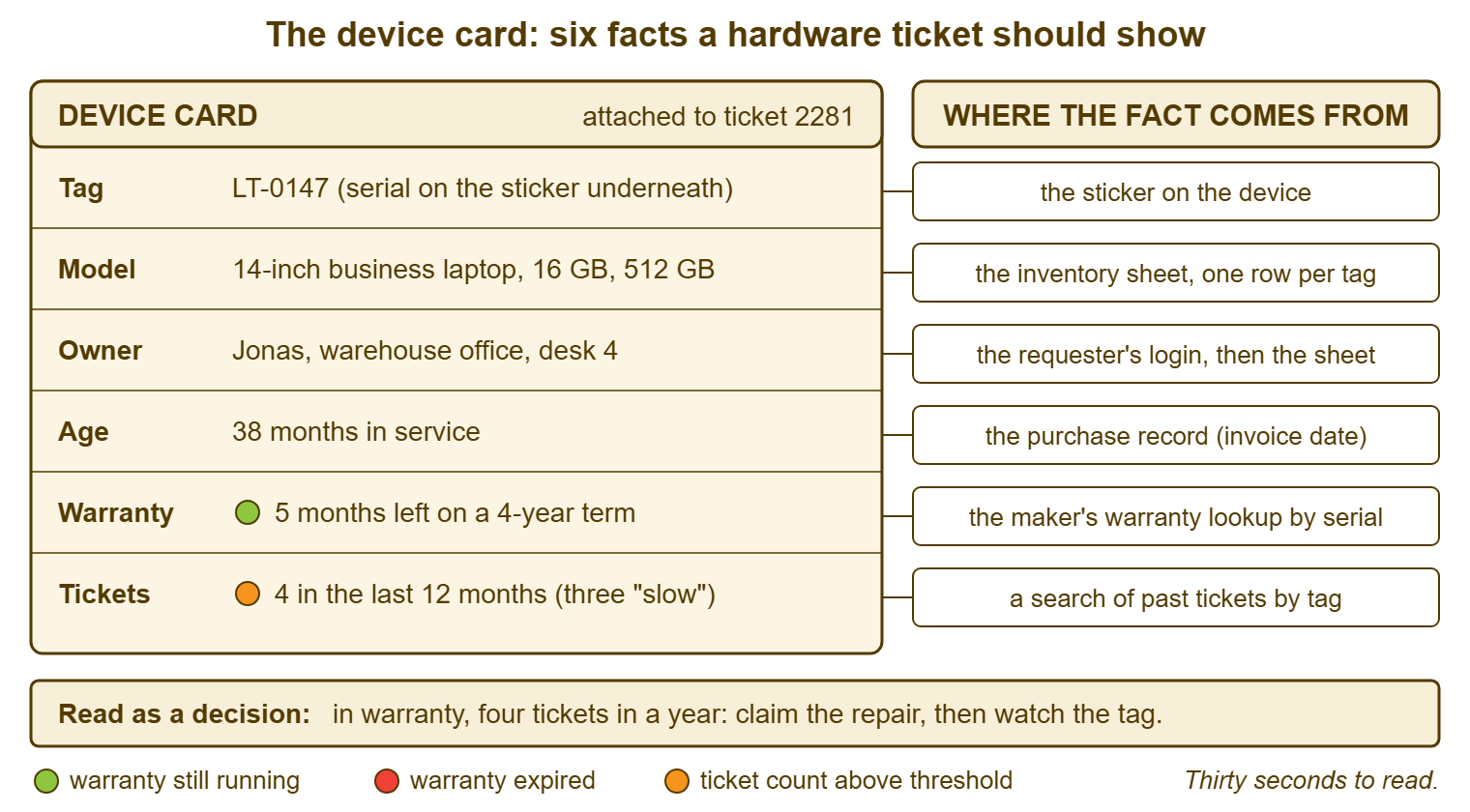
Put the card in an internal note, not a public reply, because it contains the desk's reasoning about the device. The requester does not need to read "fourth fault, swap and retire" about their machine before the technician has spoken to them. If you run QuerySolv, that is the ordinary split between a public reply and an internal note. In that case, the note stays in the ticket's event history for as long as the ticket does. So the card written at first touch is still there when the device raises its next ticket and the next technician searches the tag. In any tool, the test is that a stranger opening the ticket sees the two facts and the decision before they see anything else.
Where the tool has a custom field for the tag, the card and the field work together. The field is for filtering and counting, and the card is for reading. Where it has no field, the card's first line, "DEVICE CARD LT-0147", in the same form every time, is what the full-text search finds. Either way the card costs about a minute per hardware ticket. That is roughly the time Lukas spent looking for a second monitor cable before deciding Hana's problem was the card.
The Third Fact: Age Against the Refresh Line
The refresh line is the age at which the organisation would replace a device anyway, fault or no fault. Every organisation has one even when it has never been written down. Laptops are commonly replaced somewhere between three and five years, desktops a little later, monitors later still. The figure for your organisation is whatever finance has been nodding through. Write it in the sheet's rules, one line per device type, and the age fact becomes a comparison: months in service against the line. A device past the line that fails has, in a sense, done its job. And the right response is to thank it and swap it, not to buy it a new disk.
The age fact also changes the in-cover rows of the table, quietly. A device two months from the end of a four-year warranty is also, usually, two months from the refresh line. A covered repair on it is a free repair on a device about to be retired. That is still worth claiming but not worth a loaner and a week's disruption. Conversely, a device nine months old with a fault is almost always a claim, because nothing nine months old should be failing on the organisation's money. Age tells the technician how much the device is worth fighting for. (Not in money. In Thursday afternoons.)
Keep the age fact honest by recording in-service dates, not purchase dates, where the two differ by much. A laptop bought in a batch and kept in the cupboard for eight months is eight months younger in service than its invoice says. And its warranty, which runs from purchase, is correspondingly shorter relative to its working life. Both dates fit in the sheet. The card shows age in service and warranty end as a date. And the technician does the comparison in their head, which is the one piece of arithmetic in this article.
What to Tell the Requester
Once the decision is made, the requester gets it in two sentences, and the two facts are what make the sentences honest. "Your workstation's graphics card has failed; it is under warranty, so I have raised a claim and the part should be here Wednesday; in the meantime I will set you up on a spare this morning" is a message with a cause, a plan and a time. "This machine has had four faults this year, so rather than fix it again I am moving you to a different one this afternoon and retiring it" is another. It is one requesters are relieved to hear, because they have been living with the four faults. The desk-side craft of the estimate itself is in Honest ETAs. The point here is that the estimate is only honest if the technician knows which path the device is on.
The hardest version is the out-of-cover repair that needs a quote and an approval, because the time is not the desk's to promise. Say so: "It is out of warranty, so a replacement part needs approval from Beatriz in purchasing; I have sent the request and will tell you when I hear, and you are on a spare until then." The spare is what makes this bearable. That is why a desk with a sheet keeps two or three imaged spares in the cupboard. They have their own tags and the status "spare". A desk with no spares has only one decision available, which is "repair, somehow, now". That decision will be made for every device regardless of the table. The chase to the vendor, when the part is late, is its own subject, covered in the article on escalating to vendors and other departments.
A Short War Story: The Graphics Card at Redbrook Engineering
At Redbrook Engineering, Lukas fitted the spare graphics card into Hana's design workstation at half past nine and had her working by eleven. He closed ticket 7734 as a forty-minute fix. It was, until the second-hand card began overheating under a rendering load two days later and the machine failed again during a client deadline. When he finally looked the serial up, the workstation was eleven days inside a four-year on-site warranty. That would have brought an engineer with a new card the following morning. The maker's engineer, when at last called, noted the non-original card and the opened case. The claim was declined. Redbrook bought a replacement card at full price. Hana spent three days on a loaner without her design software while the licence was moved. The deadline slipped by a day that the account manager had to explain to the client. Lukas added up the cost afterwards. It was a card, about six hours of his own time across three visits, and three days of a designer at half speed. There was also a conversation he described as "not my favourite". The desk now writes the warranty end date on every hardware ticket before anyone touches a case. A screwdriver in a covered machine is the most expensive tool on the desk.
The Device Card
The card below is the six-line block to paste into the first internal note on every hardware ticket. It is filled from the sheet's lookup tab and one search by tag. Fill the top six lines at first touch, in about a minute. Fill the decision lines when the decision is made, which is usually the same minute. Leave "unknown" standing where it is true rather than guessing, and treat an unknown warranty as an instruction to stop and look it up. Keep the first line in exactly this form so that a full-text search for the tag finds every card ever written about the device.
DEVICE CARD — ________ (tag)
Model and spec: ______________________________
Usual user or location: ______________________
In service since: ________   Age: ____ months   Refresh line: ____ months
    [ ] under the line   [ ] past the line
Warranty ends: ________   [ ] in cover   [ ] out of cover   [ ] unknown
    Source of the warranty fact: ______________   Serial: ______________
Tickets on this device, last 12 months: ____
    Last three:  ______________ / ______________ / ______________
Last repair, swap or reimage: ______________
Watch list: [ ] yes   [ ] no

DECISION
  [ ] claim repair under warranty          claim ref: ______________
  [ ] repair out of cover                  quote ______  approved by ______
  [ ] swap to spare ________; keep device  [ ] swap to spare ________; retire
  [ ] stop: find the warranty fact first
Reason, one line: ______________________________________________
Requester told (what and when): __________________________________
Sheet row updated: [ ]
Redbrook's cards take Lukas about a minute each, and the minute has changed the shape of the desk's week more than the time suggests. There are fewer second visits and fewer quotes for covered parts. There is a watch list of six machines the desk is quietly planning around rather than meeting by surprise. The card is not a document. It is the two facts, written where the next person will read them, and a decision that says which row of the table it came from. Consider a technician who inherits a ticket on a Thursday and finds the card already there. It says "fourth fault, in cover, claim raised, spare issued" at the bottom. The first time that happens, they will understand why the minute was spent.
Frequently Asked Questions
We never recorded warranty dates. How do we backfill two hundred devices?
Does opening the case really void the warranty?
What counts as a ticket in the history count?
How many spares should a small desk keep?
Should the requester see the device card?
Who sets the refresh line, and what if we do not have one?
From the QuerySolv team: we build self-hosted help desk software for Windows. QuerySolv runs as one Windows service on your own network. It takes requests by web form, e-mail, live chat, social messages and REST API. It is licensed once per installation rather than per agent per month. The free trial runs the full product for 30 days.