
Scope Boundaries and the Gray Areas
The television in the lobby is not a computer. It has been on the wall for two years, showing the welcome slide and the weather, and in all that time nobody has asked whose it is. At 08:52 on a Tuesday it shows a blue rectangle and the words "No signal". A visitor is due at nine, and the receptionist has done the only reasonable thing, which is to call IT. The television became a computer the moment it stopped working. It will become a television again the moment it is fixed.
Every desk has a lobby television: a thing that is nobody's until it breaks, then IT's until it is mended, then nobody's again. The pattern is not the receptionist's fault, and it is not the television's. It is the absence of a line. This article, part of our What IT Supports series, is about where the lines go. It covers why boundaries matter, then the three kinds of line a desk needs (what we do, what we do best-effort, what we do not do). Next come the seven gray areas that turn up at nearly every small organization, then how to draw a line you can hold. We cover what best-effort has to mean to be worth saying, then the exception path for the times a line has to bend. There is a scope boundary sheet near the end to copy.
The catalog, covered in The Service Catalog Idea, Without the Platform, says what IT does. This article is about the edge of the catalog, which is where all the interesting tickets come from.
Why Boundaries Matter
Boundaries matter because the desk's time is finite and every yes spends some of it. A desk of two people has about eighty working hours a week, and the queue's demand for those hours has no natural ceiling. Without a line, time flows to whoever asks most confidently, which is not the same as whoever needs it most. The account request that is on the list waits behind the home printer that is not, because the home printer's owner is standing at the desk.
Boundaries are also a matter of fairness. If the desk fixes one person's personal laptop and not another's, the second person has a reasonable complaint. And "we were less busy that day" is not an answer anyone enjoys giving. A written line treats everyone the same, which is most of what fairness means in a support queue. If you are the whole department, the line is also what protects the afternoon; the One-Person IT Department series has more on that.
The staffing case depends on the line, too. When the desk asks for a third person, the first question will be what the two existing people spend their time on. If a third of it goes to work that is not on any list, the honest answer is "we do not know, and some of it we should not be doing". That is a hard case to make. A desk that can say "we do these twelve things, here is the volume of each, and here is what we declined" has a case.
Every yes creates an expectation, and expectations have no expiry date. The person whose home router you configured in a quiet week will come back when the router fails, and bring a colleague. That is not a character flaw; it is what a yes means to the person receiving it. A line, stated before the yes, lets you help once without promising forever. Without one, every kindness is a contract.
The Three Kinds of Line
A desk needs three kinds of line, not two, and the middle one is the one most desks forget. We do is the catalog: the services IT provides, owns and is accountable for, with a promise attached. We do best-effort is the ring around it: things IT will try to help with, within a stated limit, without owning them and without a promise. We do not is the outside: things IT will not touch, with a pointer to who does. Two lines (do and do not) force every gray thing into one of two boxes, and both boxes are wrong for it. Three lines give the gray things a home.
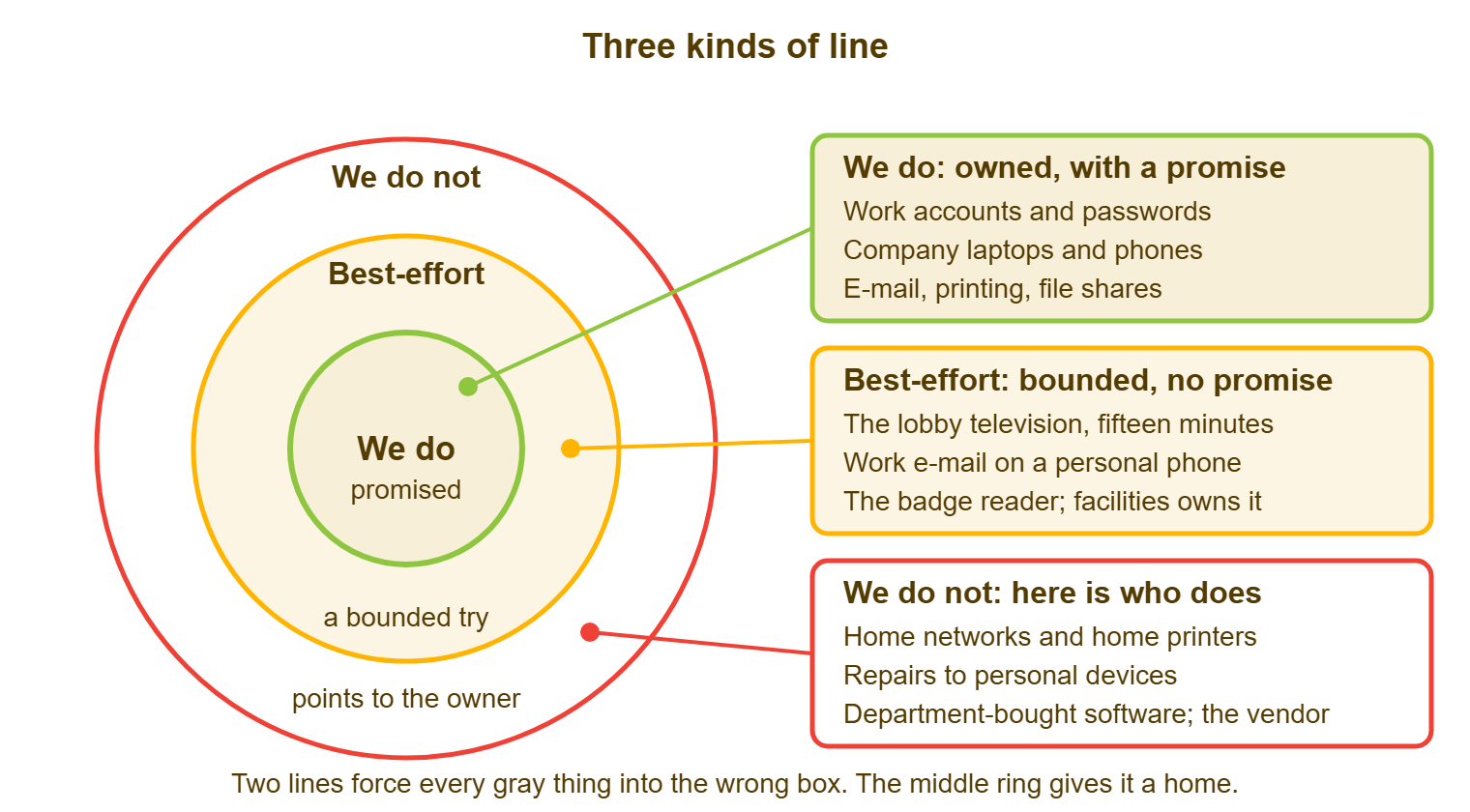
The rings in the diagram carry examples. In the center: work accounts and passwords, company laptops and phones, e-mail, printing and file shares, all owned and all promised. In the middle ring: the lobby television for fifteen minutes, work e-mail on a personal phone, and the badge reader that facilities owns, each a bounded try with no promise. On the outside: home networks and home printers, repairs to personal devices, and the department's own software that its vendor supports, each with a pointer to the owner. Your rings will differ. The shape should not.
The middle ring is where the lobby television lives, and giving it a ring is what stops it being a fight. "We will look at it for fifteen minutes and tell facilities what we found" is a sentence the desk can say at 08:52 with a straight face. It is written down, bounded and true. It is also a sentence that lets the receptionist stop worrying. The television is now someone's problem, which it was not at 08:51.
The Usual Gray Areas
Seven gray areas turn up at nearly every small organization, and it is quicker to decide them in advance than one ticket at a time. Each one below gets the same treatment: which ring it usually belongs in, and the sentence that holds the line.
Personal devices
Personal phones and laptops used for work are the commonest gray area and the one with the most feeling attached. The usual line: work e-mail and the remote-access client are best-effort; the device, its operating system and everything else on it are not ours. The sentence is "we will set up work e-mail and remote access, and we will not repair or configure the device itself." It has its own article, Personal Devices: What You Will and Will Not Touch.
Home networks
The home router, the home internet connection and the home printer belong outside the line, with one exception. If remote access fails, the desk checks that the organization's side is working and then stops. The sentence is "we support the connection from our end; your home network is yours and your provider's." The alternative is an IT department that supports eighty houses, each with a different router, some of which are in cupboards.
The executive's household
Executives ask for help at home for the same reason everyone does, which is that the help desk is the only number they have for anything with a screen. The line is the same as everyone else's. What differs is that an exception will sometimes be granted. The exception path below exists so that it is granted in writing, by a named person, rather than by whoever answered the phone. Most executives, in my experience, are relieved to be told there is a process.
The department's own software
Software a department bought without IT is a gray area with a budget line attached. The default is best-effort for access and accounts (we will create the sign-in and remove it when someone leaves). Everything else is outside the line, where the vendor's support is the support. The sentence is "we will manage who has access; the vendor supports the product." The tools nobody told you about, and how to bring one inside the line, are covered in Unsupported Software and the Shadow Catalog.
The building's screens, badges and thermostats
Screens, badge readers, door controllers, thermostats, the elevator's display: these are building systems, and they belong to facilities or the landlord. They are also on the network, which is why they reach IT. The line is best-effort with facilities as owner: the desk checks the cable and the address and tells facilities what it saw. Facilities calls the contractor. The sentence is "we will check that it is on the network; facilities owns the device and the contract." The lobby television lives here.
Events and AV
The all-hands, the customer day, the board meeting in the big room: events need a screen, a microphone and someone to make the slides appear. The request often arrives forty minutes before the event, as a statement rather than a question. The line is best-effort with notice: IT will set up the room's own equipment with a working day's warning and will not run the event. The sentence is "we will set up the room with one working day's notice; running the event is the organizer's." Hire an AV contractor for the big ones; they do it every week.
The cable that is also a desk
Furniture arrives at IT because it has a cable: the sit-stand desk with a control box, the monitor arm, the under-desk power strip, the chair with a USB port in it. The line is outside, with facilities as owner, unless the cable is a network cable or the device is a computer. The sentence is "if it computes, it is ours; if it holds a computer up, it is facilities." This one sounds flippant and holds up remarkably well in meetings.
Drawing Lines You Can Hold
A line you can hold passes two tests: you can say it in one sentence, and management will back it when someone complains. The one-sentence test keeps the line simple enough for a technician to say at a desk and for a user to remember. The management test keeps the line real. A boundary that the desk holds and the manager waives on the first phone call is not a boundary; it is a delay.
Get the backing before you publish, not after the first complaint. Take the three or four lines that will cause the most friction (personal devices, home networks, the department's own software, events) to whoever the desk reports to. Bring last quarter's ticket volume and hours for each. Ask one question: "If someone escalates past us, will you say the same thing we said?" If the answer is yes, publish. If it is "it depends", you have found the line that needs an exception path rather than a wall.
Write the line in terms of what the desk does, not what the user did wrong. "We support work e-mail on personal phones and do not repair the phones" is a line. "Personal devices are not our responsibility" is a complaint with a full sentence structure. The first tells the reader what they get. The second tells them they are a problem, and people who feel like a problem stop asking. That sounds like a win until you find out what they did instead.
A line that cannot pass the one-sentence test is usually two lines stuck together. "Meeting rooms are supported except for the big room, which is shared with facilities, except for the screen, which is ours, except on event days" is four decisions pretending to be one. Split it. Each piece will pass.
Best-Effort as a Real Category
Best-effort is a real category only if it promises something specific and withholds something specific. It promises a bounded amount of time (fifteen or thirty minutes, written down), and a competent look. It promises an honest answer about what was found and a pointer to whoever owns the thing. What it withholds: a resolution target, ownership of the outcome, responsibility for the device, and a second visit without a decision. If best-effort does not say both halves, it collapses into "we do", because the user hears the promise and not the limit.
The time limit is the part to say out loud, before starting. "I can give this fifteen minutes" is a sentence the user hears as help, and it is also a sentence that ends the fifteen minutes without an argument. Said afterwards, the same sentence sounds like an excuse. I have learned to say it before my hands reach the keyboard, because once they are on it the clock is, in everyone's mind, already running on my account.
Remember: say the time limit before you start. Said first it is the terms of the help; said after it is an excuse.
Best-effort tickets are still tickets. Log them, categorize them as best-effort, and record the pointer you gave. The record is what turns a hundred small favors into a staffing case or a new catalog entry. And it is the only way to notice that the lobby television has been looked at eleven times this year. Eleven looks is a service. It is just an unofficial one, with no owner and no budget, which is the worst kind.
Set the limit by the thing, not by the person. Allow fifteen minutes for a personal phone, and thirty for a building device because facilities needs a clear report. Allow ten for a home connection because there is little to check from our end. Put the numbers in the boundary sheet so every technician gives the same answer. Consistency is what makes a limit a rule rather than a mood.
The Exception Path
An exception is a decision to cross a line once. It needs three things to be an exception rather than a leak: a named person who can grant it, a written record, and an end. The person who grants it should be the desk's manager, not the technician at the desk and not the person asking. The record can be two lines on the ticket. The end can be a date, a number of visits, or "this ticket only". Without all three, an exception is the first instance of a new service nobody agreed to.
Here is one, in full. On a Thursday at 15:40, Marcus, the sales director at Northgate Retail, asks the desk to set up a printer and a second screen at his home. He will work there for the six weeks after an operation. The line says home setups are outside. Sam logs ticket 6204, writes "home setup requested; outside scope; exception requested" as an internal note, and asks Priya, the IT manager, by 16:00. Priya replies in the ticket at 16:25: "Approved: one visit, up to ninety minutes, company screen and printer only, home network not included; this ticket only." Sam makes the visit on Monday morning. It takes seventy minutes, and the ticket closes with the note intact. The line did not move. Someone stepped over it once, on purpose, and left a footprint.
Record the exception on the ticket rather than in a chat message or a memory. The ticket is where the next technician will look when Marcus's colleague asks for the same thing. It is where the quarterly review will find that four exceptions were granted for the same reason, which means the line is in the wrong place. In a ticket system worth using, an internal note stays off the e-mail to the requester. Every action is kept with a snapshot of the ticket's state. QuerySolv does both, which is the shape to want when "who approved that?" arrives six months later.
Count the exceptions. Three in a quarter for the same gray area is a signal that the area wants a different ring, and the review should move it rather than keep granting. One exception is a kindness. Twelve is a policy you have not written yet.
A Short War Story: Building Systems at Meridian Parts
Meridian Parts had two badge readers that dropped off the network about once a month. Every time they did, the ticket arrived as an emergency, because the warehouse door would not open and the shift was waiting outside. The desk would run across the yard, reseat a cable, and restart a device whose contract, manual and supplier nobody in IT had seen. After the fourth such morning, Dana, who ran the desk, added a line to the catalog: "Building systems (badge readers, screens, door controllers): best-effort, thirty minutes; facilities owns the device and the contract." Facilities, given the line, found the supplier's number and the maintenance agreement. The supplier replaced a failing switch in the cabinet the readers hung off. The tickets did not stop entirely. But they stopped arriving as emergencies, because the shift supervisor now called facilities first and facilities called IT only to confirm the network was up. Nobody had been doing anything wrong. The device had not had an owner until somebody wrote one down.
The Scope Boundary Sheet
Copy this sheet, change the rings to match your own decisions, and publish it next to the catalog. The "owner if not us" column is the most useful one on the page. It turns "we do not do that" into "here is who does", which is the difference between a wall and a signpost.
| Area | Ring | What we will do | Owner if not us | Exception route |
|---|---|---|---|---|
| Company laptops, desktops and phones | We do | Issue, repair, replace, take back | IT | Not needed |
| Work accounts and access | We do | Create, change, remove | IT | Not needed |
| E-mail, file shares, printing | We do | Run and fix | IT | Not needed |
| Work e-mail on a personal phone or laptop | Best-effort, fifteen minutes | Set up mail and remote access; no repairs, no changes to the device | The device's owner and its maker | IT manager, in writing on the ticket |
| Building screens, badge readers, door controllers | Best-effort, thirty minutes | Check network and address; report to facilities | Facilities and their contractor | Facilities manager |
| Events and room AV | Best-effort, one working day's notice | Set up the room's own equipment; do not run the event | The event organizer | IT manager, per event |
| Software a department bought itself | Best-effort, accounts only | Create and remove sign-ins | The vendor; the department that bought it | IT manager |
| Home networks and home printers | We do not | Confirm our end of remote access works, then stop | The user's internet provider | IT manager, in writing, one visit |
| Repairs and operating systems on personal devices | We do not | Point to the maker or a repair shop | The device's maker | None |
| Furniture with a cable | We do not | Nothing, unless it is a network cable | Facilities | None |
Back in the lobby at 08:55, the television gets its fifteen minutes. Sam finds the signal cable has worked loose from the media player behind the screen, pushes it home, and the welcome slide returns at 08:58. He logs it as best-effort, building systems, and sends facilities a two-line note suggesting a cable clip. The visitor arrives at nine and sees the weather. The television is a television again. Next month, when it goes blue, the receptionist will call facilities first, and facilities will know what the cable clip was for.
Frequently Asked Questions
Does saying "we do not do that" damage the desk's reputation?
Who decides where the lines go?
What if a gray area has no other owner?
How long should a best-effort limit be?
Should best-effort work appear in our metrics?
What do we do when someone goes over our heads?
From the QuerySolv team: we build self-hosted help desk software for Windows. QuerySolv runs as one Windows service on your own network. It takes requests by web form, e-mail, live chat, social messages and REST API. It is licensed once per installation rather than per agent per month. The free trial runs the full product for 30 days.