
The Day-One Checklist: What Must Be Ready, in What Order
Thursday, 16:30, at Ashgrove Housing, a housing association with four offices and a desk of three. Priya, who runs the desk, is looking at the parent ticket for Sam, a housing officer who starts at nine tomorrow. The laptop is built and sitting on the bench. The account exists. The mailbox exists. The access task says "waiting on manager" because nobody confirmed which tenancy system Sam needs. The badge task says "waiting on photo" because facilities need one and Sam has not been in. Owen, who owns the ticket, says Sam is "mostly ready". Priya has run enough first mornings to know that "mostly ready" is a state that exists only on the desk. At nine tomorrow, Sam will either be able to work or not.
The day-one checklist is the list of everything that must be true on the morning a new person starts. It is written in the order the work can be done, with a name against each line. A test at the end says whether the person is ready or not. The checklist is the working document behind the parent ticket that Onboarding as a Ticket Type describes. The parent says a person is coming on a date, and the checklist says what has to exist by then. This article is part of our Employee Onboarding series. And it is about the list itself, the order its dependencies force, and the difference between done and ready.
It covers what belongs on the list, then the order and the dependencies that set it, with a timeline picture. We cover what "ready" means and the test that proves it. Next we cover who signs off each part and what to do when something is not done. We cover the morning handover and the checklist as a living document. A short war story follows, then the checklist to copy, in that order.
What Belongs on the List
Seven groups of things cover nearly every starter, and the list is written by group so that each can be owned by the team that does it. The account is the entry in the directory that lets the person sign in. It has a first password that will be handed over on the morning and a second factor enrolled with the person present. The second factor is the extra proof of identity beyond the password. The mailbox is the e-mail address, the display name, the membership of the distribution lists the role uses, access to any shared mailboxes, and the calendar. The device is the laptop or desktop, built to the standard, named, and enrolled in whatever management the organisation uses. The technician signs into it once to prove it works, and it is brought up to date.
The access is the role's bundle of permissions: the shared folders, the applications, the remote access if the role works away from the office, and the printers at the person's site. The phone is the extension or the handset, the mobile if the role carries one, and the voicemail greeting. The badge is the door access, the photo, the parking or lift permissions where those exist. The desk is the physical place: a desk, a chair, a screen, a dock, a working network point or a tested wireless connection. It includes the small things such as a headset for a role that spends the day on calls.
Under those seven sit the items that are not strictly IT but fail in IT's direction when missed. They include the portal or knowledge base login and the person's entry in the internal phone list. They include the welcome message that tells them how to ask for help, and the induction slot the manager books. None of these is the desk's job alone. All of them belong on the list, because the list is what the organisation has to do for a starter. The desk is the only place that sees the whole of it.
What does not belong is anything role-specific that is not on the profile. "Set up the finance reporting pack for the quarterly cycle" is a task for the finance manager, not a line on a checklist every starter sees. The checklist holds the common case; exceptions live in the comments box on the request and become task tickets of their own. A checklist that tries to hold every role's special needs grows until nobody reads it. The standard items it was built to protect then get lost in the middle of page four.
The Order Is Set by Dependencies
A dependency is a task that cannot start until another has finished, and the day-one list has four that matter. No mailbox before the account, because the mailbox is attached to the account and cannot exist without it. No access before the role is known, because the access bundle is chosen by the role profile. A bundle granted by guesswork is either too little, which produces tickets, or too much, which produces an audit finding. No device enrolment before the account, because the device is enrolled against a person, and the technician's test sign-in is what proves the two work together. No badge before the photo, which sounds trivial and strands more starters at turnstiles than any other line on the list.
The dependencies produce an order, and the order produces a timeline counted back from the start date. The request arrives ten working days out, or as near as the organisation can manage. And the parent ticket with its tasks is created the same day. The account is created early, by six days out, because the mailbox, the access and the device enrolment all wait on it. Directories also sometimes take a while to agree with themselves about a new entry. The role profile is confirmed with the manager in the same first days, because the kit and the access both wait on it. Then the work runs in parallel: the kit is built while the access is granted while facilities sort the desk and the badge. The desk signs off one working day before the start, which leaves a day to fix whatever the sign-off test finds.
The picture below draws that timeline as eight rows against working days before the start date. The diamonds are single events: the request, the sign-off, day one, the day-three check-in. The bars are work that spreads over several days. The arrows are the dependencies: the request feeds the account and the kit, the account feeds the access, and everything feeds the sign-off. Read it as the shape of a normal onboarding. The exact days are a fictional desk's and yours will differ, but the arrows will not.
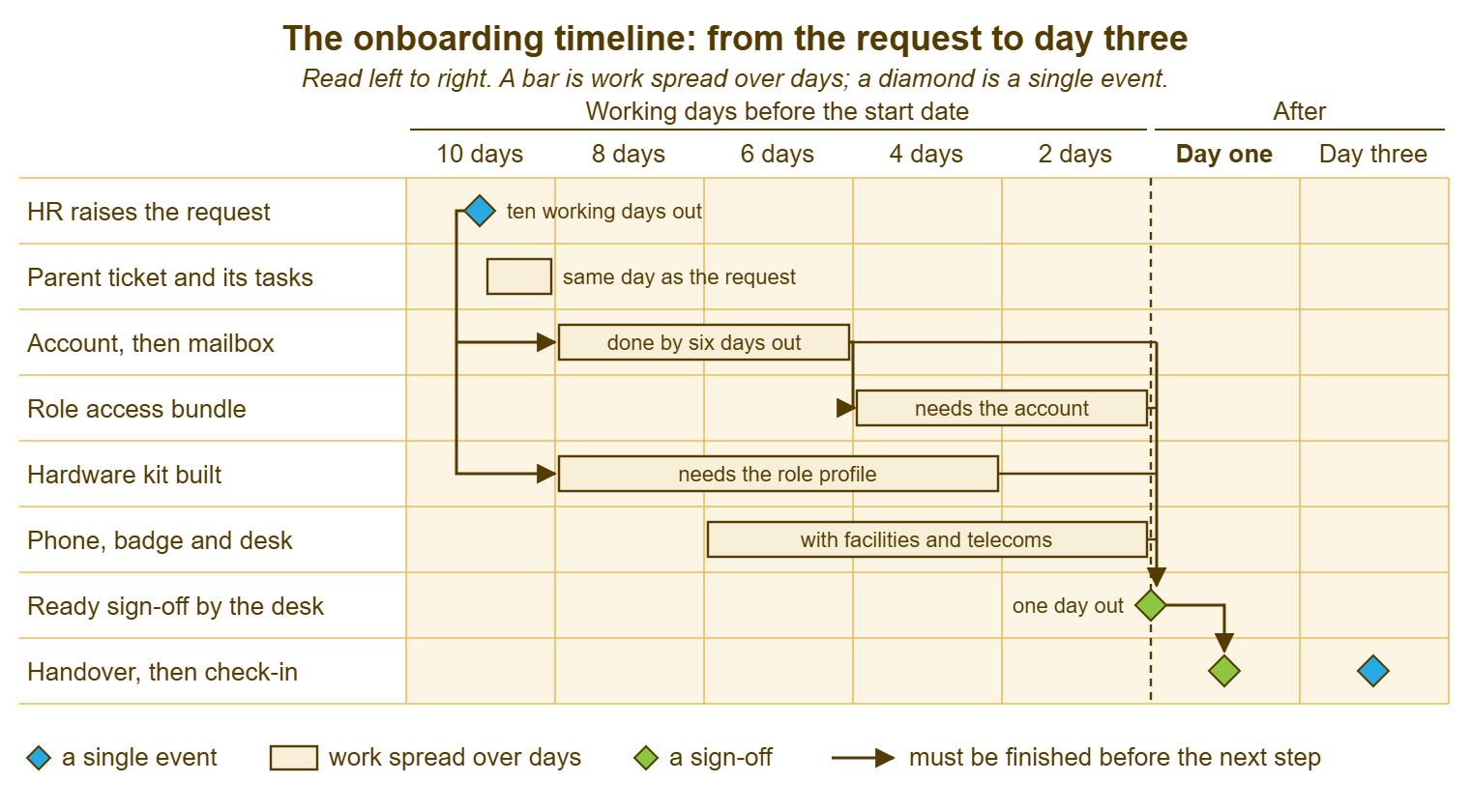
Two things in the picture are worth saying in words. The first is that most of the work is done in the middle of the window, not at the end. A desk that starts the account on the Friday before a Monday start has thrown away the parallel tracks. It has turned a ten-day job into a two-day scramble. The second is the gap between the sign-off and day one. That day exists so that the sign-off can fail. A sign-off on the morning itself is not a sign-off; it is a discovery.
| Line on the list | Cannot start until | Can run alongside | Usually owned by |
|---|---|---|---|
| Account and first password | Name, start date and department are known | Role profile confirmation; desk and chair | Desk |
| Mailbox, lists, shared mailboxes | The account exists | Device build; phone | Desk |
| Device built, named and enrolled | Role profile confirmed (which kit); account exists (enrolment) | Access bundle; badge | Desk |
| Access bundle | Account exists; profile confirmed by the manager | Device build; phone; desk | Desk or system owners |
| Phone or extension | Account exists; location known | Everything else | Telecoms |
| Badge and door access | Photo taken; location known | Everything else | Facilities or security |
| Desk, chair, screen, dock, network | Location and team known | Everything else | Facilities |
| Ready test and sign-off | Every line above is done | Nothing; it is last | Parent ticket owner |
What "Ready" Means
Ready is a test, not a feeling. The test is that a stranger could sit at the starter's desk and sign in with the starter's account on the starter's device. They could then work for an hour without raising a ticket. Done is a status a technician sets on a task. Ready is what a person experiences at nine on Monday. The two drift apart in small, specific ways. For example, an account was created and never enabled. A mailbox exists but is not in the team's distribution list. A laptop signs in on the bench and fails at the desk because the dock was never tested. An access bundle was granted to the wrong group with a similar name. Each of those is "done" on the ticket and "not ready" on the morning.
The ready test takes a technician about fifteen minutes the day before. And it is the single most valuable quarter of an hour in the whole process. Sign in as the starter on the starter's device, at the starter's desk if there is one. Open the mailbox and send a message to the desk. Open the two or three systems the role uses most and confirm they open with the role's access, not the technician's. Print a page to the nearest printer. Make a call from the extension. Walk to the door with the badge. Then sign out, and leave the device in the state the starter will find it. That is at the sign-in screen, with the first-password handover ready for the morning.
Some of the test cannot be done by the technician, and those parts are tested by proxy. The second factor cannot be enrolled until the person is present, so the test confirms that enrolment is possible and that the device is waiting for it. Role-specific access that needs the person's own credentials in a separate system is tested as far as "the account exists and the manager has confirmed it". The rest of that test is done on the morning. Write down what was tested and what was not. "Ready" with a short list of "to be done with the person present" is honest. "Ready" with nothing tested is a hope.
"Mostly ready" is the phrase to ban. It describes a state that exists on the desk and nowhere else. The starter will either work on Monday or raise a ticket, and the checklist's job is to know which before Monday. When the ready test finds a gap that cannot be closed by the morning, the state is "not ready". The next section is about what to do with it. (It is less painful than it sounds. It is a message, sent a day early, instead of an apology, delivered at reception.)
Who Signs It Off
Each group on the list is signed off by the team that owns it, and the parent ticket's owner signs off the whole. Facilities say the desk and badge are done; telecoms say the phone is done. HR say the payroll entry is done. The desk says the account, mailbox, device and access are done and the ready test passed. The sign-off is a line on the parent ticket, with the signer's name and the time, one working day before the start. Where the tool keeps a full history of every change on a ticket, as QuerySolv does, those sign-offs are already in the record. In that case, a later question about who confirmed what is a scroll, not an enquiry.
The manager signs off one thing only: that the access list is right for the role. Technicians can grant access and prove it works. They cannot know whether a housing officer at Ashgrove needs the repairs system as well as the tenancy system, and the manager can. The manager's confirmation of the profile, with any exceptions, is asked for early and is treated as the manager's sign-off of the access line. Anything the manager adds after the sign-off is an ordinary access request on its own ticket. It is handled through the usual approval route that Approval Workflows That Do Not Stall describes. It is not a reason to reopen the onboarding.
When a line is not done at sign-off time, the owner sends the not-ready message the same afternoon, to the manager and HR. It has three things in it: what will be ready on the morning, what will not, and when it will be. "Sam will have a laptop, an account, e-mail and the tenancy system from nine. The repairs system is waiting on your confirmation and will follow within an hour of it. The badge needs a photo, which facilities will take at nine-fifteen, and the door access will be live by ten." The message turns a failure into a plan, and a plan delivered a day early is something a manager can work with. A surprise at nine is not.
Do not let the sign-off become a formality that is ticked because the date arrived. The sign-off means the ready test was run and passed, or was run and the gaps were reported. A sign-off ticked without the test is the "done" that is not "ready", with a name against it. I have ticked one. The starter found the gap at 09:04 and I found out at 09:06, and the name against the line was mine.
Remember: ready is a test, run by a technician as the starter, on the starter's device, one working day before the start. Done is a status; ready is what the person finds at nine. If the test finds a gap that cannot be closed, send the not-ready message that afternoon, not the apology on the morning.
The Morning Handover
Day one is a handover, not a build, and it takes fifteen minutes if the checklist held. The manager collects the device, or the technician brings it to the desk, and the technician sits with the starter for the first sign-in. The first password is handed over in person or by a route the desk has agreed. It is never written on a note stuck to the laptop. It is never typed into a ticket where every team with a task on the onboarding can read it. The internal notes on a ticket are for the team. And the rule that a note never carries a secret applies to onboarding more than anywhere. The onboarding ticket has the widest audience of any ticket on the desk. The person changes the password on first sign-in and enrols the second factor with the technician watching. They open the mailbox and one of the role's systems. That is the handover.
The handover is also the moment to say how to ask for help. That is the welcome briefing described in First-Week Support for New Starters. Say where the portal is and what to put in a ticket. Say that the desk would rather hear about a small thing on day one than a large thing on day ten. Keep it to five minutes. The person has a manager waiting, a team to meet and a handbook to be given. And the desk is one of nine introductions they will have before lunch.
For a starter who is not in the office, the handover happens over a call with the device already shipped. In that case, the password route has to be agreed in advance, which is the part that goes wrong. The shipping and the remote first sign-in are covered in Remote Onboarding and Offboarding. The checklist here is the same, with the ship date added as a line that comes before the sign-off rather than after it.
The Checklist as a Living Document
The checklist changes every time the organisation does, and it is owned by one named person who makes the changes. A new application that every office worker uses is a new line in the access group. A new site is a new location in the badge and desk groups. A change in how the second factor is enrolled is a change to the handover section. A line that has not applied to anyone for a year is removed. The owner is usually the desk lead, and the trigger for a change is a defect. That is a starter who arrived without something, because the list did not have it. The desk's own measurement of those defects, and the habit of fixing the list after each one, is the subject of Measuring and Improving Onboarding.
Keep it to one page. A checklist that runs to four pages is read once, by its author, and then skimmed by everyone else, which is the same as not having it. The way to keep it short is to keep the standard case on the page and push the exceptions into the role profile cards and the request's comments box. If a line only applies to the finance team, it belongs on the finance profile, not on the list every starter's ticket is built from. The checklist describes what is true for everyone. The profiles describe what is true for a role. The request describes what is true for one person.
Give it a revision number and a change log at the bottom, three lines long: what changed, why, and who changed it. When a starter arrives without a line that was added last month, the log says whether it was added before or after the request was raised. That is the difference between a process gap and a one-off miss. Checklists breed, too, if nobody owns them. Leave one unowned on a shared drive and within a year there are three copies, each slightly different, each used by somebody.
A Short War Story: The Account That Was Done at Meridian Parts
Meridian Parts, a distributor with a single-technician desk run by Kieran, took on a new sales administrator called Lucy. The parent ticket for her start showed every task closed by the Thursday afternoon. The account was created, the mailbox created, the laptop built, the access granted, the extension assigned. On the Monday Lucy could not sign in. The account had been created with the option to enable it on the start date, and the option had not been saved. The task had been marked done by the person who created it, which was Kieran, who had not tried to sign in as her. When the account was enabled at 09:20 the laptop spent fifty minutes applying updates and enrolling itself. It had been built from the image but never signed into. When it finally reached the desktop the order system opened with no access. That was because the group Lucy had been added to was the one for sales managers, which had a similar name. Lucy worked for the first time at a little after eleven. Her manager spent the morning telling the sales director that IT had not set her up. Kieran spent it discovering, one item at a time, that every line on his list had been done and not one had been ready. The cost was a morning for Lucy, a morning for Kieran, and a sales manager who checked every onboarding personally for the next year. A task is done when the technician has finished; it is ready when the technician has tried it as the starter. The fifteen minutes between the two is where the morning is saved or lost.
The Day-One Checklist
The checklist below is the standard case for one organisation. It is written to be copied into the parent ticket as the first note and ticked by the team that owns each group. Fill in the owner names once for your desk; the due days are counted back from the start date and will move with your own lead time. Section 8 is the ready test and is run by the parent ticket's owner, as the starter, on the starter's device, one working day before the start. The sign-off line at the bottom is the record that it was run. Keep the change log at the foot and bump the revision every time a line changes.
DAY-ONE CHECKLIST — ONE PAGE (revision ____)
Starter: ______________________   Start date: __________   Parent ticket: __________
Role profile: ______________   Site: ______________   Owner of this list: ______________

1. ACCOUNT (desk; due 6 working days out)
  [ ] directory account created with the agreed naming
  [ ] enabled from the start date (checked, not assumed)
  [ ] first password set; handover route agreed (in person / manager / agreed channel)
  [ ] second-factor enrolment prepared; to be completed with the person present

2. MAILBOX (desk; due 5 working days out)
  [ ] address and display name correct
  [ ] distribution lists for the role and site
  [ ] shared mailboxes for the role, if any
  [ ] calendar visible to the team

3. DEVICE (desk; due 3 working days out)
  [ ] standard kit for the profile built from the current image
  [ ] named and recorded against the starter
  [ ] enrolled in management; updates applied; signed into once by the technician
  [ ] dock, screen and peripherals tested at the actual desk

4. ACCESS (desk and system owners; due 2 working days out)
  [ ] role profile confirmed by the manager on the ticket
  [ ] role access bundle granted (folders, applications, printers, remote access)
  [ ] exceptions raised as separate access requests: ______________

5. PHONE (telecoms; due 2 working days out)
  [ ] extension or handset assigned; voicemail set
  [ ] mobile issued and enrolled, if the role carries one
  [ ] internal phone list updated

6. BADGE (facilities or security; due 1 working day out)
  [ ] photo taken or booked for the morning
  [ ] door access for the site and hours; parking or lift where needed

7. DESK (facilities; due 2 working days out)
  [ ] desk, chair, screen, dock, network point or tested wireless
  [ ] headset or other role equipment from the profile

8. READY TEST (parent ticket owner; 1 working day out, as the starter, on the device)
  [ ] sign in at the starter's desk        [ ] send mail to the desk from the mailbox
  [ ] open the role's main systems          [ ] print to the nearest printer
  [ ] call from the extension               [ ] badge opens the door
  [ ] not testable until the person is present: ______________________
  [ ] welcome message queued; induction booked by the manager

SIGN-OFF
  Ready: [ ] yes   [ ] not ready; message sent to manager and HR on: __________
  Signed: ______________   Date and time: ______________

CHANGE LOG
  rev ____: ______________________________________ by ______________
Priya ran the ready test on Sam's laptop at 16:45 on the Thursday and found what Owen's "mostly" had been hiding. The tenancy system opened and the repairs system did not, and the badge was a photo away from existing. She sent the not-ready message at five, with the three things in it. Sam's manager confirmed the repairs access by half past, from his phone. On the Friday, Sam signed in at 09:02, had the badge by 09:20, and raised no ticket all day. On Priya's desk that counts as a result and on most desks counts as a miracle. It was neither. It was a list, in order, with a test at the end.
Frequently Asked Questions
Can the ready test be done on the morning instead of the day before?
Who owns the checklist when there is no desk lead?
The manager never confirms the access list in time. What then?
How do we handle the first password without putting it in the ticket?
Should the checklist include HR's and facilities' tasks if the desk does not do them?
What goes on the list for an internal transfer?
From the QuerySolv team: we build self-hosted help desk software for Windows. QuerySolv runs as one Windows service on your own network. It takes requests by web form, e-mail, live chat, social messages and REST API. It is licensed once per installation rather than per agent per month. The free trial runs the full product for 30 days.