
What Escalation Means (Two Different Things)
Friday, 16:51. Dev has been on ticket 7718 since just after lunch. It concerns a payroll export that stops at row 340 with an error nobody on the desk has seen before. He has nine minutes until he is supposed to leave. He opens the ticket, types "Escalated." in the internal notes, presses the Escalate button, and goes home. Three people read that line over the weekend, and each reads it differently. The application engineer sees the badge and assumes someone will assign it to him on Monday. The team lead sees the badge and assumes Dev wants her to decide something, though the note does not say what. Dev, on the train, believes he has handed the ticket to somebody. Mara in payroll, who has a submission deadline on Monday at noon, believes something is happening. Nothing is happening. The ticket is sitting exactly where it was, with a flag on it. A flag is a very patient thing.
Escalation is the act of taking a ticket beyond the person who currently holds it. Either it needs a skill they do not have, or it needs attention or a decision they cannot give. Those are two different acts, and the trouble starts because one word covers both. This article is part of our Escalation Done Right series. The series covers the two meanings, the paths and criteria that say when, and the handoff note. It also covers who owns the ticket afterwards, vendors and other teams, and how to measure the whole thing without blaming anyone.
This article covers the two kinds of escalation and how to tell them apart. Then it covers functional escalation in detail, followed by hierarchical escalation in detail. Next come the two mechanisms a tool offers, a flag and a transfer, and which kind uses which. Then comes what escalating does not do, including to the SLA clock. The article covers the words to write so the next reader knows which kind you meant. It ends with one ticket that goes both ways, a short war story, and a two-column definition card you can print and pin above the desk.
One Word, Two Jobs
The word "escalate" is doing two jobs on most desks, and it does neither well while it is doing both. The first job is "this needs someone who knows more than I do about this particular thing." The second is "this needs someone with more authority or more attention than I have." Both get the same verb, the same button, and the same line in the history. So a reader who sees "escalated" has to guess which was meant. They usually guess the one that is not their job.
A hardware shop makes the difference plain. If you ask about a part the assistant does not know, they say "I'll get someone from electrical". Then a person with a different skill walks over and takes the question. If you ask for a refund without a receipt, they say "I'll get the manager". Then a person with a different level of authority walks over, while the assistant stays at the till. Different skill, different authority: two kinds of help, and nobody in the shop confuses them. Support desks confuse them daily, because the tool gives them one button.
One name the industry settled on is functional escalation, where a ticket moves to a person or team with a different skill. The other is hierarchical escalation, where a ticket is raised to someone with more authority or seniority. That person looks at it, decides something, or pushes it along. The names are stiff but they are in every framework and every tool's documentation. So learn them once, then say "to a specialist" and "to the lead" in conversation and nobody will mind.
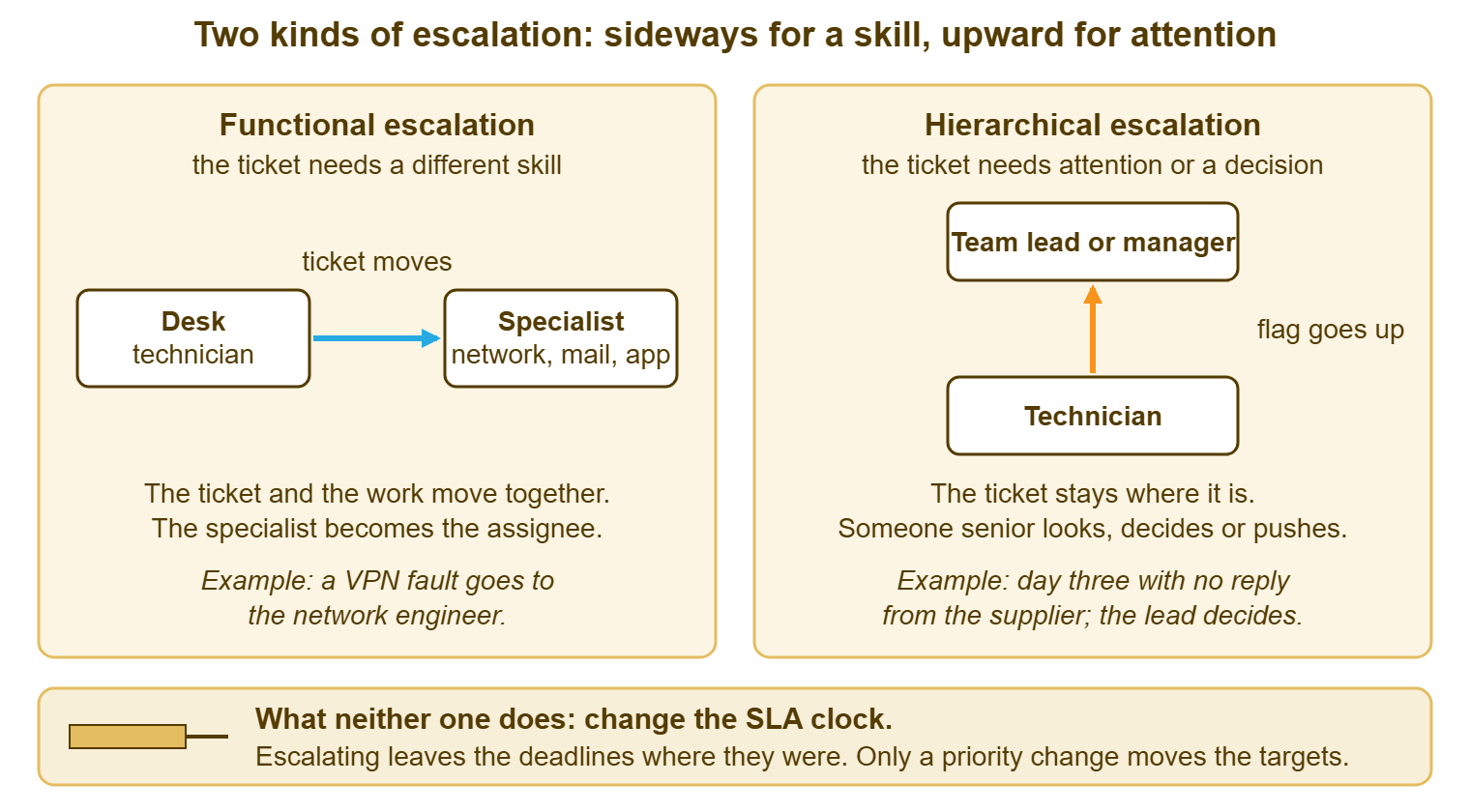
The diagram below draws the two side by side. On the left, functional escalation is an arrow that runs sideways. The ticket leaves the desk technician and lands with a specialist, who becomes the assignee, and the work goes with it. On the right, hierarchical escalation is an arrow that runs upward. A flag rises from the technician to a team lead or manager, who looks at the ticket, decides or pushes. Meanwhile, the ticket itself stays exactly where it was. The strip across the bottom records the one thing both arrows have in common, which is that neither of them touches the clock.
Functional Escalation: a Different Pair of Hands
Functional escalation is for the ticket that has reached the edge of what you know. The mail server is rejecting messages with an error code you have never seen. The line-of-business application is throwing a page of text that starts with "exception". The switch in the warehouse is dropping one port and nobody on the desk has the login. You could keep trying, and a good technician always wants to. But the honest position is that the next useful step belongs to someone with a different set of skills. So the ticket moves to them.
"Moves" is the key word, and it means the work and the ticket travel together. The specialist becomes the assignee, the ticket appears in their queue, and they are now the person doing the technical work. The desk does not keep a copy and does not keep a shadow of the work. What the desk may keep is the relationship with the requester. That is a separate question with its own article, Who Owns the Ticket After Escalation. For now, the point is that functional escalation is a transfer of work.
The signs that a ticket needs a functional escalation are concrete, and you can list them. You do not have the access needed for the next step. You do not understand the error well enough to search for it. You have tried the three things the runbook lists and the fourth would be a guess. The system involved belongs, by the desk's own written boundaries, to another team. Any one of those is enough. The thresholds, the time boxes and the "when" are in Escalation Paths and Criteria. Which team owns which system is a tier design question, and Escalation Boundaries owns it.
What functional escalation is not is a way to make a ticket leave your list. The ticket that goes sideways with no summary, no list of what was tried and no question attached has not been escalated. It has been posted. The specialist opens it, reads "user says it's broken", and starts from zero, which is where the desk was two hours ago. Escalating sideways without the handoff is how a desk turns one slow ticket into two. The note that travels with it is the subject of The Handoff That Does Not Dump.
One practical edge: the specialist is not always there. The network engineer is on leave, or in a data centre with no signal, or is one person covering four sites. A functional escalation to an absent specialist is a ticket parked in an empty room. The person sending it should know the room is empty before they send it. The written path should name a second stop for every first stop. If there is no second stop, the ticket goes up instead. That lets somebody with authority decide whether to wait, to phone the vendor, or to pull the engineer out of the data centre. That is the one case where a skill problem turns into an attention problem, and it is common enough to plan for.
Hierarchical Escalation: a Different Level of Attention
Hierarchical escalation is for the ticket that is not stuck on skill but on something only a more senior person can supply. Usually that is one of four things: a decision, a permission, a push, or attention. The supplier has not replied in three days and somebody with a contract in their drawer needs to phone them. The requester is the finance director and the month-end run is tomorrow, and the lead needs to know this one exists. The fix needs a purchase. Two departments each say the other owns the problem, and a manager has to say which. The technician can do the technical work; what they cannot do is the deciding.
In hierarchical escalation the ticket stays where it is. The technician remains the assignee and remains the person working it. What goes up is a signal: a flag on the ticket, a message to the lead, a line in the stand-up. The lead looks, decides, phones, approves, or reprioritises, and the ticket carries on with the technician, now unblocked. If the lead ends up taking the ticket over, that is a transfer, and it happens sometimes, but it is not what hierarchical escalation is for. The lead's job is to remove the obstacle, not to inherit the ticket.
Hierarchical escalation has a second, quieter use, which is the request for attention on a ticket that is going nowhere. The ticket has been on the desk for four days. It has had two updates and no progress. The technician knows, in the way technicians know, that it is about to become a complaint. Flagging it up is not an admission of anything. It is a notice that a ticket has outgrown one person's ability to keep it moving. The lead can decide whether to add a second person, change the priority, or talk to the requester. Tickets that need attention rarely ask for it. They prefer to wait quietly until someone senior asks why.
The signs here are different from the functional ones. The next step is not technical. The next step needs money, a signature, a policy exception, or a phone call to someone who outranks you. The impact has grown past what one technician should be deciding the priority for. The requester has asked three times and the honest answer is "I am waiting on something I cannot hurry". Each of those is a reason to raise the flag, and none of them is a reason to move the ticket.
Flag or Transfer: the Two Mechanisms
Every ticketing tool offers two mechanisms, and once you see them as two the confusion mostly clears. A transfer changes who holds the ticket: a new assignee, or a move to another department's queue. A flag marks the ticket as needing attention without changing who holds it: a badge, a level, a colour, a place on a "needs attention" list. Functional escalation is a transfer. Hierarchical escalation is a flag. The whole of this article fits in those two sentences, and the rest is what happens when people use the wrong one.
Using a flag when you needed a transfer is the Friday-evening mistake from the opening. Dev raised a flag, and the ticket stayed with Dev. The application engineer, who would have taken it in ten minutes, never had it in his queue. Using a transfer when you needed a flag is the opposite error. A technician who needs a purchase approved assigns the whole ticket to the IT manager. She now has a ticket in a queue she does not watch, with a requester who is going to be written to by nobody. Both mistakes look like escalation in the history. Neither moves the ticket forward.
Most tools offer both mechanisms, though they dress them differently. Some have numbered escalation levels that a button raises one step at a time and a second button clears. Some have a single flag. Some have only a "needs attention" tick box or a coloured badge. And a few have nothing but reassignment, in which case the flag is an internal note addressed to the lead by name. Whatever the flag looks like, a flagged ticket should stand out in the list so a lead scanning the queue can see what is asking for attention. The transfer is the assignee field, or a move to another team's queue. Most tools e-mail the new assignee when somebody else assigns them a ticket. The flag changes what the ticket looks like; the transfer changes whose it is. The tool will let you do either, or both, or neither, so the decision stays yours.
Where a tool has numbered levels, they deserve a word, because a scale with several steps invites misuse. A level is a volume control for attention, not a progress bar. Level one is "please look when you are passing"; level two is "today"; level three is "now". A desk should agree in writing what its levels mean and should use at most three of them. I have watched a ticket climb to level seven over ten days by being pressed once each morning. That raised the badge and nothing else, because nobody had agreed that a badge meant anything. A flag only works if somebody has promised to look at flags.
Some tickets need both mechanisms, and the order matters. The ticket that needs a specialist and also needs the lead to know it exists goes sideways first, with a flag on it. That way, the specialist has the work and the lead has the signal. The ticket that needs a decision before any specialist can act goes up first and sideways after the decision. If you find yourself doing both at once on most tickets, your criteria are probably asking for a decision too often. The article Escalation Paths and Criteria has the test for that.
What Escalation Does Not Do
Escalation does not change the clock. The SLA clock is the countdown from when the ticket arrived to when the desk promised a reply and a fix. It started when the ticket arrived. It does not know that anything has happened since. Transferring the ticket to a specialist does not restart it. The specialist inherits the ticket with the minutes already spent. Flagging the ticket does not pause it either, and no amount of pressing Escalate changes the due time by a second. In most tools an escalation flag marks the ticket and does nothing to the SLA. What moves a ticket to tighter targets is raising its priority, which is a different field and a different decision. A few tools tie the two together, so test yours once: flag a ticket, read the due time, raise its priority, read it again. Treating the escalation button as a priority button is one of the commoner ways a desk misreads its own tool.
Escalation does not change the priority, and this is worth separating from the clock, because people run the two together. Priority is the rank that decides how fast the desk has promised to respond and resolve, set from how many people are affected and how soon it hurts. A ticket can be a Low that needs a specialist, or an Emergency that one technician can fix alone. Skill and seniority are about who; priority is about how fast. If a ticket's impact has grown while you held it, raise the priority and say so. If that decision is above your level, flag it. But do not press Escalate and expect the targets to tighten. Those are two levers, and only one of them is connected to the clock.
Escalation does not inform the requester. The requester cannot see levels, badges or assignments. A ticket that has gone to the best engineer in the building looks, from outside, identical to a ticket that nobody has opened. If the requester is to know that something changed, somebody writes to them and says so. "I have brought in Lukas, who looks after the mail servers; he has the full history, and you will hear from one of us by 15:00." That sentence is the whole of what the requester wants, and the tool will not write it for you.
Escalation does not make the ticket someone else's problem in the eyes of the person who raised it. Whoever's name the requester knows is the person the requester will ask. If that is you, it stays you until you have explicitly handed the relationship over and told them. The split between the person doing the work and the person the requester talks to is the subject of Who Owns the Ticket After Escalation. The short version is that the technical work can move in a click and the relationship cannot.
Escalation does not fix the ticket. This sounds too plain to write down and is the one most often forgotten, usually at 16:51 on a Friday. A flagged ticket has been noticed; a transferred ticket has been moved; neither has been worked. The ticket is fixed when somebody does the next step, and escalation's only job is to get the ticket to the person who can.
Remember: a transfer moves the ticket; a flag marks it. Neither one changes the SLA clock, changes the priority, tells the requester anything, or does the next step. Say which one you mean every time.
Saying Which One You Mean
The cure for the one-word problem is cheap: every escalation note names the kind, the person, and the reason, in one sentence. "Transferring to Lukas for the mail server side; I have confirmed the client settings and the error is on the server." "Flagging for Priya: this needs a licence purchase before I can go further, and the requester's deadline is Thursday." Each of those tells the reader whether the ticket has moved or stayed, who is expected to act, and what they are expected to do. "Escalated." tells them nothing, in one word, with a full stop for confidence.
Pick two verbs for the desk and use only those. Most desks settle on "transferring to" for functional escalation and "flagging for" for hierarchical. That has the advantage that the verbs describe what happened in the tool. Write them into the desk's one-page guide and use them in the stand-up. The aim is for "I flagged it" and "I transferred it" to become ordinary sentences with distinct meanings. It takes about a fortnight for a team to stop saying "escalated" on its own. The habit is sticky because the word sounds like it has done something.
The same discipline applies at the receiving end. A lead who sees a flag and does not know what is being asked should ask, in the ticket, in one line: "Flag seen; what do you need from me?" A specialist who receives a transfer with no note should send it back with the same question rather than guessing. Both replies feel abrupt in the first week and feel normal by the third, and both train the desk faster than any guide. A note that gets a question back gets written properly next time.
Where the tool records who did what, the record becomes the training material. Most ticketing tools keep a history of every escalation, assignment and transfer with the person who did it and the time. So a lead reviewing a slow ticket can see that it was flagged on Tuesday, transferred on Thursday, and flagged again on Friday. The lead can ask what each of those was for. The history does not judge. It just makes it hard to say "I escalated it" and leave the sentence there.
One Ticket, Both Ways
Here is a ticket that uses both kinds, in order, so the shapes are clear. Tollgate Foods runs a packing line that depends on a handheld barcode scanner at each station. On a Tuesday at 08:20 the supervisor on line two, Carla, raises ticket 4406: "Scanner at station 4 shows 'config error' and will not pair." Omar on the desk takes it. He has a runbook for scanner faults, and it gets him three steps in: power cycle, re-pair, check the station's network lead. The error is still there at 08:50. He does not have the login to the scanner management console, which belongs to the systems engineer, and the runbook says so. That is a skill gap and an access gap together, and it is the first trigger.
Omar transfers the ticket to Jun, the systems engineer, with a note. The note covers what the error says, the three steps and their results, and the station number. It also covers the fact that line two is running with three scanners instead of four, which slows the line but does not stop it. Omar writes to Carla: "I have passed this to Jun, who manages the scanner system; one of us will update you by 10:00." The ticket has moved sideways. The clock has not moved at all. The ticket is a Medium, with a four-hour resolution target, and forty minutes of it are gone.
Jun finds the cause by 09:30: the scanner's firmware is a build the console no longer accepts. The fix is a firmware update that needs a licence key the company has not bought for that batch of devices. Jun cannot buy things. That is a decision above his pay grade, and it is the second trigger. He flags the ticket for the IT lead, Priya, with a note that says exactly what is needed and roughly what it will cost in plain terms. The note also says that line two is running one scanner short until the update is done. The ticket stays with Jun. The flag goes up.
Priya sees the badge at 09:40, reads the note, phones the supplier, and has a key by 10:15. She clears the flag with a note: "Key received, in the shared folder, go ahead." Jun applies the update, pairs the scanner, and writes to Carla at 10:40 that station four is back. He includes the cause in one sentence in case it happens to another station. Three people touched the ticket. It went sideways once and up once, each time with a note that named the kind and the ask. Nobody had to guess what "escalated" meant because nobody wrote it.
Notice what the clock did throughout, which is nothing unusual. The four-hour target ran from 08:20 and would have expired at 12:20. The ticket was resolved at 10:40 with the clock never paused, never restarted and never touched. Two escalations, one transfer and one flag, and the SLA engine saw one ticket with one target the whole way through. That is the correct behaviour, and it is what the strip at the bottom of the diagram is for.
A Short War Story: The Flag That Impressed Nobody at Meridian Parts
Meridian Parts, a distributor with a trade counter and a desk of three, had a network switch behind the counter that started dropping its uplink every few hours. The ticket landed with Tomasz, who had the symptoms but not the switch's password. Tomasz pressed Escalate on Monday, and again on Tuesday. By Thursday the ticket was at level four, with a note each day reading "escalated again, still dropping". Meanwhile, the network engineer, Ines, sat eleven metres away and had the password. She never once saw the ticket in her queue because it had never been assigned to her. The trade counter ran on paper for four days. The warehouse re-keyed eighty-one orders by hand. The fix, once Ines had the ticket, took twenty minutes and a cable. Nobody had broken the desk's rules, because the desk had no rule that said what Escalate was for. The lesson went on the wall the next week in one line: a flag asks for attention, a transfer asks for work, and you must know which one you are pressing.
The Two-Column Definition Card
The card below puts the two kinds side by side so that anyone on the desk can answer "which one is this?" at a glance. Print it, pin it where the queue is worked, and read down the column that matches your situation. The last few rows tell you what to do in the tool and what to write in the note. It is plain text so it can also live in the knowledge base and in the desk's one-page guide.
ESCALATION: WHICH KIND IS THIS? — ONE PAGE

                      FUNCTIONAL                    HIERARCHICAL
Question it answers   "Who knows this better?"      "Who can decide or push?"
Trigger               A skill or access you lack;   A decision, approval,
                      the runbook has run out       purchase, or attention
                                                    beyond your level
What moves            The ticket and the work       A signal only
Who holds the ticket  The specialist becomes        You keep it
afterwards            the assignee
Who does the next     The specialist                You, once unblocked
technical step
What changes in       Assignee or department        Escalation level / badge
the tool
What it does NOT      SLA clock, priority,          SLA clock, priority,
change                requester's view              assignee, requester's view
Who tells the         The sender, before            You, if the wait changes
requester             the transfer                  what they will see
Line to write         "Transferring to ____ for     "Flagging for ____:
in the ticket         ____; tried ____; asking      need ____ by ____;
                      you to ____; due ____."       ticket stays with me."
Example               VPN fault to the network      Day three with no reply
                      engineer                      from the supplier
Both at once          Transfer first, then flag, when the specialist will
                      need a decision too.  Flag first when the decision
                      must come before anyone can act.
Two edges deserve a note in the card's margin. On a desk of one, there is no sideways inside the building. On such a desk, every functional escalation is to a vendor or to a contractor. In that case, the card's left column still applies, with the vendor's case number standing in for the assignee. That is described in the article on escalating to vendors and other teams. On a desk of two or three with no lead, the right column points at whoever is senior that day. In that case, the honest version of "flagging for" is "saying it out loud at the stand-up". That is a flag by any other name and should still get a note in the ticket so the history shows it.
Dev's ticket 7718, from the opening, needed the left column and got the right one. The fix on Monday morning was not to the payroll export, which took the application engineer twenty-five minutes once he had it. The fix was one sentence in the note that should have read "Transferring to Aled for the export error; tried a re-run and a smaller batch, both stop at row 340; Mara needs this by noon Monday." That sentence would have taken Dev ninety seconds on Friday. It would have been read by exactly the right person, and the weekend would have been a weekend.
Frequently Asked Questions
Is escalating a ticket the same as raising its priority?
Should every escalation go through the team lead?
How do I tell whether a ticket needs a skill or a decision?
Does transferring a ticket to a specialist restart the SLA clock?
Our tool has one Escalate button and nothing else. How do we keep the two kinds apart?
How many escalation levels should we actually use?
From the QuerySolv team: we build self-hosted help desk software for Windows. QuerySolv runs as one Windows service on your own network. It takes requests by web form, e-mail, live chat, social messages and REST API. It is licensed once per installation rather than per agent per month. The free trial runs the full product for 30 days.