
The Anatomy of a Ticket
The ticket arrived at 08:52. Subject: "help". Body: nothing. Requester: an address at Northgate Retail's Harbor Street store that the desk has seen twice before. There is no category, no priority, no phone number. Somewhere a person is standing beside a till that is doing something it should not, waiting for whatever happens next. The queue, which has moods, has filed it under new and gone back to sleep.
That is not a bad ticket. It is a ticket in the state most of them arrive in: a person with a problem and about four seconds to describe it. Everything that makes it useful, the summary, the detail, the owner, the clock, gets added afterward by the desk. A desk that knows what a ticket is made of adds it in a minute. A desk that does not leaves it as "help", and "help" sinks to the bottom of the pile under its own weight.
This article takes a ticket apart. It is part of our Helpdesk Fundamentals series. It covers what a ticket is for (two things, pulling in different directions), then the eight fields that matter and the thirty that do not yet. Next come the lifecycle from new to closed and the difference between an internal note and a reply. We also cover the ticket as the unit of trust between IT and everyone else. There is a diagram, one ticket followed from "help" to closed, and a minimum viable ticket to copy into whatever tool you have.
A Ticket Is a Promise and a Record
A ticket is two things at once: a promise to a person and a record for the organization. The promise says: we have heard you, someone owns this, and you will hear from us. The record says: this is what was asked, this is what was done, this is when, and this is who did it. The promise faces outward and matters most for about a day. The record faces inward and matters for years.
The promise half is why acknowledgment matters more than resolution speed. A user who hears "we have it, Priya owns it, you will hear by eleven" within ten minutes can get on with something else. A user who hears nothing for two hours and then gets a perfect fix has spent two hours wondering whether the ticket exists. The fix was the same. The experience was not, and the experience decides whether they use the desk next time. What Good Support Actually Looks Like is mostly about this half.
The record half is why the fields matter. Six months from now, somebody will ask when the desk was told about the till, what it did, and whether the user was informed. The only honest answer will be whatever the ticket says. Memory is a poor witness. The ticket was in the room the whole time.
Most bad ticket habits come from serving one half and forgetting the other. A desk that only keeps promises has happy users and no memory; the second time the till fails, it starts from scratch. A desk that only keeps records has a perfect archive of people it never replied to. The fields below serve both halves.
The Eight Fields That Matter
Eight fields carry almost all the value in a ticket, and every tool has them under some name. The table gives each one's job and the way it most often goes wrong. The paragraphs after it take the three that cause the most trouble.
| Field | What it is for | How it goes wrong |
|---|---|---|
| Requester | Who has the problem and how to reach them right now. | Raised on behalf of someone else, so replies go to the wrong person. |
| Summary | One line a stranger could triage from: where, what, since when. | "help", "urgent", "printer", "same as last time". |
| Description | What was seen, what was expected, when it started, what was tried. | A screenshot of the wrong window, or three paragraphs with no symptom. |
| Category | What kind of thing this is, for routing now and counting later. | Four hundred categories, or one called Other that holds half the queue. |
| Priority | How fast this must move, based on who is stopped and how many. | Everything is high, or the requester sets it and everything is still high. |
| Status | Where in the lifecycle the ticket is, and whose move it is. | "In progress" for three weeks with no note; "waiting" with nobody told what for. |
| Assignee | The one person responsible for the next action. | Blank, or set to a group, which in practice means nobody. |
| Timestamps | Created, first response, last update, resolved, closed. | Recorded by the tool and read by nobody, so nobody notices how old a ticket is. |
The summary is the field the desk should rewrite most often, and almost never does. "help" becomes "Harbor Street: till 2 rejects all card payments since 08:45" after one phone call. From then on everyone who glances at the queue knows where, what and since when without opening it. Write the summary for the person who will triage the queue at 17:55 tomorrow with twelve others in it. That person may be you.
Priority is a statement about people, not about technology. The question is who is stopped, how many of them, and until when, and the answer sets the order of the queue. A till that cannot take cards with four customers in line is high. The same till on a Sunday night with the store closed is normal. The symptom is identical; the priority is not. Setting targets against each priority is a later pillar; for now, the field only needs to mean something.
The assignee is one person, by name. Not a team, not a queue, not "IT". A ticket assigned to a group is a ticket that everyone assumes someone else has. And the assumption is correct in every case but one. One name means one person who knows it is theirs, and a queue sorted by owner that shows who is drowning.
One Ticket, Labeled
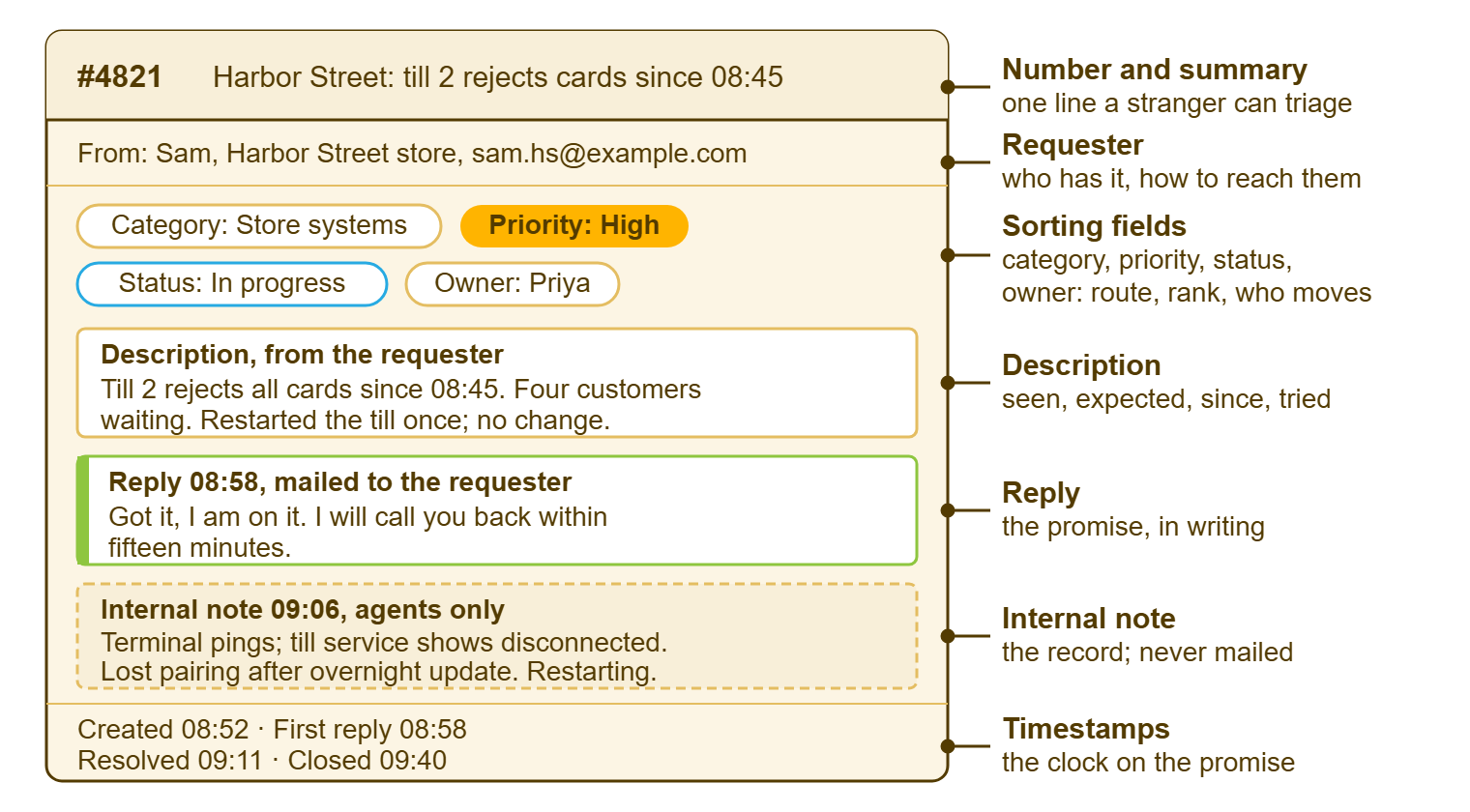
The diagram shows the same ticket as a card. The number and summary run across the top. The number is the handle the requester quotes and the key the record is filed under, and it must never change. The requester line sits beneath them with the e-mail address the desk will reply to. Then come the sorting fields, category, priority, status and owner, which route the ticket, rank it, and say whose move it is. The middle of the card holds the conversation: the description from the requester, a reply that was mailed to them, and an internal note that was not. The footer carries the clock: created, first reply, resolved, closed.
The Fields That Do Not Matter Yet
Every ticket tool ships with more fields than a desk needs, and every desk adds a few more in a hopeful afternoon. Asset tag, cost center, floor, impact, urgency, sub-category, sub-sub-category, root cause, resolution code, the requester's manager, the requester's other phone. Each one was somebody's good idea. Together they make a forty-field intake form. A forty-field intake form is filled in by nobody, which is the same as having no fields and a longer page.
A field earns its place by being used in a decision or a report. If the desk routes on it, sorts by it, or counts it at month-end, it stays. Otherwise it is decoration, and decoration on a form is a cost paid by every requester every time. Hide it. The tool will remember how to show it again when the day comes.
Add a field when a question keeps being asked that the ticket cannot answer. At Northgate Retail the question was "which store?", asked on the phone a dozen times a day until a store field was added to the form. After that, it was asked never. That is the test: a real question, asked often, that the form could have answered.
Fixed lists are a feature here, not a limitation. A tool whose priorities and statuses cannot be renamed or added to is protecting you from the Tuesday afternoon when someone proposes a sixth priority called "really urgent". QuerySolv ships five priorities and ten statuses that cannot be changed, which I think is the right call for a small desk. The discipline comes from the tool rather than from a meeting. If your tool allows additions, add a value only when a real question needs it, and never on the day it is proposed.
The Lifecycle in Brief
A ticket moves through a small number of states, and each state answers one question: whose move is it? The names differ between tools; the states do not. Later pillars cover triage mechanics, escalation and the clocks; this is only the shape.
| Status | What it means | Whose move |
|---|---|---|
| New | It has arrived and nobody has read it yet. | The desk: triage it. |
| Triaged (or Open) | Read, summarized, categorized, prioritized and owned; work has not started. | The owner. |
| In progress | Someone is working on it now, or will today, and has said so. | The owner. |
| Waiting on user | The desk has asked the requester something and cannot proceed until they answer. | The requester, who has been told what is needed. |
| Waiting on vendor | Blocked on someone outside the desk: a supplier, another team, a delivery. | The outside party; the owner chases on a set day. |
| Resolved | The desk believes it is fixed and has told the requester; awaiting confirmation or a timeout. | The requester: confirm, or reply if not. |
| Closed | Confirmed, or timed out after the stated number of days. The record is complete. | Nobody. |
| Reopened | The requester replied after resolved or closed. It counts against the original fix. | The owner. |
The waiting states are where tickets go to age. "Waiting on user" is honest for three days and a dodge after a week. The ticket should say what was asked, when, and when the desk will ask again. "On hold", where a tool offers it, is the status equivalent of a drawer. Tickets go in. They develop a settled, permanent look. Every waiting ticket needs a date on which somebody looks at it again, written into the ticket rather than remembered.
Resolved is not closed, and the gap between them is where the promise is kept. Resolved means "we think it is fixed, and we have told you". Closed means "you agreed, or enough time passed that we stopped asking". Skipping straight to closed saves a click and costs the confirmation. The desk then learns which fixes held only when the same tickets come back under new numbers.
Reopened is the most honest status in the table, which is why some desks avoid it. A reopened ticket says, in the record, that the fix did not hold, and the reopen rate across a month says how often that happens. It is one of the three numbers worth looking at early; Your First Week Running a Helpdesk says what to do with it.
The Ticket as the Unit of Trust
Between IT and everyone else, the ticket is the only shared record of what was asked and what was done, which makes it the unit of trust. The requester trusts that writing it down means it will be dealt with. The manager, the auditor and whoever takes over the desk next year trust that the ticket is what happened. Each of those trusts is only as good as the record.
"When did we tell them?" is the question the record exists to answer. It is asked after something went wrong, by someone who was not there. And the answer has to be a timestamp and a message rather than a recollection. A desk that can open the ticket and read the reply ends the conversation in a minute. A desk that cannot has a conversation that lasts a week and ends in a draw.
The record outlives the people. Dana will leave; the ticket about the dispatch printer stays, with her note. The note explains that the spooler sticks after the overnight update and the fix is a restart of the print service, not of the PC. The next person to meet that printer finds the note in thirty seconds. Without it, they find the answer in two hours. I have been the next person. The note is worth more than the fix.
For the record to be trusted it has to be complete and beyond editing. Every change, who made it, when, and what the ticket looked like before, should be kept. Nobody on the desk should be able to make a ticket disappear. A help desk that stores a state snapshot with every action and lets nobody delete a ticket makes this half of the job automatic rather than a matter of discipline. QuerySolv works that way. In QuerySolv, a requester's reply on a resolved or closed ticket reopens it by any channel, with the reopen counted. Whatever your tool, the test is the same: could a stranger reconstruct what happened from the ticket alone? If the answer is "mostly", it is no.
Remember: as far as anyone else can tell, work that is not in the ticket did not happen. Put the hallway conversation in the ticket, as a note, with the time.
Internal Notes Versus Replies
Every ticket conversation has two audiences, and a tool that keeps them apart is doing you a favor. A reply is a message to the requester. It is mailed to them, it appears in their view of the ticket, and it is the promise half in writing. An internal note stays on the ticket and is seen only by agents. It is the record half.
Notes are for the working theory you are not ready to promise. "Suspect the terminal lost its pairing after the overnight update; restarting the till service first" is a note. It tells the next technician what you were thinking, and it tells nobody else, which matters if the theory is wrong. Keep notes factual. They get read in disputes, and a note written in a bad mood does not improve with age.
Replies are for what you did, what you need from the requester, and what happens next. Every reply ends with whose move it is: "please run a test sale and reply either way", or "nothing needed from you; I will update you by three". A reply that does not say whose move it is leaves both sides waiting for the other. The desk calls that "waiting on user" and the requester calls it "they've gone quiet".
The common failure is the reversed audience. The diagnosis gets typed as a reply ("looks like the DNS cache again") and the requester learns a phrase they did not need. The next step gets typed as a note and the requester never learns the thing they did need. Before sending, ask who the sentence is for. "Me, later" is a note. "Them, now" is a reply.
One Ticket From "help" to Closed
Here is the 08:52 ticket from the opening, followed through to closed, with the field that changed at each step. The whole thing took forty-eight minutes, of which the fix was five.
| Time | What happened | What changed on the ticket |
|---|---|---|
| 08:52 | E-mail arrives from Sam at the Harbor Street store. Subject "help", body empty. | Ticket created; status New; requester set from the sender address. |
| 08:58 | Priya, on morning triage, phones the store. Till 2 has rejected every card since about 08:45; four customers are waiting. She rewrites the summary, fills in the description, and replies: "Got it, I am on it. I will call you back within fifteen minutes." | Summary, description, category (store systems), priority (high), assignee (Priya); status In progress. |
| 09:06 | Priya adds an internal note: the terminal answers a ping but the till service shows it disconnected; she suspects the pairing was lost after the overnight update and is restarting the till service. | Internal note added. Nothing mailed. |
| 09:11 | Till 2 takes a test card. Priya phones Sam, then replies: "Till 2 is back. Please run one more sale and reply either way." | Status Resolved. |
| 09:40 | Sam replies: "Working, thanks." | Status Closed. |
| 13:15 | Priya adds a note: two other stores reported the same symptom this morning, all after the overnight update. She opens a separate ticket for the cause and links the three. | Internal note added; linked ticket reference. |
Three things made this work, and none of them was technical. The phone call at 08:58 turned "help" into a summary, a priority and an owner in six minutes. And the reply in the same minute kept the promise before the fix had started. The note at 09:06 kept the record: if the restart had not worked, the next technician would have known what had been tried. And the ticket was resolved at 09:11 and closed at 09:40, in that order, because Sam confirmed. The 13:15 note is the desk feeding intelligence back, in one sentence; The Helpdesk Mission Beyond Closing Tickets explains why that sentence matters more than the fix did.
A Short War Story: Meridian Parts and the Word "Ready"
At Meridian Parts a dispute arrived on a Monday about whether IT had promised to have the new warehouse scanner working before the stock count on Friday. The warehouse manager was certain the promise had been made. And the desk was certain it had said the scanner would arrive on Friday, not work on Friday. Both were sure, both were polite, and both were about to escalate. Lena opened the ticket, scrolled to the reply from the previous Tuesday, and read it aloud: "The scanner is due for delivery Friday; we will configure it the following Monday." The meeting took about a minute. The stock count moved to the Tuesday, and the scanner was configured on the Monday as written. And the only thing the desk changed was to stop using the word "ready" in replies. It had turned out to mean two different things to two reasonable people.
The Minimum Viable Ticket
Strip the eight fields down to what a desk must fill in by hand, and six remain. The tool sets the timestamps, and category is one click at triage. Each of the six answers one question, and a ticket with any of them blank is not triaged yet, whatever its status says.
MINIMUM VIABLE TICKET: six fields, one question each

REQUESTER    Who has the problem, and how do we reach them right now?
             Name, e-mail, and a phone number if anyone is stopped.

SUMMARY      What is wrong, in one line a stranger could triage?
             Where: what, since when.
             e.g. "Harbor Street: till 2 rejects all cards since 08:45"

DESCRIPTION  What did you see? What did you expect? When did it start?
             What have you tried? Four short answers beat one long paragraph.

PRIORITY     Who is stopped, how many, and until when?
             Cannot work now: high.  Can work around it: normal.  Would be nice: low.

OWNER        Which one person is responsible for the next action?
             One name. Not a group. Not blank.

STATUS       Whose move is it?
             New / in progress / waiting on (whom, until when) / resolved / closed.

The tool sets the timestamps. Category is one click at triage.
If any of the six above is blank, the ticket is not triaged.
Use it as a triage checklist rather than as a form. The requester fills in what they can, which on a bad morning is "help", and the desk fills in the rest within minutes. That is the difference between a desk that remembers and one that asks again next time. The queue will still have moods. At least the tickets in it will be legible.
Frequently Asked Questions
What is the difference between resolved and closed?
Should requesters set their own priority?
How many categories does a small desk need?
Is it all right to close a ticket when the requester never replies?
What belongs in an internal note rather than a reply?
Should I merge duplicate tickets or link them?
From the QuerySolv team: we build self-hosted help desk software for Windows. QuerySolv runs as one Windows service on your own network. It takes requests by web form, e-mail, live chat, social messages and REST API. It is licensed once per installation rather than per agent per month. The free trial runs the full product for 30 days.