
Support Is a System, Not a Person
"Where's Tomas?" It is 08:40 on the first Tuesday Tomas is not there, and it is the first thing anyone says. Tomas knows which printer needs the old driver, which three accounts must never be touched, and which checkbox makes the finance export work. Tomas is on a plane. The queue has fourteen new tickets, two of them urgent. The person covering the desk is reading each one and thinking the same thing: I would know what to do if I could ask Tomas.
Nobody did anything wrong. Tomas was good at the job, so the job collected around him, and the desk became a person. This article is the second in our Helpdesk Fundamentals series. The first one, What Good Support Actually Looks Like, described a trusted desk from the outside. This one is about what holds it up from the inside, which is not a hero. It is a loop.
It covers why heroics do not scale and why organizations reward them anyway. Next come the six stages every desk runs whether it has named them or not (intake, triage, work, resolution, knowledge, feedback). The article describes what good looks like at each and what breaks when a stage is missing. Then the article covers where small desks lose the loop and a test for whether your desk is a system yet. Finally, it covers how to build the loop in a month on any tool. There is a one-page checklist to steal near the end.
Why Heroics Do Not Scale
A hero is a person whose knowledge is the system. The desk works because they are in it, and it works well. That is why nobody notices the problem until the first day they are not. Heroes are limited by hours, by memory, and eventually by a better offer.
Heroics fail in three ways. Capacity: one person can hold perhaps forty live problems in their head, and the queue has no such limit. Availability: leave, illness, a plane. Succession: when the hero leaves, the desk's knowledge leaves in the same car. The replacement starts at zero with a queue that did not. None of these is a character flaw. They are properties of being one person.
Organizations keep rewarding heroics because heroics are visible and systems are not. The technician who stays until 21:00 to rescue the payroll run gets thanked in the morning meeting. The technician who wrote the runbook that stopped the payroll run from breaking gets nothing, because nothing happened. "Nothing happened" is the hardest outcome to put in a status report, and the most valuable.
The fix is not to stop valuing the hero. It is to move what they know out of their head and into the loop, while they are still there to check it. The goal is a desk that does not need them on Tuesday, so that they can take the Tuesday.
The Loop Every Desk Runs
Every desk runs the same six-stage loop, whether or not it has named the stages. Intake is the request entering the system. Triage is the first human look: what is it, who owns it, how urgent. Work is the diagnosis and the fix. Resolution is the user agreeing it is done. Knowledge is writing down what was learned. Feedback is finding out how it went, from the user and from the numbers. A desk that has not named them still does all six, in someone's head, inconsistently.
Two arrows matter more than the rest, and they are the ones a desk under pressure drops first. Knowledge feeds back into intake and triage: the answer written down last week shortens next week's ticket, and sometimes prevents it. Feedback feeds into everything. What users say and what the numbers show changes what the form asks, how triage sorts, and what gets written down. Without those two arrows the loop is a line, and a line does the same work forever.
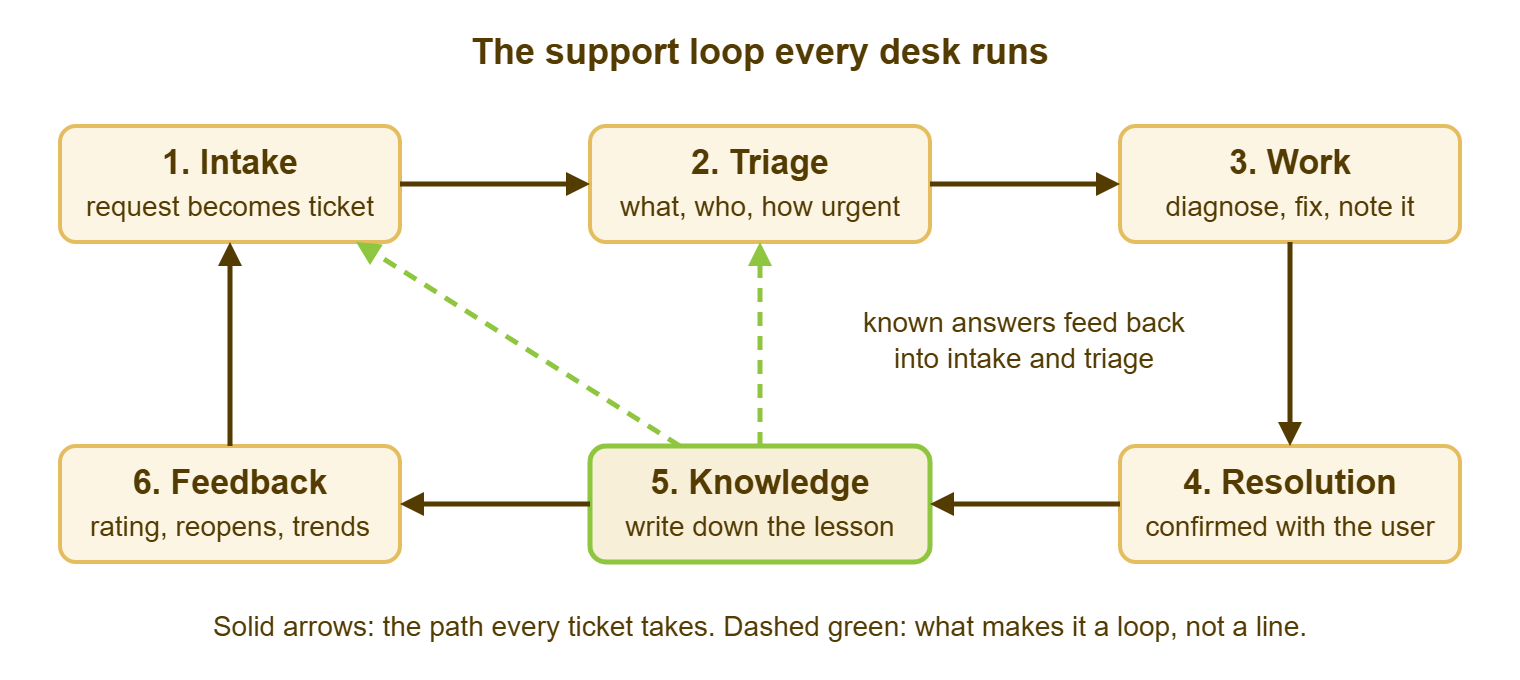
To keep the stages concrete, one ticket will travel the whole loop in the sections that follow. Lena, in accounts at Meridian Parts, e-mails the desk at 10:14 on a Monday. The invoice export to Bluewater Bank is failing with the message "file in use", and the invoice run has to go by 16:00.
Intake: The Request Becomes a Ticket
Intake is the moment a request enters the system and gets an identity: a number, a timestamp, a requester, and a receipt. Good intake is easy to state. Every route into the desk, whether e-mail, web form, chat, phone or walk-up, ends in the same queue as the same kind of ticket. Nothing the desk works on exists outside that queue. A phone call becomes a ticket while the caller is still talking. QuerySolv's phrase for this is five ways in, one queue. Web form, e-mail, live chat, social messages and the API all create the same kind of ticket. That is the shape to aim for whatever tool you have.
Lena's e-mail becomes ticket 5120 at 10:14, and she has a receipt with the number by 10:15. Nothing else has happened yet, and that is fine. The system knows the request exists, which is the whole job of intake.
When intake is missing, work happens and no record does. The desk's count is wrong, so the staffing case is wrong. The history is in a personal mailbox, so the next technician cannot find it. And the user who walked up has no number to quote. The untracked walk-up and the shadow mailbox have their own section in The Seven Ways Support Quietly Fails.
Triage: What Is It, Who Owns It, How Urgent
Triage is the first human look at a ticket. It answers three questions: what is this, who owns it, and how urgent is it compared with everything else. Priority is the order in which the desk will work, decided by how many people are affected and how soon it hurts. Good triage happens at fixed times, twice a day, in under five minutes per ticket. Every ticket leaves it with an owner, a priority, and a human acknowledgment naming the next update time. Triage also asks the question that makes the loop a loop: have we seen this before?
Sam triages at 10:30. Ticket 5120 is category Finance applications, priority High because a payment deadline is attached, owner Sam. He searches the knowledge base for "file in use" and finds nothing. At 10:31 he replies: "Looking at this now. I'll update you by 11:30 either way."
Without triage the queue sorts itself, and it sorts by age. The urgent ticket waits behind the old one, two technicians pick up the same ticket from opposite ends, and nothing has an owner until someone shouts. An untriaged queue develops moods, and none of them are good. Forms, categories and priority rules belong to a later pillar; the fundamental is that a human looks at every ticket, soon, and decides.
Work: Diagnose, Fix, and Write It Down as You Go
Work is the diagnosis and the fix, and it is the stage most technicians think is the whole job. Good work means one owner per ticket and a trail inside the ticket of what was tried and what was found. That trail is written as internal notes a stranger could follow. Good work also means an update to the user at the promised time whether or not there is news. A waiting status is used honestly: waiting on the user, waiting on a vendor, not waiting as a place to hide.
Between 10:45 and 11:18 Sam finds that the export writes to a shared folder where last Friday's export file is still locked. A session from a machine that was shut down without logging off is holding the lock. He clears the stale session on the file server, Lena runs the export, and it completes at 11:18. His note at 11:20 reads: "Export locked by stale session from WS-ACC-04 on files.example.com. Cleared session; export OK. Cause: machine shut down mid-export on Friday."
When the work stage lives in heads and chat threads, the ticket says "fixed" and nothing else. The next technician starts from zero on the same problem. The user chases because the promised update never came. The knowledge stage has nothing to work from. A history that reads "fixed" is a mystery novel missing its last page.
Resolution: The User Agrees It Is Done
Resolution is the desk's claim that the problem is gone; closing is the user's agreement, or their silence after a stated period. A good resolution reply says what was wrong, what was done, and what to do if it returns, then asks the user to confirm. Reopening is easy for the user and counted by the desk. The difference between a fixed ticket and a resolved problem is drawn out in What Good Support Actually Looks Like. Here the point is that the user, not the technician, closes the loop.
At 11:22 Sam replies to Lena with those three sentences and asks her to confirm. She replies "Confirmed, thanks" at 11:40, and the ticket closes. A tool should make the dispute path automatic. In QuerySolv, a requester's reply on a resolved or closed ticket reopens it, by any channel. The reopen is counted. Together, those features turn "resolved" from a verdict into a question.
Without a real resolution stage you get the silent close. Tickets are marked resolved because the technician stopped working on them. Users find out when they go to check. The reopen rate is invisible because reopens arrive as new tickets. Users learn that Resolved means "we stopped", and they stop confirming anything, which makes the numbers look better still.
Knowledge: Write Down What You Learned
Knowledge is the stage where one fix becomes a reusable answer. That could be a short article, a note on the category, a change to the form, a line in the runbook. Good knowledge work is modest. The answer is written the same day while it is fresh, in under ten minutes. It is for one of two audiences: an agent-only how-to, or a user-facing guide. Wrong articles are marked outdated rather than deleted, so the history survives. QuerySolv's knowledge base has three visibility states (published, agents only, draft) and an outdated flag, which is about the minimum a knowledge stage needs.
At 11:45 Sam writes an agents-only article, ninety words long, titled "Invoice export fails with 'file in use'". It has the symptom, the cause, the three-step fix and a link to ticket 5120. It takes him eight minutes, and it is the most valuable eight minutes of the ticket. Knowledge kept in one head has exactly one head's worth of uptime.
Knowledge is the stage small desks skip, because the next ticket is already there and the article can wait. The result is the same fix done eleven times by three people, each learning it from scratch. The method for making writing part of solving rather than a separate project is called knowledge-centered service, or KCS. It has its own pillar later. The fundamental is one habit: the ticket is not finished until the lesson is somewhere other than your head.
Feedback: What the User and the Numbers Say
Feedback is how the desk finds out whether it is working: the user's rating and comment, the reopens, the repeats, and a handful of monthly numbers. Good feedback is one question after every resolution, read by a human weekly. It also means three numbers at month end, which are volume, the age of the oldest open ticket, and the reopen rate. And it means one change made because of them. CSAT, customer satisfaction, is the average of those ratings, and the comments are worth more than the average. Metrics in depth belong to a later pillar; the fundamental is that feedback has to arrive, be read, and change something.
Lena rates ticket 5120 a nine and writes "would have liked to know how to check this myself". The next Monday at 09:05, Marcus in the same department e-mails the same error. Triage searches "file in use" and finds Sam's article in four minutes. The ticket resolves at 09:20, by a technician who had never seen the problem. Because of Lena's comment, the article gets a user-facing version with the one check accounts staff can do themselves. The category had six tickets in the two months before the article and one in the two months after. That is the loop closing, in both directions at once.
Without feedback the desk works hard and does not know whether it is working. The first real signal is a department that has quietly stopped using the desk. An empty dashboard is green by default. That is not the same as good.
Where Small Desks Lose the Loop
Small desks lose knowledge and feedback first, because those are the two stages with nobody waiting on them. Intake, triage, work and resolution each have a user attached, and the user will chase. Knowledge and feedback have only the future attached, and the future does not send e-mail. So those stages are done "when there is time". There is never time, because the time is being spent re-solving the things nobody wrote down.
The second loss is triage collapsing into work. Whoever sees the ticket first starts fixing it, nothing is prioritized, and the urgent waits behind the interesting. This feels efficient, because everyone is always busy. It is the busyness of a desk with no owner for anything.
The third loss is resolution dropping its confirmation step under pressure. The technician believes it is fixed, marks it so, and moves on. The reopen arrives as a new ticket a week later with a sharper tone.
The defense is small and specific. Protect fifteen minutes a day for knowledge and fifteen minutes a week for feedback, as fixed appointments, not as leftovers. Against that: a desk that re-solves one known problem a day, at twenty minutes each, spends about eighty hours a year rediscovering its own answers. I have done that arithmetic on my own desk. I did not enjoy the result.
The Stranger Test, and a One-Page Checklist
The test for whether a desk is a system is this: could a competent stranger, a technician who has never seen your organization, run the desk for a week from what is written down? Not brilliantly. Adequately, without calling Tomas. If any stage's honest answer is "they would have to ask", that stage still lives in a person.
Run it by handing the written material to the newest technician, or to yourself pretending to be one, and asking the question below for each stage. Where the answer lives nowhere, you have found the gap, and the gap is the next thing to write.
THE SUPPORT LOOP ON ONE PAGE
Desk: ____________________   Owner: ____________   Reviewed: ________

Stage        The question it must answer                 Written where?
-----------  ------------------------------------------  --------------
Intake       How does a request become a ticket, by
             every route, with a receipt to the user?    ______________
Triage       Who looks, at what times, and how do they
             set priority and owner? What is searched
             first?                                      ______________
Work         What goes in the ticket while working?
             When is the user updated, and by whom?      ______________
Resolution   What does the resolution reply contain?
             How does the user confirm or reopen?        ______________
Knowledge    When is the answer written, where, for
             which audience, and who marks it outdated?  ______________
Feedback     What do we ask the user after resolution?
             Which three numbers are read monthly, by
             whom, and what changed because of them?     ______________

Stranger test: a competent technician who has never seen this desk could
run it for a week from the "Written where?" column alone.   [ ] yes  [ ] no
Gaps found: ____________________________________________________________
Keep the page where the desk can see it, and review it when anyone joins or leaves. Rules change, tools change, and the person who knew why the exception existed moves on. The page is the desk's memory of itself.
A Short War Story: Three Weeks at Kestrel Payroll
Priya ran the Kestrel Payroll help desk on her own. Before three weeks of leave she spent two afternoons writing the loop on one page. It covered where tickets came from, triage at 09:00 and 14:00, what every reply had to contain, and where fixes were written down. Dana, six months into the job, ran the desk from that page. When Priya came back, sixty-one tickets had been opened and fifty-eight closed, with two reopens. The three still open were waiting on a vendor. The one thing that had gone wrong was the payroll-run freeze on the twenty-fifth. That lived in Priya's head and not on the page. Dana had changed a printer driver during the run, and the run was late by forty minutes. Nobody was blamed, and the freeze went on the page the next morning. The runbook had held everywhere it existed, and failed in exactly the place it did not.
I have run that experiment on myself, unplanned, with a week of flu. The desk held. The thing that broke was the thing I had been meaning to write down.
Building the Loop in a Month on Any Tool
You can build the loop in four weeks on any ticket tool, including a shared mailbox and a spreadsheet. The loop is a set of habits and written answers rather than a set of features. The tool decides how much typing each habit costs. It does not decide whether the habit exists.
- Week one, intake: use one address and one form for everything. Every phone call and walk-up is logged as a ticket by the technician. The receipt is switched on.
- Week two, triage: set two fixed times a day. The priority rule is written on a card (how many people, how soon it hurts). Every ticket leaves triage with an owner and an acknowledgment that names the next update time.
- Week three, work and resolution: use a note template (tried, found, changed). Use a resolution reply template (what was wrong, what was done, what to do if it returns, please confirm). A reply from the user reopens the ticket, and reopens are counted.
- Week four, knowledge and feedback: take fifteen minutes a day to write the answer to anything that took more than twenty minutes to solve. Ask one rating question after every resolution. Read three numbers at month end, with one change decided.
Features that make the loop cheaper exist in most ticket tools. They include one queue for every channel, full-text search across old tickets, and articles only agents can see. There is also a rating link in the resolution reply, and a reopen that is counted rather than filed as a new ticket. If your tool has them, use them. If it does not, the loop still works; it costs more typing. The daily rhythm that carries these habits is laid out in Your First Week Running a Helpdesk.
When Tomas lands, the best thing he can find is a desk that did not need him for a week, and a short, honest list of the places where it did. That list is the next page of the runbook. Then Tomas can take a Tuesday off without anyone asking where he is. That is, when you think about it, the whole point of a system.
Frequently Asked Questions
We are a one-person desk. Does the loop still apply?
What is the difference between a runbook and a knowledge base?
How much time should the knowledge stage take?
Do we need ITIL to do this?
Which numbers should the feedback stage track first?
What if the person who knows everything has no time to write it down?
From the QuerySolv team: we build self-hosted help desk software for Windows. QuerySolv runs as one Windows service on your own network. It takes requests by web form, e-mail, live chat, social messages and REST API. It is licensed once per installation rather than per agent per month. The free trial runs the full product for 30 days.