
Skills to Build While You Are Still on the Desk
Friday, 14:10, at Harbourview Clinic. The physiotherapy department has been renamed. That means forty-three accounts need their department changed, their old group removed and their new group added. Tomas has been doing it since lunch, one account at a time, in the directory's management console: open, edit, save, next. He is on account nineteen. Ingrid, the clinic's one systems administrator, stops on her way past with a coffee. She looks at the screen for about four seconds and says, "You know there's a loop for that?" Tomas does not know there is a loop for that. Nobody has ever shown him. He has, however, just been handed the first skill on the list below, by the desk, for free, in the middle of a Friday afternoon.
The skills to build on the desk are the six things a systems administrator uses every day that a first-line technician can start learning without leaving the queue. They are scripting in the operating system's own tools, the directory, networking fundamentals, documentation, change discipline and the problem record. None of them needs a lab, a course or permission. Each is handed to you by a kind of ticket the desk already receives, usually several times a week. The only difference between the technician who builds them and the one who does not is whether they noticed the ticket was an invitation. This article is part of our The Helpdesk-to-Sysadmin Ladder series, which draws the rungs from first line to systems administrator and the route between them.
It covers why the desk is a classroom nobody advertises. Then come the six skills in turn, each with what it is, where the desk hands it to you and how to start. Next come a grid of which tickets teach which skill, the order to learn them in, and how to find the hour a week. A short war story follows, then the skills inventory. That is a one-page template for recording what you can do and what you have done it on.
The Desk Is a Classroom Nobody Advertises
Every skill in this article is a thing that goes wrong for users, which is why the desk sees it first. The directory is abstract until forty-three accounts need the same change. Networking is a chapter in a book until the tenancy office cannot reach the print server. Then you have to work out whether it is the address, the name or the route. Change discipline is a policy until a driver update takes down printing for a floor. The queue is a stream of small, safe, real encounters with the systems a sysadmin owns. A technician who works it with their eyes open gets a better practical education than most courses offer, with a tutor who phones back when you get it wrong.
The catch is that the desk hands you the skill and the deadline in the same ticket, and the deadline usually wins. Tomas could have learned the loop at account one. He was going to learn it at account forty-three or not at all, because the department wanted its accounts fixed before the weekend. So the discipline this article teaches is not "learn six things" but "when the ticket that teaches one arrives, spend an extra twenty minutes on it". Twenty minutes, a few times a week, over a year, is a second education. The queue will not thank you for it. The queue has never thanked anyone for anything.
Scripting in the Operating System's Own Tools
Scripting is telling the computer to do the same thing many times, or the same thing every day. You write the steps down in the shell or scripting language built into the operating system, rather than clicking through them. Every modern operating system ships with one; Windows has one, and so does everything else. You need no extra software and no permission to open it, which is why this is the first skill on the list. A sysadmin who cannot script is doing by hand what the computer would do for them. A technician who can has quietly become the most useful person on the desk.
The desk hands you scripting the moment a ticket says "for all of the following". Forty-three accounts to move between groups. Twelve new starters who need the same six settings. A folder that must be created on every laptop in a department. The repeated fix you apply four times a week by hand, which is the subject of Turning a Fix Into a Script Safely and the natural second step once you can write a loop. Each of those tickets is an invitation to learn one new thing. That might be how to read a list of names from a file or how to do one action for each name. Or it might be how to print what would happen without doing it.
Start in this order and no other. First, the line that lists: write the command that shows you the forty-three accounts and nothing else. Look at the list until you are sure it is the right forty-three. Second, the same line with the change added, run against one account, by name, and then checked in the console the slow way. Third, against ten. Fourth, against all of them, with the list of what changed saved to a file. A script that lists before it changes, and is run on one before it is run on all, is a safe tool. A script that changes on its first run, against everything, on a Friday, is the war story at the end of this article.
The Directory
The directory is the central list of every account, group and computer in the organisation, and the rules that apply to them. When a user signs in, the directory says who they are. When they open a shared folder, the directory's groups say whether they may. When their laptop applies a setting at start-up, a policy from the directory put it there. A sysadmin lives in it. A first-line technician usually meets it through one narrow door, the password reset, and never looks round the rest of the building.
The desk hands you the directory three times a day. The password and lockout ticket is the obvious door. A lockout that keeps coming back has a source. Finding the source means reading the account's sign-in history and the directory's view of where the bad attempts come from. The new starter is the second door: an account, a mailbox, group memberships that grant access, and a question about why the group grants what it grants. The access request is the third. "Can Priya see the finance share?" is a question about which group the share trusts and whether Priya is in it. The technician who learns to answer that by reading the permissions rather than by asking Ingrid has learned the thing the directory is for.
Four ideas are enough to start. An account's access comes from the groups it is in, not from the account itself, so a permission problem is usually a membership problem. Permissions on folders are inherited from the folder above unless somebody stopped them, so a tangle is usually an inheritance someone broke. A policy is a rule the directory pushes to computers or users. So a setting that keeps coming back was put there on purpose by a policy. And the account, the mailbox and the device are three different objects that happen to share a name, so "delete the user" is three decisions. Learn those four from real tickets, with the console open and a sysadmin to ask. Then the directory stops being a password-reset tool and starts being the map.
Networking Fundamentals
Networking, for the purposes of the desk, is how one computer finds and reaches another. The fundamentals are four questions asked in order. Does the device have an address? Can it turn the name it was given into an address? Can it reach the way out of its own network? And can it reach the service at the far end? Every "can't connect" ticket is one of those four failing. A technician who asks them in order fixes the ticket faster than one who restarts things in the hope that it helps. Restarting does help, often. It just does not tell you anything.
The desk hands you networking through the can't-connect ticket and, less expectedly, through the printer. Printers are the networking classroom nobody signed up for. They have addresses that were set by hand years ago and names that resolve to the printer that was replaced. They also have a habit of being reachable from one floor and not the next. Every printer ticket that is not a jam is a networking ticket with toner on it. The VPN gateway is the third tutor, because a remote user who is "connected but can't reach it" is the four questions with a tunnel in the middle. Working out which question fails teaches you what the tunnel does.
To start, learn to read the device's own answer to each of the four questions using the operating system's built-in tools. Write the answers in the ticket as four lines. Then learn what the answers mean. Learn what the address range tells you about where the device is. Learn what it means when the name resolves to an address that is not the one the server has. Learn what the gateway is and why a device that cannot reach it cannot reach anything. A networking fundamentals course will give you the vocabulary. The printer in the tenancy office will give you the exam.
Documentation
Documentation, on the ladder, means two things. There is the note in the ticket that says what was found and done. Then there is the runbook, a one-page set of steps a competent stranger could follow to do a job you have done before. The first is a habit; the second is a product. A sysadmin writes both constantly, because the job above the desk is mostly things that happen rarely. A thing that happens rarely is a thing nobody remembers how to do. The technician who can write a runbook that works has already done the hardest part of rung three.
The desk hands you documentation every time you solve the same thing twice. The second time you map the finance printer for a new starter is the moment to write the steps down. There will be a third time and it will be someone else doing it. The second time a repeat ticket needs the same workaround, the workaround belongs in a runbook with the ticket numbers attached. The new-starter checklist, the printer setup, the folder-permission fix, the account unlock: each is a runbook waiting for someone to write it. And Writing the Runbook is the article on how. Where the desk keeps a knowledge base with articles visible to agents only, as QuerySolv does, the runbook has a home that the next technician will search before they ask you.
Start with the ticket note, because it is daily and nobody reviews it. A note that a stranger could act on says what the user reported in their words and what you checked and found. It says what you changed and how to undo it, and what you told them. Then take one solved-twice ticket a month and turn its note into a runbook. Give it a title that says what it is for. Add the conditions it applies to and the steps. Include the check at the end, and the date and your name. Twelve a year is a documentation set. It is also twelve pieces of evidence for the ladder card that nobody can argue with.
Change Discipline
Change discipline is the habit of writing down what you are about to change to a shared thing, before you change it. You record when, who it affects, how you will undo it and who you have told. A change, in this sense, is any alteration to something more than one person depends on: a print queue, a group, a policy, a server setting, a driver on a shared machine. On the first rung almost nothing you touch is a change in this sense. On the second rung, suddenly, most of it is. The technicians who arrive there with the habit already formed are the ones the sysadmin lets near the servers.
The desk hands you change discipline in the most memorable way available: through the fix that broke something. The driver update that fixed one user's printing and stopped the floor's. The group change that gave Priya the finance share and gave the whole department the payroll folder. The policy tweak that fixed the drive mapping and removed everyone's desktop shortcuts on Monday. Every technician has one of these. The lesson it teaches is not "be careful" but "write it down first, so that when it breaks you know what you did and can put it back". The one-page record that does this, and takes five minutes, is in The One-Page Change Record; the whole discipline fits on it.
Start before anyone requires it. The next time a ticket leads you to a shared thing, write five lines in the ticket before you touch it. Those lines cover what you will change, when, who uses this thing, how you will undo it, and who you have told. Then make the change, then write a sixth line saying what happened. Nobody will ask you to do this on the first rung. That is the point. A technician who does it unasked has shown the sysadmin something no interview can.
The Problem Record
A problem record is a ticket about a cause rather than a case: the thing that keeps generating tickets. The cause is written up once, with the tickets it caused linked to the record. The record includes the workaround that keeps users going, and the permanent fix when there is one. An incident is one user's broken thing; a problem is the reason it keeps breaking. The desk resolves incidents all day. A sysadmin's job is mostly problems. The technician who can spot one in the queue, write it up and chase the fix is already doing sysadmin work with a desk badge on.
The desk hands you the problem record through repetition. The third lockout ticket from the same user in a fortnight is a problem, and its cause is somewhere in that user's devices or saved passwords. The fourth printer ticket from the tenancy office this month is a problem, and the cause is in the queue, the driver or the address, not the printer. The "known error", the thing everybody on the desk knows is broken and has a workaround for, is a problem that nobody has written down. Writing it down is the first step. Finding the Repeat Tickets is the method for spotting them in the record; the skill for the ladder is the habit of looking.
Start with one. Pick the repeat you are most tired of and open a ticket about the cause rather than the case. Link the last five incidents to it, write the workaround at the top, and put your name on it. Then spend an hour a week on it until it is fixed or until you can say exactly why it cannot be. You will have learned how the thing works and met the sysadmin about it. You will also have produced the single most persuasive item a ladder card can carry: a problem you found, owned and closed.
Where the Desk Hands You Each One
The grid below puts the six skills against the six kinds of ticket that teach them. A green dot means the ticket hands you the skill directly. Examples are the account change that needs a loop and the can't-connect ticket that is the four questions. Another is the repeat ticket that is a problem record in disguise. An amber dot means the ticket touches the skill. The technician should take the chance when it comes, which usually means spending the extra twenty minutes. Read the grid by row to see what a skill needs, and by column to see what a ticket offers. Keep it near the queue for the first few months, because the hardest part of this education is noticing the lesson while the deadline is shouting.
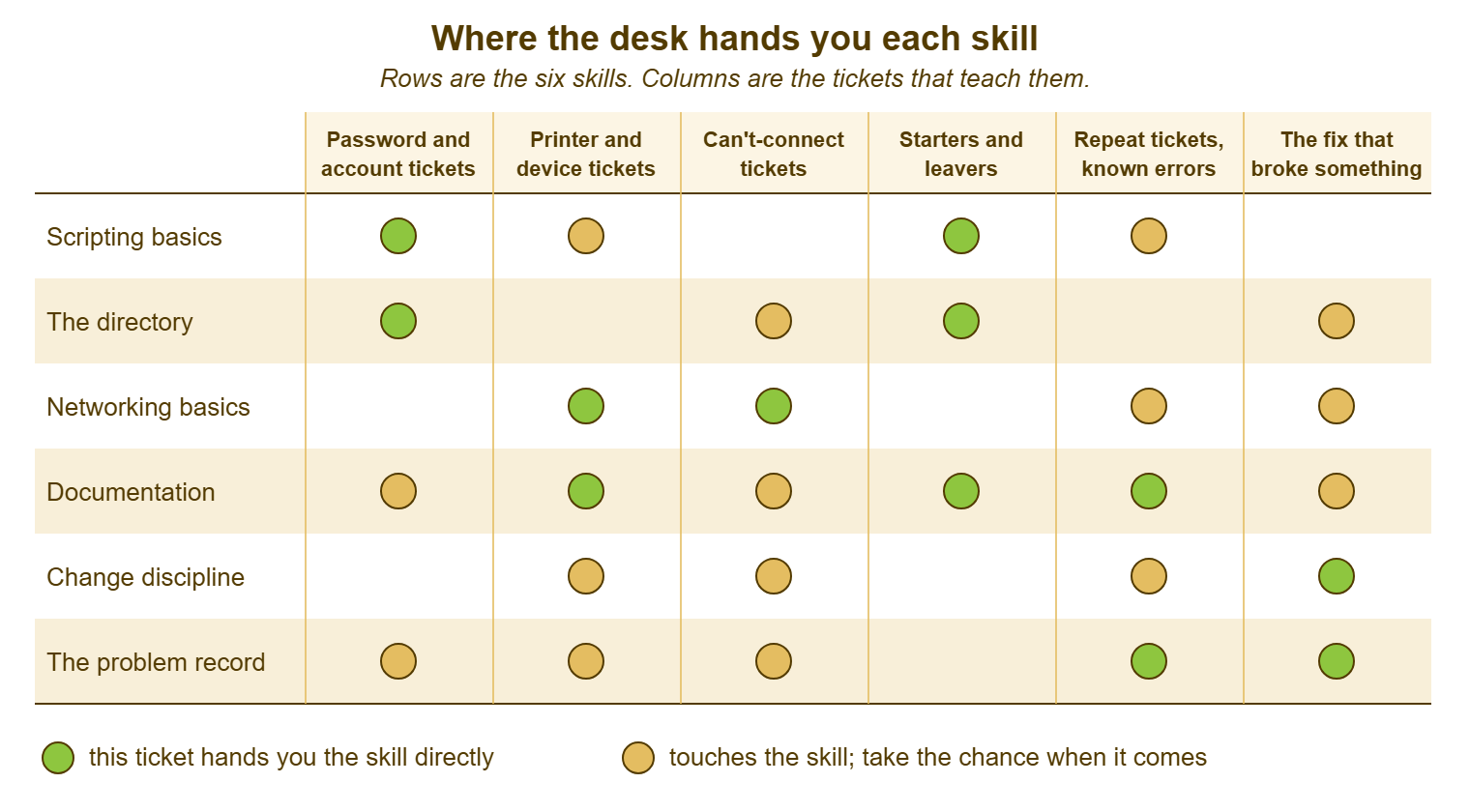
Two things stand out from the grid. The repeat ticket and the fix that broke something teach almost everything. That is why the tickets most technicians avoid are the ones most worth taking, a point The Tickets That Teach Infrastructure takes further. And documentation touches every column, because every ticket you solve is a note, and every note you write twice is a runbook.
The Order to Learn Them In
Learn documentation first, because it is daily, needs no permission and improves every other skill as you learn it. A technician who writes a note a stranger could act on is already halfway to a runbook. A runbook is the evidence the other five skills will need. Then scripting, because it is the one most likely to make the queue smaller, which buys the hour a week the rest of the list needs. The directory and networking come next, together, from the tickets that arrive. Change discipline comes the first time a ticket leads you to a shared thing, which on most desks is within the first month. The problem record comes when you are tired enough of a repeat to do something about it.
The hour a week comes from the scripting. Tomas's forty-three accounts took ninety minutes by hand. The loop, once he had it, took four. The ninety minutes did not come back to the desk, because the desk does not know how long things used to take. Spend the first few returned hours on the next skill, and say so to your manager, plainly: "I am using the time the script saved to learn the directory properly, and here is what that has fixed so far." A manager who hears that will usually protect the hour. A manager who does not hear it will fill the hour with tickets, because that is what hours are for, as far as a queue is concerned.
Keep the inventory honest about levels. There is a large gap between having read about a thing, having done it once with someone watching, doing it on your own, and being able to teach it. The ladder cares about the last two. "Can script" on a card means "has written a script that changed something on a real system, safely, and here is the ticket number". Anything less is reading, and reading is fine, but it is not a rung.
Remember: the desk hands you each skill inside a ticket with a deadline on it. The deadline will always win unless you decide, in advance, that the ticket that teaches something gets twenty extra minutes, and then write down what you learned.
A Short War Story: The Surname Filter at Harbourview Clinic
Three weeks after Ingrid showed him the loop, Tomas was handed the leavers list from the clinic's HR team, twelve names. He wrote a script to disable all twelve accounts in one go. That was the right instinct and the wrong afternoon. His filter matched accounts by surname rather than by account name. He had not run the line that lists before the line that changes. The clinic employed two consultants and a receptionist who shared surnames with people on the list. Thirty-one accounts were disabled at 15:50 on a Tuesday, including the three booking accounts at the front desk. For forty minutes no patient could be booked in at any of the three reception points. During that time, Tomas worked out what had happened and Ingrid re-enabled accounts from the list of what changed. Fortunately, he had saved that list. The cost was forty minutes of booking across a busy clinic, an afternoon of apologies, and a very quiet conversation with the practice manager about who was allowed to run what. The desk had handed him the skill and the discipline in the same month, and he had taken only the first. A script that lists before it changes, and is run on one account before it is run on all, would have cost him four extra minutes.
The Skills Inventory
The inventory is one page, six rows, kept by the technician and updated when something changes rather than at review time. Each row records the level honestly, using the four levels described above, and the evidence that proves it. That is ticket numbers, scripts, runbooks and change records rather than adjectives. The row also records the next chance to move up a level, and when. The evidence column is what makes it useful at a review and in an interview. A manager or a sysadmin can open the tickets and see the work. Fill it in with the ticket record open, not from memory, and expect the first honest version to have more "once, with help" than you would like. That is what the next quarter is for.
THE SKILLS INVENTORY — ONE PAGE, UPDATED AS IT CHANGES
Name: ______________________   Updated: ____________   Reviewed with: ______________

Levels:  0 = read about it   1 = done once with help   2 = do it on my own   3 = could teach it

Skill                    Level   Evidence (ticket / script / runbook / change record)   Next chance        By
Scripting basics          [ ]    ______________________________________________   ______________   ______
  (lists before it changes; run on one, then ten, then all)
The directory             [ ]    ______________________________________________   ______________   ______
  (accounts, groups, inheritance, policy; account vs mailbox vs device)
Networking basics         [ ]    ______________________________________________   ______________   ______
  (address, name, gateway, service; the four questions in order)
Documentation             [ ]    ______________________________________________   ______________   ______
  (notes a stranger could act on; one runbook a month)
Change discipline         [ ]    ______________________________________________   ______________   ______
  (what, when, who is affected, how to undo, who was told; written first)
The problem record        [ ]    ______________________________________________   ______________   ______
  (one repeat owned: cause, linked incidents, workaround, fix)

Runbooks written this year:  ____   Scripts in use on the desk:  ____   Problems closed:  ____
The one skill to move up a level next quarter:  ______________________   with:  ______________
Tomas's first inventory, filled in the week after the surname filter, had a 1 against scripting and the leavers ticket as its evidence. That was honest and, as it turned out, exactly what Ingrid wanted to see. She did not want a technician who had never broken anything. She wanted one who had written down what he broke.
Frequently Asked Questions
I do not have rights to the directory or the servers. How can I learn them?
Which scripting language should I learn?
My manager fills every spare minute with tickets. Where does the hour a week come from?
Is a home lab worth setting up?
How do I prove these skills to a sysadmin who has never seen me work?
Should I learn all six at once?
From the QuerySolv team: we build self-hosted help desk software for Windows. QuerySolv runs as one Windows service on your own network. It takes requests by web form, e-mail, live chat, social messages and REST API. It is licensed once per installation rather than per agent per month. The free trial runs the full product for 30 days.