
What a Service Desk Adds to a Helpdesk
Lena opens the sales dashboard at 09:02 on Monday and it tells her the report is "not available". She does not know whether it is broken or whether she was never meant to see it. She has a meeting at 09:30. The IT page offers two links, Report a Problem and Request Access. She sits for a moment with the mouse between them, trying to work out which kind of thing her thing is. She picks one. It is the wrong one, and she will find that out on Wednesday.
Lena should not have to know. Whether her problem is a problem or a request is a decision the desk is equipped to make and she is not. A desk that pushes the decision onto her has moved its own filing system out to the door. That one idea, that there is one door and the sorting happens behind it, is most of what a service desk adds to a helpdesk. The rest follows from it. This is the second article in our Helpdesk vs Service Desk series. The first, Three Terms, One Job?, defined the words. This one is about the difference in practice.
It covers the single point of contact, then incidents and requests in plain words, with ten everyday tickets sorted into each. The service catalog follows in one section. Then come owning the whole experience rather than the fix, and Lena's ticket on a desk that does this. The article covers what actually changes on Monday, which parts of the idea are marketing, and what it costs. It ends with a war story about new-starter accounts that took nine days, and a readiness checklist to copy.
One Door for Everything
A single point of contact is one door through which every incident and every request enters, whatever the channel. The sorting is done by the desk rather than by the user. The helpdesk had a door too, but the sign on it said "broken things only", and requests went around the side. A service desk takes the sign down. Form, e-mail, chat, phone and walk-up all lead to the same queue. "Which kind is this?" is the first question the desk asks, not the first question the form asks.
One door matters for three reasons. The user has one thing to remember, which is the right number of things to ask anyone to remember about IT. The desk sees all the work. So the monthly count describes the desk you actually run rather than the half of it that was broken. And nothing goes around the side, so nothing is a favor, and favors are the tickets that never close because they never opened.
With two doors, the user guesses, because the edge between "broken" and "missing" is not visible from where they sit. A wrong guess costs a day or two while the ticket is filed again. After a few of those the user stops using either door and walks up instead. The side door is always open. It has no sign, no queue and no numbers, and it is the busiest door in the building.
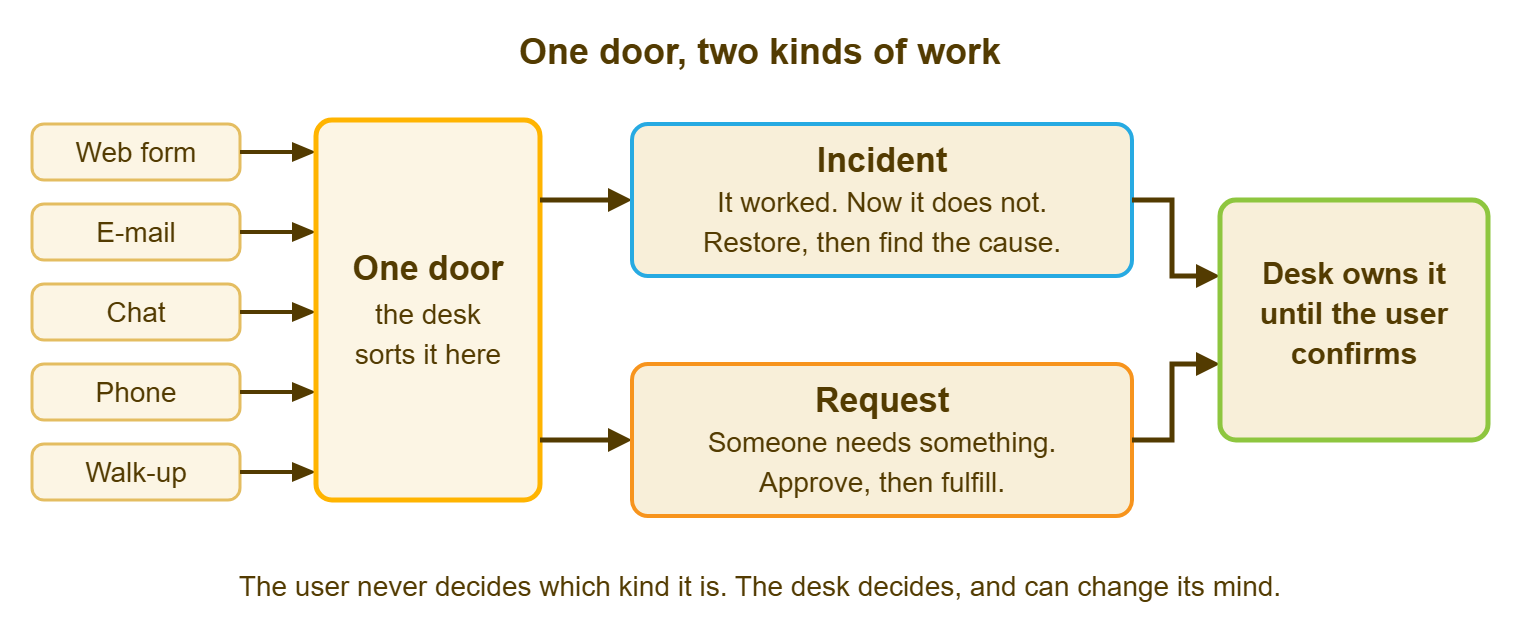
A single point of contact is not a single person, a single phone number, or a rule that users may not speak to anyone else in IT. It is a promise about where tickets begin. The answer to a corridor question is "I'll log that", and then it is logged.
Incidents and Requests in Plain Words
An incident is something that worked and has stopped working, or is working wrongly. A request is someone needing something IT offers that they do not have yet. The test takes one question: did this work yesterday? If yes and now it does not, incident. If they never had it, request.
The distinction matters because the two kinds of work are handled differently. An incident is urgent in proportion to the damage. The rule is restore first and understand afterwards, and the measure is how soon it works again. A request is not urgent in that way. It follows a known path with known steps, often has an approval in it, and is measured against a stated lead time. Treat a request like an incident and every new monitor is a fire. Treat an incident like a request and a user with no e-mail sits in a queue with a three-day target.
The edges are where the arguments live, and the edges are mostly one shape: the incident that creates a request. A cracked laptop screen is an incident (the user cannot work) that creates a request (a replacement through the hardware path). Handle the incident now with a loaner and the request through the catalog, on the same ticket or linked ones. A request phrased urgently is still a request. An incident phrased politely is still an incident.
The desk decides, at triage, in seconds, and can change its mind later without the user doing anything. That last clause is the one that protects Lena. If the first guess was wrong, the type changes, the number does not, and nobody is sent back to the door.
Ten Everyday Tickets, Sorted
The table below takes ten tickets as users actually write them and sorts each one, with the reason. Two of the ten are the awkward shape, and they are the two worth reading twice. Copy the table into the runbook and add your own rows as the arguments arrive.
| The ticket as the user wrote it | Incident or request? | Why |
|---|---|---|
| "I can't log in to e-mail since this morning" | Incident | It worked yesterday and does not today. Restore first. |
| "I need access to the finance share" | Request | Never had it. Follows the access path, with the folder owner's approval. |
| "The printer on floor two is jammed again" | Incident | Working wrongly. "Again" is a note for the problem list, not a change of type. |
| "New starter on Monday, needs a laptop and accounts" | Request | A known path with several steps and a lead time. |
| "My laptop is slow" | Incident | Working wrongly, cause unknown. Vague is still an incident. |
| "Can I have a second monitor?" | Request | An item IT offers, with an approval and a stock check. |
| "The VPN keeps dropping" | Incident | Intermittent is still broken. |
| "Please install the design tool on my machine" | Request | Software from the standard list, with a license check. |
| "My laptop screen is cracked" | Incident that creates a request | Incident: restore the user with a loaner today. Request: the replacement, through the hardware path. |
| "I'm leaving on Friday, please close my accounts" | Request | The leaver path, with steps and a date. Nothing is broken. |
If your ticket tool gives you one extra field, make it this one: a type with two values, set by the desk. Everything else in this article depends on counting requests separately from incidents, and you cannot count what you have not marked.
The Service Catalog in One Section
A service catalog is the written list of what IT offers, how to ask for each thing, and roughly how long it takes. At a small organization it is one page of ten to twenty lines, and it exists so that the request form has something to offer. Without a catalog, "I need something" is a free-text box, and a free-text box is a request for the desk to guess. With one, the user picks "access to a shared folder", the form asks which folder, and the desk already knows the path.
The lines are short and the lead times are honest. "New starter: five working days' notice, please." "Access to a shared folder: one working day after the owner approves." "Software from the standard list: two working days." "Replacement laptop: a loaner the same day, the replacement within ten working days." A catalog is not a promise to do everything. It is a list of what is normal, so that everything else can be called what it is, which is a conversation.
The catalog's full treatment, including what the desk will decline, belongs to the pillar on defining what IT supports. Here the rule is one page, ten to twenty lines, reviewed each quarter. I once inherited a catalog of ninety-one items, of which eleven had ever been requested. It had an index.
Owning the Whole Experience, Not Just the Fix
Ownership means the desk follows the ticket to the end even when another team does the work. The helpdesk reflex is to hand off and close its part. The service desk rule is different. The ticket belongs to the desk until the user confirms it is finished, whoever is holding the screwdriver. The desk does the chasing, the updating and the confirming while the specialist does the work.
The user gets one contact who knows where the ticket is, which is the whole of what "service" means to them. Nothing falls into the gap between teams, because somebody is standing in the gap on purpose. And the desk learns, within a month, where the slow parts of the organization are, because it is the only function watching tickets cross every boundary.
Without ownership, tickets live "with someone". Each team's numbers look fine, because each team measures the part it did. The user's experience is the sum of the parts plus the gaps, which nobody measures. Ownership also settles who decides when the ticket is finished: the user does, not the desk. In QuerySolv a requester's reply on a resolved or closed ticket reopens it, by any channel. The reopen is counted. That is the behavior any tool should have for this rule to be real.
Remember: the specialist owns the work; the desk owns the ticket. The two are different jobs, and the second one is the one users notice.
A Worked Example: Lena's Ticket, Twice
Here is Lena's Monday at Northgate Retail on a desk with one door. At 09:02 she sends one e-mail to the one address: "Sales dashboard says the report is not available." Ticket 7318 exists at 09:03, with a receipt. Marcus triages it at 09:20 and checks that the dashboard works for two other people in sales. He looks at her account and finds she is not in the report-viewer group. She never had it. Request, not incident.
Marcus does not tell her to file something else. He sets the type to request and sends the approval to Sam, who owns the report, with a return time of 12:00. He moves the ticket to "waiting on another team" and replies to Lena at 09:24: nothing is broken. You need to be added to a group. Sam has been asked. Expect it by noon, and I will tell you either way. Sam approves at 11:10. Marcus adds her at 11:15 and asks her to try. She confirms at 11:40, and 7318 closes. Elapsed: two hours and thirty-eight minutes. Time Lena spent deciding what kind of thing her thing was: none.
Now the same Monday on a desk with two doors. Lena picks Report a Problem, because "not available" sounds broken. The incident queue is busy with a printer outage. A technician reaches her ticket on Wednesday at 14:00, finds nothing broken, and closes it with a polite note asking her to use Request Access. She does. The request is approved on Thursday, and she has the report on Thursday afternoon, three and a half days after she asked. Two tickets, one closed as "not an incident", and one user who has learned that the quickest route is to find Marcus in the kitchen.
What Changes on Monday
Three things change in practice, and none of them needs a project. First, there is a request form: the catalog's lines in a list, each with the two or three questions it needs. It has a "something else" box for the conversations. Second, there is a "waiting on another team" status that the desk still owns. It is reviewed every morning as a list so that nothing waits silently. Third, there is a weekly fifteen minutes looking at requests as a class. That review asks how many, which kinds, how long each kind took, and which team each kind waited on.
The weekly look is the one that pays. Incidents are noisy and individually interesting. Requests are quiet and collectively expensive, because the same six kinds arrive every week by the same wandering path. Fifteen minutes with the list is how the path stops wandering, and how a desk finds out that a new starter takes nine days.
If the organization wants to put more than IT behind the one door, the same shape extends. Facilities takes requests too (a desk move, a badge), and so does HR (a start date, a leaver). Each needs its own form and its own people who may see the tickets. A help desk tool can have departments that are really separate, each with its own form, custom fields, mailbox and per-agent permissions. That lets one installation be the one door for IT, facilities and HR without any of them reading the others' tickets. QuerySolv's departments work that way. Whether the organization is ready for a shared door is a separate question, and the first answer is usually "not yet".
What does not change on Monday is the people, the categories, the tool or the name. If the name is the only thing that changes, the result is the subject of Renaming the Desk Without Reorganizing It, and it is not a happy one.
What Is Marketing
A fair amount of what surrounds the term "service desk" is marketing, and it helps to know which parts. The word "service" is the first. It came from ITIL, a published library of good practice for running IT. ITIL wanted IT to describe what it does in terms a user would recognize. That was a good idea. The word has since been attached to everything a vendor sells. It now means roughly "a thing with a form in front of it". The idea underneath is still sound. The word has been worn smooth.
The second is the maturity model: a ladder of five levels on a consultant's slide. It runs from "chaotic" at the bottom to a word like "optimized" at the top, with your organization marked at level two. Every maturity model has five levels, and every organization assessed with one is at level two. This is not a coincidence. It is the business model. The useful content of any maturity model is the three changes above, and they fit on an index card.
The third is the platform you supposedly need. We sell help desk software, so discount our enthusiasm and check the reasoning. The reasoning is this. The three Monday changes are a form, a status and a weekly habit. Any ticket tool you already have can hold a form and a status. The tool decides how much typing each habit costs. It does not decide whether the habit exists. Buy a tool when the typing cost is what is stopping you, and not before.
What It Costs
A service desk costs more process, and the process is real. Somebody has to sort every ticket at triage. Somebody has to chase the tickets waiting on another team, and somebody has to look at the request list on Friday. For a desk of two that is perhaps forty minutes a day, out of the same two people. Say so when you propose it. A process nobody has budgeted time for will be done until the first busy week.
It costs more fields: the type, the catalog item, the approver, the team being waited on. Each one you add after the first four should have to justify itself against a specific report that someone will read. Fields breed. A form that asks eleven questions to request a mouse has not become more mature; it has become a form nobody fills in.
And it costs the temptation to over-build, which is the expensive one. The catalog grows toward ninety-one items. The approval path for a monitor acquires a third signature. The desk begins to look like the slide. Start with one type field, ten catalog lines, one waiting status and one weekly look. Add nothing until those have been in use for a quarter. The size of desk that needs more is the subject of Choosing the Support Model for Your Size. Most desks reading this do not.
A Short War Story: Nine Days at Northgate Retail
Northgate Retail's desk began owning requests end to end in the spring. For the first time, somebody looked at every new-starter ticket each morning until the starter could log in. Within a month the desk had a number nobody had seen before. A new-starter account took nine working days from request to first login, against a store-opening schedule that allowed five. Four teams touched each one, and each believed it was waiting on another. The desk was waiting for HR to confirm the start date, and HR for the store manager's form. The manager was waiting for the desk to say what the form needed. The applications team was waiting for an account the desk had not yet been told to create. Nobody had been slow. Everybody had been waiting. The fix was a single ticket owned by the desk, with four named steps and a return time for each. The fix also included a daily look at every open one. Nine days became three by the end of the summer, and the store managers stopped planning their openings around it.
I have run that exact query on two other desks since. The number was never nine. It was never five either.
The Readiness Checklist
The checklist below is ten yes-or-no questions. Answer them honestly about the desk as it is this week, not as the announcement describes it. With eight or more, the name is already true. With fewer, the missing ones are the Monday list, in order.
SERVICE DESK READINESS: TEN QUESTIONS
Desk: ______________   Date: __________   Answered by: ______________

One door
[ ] Every channel (form, e-mail, chat, phone, walk-up) ends in one queue
[ ] The form does not ask the user whether this is an incident or a request
[ ] Requests that arrive by e-mail or on foot are logged as tickets, not favors

Two kinds of work
[ ] Every ticket carries a type, incident or request, set by the desk at triage
[ ] The desk can change the type later without the user filing again

The catalog
[ ] One page lists what IT offers, how to ask, and how long it normally takes
[ ] The request form offers those items by name, plus a "something else" box

Ownership
[ ] A ticket stays with the desk until the user confirms, whoever does the work
[ ] "Waiting on another team" is a status with a morning review, not a drawer
[ ] Someone looks at requests as a class every week: how many, which, how long

Score: ____ of 10.   First missing item to fix: ______________________________
Run it again a quarter after the Monday changes. The questions that moved from "no" to "yes" are the measure of whether the desk became a service desk. That is a better measure than the announcement or the level on the slide. Lena will not notice any of it. She will notice that her report arrived before lunch, and that she never had to decide what kind of thing it was. That was the point.
Frequently Asked Questions
What is the difference between a helpdesk and a service desk in one sentence?
Do we need a service catalog before we can call ourselves a service desk?
Who decides whether a ticket is an incident or a request?
What does owning the ticket mean when another team does the work?
Do we need a new tool to become a service desk?
How many request types should we start with?
From the QuerySolv team: we build self-hosted help desk software for Windows. QuerySolv runs as one Windows service on your own network. It takes requests by web form, e-mail, live chat, social messages and REST API. It is licensed once per installation rather than per agent per month. The free trial runs the full product for 30 days.