
Bringing Support Back In-House
The contract ends on a Friday. On the Monday, Priya, who has been Acme's IT lead for six weeks, opens the handover folder the outside provider left. She finds a spreadsheet of forty-one server names, a network diagram from two office moves ago, and a very polite letter. The password vault is the provider's vault. The ticket history is in the provider's portal, which her login stopped opening on Saturday. The knowledge base is the provider's, and most of its three hundred articles are about other customers. The fence is exactly where it was always going to be. Everything useful is on the other side of it.
This is the fifth article in our Sourcing Support series, and it is about not having that Monday. Bringing support back in-house, which the industry calls insourcing, is a project with a calendar. The calendar starts the day you give notice rather than the day the contract ends. A good provider will hand them over if you ask in writing, early, and by name. A reluctant one will hand them over if the contract says so. That is why What to Keep In-House No Matter What wanted an exit clause in there from the start.
It covers why desks come back in-house, the knowledge gap and how to inventory it, then a ninety-day plan in three blocks, with a diagram. Next come what to insist on at handover, and the overlap month, with the provider's engineers working as scoped agents in your new queue. The article then covers the first month alone. That month will be worse than the last month of the contract and is meant to be. The article ends with a war story about eleven service accounts and an exit checklist to copy.
Why Support Comes Back In-House
A managed service provider, or MSP, is an outside company that runs some or all of your IT for a recurring fee. The fee is usually shaped as a monthly amount per user or per device. Desks come back from an MSP for four reasons, and it is worth knowing which is yours, because it changes what the project is for. Cost: the fee grew with the headcount until a team of your own became cheaper. Control: a regulator, a customer or an auditor wants named people and records you hold. Growth: the business changed shape and the contract did not. Fit: the contract was met and the users were unhappy anyway, usually because the SLA measured the wrong thing.
The reason decides the shape of the new desk. A cost exit needs the new team to cost less than the fee, which means tooling and process rather than heroics. A control exit needs the records and the identity decisions home first and the desk second. A growth exit needs a desk built for the organization you are becoming. A fit exit needs you to write down what fit would have looked like, so that you build it rather than merely leave.
Whatever the reason, say it in one sentence at the top of the plan. Ninety days is long enough for a project to forget why it started. The onboarding deck, years ago, promised synergies. There is no offboarding deck. You are writing it.
The Knowledge Gap, and How to Take Its Inventory
The knowledge gap is everything the MSP knows about your estate that nobody on your payroll knows. It is larger than anyone in the building thinks, because the whole point of a good MSP was that you did not have to know it. It includes the obvious things, such as passwords and the backup schedule. It includes the invisible things: which server must be restarted second, which printer needs the old driver, which vendor's support line is answered by a person. Invisible knowledge only shows up when it is missing.
Take the inventory in the first week by walking the estate with a list of questions rather than by asking the MSP what they know. They do not know what they know either. For every server, service, device class and scheduled job, ask: who logs in, with what, how often, to do what, and what happens if nobody does. For every category in the ticket export, ask: what did the fix usually involve, and is it written anywhere we can read. The answers that come back as "Tomas handles that" are the gap. Tomas works for the MSP.
The inventory becomes the handover list, and the handover list becomes the exit checklist at the end of this article. Expect a hundred lines for a two-hundred-user estate, and more by the end of the month. The line you do not write down is the one that pages someone at 02:00 in month four.
The Ninety-Day Plan at a Glance
Ninety days is the shortest sensible exit, and it divides into three thirty-day blocks. In handover, the knowledge and the data come across. In build, the new queue, the new people and the rotated credentials go in. In overlap, both desks run and the MSP's engineers work inside your system for the last month. The contract ends on day ninety. The first month alone, days ninety-one to one hundred and twenty, is part of the plan even though it is past the contract. It is when you find out what the plan missed.
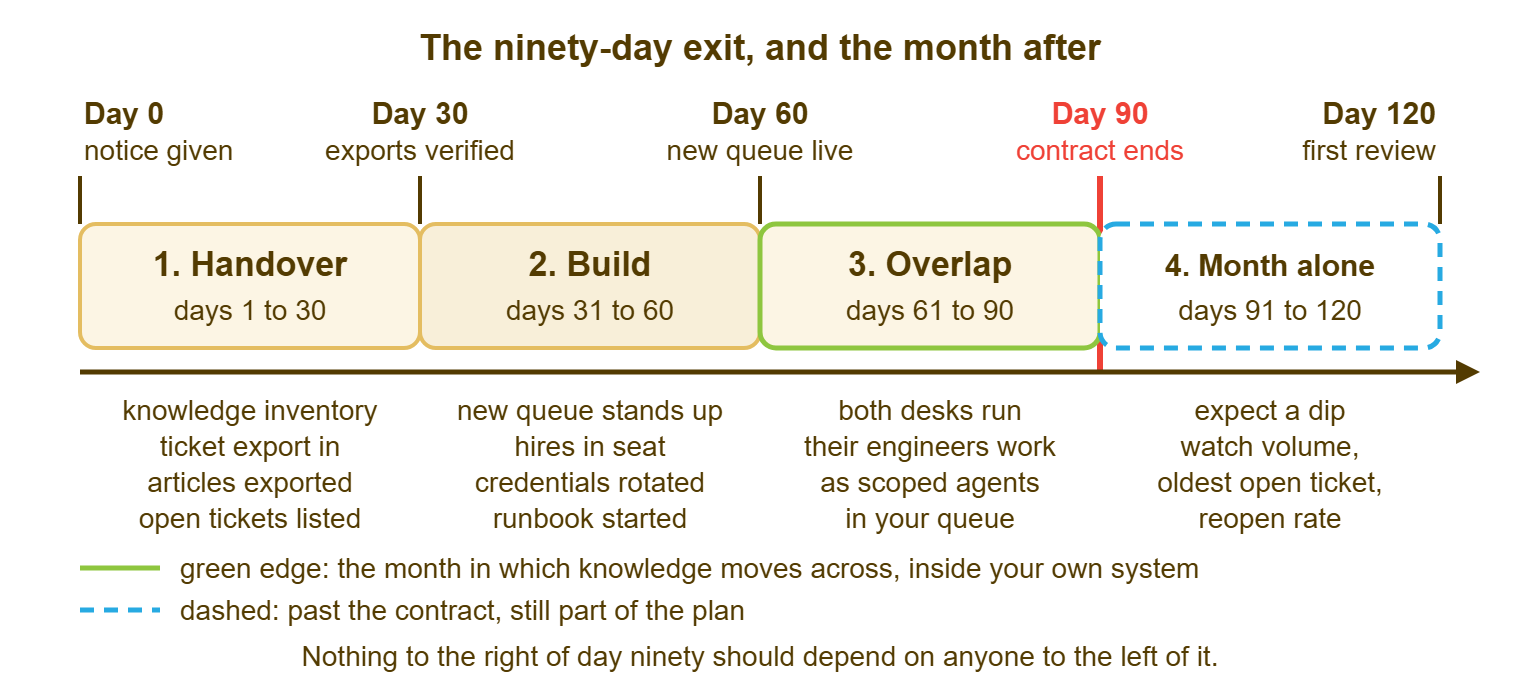
Give notice on day zero and send the exit request the same day, naming every item on the handover list with a date against each. Nothing on the right of day ninety should depend on anyone on the left of it. Start each block on time whether or not the last one is finished. A late item is a reason to chase, not to slide the calendar. A plan with a sliding end date is not a plan. It is a mood.
Days One to Thirty: Handover
The first block brings the knowledge and the data across in a form you can use without the MSP. The two big items are the ticket export and the knowledge articles about you; the rest is lists. Ask for the ticket export first, because it tells you what the desk actually does, and because it takes the MSP longest to produce. A usable export has every ticket, field, status and internal note, and the requester's address, in a plain format with a page saying what each column means.
Here is what came across at Acme, a two-site organization of two hundred and forty users, in the first thirty days after Priya gave notice. Day four: an export of six thousand four hundred tickets from three years, with the internal notes missing; the complete file arrived on day eleven. Day nine: a hundred and forty knowledge articles that mentioned Acme by name, out of the MSP's three hundred, of which about ninety were still accurate. Day fifteen: the estate list, with fifty-three credentials by name and owner, nine of them marked "service account, see vault". Day twenty-two: thirty-eight vendor contacts with renewal dates, four of which had already renewed on terms nobody at Acme had seen. Day twenty-eight: the known-error list, eleven items long.
A known-error list is the set of faults the MSP works around rather than fixes. Examples are the job that fails on the first of the month and is rerun by hand, and the switch that needs a reboot every few weeks. Every MSP has one, and most keep it in the heads of two engineers. Ask for it by that name, and ask the engineers rather than the account manager. It is the knowledge gap's table of contents.
Read the ticket export in the first week, even roughly: tickets by month, by category, and by who resolved them. That count is your staffing case, and it answers the question a manager will ask on day forty: how many people does this need?
Days Thirty-One to Sixty: Build
The second block stands up the things that have to exist before the MSP leaves: the new queue, the new people, and the rotated credentials. Use that order if you can, because the queue is what the new people will work in and the credentials take longest to get right. Standing up a desk is a project in its own right, and Helpdesk From Scratch is the pillar for it. The points here are the ones specific to an exit.
The new queue is the queue of record from the day it is live, which should be well before day sixty. Import the ticket export, or at least the open tickets and the last six months. That way, the history is searchable from the first day your people work alone. Choose the database before any real ticket is created, because a desk that offers several usually has no way to move between them later. QuerySolv, for instance, runs on its built-in database or on a server database (MySQL, MariaDB or SQL Server). Each has the same features, and there is no migration tool between them. We are naming our own product in an article about choosing a queue. We sell help desk software, so weigh our enthusiasm accordingly and check the reasoning yourself. The reasoning is only that the record should sit on your side of the fence this time.
Hire for the gap, not for the org chart. The export told you which categories carried the volume; the inventory told you which specialists you lack. An organization of Acme's size coming off a full-service MSP usually needs one of these arrangements. Those arrangements are two desk people and one infrastructure person, or two desk people and a retainer for the infrastructure. The latter is a small co-managed desk and is drawn in Designing a Co-Managed Support Desk. Get the hires in seat by day forty-five so that they overlap with the MSP's engineers for real.
Credential rotation means changing every password, key and token the MSP has ever held. That way, their access ends when the contract does rather than when someone remembers. Build the list in this block and rotate in order of risk. Start with directory admin, then the firewall and the remote-access gateway, then the backup system, then everything else. Rotate before day ninety, not on it, and test after each one. A service account is one that a program rather than a person logs in with, for a scheduled job or a link between two systems. These are the ones that bite: nobody knows which job uses which account until the job stops. Change them one at a time, with the job's owner watching. Service accounts are the only staff who never resign and never say what they do.
What to Insist On at Handover
Ask for every item below by name, in writing, with a date, in the exit request on day zero. Each is cheap for the MSP to give and expensive for you to rebuild. Send the list back with the gaps marked every Friday until it is complete. Politeness is fine. Vagueness is not.
- The ticket export: every ticket, field and note, in a plain format with a column guide.
- The knowledge articles about your estate, as documents you can import, not as a login to their base.
- The estate list: every device, server, service and subscription, with its owner, its vendor, and how it is supported.
- Credentials: every account they hold, by name and purpose, delivered securely, including service accounts and vendor portals.
- Vendor and supplier contacts, with contract numbers, renewal dates and the name of the human who answers.
- The open tickets, each with its status, owner, what has been tried and the next action.
- The known-error list, with the workaround for each.
- Monitoring and scheduled jobs: what is watched, who is alerted, and every job on a timer, where, under which account.
- Documentation: runbooks, diagrams, change records, joiner and leaver procedures.
- Named contacts on the MSP's side for the overlap and for thirty days after, with a response time.
Most of this is yours already, in the contract and in law. All of it is theirs in practice, because it sits on their systems, and the handover is the act of making the two agree. Insist on named engineers as the contacts; an account manager is not an escalation path, as Working With an MSP Without Losing the Plot says at length.
Days Sixty-One to Ninety: The Overlap Month
The overlap period is the last thirty days, when both desks run at once. Your new people take every first contact in your queue of record. The MSP's engineers work inside that same queue as scoped agents, seeing only the tickets assigned across to them. This is the most useful month of the whole exit, and the one organizations cut first to save a month's fee. Do not. The fee buys thirty days of watching people who know the estate work tickets inside a system you keep.
Run the month as a shadow shift in two halves. For the first two weeks, your people do and their people watch, inside each ticket, correcting in the internal notes. For the second two weeks, swap: your people take tickets end to end and ask the MSP's engineer only when stuck. During that phase, every ask becomes a knowledge article the same day. The aim is to run out of things to ask before the contract runs out of days. The one rule to enforce without exception is that every MSP note goes in your system, because the whole reason for the month is that the notes stay.
Remove the MSP's access on a schedule through the month, not in one go on the last day. Server and directory admin goes first, after rotation, around day seventy-five, leaving them the ticket queue and a named contact. Their agent accounts are disabled on day ninety. Their named contact stays reachable for thirty days after on a small retainer, which is cheap insurance against the one thing nobody wrote down.
The First Month Alone
The first month alone will be worse than the last month of the contract. You should say so to management before it starts rather than after. Volume rises, because requests that used to reach the MSP's engineers by the side door now arrive at the desk. Age rises, because your people are slower at things they are doing for the second time. Reopens rise, because some fixes will be incomplete. None of this means the decision was wrong. It means the knowledge gap was real, which you already knew.
Watch three numbers weekly: ticket volume, the age of the oldest open ticket, and the reopen rate. At Acme, volume went from three hundred and ten tickets in the last contract month to three hundred and fifty in the first month alone. The oldest open ticket went from four days to twelve. Reopens went from three in a hundred to seven. By the second month the oldest ticket was back to six days and reopens to four in a hundred. Volume stayed up, because it had been that high all along and part of it had been invisible. Any help desk's reports should give you the three numbers without arithmetic. QuerySolv's, for instance, show backlog by age over seven, thirty or ninety days and count a reopen as a reopen rather than as a new ticket.
Expect the dip to last six to eight weeks. Make one change a week from what the numbers say. Examples are an article for the category that reopened most, and a second pair of eyes on anything over a week old. On day one hundred and twenty, hold the review the plan promised. Ask what still needed the MSP's named contact, and whether that is a retainer worth keeping or a skill worth hiring. The answer is usually a short retainer for one domain, which is a small co-managed desk. In-house does not mean alone.
A Short War Story: Eleven Service Accounts at Meridian Parts
Meridian Parts brought its desk in-house with a ninety-day plan and a full overlap month. Most of it went as the plan said: the export arrived, the articles were imported, the two new technicians shadowed and then led. The hard part was eleven service accounts that ran scheduled jobs on the file servers and the invoice feed. Their passwords were in the MSP's vault under names nobody at Meridian recognized, and nobody had listed their jobs. Lena, the new infrastructure lead, found them one at a time over seven weeks, each by the same method. Lena rotated a credential, waited for something to stop, read the error, and traced it to the job. The last one surfaced on day one hundred and three, when the month-end invoice feed to Bluewater Bank failed at 06:00. It was running again by 08:30 under an account with a name that said what it did. Nobody was blamed, and the list of eleven became the first page of the new runbook. Meridian now keeps a register of service accounts and the job each one runs. It is the most boring document in the building and the one most often opened.
The Exit Checklist
The checklist below is the plan on one page, in the order it happens. Copy it on day zero, and put the owner's name at the top. Read it aloud at the weekly exit meeting with the MSP's named contact on the call. An item is ticked when the thing is in your hands and checked, not when it has been promised.
MSP EXIT CHECKLIST
Contract ends: ________   Notice given: ________   Owner: __________
Why we are leaving, in one sentence: ______________________________

DAYS 1-30  HANDOVER
[ ] Exit request sent in writing, naming every item below, with dates
[ ] Knowledge inventory started: what they know that we do not
[ ] Ticket export received: every ticket, field, status and note
[ ] Knowledge articles about us received as documents we can import
[ ] Estate list: every device, server, service, with owner and vendor
[ ] Vendor and supplier contacts, contract numbers, renewal dates
[ ] Open tickets listed with status, owner, tried, and next action
[ ] Known-error list, with the workaround for each
[ ] Monitoring and scheduled jobs: what, where, when, which account

DAYS 31-60  BUILD
[ ] New queue live; database chosen; history imported
[ ] Front door announced: our address, our form, our number
[ ] Hires in seat, or a retainer arranged for the gaps
[ ] Credential inventory complete: admin, service, vendor portals
[ ] Rotation plan: order of risk, who tests after each one
[ ] Runbook started: the jobs the MSP did without being asked
[ ] Named escalation contact at the MSP for the overlap, in writing

DAYS 61-90  OVERLAP
[ ] MSP engineers working as scoped agents in our queue
[ ] Every note they write goes in our system, not only theirs
[ ] Shadow shift: we do, they watch; then we lead, they answer
[ ] Credentials rotated; admin access removed by day 75
[ ] Remaining open tickets handed back with next action
[ ] Agent accounts disabled on day 90; contact kept for 30 days
[ ] Exit sign-off: this list checked by both sides

DAYS 91-120  FIRST MONTH ALONE
[ ] Three numbers read weekly: volume, oldest open ticket, reopens
[ ] Dip expected, and explained to management in advance
[ ] One change per week from what the numbers say
[ ] Day 120 review: what still needs outside help, and how to buy it
I have run an exit without the shadow-shift half of the overlap, to save the month. The month I saved was spent, with interest, in the three that followed. I would not do it again.
The Monday after the contract ends should be dull. Priya's version, on the plan, looked like this. The queue was hers and had been for two months. The history was in it, the credentials were in her vault, and the service accounts had names. The MSP's engineer answered one question that week, about a printer that needed the old driver. The fence was where it had always been. Everything useful was on her side of it.
Frequently Asked Questions
How much notice should we give?
The MSP says the ticket history belongs to them. Does it?
Can we skip the overlap month to save the fee?
Do we really need to rotate every credential?
How many people do we need to hire?
What if we find a system we did not know existed after the contract ends?
From the QuerySolv team: we build self-hosted help desk software for Windows. QuerySolv runs as one Windows service on your own network. It takes requests by web form, e-mail, live chat, social messages and REST API. It is licensed once per installation rather than per agent per month. The free trial runs the full product for 30 days.