
What a Knowledge Base Is For, and Why Most Are Ignored
Monday, 09:15, at Tollgate Foods. Nadia has been on the desk four months and picks up ticket 4418 from despatch: "Label printer says offline again, lorries waiting." She opens the knowledge base, types "label printer", and gets two results. One is a policy on printer purchasing. The other is an article called "Despatch print queue configuration (legacy)" that is nine screens long and begins with a network diagram. She closes it and walks over to Dev, who has been there six years. Dev does not look up from his screen. "Pause the queue, power the printer off, count to ten, power it on, resume the queue. It drops off the network when the despatch door is left open and it gets cold." Two minutes. The knowledge base at Tollgate has three hundred and forty articles. One of them was opened last month, by the person who wrote it, to check a link.
A knowledge base is a collection of written answers, kept in the one place the people who need them already look. Each answer is written once so it can be read many times. That is all it is. It is not a product, a project, or a portal. It is the desk's memory, in writing, in a shape that other people can use without asking. This article is part of our Knowledge Base Fundamentals series. It is about the three jobs that memory does and the three habits that kill it. It also covers the one test that tells you whether yours is alive.
It covers the three jobs in turn: answering the user before they ask, answering the technician faster than memory, and remembering the fix after the person leaves. Next comes why knowledge bases die, which is three habits feeding each other. Then come what a knowledge base is not, the test of a living one, and where to start. It finishes with a short war story and the purpose card to copy.
The Three Jobs of a Knowledge Base
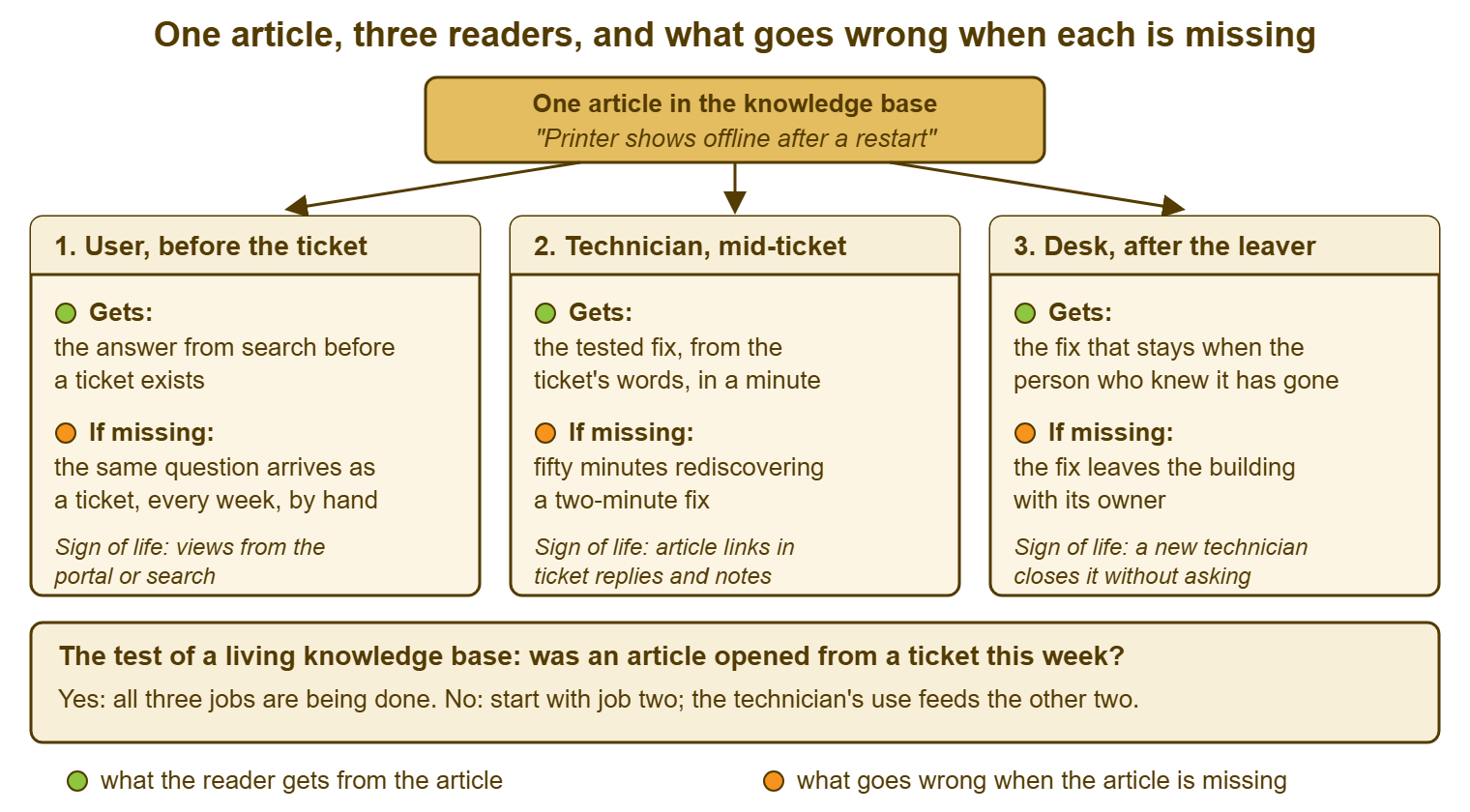
A knowledge base has three readers, and a different job for each. The first reader is the user, before they raise a ticket; the job is to answer them so that no ticket exists. The second reader is the technician, in the middle of a ticket. The job is to hand them the tested fix faster than they could remember it or find someone who does. The third reader is the desk itself, after the person who knew the answer has gone. The job is to make sure the answer did not leave with them. One article can serve all three readers. Most knowledge bases are built for the first reader only, measured by the first reader only, and die because the second reader never opened them.
The order matters more than it looks. The user's job is the one management asks about, because it is the one that promises fewer tickets. It is the one every launch announcement is written around. The technician's job is the one that keeps the knowledge base alive. The technician is the only reader who is in the knowledge base every day, finds the wrong article every day, and can fix it on the spot. The desk's job is the one nobody thinks about until the day it matters, which is the day Dev hands in his notice. Build for the technician, and the other two jobs get done. Build for the user alone, and you get three hundred and forty articles and one view.
I have built knowledge bases both ways. The one built for users had a launch, a logo, a mention in the all-staff newsletter and a steady readership of nobody. The one built for the technicians was an ugly list of eighty titles that the desk opened forty times a day. After six months the users had found it too, because every reply from the desk had a link to it. Nobody announced that one. It did not need announcing; it was already in use.
Job One: Answer the User Before They Ask
The first job is to put the answer in front of the user before the question becomes a ticket. The user is standing in despatch with a cold label printer and a line of lorries. Suppose they type "label printer offline" into the portal and get a six-line article as the first result. The article says pause, power off, count to ten, power on, resume. In that case, the ticket is never raised, the lorries leave, and the desk never hears about it. That is a success nobody sees, which is the trouble with it. The desk cannot count a ticket that was not raised, and neither can the user, who does not experience "self-service". They experience having found the answer.
Articles for this reader are short, titled by the question in the user's words, and tested on a person who has never done the thing. They assume no vocabulary. They say what the user will see at each step and what to do if they see something else. They end with "if this did not work, raise a ticket and mention this article". That is because the article's job is to answer the common case, not every case. A user who tried and failed should be able to say so in one line. The craft of writing one is its own subject, covered by the series on writing articles people can follow. This article is about what the article is for.
The trap in job one is to build for it alone and then measure it alone. A desk writes two hundred articles for users, publishes a portal, counts views, sees a small number, and concludes that users do not read. Users read when the answer is where they look, says what they would type, and works. What they do not do is browse a library in case something in it is useful later. Nobody does that. (You have a library of unread articles at home; it is called the manual drawer.) Whether a user ever arrives at the article is the subject of What Deflection Means; whether they come back is the subject of portal adoption. Job one depends on both, and on job two having been done first.
Job Two: Answer the Technician Faster Than Memory
The second job is to hand the technician the tested fix faster than they could get it any other way. "Faster than memory" is a precise standard. Nadia had three other ways to get the label printer fix. One was to remember it, which she could not because she had never seen it. She could work it out, which would have taken her an hour of checking cables, drivers and the print server. Or she could walk to Dev, which took two minutes and cost Dev his concentration. For the knowledge base to win, it has to beat two minutes. An article titled "Label printer in despatch shows offline" that comes up first for "label printer" and has five steps beats two minutes. An article called "Despatch print queue configuration (legacy)" that is nine screens long does not beat anything.
Articles for this reader can assume the technician's vocabulary and include the admin steps the user must never see. They can be blunt about cause and about what does not work. They are often the same subject as the user's article with a second half the user cannot read. Tools handle the split differently. Some keep two separate articles, and some let one article carry an internal section. Some have a knowledge base visible to the desk only and another visible to everyone. If you run QuerySolv, the knowledge base already distinguishes articles everyone can see from those only agents can. So the user's five steps and the technician's "and if that fails, restart the print spooler on the server" can cover the same subject. They do not have to be the same page. In any tool, the test is that the technician finds the fix from the words in the ticket in under a minute.
Job two is the one that keeps the knowledge base alive, and the reason is simple: the technician is the only reader who is in there every day. A user opens the knowledge base when something breaks, once, and judges it on that one visit. A technician opens it forty times a week, sees the article that is wrong, and can fix it in the time it takes to get annoyed about it. The habit of looking before solving, and of correcting what you find, is the subject of Search First, Before Solving. A knowledge base that the desk uses stays accurate because the desk notices. A knowledge base that only users use rots in private.
Job Three: Remember the Fix After the Person Leaves
The third job is to make sure the fix does not leave the building with the person who knew it. Dev knows the label printer trick and the reason the despatch door matters. Dev knows the order to restart the three warehouse services in after a power cut, and which supplier contact actually answers the phone. None of that is written down, because none of it takes Dev more than two minutes, and nobody writes down a two-minute fix. When Dev leaves, the desk will not lose a technician. It will lose about forty of these, all at once, and discover them one at a time over the following year. Each discovery will come at the moment the fix is needed and in the presence of lorries.
This is the job the knowledge base does for the desk rather than for any one reader. And it is the one that justifies writing down things that seem too small to write down. The standard is the leaver test: if the person who knows this gave notice today, would the desk still be able to do it in a month? If the answer is no, it belongs in the knowledge base, however short it is. Five lines about a cold label printer are not beneath the knowledge base's dignity. They are, on the day Dev leaves, the most valuable five lines in it. The same argument, made for a desk of one, is in Documentation as Your Second Person. It applies to a desk of four exactly as well. A desk of four with one person who knows everything is a desk of one with three spectators.
The picture below puts the three readers around one article. The green mark on each card is what the reader gets when the article exists. The orange mark is what happens when it does not. The last line is the sign that the job is being done. It is also the number to check when you want to know whether the knowledge base is working. The bar underneath is the single test this article comes back to, and the reason it says to start with job two.
Why Knowledge Bases Die: Nobody Reads, Nobody Writes, Nobody Owns
Knowledge bases die of three habits, and the habits feed each other, which is why a dying knowledge base rarely recovers on its own. Nobody reads it, because the articles are hard to find, out of date, or written for a different reader. Nobody writes for it, because nobody reads it, and writing for an empty room is a hard thing to ask of a busy technician. Nobody owns it, because writing was never anyone's job and reading was never anyone's habit. So when an article goes wrong there is no one whose Tuesday includes fixing it. And because nobody owns it, the wrong article stays wrong, and the next reader who finds it learns not to read. Round it goes.
The cycle usually starts in one of two places. Some knowledge bases are born dead: a project writes two hundred articles from the vendor's manuals and publishes them with an announcement. And the desk, which was not consulted and does not recognise its own tickets in any of the titles, carries on answering from memory. Others die slowly: a good small knowledge base is built by one keen technician and kept accurate by them alone. It is abandoned the week they move to the infrastructure team. After that, every article ages at the speed of the systems it describes. The first kind never had a reader. The second kind had one and lost them. Either way, by the time anyone notices, the fastest way to an answer is Dev.
The table below puts the three habits side by side with what each looks like from the desk, what feeds it, and where it can be broken. Notice that only one of the three can be broken by a rule you can enforce in a day. You cannot make users read. You cannot make tired technicians write for an empty room. You can make it the desk's habit to look before solving, and to fix or flag what they find. Once that habit exists the other two habits weaken. The articles start being right and the people who use them start caring that they are.
| The habit | What it looks like | What feeds it | Where to break it |
|---|---|---|---|
| Nobody reads | No article opened from a ticket this week; users ask the desk by hand for things the knowledge base answers | Articles that are unfindable, wrong, or written for the other reader | The technician's search-first habit; links to articles in every reply; titles in the reader's words |
| Nobody writes | The newest article is months old; fixes live in heads, chat and ticket notes | Writing for a room nobody enters; no time set aside; no credit | Write the first twenty from the queue; draft inside the ticket; make the fix of a wrong article a thirty-second job |
| Nobody owns | No name on any article; no review date; the article outlives the system it describes | Writing and upkeep were never anyone's job description | One owner per article, one editor for the whole, a review date on each; see the ownership article |
Break the cycle at the technician. The technician is the only one of the three readers you manage, and the only one in the knowledge base every day. The technician is also the only one who can tell a wrong article from a right one at a glance. When the desk reads, articles get corrected. When articles are right, replies link to them. When replies link to them, users find them. When users find them, somebody notices the view counts and writing stops feeling like shouting into a cupboard. None of that starts with the user. All of it starts with Nadia typing "label printer" and finding five lines that work.
Remember: a knowledge base is kept alive by the technician who reads it every day, not by the user who reads it once. Build for the technician first, link the article in every reply, and the other two jobs follow.
What a Knowledge Base Is Not
A knowledge base is not the ticket notes. The notes on ticket 4418 record what happened to this label printer, on this Monday, for this requester, including the three things Nadia tried that did not work. They are a history, and histories are specific. The knowledge base article is the general answer that the history led to: when any label printer in despatch shows offline, do these five things. Notes feed articles. The discipline of writing notes well enough to be turned into one belongs to the series on ticket notes. But a search through a thousand resolved tickets is not a knowledge base. It is an archaeology dig with a search box.
A knowledge base is not the policy library. The purchasing policy, the acceptable-use policy, the eleven-page document on data classification: these are documents people are required to have read and nobody consults in a hurry. They can live beside the knowledge base. And some tools will put them in the same place, but mixing them into the search results is how "label printer" returns a procurement policy. Keep the knowledge base for answers to questions people actually ask. And put the documents people are told to read somewhere they can be told to read them.
A knowledge base is not the complete documentation of every system. The nine-screen "Despatch print queue configuration (legacy)" article is a design document. Design documents belong with the system's build notes, not between "How do I reset my password?" and "Label printer shows offline". The technician's runbook is the full set of steps for operating or recovering a system. It has its own home and its own rules, which the series on technician documents against user documents sets out. The knowledge base holds the answers that recur. If a question has been asked once and will never be asked again, it does not need an article; it needs a good resolution note.
The Test of a Living Knowledge Base
There is one test, and it takes a minute: was an article opened from a ticket this week? This means more than a view by someone, somewhere, for some reason. It means an article opened by a technician while working a ticket, or linked in a reply to a requester. It also means an article found by a requester who then did not raise a ticket. If the answer is yes, the knowledge base is doing job two, and probably jobs one and three with it. If the answer is no, the knowledge base is a filing cabinet, however many articles it holds. In that case, the number of articles is a measure of how much filing was done.
You can check it three ways, and a desk of any size can do at least one. Ask the team at the start of the week: "Who opened a knowledge base article while working a ticket in the last five days, and which one?" If the answer is silence, you have your answer. Search the last week's ticket replies and internal notes for links to the knowledge base. That is a text search in most tools and takes a minute. If you run QuerySolv, every reply and note sits in the ticket's event history. So the search covers everything the desk said to anyone. And if the knowledge base reports views, read the last week's, ignoring the ones from the desk's own accounts on the day they wrote the article. Three sources, one question. Any one of them answering "yes, this one, for that ticket" means the knowledge base is alive.
Secondary tests follow the three jobs. For job one, count the tickets in the last month that an existing article would have answered. Do that by reading the top ticket types and checking whether an article exists and was offered. If an article exists and the ticket still arrived, the article is in the wrong place or under the wrong title. For job two, time a new technician finding the fix for the most common ticket, from the ticket's words, without asking anyone. For job three, run the leaver test on the senior technician: list the ten things only they know, and count how many are written down. The full thirty-minute version of these checks, with ten signs and a fix for each, is in A Knowledge Base Health Check in Thirty Minutes. The one-minute version is the question above, asked on a Monday, out loud.
Where to Start
Start from the queue, not from a plan. The first twenty articles are the top twenty ticket types by volume, written by the people who close those tickets, in a week. And that is the whole plan; the method is in The First Twenty Articles. Twenty articles that answer real tickets will be opened in their first week, because the tickets they answer arrive every week. Two hundred articles written from manuals will not, because nobody's ticket says "see chapter four". A knowledge base is alive from its first article or it is never alive. And the first article decides which, so make it the one Nadia needed on Monday.
Then give it a shape that stays navigable and a name on every article. The shape is flat, titled by the question, with a handful of categories that mirror the ticket categories. That way, the knowledge base and the queue speak the same language. The name is an owner for each article and an editor for the whole, with a date the article will next be looked at. That way, when the despatch printer is finally replaced the article about it does not outlive it by three years. Both are later articles in this series. Neither is optional, and the order is: twenty articles, then the shape, then the names. Shape and names applied to an empty knowledge base are a filing system for air.
Resist the two things everyone wants to do first. The first is to choose a tool, which matters less than any of the above. The knowledge base inside the help desk, a shared folder, a wiki: any of them will do for twenty articles. The one the desk already has open all day will do best. The second is to write a style guide, a template and a review process before writing an article. Those are for the fifth week. In the first week, write the five lines about the label printer, title them with the words despatch uses, and link them in the next reply. The style guide can be written by someone who has read what the desk actually produces.
A Short War Story: The Four Hundred Articles at Pembury Dental
Pembury Dental ran eleven practices from one small IT desk. When Grace took over as IT manager she inherited a knowledge base of four hundred and six articles. They were written over one summer by a contractor given the vendor manuals for every system in the building and a target of four hundred. The desk had been shown it at a launch meeting and had searched it twice for real tickets. The desk had found nothing in either case and had not opened it since. The contractor's final invoice described it as "complete". Eighteen months later Luis, the technician who had set up the practice management system, left for another job. The following week the appointment book at three practices stopped synchronising on a Tuesday morning. The fix was a service restart in a particular order with one configuration flag reset first. Luis had done it four times in two years. It appeared nowhere in the four hundred and six articles, because it was not in the manual. The desk rediscovered it on Thursday afternoon, after two and a half days of paper appointment books at three practices. There had also been a conference call with the vendor that mostly consisted of the vendor asking what Luis used to do. Grace retired three hundred and ninety of the articles the following month. She asked the desk to write the twenty they actually needed, starting with the one Luis had taken with him. A knowledge base is measured by what gets opened, not by what got written.
The Knowledge Base Purpose Card
The purpose card below is one page that says who the knowledge base is for and what each job is measured by. It also says what goes in, what does not, and who owns it. Fill it in once, in a meeting of no more than thirty minutes with the whole desk. Pin it at the top of the knowledge base or in the team's chat channel. It is not a policy and it is not a plan. It is the thing you read when someone proposes adding the purchasing policy or writing four hundred articles over the summer. You also read it when someone proposes launching a portal before the desk has used a single article from a ticket. Keep the three jobs in the order given: technician first, because that is the order that works.
KNOWLEDGE BASE PURPOSE CARD — ONE PAGE
Desk: ______________________   Editor (one name): ______________________
Where the knowledge base lives: ________________________________________
Where the desk looks when stuck (must be the same place): ______________

THE THREE JOBS, IN THE ORDER WE BUILD FOR THEM
  2. The technician, mid-ticket
     Standard: finds the tested fix from the ticket's words in under a minute
     Measured by: articles opened or linked from tickets this week ______
  1. The user, before the ticket
     Standard: finds the answer from the words they would type, follows it,
               and raises no ticket
     Measured by: views from the portal or search ______
                  top ticket types that an existing article should have
                  answered ______
  3. The desk, after the person who knew it has left
     Standard: a new technician can do it in a month without asking
     Measured by: things only one person knows, written down ___ of ___

WHAT GOES IN
  [ ] answers to questions that have been asked more than once
  [ ] fixes that only one person knows, however short
  [ ] workarounds for known errors, titled by the symptom
  [ ] the steps a user can follow, and the steps only the desk may follow,
      kept apart by audience
WHAT STAYS OUT
  [ ] ticket notes and one-off histories
  [ ] policies people are required to read
  [ ] full system documentation and design notes
  [ ] anything nobody has asked for yet

THE TEST, ASKED EVERY MONDAY
  "Was an article opened from a ticket this week? Which one?"
  Last week's answer: ______________________________________________

OWNERSHIP
  Every article carries: an owner's name, a date last checked, a date due.
  Editor's duty: the monthly test above, and the quarterly sweep.
  Reviewed on: ________   Next review: ________
Nadia wrote the label printer article at 09:30 on the Monday, five lines and one sentence about the despatch door. It came from Dev's two-minute answer and her own knowledge of which search words had failed. She titled it "Label printer in despatch shows offline" and linked it in her reply to ticket 4418. It was opened from a ticket three times that week, twice by Nadia and once by Dev, who had forgotten the bit about the door. By the end of the month, despatch had found it on the portal and the ticket had stopped arriving. Three hundred and forty articles had not managed that between them, because none of them had ever been for anyone.
Frequently Asked Questions
Isn't a knowledge base mainly for users to help themselves?
We are a two-person desk. Is a knowledge base worth the effort?
Should we write articles for users or for technicians first?
How many articles does a knowledge base need?
Our knowledge base exists but nobody uses it. Should we start again?
Can we just search old tickets instead of writing articles?
From the QuerySolv team: we build self-hosted help desk software for Windows. QuerySolv runs as one Windows service on your own network. It takes requests by web form, e-mail, live chat, social messages and REST API. It is licensed once per installation rather than per agent per month. The free trial runs the full product for 30 days.