
The Room Triage Card: Display, Audio, Sharing, Call
Tuesday, 13:02, at Harbourview Clinic. Nadia, the practice manager, has twelve nurses in the second-floor meeting room for the weekly clinical review. She has a laptop that is sending its picture somewhere, but not to the screen on the wall. The screen shows her wallpaper, a beach, and nothing else. Her slides are open on the laptop in front of her. She presses the key that worked last week, the beach stays, and she calls the desk. Theo walks up, looks at the laptop for three seconds, presses one key twice, and the slides appear. The laptop had been treating the room's screen as a second desk and putting the slides on the one nobody could see. Four minutes, door to door. On the way back down the stairs Theo thinks what every technician thinks on that staircase. She would have fixed it in ten seconds if there had been one line on the table that said so.
The room triage card is that line, and about eleven more. It is a single printed sheet left on the table of every meeting room. It names the four things that fail in a room: the display, the audio, the sharing and the call. It gives the first three checks for each, in the order most likely to work. It is written in the words of the person standing in front of the fault. It is not a manual. It is the ten seconds the meeting is willing to spend before it calls, made useful. This article is part of our Meeting Room & AV Support series. It is about what goes on the card, what stays off it, and how to keep it true.
It covers what the card is for, then the four things that fail and why there are only four. Next come the first checks for the display, the audio, the sharing and the call, one section each. Then comes how to write the card so that it is read, followed by where it lives and how it stays accurate. Whether it works and how you would know, a short war story and the card itself to copy follow, in that order.
What the Card Is For
The card exists because the first checks for a room fault are faster than a phone call and need no technician, and because the organiser does not know what they are. A technician walking into a room checks the input, the cable and the mute light in the first thirty seconds, from habit. The organiser, facing the same blue screen, has no habit to fall back on and presses the key that worked last time. The card gives them the technician's first thirty seconds, in print, before the two-minute budget described in The 9:01 Panic runs out. When it works, nobody calls and the meeting starts a minute late instead of ten. When it does not, the organiser calls knowing what they have already tried, which is the most useful sentence a room call can begin with.
The card is deflection, the answer arriving before the ticket. That is covered as a general idea in What Deflection Means. The card applies it to the one place where the requester cannot search a knowledge base because they are standing up in front of twelve people. A room is the only environment in which a laminated sheet beats a search box. The organiser will not open a browser, will not phone, and will not read more than one side of paper. They will glance at the table. The card is designed for the glance.
What the card is not is a substitute for the walk. The response standard still says that a room with a meeting in it gets a person moving within a minute of the call, whether or not the card was tried. The desk never asks "did you read the card?" on the phone. The card lowers the number of calls. It does not lower the standard for the ones that come. And a desk that uses it as a reason to go more slowly has turned a courtesy into a condition. The organiser will notice. They will also stop reading the card, on the reasonable grounds that it has become the desk's excuse rather than their help.
The Four Things That Fail
Nearly every room call is one of four complaints: nothing on the screen, nobody can hear, my screen is not showing, or the room cannot join the call. The first is the display, the second the audio, the third the sharing, and the fourth the call. A desk that reads a year of room tickets will find those four covering all but a handful. The handful include the camera showing the ceiling. That belongs with the call and is handled in Hybrid Meetings and the Remote Half. There is also the remote with a dead battery, which is a display or audio fault wearing a costume. And there is the genuinely broken piece of equipment, which no card will fix and which the walk is for.
There are four columns, then, because the organiser has to find the right one in a second. Four is the number that fits across a sheet in type large enough to read standing up. The columns are named by the complaint, not the component: "nothing on the screen", not "display subsystem". The organiser does not know that the problem is the display; they know the screen is blank. The table below is the sort the desk does in its head and the card does in print.
| What the organiser says | Column on the card | What it nearly always is | What it occasionally is |
|---|---|---|---|
| "The screen is blank" or "it says no signal" | Display | Display off, wrong input, or a cable not pushed home | A dead remote battery; a failed display |
| "Nobody can hear" or "they can't hear us" | Audio | The room is muted, the volume is down, or the laptop is sending sound to itself | A microphone battery; a failed speaker |
| "My screen isn't coming up" or "it's showing the wrong thing" | Sharing | The wrong sharing method, a locked laptop, or sharing to the wrong room | A laptop that needs an adapter the room lacks |
| "The room won't join" or "it's asking me to sign in" | The call | The room was not invited, someone joined from a laptop instead, or the room has lost its sign-in | The conferencing service itself; the network |
The right-hand column is why the card has a bottom line. Each column's three checks clear the "nearly always" cases, which is most of them. The "occasionally" cases need a person, and the card says so without making the organiser feel they should have tried harder. Three checks per column is a design limit, not a count of everything that could be wrong. A card with seven checks per column is a card with twenty-eight checks, and a card with twenty-eight checks is a poster.
Display: Power, Input, Cable
The display column's three checks are power, input and cable, in that order. That is because that is the order of how often each one is the fault and how little each costs to try. Is the display on? A black screen with no words on it is usually a display that was switched off by the previous meeting or by a cleaner. The fix is the power button on the panel or the remote. Is it on the right input? A screen that says NO SIGNAL, or shows the name of an input, is a display that is listening to the wrong socket. The fix is to choose the one the cable goes to. That is why the standard in Standardising Rooms to Cut Tickets puts the input's name on a label beside the cable. Is the cable seated? A cable that is in but not home gives a picture that flickers or never arrives. The fix is to push it in at both ends and wait ten seconds, because displays take a moment to notice.
Three things stay off the display column on purpose. Anything about the display's own menu stays off, because a menu is where a ten-second check becomes a five-minute one. It is also where an organiser can change something the desk will have to change back. Anything about the laptop's display settings stays off, because that belongs under sharing and the organiser does not know which column they need until they have tried this one. And the brand or model of anything stays off, because the card must survive the display being replaced. Also, "the panel" is a phrase every organiser understands while a model number is a phrase none of them do.
Audio: Mute, Volume, Where the Sound Goes
The audio column's three checks are mute, volume and routing. Is the room muted? Most room microphones and panels show a red light when muted, and the previous meeting leaves it on more often than anyone would guess. The check is to look for the light and press the button under it. Is the volume up? The card says to use the room's control, not the laptop's keys. That is because a laptop at full volume feeding a room control at zero makes no sound. And the organiser will have turned the laptop up twice before thinking of the wall. Is the sound going to the room? A laptop joined to a call plays the far end through its own tiny speaker unless it is told to use the room's. The fix is to pick the room's speaker in the laptop's sound choice. The card describes that as "pick the room speaker on the laptop" and nothing more precise. That is because the precise words change with every release of everything.
The audio column is the one where "they cannot hear us" and "we cannot hear them" get the same three checks. That surprises people until they think about it. Mute on the room stops the far end hearing you; volume at zero stops you hearing them; sound routed to the laptop stops the room hearing anything. All three are fixed from the same panel and the same laptop. The organiser does not need to know which direction is broken to try all three. If the three checks fail, the fault is a microphone battery, a cable at the back of the system, or the hybrid arrangement of the room. In that case, the card's bottom line applies.
Sharing: The Method, the Lock Screen, the Right Room
The sharing column is the one that varies most between organisations. Its first check is simply to use the method printed on the label at the table. That is because every room has one way to share that the desk supports and at least two others that somebody once got working. Rooms that share by cable have the cable at the table and the label says "plug this in". Rooms that share wirelessly have the room's name on the display and the label says how to send a picture to it. The card does not teach the method; the label does, and the card points at the label. A card that tries to describe three ways to share in one column has confused the organiser before they have started.
The second check is whether the laptop is awake and unlocked, which sounds too simple to print and accounts for a steady share of calls. A laptop that locks itself while the organiser is talking stops sharing in most setups. The screen goes blank or shows the lock screen to the room. The organiser's first thought is that the room has failed. The card says: unlock the laptop. The third check is whether the laptop is sharing to the right room. That matters anywhere rooms share wirelessly and the organiser has used a different room this week. The fix is to share to the room whose name is on the display. That is why the display shows its name and why every room in the building needs a different one.
Nadia's beach belongs in this column, and it is the one case where the card has to describe a keypress it cannot name. A laptop that treats the room's screen as a second desk shows the room one thing and the organiser another. The fix is to tell the laptop to show the same picture on both. The card says "if the screen shows your wallpaper but not your slides, set the laptop to show the same picture on both screens". That is the plainest form the desk can find. The organiser who needs more than that gets the walk. Nobody has ever lost a meeting by setting a laptop to show the same thing twice. Several have lost ten minutes trying to find the key.
The Call: The Booking, the Room System, the Account
The call column covers the rooms that have a room system, the box in the room that joins a conference call on its own without a laptop. The column's three checks are the booking, the join and the sign-in. Was the room invited? A room system joins the meetings in its own calendar. So a meeting that was booked without adding the room as an attendee is a meeting the room knows nothing about. The fix is to add the room to the invitation and send it again, which takes the organiser twenty seconds from their phone. Is the room being used to join? A laptop in the room joining the same call creates an echo that makes everyone sound as if they are speaking from a well. The fix is to join from the room system and leave the laptops out of it. Or mute every laptop in the room if they must be in the call for some other reason.
The third check is the one the organiser must not try to fix. A room system that asks for an account name or a password has lost its sign-in to the conferencing service, and the right thing to type is nothing. The card says "if the room asks for an account, call the desk now". It says so because a room system signed in with a personal account is a room that will stop working the day that person leaves. Also, the room's own account details belong to the desk. The organiser who is asked for a password by a piece of furniture should not feel obliged to have one. The desk comes, signs the room back in, and writes a ticket, because a room losing its sign-in twice in a month is telling you something about the account.
Writing the Card So That It Is Read
The card is one side of a sheet, in type that can be read standing at the table. It is written in the words of the complaint rather than the words of the component. "Nothing on the screen", not "no video output". "Nobody can hear", not "audio path". Each column has three numbered checks. Each check is one short imperative sentence with the symptom first and the action second. Each check can be tried in about ten seconds by someone who has never seen the equipment. If a check needs a second sentence, it is two checks or it is too long. The craft of writing instructions without technical vocabulary is the subject of Skipping the Jargon. The card is the sternest test of it in the building, because the reader is standing up, being watched, and has ten seconds.
The bottom line is the desk's number and two instructions: say the room name, and say what the screen shows. It is the last thing on the card and it is not small. That is because the card's job is to get the easy fixes done and then get the call made quickly. Its job is not to delay the call by making the organiser feel they have not tried hard enough. Some desks add one sentence under the number: "someone comes to the room; you do not need a ticket first". That is the response standard stated from the organiser's side. It is the sentence that stops them typing a ticket on their phone while fifteen people wait.
The picture below is the card's layout as a diagram. It has four columns, each headed by the complaint, each with its three checks in order. The bottom band has the instruction to call. The diagram is drawn to show the shape. The text you print will be your own, with your rooms' labels and your desk's number. The template at the end of this article is the version to copy.
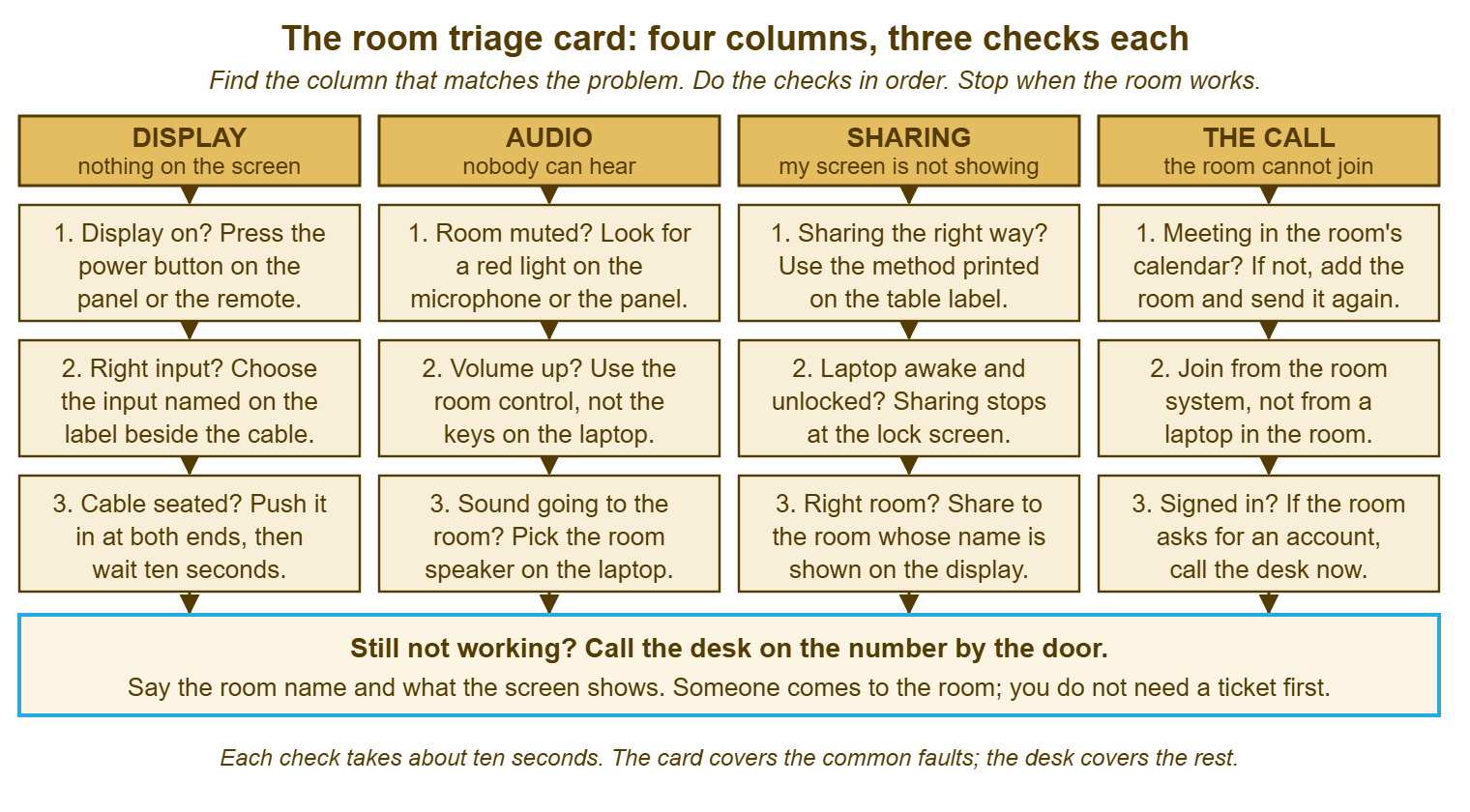
Things that stay off the card include any check that takes longer than ten seconds, any check that opens a menu, and any brand or model name. Also off the card are any wording that will change when the room's equipment is replaced and anything the desk would rather the organiser did not touch. The temptation is to add the fourth check for each column because it fixed something once. Resist it. The card's value is in being short enough to glance at, and every line added makes the first line less likely to be read. The fourth check is what the walk is for.
Where the Card Lives and How It Stays True
The card is laminated and fixed to the table, in a stand or under a clear corner, where the organiser's hands are when the fault appears. A card in a drawer is a card that does not exist, and a card pinned by the door is read on the way out. Some desks print a second copy on the wall beside the panel, because the display checks happen at the panel; both copies say the same thing. The lamination is not fussiness. An unlaminated card lasts a fortnight on a table where people eat lunch. The desk will not notice it has gone until the room calls about something the card would have fixed.
The card is checked on the weekly walk, which is the subject of The Room Check Routine: is it there, is it legible, does it still match the room? The last question is the one that matters. A room whose sharing method changed last month has a card that is now wrong about the thing most likely to be tried. A wrong card is worse than no card, because the organiser who follows it and fails has learned that the desk's advice does not work. Every card carries a version number in its corner. The desk keeps the master copy. A change to any room's equipment includes reprinting that room's card in the same ticket.
Keep the master copy where the organiser can read it from a phone too. That is because the person in the corridor on the way to the room would rather know the first checks before they arrive. If you run QuerySolv, the card's text belongs in a knowledge base article visible to everyone. In that setup, the version on the table and the version on the phone are the same four columns. And the desk edits one place when a room changes. In any tool the principle is the same: one master, every copy traceable to it, and the walk as the check that the copies are current.
Does the Card Work?
You know the card works when room calls fall and when the ones that still come begin with "I tried the card and". Take a fictional desk. Harbourview Clinic has fourteen rooms and, before the card, took between twenty-five and thirty-five room calls a month. The desk's own tickets said roughly two in three of those were input, cable, mute, volume or a locked laptop. After the card went on every table and had been there a quarter, the count was between twelve and eighteen a month. The ones that came were more often the microphone battery or the room that had lost its sign-in. Those are the faults the card is designed to hand on. The hours saved were modest, perhaps two to three a month of walking. The meetings that started on time were the point, and those are harder to count and easier to notice.
Those are one desk's numbers, in ranges, and the method for counting your own is in Measuring and Reducing Room Tickets. The one measure that belongs here is the share of calls that the card should have fixed. The technician judges this on the walk and marks it in the ticket: "card would have fixed: yes". If that share stays high after a quarter, the card is not being read. In that case, the cause is usually that it is missing, unreadable, wrong, or written for the technician who installed the room rather than the person using it. The last of those is the subject of the war story.
Remember: four columns named by the complaint, three ten-second checks each, in order, in the organiser's words, with the desk's number at the bottom. Nothing that opens a menu, nothing with a brand on it, nothing a replacement would make wrong. Check it on the walk; reprint it when the room changes.
A Short War Story: The Card Nobody Could Read at Tollgate Foods
Tollgate Foods had a card on every meeting room table for a year, written by Marcus, the technician who had installed the rooms. It was accurate in every particular and read like his own notes. It told the organiser to confirm the source selection on the switcher, verify the handshake with the display, and check that the audio was routed to the correct output bus. Bea, the operations manager, told the desk at a quarterly review that she had read it once, understood none of it, and had not looked at it since. The desk's own figures agreed with her. That was because room calls had not moved in the twelve months the card had been on the tables, at thirty to forty a month across nineteen rooms. Marcus rewrote it in an afternoon in the words organisers used on the phone, with three checks per column and the desk's number in large type at the bottom. The count over the next quarter settled between fifteen and twenty. The year of the first card had cost the desk roughly two hundred walks it need not have made, and had cost Bea's meetings a minute or ten each. The lesson the desk kept was that a card written for the technician is a card nobody else reads, and nobody else is the audience.
The On-Table Card
The card below is the text to print, one side, large type, four columns across. Replace the blanks with your rooms' labels and your desk's number. Keep the three checks per column unless your rooms genuinely differ, and resist adding a fourth. Rooms without a room system drop the fourth column and widen the other three. Put the version number in the corner, keep the master in the knowledge base, and reprint on any change to the room. It is deliberately plain. The organiser is not reading it for pleasure.
MEETING ROOM QUICK FIXES — TRY THESE BEFORE YOU CALL
Room: ______________                                                  Card version: ____

NOTHING ON THE SCREEN            NOBODY CAN HEAR
  1. Is the display on?            1. Is the room muted?
     Press power on the               Look for a red light on the
     panel or the remote.             microphone or the panel.
  2. Is it on the right input?     2. Is the volume up?
     Choose the input named           Use the room control on
     on the label by the cable.       the ______________, not
  3. Is the cable pushed in?          the laptop's keys.
     Push it in at both ends,      3. Is the sound going to the room?
     then wait ten seconds.           Pick the room speaker on
                                      the laptop.

MY SCREEN IS NOT SHOWING         THE ROOM CANNOT JOIN THE CALL
  1. Are you sharing the right     1. Is the meeting in the room's
     way? This room shares by         calendar? If not, add the room
     ______________ (see the          to the invitation and send it
     label on the table).             again.
  2. Is the laptop awake and       2. Join from the room system,
     unlocked? Sharing stops          not from a laptop in the room.
     at the lock screen.              Mute any laptop that is in
  3. Sharing to the right room?       the call.
     Share to the room whose       3. Is the room asking for an
     name is on the screen:           account or a password?
     ______________                   Do not type anything.
     If the screen shows your         Call the desk now.
     wallpaper but not your
     slides, set the laptop to
     show the same picture on
     both screens.

STILL NOT WORKING?  CALL THE DESK: ______________
  Say the room name and what the screen shows.
  Someone comes to the room. You do not need a ticket first.
Theo put the first card on the second-floor table at Harbourview Clinic the week after the beach, with Nadia's fault written into the third column in her own words. She used it the following month, when the laptop locked itself halfway through the review. She told him afterwards that the second line of the third column had taken four seconds. He wrote that in the ticket for the walk he had not had to make. It was the first room ticket at the clinic that was a record of a call that never came. That is the only kind of room ticket a desk should be trying to collect.
Frequently Asked Questions
Our rooms are all different. Do we need a different card for each one?
Should the card include our conferencing service's own instructions?
What if the organiser follows the card and makes something worse?
How do we know whether people are actually reading it?
Can the card replace the desk's walk for small rooms?
Who owns the card when the equipment changes?
From the QuerySolv team: we build self-hosted help desk software for Windows. QuerySolv runs as one Windows service on your own network. It takes requests by web form, e-mail, live chat, social messages and REST API. It is licensed once per installation rather than per agent per month. The free trial runs the full product for 30 days.