
The Cutover Plan, and Why It Should Be a Tuesday
Thursday, 16:30, at Bellweather Logistics. Sam runs a desk of three and is in a small meeting room with Grace, the operations director, who has the migration plan in front of her. Grace has one question. "Can't you just do it on Saturday? Nobody's in." Sam has been waiting for this. On Saturday, nobody is in: not the vendor's support line or the requesters who would notice that the acknowledgment looks strange. The two technicians would have to come in on their day off. By nine in the evening, they would be deciding whether "mostly imported" counts as imported. And on Monday at 08:00, everybody is in, at once, with the weekend's problems. That is when the new system would meet its first real load. Sam says all of this in about forty seconds. Grace moves the date to Tuesday. It is the shortest argument the project has.
A cutover is the day the new system becomes the system of record. It is the moment after which a new request lands in the new system and nowhere else. The old system stops being where the desk works. Everything before the cutover is preparation and can be redone. Everything after it is live. This article is part of our Migrating Ticketing Systems series. It is about that one day, hour by hour.
It covers what a cutover is and why a quiet weekday beats a weekend, then the day in one picture. Next come the six steps in order: freeze, export and import, verify, switch the mailboxes and the portal link, announce and watch. The rollback, which is written before the switch, a short war story and the cutover runbook to copy follow, in that order.
Why a Quiet Weekday Beats a Brave Weekend
The cutover is the migration's only real test, and a test needs witnesses. Every step before it, the mapping, the test import, the rehearsal, was done on a copy with nobody waiting. The cutover is the first time real mail arrives at a real address and becomes a real ticket that a real requester will reply to. The people who can tell you whether that worked are the requesters, the technicians and the vendor's support line. On a Saturday, none of them are there. The weekend does not reduce the risk of the cutover. It removes the people who would notice the risk coming true.
Tuesday is the quietest day with everyone in it. Monday carries the weekend's backlog and the week's worst queue, and is the day a new system should meet last, not first. Friday has no tomorrow: anything found at four in the afternoon waits until Monday, which is a weekend cutover with extra steps. Tuesday, Wednesday and Thursday have the whole desk present, the vendor answering, and a queue light enough that the first new tickets can be watched one at a time. They have three working days of daylight before the weekend to fix what the day reveals. Of the three, Tuesday gives the most daylight. That is the whole case for it.
The objection is always that a weekday cutover is visible, and it should be. Requesters will see a new acknowledgment, a new portal link, and possibly a short gap in the morning when the desk asks them to hold non-urgent requests. That visibility is the retraining starting, as Retraining Users and Technicians Without a Course covers. And a cutover that nobody noticed is a cutover nobody learned from. The brave weekend, and the other four patterns a plan can fall into, are laid out in Why Ticket System Migrations Go Wrong. This article is the alternative.
The Day in One Picture
The cutover day has six steps in a fixed order, with a seventh that is simply watching. There is one line through the middle that matters more than any step. The steps are freeze, export, import, verify, switch, announce. The line is the rollback point, and it sits between verify and switch. Everything to its left is work only the desk can see. The old system is frozen but still answering requesters. If anything goes wrong the desk unfreezes it and nobody outside the room knows there was a plan. Everything to its right is visible. Mail is flowing into the new system, requesters have been told, and going back means moving the morning's new tickets by hand. The picture below puts the day on one timeline with the times a small desk might use. A larger desk's import and verification stretch the middle, but the order and the line do not move.
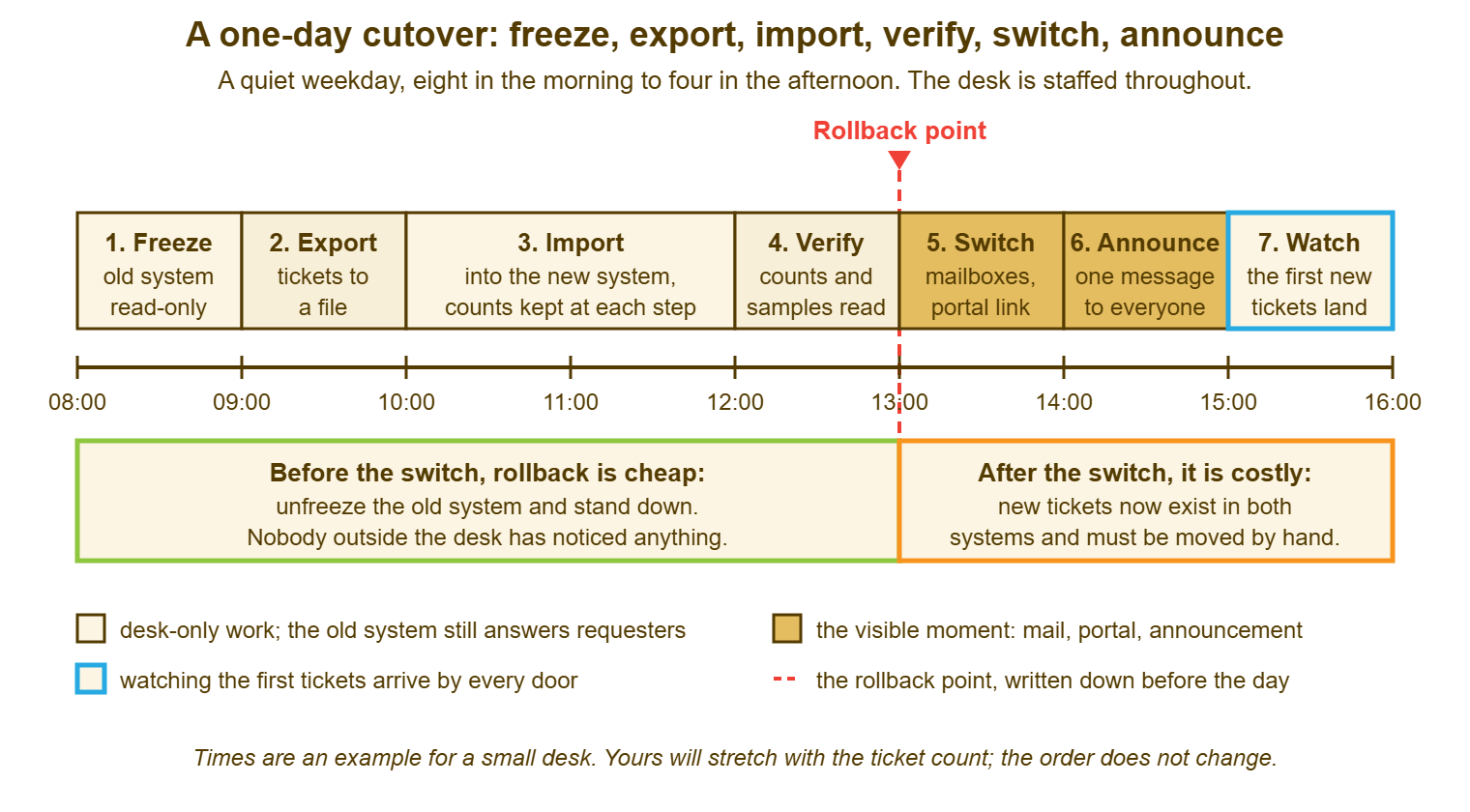
Read the picture as a budget as well as a sequence. The desk has from eight until one to discover that something is wrong and walk away at no cost. After one, the cost of walking away rises with every ticket that arrives. That is why verification is the longest box the desk controls. It is also why the decision at the rollback point is made by one named person against a written rule rather than by a conversation about whether it is probably fine.
Step One: Freeze
The freeze is the moment the desk stops changing anything in the old system. It is the first step because every later step depends on the old system holding still. Where the old system can be made read-only, make it so. Where it cannot, the freeze is a rule, announced to every technician the day before and again at eight. From this minute, there are no replies, no status changes, no new tickets created by hand in the old system. A ticket that changes in the old system after the export is a change that the new system never sees. And the requester who gets a reply from the old system at ten and a different one from the new system at three has met the migration in the worst possible way.
The freeze does not stop requesters from writing in, and the plan must say what happens to what arrives. Between the freeze and the switch, mail still lands in the old addresses. The simplest handling is to leave it unread, note the count, and deal with it by hand after the switch. Each message is forwarded into the new system or re-created there, and the requester gets the new acknowledgment. For a small desk on a quiet Tuesday morning that is a dozen messages and twenty minutes. The window is kept short for exactly this reason. The desk's own announcement the day before, asking people to hold non-urgent requests until the afternoon, shrinks it further. Anything urgent is phoned in, and the technician handling the phone writes it on paper and creates it in the new system after the switch. Paper does not have a rollback problem.
Record the freeze time to the minute in the runbook. Record the counts in the old system at that moment: open tickets, tickets closed inside the window being migrated, requesters, attachments. Those counts are what verification will be measured against, and they can only be taken while the old system is still and before the export begins. Taking them is two minutes. Not having them turns verification into an opinion.
Step Two: Export and Import
The export produces the file, and the file is kept. Most tools can export tickets to a spreadsheet file. Whatever the format, the export of the frozen old system is the single most valuable file the migration makes. It is the import's source, the archive's seed, and the evidence of what the old system held at the freeze. Save it twice, in two places, with the freeze time in its name, before the import starts. Then count what is in it, tickets, messages, attachments, requesters, and write the counts beside the ones taken from the old system. They should match. If they do not, stop and find out why before importing, because an export that dropped something will import something missing, confidently.
The import is a repeat, not a first attempt. By cutover day the import has been run at least once on a copy of the old system's data, weeks earlier, using the mapping table from Remapping Categories, Statuses and Fields. The fifty awkward tickets have been opened and read. The cutover import is the same procedure, with the same settings, against the real export. The person running it has a written list of the steps they took last time. An import that has never been run before is not an import. It is an experiment, with the desk as the audience.
Keep counts at every stage of the import that reports one, and write them down as they appear. The import's own totals, tickets created, messages attached, requesters matched, failures, are the first verification. A failure count that is not zero is read line by line before anyone moves on. Most failures are a value the mapping table missed, which is why the table has a row for everything. The rest are usually an attachment too large or a requester address malformed in a way the old system tolerated. Fix what can be fixed, list what cannot, and carry the list to verification. The import for a desk of three on a few thousand tickets is a morning. Budget the morning and do not fill it with anything else.
Step Three: Verify Before You Switch
Verification is where the desk decides whether to cross the line. It is done against a written checklist with pass conditions, by two people, before anyone touches a mailbox. The checklist has two kinds of item. Counts must match the freeze counts exactly or be explained to the ticket. Reads are where a human opens tickets and looks. Counts catch what is missing. Reads catch what is wrong. Both are needed, because an import can produce the right number of tickets with every date set to today, and the count will pass.
| Check | How | Pass means |
|---|---|---|
| Open ticket count | Count open tickets in the new system against the freeze count | Exactly equal, or every difference named |
| Every open ticket opened | Open each one; read the first message and the last | Conversation present, requester right, owner set, status sensible |
| Closed-window count | Count closed tickets in the window against the freeze count | Exactly equal, or every difference named |
| The fifty awkward tickets | Open the same fifty used in the rehearsal | Each where the mapping table says, legacy block present |
| Dates | Sort by creation date; look at the oldest and the newest | Original dates kept; nothing dated today except today's |
| Attachments | Open five attachments on five different tickets | Each opens and is the right file |
| Requester lookup | Search for three requesters by name and by address | Their tickets, and only theirs, come back |
| Old number lookup | Search for three old ticket numbers | The right ticket is found through its legacy block |
| A report reads sensibly | Run the backlog-by-age report | Ages spread as they did in the old system, not all under a day |
| Import failures | Read the failure list from the import | Every line resolved or carried forward with an owner |
The report check is the one most desks skip and the one that catches the most. If the new system reports backlog by age, as QuerySolv does, that report read side by side with the same report saved from the old system shows in ten seconds whether the dates survived the trip. A backlog that was spread across months in the old system and sits entirely under one day in the new one has had its history flattened, however good the counts look. The same comparison for volume by month tells you whether the closed window came across whole. Reports are verification that reads the whole import at once.
The checklist ends with a line that says pass or fail and a name. The name is the rollback owner's. Pass means every count matched or was explained, and every read came back clean or with a fix already made. Anything else is fail. Fail at this point costs nothing. The old system is unfrozen, the desk works the afternoon as if nothing had happened, and the import is studied on Wednesday. The temptation to argue "it is mostly fine" is strongest here, at one in the afternoon, with a morning's work on the screen. The written rule exists so that nobody has to win that argument. They only have to read it.
Step Four: Switch the Mailboxes and the Portal Link
The switch is the point of no return. It is a list of addresses worked through one by one with a test after each. Every address a requester has ever written to was listed on the data inventory. Each is now pointed at the new system, by redirecting it, by re-creating it, or by whatever the organisation's mail administrator does to move a mailbox. The old system is cut off from receiving mail so that it cannot create another ticket. Where each department has its own mailbox, as QuerySolv's departments do, the switch list is one line per department and the test is one message per line. Send each test from a personal address that is not a technician's. Watch it become a ticket in the right department, and check that the acknowledgment comes back and reads as it should. One address, one message, one tick. Then the next.
The portal link moves at the same time, everywhere it lives. That includes the intranet page, the e-mail signatures, the sticker on the printers, and the staff handbook page that nobody updated after the last reorganisation. The old link should land on a page that says where the new one is, because people will follow the old link from bookmarks for months. The old address, if it cannot be redirected, gets an automatic reply that says the same, for the same reason. The migration is not finished when the new door opens. It is finished when the old doors say where the new one is.
If the old system cannot be stopped from receiving mail, which happens with hosted systems the desk does not fully control, the plan says who empties the old mailbox into the new system by hand. In that case, it also says how often and until when. Daily, by the desk lead, until a week passes with nothing in it, is the usual answer. The mail pipeline is worth a rehearsal of its own before cutover day, and Testing the Mail Pipeline is the checklist for it. The cutover simply runs that checklist for real against each address.
Step Five: Announce, Then Watch the Queue
The announcement is short, goes to everyone, and is sent after the switch has been tested, never before. It says that the desk has moved, where to write now, and what the new acknowledgment looks like so that nobody deletes it as spam. It also says that open requests have come across with their history. The one-page what-changed, which the retraining article owns, is attached or linked. Nothing in the announcement is about the project, the vendor, or the benefits. Requesters have one question, "where do I write now", and the announcement answers it in the first line and then stops.
Then the desk watches, for the rest of the day, every ticket that arrives. Did it land in the right department? Did the acknowledgment go? When the requester replies, does the reply thread onto the same ticket rather than opening a new one? The threading question is the one that fails quietly and the one worth reading up on in Threading Replies to the Right Ticket. On cutover afternoon, the test is to reply to one of the test tickets from the personal address and watch where the reply goes. Technicians work in pairs for the afternoon, one handling the ticket and one checking the mechanics. Every oddity goes on a list rather than being fixed on the spot and forgotten. The list is Wednesday morning's agenda.
The afternoon's watching also handles the freeze window. The messages that arrived at the old addresses between the freeze and the switch are forwarded or re-created in the new system now. Each has a short note to the requester saying their request was received and has a new number. The paper from the morning's phone calls becomes tickets. By the end of the day, every request that reached the desk on cutover day exists in exactly one system, and that system is the new one. That sentence is the definition of a finished cutover.
The Rollback Is Written First
The rollback is the written decision about when the desk goes back to the old system and how. It is written before the day, not during it. It has three parts. The first is the rollback point, which is the switch of the first mailbox. The second is the rule for the decision at that point: the pass-or-fail line at the bottom of the verification checklist. The third is the name of the one person who reads the line and decides. Before the point, rollback is "unfreeze the old system, tell the desk to resume, keep the export, study the import tomorrow". It costs an afternoon of nothing. After the point, rollback is "move every ticket that arrived in the new system back into the old one by hand, redirect the mail again, and tell everyone twice". It costs trust. The rule is therefore strict before the point and nearly absolute after it.
Write the two versions out as paragraphs in the runbook, so that nobody has to compose them at one in the afternoon. The before-the-switch paragraph is the easy one. The fact that it is easy is the reason the whole day is arranged to find problems before the switch. The after-the-switch paragraph exists to be read and almost never used. The realistic response to a problem found at three is to fix it in the new system, because the cost of going back now exceeds the cost of almost any fix. Knowing that in advance is what lets the desk cross the line calmly. A cutover is a change like any other. The one-page change record in The One-Page Change Record is a fair shape for the whole plan: what, when, who, how to verify, how to back out.
Remember: the rollback point is the switch of the first mailbox. Before it, a failed verification means unfreezing the old system and walking away at no cost. After it, going back costs more than almost any fix. Write both paragraphs and name one person to read the pass-or-fail line. Arrange the day so that every problem is found on the cheap side of the line.
A Short War Story: The Saturday at Stonebridge Insurance
Stonebridge Insurance moved ticketing systems on a Saturday, because the desk lead, Richard, had been told it would be less disruptive. He and one technician started the export at four in the afternoon with a laptop and the vendor's written instructions. The import stopped at 22:40 with an error about a requester record that the old system had allowed and the new one would not. The vendor's support line was closed until Monday. The two of them decided at midnight that the two-thirds of tickets already imported were probably enough to open on. On Monday at 08:00 the desk opened on a system that held some tickets, had no mailboxes pointed at it yet, and showed every migrated ticket as created on Saturday. Meanwhile, sixty requesters with weekend problems wrote to the old addresses. Those still fed the old system, which half the desk was still using. Stonebridge ran both systems for three weeks, re-created about sixty tickets by hand, and spent a month explaining to requesters why they had two ticket numbers for one problem. Richard's note on the next plan said that the error which stopped the import would have taken the vendor ten minutes to explain on a Tuesday. The note also said that the Saturday had saved the organisation nothing except the chance to find out.
The Cutover Runbook
The runbook is one page, printed, on the desk on the day, with the times filled in as each step happens rather than as planned. The top block names the day, the people and the rollback owner. The steps follow in order with a space for the actual time, the counts where counts are taken, and a tick. The rollback paragraphs sit in the middle, at the point where they would be read. The bottom block is the watch list for the afternoon and the sign-off. A runbook that is filled in during the day is also the record of the day. That is the only account of it anyone will have when the first question comes on Wednesday.
CUTOVER RUNBOOK — ONE PAGE, PRINTED, FILLED IN ON THE DAY
Migration: ______________________   Date (a quiet weekday): ________
Desk lead: ______________   Import run by: ______________   Rollback owner: ______________
Vendor support contact: ______________   Mail administrator: ______________

Day before
  [ ] Desk told: no changes in the old system from ____:____ tomorrow
  [ ] Announcement sent: hold non-urgent requests until tomorrow afternoon
  [ ] Rehearsal notes and mapping table printed and on the desk

1. FREEZE                               planned ____:____   actual ____:____
  [ ] Old system read-only, or freeze rule confirmed with every technician
  [ ] Counts at freeze:  open ______  closed in window ______  requesters ______  attachments ______
  [ ] Old addresses left unread; count of arrivals noted at the switch: ______

2. EXPORT                               planned ____:____   actual ____:____
  [ ] Export file saved twice, freeze time in the name:  ______________________
  [ ] Counts in the file:  tickets ______  messages ______  attachments ______  requesters ______
  [ ] File counts match freeze counts, or difference explained: ______________________

3. IMPORT                               planned ____:____   actual ____:____
  [ ] Same settings and steps as the rehearsal (list attached)
  [ ] Import totals:  created ______  messages ______  matched requesters ______  failures ______
  [ ] Every failure line read; fixed ______  carried forward with owner ______

4. VERIFY                               planned ____:____   actual ____:____
  [ ] Verification checklist run by two people (attached, every line ticked or explained)
  [ ] Backlog-by-age report compared with the saved old report
  PASS / FAIL (circle one) ______   decided by rollback owner: ______________ at ____:____

  ROLLBACK BEFORE THE SWITCH: on FAIL, unfreeze the old system, tell the desk to resume,
  keep the export file, review the import tomorrow. Nobody outside the desk is told.

5. SWITCH                               planned ____:____   actual ____:____
  Address                      Pointed at new system   Test message sent   Ticket in right dept   Ack received
  ___________________________  [ ]                     [ ]                 [ ]                    [ ]
  ___________________________  [ ]                     [ ]                 [ ]                    [ ]
  ___________________________  [ ]                     [ ]                 [ ]                    [ ]
  [ ] Old system cut off from receiving mail, or hand-emptying owner named: ______________
  [ ] Portal link changed: intranet [ ]  signatures [ ]  printed notices [ ]  handbook [ ]
  [ ] Old link and old address point to the new ones

  ROLLBACK AFTER THE SWITCH: only for a failure that stops the desk working. Redirect mail back,
  move today's new tickets to the old system by hand, announce twice. Decided by rollback owner only.

6. ANNOUNCE                             planned ____:____   actual ____:____
  [ ] Announcement sent to everyone with the what-changed page attached
  [ ] Freeze-window arrivals forwarded or re-created in the new system: ______ handled
  [ ] Phone notes from the morning created as tickets: ______

7. WATCH (rest of the day, technicians in pairs)
  [ ] Each new ticket: right department, acknowledgment sent, reply threads onto the same ticket
  Oddities for tomorrow's list:  ________________________________________________
                                 ________________________________________________

Signed off at ____:____ by ______________   Every request today exists in one system: [ ]
Sam ran the Bellweather cutover on the Tuesday with the runbook on a clipboard. The actual times drifted from the planned ones by about forty minutes, all of it in verification. That was because one attachment check found a file that had not come across and the two of them spent the time finding out why. The rollback owner, who was Sam, read the line at 13:35 and circled pass. Grace stopped by at four to ask how it had gone. Sam showed her the clipboard, which had every box ticked and three oddities on the list for Wednesday. "That's it?" she said. That was it. It had been a very dull day, which is what Sam had promised her on the Thursday.
Frequently Asked Questions
Our management insists on a weekend. What is the least bad way to do it?
What do we do with requests that arrive during the freeze?
How long should verification take?
Who should be the rollback owner?
What if we find a problem at three in the afternoon, after the switch?
Do we need the vendor present on the day?
From the QuerySolv team: we build self-hosted help desk software for Windows. QuerySolv runs as one Windows service on your own network. It takes requests by web form, e-mail, live chat, social messages and REST API. It is licensed once per installation rather than per agent per month. The free trial runs the full product for 30 days.