
What the Desk Supports on a Phone, and What It Does Not
Tuesday, 11:40, at Meridian Parts. Dev, a field sales rep, is at the desk window with his own phone in his hand and a list in his head. "Can you make my work email work on this? And while you're here, the camera's gone blurry, my daughter's game keeps crashing, and I think the battery's on the way out." Asha has run the two-person desk for a year. She knows the answer to the first question is yes. The answer to the last three is some shade of no. She has never once written down where the shade changes. Dev is not being unreasonable. He has one phone, it has one screen, and everything on it looks like the same kind of problem to him.
The mobile support scope is the written statement of which phones the desk supports and which things on those phones it will fix. It says which it will try to help with for a bounded time, and which it will point somewhere else. It is the difference between Asha deciding at the window, every time, with Dev watching, and Asha reading a sentence off a page that the whole desk agreed to. This article is part of our Mobile Device Support series. The policy on whether personal phones are allowed near work at all, and on what terms, lives in BYOD and Personal Devices. This article is about what the desk does once the phone is in front of it.
It covers why a phone is not a small laptop, then company phone against personal phone. Next come the apps the desk owns and the three rings of support. Ring two, where the arguments live, then ring three and where to point follow. After that come how to say the boundary kindly, making it visible, a short war story and the mobile support scope to copy, in that order.
Why a Phone Is Not a Small Laptop
A laptop belongs to the organisation in every sense that matters: it chose the model, built the image, owns the hardware and manages it. The user borrows it to do work. A phone is different even when the organisation paid for it. It is carried everywhere, used for personal things by nearly everyone. The line between work and personal runs through the inside of the device rather than around the outside of it. On a personal phone the line is sharper still, because the organisation owns nothing but a work account and whatever that account brought with it. The desk's authority stops at the line, and so must its promises.
The second difference is that the desk usually cannot see the phone. The remote-control tools that let a technician drive a laptop from the other end of the building mostly do not work on a phone, or work only for looking. The desk falls back on asking the user to read the screen aloud. Diagnosis by description is slower and vaguer than diagnosis by looking. That changes the economics of every ticket. A ten-minute laptop fix is a twenty-five-minute phone call. The subject of remote support tooling is its own series. The short version for phones is that you will be doing a lot of "what does it say now?".
The third difference is that phones are replaced on the user's schedule, not the desk's. A laptop is refreshed when the organisation refreshes it. A phone is upgraded when its owner feels like it, which is usually the week after the desk finished the guide for the old one. The platform updates itself when it chooses. Apps change shape underneath the user. The desk's knowledge of "where the setting is" has a shelf life measured in months. All three differences point the same way. The desk needs a scope that is about kinds of things, not about this model or that menu, because the model and the menu will not hold still.
Company Phone Against Personal Phone
The first question in any mobile ticket is whose phone it is, because the answer sets the desk's reach before anything else is known. A company phone is one the organisation bought, owns and can take back. The desk supports the whole device, because the whole device is the organisation's. A personal phone is one the user owns and has chosen to put work on. The desk supports the work on it and not the phone. The practical mechanism for "the work on it" is usually a work profile. This is a separate, managed compartment on the phone that holds the work apps and their data. The organisation can empty it without touching anything outside it. The honest explanation of what that compartment can and cannot see is the subject of BYOD Boundaries in Practice. The table below sets the two side by side.
| Question | Company phone | Personal phone with a work account |
|---|---|---|
| Who chose it | The organisation, from a short standard list | The user, from everything on sale |
| Who pays for it and the plan | The organisation | The user, unless a policy says otherwise |
| Who set it up | The desk, or the user following the desk's guide | The user, following the desk's guide for the work part only |
| What the desk can see | The device as a whole, through the management profile | The work profile and the device's basic state; nothing personal |
| What the desk fixes | Everything on it, within reason | The work account and the work apps |
| When it is lost | Lock or wipe the whole phone | Remove the work profile; the rest is the user's |
| When the person leaves | The phone comes back, wiped | The work profile is removed; the phone stays with its owner |
| Who replaces a cracked screen | The desk, through the organisation's repair route | The user, through a shop of their choosing |
The grey case is the company phone that has quietly become the family phone, with three years of photos on it and a child's games beside the authenticator app. The rule has to be said on the day the phone is handed over, and again on the scope page. A company phone can be locked, wiped and taken back by the organisation, and anything personal on it goes with it. Nobody enjoys saying this. It is far easier to say in a welcome message than at a desk window with the photos already gone. That is where the war story later in this article takes place.
The Apps the Desk Owns
On any phone, company or personal, there is a short list of things the organisation put there and the desk therefore owns outright. The first is the work account, the sign-in that identifies the user to the organisation's services and whose password and lockouts are the desk's business wherever they happen. The ticket for that is the subject of the whole Password & Lockout Tickets series. The second is work mail and calendar in whatever mail app the organisation uses, because a rep who cannot see the calendar on the road is a rep who misses the meeting. The third is the authenticator app, the app that produces or approves the second sign-in factor. It is the single most important app on the phone and the one most often lost with it. The fourth is the VPN client where one is used, the app that lets the phone reach the office network from outside it.
The fifth, on company phones and in the work profile of personal ones, is the management profile. This is the small piece of configuration that tells the phone which organisation it belongs to. It lets that organisation set rules, push the work apps, and lock or wipe what it owns. The desk owns the management profile because the organisation chose it, and because when it goes wrong nothing else on the list works. These five are owned for the same reason the laptop image is owned. The organisation decided they would exist, so the organisation's desk answers for them.
Each of the five has a known set of ways to fail, and a known fix for most of them. That is what makes them ownable. Mail stops after a password change. The authenticator is on the old phone. The VPN client wants a certificate the phone does not have. The management profile was removed by a user tidying up. Email and Calendar on Mobile walks the mail failures in order, and Second-Factor Problems owns the authenticator. The desk owns these because it can learn them. Everything else on the phone is either helped with or left alone.
The Three Rings
The scope is easiest to draw, and easiest to explain at a desk window, as three rings. Ring one is what the desk owns: the five things above, and on a company phone the device itself. The desk fixes ring one, logs it as an ordinary ticket, and a service-level target applies. Ring two is what the desk helps with. These are things the organisation did not put on the phone but that stop the work it did put there. Or they touch the organisation's own network. The desk gives these a bounded amount of time and makes no promise about the result. Ring three is what the desk leaves alone: the personal apps, the carrier, the repair of a personal phone, the family's devices. The desk's whole duty in ring three is to say, kindly and specifically, where to go instead.
The ring is decided by the thing, never by the person asking. A director's personal photo app is in ring three. A new starter's work account is in ring one, on their first morning, on a phone the desk has never seen. The moment the ring starts depending on who is asking, the scope becomes a negotiation. The people who negotiate hardest are not the people who need the most help. The picture below draws the three rings with the examples beside each. That lets a technician see at a glance which ring a request belongs in and what the desk owes it.
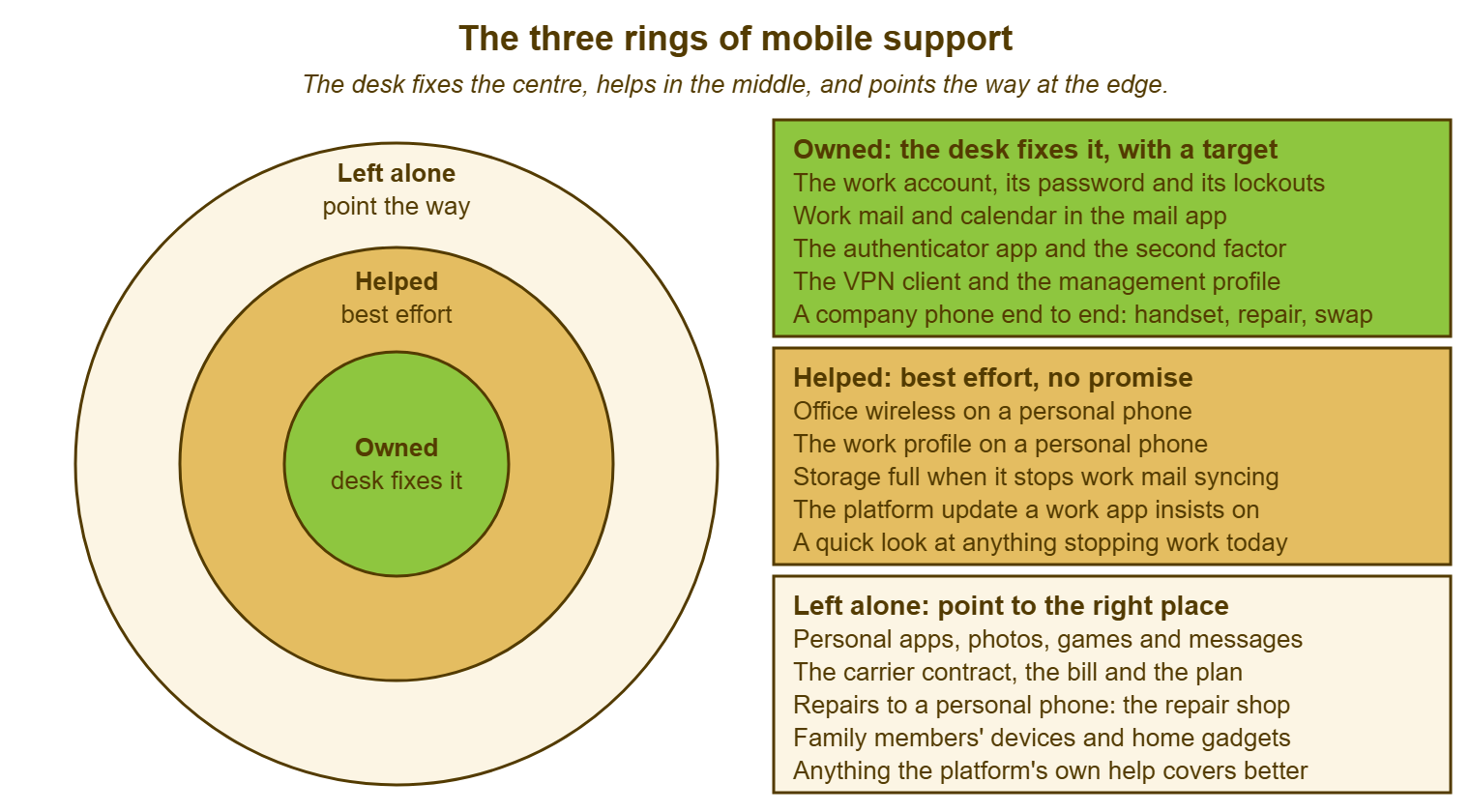
Three rings is the right number. Two rings, owned and not, leaves no room for the storage-full problem that is stopping work mail and that any decent technician would spend ten minutes on. Four rings or more is a policy document, and a policy document is read by the person who wrote it and the auditor. (The auditor reads it once.) Three fits on a card, and a card is what the technician has at the window.
Ring Two Is Where the Arguments Live
Best effort means a bounded amount of a technician's time, with no promise about the outcome. After that time, the desk stops and says where to go next. The bound is the part most desks leave out. "We'll have a look" with no limit becomes forty minutes on a personal phone's storage, and then an hour, and then a ticket that has somehow acquired a target. On a fictional desk of three, the bound is fifteen to twenty minutes per ring-two request. There is a second attempt only if the first one found something specific to try. Write the number down; the number will vary by desk. But a desk without one has a ring two that is really a ring one with worse documentation.
Ring two exists because some things outside the organisation's control still block the things inside it. A phone with no storage left will not sync work mail. So the desk helps the user clear space even though the space is full of personal video. A personal phone that cannot join the office wireless is half the desk's problem, because the wireless is the organisation's. A platform update that a work app insists on before it will open is the platform's business and the user's phone. But the work app is the desk's, so the desk helps the user through the update. The test for ring two is a sentence: "this is not ours, but until it is sorted, something of ours does not work."
The rule inside ring two is that when the time runs out, the desk says what it did and where the user can go next, and logs both. Service-level targets belong to ring one. Many tools, QuerySolv among them, run service-level targets per priority on a business-hours schedule. The honest way to log a ring-two ticket is at the lowest priority with the first reply saying "I'll give this twenty minutes and tell you what I find." The ticket is still a ticket, because the desk wants to count how much ring-two work it does. That is how ring two is kept from growing. It grows by habit. Asha fixed a personal phone's photo backup once, so it is now "something the desk does", and the next user has heard. Keep the bound, log the time, and review the ring-two count each quarter against the scope. The scope is only true for as long as the desk keeps it true.
Ring Three, and Where to Point
Ring three is not a refusal. It is a direction, and the direction has to be specific. That is because "that's not something we support" with no next step is the sentence that makes a user feel the desk is a wall. The carrier owns signal, the bill, roaming, the plan and the SIM. Point there by name, with the number the organisation uses if the phone is a company one. The repair of a personal phone belongs to a repair shop or to the maker's own repair route. The desk's contribution is to say which it is and, for a company phone, to run the organisation's repair route itself. The phone's own features, the camera, the photos, the storage of personal things, belong to the platform's own help pages. Those are better at them than the desk will ever be. Family devices and home gadgets belong to the family.
The "while you're here" request is the commonest shape ring three takes, and it deserves one honest sentence rather than a sigh. "I can't do anything about the camera, and I'd be guessing if I tried, but the phone's own help pages cover it and the shop on the high street does screens and cameras while you wait." The user has been told no, told why, and told where, in one breath, and has not been made to feel that asking was a mistake. The desk that says this well gets fewer ring-three requests over time, not because users were trained to stop asking but because they learned where the answer lives.
One thing in ring three can jump the rings, and the desk must know it: anything that turns into a security matter. A game that "appeared" on a phone carrying work mail, a text message asking for a code, a phone that has started behaving oddly since an unknown app was installed, is not a personal-app problem any more. It is a security ticket the desk will see, and it moves to ring one on the spot. A phone that has gone missing moves there faster still, because the first hour is about the organisation's data and not about the hardware. That is the subject of Lost and Stolen Devices. The ring is about the thing, and the thing has changed.
Remember: the ring is decided by the thing, never by the person. Ring one is fixed with a target; ring two gets a bounded time and an honest "here is what I found"; ring three gets a specific place to go. Anything that becomes a security matter moves to ring one at once.
How to Say It Kindly
The boundary is said in three sentences, in order: what I can do now, what I will try and for how long, and where to go for the rest. Asha's reply to Dev, built that way, is: "I'll get your work mail and calendar on this now; that's ours and it takes ten minutes. I'll have a quick look at the storage while I'm in there, because if it's full the mail won't sync, but I can't promise anything there. The camera, the game and the battery are the phone's own, and the help pages and the shop on the high street are the right places for those." Nothing in those sentences is a policy. The word "policy" is a brick, and users can hear it land.
Never say "not my job", and never make the user feel the request was foolish. That is because to the user every problem on the one screen looked like the same kind of problem, and that is a fair way to see it. The craft of declining without a wall, of pointing at the page rather than at yourself, is the subject of Declining Out-of-Scope Requests. The mobile scope is simply the page that article tells you to point at. If the desk has no page, the technician is the page, and technicians are not consistent on Tuesday afternoons.
The manager who wants the boundary moved for their team, or the director who wants their own phone's photos rescued, is not asking the technician for a favour. They are asking for an exception to a scope the technician did not write and cannot change. Route the decision to whoever owns the scope, in writing, with the deadline. In the meantime do the ring-one and ring-two parts as normal. The shape of that conversation is in Saying No Upward. The important thing is that the technician does not quietly extend ring one for one person, because the next person will have heard about it by lunch.
Making the Boundary Visible
A scope nobody can find is a scope that does not exist. So publish it where users look before they ask: the knowledge base, on a page visible to everyone and not only to the desk. A knowledge base article that anyone in the organisation can read, which most tools allow and QuerySolv does, is the natural home. The article is short. It is the three rings with the examples, and it ends with where to go for the ring-three things. Link it from the request form and from the first reply to any mobile ticket. The idea that the desk says what it supports in one place and points at it is the subject of The Service Catalog Idea. The mobile scope is one entry in that catalogue, and the one users read most.
Put the question on the form. A single field asking "company phone, personal phone, or not a phone" tells the technician the ring before the ticket is opened. The field tells the user, quietly, that the distinction exists. Where the desk has a department of its own for mobile or for devices, with its own form and mailbox, the field lives on that form. Where it does not, it lives on the general form and is skipped for everything else. The field is worth more than it looks. It is the only part of the scope most users will ever read.
Train the desk on the rings before the users meet them. A new technician's first week includes the card with the three rings, the examples, and the three sentences. Their first mobile ticket is done with someone watching. The scope is reviewed twice a year against the ring-two count and the complaints. It is changed in writing when the organisation's choices change. For example, a new work app goes into ring one, and a retired VPN client comes out. The review is short, and the point of it is not the document but the agreement. A scope the desk agrees with is a scope the desk will say out loud.
A Short War Story: The Holiday Photos at Tollgate Foods
At Tollgate Foods, a depot manager called Sunil brought his failing company phone to the desk with three years of family photos on it. A technician called Marcus, who had no written scope and a kind heart, agreed to move the photos to Sunil's laptop before resetting the phone. The transfer stalled. Marcus assumed it had finished, and the reset took the photos with it. Two days of Marcus's time went into recovery attempts that recovered nothing. A formal complaint went to his manager, and Sunil never brought a phone to the desk again. The review found that the photos had never been the organisation's to move. It also found that nobody had told Sunil, on the day he was given the phone, that a company phone could be wiped. Nor had he been told that day that his own things on it were his own risk. The desk wrote its three rings the following week, with "personal data on a company phone" in ring three and a sentence about it in every handover message. A ring you never wrote down is one you will be blamed for crossing, in either direction.
The Mobile Support Scope
The sheet below is the one page a desk agrees to and publishes. Section A says whose phones are in scope at all. B, C and D are the three rings with the organisation's own examples filled in. E is the bound on ring two and what happens when it runs out. F is the list of places the desk points to, by name, so that ring three is a direction and not a shrug. G is who owns the scope and when it is reviewed. Fill it in once with the whole desk in the room, publish it where users look, and read from it at the window.
MOBILE SUPPORT SCOPE — ONE PAGE
Desk: ______________________   Owner of this scope: ______________   Reviewed: ____________

A. WHOSE PHONES
   Company phones (owned by the organisation) .......... in scope, whole device
   Personal phones with a work account ................. in scope, work part only
   Personal phones with no work account ................ not in scope
   Family members' devices ............................. not in scope

B. RING ONE — OWNED (fixed, logged, target applies)
   [ ] The work account: sign-in, password, lockouts
   [ ] Work mail and calendar in the organisation's mail app
   [ ] The authenticator app and the second factor
   [ ] The VPN client: ______________________
   [ ] The management profile / work profile
   [ ] Company phone hardware: fault, repair, replacement, return
   [ ] Other work apps the organisation put on the phone: ______________________

C. RING TWO — HELPED (bounded time, no promise)
   [ ] Joining the office wireless on a personal phone
   [ ] Storage or battery problems that stop a work app running
   [ ] Platform updates a work app requires before it will open
   [ ] Setting up the work profile on a personal phone
   [ ] Other: ______________________

D. RING THREE — LEFT ALONE (pointed, not fixed)
   [ ] Personal apps, photos, games, messages, backups
   [ ] The carrier: signal, bill, plan, roaming, SIM
   [ ] Repair of a personal phone
   [ ] Personal data on a company phone (wiped with the phone)
   [ ] Anything that is a security matter moves to RING ONE at once

E. THE BOUND ON RING TWO
   Time per request: ______ minutes   Second attempt: only if the first found something specific
   When it runs out: say what was tried, say where to go, log the time

F. WHERE WE POINT (by name)
   Carrier for company phones: ______________________   contact: ______________________
   Repair route for company phones: ______________________
   Repair for personal phones: "a repair shop of your choosing" / maker's route
   The phone's own features: the platform's help pages
   Lost or stolen phone, any hour: ______________________ (see the lost-device runbook)

G. THE THREE SENTENCES AT THE WINDOW
   1. What I can do now: ______________________
   2. What I will try, and for how long: ______________________
   3. Where to go for the rest: ______________________
Asha filled the sheet in with her colleague the following Monday, which took forty minutes and one argument about whether the office wireless was ring one or ring two. It was ring two, with the bound. Dev's work mail was on his phone by noon on the Tuesday. His storage was indeed full. The camera, the game and the battery went to the help pages and the shop, in that order, with no hard feelings on either side of the window. He came back a month later with a new phone and the same questions. Asha read from the page.
Frequently Asked Questions
Should we support personal phones at all?
What if a ring-two problem is clearly going to take an hour?
A user says their manager told them the desk fixes everything on phones. What now?
Does a company phone used for personal things change the rings?
Where does a tablet fit?
How often should the scope change?
From the QuerySolv team: we build self-hosted help desk software for Windows. QuerySolv runs as one Windows service on your own network. It takes requests by web form, e-mail, live chat, social messages and REST API. It is licensed once per installation rather than per agent per month. The free trial runs the full product for 30 days.