
Running Support Solo: The Operating Model
It is 08:31. The queue has nine new tickets, two of them marked urgent by the people who opened them. The desk phone is ringing. Dana from accounts is in the doorway holding a laptop at the angle that means it will not connect to anything. And the monitoring system has just sent its third e-mail about the disk on the file server, each one a little more upset than the last. There is one of you. There has only ever been one of you.
Nobody planned it this way. The organization grew, the computers multiplied, and the person who was good with them became the IT department, singular. The budget line calls you "the IT team". This article is the first in our One-Person IT series, which is about running support when you are the whole department. The series covers the operating model, the boundaries, and the ten tickets to automate first. It covers documentation as your second person, staying sane, and the case for a second person.
This one is the operating model. It covers the rule that saves the day: everything is a ticket, including your own work and the walk-up you just handled. Next come the shape of a solo day, triage when you are also the escalation point, and the interrupt sponge. We cover what to let drop and the weekly fifteen minutes. We finish with a Tuesday walked through hour by hour and a one-page operating card to print.
The Rule That Saves the Day: Everything Is a Ticket
The rule is this: everything the desk works on is a ticket. That includes the walk-up you just handled, the phone call, the server alert, and your own project work. A ticket is a numbered record of one request with a requester, a timestamp, a status and a history. The rule does not say everything must arrive as a ticket. It says nothing gets worked on until it is one, even if you type it yourself after the fix.
Do it because on a one-person desk the ticket is the only record that exists. A team has witnesses: someone saw you spend the morning on the printer. You have nobody, so the morning never happened unless it is written down. A morning that never happened cannot be counted or used as evidence. The queue is your memory, your witness, and your timesheet. It is the one colleague you have.
The hard part is logging what you have already done. Dana's laptop took four minutes to fix at the door; opening a ticket for it takes forty seconds and feels like paperwork. Open it anyway, with a one-line summary, the category, and "fixed at the door, 08:34". Log your own work too: "patching the file server, two hours" is a ticket with you as the requester, because the hours have to be somewhere.
What happens if you do not is that the queue shows a quiet desk and a busy admin, and nobody can explain the gap. Half the work is invisible, so the backlog looks small and the case for help looks weak. The hallway is a support channel. It has no ticket number and excellent latency.
Whatever tool you have, the walk-up you log by hand belongs in the same list as the e-mail that arrived properly. QuerySolv's phrase for the shape is five ways in, one queue. Web form, e-mail, live chat, social messages and the REST API all create the same kind of ticket. A shared mailbox and a spreadsheet can hold the same rule, with more typing.
The Shape of a Solo Day
A solo day needs a fixed shape, because without one the day is shaped by whoever arrives first. The shape below is the one I settled on after several years of letting the queue decide. It has five fixed appointments: triage at 08:30, a midday sweep, a sponge hour, a protected block on two afternoons, and a close. Everything else is a work block, a stretch of time with a list and a door that is mostly shut.
| Time | What | Why it is fixed |
|---|---|---|
| 08:30 to 09:00 | Triage: read every new ticket, set the order, send an acknowledgment naming the next update time | The order is decided once, before the first interruption |
| 09:00 to 11:00 | Work block one: the top of the list, hardest first | Best attention to the hardest problem |
| 11:00 to 12:00 | Sponge hour: door open, walk-ups welcome, phone answered | Interruptions get an hour of their own |
| 12:00 to 12:15 | Midday sweep: new arrivals triaged, the order re-sorted | The afternoon list is as good as the morning one |
| 12:15 to 13:00 | Lunch, away from the desk | A desk you never leave is one nobody learns to leave alone |
| 13:00 to 15:00 | Work block two; on Tuesday and Thursday this is the protected block: door closed, projects only | Projects need two uninterrupted hours |
| 15:00 to 16:45 | Small tickets and deskside visits | More people about, less focus; match the work to it |
| 16:45 to 17:15 | Close: update every ticket touched, write tomorrow's top three, read the alerts once more | Tomorrow's triage starts from a true picture |
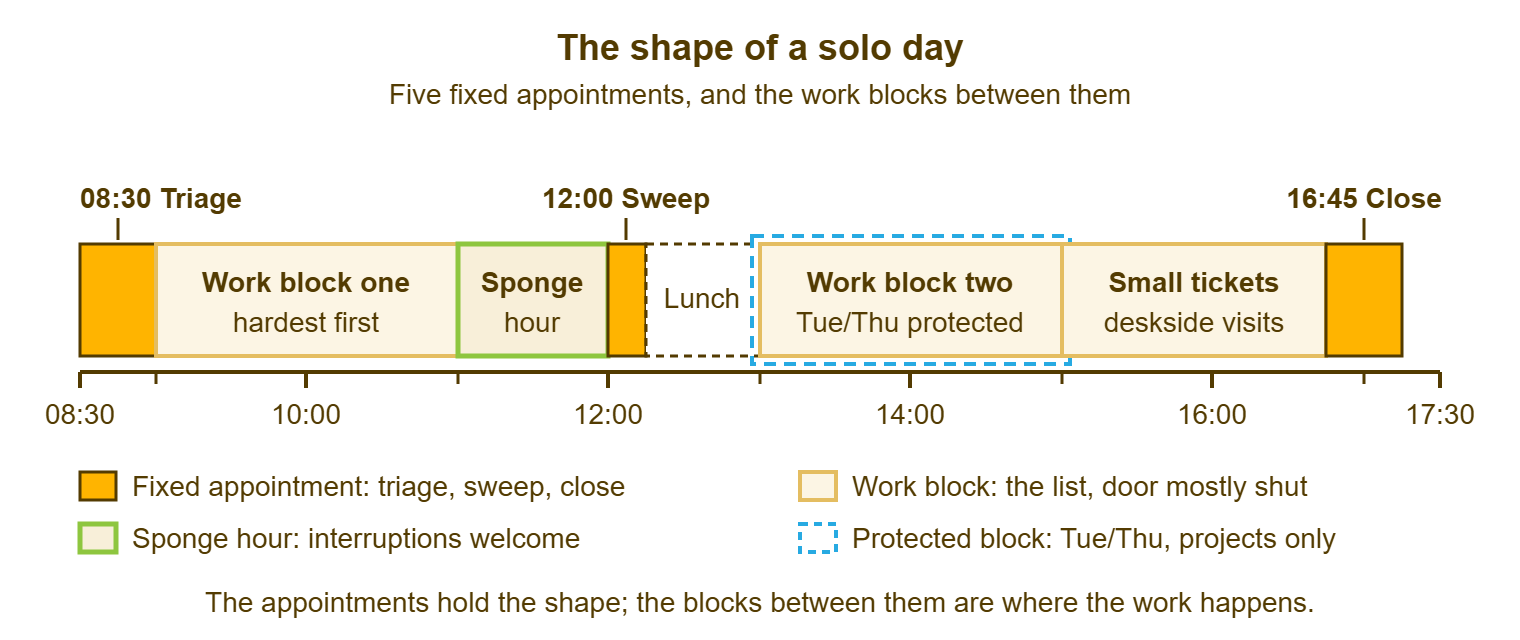
The exact times matter less than the fact that they are fixed and posted. Fixed, so that you do not re-decide the day every time the phone rings. Posted, on the door and in your e-mail signature, so that the building can plan around you instead of around the chance that you are free. The queue does not know you are alone. It has never asked.
The protected block is the one people find strange. It is two hours, twice a week, during which the door is shut and the queue waits. And it is the only reason the project list ever moves. Days will break the shape; a real outage eats block one. The shape survives because it is the default, not a promise: when the outage ends, you go back to the next appointment on the card.
Triage When You Are Also the Escalation Point
Triage on a solo desk answers a different question from triage on a team. A team asks "who takes this"; you ask "what order". Triage is the first human look at each new ticket. On a one-person desk it is the only look that decides anything, because there is nobody to escalate to. The question is never whether you can fix it. You probably can, eventually. The question is what you fix first and what you tell everyone else.
Use a priority card and decide by it, not by who is loudest. A priority is a rank decided by two things: how many people are affected and how soon it hurts. The card below has four lanes, each with what qualifies and what it does to your day. The sentence to send for each lane is on the operating card at the end. Always send the sentence; a requester who hears nothing assumes nothing is happening.
| Lane | What qualifies | What it does to your day |
|---|---|---|
| Now | Something many people depend on is down; a payroll, payment or filing deadline inside hours is blocked; a security incident is suspected | Drops the current block; everything else waits and is told so, with a next update time |
| Today | One person cannot do their job; a deadline tomorrow is at risk; a problem is spreading | Top of the next block, or the sponge hour if it needs the person present; done or updated by a named time today |
| This week | Slows someone down but a workaround exists; small requests; equipment waiting to be set up | Scheduled into a block, with the day named in the ticket |
| Can wait | Nice to have; a change request; anything with no date from the person asking | Parked with a review date inside four weeks; read again at the weekly fifteen minutes |
The lane is decided at triage and changed only by new information, not by a second e-mail. A second e-mail is information about patience, not about priority. If the requester has a real reason the lane is wrong, they will say so when you ask, and then you change it and say why. Rank by effect, and most arguments stop before they start, because the rule is on the wall.
Being the escalation point changes one thing. When a ticket is beyond you, which happens to everyone, the escalation is to a vendor or a contractor. Or it is to a written note that says "parked until I have two quiet hours". That note is a decision, not a failure. Vendor documentation assumes a change board to consult. You are the board. Quorum is easy.
The Interrupt Sponge
The interrupt sponge is one hour a day when interruptions are welcome, posted on the door, so that the rest of the day can be defended. Walk-ups, phone calls, the "have you got a second" at the coffee machine: all of it is invited into that hour. Most of it will come, because people would rather catch you than e-mail you.
Do it because interruptions are not the problem; unscheduled interruptions are. A walk-up at 11:10, during the hour set aside for walk-ups, costs the four minutes it takes. The same walk-up at 09:40 costs four minutes plus the twenty it takes to get back into the thing you were doing. And that second cost is invisible to the person who walked up, which is why it never stops on its own.
Post it plainly: "IT is open for walk-ups 11:00 to 12:00. Outside that hour, e-mail help@example.com and you will get a ticket number straight back. If it cannot wait, knock." Then keep the hour, every day, even when nobody comes; the first week the sign lies is the week it stops working. The words for the redirect, and the emergency definition behind "cannot wait", are in Boundaries for the Solo Admin.
Without a sponge the whole day is one. Every hour is an interrupt hour. So no hour is a work hour, and anything that needs two consecutive hours is done after 17:30 or not at all. The quick question is the most expensive item the desk handles. It is also the only one that never appears in the numbers.
What to Let Drop
Some tickets can wait a week, and the solo desk's skill is saying so in writing. Letting it drop does not mean ignoring it. It means moving it to the Can wait lane with a date and a sentence, so that the requester knows and the queue remembers. The second monitor for a desk that has one, the shortcut that would save a minute a day: real requests, and none of them this week.
Say it in the ticket, with a date. "I'm not going to get to this before the twentieth. It's in the queue for that week, and I'll update you then. If something changes on your side and it becomes urgent, reply here and say why." That sentence is honest and gives the requester a date to plan around. It hands them a way to argue that goes through the ticket and not the hallway.
Do it because a one-person desk cannot do everything this week, and pretending otherwise means the choice is made anyway, by whatever got buried. A ticket that drops silently is a broken promise; a ticket that drops in writing is a schedule. I have had people thank me for a "not before the twentieth". Nobody has ever thanked me for a ticket they had to chase.
Do not let the Can wait lane become a cemetery. Every ticket there has a date inside the next four weeks. And the weekly fifteen minutes either moves something up or extends a date and says so. A queue with sixty tickets older than a month has stopped meaning anything.
Remember: a ticket may wait a week. It may not wait in silence.
The Weekly Fifteen Minutes
Once a week, at a fixed time, read three numbers and decide one change. The numbers are the count of tickets opened and closed this week, the age of the oldest open ticket, and the category that took the most of your time. The change is one thing you will do differently next week because of them. That could be a category to automate, a date to move, or a sign to put up. Fifteen minutes, Friday at 16:30, logged as a ticket. Yes, the review gets a ticket too.
Do it because the three numbers are the only management the desk has. A team has a lead who looks at the board; you have fifteen minutes on a Friday, and if you skip them nobody looks. The "most time" number is the one that pays. It is how the ten tickets worth automating find you, which is Automate the First Ten Tickets. That number is how, months later, the case for a second person stops being a feeling and becomes a table, in When to Hire the Second Person.
Write the three numbers down somewhere that keeps them. Twelve Fridays of three numbers is a trend, and a trend is an argument. A feeling about how busy you are is not, however accurate it is.
A ticket tool's reports shorten the fifteen minutes to five if they show volume by category, backlog by age and the busiest hours of the week. QuerySolv's reports include those over seven, thirty or ninety days. Its dashboard counts what is waiting on you and what is waiting on the requester. Without that, a saved search and a tally of categories do the same job with more scrolling.
One Tuesday at Acme, Hour by Hour
Here is the shape on a day real enough. Acme has sixty-eight staff and one administrator, Sam. At 08:31 on a Tuesday the queue holds nine new tickets, and the phone is ringing. Dana from accounts is at the door with a laptop that will not join the wireless network. The monitoring system has e-mailed three times about files.example.com, whose system disk is at ninety-one percent.
Sam triages in the order the card says, not the order things arrived. The disk alert first, because it is the only thing that could become Now: ninety-one percent, growing about one percent a day, nothing down. That is Today, ticket 6140, with Sam as the requester. Dana's laptop means one person cannot work, so Today. Ticket 6141 takes forty seconds, a look shows it is the wireless profile, and it is fixed at 08:36. The voicemail is Marcus in sales, who cannot print a quote for a 10:00 meeting. That is Today, first thing in block one, ticket 6142. A reply by 08:41 says "On it at 09:00, you'll have it by 09:30."
The nine tickets take twelve minutes. Two are marked urgent by their requesters. One is: the finance export has failed and the run is at noon, so Today, after Marcus. One is not: a second monitor, Can wait, dated the twenty-second, with the sentence. Four are This week, two are known problems answered with a knowledge article, and one is a vendor renewal, logged and parked. At 08:52 every ticket has a lane, an owner and a sentence.
Block one runs from 09:00. Marcus's print problem is a stuck spooler, done 09:14. The finance export is a renamed share, done 10:05, confirmed by Lena at 10:20. The disk is a folder of old installers, cleared to sixty percent by 10:40. Sam opens a Can wait ticket for himself to set an alert at eighty-five. The sponge hour brings three walk-ups and two calls, all logged, all small. The midday sweep finds four new tickets; one is Today. Block two, on a Tuesday, is protected. Sam spends it on the backup restore test that has waited six weeks, door shut, and finishes it. The close at 16:45 updates eleven tickets and writes tomorrow's top three.
Numbers at 17:15: fourteen tickets opened, twelve closed, oldest open ticket six days (a monitor, waiting on delivery). Nobody waited more than an hour for a sentence. The day was not calm. It was shaped, which is the most a solo day can be.
A Short War Story: The Printer at Kestrel Payroll
Priya ran IT alone at Kestrel Payroll for a year before she wrote anything down. Every request came as an interrupt and was handled as one: the phone, the doorway, the chat tool, and the printer on the second floor. She visited that printer most days and never logged it. When she started the ticket-for-everything rule, she opened a ticket for each printer visit, including the ones made on the way to something else. At the end of the second month the category report said that one printer accounted for a third of her logged time. She took the report to her manager, and the printer was replaced the following week. Nothing about Priya had changed; the only new thing was the record.
I have a version of that printer. Mine was a label writer in a warehouse, and it took a ticket count to make me see it. When you are the one walking, the walk feels like part of the job. The queue sees what you do not.
The Solo Operating Card
Everything above fits on one page. Print it, pin it where you can see it from the chair, and change it when the numbers say to. The card is the operating model; the rest of this article was the argument.
THE SOLO OPERATING CARD
Desk: ____________________   Admin: ____________   Reviewed: ________

THE THREE RULES
1. Everything is a ticket: the walk-up, the call, the alert, my own work.
   Nothing is worked on until it has a number, even if I type it afterward.
2. The order is decided at triage, by the card, not by who is loudest.
3. Nothing drops silently. What waits is told it is waiting, with a date.

THE DAILY SHAPE
08:30-09:00  Triage: every new ticket gets a lane, an owner, a sentence
09:00-11:00  Work block one: top of the list, hardest first
11:00-12:00  Sponge hour: door open, walk-ups and calls welcome
12:00-12:15  Midday sweep: new arrivals triaged, order re-sorted
12:15-13:00  Lunch, away from the desk
13:00-15:00  Work block two (Tue/Thu: protected, door shut, projects only)
15:00-16:45  Small tickets, deskside visits
16:45-17:15  Close: update every ticket touched, write tomorrow's top three

THE PRIORITY CARD
Now        many down, a deadline inside hours, a security incident
           -> drop the block; "next update by [time]"
Today      one person cannot work, a deadline tomorrow, spreading
           -> top of the next block; "done or updated by [time] today"
This week  slows someone, workaround exists, small requests
           -> scheduled into a block; "scheduled for [day]"
Can wait   nice to have, no date from the requester
           -> review date inside four weeks; "review on [date]"

THE WEEKLY FIFTEEN MINUTES (Friday 16:30, logged as a ticket)
Opened / closed: ____ / ____   Oldest open ticket: ____ days
Category that took the most time: __________________
One change for next week: _______________________________________
The card will be wrong for your desk in some detail, and that is what the Reviewed line is for. Move the sponge hour if your building wakes up late. Make the protected block one afternoon if two is more than the organization will stand for yet. Keep the three rules exactly as they are.
Tomorrow at 08:31 the queue will have nine new tickets, the phone will ring, someone will be in the doorway, and the monitoring system will have opinions. There will still be one of you. The difference is that the day will have a shape before any of them arrive.
Frequently Asked Questions
I am the only person. Who do I escalate to?
Is it really worth logging a two-minute walk-up?
What if my manager will not accept a protected block?
How do I handle a real outage during the sponge hour?
Should my own project work really be a ticket?
How many tickets a week can one person handle?
From the QuerySolv team: we build self-hosted help desk software for Windows. QuerySolv runs as one Windows service on your own network. It takes requests by web form, e-mail, live chat, social messages and REST API. It is licensed once per installation rather than per agent per month. The free trial runs the full product for 30 days.