
Update Cadence During an Incident: The Interval by Severity
09:40 at Bluewater Bank, forty minutes into an outage of the system the six branches use to open accounts. Lena on the desk has sent a first notice and one update, and she now has three requests for three different rhythms. The branch managers want something every fifteen minutes, because customers are standing in front of them. The operations director wants to be told "only when something changes", because she has read two messages that said nothing had, and has a meeting. The call centre lead wants a message every time the workaround changes and nothing in between. That is because his agents read the screen between calls and cannot absorb a paragraph. Lena has one keyboard and one clock. She has to decide what goes out, to whom, and how often. She has to decide it before 09:50, because that is the time she promised.
The cadence is the fixed rhythm at which updates go out during an outage. It is an interval for each audience, set by how severe the outage is, and kept whether or not there is news. The interval is a promise the people affected plan around. It is kept with a message that says "no change" as readily as with one that says "fixed". This article is part of our Outage Communication series. It is about the timing and content of the updates for every audience. The incident lead's own routine, who sends what and how the lead works with the fixer, is in Communicating During the Incident: The Lead's Routine. This article does not repeat the roles. It takes the messages and asks how often, to whom, and saying what.
It covers why the interval is a clock and not a condition, and how severity sets the interval. Next comes the separate clock each audience runs on, with a picture of the whole arc. Then come what every update contains and the update that says there is no news. After that come what to do when the cadence has to change and the out-of-cycle update that changes what people should do. Then come a table of intervals by severity and a short war story. Last comes the cadence table with the update message to copy.
A Clock, Not a Condition
Updates go out at a fixed time, not when something happens. A fixed time is the only kind of promise the desk can keep with no information. "Next update at 10:00" can be honoured at 10:00 with nothing to report. "We will update you as soon as we know more" cannot be honoured at all, because there is never a moment when "more" is clearly known. The people affected cannot plan around it. They do not know whether to wait five minutes or an hour, so they phone. The clock turns the gap between messages from an absence into a schedule. A schedule is something a branch manager can tell a customer.
The clock is set in the first notice and reset by every message after it. Each update ends with the time of the next. That time is the one thing the reader is guaranteed to look for. It answers the only question they have left once they know it is still down. A message that forgets the next time has broken the chain. The reader has been returned to the state they were in before the first notice, which is wondering. Put the time at the end of every message, in the subject line where there is one, and on the status page, so that all three agree.
Keeping the clock matters more than what the messages say. A desk that is wrong about the cause for an hour and right about every update time keeps all of its credibility. A desk that is right about the cause and skips the 10:00 update is remembered, for a year, for the 10:00 update. People forgive not knowing. They do not forgive being forgotten, and a missed update is what being forgotten looks like from a branch counter.
Severity Sets the Interval
Severity is how bad the outage is for the people it affects, and it decides the interval. Judge it by three questions: how many people are affected, whether they can still work, and whether customers, money or safety are involved. Everyone stopped, with customers waiting, is the top band. One team stopped, or everyone slowed, is the middle. A few people inconvenienced with a workaround that works is the bottom. Three bands are enough for a small organisation, and the names matter less than the intervals attached to them. Call them critical, major and minor, or red, amber and yellow, or anything the organisation already uses. What matters is that everyone on the desk puts the same outage in the same band.
The top band updates the people affected every fifteen to twenty minutes. The middle updates them every thirty, and the bottom every hour or at the next change, whichever comes first. The reasoning is the cost of the gap. When a customer is standing at a counter, twenty minutes of silence is long, and the branch manager will phone at minute twenty-one. When the shared drive is slow and people are working from local copies, an hour of silence is fine. In that situation, a message every fifteen minutes is noise that trains them to ignore the one that matters. The interval is short in proportion to how uncomfortable the wait is for the reader, not to how hard the desk is working, which is the same whatever the band.
Decide the bands and the intervals before the day, write them on one page, and make the first notice's "next update" time arithmetic from the band. Severity is judged once at the first notice and revisited at each update, because outages move between bands. For example, a slow drive becomes a dead drive. Or a dead order system gets a workaround that makes it merely annoying. When the band changes, the interval changes with it, and the update that changes it says so. The threshold at which an outage also becomes a major incident with a lead and a bridge is a separate decision, described in What Makes an Incident Major. Most outages in the middle and bottom bands never reach it, and they still run on a clock.
Each Audience Runs on Its Own Clock
Not every audience wants every update, and sending everyone everything is how the one message that matters gets buried. The people affected get every update on the band's interval, because they are the ones waiting. Their managers get the same updates, because a manager who knows less than their team is a manager who phones the desk. Senior management gets a summary on a slower clock, hourly in the top band and at milestones otherwise. Those milestones are when the cause is found, when a fix has a time, when the fix is in, and when the all-clear goes. People outside the organisation get a message whenever what they should do changes, and at least hourly, in fewer words. The status page gets every message, because it is where the messages live.
The operations director at Bluewater was not wrong to ask for "only when something changes". She was describing the senior-management clock. Lena had been sending her the branch managers' one. The fix was to send the director one message an hour. It contained the state, what had been ruled out, the decision the desk might need from her, and the time of the next summary. The branch managers still got a message every twenty minutes as before. Both got what they could use. Neither got the other's. The same facts went to both, which is the rule that never changes; what changed was the length and the clock. How to write the senior version so that it is read is a subject of its own in this library. The short answer is: the business effect first, the technology never.
The picture below is the whole arc of one top-band outage from the first notice to the after-note. It shows the three main audiences as rows and the messages as dots on each row. Read it across: the first notice at minute five goes to everyone. The updates every twenty minutes go to the people affected, their managers and the page. The all-clear goes to all three after two confirmations. The after-note the next morning goes to the managers, as described in The All-Clear and the Follow-Up. The boxes along the bottom say what each kind of message contains. Senior management is not a separate row because in this outage the managers' row carried their hourly summary. On a larger organisation it would be a fourth row with fewer dots.
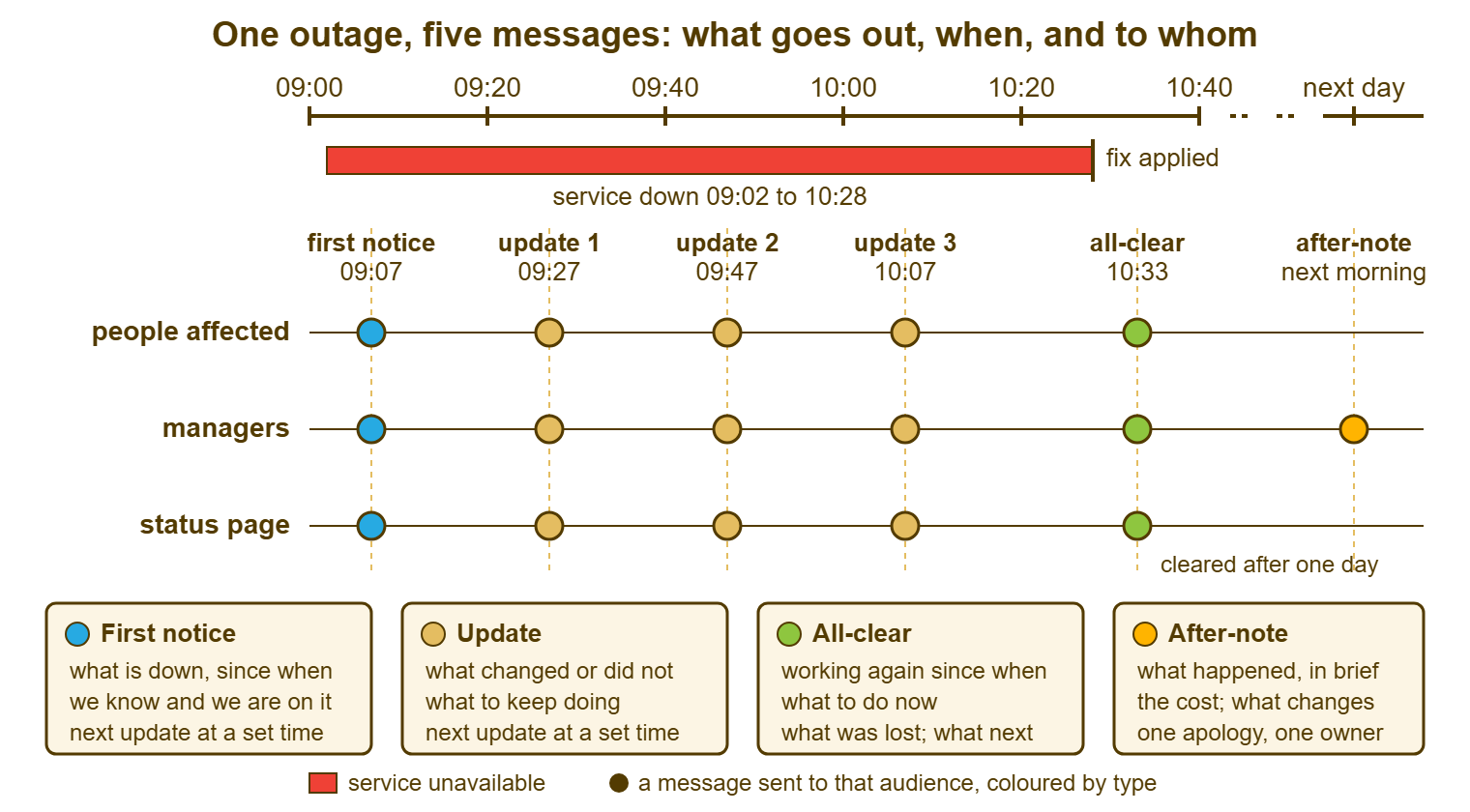
The desk's own team is not on the picture because it does not get updates. It gets the bridge, the shared call or chat where the fixer and the lead talk continuously. The updates are written from that bridge. If you run QuerySolv, write each update as an internal note on the incident ticket before it is sent. That way, the ticket's event history becomes the update log with the times already on it and the review has nothing to reconstruct. The log matters at the end of the day more than it seems at 09:50, because the cadence of the next outage is set by reading what this one's cadence cost.
What Every Update Contains
Every update has the same six parts, in the same order, so the reader can find the one line they want without reading the rest. First, the update number and the time: "Update 3, 10:07". Second, what has changed since the last one, or the words "no change". Third, what the desk is doing now, as a fact rather than a hope: "working with the supplier on the database" rather than "expecting the supplier to resolve it". Fourth, what the reader should keep doing, which is usually the workaround restated in one line, or a change to it. Fifth, an estimate, only when the desk would bet its afternoon on it, with a margin and the words "either way". Sixth, the time of the next update. Six lines. The shape never changes, and the shape is what makes a message written in ninety seconds at minute sixty read as calm.
Number the updates and keep the subject line stable, because the numbers tell the reader at a glance whether they have missed one. "Update 3: order system, 10:07, next 10:27" is a subject line that sorts next to "Update 2" and says everything a phone notification can show. A person who sees "Update 3" and remembers reading "Update 1" knows to look for the second. A person who reads them out of order can put them back. The number also tells the desk, at the review, how many messages the outage took. That is a measure of its length that managers understand better than minutes.
Put what changed first, because that is what the repeat reader is looking for, and because the sentence after it is the one that gets skipped. A reader who has seen two updates reads the third for the difference. If the difference is on line two they find it in a second. If it is buried after a paragraph of reassurance they phone to ask whether anything has changed. "No change" on line two is not a failure of the message. It is the message, and it is the most useful two words in the outage for the reader who was wondering.
Give an estimate only when it is a fact about work remaining, never when it is a hope about diagnosis. "The fix is being applied; we expect the system back by 10:25; next update at 10:25 either way" is an estimate the desk can stand behind. That is because the fix is known and the remaining step has a known duration. "We expect this to be resolved within the hour" at minute fifteen, with no cause, is a guess with a deadline. The desk will spend minute sixty-one explaining it. The discipline of honest estimates, and what to do when a given one slips, is the subject of Honest ETAs. During an outage the rule compresses to "either way" on every time you ever give.
Remember: the interval is set by the severity band and kept with a "no change" message as readily as with news. Every update ends with the time of the next one. An update that changes what people should do goes out now, restarts the clock, and says so in the subject line.
The Update That Says Nothing Has Changed
The no-news update exists to say that someone is still there, and for the people affected that is its entire content. "Update 3, 10:07. No change; the account system is still unavailable in all branches. We are working with the supplier. Keep using the paper application form. Next update at 10:27." It is written in under a minute from the same six parts with the second one filled in by two words. The lead's version of this message and the three substitutes for content to avoid are in the lead's routine article. What this article adds is that the no-news update reads differently to each audience. The difference is in what has been ruled out.
To the people affected, "no change" is enough, because what they need is the next time. To their managers, add one line of what has been eliminated: "we have ruled out the network and the branch machines". A manager who can say "it is not our end" to a regional director has been given something to do with the message. To senior management, the no-news message is the hourly summary with "no change" in the state line and a sentence on the decision that may be coming. For example: "if the supplier has not restored service by 11:30 we will recommend opening on paper for the day". To people outside, the no-news message is the same as the last one with a new time, because they are not reading for progress. They are reading for whether to try again.
Never skip a no-news update to avoid "bothering people". The people affected are already bothered; the outage saw to that. What they want from the desk is to know that it has not gone away. The update at 10:07 that says nothing has changed is exactly how they know. A desk that sends the no-news update on time is a desk that will be believed at 10:27 when it says the fix is in. A desk that waited "until there was something to say" has, by 10:27, been replaced in the branches by whatever the regional director heard in a corridor.
When the Cadence Has to Change
Slow the cadence when the outage settles into a long one, and announce the change in the update that makes it. By the third hour of a top-band outage with a working workaround, twenty-minute messages are being filed unread. At that point, the useful rhythm is hourly. It comes with the promise that any change in what people should do comes out of cycle. "Update 9, 12:00. No change. We are moving to hourly updates from now; the next is at 13:00, and we will send one sooner if anything you need to do changes." The reader is told the clock has changed, told the new time, and told the exception. That way, the quieter afternoon does not read as the desk going home.
Speed it up again when the fix is close, because the last twenty minutes of an outage are when people most want to know whether to start the restart. When the fixer says the fix is being applied, the update says so and shortens the interval to the estimate: "next update at 13:25 either way". When the fix is in and the desk is waiting for the second confirmation, a short message that the all-clear is minutes away is worth sending. That message stops the branch starting the afternoon's paperwork on paper when the system is about to come back.
If the outage will run into the evening, send an end-of-day message that says what happens overnight, who is watching, how the morning will start, and when the next message will come. That is usually a fixed time the next morning. The person sending the updates may change at that point. The handover of the message thread, the clock and the status page is the same handover as any other shift's. It has the same written list. The morning message is written before people arrive, says the state as of that minute, and resets the clock for the day. An outage that runs overnight with no evening message produces, at 08:00, exactly the phone calls the first notice was sent to prevent, from people who have had twelve hours to wonder.
The Update That Changes What People Should Do
An update that changes the workaround goes out the moment the change is known, not at the next scheduled time. The clock restarts from it. "Stop using the paper form; the system is accepting applications again but may be slow" is a sentence that must be read by everyone on the floor within a minute of being true. Every form filled in after that moment is work someone will have to key in twice. An update like this gets the word "ACTION" at the front of the subject line, the instruction in the first sentence, and the explanation second. That way, a person reading on a phone between customers gets the instruction before the screen cuts off.
These are the only updates that justify every channel at once. The scheduled no-news update goes through the usual two or three doors. The action update goes through the phone tree and the supervisor's whiteboard as well, because the cost of one branch not hearing it is a morning of double-keying. The channels and the matrix that says which doors each kind of message uses are in Choosing the Channels for Outage Messages. The cadence article's contribution is only that the action update does not wait for the clock, and that the clock starts again from it.
The table below puts the intervals by severity band and audience on one page. Treat the minutes as starting points to be adjusted after the first outage runs on them. Write your own version into the playbook. That is because an interval that is not written down is reinvented at minute five by whoever is on the desk, under the gaze of a branch manager with a queue.
| Severity band | What it looks like | People affected and their managers | Senior management | People outside | Status page |
|---|---|---|---|---|---|
| Critical | Everyone, or a customer-facing site, cannot work; money, customers or safety involved | Every 15 to 20 minutes; sooner when what to do changes | Summary hourly, and at every milestone: cause found, fix timed, fix in, all-clear | At every change in what they should do, and at least hourly | Every message, and the clear-down after the all-clear |
| Major | One team cannot work, or everyone is slowed with a workaround that works | Every 30 minutes | At milestones only; first notice forwarded at the start | Only if their service is affected; at changes | Every message |
| Minor | A few people inconvenienced; a workaround that costs little | Hourly, or at the next change, whichever is first | None, unless it lasts past the day | None | The entry and the all-clear |
| Any band, after two or three hours | The outage has settled; the workaround is in use | Move to hourly and say so; action updates out of cycle | Hourly summary with the decision that may be coming | Hourly, same words, new time | Every message; the end-of-day entry |
| Any band, fix being applied | The cause is known and the fixer is applying it | Shorten to the estimate, "either way"; then the all-clear | One line: fix in progress, all-clear expected by | Same as the people affected | State changed to Watching when the fix is in |
A Short War Story: The Buried Update at Kestrel Payroll
Kestrel Payroll lost its payroll processing system at 08:30 on the morning the month's payroll ran. Jonas on the desk, determined not to be accused of silence, sent an update to every member of staff every ten minutes for three hours. Each one was three paragraphs long, and most of them said nothing had changed. By 10:00 the payroll clerks had set up a mail rule that moved the updates into a folder unread. The finance director had asked, in person, to be taken off the list. At 11:10 the supplier restored the system with one condition, that the batch half-processed at 08:30 must not be re-run. Jonas sent that instruction as update nineteen, in the same shape and the same subject line as the eighteen before it. It went into the clerks' folder with the rest. Two clerks re-ran the batch at 11:20. The review counted a day of reconciliation and roughly two hundred duplicated payments to be reversed with the bank. It also found a finance director who now reads outage messages because the desk sends her one an hour. Kestrel's cadence table has three rows and a line in bold under it. The line says an update that changes what people must do gets the word ACTION in the subject and goes out on every channel, once. The cost of sending too much was not the time it took to write. It was that nobody could find the one that mattered.
The Cadence Table and the Update Message
The template below is two things on one page: the cadence table with blanks for the intervals the organisation chooses, and the update message with its six parts. Fill in the intervals once, on a quiet afternoon, and the update message during the outage, in under a minute each time. The subject-line forms at the bottom are the ones to keep stable across the whole outage. That way, the messages sort together and the action update stands out from the rest.
UPDATE CADENCE — ONE PAGE
Organisation: ______________________   Owner: ______________   Reviewed: ________

SEVERITY BANDS AND INTERVALS
  Band       What it looks like                    People affected   Senior mgmt    Outside
  Critical   ______________________________        every ____ min    hourly summary every ____
  Major      ______________________________        every ____ min    milestones     at changes
  Minor      ______________________________        every ____ min    none           none
  After ____ hours in any band: move to hourly and say so in the update.
  Fix being applied: shorten to the estimate, "either way", then the all-clear.
  Overnight: end-of-day message by __:__; morning message by __:__.

THE UPDATE MESSAGE (same six parts every time)
Subject: Update __ : ____________________ ; __:__ ; next __:__

1. Update __, __:__.
2. Since the last update: ______________________________________________
   (what changed, or "No change: ____________ is still unavailable.")
3. What the desk is doing now: _________________________________________
   (a fact about work, not an expectation)
4. Please keep: _______________________________________________________
   (the workaround, restated in one line)
5. Estimate: ________________ , either way.   (only when the fix is being applied)
6. Next update at __:__, whether or not anything has changed.
-- ____________, help desk

VERSIONS OF THE SAME UPDATE
  Managers:       add "Ruled out so far: ______________________."
  Senior mgmt:    state in one line; ruled out; decision that may be coming:
                  "If ____________ by __:__, we will recommend ____________."
  Outside:        "____________ is still unavailable. ____________ (what to
                  do). Next update at __:__."

THE ACTION UPDATE (out of cycle; every channel; restarts the clock)
Subject: ACTION: ____________________ ; __:__
  ____________________________________________ (the instruction, first)
  Because: ____________________________________________ (one line)
  Next update at __:__.

THE CADENCE-CHANGE LINE (put in the update that changes it)
  "We are moving to ________ updates from now. Next at __:__. We will send one
   sooner if anything you need to do changes."
Lena's answer at Bluewater, at 09:50, was three clocks. The branch managers and their staff got updates every twenty minutes. The operations director got hourly updates with the ruled-out line and the decision that might be coming. The call centre lead got updates only when the workaround changed, with "ACTION" at the front when it did. The account system came back at 11:40. The director's three summaries were the only outage messages she read that year, and she said so. The call centre got two messages in two hours and acted on both. The branch managers got six, five of them saying no change, and phoned the desk once, at 09:21, before the first one had arrived.
Frequently Asked Questions
How often should we update users during an outage if we have no policy yet?
Is it really better to send an update that says nothing has changed?
Senior management complain about too many messages. Should we stop sending them?
What do we do when the outage runs past the end of the working day?
When is it safe to give an estimated fix time?
How do we make sure the one update that changes what people should do is actually read?
From the QuerySolv team: we build self-hosted help desk software for Windows. QuerySolv runs as one Windows service on your own network. It takes requests by web form, e-mail, live chat, social messages and REST API. It is licensed once per installation rather than per agent per month. The free trial runs the full product for 30 days.