
The Lockout That Keeps Coming Back Every Twenty Minutes
Tuesday, 09:10, at Harbourview Clinic. Fatima, a nurse on the day ward, is locked out of the clinical system for the third time since eight o'clock. Jonah, on the desk, unlocks the account for the third time. With the patience of a man who has said it twice already, he says, "That should be you sorted now." It is not. At 09:31 the ticket comes back: "Locked out AGAIN. I have not touched anything. I was with a patient." Fatima has not typed her password once since the second unlock. She is, as far as she can tell, being locked out by the building. Jonah is beginning to suspect the directory is broken, which it is not. Fatima is beginning to suspect Jonah, which is unfair but understandable. Neither of them has yet asked the question that would end it: "Did you change your password yesterday?" She did. The computer made her.
A recurring lockout is an account that locks again shortly after being unlocked, without the person typing anything wrong. This happens because something else is trying their old password on their behalf. It is the most irritating ticket in the password family, for the person and for the desk. It is also the most mechanical. There is always a device, it is always one of a short list, and it can always be found. This article is part of our Password & Lockout Tickets series, and it is the one about finding the device.
It starts with what a lockout is and why it exists, then why it comes back. Next come the six places the old password hides, with a picture, and the diagnostic order, most likely first. Then comes how to ask the person without blaming them, and reading the sign-in record from the defender's side. After that: the stubborn case, what not to do, and a short war story. It ends with the lockout diagnostic sheet.
What a Lockout Is and Why It Exists
A lockout is the directory refusing all sign-ins to an account, right password or wrong, because too many wrong attempts arrived in a short time. The lockout policy sets how many wrong attempts, in how long a window, and for how long the account then stays locked. It determines whether the account unlocks itself after a wait or waits for an administrator. The numbers vary from one organisation to the next and are set by whoever owns security. So this article does not give any; the shape is what matters. A handful of wrong attempts, close together, and the door shuts.
The lockout exists to stop guessing. Without it, a program could try passwords against an account all night, and some of them would eventually be right. With it, the program gets a few tries and the account closes, which is a good trade for the organisation and a nuisance for the person. It is worth saying this plainly to a locked-out user, once. They tend to experience the lockout as the computer being spiteful. In fact, it is the computer protecting the account from exactly the thing that is happening to it: wrong passwords arriving from somewhere.
Two actions follow from a lockout and they are not the same. An unlock clears the counter and reopens the account; the password is unchanged, and if the person knows it, they can sign in. A reset replaces the password with a new one. A lockout needs an unlock. It needs a reset only if the person has also forgotten the password. Resetting an account that merely needed unlocking makes the recurring lockout worse. Now there are two stale passwords in the world instead of one. The distinction is the first line on the diagnostic sheet. The article in this series on the reset itself starts from the same place.
Why It Comes Back
The lockout comes back because the thing that caused it was never the person. When Fatima changed her password at the prompt on Monday, every device and every saved session that held her old password was left holding it. Her phone's mail app tried to collect mail with the old password and was refused. It tried again a few minutes later, because that is what mail apps do. Each refusal counted as a wrong attempt. After a few, the account locked. Jonah unlocked it, which reset the counter to zero and told the phone nothing. The phone, which had not been consulted, tried again. The account is not being attacked. It is being helped, by a device doing exactly what it was told to do last month.
The interval between unlock and relock is a clue, and the diagnostic sheet asks for it. A lockout that returns within a few minutes is something that retries often: a mail profile on a phone, a saved session that reconnects on its own. A lockout that returns at the same time every day is something on a schedule: a task, a service, a backup job, a tablet that wakes once an hour. A lockout that returns only when the person arrives at the office, or only when they go home, points to a particular machine. Something connects when that machine is switched on. It is usually the second machine or the mapped drive on it. The pattern does not name the device, but it narrows the list before you have asked a question.
The other clue is the change. Almost every recurring lockout follows a password change within the previous day or two. The change is often one the person does not think of as something they did. The system prompted them and they complied. "Did you change your password recently?" gets "no" more often than it should. "Did the computer ask you to choose a new password this week?" gets the truth. Ask the second question.
The Six Places the Old Password Hides
There are six places an old password keeps living after a change, and the picture below draws them around the account they keep locking. The phone's mail app is the first and by far the most common: it has the old password saved and retries on its own. A second machine still signed in somewhere is the second. It might be a laptop at home, a desktop in another office, or a machine the person forgot they had. A saved session is the third, a browser or an application that remembered the password and offers it again when its session expires. A mapped drive or a printer connection with a saved credential is the fourth, and it tries the old password every time it reconnects. A forgotten tablet, in a drawer or a car, still checking its mail, is the fifth. The sixth is a scheduled task or a service. It is something set up to run as the person's account with their password typed into it. This is rare for an ordinary user and common for a technical one.
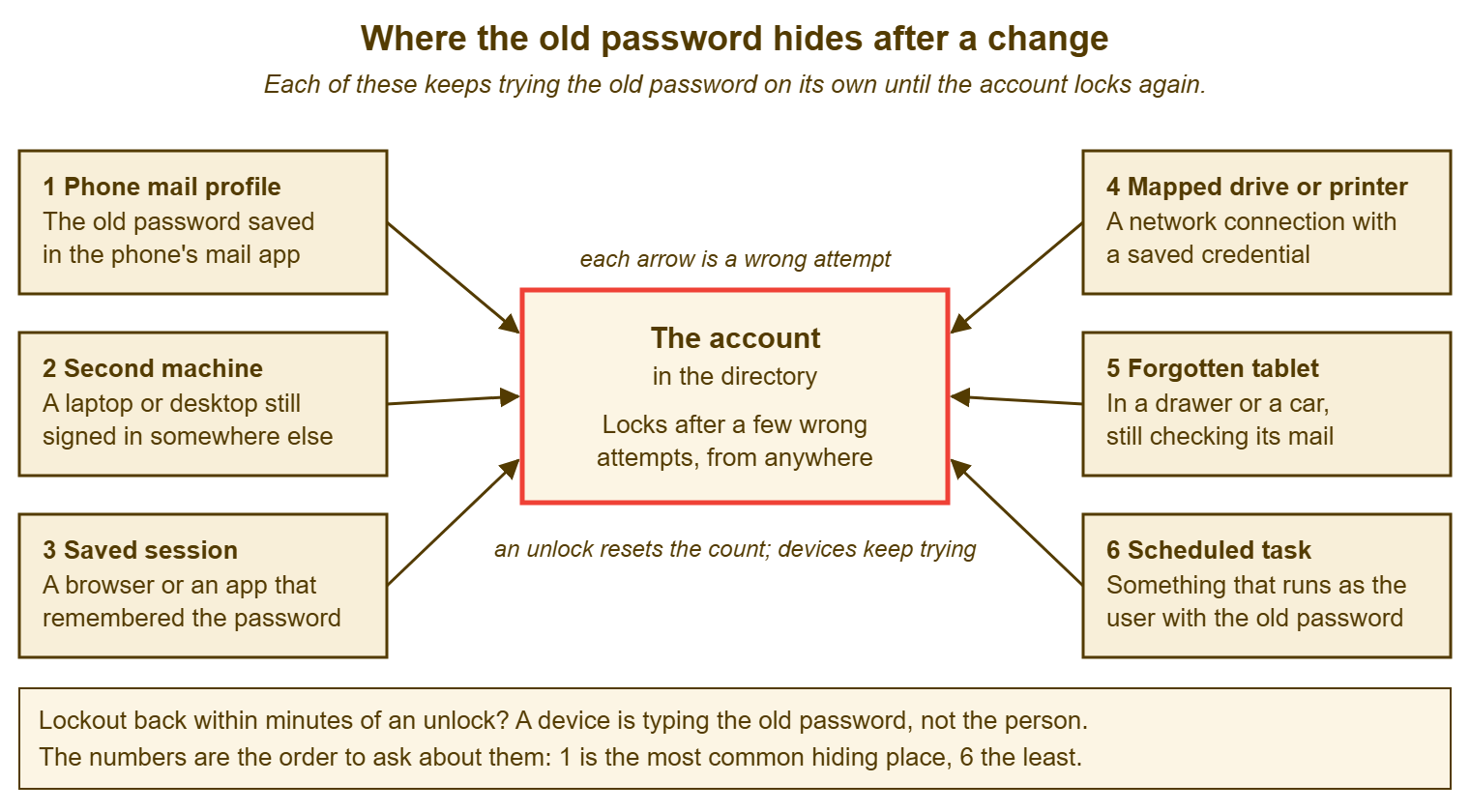
Every arrow in the picture is a wrong attempt counted against the person, and the person has typed none of them. That is the whole mechanism, and it is why unlocking does nothing lasting. The unlock resets the count, the devices keep trying, and the count climbs back. The only fix is to find each device holding the old password and give it the new one, or sign it out, or switch it off. The table below is the same six places with the tell-tale sign for each and the fix, in the order the next section explains.
| Hiding place | How it tries the old password | Tell-tale sign | The fix |
|---|---|---|---|
| 1. Phone mail profile | Retries every few minutes to collect mail | Relocks within minutes; phone "keeps asking me to sign in" | Enter the new password in the phone's mail account, or remove and re-add it |
| 2. Second machine | Reconnects to mail, drives and services when switched on | Relocks when the person arrives, goes home, or at a fixed time | Sign in on that machine with the new password, or sign it out and restart it |
| 3. Saved session | A browser or app offers the remembered password when its session expires | Relocks at irregular intervals, often during the working day | Sign out of the app or browser profile; clear the saved password; sign in again |
| 4. Mapped drive or printer | Reconnects with a saved credential at sign-in or when first used | Relocks shortly after the person signs in each morning | Remove the saved credential for the share or printer; reconnect with the new password |
| 5. Forgotten tablet | Wakes on a schedule and checks mail | Relocks hourly or at odd hours; the person "doesn't have a tablet" until reminded | Find it; update the mail account or wipe the profile; if lost, treat it as a lost device |
| 6. Scheduled task or service | Runs at its set time as the user's account | Relocks at exactly the same minute daily; the person is a technical user or an administrator | Update the stored credential on the task or service, or move it to a dedicated account |
The Diagnostic Order, Most Likely First
Check the six places in the numbered order, because the order is by how often each one is the cause and by how cheap it is to check. The phone is first because it is the cause more often than the other five together on most desks. The question also takes ten seconds: "Do you get your work e-mail on your phone? Has it asked you to sign in since yesterday?" The second machine is next, because people who work in more than one place forget the other place exists. The saved session is third. It is common, but it takes a moment longer to find. The person has to think about which applications they stay signed in to. The mapped drive and printer are fourth, cheap to check but less often the cause since many organisations connect those without a separate saved password. The tablet is fifth because it is rarer and because the person usually has to go and look for it. The scheduled task is last for an ordinary user. It is first for an administrator, a developer or anyone who has ever set something up to "run as me". So ask what the person does before you decide where to start.
The order is also the order of embarrassment, which matters more than it sounds. Nobody minds being asked about their phone. Being asked whether they left themselves signed in on a machine in the old office is a slightly harder question. Being asked whether they once typed their password into a scheduled task on a server is harder still. Some people would like a moment to prepare for that question. Starting with the phone gets the common case solved in a minute, and gets the person on the desk's side before the harder questions arrive.
Stop at the first device you find and fix it, then wait for the next lockout window to pass before declaring the job done. If the lockout was returning within five minutes and twenty go by without it, you have found the device. If it comes back, there is a second device. This is more common than you would hope: a phone and a tablet, or a phone and a laptop at home, both holding the old password. Carry on down the list. Do not go back to unlocking and hoping. Hope is not on the sheet.
Asking Without Blaming the Person
The person with a recurring lockout has been locked out three times and has done nothing wrong that they know of. The desk has already told them twice that it is fixed. They arrive at the third conversation braced to be told it is their fault. It is not their fault, and the questions have to be worded so that this is clear. A person who feels accused stops volunteering information. The information is the only way to find the device. "Did you leave yourself logged in somewhere?" is an accusation with a question mark. "Which other devices have your work e-mail on them?" is a question.
Say what is happening before you ask anything, in one or two sentences the person can picture. "When you changed your password on Monday, anything that had the old one saved, your phone for instance, keeps trying the old one, and after a few tries the system locks the account to protect it. So I'm not looking for something you did wrong; I'm looking for a device that doesn't know yet." Most people relax immediately, and a fair number say "oh, my phone" before you have asked. The explanation costs fifteen seconds and replaces three more unlocks.
Then ask the six questions in order, as questions about devices rather than about behaviour: "Do you get work e-mail on your phone?" "Do you use another computer, at home or in another office?" "Is there an app or a website you stay signed in to for work?" "Do you have a drive letter or a printer that asks for a password?" "Any tablet, old or new, that has ever had your work e-mail on it?" "Have you ever set anything up to run under your account on a schedule?" The person will not know the answers to all six and does not need to. They need to know you are asking about the furniture, not about them. (The furniture is guilty. It usually is.)
Reading the Sign-In Record
When the questions do not find the device, the directory can. Every time an account fails to sign in, the directory records the failure. The record usually includes the name of the computer or the service that sent the attempt and the time it arrived. Opening that record for the locked account shows where the wrong attempts are coming from. The operating system's built-in tools and most directories allow an administrator to do this. The source might be a computer name the person recognises as their old laptop. The mail service's own name means a phone or tablet behind it. A file server's name means a mapped drive. A server the person has never heard of means a scheduled task that somebody set up for them. The times tell you the retry interval, which confirms which of the six it is.
This is the defender's view of the account, and it should be read as such. The record exists so that someone can see what is happening to an account. For a recurring lockout it is the fastest route from "something keeps trying" to "this thing keeps trying". It is also the point at which the desk's job and the security function's job meet. The ticket stops being a lockout ticket if the failed attempts are coming from a source nobody can explain. The same applies if they come from outside the organisation or from a machine that should not exist. It becomes one of the security tickets the desk will see. It goes to whoever owns security, and the desk does not keep unlocking the account while it waits. An unexplained source is rare. It is also the only reason not to treat a lockout as routine, so check.
Describe the step rather than the clicks when you write it into the knowledge base. The clicks change with releases and the step does not: "open the account's record of failed sign-ins, note the source name and the times, and match the source to one of the six places". A junior technician given that sentence and the table above can find the device in most cases without help. A junior technician given a screenshot of last year's dialog box cannot.
The Stubborn Case
Some lockouts survive all six questions and the sign-in record, and they have a short list of causes of their own. The account may be shared, so that the device holding the old password belongs to a colleague who was never told it changed. The account may be used by a kiosk, a meeting room screen or a piece of equipment that signs in as a person. In that case, nobody set it up with an account of its own. An old phone may have been handed to a family member with the work mail profile still on it. That is a lost-device matter as much as a lockout one and is handled as Lost and Stolen Devices describes. Or the record shows the source but the person genuinely cannot find the device, because it is in a car two hundred miles away.
The last resort, when the device cannot be reached, is to change the password again. Do this while every device the person can reach is switched off or signed out. Then bring them back one at a time with the new password. Let the unreachable device keep failing until it can be dealt with. This works because a device offering a stale password cannot lock an account under the following conditions. Its lockout count has been cleared, and it is not receiving other wrong attempts for long enough to matter. This does not work forever, and the unreachable device still has to be found or wiped. Write the plan into the ticket, with the device named, and set a follow-up. A stubborn lockout left half-solved is a ticket that comes back next Monday with a new number and the same person, more tired.
The ticket itself should carry the history. The third unlock should not look like a first one to whoever picks it up. Link the earlier lockout tickets to the current one, or merge them. Write the recurrence on the ticket in a sentence: "third lockout since the change on Monday, returns within five minutes, phone updated at 10:15, now watching". If you run QuerySolv, linking the earlier unlock tickets to the current one makes the pattern visible to the next technician before they unlock a fourth time. The ticket's event history already holds the times of each unlock. In any tool, the sentence on the ticket does the same job, provided somebody writes it.
Remember: an unlock treats the symptom. The device holding the old password is the cause, and it will lock the account again until it is found. Find the device before you unlock a third time.
What Not to Do
Do not raise the lockout threshold for one person, or switch the lockout off for them, to make the ticket go away. The threshold is a security setting. It belongs to whoever owns security. Loosening it for the person whose account is currently receiving a stream of wrong passwords is loosening it for exactly the account where it is doing its job. The stream is a phone, this time. The policy cannot tell the difference, which is the point of the policy. Do not turn the lockout off. Not for a director. Not for "just until we find it".
Do not reset the password as a reflex when the account only needed unlocking. A reset creates a second stale password in every device that had the first. The person now has to remember a temporary password and choose a new one while their phone is still trying last week's. They are in a worse position than before the call. Unlock first. Reset only when the person does not know the password. When you do reset, do it the way the reset article describes, with the warning about devices built in.
Do not tell the person to wait it out. A policy that unlocks the account automatically after a period will indeed unlock it. The phone will lock it again. The person will spend the day in a cycle of brief access and long waits while believing the desk has given up on them. And do not close the ticket on the unlock. Close it when the lockout has not returned for long enough to be sure, which is a follow-up and a sentence on the ticket, not a feeling. A closed ticket that reopens an hour later is the desk telling the person it was not listening.
A Short War Story: The Tablet in Bay Four at Bellweather Logistics
Bellweather Logistics was a haulage firm with a depot desk of two. The night shift supervisor, Grzegorz, found his account locked at ten past six every morning for three weeks. The desk unlocked it every morning, nineteen times in all. Each ticket had a note that said "unlocked" and nothing else. Each unlock took a few minutes. The dispatch run that depended on his sign-in started late on two of the mornings. By the third week the depot manager was asking whether the directory needed replacing. A new technician, Priya, opened the account's failed sign-in record on her second day. She saw that every attempt came from a tablet named after a forklift. The attempts arrived at six o'clock when the forklift's charging dock woke it. She found the tablet in bay four. Its dispatch app was signed in under the password Grzegorz had changed three weeks earlier. The cost was about ten hours of desk time, two delayed dispatch runs, and three weeks of a supervisor who had stopped trusting the desk. The lockout had been telling them the time every single day; nobody had asked what happened at ten past six.
The Lockout Diagnostic Sheet
The sheet below is the one Priya wrote afterwards and the desk now keeps beside the unlock procedure. Section one separates unlock from reset and captures the pattern, the interval and the date of the change, before anyone touches the account. Section two is the six questions in order, as questions about devices, with a box for the answer and a box for the fix. Section three is the sign-in record, for when the questions do not find it. Section four is what goes on the ticket so the next technician knows this is a recurrence and not a fresh lockout. Fill in section one on the first recurrence, not the third.
LOCKOUT DIAGNOSTIC SHEET — ONE ACCOUNT, ONE PAGE
Ticket: ________   Account: ______________________   Technician: ______________
Earlier lockout tickets for this account this week: ________  ________  ________  (link them)

1. THE PATTERN  (fill in before unlocking again)
   Does the person know the password?   [ ] yes -> unlock only   [ ] no -> verify, then reset
   Password changed or expired recently?  [ ] yes, on ______   [ ] no   [ ] not sure
   How soon after the last unlock did it relock?  ______ minutes / hours / next morning
   Same time each day?  [ ] yes, at ______   [ ] no
   Relocks when the person:  [ ] arrives   [ ] goes home   [ ] any time   [ ] not known

2. THE SIX QUESTIONS, IN ORDER  (ask about devices, not about behaviour)
   1. Work e-mail on a phone? ............ [ ] yes [ ] no   Fixed: [ ] updated [ ] removed
   2. A second computer, anywhere? ....... [ ] yes [ ] no   Fixed: [ ] signed in [ ] signed out
   3. An app or site kept signed in? ..... [ ] yes [ ] no   Fixed: [ ] signed out [ ] password cleared
   4. A drive or printer with a password? [ ] yes [ ] no   Fixed: [ ] credential removed
   5. Any tablet, ever, with work mail? .. [ ] yes [ ] no   Fixed: [ ] updated [ ] wiped [ ] lost: see lost-device procedure
   6. Anything set to run as this account? [ ] yes [ ] no   Fixed: [ ] credential updated [ ] moved to own account
   Stop at the first device found; wait one lockout interval; relock? [ ] no -> done  [ ] yes -> continue

3. THE SIGN-IN RECORD  (when the questions do not find it)
   Source name of the failed attempts: ______________________
   Interval between attempts: ______   Matches hiding place number: ____
   Source unexplained, external, or unknown machine?  [ ] yes -> STOP; hand to security; do not unlock again

4. THE TICKET
   One sentence on the ticket: "Lockout number ____ since change on ______; relocks within ______;
   device found: ______________; fixed at ______; watching until ______."
   Follow-up set for: ______   Closed only after no relock for: ______
Fatima's lockout, in the end, was her phone. The conversation that found it took about a minute once Jonah asked whether the computer had made her choose a new password that week. She updated the phone while he waited. The account did not lock again. The third unlock had taken two minutes. The question that made it the last one had taken ten seconds, and it had been available at the first.
Frequently Asked Questions
The person swears they have not changed their password. Can it still be a stale device?
How long should I wait after fixing a device before closing the ticket?
Should I unlock the account at all while I am still looking for the device?
Can the directory just unlock the account automatically after a while?
What if the device is a shared tablet or a kiosk that signs in as the person?
We see the same person locked out every few weeks. Is that the same problem?
From the QuerySolv team: we build self-hosted help desk software for Windows. QuerySolv runs as one Windows service on your own network. It takes requests by web form, e-mail, live chat, social messages and REST API. It is licensed once per installation rather than per agent per month. The free trial runs the full product for 30 days.