
Fixing Before the Ticket: The Idea and Its Limits
Tuesday, 09:15, at Northgate Retail. Priya is in the back office of the Hill Road store because the manager's laptop "froze during the morning sales report". This is the fourth ticket with those words this month. She knows before she sits down what she will find. And she finds it: three hundred and eighty megabytes free on the system drive, a cache folder that has quietly eaten twelve gigabytes. She also finds a user who has saved a copy of every weekly report to the desktop since she started. Twenty minutes later the laptop has forty gigabytes free and the manager has her morning back. On her way out Priya glances at the two other laptops in the back office, because she is there anyway. One has ninety gigabytes free. The other has two.
She cleans the second one too, leaves a note on the keyboard, and opens a ticket for it herself on the walk back to the car. That second laptop is the whole subject of this series. Nobody had reported it. In about a fortnight somebody would have, with the same four words, and Priya would have driven out again. Proactive remediation is fixing a fault you went looking for and found before anyone reported it. You use a signal that was visible in advance, on a schedule, with the fix written down. This article is part of our Proactive Remediation series. The series covers the handful of signals worth sweeping for, the sweeps themselves, and the hardware that warns before it dies. It covers the ticket patterns that become scheduled maintenance and the message to a user who never had a problem. It also covers the awkward business of counting tickets that never arrived.
It covers what a signal is and which ones precede tickets, then the sweep, which is the unit of proactive work. Next comes how a sweep differs from monitoring and from a scripted fix. The three limits follow: what a sweep cannot see, what it must not touch, and what it costs. Then the article covers where to start, the timeline that makes the case, a short war story, and the signal list to copy, in that order.
The Signals That Precede Tickets
A signal, in this series, is a condition you can read today that reliably turns into a ticket if nobody acts on it. Free space on a laptop's system drive is the plainest example. A drive with two gigabytes free is not a ticket yet, but it is a ticket in two or three weeks. The number was sitting there to be read the whole time. The ticket, when it comes, will not say "disk nearly full". It will say "laptop very slow", "can't save", "froze during the report" or "keeps restarting". And the technician will spend the first ten minutes translating.
Most desks have eight or ten signals of this kind, and they share three properties. They are visible before the ticket, by days or weeks rather than minutes, which is what lets you act on a schedule instead of on a phone call. They are cheap to read across every machine on the list, in under an hour, by a script or a walk-round. And they have a fix that is safe to do without being asked, or at least a notice that is. A condition with the first two properties and not the third is still worth knowing about; it ends in a conversation rather than a repair.
The common list is short enough to recite. Free space on system drives and on the shares people actually save to. Disk health warnings, which most drives report about themselves long before they stop. Battery wear on laptops. Certificates, licences and support contracts, every one of which carries its own expiry date in a field you can read a year ahead. Backup jobs that failed last night and will fail again tonight. Machines that have not restarted in weeks and are carrying a pending update like a stone in a shoe. Mailboxes and shared folders near their quota. And the quietest signal of all: the same ticket, from different people, three times in a month. That last one is read from the queue rather than from a machine. And the problem-management series in this library owns how to find it; the fourth article in this series picks it up from there.
What is not a signal is anything that goes from fine to broken in a minute. Examples are a server that stops responding, a switch that dies, an internet line that drops. Those are failures, not warnings, and no weekly look will catch them. The test is lead time. If the condition precedes the ticket by weeks, it is yours, and it has been waiting for you.
The Sweep: The Unit of Proactive Work
A sweep is a scheduled pass over a list of machines or systems, reading one or two signals, that ends in a short list of hits. That is the whole mechanism. Every Friday at ten, somebody on the desk runs the disk-space check against the laptop list. They get back the five machines under threshold and open a ticket for each. The sweep is not the fix. It is the look, done on purpose, at a time that was chosen rather than forced.
Every hit becomes a ticket before it becomes a fix, and this is the rule that turns a good habit into a working practice. A ticket makes the work visible on the same queue as everything else, so the desk lead can see where Friday morning went. A ticket gives the fix a record. When the same laptop is under threshold again in six weeks, somebody can see that it was cleaned in week one and ask why. And a ticket makes the work countable. A desk that prevents thirty tickets a month and cannot show it looks exactly like a desk that had a quiet month. The sweep ticket is raised by the technician, on behalf of a user who does not yet know they have a problem. It says so in the first line.
The sweep itself is usually a script, and the script is usually short. Here is the shape of a disk-space sweep in plain words. The real thing, in whatever shell or scripting language is built into the operating system, is about the same length. It does nothing the plain-words version does not. It reads, and it writes a list. It changes nothing on any machine, which is deliberate, because the sweep's job is to find. The decision about what to do belongs to a person reading the list.
SWEEP: FREE SPACE ON THE SYSTEM DRIVE (reads only; changes nothing)
for each name in machines.txt
    if name does not answer on the network
        write "name, offline" to sweep-report.csv
        continue with the next name
    free  = free bytes on the system drive of name
    total = total bytes on the system drive of name
    pct   = free divided by total, times 100
    write "name, free in GB, pct" to sweep-report.csv
sort sweep-report.csv by pct, lowest first
print the lines where pct is under the threshold
The output is a one-page list, and the list is what the technician acts on. Machines under threshold get a ticket and a cleanup, which is the subject of Disk-Space Sweeps. Machines marked offline get a second look next week and a note if they are offline again. A laptop that never answers has either left the building or been renamed. The report itself is attached to a single sweep ticket for the week, so the whole pass has a record even when it finds nothing. If you run QuerySolv, the script can raise the hit tickets itself through the REST API. Each one then lands in the same queue as everything else rather than in a spreadsheet nobody opens. Finding nothing is a result. Write it down.
How This Differs From Monitoring
Monitoring is software that watches a system continuously and raises an alert the moment a condition is met. A sweep is a person, or a script a person runs, looking at a list on a schedule. The difference is not quality; it is cadence and cost. Monitoring watches every minute and needs an agent on every machine, a server to collect from them, and thresholds to tune. It needs somebody to answer when it speaks, which it will do at three in the morning. A sweep looks once a week and needs a list, a script and an hour. Monitoring is a smoke detector. The sweep is the walk round the building on a Friday to check the detectors have batteries. The industry is very keen to sell you detectors.
Use monitoring for conditions that go bad in minutes and matter when they do. Examples are a server that stops answering, a service that has died, a disk on the file server filling at a rate measured in hours. Use a sweep for conditions that degrade over weeks and sit on devices monitoring does not reach. On most small desks that means every laptop in the building and a good share of the desktops. The two meet in the middle, and when they do the sweep should lose. A signal that starts producing tickets faster than the weekly look can catch has earned a monitor. The Monitoring to Ticket Integration series covers what happens next: the alert becomes a ticket like any other. Until then, the sweep is cheaper and the sweep is enough.
There is a second, quieter difference. Monitoring reports the condition it was configured to watch, and nothing else. A technician running a sweep looks at a list of machines and notices things. There is the laptop offline for four weeks, the one whose name is wrong, the desktop somehow running a server role. None of those is the signal being swept for, and all of them become tickets. The walk-round finds what the detector was never asked about.
How This Differs From a Scripted Fix
A scripted fix is a repair made repeatable: the ten commands a technician runs every time the print spooler jams, written once and run as one. Scripted fixes are about the repair. Proactive remediation is about the timing of the repair, which is before the report rather than after it. The two are often used together, since the thing a sweep finds is frequently the thing a script fixes, but they answer different questions. The script answers "how do we fix this quickly". The sweep answers "how do we fix this before anyone asks". The Scripted Fixes and One-Click Remediations series owns the first question in full.
The boundary matters most at the step between finding and fixing. In a sweep, that step is a person. The report lists five machines. The technician reads it, decides which to clean today, which to leave, which to telephone first, and opens the tickets. In self-healing, which that series also covers, the step is removed: the machine detects the condition and runs the fix itself. Self-healing is the right end state for a handful of well-understood, low-risk fixes. It is the wrong starting point for a signal you have only just begun sweeping. You do not yet know what else is going on on those five machines, and a script does not notice.
The honest sequence, then, runs sweep first, scripted fix second, self-healing last and only for some. Sweep a signal by hand for a month to learn what the hits look like. Script the fix once the hits are boringly similar. Most signals never get past that second step, and that is fine. The table below sets the four approaches side by side, because new desk leads are routinely sold the fourth before they have tried the second.
| Approach | When it looks | Who decides the fix | Best for | What goes wrong |
|---|---|---|---|---|
| Monitoring | Continuously | A person answering the alert | Servers, services, links; anything that breaks in minutes | Alert floods; nobody answers; laptops never covered |
| Sweep (proactive remediation) | On a schedule, daily to monthly | The technician reading the report | Conditions that degrade over weeks; every laptop and desktop | Skipped in busy weeks; hits not ticketed; nobody told |
| Scripted fix | When a person runs it | The technician who runs it | Repairs done the same way more than once a week | Run on the wrong machine; nobody reads what it did |
| Self-healing | The instant the condition is met | Nobody; the script decides | A few low-risk, well-understood fixes with a long record | Fixes the symptom forever and hides the cause |
The First Limit: What a Sweep Cannot See
A sweep sees what has a readable signal, and most of the queue does not. Examples are the user who cannot find the shared folder and the application that crashes on a document nobody had opened before. Another is the network that drops for ninety seconds at eleven every day. None of these announces itself in advance, and no list will find them. I have watched a desk lead, new to the idea, try to sweep for "slow". The report said every machine was fine on the day it ran, which was a Friday afternoon, when every machine is fine. Sweep for things that have a number. Leave "slow" to the people who feel it.
A sweep also cannot see a machine that is not there. Laptops at home, laptops in bags, desktops switched off at the wall by a cleaner: on the day of the sweep they return "offline". The signal on them goes unread. A sweep of sixty laptops that reaches forty has swept forty, and the report should say so. Over a month the offline list rotates and most machines are caught eventually. But the one never caught is exactly the one that lives in a bag and comes in on the day it fails. Accept the gap and know its size. A sweep is a sample.
And a sweep cannot see a signal that lies. Free space can hide a quota the user is about to hit. A battery that reports healthy can swell. A drive that passes its own health check can fail on Tuesday, because the check predicts most failures and not all of them. The lesson is not to distrust the signal; it is to treat a clean sweep as "nothing found", never as "nothing wrong". Those are different sentences, and the second one has a way of appearing in reports.
The Second Limit: What You Must Not Touch Uninvited
The sweep may read freely. It may change only what the user has agreed to in advance or what the desk's own standards say is the desk's to change. Reading a laptop's free space is observation. Deleting a folder on it is an intervention in somebody's working day, and trying to help does not change whose folder it was. The safe list is short and should be written down. It includes temporary files the system itself created, caches that rebuild themselves, update leftovers, log files past their retention, the recycle bin after a notice. The unsafe list is everything else, starting with the user's own files, wherever they have put them.
Do not clean a user's Downloads folder uninvited. Not once. Not "just the installers". The folder is theirs. The installer may be the only copy of the licensed tool they fought procurement for. And the twenty gigabytes of recordings are the training course they were asked to produce. Where the signal says the space is in the user's files, the sweep's output is a notice and a conversation rather than a deletion. Telling Users Before They Notice is about how that message is written so it lands as help rather than as an inspection.
Changes to shared systems have a second gate. Renewing a certificate, extending a share, restarting a service that forty people are using: these go through whatever the desk uses to record changes. They get a time, a rollback and a name, however light that record is. A sweep that finds a certificate expiring in three weeks has found a change to schedule. It has not found a fix to make at eleven on a Friday because the report said so. What the sweep gives you is the luxury of planning. Spend it on planning.
Remember: a sweep reads everything on the list and changes only what the signal list says is safe to change without asking. Every hit becomes a ticket before it becomes a fix, and a clean sweep means "nothing found", never "nothing wrong".
The Third Limit: What It Costs
A sweep costs the hour it takes, and that hour comes out of the same week as the queue. On a desk of two, an hour on Friday morning is a real price, and the question of whether it pays is not rhetorical. Here is the arithmetic for a fictional desk, in ranges, because a point estimate here would be a guess wearing a tie. Sixty laptops; a disk-space sweep that takes forty-five to ninety minutes including the cleanups; two to five hits a week. Each hit, left alone, would have become a ticket costing the desk one to two hours by the time it was reported, diagnosed, driven to and fixed. It would have cost the user half a day of a slow or dead machine on top. The desk spends about an hour and gets back two to ten. The users get back one to two and a half working days between them, which the desk's numbers do not show and the users' managers notice anyway.
That arithmetic only holds while the sweep finds things. A signal that has produced nothing for six sweeps is costing an hour a week to confirm that it is fine. It should be moved to monthly or retired until it earns its place back. A signal producing ten hits a week has outgrown the sweep and is telling you something about the fleet. In that case, the finding is usually that the standard build has too small a drive or one application leaks. Both signal patterns are findings, and the hits-per-sweep number is the first thing to look at each month. The proper way to count what the sweep saved, in ranges and without flattering yourself, is in Measuring the Tickets That Never Arrived.
Where to Start: One Signal, One List, One Hour
Start with free disk space on laptops. It is the signal with the longest lead time, the cheapest read, the safest partial fix and the most recognisable ticket at the other end. Nearly every desk already has the "laptop very slow" tickets to prove the need. Nearly every desk lead can be persuaded to spend one hour a week against a ticket type they can see in last month's numbers. Save the hardware signals for month two and the pattern work for month three. Starting with the hardest signal is how proactive work gets tried once and abandoned.
You need a list of machines, and the list is the harder half. Most small desks have no asset system. The sweep's machine list is whatever can be assembled from the directory, the ticket history and a walk round. That is fine as long as it is one list, kept in one place, with a column for who has the machine. Thirty names in a spreadsheet beats a plan for an asset database. Start with the list you can make this afternoon, and let the sweep correct it. Every "offline" that stays offline for a month is a row to check. And every machine that turns up in a ticket but not on the list is a row to add.
Put the hour on the rota, not on a person. "Friday, 10:00, disk sweep" on the desk's shared calendar, rotating through whoever is on the desk that week, survives holidays and resignations. "Priya does the sweep" survives until Priya is busy, which is next Friday. The whole pass, from running the script to attaching the report to the week's sweep ticket, should fit in the hour. If it does not, the list is too long or the threshold is too generous, and either is easy to change. After four sweeps, look at the reports together. Hits per sweep should be falling, and "laptop very slow" tickets from listed machines should be nearing zero. Any machine that appeared twice is a sizing problem or a leaking application rather than a cleanup. Then add the second signal. Not before.
The Timeline That Makes the Case
The whole argument for proactive remediation fits on one timeline. It is worth drawing for anyone who asks why the desk spends Friday mornings looking at machines nobody has complained about. On day one, a laptop's free space drops under the threshold. Nothing happens; the user notices nothing. On day four, the weekly sweep lists the machine. The technician opens a ticket and runs the safe cleanup, and the space comes back in twenty minutes. On day five the user gets a two-line note saying so. On day fourteen, which is roughly when the drive would have filled, nothing happens either, because there is nothing left to happen. Below that is the same laptop without the sweep: the same signal on day one. Two weeks of slowing down follow, which nobody raises because it is never quite bad enough. A "laptop frozen" ticket arrives on day fourteen with a morning's work lost. The fix on day fifteen is done in a hurry with the user watching. Same fault, same fix, same twenty minutes of technician time. The difference is a lost morning and a ticket, and both were optional.
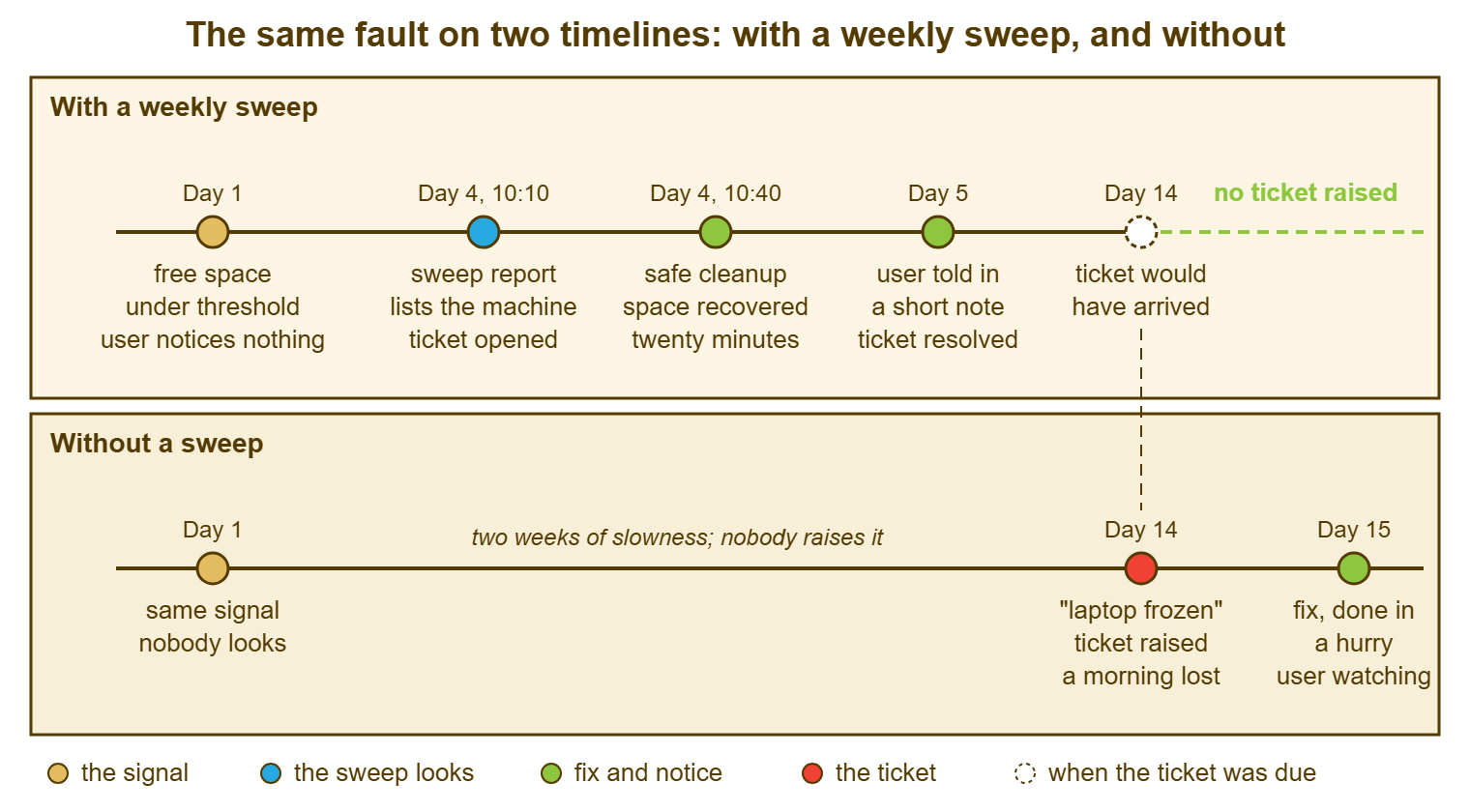
The picture is also honest about what it does not show. The sweep costs an hour that the lower lane does not spend. The cleanup on day four was done to a machine whose user had no complaint, and had to be explained. And the dashed line on day fourteen is an estimate. Some drives fill in a week and some take a month, which is why the measuring article insists on ranges. None of that changes the shape.
A Short War Story: The Certificate at Redbrook Engineering
Redbrook Engineering ran its design software against a licence server in the office. The licence server identified itself to the engineers' workstations with an internal certificate. Somebody had issued it, with a one-year life, during a quiet week the previous summer. On a Monday at 08:00 the certificate expired, and the design tool on forty workstations refused to talk to the server. Owen, the one technician in that morning, spent three and a half hours finding out why. The error on the workstations said "connection refused" and nothing anywhere said "certificate". The fix, once he had it, took eight minutes. The cost was about a hundred and forty engineer-hours of a Monday morning and a drawing package that missed a client deadline by a day. And the review noted that the expiry date had been readable in the certificate's own properties for the whole of the preceding year. It was in a field labelled "expires", which the report described as "insufficiently prominent". The desk now keeps a renewals list with every certificate, licence and support contract on it. The desk sweeps the list on the first working day of each month and opens a ticket for anything due inside ninety days. A date you can read a year in advance is a signal. And the only thing Redbrook had been missing was a list to write it on.
The Signal List
The template below is the desk's register of what it looks for, how often, and what it is allowed to do when it finds something. Fill in one block per signal, starting with the one you will sweep first, and leave the rest blank until they have earned a line. A list of fifteen signals nobody sweeps is a list of good intentions. The three tests at the top are the admission rule, and the rules at the bottom keep the practice honest. Keep it to a page, where the rota can see it.
THE SIGNAL LIST — ONE PAGE
Desk: ______________   List owner (role): ______________   Last reviewed: ________

A SIGNAL EARNS A LINE ONLY IF ALL THREE ARE TRUE
  [ ] it is visible days or weeks before the ticket it precedes
  [ ] the whole machine list can be read for it in under an hour
  [ ] the fix is safe to do uninvited, or a notice to the user is

SIGNAL 1: free space on the system drive
  Read from: the sweep script, against machines.txt
  Threshold: under ____ GB or under ____ percent, whichever comes first
  Usual lead time: one to three weeks     Swept: weekly, Friday 10:00
  On a hit: open a ticket; run the safe cleanup; send the notice
  Safe to change uninvited: system temporary files, caches, update leftovers
  Never without asking: the user's own files, wherever they are
  Runbook: RB-____   Owner (role): ______________

SIGNAL 2: ___________________________________________________
  Read from: ______________________   Threshold: ______________________
  Usual lead time: ____________        Swept: [ ] daily [ ] weekly [ ] monthly
  On a hit: ______________________________________________________________
  Safe to change uninvited: ______________________________________________
  Never without asking: __________________________________________________
  Runbook: RB-____   Owner (role): ______________

SIGNAL 3: ___________________________________________________
  (the same seven lines)

CANDIDATES NOT YET ON THE LIST (and which test they fail)
  ______________________________   fails: [ ] lead time [ ] cheap read [ ] safe fix
  ______________________________   fails: [ ] lead time [ ] cheap read [ ] safe fix

RULES
  Every hit becomes a ticket before it becomes a fix.
  Read freely; change only what the signal's "safe" line allows.
  A clean sweep is recorded as "nothing found" on the week's sweep ticket.
  Retire a signal after six sweeps without a hit; move it to monthly first.
  Add a signal when the same ticket has arrived twice from a swept machine.
  Changes to shared systems go through the change record, not the sweep.
Priya's second laptop, the one with two gigabytes free, became ticket 4471, raised by her, with the first line "found on a walk-round; user not yet affected". It was the first proactive ticket Northgate's desk had ever raised, and for a week it was the only one. There is now a Friday sweep and a list with three signals on it. There is also a column in the monthly report headed "found before reported" that the desk lead has started reading first. The manager at Hill Road still keeps her reports on the desktop. There are a hundred and twelve gigabytes free, and nobody has told her the number, which is as it should be.
Frequently Asked Questions
How often should a sweep run?
Do we need monitoring software before we can do this?
Should the sweep fix things automatically?
How do we raise a ticket for a user who has not reported anything?
What if a user objects to the desk looking at their machine?
How do we know which signal to add next?
From the QuerySolv team: we build self-hosted help desk software for Windows. QuerySolv runs as one Windows service on your own network. It takes requests by web form, e-mail, live chat, social messages and REST API. It is licensed once per installation rather than per agent per month. The free trial runs the full product for 30 days.