
Problems vs Incidents: The Difference That Saves Hours
Tuesday, 10:14, at Meridian Parts. Ticket 4650 arrives from the warehouse: "Scanner in the cold store has dropped off the network again, can someone reset it?" Marcus reads it, walks to the cold store, and holds the scanner's power button. He waits for the Wi-Fi icon to come back and closes the ticket at 10:22 with a tidy resolution note. Eight minutes. The requester is pleased, the note is good, and the desk's numbers for the day are a little better for it. Marcus has done exactly this about forty times before. So has everyone else on the desk. Nobody has counted, because there has never been anything to count. Each ticket was its own small success, and the desk measures tickets.
An incident is something that has broken and needs putting back: a scanner off the network, a login that fails, a printer that will not print. A problem is the reason it keeps breaking. The two words sound like synonyms, and in most offices they are used as synonyms. The whole practice of problem management follows from refusing to do that. This article is part of our Problem Management series. The series covers finding the repeat tickets, working out the cause without a committee, publishing workarounds, getting the permanent fix done, and running the whole thing in an hour a week.
It covers the difference between the two words and why the desk is built to see only one of them. Then come the we-have-fixed-this-five-times test and the incident that is only a symptom. Next are what a problem record is for, with a picture, and who owns a problem. After that comes where a problem lives in a tool that has no problem module. Last come the two clocks and what changes once the desk has the word. A short war story and the problem record skeleton to copy are at the end, in that order.
An Incident Is the Fire, a Problem Is the Wiring
An incident is the fire and a problem is the wiring, and the fire brigade is not expected to rewire the house. That is the one analogy this article needs. When the scanner drops off the network, somebody has to get it back on, now, because a picker is standing in a cold store holding a dead device. That is incident work: fast, local, finished when the person can work again. Why the scanner keeps dropping off is a different question with a different pace, and it is finished when the scanner stops dropping off. Nobody at Meridian Parts is asking the second question, because every one of their habits points at the first.
The desk is built, top to bottom, to handle incidents. Priorities rank them. Targets time them. The queue sorts them. "Closed" rewards them. Every report counts them, and every technician is measured on how many they closed and how fast. Nothing in that machine ever asks why, because asking why does not close anything. The queue is a machine for forgetting. That is its job, and it is very good at it.
Problem management is the practice that adds the second question: noticing the repeats, finding the cause, and either removing it or writing down a reliable way round it. It is one of the few ideas from the formal service-management frameworks that pays for itself on a desk of two. That is why it is among the five ITIL ideas worth stealing. The framework version has roles, records, a database and a review board. The version that works on a small desk has a list, an owner, and a Friday. This series is about the second version.
The cost of not asking is invisible because it is spread thinly, and anything spread thinly enough disappears. Forty-one scanner tickets at eight minutes each is about five and a half hours of desk time spent restoring one device to the same state. Add the picker, who stopped work, found a phone, raised a ticket and waited, twenty minutes each time. Then the warehouse has lost nearly fourteen hours. The fix, when the cause was found, was one extra wireless access point and an afternoon. Nobody chose that trade, because the tickets arrived over five months and four technicians. No single person ever saw more than a dozen. A dozen over five months feels like weather. The total only exists if someone adds it up, and adding up is not a step in closing a ticket.
There is a slower cost underneath the arithmetic. The warehouse started keeping a spare scanner charged by the cold store door, then stopped raising tickets for the drops, because a swap was faster than a ticket. The count in the desk's reports fell, and the desk read the fall as improvement. It was the warehouse giving up on being helped, which looks identical from inside the queue.
The We-Have-Fixed-This-Five-Times Test
The rule is short: the fifth time the desk fixes the same thing the same way, somebody opens a problem record. Not the fortieth. Not "when we have time". The fifth. Once is weather, twice is coincidence, and three times is a pattern you may not have noticed yet. Five is too many to be chance and few enough that the cost so far is still small. The number is a threshold rather than a law. Some things earn a record on the second occurrence: anything that took a whole site down, anything in a clinical or safety-critical area, anything that took more than an hour to restore. But five is the default, and a default is what makes the habit survive a busy month.
"The same thing" means the same symptom and the same fix, and the fix is the better half of the test. Two tickets with different subjects, from different people, in different categories, that were both closed by restarting the same print server are the same thing. Two tickets both filed under "Printing", one fixed by replacing a toner and one by reinstalling a driver, are not. Categories are what the triager guessed at the start; the fix is what the technician found at the end. That is why the test runs at close and not at open. It is also why the test depends on a resolution note that says what was done.
The test is run at the moment of closing, by the technician, with one question: "Have I seen this before?" If the honest answer is yes, the technician spends sixty seconds searching closed tickets for the same fix, and counts. Fewer than five, they add a word to the resolution note so the next search is easier, and move on. Five or more, they open the problem record, link the tickets they found, and tell whoever keeps the problem list. Two minutes on the fifth occurrence, nothing on the first four. The expensive version, where somebody notices at forty-one, costs five and a half hours plus a warehouse.
The test has one blind spot, and it is the reason the next article in this series exists. Five repeats spread across four technicians are invisible to all four, because each has seen one or two, and one or two feels like weather. The closing-time habit catches what one person repeats. Catching what the desk repeats takes a search across everyone's tickets, on a schedule, which is the subject of Finding the Repeat Tickets. Run both. The habit is cheap and the search is thorough, and neither alone is enough.
The Incident That Is Only a Symptom
A symptom is the thing the requester can see, and it is often a long way from the thing that is wrong. "E-mail is slow" was, on one desk I ran, a single mailbox with a rule that forwarded every message to itself. "The printer on the second floor is offline" was a pool of network addresses that ran out every afternoon. "I cannot log in on Monday mornings" was a device in a cupboard that nobody had thought about for a year. In every case the ticket was accurate, the requester was right, and the thing they named was not the thing that was broken.
You can usually tell a symptom from its fix. The fix is a restart, a reset, a re-something: reboot it, unlock it, reconnect it, clear it. The fix is the same whatever the details of the ticket say. The fix changes nothing; afterwards every setting is exactly what it was before, which is why the symptom comes back. And the ticket closes with "working again" rather than "replaced the faulty cable", because nothing was found, only restored. A restart is the help desk's aspirin: it works, it is cheap, and it has never cured anything.
Two verbs keep the distinction straight. To restore is to get the person working again by whatever means is fastest, and it is the whole of incident work. To repair is to change the thing that was wrong so that it stays right, and it is the whole of problem work. Recognising a symptom does not change what you do first. The picker still needs the scanner back, and the restore still happens in eight minutes. That is because an incident does not become less urgent for having a cause. What changes is the close. The technician notes that the fix was a restore and runs the five-times test. If a problem record exists for this symptom, the technician links the ticket to it. That link is the only thing that turns forty-one separate successes into one count.
What a Problem Record Is For
A problem record is one ticket or one page that stands for the cause rather than the occurrence. Where an incident ticket says "scanner 7 dropped off the network at 10:14 and was restored at 10:22", the problem record says "scanners in the cold store drop off the network; forty-one times since spring; cause under investigation; owner Dana". It carries what the queue cannot: the running count, the list of linked tickets, and the current best guess at the cause. It also carries the workaround if there is one, and the name of the person who is supposed to move it. Its job is to remember what the queue is built to forget.
The picture below shows the shape of the whole practice in one view. On the left are the incidents, each a ticket with its own number, each closed separately in eight minutes, forty-one in all. They funnel into one problem record in the middle, with a symptom, an owner and a status. The record produces two things on the right. One is a known error with a published workaround, so the next technician restores the scanner in two minutes instead of eight. The other is a permanent fix, made as a change. The small chart at the bottom right is the point of all of it. Scanner tickets per week run at five or six, the fix goes in, and the count falls to one and then to nothing.
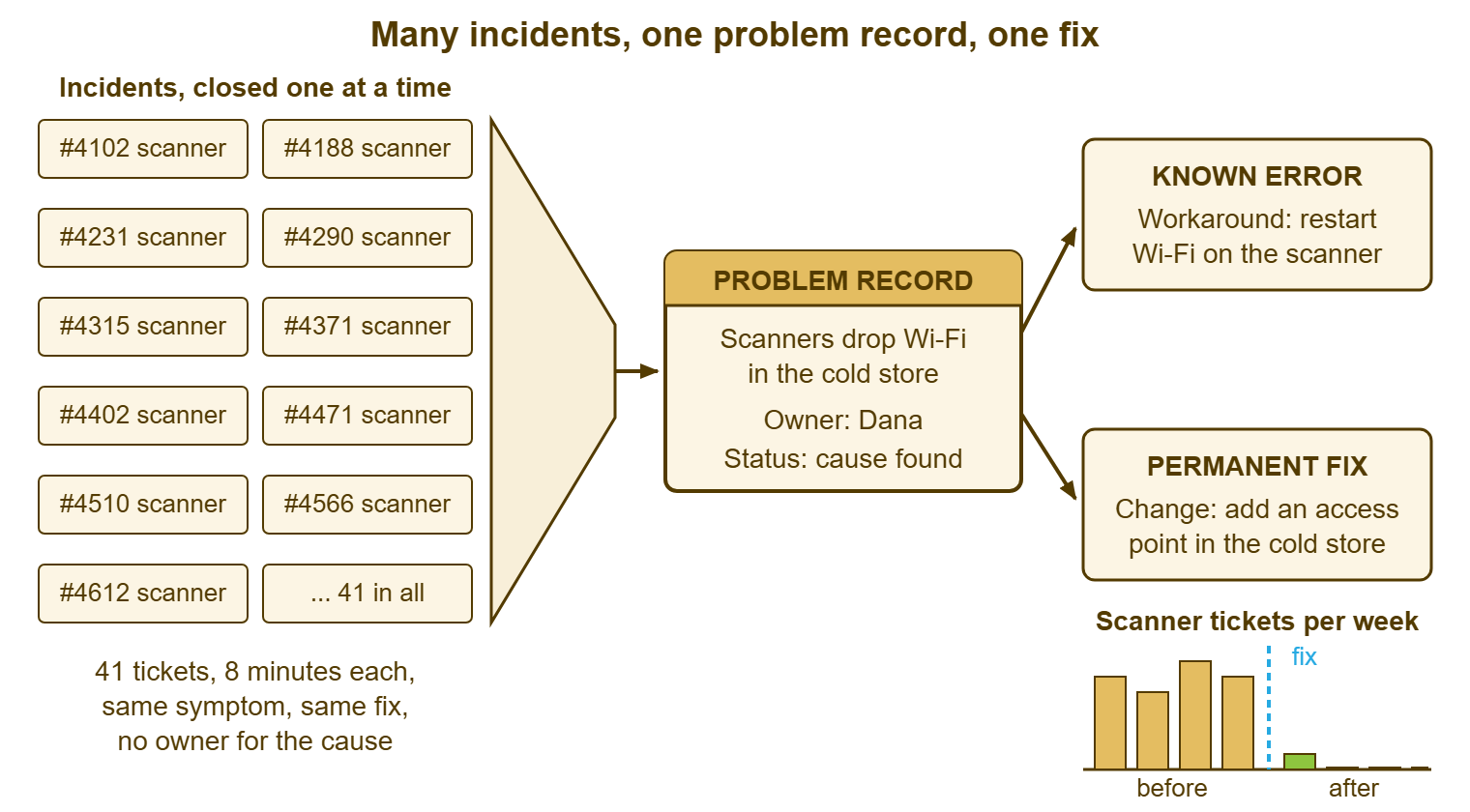
A problem record is not a bigger incident, and treating it as one is the commonest way it goes wrong. It has no requester waiting on it, no single fix, and no one at fault. The forty-one tickets were closed correctly by four competent people, and the record exists because nobody was assigned the question. Its two outputs have their own articles later in this series, Known Errors and Workarounds and Getting the Permanent Fix Done. The table puts the two kinds of record side by side. Read the "when it closes" row twice, because the instinct is to close the problem when the forty-second incident is restored. That is exactly the moment the problem should stay open.
| Aspect | Incident | Problem |
|---|---|---|
| The question it answers | How do we get this person working again? | Why does this keep happening, and what would stop it? |
| What one looks like | Ticket 4650: scanner 7 off the network, restored 10:22 | Problem 7: cold-store scanners drop off the network, 41 incidents, owner Dana |
| Who owns it | Whoever the ticket is assigned to today | One named person, for as long as the record is open |
| How it is judged | Speed: time to reply, time to restore | Whether the incidents stop |
| When it closes | When the requester is working and confirms | When the fix has been in long enough that the tickets have stopped |
| Its clock | Hours, against a target | Weeks, against a next-review date |
| What it records | What was wrong, what was done, how to tell if it comes back | Symptom, count, linked tickets, hypothesis, workaround, fix, owner |
Who Owns a Problem
A problem is owned by one named person, chosen rather than being whoever happened to close the fifth ticket. On a desk of three or four, the owner is usually the lead or the most senior technician. That is because they can read everyone's tickets and can ask for an afternoon to fix something without applying for it. On a desk of one, the owner is you. In that case, the record matters more rather than less, because there is no one else to remember. On a larger desk, ownership can be spread, one or two problems per person, as long as every open record has exactly one name on it.
Owning a problem does not mean fixing it alone. The owner has three duties. They keep the record current, so that the count and the linked tickets are right. They decide the next step and when, so that the record always has a next-review date. They report on it at the weekly review in one sentence. The investigation can be done by anyone, and the fix is often done by someone else entirely, with the owner chasing. The owner is the person who notices when nothing has happened for three weeks, which is a job nobody does unless it is theirs. A problem with two owners has none, and a problem with a committee has minutes.
The owner also decides when a problem is not worth pursuing, which is a respectable outcome. A symptom that occurs monthly, costs four minutes to restore, and would take two days to remove is a problem the desk may choose to live with. In that case, the record says so, with the reason and the date, and closes as "accepted". Writing that down is the difference between a decision and a drift. The weekly cadence that keeps these decisions happening is the subject of Problem Management in an Hour a Week.
Where a Problem Lives in an Ordinary Tool
Most small-team help desk tools have no problem module, and that is not an obstacle. A full ITSM suite has a separate record type for problems, with its own fields and a way to link incidents to it. If you have one, use it. If you have an ordinary ticketing tool, which is most desks, the problem record is a convention. It is a thing everybody agrees to do the same way, in a place everybody can find. The convention matters more than the feature. I have seen a suite with a problem module that held three stale records, and a small desk with a single pinned page that held eleven live ones.
The table lists the conventions that work. Pick one, write it down, and use it for every problem; the failure mode is not a bad convention but two of them. Whichever you choose, the link must run both ways. The incident's resolution note names the problem, and the problem lists the incidents. That way, the next technician who restores a scanner finds the record in one search and the owner finds the count without one.
| Convention | How it works | Good when | Watch out for |
|---|---|---|---|
| A ticket with a fixed subject prefix | "PROBLEM: cold-store scanners drop Wi-Fi", kept open, incident numbers in its notes | The tool has one record type and you want one search | The ticket counting against targets or showing as overdue |
| A separate department or form | A "Problems" department or form with its own view | The tool has departments or forms | A real incident routed into it by mistake |
| A page per problem in the knowledge base | One internal article per problem, record fields as headings, an index page | The workaround and the record should live where technicians already look | The count going stale; the owner updates it weekly |
| A shared spreadsheet | One row per problem, one column per field | Nothing else is available and you start this week | Being forgotten by month two |
| A problem module in an ITSM suite | Native problem records with incident linking | You already have the suite | Filling in fields instead of doing the work |
Two settings matter whichever convention you use, and both vary by tool. First, check whether a ticket used as a problem record is counted in your response and resolution reports. If it is, find the status, priority or department your reports leave out, or your breach figures will carry a permanent problem-shaped dent. Second, check whether the requester on that ticket is notified when it is updated. If so, make the requester the owner or a desk address. Both are five-minute tests with a dummy record.
Remember: an incident is judged on how fast the person got working again; a problem is judged on whether the incidents stop. Restore the incident now, link it to the problem at close, and give the problem one named owner and a next-review date.
The Two Clocks
Incidents run on hours and problems run on weeks. A desk that puts the incident clock on a problem will either abandon the problem or fake the clock. A problem record never carries a response target. What it carries instead is a next-review date: the day on which the owner will look at it again and decide the next step, whatever the state of the investigation. A problem with a next-review date is being managed. A problem without one has been filed, and will be remembered at the next outage by whoever was most inconvenienced.
Problems have statuses, and they are not the incident statuses. The useful set is short. It starts with Open, meaning the repeat has been noticed, and Investigating, meaning someone is looking for the cause. Next is Known error, meaning the cause is understood and a workaround is published. Then comes Fix scheduled, meaning a change has a date. Next is Fixed and watching, meaning the change is in and the owner is counting tickets. Last comes Closed, with a reason: "fixed", "accepted" or "went away". Some tools let you add statuses and some ship a fixed set. If yours is fixed, the problem's status goes in a field, a tag, or the first line of the subject. The meaning lives in the written definition, not in the label.
Problems have a priority too, but it is not the incident grid, which ranks urgency. A problem is never urgent; only the incidents it causes are. A problem is ranked on how often it happens, what each occurrence costs, and what the fix would cost. On a small desk that is one line of arithmetic, which doubles as the business case later.
What Changes When the Desk Has the Word
The word changes behaviour before anything else does. The first week a desk starts saying "problem" out loud, technicians close tickets differently: "restored, that is incident twelve of problem 7, linked it". The restore is still done in eight minutes. The guilt about not fixing it properly goes away, because fixing it properly now belongs to someone. The technician's part is to link the ticket and move on. The reports change next, because a desk with linked problems can answer a question no incident report can: how many of this month's tickets were caused by things we already know about? If the answer is a third, the case for an afternoon on the fix makes itself.
The list changes last, and it changes by staying short. A desk that discovers problem records tends to open one for everything. By month three it has twenty open problems and no owner who can say what is happening with any of them. Five to ten open problems is about the limit for a small desk, and a candidate that does not make the cut is noted and left. Problem management is not a place to keep every annoyance. It is a place to keep the few that are worth an afternoon, and to make sure the afternoon happens.
A Short War Story: The Monday Logins at Harbourview Clinic
Harbourview Clinic's reception ran four desks on a shared login. Most Monday mornings one or two of them could not sign in. So the desk's technician, Priya, unlocked the account and reset the password, six minutes each time, thirty times in four months. Each ticket was closed properly with a note reading "account unlocked, user working". Each Monday, patients queued at a desk with a dead screen for ten or fifteen minutes while a receptionist walked to find Priya. The cause came to light when a locum doctor, waiting in the same queue, asked why it only ever happened on Mondays. Priya went looking. A tablet in the back office, used for the weekend cleaning rota, had the old reception password saved. It had been retrying it every hour from Friday evening, locking the account by Monday 07:00. Deleting the saved credential took four minutes. The thirty unlocks had cost three hours of desk time and roughly eight hours of a receptionist standing at a dead screen in front of patients. The fifth unlock had been the moment to ask why; the thirtieth was when someone did.
The Problem Record Skeleton
The skeleton below is the record as plain text. So it can be pasted into a ticket, a knowledge base page, or a spreadsheet row with the headings as columns. Fill in the symptom in the requester's words, not the technician's guess, because the requester's words are what the next search will match. The cost lines are arithmetic, not an estimate: desk minutes per incident multiplied by the count, and the same for the requester. Leave the hypothesis blank rather than guessing; a blank line is honest and a wrong guess is persuasive. The record is one page, and it stays one page for the whole of its life.
PROBLEM RECORD — ONE PAGE
Problem ID: ________   Opened: __________   Owner: ________________
Status: [ ] Open  [ ] Investigating  [ ] Known error  [ ] Fix scheduled
        [ ] Fixed, watching  [ ] Closed: ______________

SYMPTOM (in the requester's words)
  ___________________________________________________________________

WHERE AND WHEN
  Who is affected: ______________   Site / department: ______________
  First seen: __________   Last seen: __________
  Pattern (day, time, trigger, if any): ___________________________

LINKED INCIDENTS
  Count so far: ____   Ticket numbers: ______________________________
  Search that finds them (subject, keyword, category): _______________

COST SO FAR
  Desk minutes per incident: ____  x count ____  = ____ hours
  Requester minutes per incident: ____  x count ____  = ____ hours

RESTORE STEP (what gets the person working today)
  ___________________________________________________________________

CURRENT HYPOTHESIS OF THE CAUSE
  ___________________________________________________________________
  Evidence for: __________________   Evidence against: __________________

WORKAROUND
  Published to technicians?  [ ] yes, article: __________   [ ] no
  ___________________________________________________________________

PERMANENT FIX
  Proposed: ______________________________   Change record: __________
  Scheduled: __________   Applied: __________   Tickets since fix: ____

NEXT REVIEW DATE: __________   Next step: ______________________
Decision if not pursued: [ ] accepted, reason: ____________________
Use the skeleton on the fifth ticket, not the first. Expect most records to sit at "Open" with a count and a next-review date for a few weeks before anyone has an afternoon to investigate. That is fine; the record's first job is to count. Marcus opened problem 7 at Meridian Parts on a Tuesday afternoon with forty-one linked tickets, a blank hypothesis and a next-review date of the following Friday. By the second Friday the hypothesis said "no access point covers the cold store". By the fourth the chart in the picture above had started to fall. Ticket 4650 was the last scanner ticket anyone at Meridian Parts closed in eight minutes. The one after it took two, because the workaround was written down, and the one after that never arrived.
Frequently Asked Questions
Does every repeat ticket need a problem record?
Our tool has no problem module. Where do we keep problem records?
Who should own problems on a three-person desk?
Should a problem record have an SLA?
What is the difference between a problem and a known error?
Can an incident be closed before its problem is solved?
From the QuerySolv team: we build self-hosted help desk software for Windows. QuerySolv runs as one Windows service on your own network. It takes requests by web form, e-mail, live chat, social messages and REST API. It is licensed once per installation rather than per agent per month. The free trial runs the full product for 30 days.