
Remote Control Done Securely: The Principles
Tuesday, 10:15, at Meridian Parts. Nadia on the desk picks up ticket 5182 from Tomasz in purchasing: the spreadsheet add-in that pulls supplier prices will not load. She phones him, asks if she can connect, watches him click "allow", and fixes it in four minutes while he narrates what he usually clicks. At 14:40 the same day the warehouse phones. A man has just rung the packing bench saying he is "from the IT department" and that the scanner link is faulty. He says Dev needs to go to a website and install a small program so he can take a look. Dev has not installed anything. He rang the desk to check, which is the only reason this paragraph is short.
Both calls were about remote control. One was support and one was an attempt at something else. From the chair of the person being helped they looked almost identical. There was a voice, a request to allow a connection, and then a cursor on the screen that is not theirs. The difference between the two is not the software. It is a set of principles that the desk follows every time and that the attacker, by definition, cannot. The user agreed, the technician could be identified, and the session was recorded. The technician had only the rights the job needed. And the connection could not be read in transit. This article is part of our Remote Support Tooling series. It is about those five principles in plain words. That way, everyone on the desk can say what they are and why they matter before anyone argues about which tool to buy.
It covers what a remote session is and what it is not, then consent and identity in both directions. Logging and least privilege follow, then encryption, explained without the mathematics. Next come the life of one session from request to review, with a picture, and what each skipped principle costs, in a table. It finishes with a short war story and the one-page remote support policy to copy, in that order.
What a Remote Session Is, and What It Is Not
Remote control is a technician operating a user's computer over the network: seeing its screen, moving its mouse, typing on its keyboard. It is as if they had pulled up a chair beside the user and been handed the keyboard. A remote session is one such episode, from the moment the connection opens to the moment it closes. Most sessions are short, dull and helpful. The add-in gets fixed, the printer gets re-added, the setting gets changed, and the user learns which menu it was in. Done well, remote control is the single biggest time saver a small desk has, because it removes the walk, the wait and the "can you describe what you see?"
What a remote session is not matters just as much, and I would write it on the wall. It is not a right the desk has over the organisation's computers. It is not a shortcut around asking, because the asking is the point. It is not a way to look at something while the user is at lunch. It is not monitoring, inspection, or a quiet check on whether someone is working. A remote session is a technician standing at someone's desk, except that they cannot see you. And that last clause is why the rules are stricter rather than looser. Everything the user would notice if you were physically there, you must tell them, because they cannot notice it for themselves.
A remote session also has edges that an in-person visit does not. The technician can see every window that is open, including the payroll file, the private message and the folder that nobody needs to know about. The connection crosses a network, and perhaps the internet, where it can in principle be observed. The tool that makes it possible has an account, a password and a log, and each of those can be mishandled. The five principles exist because the convenience is real and so are the edges. One without the other is how a desk ends up explaining itself to the whole organisation.
Principle One: Consent
Consent means the person at the computer agreed to this session, now, knowing what it is for and how long it will roughly take. They can end it. It is not the same as permission in general. The organisation may have a policy saying the desk is allowed to use remote control; that is permission. Consent is the specific yes, from the specific person, for the specific job. It is given every time, including the fourth time this week for the same user with the same add-in. Policy says the desk may. Consent says the user did.
The reason consent is the first principle rather than a courtesy is that it is the one thing an attacker cannot manufacture. The man who phoned Dev could imitate the desk's voice, borrow its vocabulary and even know the scanner's make. He could not make Dev's agreement real. And a desk that has taught its users "we always ask, in these words, and you can always say no" has given them the one test that works. The user who expects to be asked notices when they are not. The user who is used to cursors appearing on their screen notices nothing.
How to ask, what to say, and what the user should see on their screen during the session fill a whole article. It also covers the handful of situations that feel like exceptions and are not. That article is Consent, Every Time. The principle here is one sentence: nobody connects to a computer with a person at it without that person saying yes first, and the yes is written in the ticket. Yes, even for the colleague who says you never need to ask him. Especially for him.
Principle Two: Identity, in Both Directions
Identity means each side of the session knows who the other side is. The desk tends to think about this in one direction only, confirming that the user is who the ticket says. That direction matters. A request to "remote in and reset my manager's e-mail" from an address you do not recognise is a request to decline. But the other direction is the one that fails more often and costs more. The user has to be able to tell that the person asking to connect is really the desk. And most users have been given no way to do that beyond a confident voice and a plausible job title.
Give them a way. The desk only ever connects on a ticket the user can see, with a ticket number the user can quote back. The desk never cold-calls and asks a user to install something, visit a website or read out a code. A remote session begins from a request the user made, or from a ticket the user can find in their own mailbox. The desk connects from a known tool the user has seen before. If the tool shows the technician's name, the user knows the names on the desk. Write those four rules on the one-page card that every user gets. That way, Dev's phone call to the desk becomes the normal response rather than a lucky one.
Identity on the technician's side means a named account for each person who can connect, never a shared one. "helpdesk" as a login is a name the log can record and nobody can be held to. Each technician's account is protected by a second factor where the tool supports it. That is a second proof of identity on top of the password, usually a code from a phone or a prompt to approve. And the technician confirms the user's identity in the ordinary ways. The ticket came from their account, the phone number matches the directory, and the voice is the one you spoke to yesterday. None of this is elaborate. A shared account and an unverified caller are both ways of saying "someone connected", and someone is not a name.
Principle Three: Logging
Logging means that every session leaves a record of who connected to which computer, when it began, when it ended and why. That record exists somewhere the technician cannot quietly edit. There are always two records, and the desk needs both. The first is the tool's own log, which most remote support tools keep automatically. It records account, device, start time, end time, and often whether files were moved or elevated rights were used. It is accurate, dull and read by nobody until the day it is read by everybody.
The second record is the note in the ticket, and it is the one people read. It says, in a technician's words, what the session was for, what was done, what the user saw and how it ended. The tool log says a connection lasted eleven minutes. The ticket note says the add-in was re-registered, the user confirmed the supplier figures loaded, and the session was closed with the user watching. If you run QuerySolv, that note joins the ticket's event history alongside every other action on the ticket. So when a session is questioned later, the answer is in one place. In any tool, the rule is the same: no session without a ticket, no ticket without a session note.
What to log, how long to keep it, who reviews it and how to answer the question that arrives a month later are the business of Logging and Session Records. The principle is that the record is made at the time, by the person who did the work. The principle also requires that the organisation can read it without that person's help. A log that only the technician can interpret is a diary. The desk needs a ledger.
Principle Four: Least Privilege
Least privilege means every account, person and connection has the smallest set of rights that the job in front of it needs, and no more. Applied to remote support it has three layers, and desks tend to get the first right and forget the other two. The first layer is the technician's rights on the user's computer during the session. See what the user sees, and do what the task needs. And use an administrator account only for the step that needs one, then step back down. The second layer is the rights the remote support tool gives each technician. These cover who may connect to which group of devices, who may transfer files, and who may connect without a person present. The third layer is the tool's own account on each device. That account has to be powerful enough to work and is therefore the most valuable thing an attacker could borrow.
In practice least privilege looks like a short list of decisions, each made once and written down. New technicians can connect to workstations in their own department's scope and nowhere else until someone widens it. File transfer is off unless the task needs it, and when it is used the note says what moved. Nobody connects to a workstation without a person present, which is the subject of Unattended Access: When, Where and Who. The short list of servers where that is allowed has a named approver. Every technician has a day-to-day account with ordinary rights and a separate administrative account used only when a step demands it. The administrative account is not the one you read e-mail with. It is not the one you use to connect. It is the one you reach for, use, and put back.
The reason to be strict is not distrust of the technicians. It is that rights are only ever added, by people in a hurry, and never removed, by people who have forgotten. A tool whose every technician can connect to every device, unattended, with file transfer on, is not a tool anybody chose. It is a tool that was installed in a week when there were two of you and nobody has looked at since. Rights breed in the dark. Switch the light on once a quarter.
Principle Five: Encryption, in Plain Words
Encryption means the screen pictures, keystrokes and files that travel between the technician's computer and the user's are scrambled before they leave. They are unscrambled on arrival. So anyone who sees them in between sees noise. Think of a sealed envelope rather than a postcard: both arrive, but only one can be read on the way. For a remote session the "way" may be your own office network, the user's home broadband, and a stretch of the public internet. Any of those can be watched by someone you have not met. Encryption is what makes watching pointless.
There are two questions to ask of any tool, and neither needs mathematics. The first is whether every part of the session is encrypted by default, with no setting a technician could switch off to make things faster. The second is who holds the keys, which decides who could in principle read the session even though it is encrypted. Many remote support tools route the connection through the vendor's servers so that it can reach a home worker behind a home router. Ask the vendor plainly whether their staff or systems could read a session in transit, and expect a plain answer. "Enterprise-grade encryption" in a brochure is a phrase that means "encryption". Ask the question behind it.
Encryption also protects the connection's identity, which is the point that joins this principle to the second one. A properly set up tool makes sure the technician is connecting to the device they think they are. The tool also makes sure that the device is accepting a connection from the desk's tool rather than an impostor's. You will not check the mathematics of that and should not try. You will check that the vendor documents it and that the tool warns loudly when something does not match. You will check that the warning is treated as a stop rather than a nuisance to click past. The criteria and the questions to put to a vendor are in Choosing and Reviewing the Remote Support Tool.
Remember: a remote session begins with a ticket and proceeds only with the user's consent. It is done by a named technician with the rights the task needs. It is recorded in the ticket and is closed in front of the user. Skip any one of those and the session is a risk the desk chose to take.
The Life of One Session
The five principles are easier to hold onto as a sequence than as a list, because that is how a session happens. It begins with a request, which means a ticket exists and the need and the device are written down before anyone connects. Consent comes next, asked every time, and is the stage that can never be skipped. The session itself is visible to the user throughout, does only the agreed task, and can be ended by the user at any moment. Logging happens in two places, the tool and the ticket. The close is deliberate: disconnect, tell the user, and remove any rights that were raised for the job. And the review happens later, when someone who was not in the session samples the logs, matches them to tickets and asks about any that do not match. The picture below lays the six stages out as a strip, with two bars beneath showing what the user can see and what the ticket records.
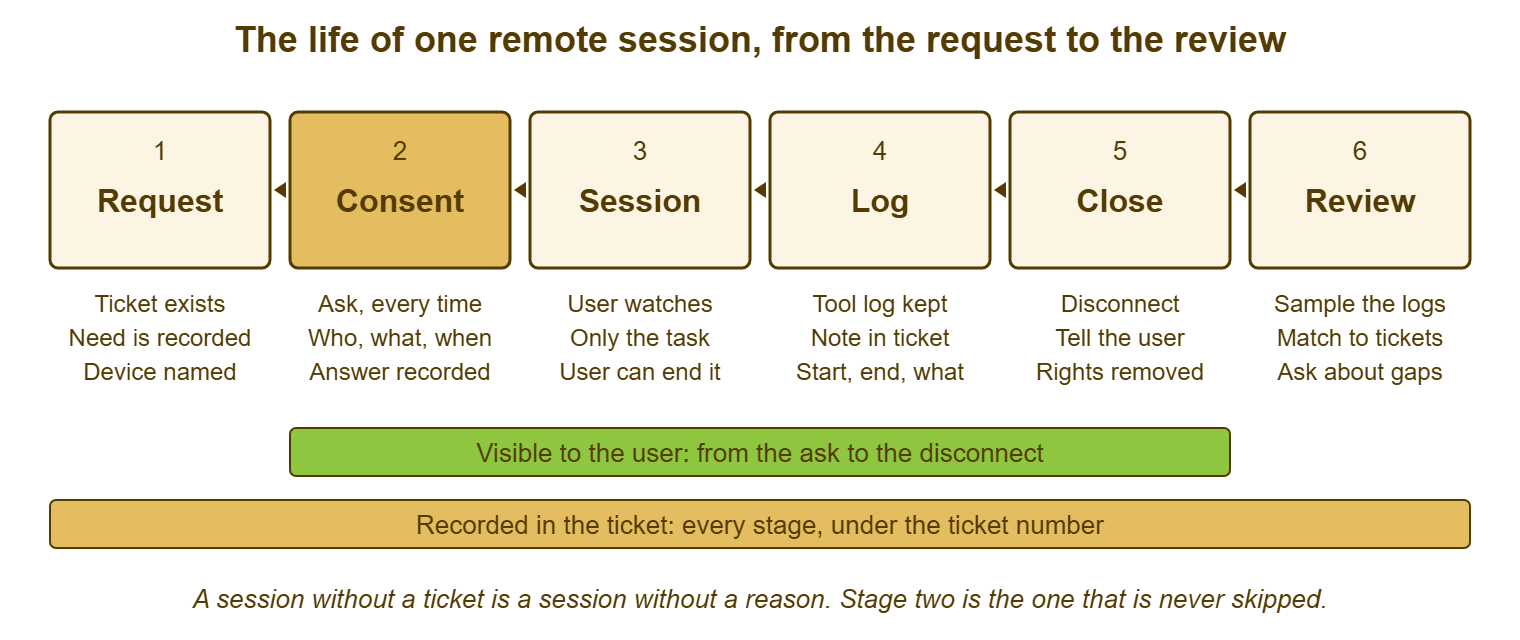
Two things about the strip are worth saying in words. The green bar starts at consent and ends at close, which means the user watches the whole working session. There is no stage where the technician is connected and the user is not aware of it. The amber bar runs the full length, which means the ticket holds the request, the consent, the note and eventually the review, under one number. A session that does not fit the strip, one with no ticket, no ask, no note or no clean close, is the kind the review exists to find. Most desks have a few. The point of drawing the strip is to make them look odd rather than normal.
What Each Skipped Principle Costs
Principles are easier to keep when the cost of dropping each one is concrete, so here is the table I would pin beside the strip. Every row is a thing I have seen happen on a real desk, lightly disguised. None of them was malicious. All of them took longer to explain than the session they came from.
| Principle | What skipping it looks like | What it costs | The one-line rule |
|---|---|---|---|
| Consent | Connecting because the ticket exists, without asking; connecting while the user is away | A user who no longer trusts the desk; a complaint that reaches the whole organisation | Ask every time, in the ticket or by voice, and record the yes |
| Identity | A shared technician login; a connection to a caller nobody verified | A log that names nobody; a session with someone who was not who they said | Named accounts with a second factor; connect only on a ticket the user can see |
| Logging | No session note; a tool log nobody reviews or exports | A question a month later that cannot be answered | No session without a ticket; no ticket without a session note |
| Least privilege | Every technician can reach every device, unattended, with file transfer on | One compromised password reaches the whole estate | Scope by group, transfer off by default, administrative account used and put back |
| Encryption | A tool chosen for speed with encryption optional; warnings clicked past | Screens and keystrokes readable on a home network or in transit | Encrypted by default, keys understood, mismatch warnings treated as stops |
Notice that the right-hand column is five short sentences, and that between them they are most of the policy. The temptation with a security topic is to write eleven pages, which nobody on a three-person desk will read. The policy will then live in a folder while the desk does what it always did. Five rules that every technician can recite are worth more than eleven pages they cannot find. The one-page version is at the end of this article.
Where the Principles Come From
Nothing in the five principles is special to remote support. They are the ordinary rules of handling someone else's property and someone else's data, applied to the odd situation of operating a computer from a distance. Consent is what you would do at the user's desk, where you would say "mind if I take the keyboard?" and nobody would think it strange. Identity is the badge on your lanyard and the name on the ticket. Logging is the note you would write anyway, if your notes are the kind that survive you, which is a discipline of its own elsewhere in this library. Least privilege is not using the administrator account to read e-mail. Encryption is the one principle the physical visit does not need, because nobody can intercept you walking down a corridor.
That is also why the principles survive a change of tool. Desks change remote support tools more often than they change anything else. That may be because the vendor changed its cost model, or the operating system changed what is built in. Or a security review asked a question the old tool could not answer. Each time, the policy written around the principles stays the same, and only the paragraph about which tool implements them changes. A policy written around a tool's menu names is a policy that expires with the tool. I have rewritten that one twice, which is how I learned to write the other kind.
It is also why the principles apply to the person working from their kitchen table as much as to the one on the third floor. That needs some extra care about whose network and whose device is involved. That is the subject of Remote Support for People Working From Home. The home worker's session goes over a network you do not control, to a device you may not own, with nobody able to walk over and check. Every one of the five principles gets harder there. None of them changes.
A Short War Story: The Shared Login at Bellweather Logistics
Bellweather Logistics ran a four-person desk whose remote support tool had a single technician account called "helpdesk". The tool had been set up in a week when there were two of them and sharing seemed simpler than asking the vendor for more logins. A contractor named Ola worked on the desk for five months and left on good terms, knowing the password. Nobody changed the password because it was on a note under Marcus's keyboard and changing it meant telling three people. Three weeks after Ola left, the dispatch server's log showed an unattended connection from "helpdesk" at 22:40 on a Sunday, lasting nineteen minutes. During that connection a folder of scheduling scripts was copied off. The desk could not say which of its four people, or its one former person, had connected. So it had to treat all five as possible and reset every password the account could have reached. It had to review every session for the previous quarter by hand. It had to report the whole thing to the operations director as an incident of unknown scope. Ola, when asked, said he had only wanted his own scripts back. The two days of work and the report to the board cost far more than four named logins would have. And the lesson was written at the top of the new policy: a shared account turns a log into a list of times.
The Remote Support Policy
The policy below is one page on purpose. It names the five principles and gives each the rule a technician can recite. It points to the three other documents that carry the detail: the consent script, the session note and the unattended access register. Each has its own article in this series. Fill in the blanks for your desk and have whoever owns security in your organisation sign the bottom. Publish it where users can read it too, because the "what the desk will never do" lines are written for them. Review it once a year or when the tool changes, whichever comes first.
REMOTE SUPPORT POLICY — ONE PAGE
Organisation: ______________   Owner (role): ______________
Tool(s) in use: ______________   Reviewed on: ________   Next review: ________

PURPOSE
  Remote control lets the desk fix a computer without walking to it.
  This page says how we do it so that users can trust it every time.

SCOPE
  Applies to every remote session by desk staff, on any device the
  organisation supports, from any location, including home working.

PRINCIPLES AND RULES
  1. CONSENT
     We ask before every session and record the answer in the ticket.
     The user can end the session at any moment without giving a reason.
     We do not connect to a workstation with nobody present.
     Exceptions: none for workstations. Servers: see UNATTENDED ACCESS.
  2. IDENTITY
     Each technician has a named account with a second factor.
     We connect only on a ticket the user can see and quote.
     We never cold-call a user asking them to install software,
     visit a website, or read out a code.
  3. LOGGING
     The tool keeps a log of every session. Every session has a ticket.
     Every ticket with a session has a session note (see SESSION NOTE).
     Logs are kept for ______ and reviewed by ______________ every ______.
  4. LEAST PRIVILEGE
     Technicians may connect only to devices in their scope: __________.
     File transfer is off unless the task needs it, and is noted.
     Administrative accounts are used for the step that needs them only.
  5. ENCRYPTION
     Every session is encrypted end to end by default.
     Identity warnings from the tool are a stop, not a prompt to continue.

UNATTENDED ACCESS
  Allowed only on devices listed in the register, with a named approver,
  and every use raises an alert to ______________. (See the register.)

WHAT THE DESK WILL NEVER DO (published to all users)
  Connect without asking.   Ask for your password.
  Ask you to install anything we did not raise a ticket for.
  Stay connected after the job is done.

RELATED DOCUMENTS
  Consent script: ________   Session note: ________   Register: ________

Approved by: ______________ (role)   Signature: ______________
Nadia's two calls at Meridian Parts ended the way the policy says they should. Ticket 5182 has a session note that says what was fixed, that Tomasz watched, and that the session closed at 10:21. Dev's call became ticket 5190, category "suspected impersonation", with the caller's number and the words he used. A notice went to every user that afternoon repeating the four lines under "what the desk will never do". Dev was thanked by name in the notice. He has mentioned it, I am told, at some length, and the desk is content for him to carry on.
Frequently Asked Questions
Do we really need a policy for a two-person desk?
Is remote control built into the operating system good enough?
What is the difference between permission and consent?
Can a technician use their ordinary account to connect?
How do we explain encryption to the person who approves the tool?
What should a user do if someone they do not know asks to connect?
From the QuerySolv team: we build self-hosted help desk software for Windows. QuerySolv runs as one Windows service on your own network. It takes requests by web form, e-mail, live chat, social messages and REST API. It is licensed once per installation rather than per agent per month. The free trial runs the full product for 30 days.