
From Script to Button: Who Can Press It, and What It Writes Back
Tuesday, 07:35, at Bellweather Logistics. Nadia is three weeks into her first support job and the only person on the desk until nine. A ticket arrives from the Westfield depot: the label printer on the loading bay has stopped, and there are two lorries waiting for labels. Nadia knows exactly what the fix is, because she watched Kwame do it on Friday: restart the print spooler on the bay workstation. Kwame has a script for it. The script lives in a folder Nadia cannot open and runs under an account she does not have. The desk rule says trainees do not run scripts. She writes a note on the ticket, phones the depot to say someone will look at it shortly, and waits. Kwame arrives at 08:58, presses one key, and the fix takes eight seconds. The lorries left at 09:10. The fix had been ready since 07:35.
A remediation button is a tested script wrapped in four things. It has a name, a permission that says who may run it, and one checked input that says where. A record of every press is written back to the ticket. Some endpoint and device management tools provide this as a feature: a stored script you can run against a chosen machine from a console. A desk without such a tool can build the same four things around a wrapper script that asks the same questions. Either way, the button is not a help desk feature and not a new script. It is the old script with its edges made safe enough for more hands. This article is part of our Scripted Fixes & One-Click Remediations series. It is about those four edges.
It starts with what a button adds and what it does not. Next comes permission: who may press it and which account does the work. Then it covers the parameter and how it is checked, followed by the confirmation and why "are you sure?" is not one. It moves on to the record written back to the ticket and the button a trainee may press. Naming the buttons and keeping a catalogue come next. A short war story and the button specification to copy finish the article.
What a Button Adds, and What It Does Not
A button adds a boundary between the person and the script, and the boundary is where the safety lives. When Kwame runs his script from a command window, he is the permission check, the parameter check and the confirmation. He does all three at once, in his head. He is also the only record unless he writes one. When the same script is behind a button, the boundary asks the questions for him. Is this person allowed? Is this machine a valid target? Do they understand what will happen? Has the press been written down? The script inside does not change. The questions around it are what let Nadia press it at 07:35.
A button does not make a bad script safe. If the script does not check before acting, the button will cheerfully run it on healthy machines. If the script loops over a list, the button will loop with it. If the script prints "done" before checking, the button will report success that did not happen. Everything in Turning a Fix Into a Script Safely is a precondition for this article, not a nice-to-have. The button is the last step of the script's journey. The only script that should reach it is one that passed the checklist. It must have run by hand, from the command line, enough times for the desk to trust its log.
Nor does the button need a console to exist. If your desk has no management tool with stored actions, a wrapper script does the job. It is a second small script that asks for the technician's name, the target machine and the ticket number. It checks each one, prints what is about to happen and waits for a typed "yes". It runs the real script and appends the result to the ticket. That is a button. It has no icon and it needs no licence, and it provides the same four edges. The console version is more convenient and better at the permission part. The wrapper version is what most small desks start with, and some never need more.
Permission: Who May Press It
Permission is a role, never a name, and there are three roles that matter. The first is anyone on the desk, including a trainee on their first day. The second is second-line only: technicians who have done the fix by hand and understand what the script refuses. The third is the button's owner alone. That is the right setting for the first month of any new button. It is also the right setting for any button whose confirmation says the user may lose work. Write the role on the specification and set it in whatever enforces it. When a person changes role, their buttons change with them, because the role was the thing that had the permission.
The account the button runs as is a separate question from who may press it, and the two must never be the same account. The presser is a person with a name; the runner is an account with exactly the rights the fix needs on workstations and nothing more. A spooler restart needs the right to stop and start one service on user machines. It does not need rights on servers or to read anyone's files. It certainly does not need to be a domain administrator. That is the account that always seems to be nearest to hand when a script will not run. The habit of giving a thing only the rights its job needs is called least privilege, and the button is where it either happens or quietly does not. The account's credentials live in the tool or the operating system's own secure store, never in the script and never in the wrapper. That rule has its own article in Guardrails: What Scripts Must Never Do.
Separating presser from runner is what lets a trainee press a button that does something a trainee could not do by hand. Nadia has no rights on the bay workstation. The runner account does. The button lends her the one action, on the one machine, for the eight seconds it takes, and lends her nothing else. That is the entire mechanism, and it is why the permission to press is worth designing carefully. It is a grant of a specific power, bounded by the script. A well-bounded grant can go to more people than a general one ever should.
The Parameter: One Input, Checked
A button takes one input, which is the machine it will act on, and it checks that input before anything runs. "Checked" means the name is looked up against the list of machines the desk manages. A name that is not on the list is refused with a message, not passed along in the hope that it exists. A free-text box that takes whatever is typed is not a parameter. It is a wildcard with a label. The war story below is about exactly that box, and the lesson is cheap when read and expensive when lived.
The ticket number is the second input and it is also checked, because the ticket is where the record will go. A button pressed without a ticket is a button whose press is about to be lost. The check is simple: it is a number in the right range and the ticket exists. The button refuses to run without one. This feels bureaucratic for a moment on the first day. It is the single best thing you can do for the ledger that Measuring Whether the Buttons Pay depends on. Every press is now attached to the ticket that justified it.
Anything beyond those two inputs is a reason to pause. A button that also takes "which service" has become a general-purpose restart tool. A general tool needs a general permission, which is the opposite of the point. A button that takes a list of machines has put the loop back inside the boundary, and the loop is the thing the boundary was built to keep out. Where a fix really needs a third input, such as the name of a printer to re-add, the input is never typed. It is chosen from a list the button presents. That list is the printers on that machine's site. One machine, one ticket, and a choice from a short list where a choice is unavoidable: that is the whole parameter design, and the rest is restraint.
The Confirmation
The confirmation restates what is about to happen, to whom, with its cost, and waits. "Restart the print spooler on BAY-WS-03 (Westfield loading bay) for ticket 8191. The user currently signed in is Marek. Any print jobs waiting on this machine will be lost. Type yes to continue." That sentence is the confirmation. "Are you sure?" is not. It is a question nobody has ever answered no to, because it contains no information the person did not have when they pressed the button. A confirmation that does not name the machine, the user and the cost is a speed bump, and speed bumps are driven over.
The cost line is the one to fight for. Every scripted fix has a cost to the user when it runs, even if the cost is "nothing, the drive reappears", and the confirmation says which. Lost print queue. Application closes; unsaved work is lost. User is signed out of the service and must sign in again. No visible effect. The technician reading that line decides whether to phone the user first. On a button a trainee may press, the line is the trainee's judgement until they have their own. Write the cost in the user's terms, not the system's. "The document they are printing will need printing again" is understood at 07:35 by a trainee. "Spool files are purged" is not.
Some buttons earn a second confirmation, and the rule is that any fix that interrupts the user gets one. The second step is not another "yes" but a different question: "Have you told Marek? Type told to continue." It is slightly annoying, by design, and it is the moment at which most technicians pick up the phone. A button whose cost is "no visible effect" does not need the second step and should not have it. Confirmations that are always answered without reading teach people to answer every confirmation without reading, including the one that mattered.
Remember: a button is a script with a role that may press it and one checked machine as input. It has a confirmation that names the machine, the signed-in user and the cost. It writes a note on the ticket for every press. Leave out any of the four and the script was safer on the command line.
The Record Written Back to the Ticket
Every press writes one line onto the ticket, and that line is the only reason anyone will later know the press happened. The line says who pressed, when, on which machine, what the script found, what it did, how it exited and where the full log is. "Button restart-print-spooler pressed by Nadia at 07:36 on BAY-WS-03 for ticket 8191: spooler was stopped; restarted; running after four seconds; exit 0; log on BAY-WS-03 in the desk log folder." That is a long line, and every part of it will be wanted by someone. The depot manager asks what was done. A colleague picks up the ticket at nine. Someone does the quarterly count. An auditor wants to know who touched a machine on a given morning.
The note is internal, never a public reply. The user does not need to see exit codes and log paths. Some of what the line contains, such as the signed-in user's name on a shared machine, is not the requester's business. The technician then writes the public reply in their own words: "The label printer is working again; the queue was cleared, so please re-send anything that did not come out." Two notes, two audiences, the same ticket. If you run QuerySolv, the button can post its line through the REST API as an internal note. The ticket's event history then shows the press between the technician's own entries. That is where a tired colleague and an auditor both look first. In any tool, the shape is the same: the script's account of itself goes on the ticket, marked internal, and the person's account of it goes to the user.
The same record also goes to a log file, because tickets get merged. The count of presses per month is also easier to take from one file than from a search across the quarter's tickets. The ticket line and the log line are the same text, written twice. If they ever disagree, something is wrong with the button, and the disagreement is the first clue. The reasons a remote-control session is recorded in the ticket, and what the record must contain, are set out in Logging and Session Records. A button press is a shorter session with the same obligation.
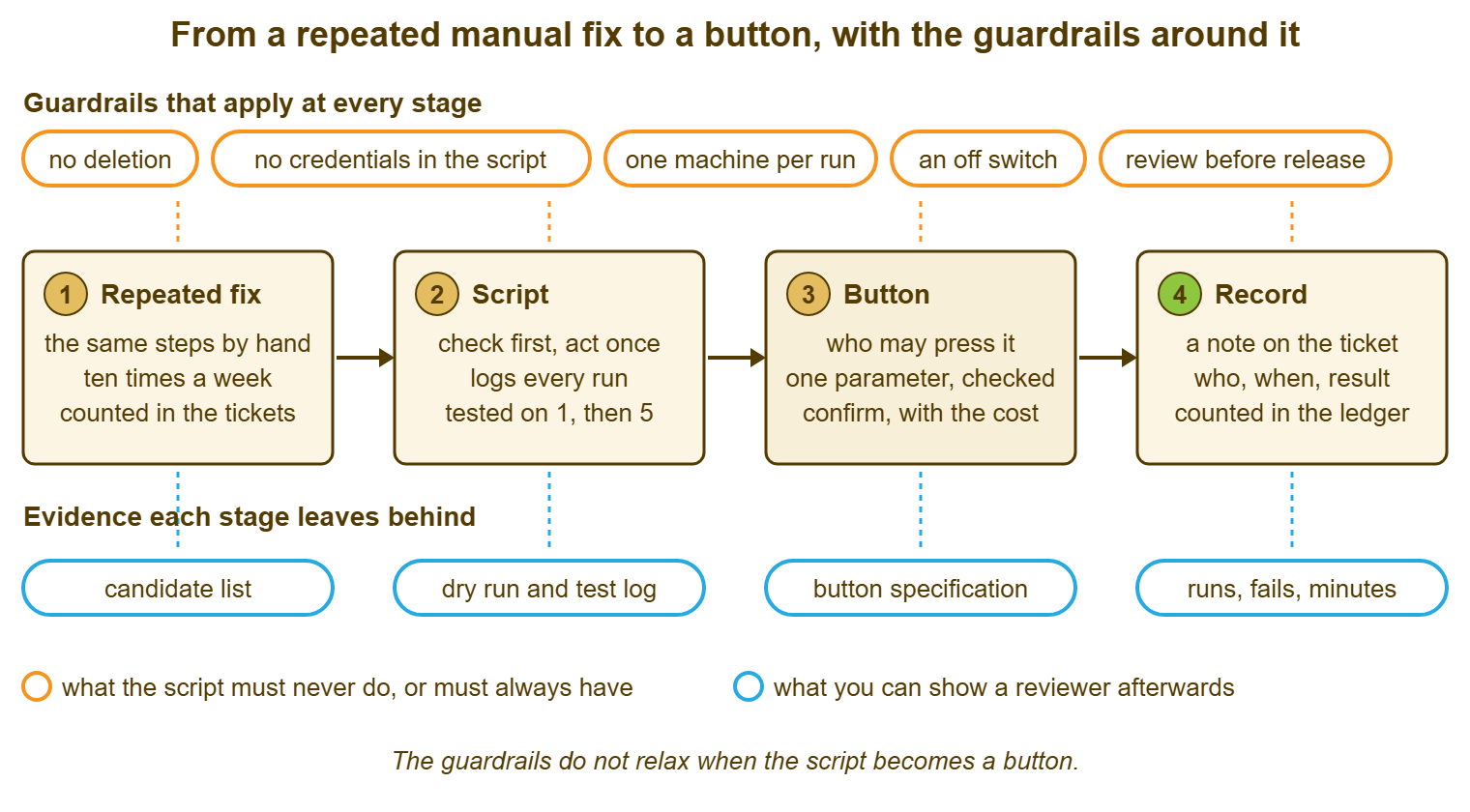
Here is the whole journey in one picture, from the fix Marta does by hand to the line on the ticket. The guardrails above it apply at every stage. The evidence below it is what each stage leaves behind. The button is the third box, and the point of the picture is that it is only one box of four. The script before it has to be right. The record after it has to exist. The guardrails never relax because a script acquired a name.
The Button a Trainee May Press
A button a trainee may press on their first day passes four tests, and most buttons pass them, which is the point of building buttons. The fix is harmless if pressed when it was not needed, because the script checks first and the confirmation says "no visible effect". The fix cannot interrupt the user without the confirmation saying so, which means the trainee cannot cause the interruption without being told they are about to. The result is self-evident, so that the trainee can read "spooler was stopped; restarted; running" and know what happened without understanding spoolers. And the failure mode is "nothing happened", not "something worse happened", so that a failed press leaves the trainee exactly where they started, with a ticket and a phone.
The trainee learns the fix by pressing the button, which is the opposite of the fear that buttons stop people learning. Nadia reads the confirmation and learns that the spooler is a service, that it has a queue, and that the queue is lost on restart. She reads the record and learns that the service was stopped, which tells her what "printer offline" usually means on that machine. After twenty presses she can describe the fix. After forty she can tell from the ticket whether the button will help before pressing it. She has seen the "nothing to do" line often enough to know what else it might be. The button did not replace her training. It was her training, with a log.
A trainee may not press any button whose cost line says the user loses work until they have done that fix by hand beside someone. They also may not press any button that acts on a server, because the blast radius of a server is everyone on it. The tier boundaries that say which fixes belong at first line and which above it are drawn in Escalation Boundaries. The button's permission role should follow those boundaries rather than invent new ones. A button is a way of moving a fix down a tier safely. It is not a way of pretending the tiers were never there.
Naming the Buttons and Keeping a Catalogue
A button's name says the verb and the object and nothing else: restart-print-spooler, remap-shared-drive, clear-cached-credential, resync-clock. Not "Fix Printing", which promises more than a spooler restart delivers and will be pressed for every printing problem the desk ever sees. Not "Kwame's spooler thing", which will outlive Kwame. The name appears in the confirmation, the record and the log. A name that says what happens is a name that makes all three readable by someone who has never seen the script.
The catalogue is one page in the agents-only part of the knowledge base, with one line per button. The line gives the name, what it fixes in the ticket's words, who may press it, the cost to the user and the owner. It includes the link to the specification and the procedure the script replaced. A desk with six buttons does not think it needs a catalogue, and it is right until the seventh, by which point nobody remembers whether the credential button signs the user out. Buttons multiply, and unlike tickets they do not close themselves. The catalogue is also where a button is retired. A button not pressed in six months is removed from the catalogue, its permission revoked and its script moved to the archive folder. If the fix comes back it comes back through the checklist like a new one.
Review the catalogue when you review the candidate list, which is quarterly. Ask three questions of each line: is it still being pressed, is the cost line still true, and does the role still match who actually presses it. The third question finds the button that was supposed to be second-line only and has been pressed by everyone for a year because the role was never set. That is not a crisis. It is a line on the specification that needs updating to match reality, or a permission that needs setting to match the specification. Either is a ten-minute job once someone has looked.
A Short War Story: The Box That Took Anything at Harbourview Clinic
Harbourview Clinic's desk built its first button around a working script and a free-text box labelled "Target", and the confirmation said "Run restart-print-spooler? Yes / No". On a Monday morning in surgery hours, Jonah was dealing with a printer ticket from reception. He had been on the desk for a month. He typed the room name he saw on the ticket. It happened to be the name the management tool used for the whole clinic group rather than one machine. The box accepted it, the confirmation asked whether he was sure, and he was. The spooler restarted on every workstation in the building inside a minute, including the three consulting rooms where prescriptions were printing. The practice manager spent twenty minutes walking the corridor re-printing while patients waited. The script had been correct the whole time; the button around it had checked nothing. The rebuilt confirmation named the machine, the signed-in user and the words "prescriptions in the queue will be lost". The target box became a list of single machines. That took an afternoon to build and would have taken an afternoon the first time.
The Button Specification
Fill in one specification per button, before the button exists, and keep it beside the script's checklist and the catalogue line. It is one page, and most of it copies from the script header. The parts that do not are the four edges this article is about. Those are the parts a reviewer reads. The specification is what you hand to whoever builds the button, whether that is a console configuration or a wrapper script. It is what you check the built button against. A button that does not match its specification is either a specification that needs updating or a button that needs fixing, and the specification is where you find out which.
BUTTON SPECIFICATION — ONE PAGE
Button name (verb-object): ______________________   Owner (role): ______________
Script it runs (name, location, checklist date): _______________________________
Fix it replaces (candidate list line): __________________________________________
Procedure to follow when the button refuses or fails: ___________________________

PERMISSION
  Who may press (role): anyone on the desk / second line only / owner only
  Account it runs as: ______________________
  Rights that account holds: _______________________________________________
  Rights it does NOT hold (servers, files, directory): _____________________
  Where the account's credentials live (never in the script): ______________

PARAMETERS
  Machine: one name, checked against: ______________________  Refuses unknown: Y
  Ticket: number, checked that it exists:  Y    Refuses without one: Y
  Third input (only if unavoidable): ______________  Chosen from a list of: ____
  Lists, wildcards, "all", free text accepted?  NO

CONFIRMATION (shown before every run)
  "Run ______________ on ______ (______) for ticket ____.
   Signed-in user: ______.  Cost to the user: _______________________________.
   Type yes to continue."
  Second confirmation (only if the user is interrupted): "Have you told ______?"

RECORD (written after every run, whatever happened)
  To the ticket as an internal note:  button, presser, time, machine, ticket,
    found, action, result, exit code, log location
  To the log file: the same line
  Public reply to the user: written by the presser, in their own words

TRAINEE TEST
  [ ] Harmless when pressed on a healthy machine ("nothing to do")
  [ ] Cannot interrupt the user without the confirmation saying so
  [ ] Result line readable without knowing the fix
  [ ] Failure leaves the machine as found
  Passed all four?  Y / N   If N, role is second line or owner only.

CATALOGUE LINE
  Name | fixes: ____________ | role: ______ | cost: ____________ | owner: ______
Reviewed by: ______________   Date: ________   Next review: ________
Bellweather's spooler button now has a specification, a role of "anyone on the desk", and a confirmation that names the loading bay and the lorries' labels in plain words. Nadia pressed it for the first time two days after the morning she spent waiting, at 07:41, for a ticket from the same depot. The record on the ticket says the spooler was stopped and was running again four seconds later. The public reply she wrote above it says the labels should print now and to re-send any that did not. Kwame read both at nine, from his car, and did not need to come in early.
Frequently Asked Questions
We have no management tool with stored actions. Can we still have buttons?
Should the button also update the ticket's status?
How many buttons should a small desk have?
What happens when the button fails?
Can a user press a button on their own machine?
Who reviews the specification, and how often?
From the QuerySolv team: we build self-hosted help desk software for Windows. QuerySolv runs as one Windows service on your own network. It takes requests by web form, e-mail, live chat, social messages and REST API. It is licensed once per installation rather than per agent per month. The free trial runs the full product for 30 days.