
Response Targets vs Resolution Targets
Two tickets, one week, the same desk. Ticket 3318 was answered in nine minutes and fixed nine days later, after a part arrived. The user rated it a nine and wrote "kept me posted throughout". Ticket 3327 was fixed within the hour by a technician who walked straight to the user's machine. The technician said nothing in the ticket and closed it on the way back. The user rated it a four and wrote "no idea what happened or whether it will happen again". The slow ticket was the good one. The fast ticket was the bad one. The difference was not the fix.
Both tickets were measured against the same pair of numbers. And that pair is the subject of this article, the second in our SLA Design series. A response target is how soon a human replies. A resolution target is how soon the problem is fixed or the request fulfilled. They are set together, reported together and confused constantly. And most of what goes wrong with an SLA goes wrong in the gap between them.
It covers what counts as a response and why it matters most to the user. Then come what counts as a resolution and why it depends on things outside the desk. Next are the two further targets most desks forget, one ticket drawn against all of its clocks, and realistic ranges for a small desk. Business hours, holidays and the on-hold question follow, along with how to measure without inviting gaming. It ends with a targets table you can copy into your SLA and your tool.
Response: A Human Reply, Not a Receipt
A response, for SLA purposes, is a reply from a person who has read the ticket. It says three things: I have this, here is what happens next, and here is when you will hear from me again. The auto-acknowledgment that arrives one second after the ticket is created is not a response. It is a receipt, and nobody has ever been reassured by a receipt.
Measure the response target to the first human reply and say so in the SLA. Many ticket tools can be set to count the acknowledgment and some do so by default. A desk whose response figure reads one hundred percent met, at one second, has measured its mail server. The number is true, and it is about nothing.
The response matters most to the user because it is the moment the ticket stops being a message into the dark. Before the reply, the user does not know whether anyone has seen it, whether to chase, or whether to walk over. After the reply, the user has a name, a plan and a time, and can go back to work. Everything the user later says about the desk is colored by the length of that first wait. The fix comes later and is remembered less.
The response target is also the one target the desk controls completely. No vendor, no part and no user holiday stands between a technician and a two-line reply. That is why it should be the tightest target in the SLA and the one you never miss on purpose. A desk that keeps its response target every time has earned the patience it will need on everything else.
Resolution: The Fix Confirmed, or the Request Fulfilled
A resolution is the point where the problem is fixed or the request fulfilled, and the user agrees. The agreement is the point. A technician marking a ticket resolved is a claim. The user confirming it, or staying silent for a stated period after being asked, is the resolution. Without that rule the resolution clock stops whenever a technician decides it should, and the target measures optimism.
Resolution depends on things outside the desk. That is why its target has to be looser than the response target and why it is the one that breaches. A part has to arrive. A vendor has to answer. The user has to be at their desk to test. The desk can promise its own link in that chain and only its own link. The resolution clock does not know the supplier is closed on Fridays, and the supplier does not know there is a clock.
Set the resolution target by priority, and keep in mind that incidents and requests resolve differently. An incident is something broken, and it is resolved when it works again. A request is something wanted, and it is fulfilled when the user has it. For a new starter's account that is an hour, and for a new laptop it is however long the supplier takes. The sibling article What to Promise and What Never to Promise is about phrasing the parts you do not control so that they are honest rather than absent.
The Two Targets Most Desks Forget
The response and resolution targets cover the first minute and the last minute of a ticket, and nothing in between. A ticket that waits six days for a part has its response met on day one and its resolution pending on day six. For the five days between, the SLA says nothing. The user, meanwhile, is sitting in exactly the silence the response target was meant to end.
The update interval is the third target: the longest a ticket may go without a word from the desk while it is open. Every four business hours for a High ticket, once a business day for a Normal one, once a week for a Low one. The update does not need news. "Still waiting on the part, expected Tuesday, I will write again on Tuesday" is an update, and to the user it is worth more than the part. The interval is what made the nine-day ticket in the opening rate a nine.
The subsequent response target is the fourth: how soon the desk replies to each later message from the user, not only the first. A user writes "it is doing it again" on day three and hears nothing for two days. That user has been failed in a way the first-response figure will never show. Set it equal to the first response target, or slightly looser, and measure it. Of the four targets, these two are the ones a tool is least likely to track by default. They are the ones that decide whether the SLA is felt or merely filed.
Four targets per priority sounds like the twenty-cell grid this series keeps warning about. It is not, because three of the four follow the same pattern on every desk: reply fast, update on a rhythm, reply to replies as fast as the first. Only resolution needs real thought. The grid is wide, but it is not deep.
One Ticket, Three Clocks
Here is one ticket drawn against all of its clocks. Northgate Retail runs business hours of 08:00 to 17:00, Monday to Friday. Its High priority carries a two-business-hour response target, an update every four business hours, and an eight-business-hour resolution target, which is one business day. At 15:40 on Thursday, Lena at the returns desk logs ticket 6210: the label printer has stopped and customers are waiting with their receipts. Marcus triages it High at once.
Three clocks start at 15:40. The response clock has two business hours to run. That is one hour and twenty minutes until the desk closes at 17:00, then forty more from 08:00 on Friday. So the reply is due by 08:40 on Friday. Marcus replies at 16:25: "I have this. A replacement printer is in stock. I will be at the returns desk by mid-morning tomorrow and will update you before 11:30 either way." Response met, with forty-five minutes used. The update clock now starts from 16:25 with four business hours. That is thirty-five minutes to closing, then three hours and twenty-five from 08:00. So the next update is due by 11:25 on Friday. The resolution clock has eight business hours from 15:40, which lands at 14:40 on Friday.
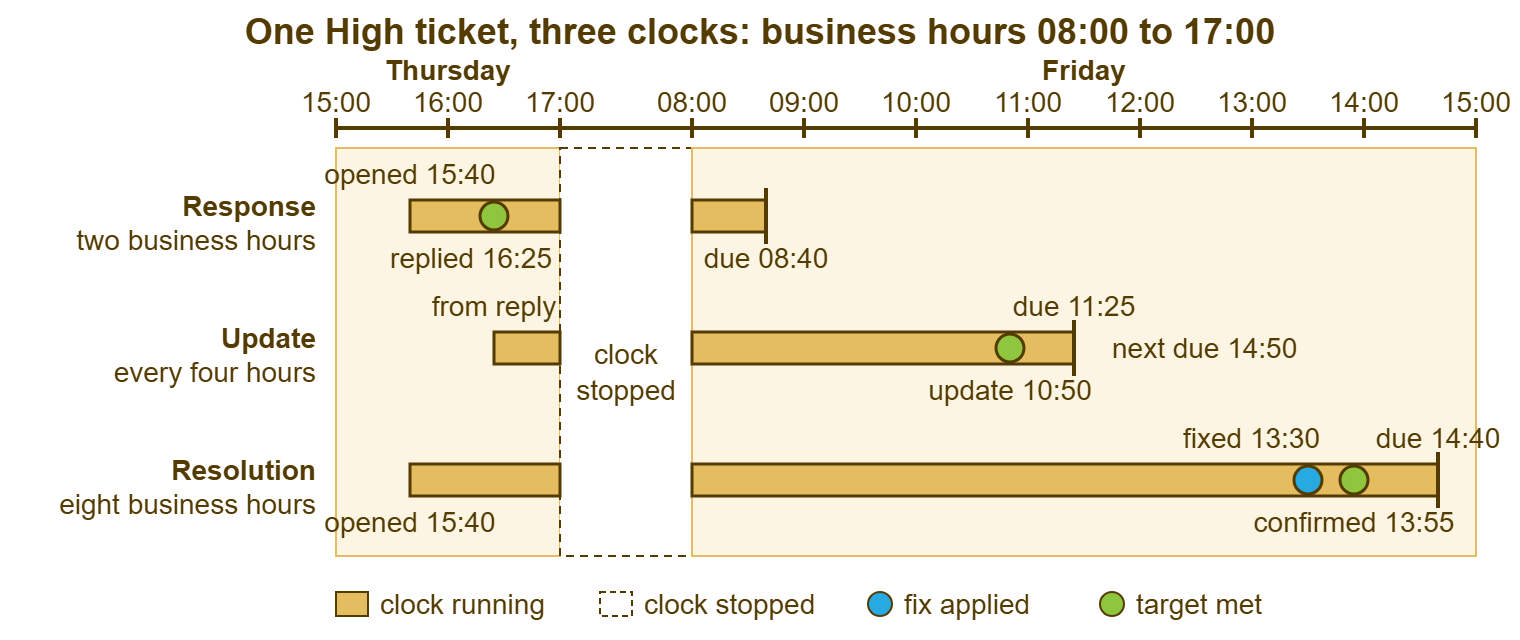
Overnight, all three clocks stop. On Friday at 10:50 Marcus writes that the printer is swapped and the driver is installing. That meets the update target with thirty-five minutes to spare and starts the next interval, due at 14:50. At 13:30 the new printer produces a test label; at 13:55 Lena confirms the first real receipt. The resolution clock stops at 13:55, forty-five minutes inside its target. And the second update interval never comes due because the ticket resolved first. Three clocks, three met, and one user who was never left wondering.
Draw this once for your own desk, on paper, with your own hours. It takes ten minutes, and it finds the target that was set in calendar hours by someone who believed a business day had twenty-four of them.
Setting Each Target
Set the targets from a month of your own tickets rather than from a list like the one below. The right numbers depend on how many technicians you have, how many tickets arrive, and when they arrive. The ranges here are what small desks of two to five people commonly manage, and they are examples, not rules. Start at the loose end of each range, meet it for two months, then tighten.
| Priority | First response | Update interval | Resolution | Typical case |
|---|---|---|---|---|
| Critical | Fifteen to thirty minutes | Every hour | Four to eight business hours | Many people stopped; worked until fixed |
| High | One to two business hours | Every four business hours | One to two business days | One person stopped, or a deadline today |
| Normal | Four to eight business hours | Once a business day | Three to five business days | Work slowed; a workaround exists |
| Low | One to two business days | Once a week | Ten to fifteen business days | Requests, questions, nice-to-haves |
| Planned (optional) | One business day | At each agreed milestone | The agreed date | Work with a date set with the requester |
Two patterns hold across the table. The response target is always far tighter than the resolution target, by a factor of eight or more. One is within the desk's control and the other is not. And the update interval sits between the two, so that no ticket at any tier goes silent for longer than its user would take to start worrying. If a tier's update interval is longer than its resolution target, the update will never fire, and the row is decorative.
The priority that picks the row is the subject of Priority Tiers That Are Realistic. Here the only rule is that a tier's targets must be ones the desk has already met for most tickets at that tier. A target set above anything the queue has ever done is not ambitious. It is a breach with a start date.
The Clock: Business Hours, Holidays and the Hold Question
Business hours are the hours the clock runs, and every target in the table above is counted in them. A business day is one day's worth of business hours. So a one-business-day target on a ticket opened at 15:40 is due at 15:40 on the next working day, not at midnight. Calendar hours are the alternative, where the clock runs through evenings and weekends. They belong only to a desk that is staffed through evenings and weekends. Everyone else should write the hours into the SLA and let the clock stop at 17:00.
Holidays stop the clock too, and the tool needs to be told which days those are. A desk that forgets to load the holiday calendar finds out on the first working day after the holiday. Every open ticket is then a day nearer breach than anyone expected. Split shifts, where the desk covers 07:00 to 11:00 and 14:00 to 19:00 for instance, are a schedule the tool either supports or does not. It is worth finding out before promising hours you cannot measure.
The hold question is the one that divides tools. When a ticket is waiting on the user, or on a vendor, or on a part, does the resolution clock pause? Some SLA engines pause it when the ticket enters a waiting status and restart it when the ticket comes back. Others do not pause at all: only non-working hours and holidays are excluded. On those clocks, a ticket that waits five days for the user to return from leave accrues five days. Both behaviors are documented, and each is described by its vendor as the sensible one.
Design for the clock you have. On a clock that pauses, the resolution target can be tight, and the waiting status has to be used honestly. On that clock, every hour on hold is an hour the report will not see. On a clock that does not pause, the resolution target for anything that commonly waits on others must leave room for the waiting. Or the SLA must state a silence rule, such as "a ticket waiting on you for five business days with no reply is closed, and replying reopens it". Either way, the SLA document says which clock it runs on, in one sentence, so that no breach is ever argued over which hours counted.
Measuring Without Gaming
Any target that can be met by changing a status will, sooner or later, be met by changing a status. This is not a remark about technicians. It is a property of targets. The defense is to measure each one against something the user would recognize rather than something the desk can click.
Measure response to the first reply written by a person and sent to the user. An internal note does not count, a status change does not count, and the acknowledgment does not count. If the tool cannot tell a human reply from an automatic one, measure by hand on a sample of twenty tickets a month. That takes fifteen minutes and is more honest than a perfect number about the wrong thing.
Measure resolution to the user's confirmation, or to the end of a stated silence period after the desk asks for it. "Fixed, please confirm; if I do not hear back within three business days I will close this" is the sentence that makes the measure fair in both directions. The user who confirms stops the clock. The user who vanishes stops it three days later. The technician alone cannot stop it, and a reopen inside a stated window restarts the clock along with the ticket.
Report the four numbers by priority as percentages met, with the ticket count beside each so that a single Critical breach is not reported as a zero. Then read the misses one by one, because a miss is information about the target at least as often as about the ticket. The sibling article SLA Breaches and What They Teach is the method for that reading.
A Short War Story: Kestrel Payroll
Kestrel Payroll's first SLA had one target: every ticket resolved within four hours. The two-technician desk breached it on roughly half of all tickets, mostly the ones that waited for a vendor or a part. The monthly report had become a list of things nobody could have done differently. Sam, who had inherited the desk, replaced the single target with a one-hour response target for everything and a daily update on anything still open. She left resolution targets out of the document for one quarter while she measured what the fixes actually took. Breaches fell from about one in two to about one in twenty. The one in twenty were now all response misses, which the desk could fix by itself. The fixes took exactly as long as before. The users rated the desk two points higher, and the vendor remained closed on Fridays.
I did a version of the same thing once, with less grace and a longer quarter. The lesson is the same either way: measure the thing you control first, and promise the rest only after you have watched it for a while.
The Targets Table Template
The table below is the one to copy into the SLA document and into the tool. Fill the three target columns from your own month of tickets. Set the subsequent-response target equal to the first unless you have a reason not to. Keep the hours column honest, and add the Planned row only if your desk takes work with agreed dates. The values shown are the ones Northgate Retail runs, and they are a starting point rather than a standard.
| Priority | One-line test | First response | Update interval | Resolution | Hours counted |
|---|---|---|---|---|---|
| Critical | Many people cannot work | Thirty minutes | Every hour | Four business hours | Business hours; the clock does not pause on hold |
| High | One person cannot work, or a deadline today | Two business hours | Every four business hours | Eight business hours (one business day) | Business hours; the clock does not pause on hold |
| Normal | Work slowed; a workaround exists | Four business hours | Once a business day | Three business days | Business hours; the clock does not pause on hold |
| Low | A request, a question, a nice-to-have | One business day | Once a week | Ten business days | Business hours; the clock does not pause on hold |
| Planned | A date agreed with the requester | One business day | At each milestone | The agreed date | Calendar days to the agreed date |
A tool's SLA engine may carry four targets per priority (first response, resolution, subsequent responses and update interval). If it also has a business-hours schedule with split shifts and holidays, it can hold this table as it stands. QuerySolv's SLA engine is built that way, and its documented limit is the one discussed above. The clock does not pause on hold, and only non-working hours and holidays are excluded. So on that engine the resolution targets in the table should be set with the waiting already included. On an engine that pauses, tighten resolution and keep an eye on the hold status instead.
Ticket 3318 and ticket 3327 were worked by the same desk in the same week. One of them had a response, three updates and a resolution confirmed by the user. The other had a resolution. Set the four targets, count them in business hours, and measure them against things the user can see. Then the nine-day ticket will keep rating a nine, which is the strangest and most dependable fact in support.
Frequently Asked Questions
Does the automatic acknowledgment count as a response?
What is a reasonable first-response target for a small desk?
Should resolution be measured to the resolved status or to the user's confirmation?
Our tool does not track an update interval. Should we still set one?
Do requests need different resolution targets from incidents?
Should the clock pause while a ticket is waiting on the user?
From the QuerySolv team: we build self-hosted help desk software for Windows. QuerySolv runs as one Windows service on your own network. It takes requests by web form, e-mail, live chat, social messages and REST API. It is licensed once per installation rather than per agent per month. The free trial runs the full product for 30 days.