
One Queue, Many Doors
Most organizations have three queues and admit to one. The first is the ticket system, which has a dashboard, a count, and a manager who looks at it. The second is the shared mailbox, which has nine hundred unread messages and a folder called "done" that is not. The third is the chat tool, where a technician named Marcus has fourteen open direct messages. Each begins "quick one", and each is a request that exists nowhere else. Three queues, one desk, and a count on the dashboard that is wrong by a factor nobody has measured.
The fix has one rule, and the rule is the title. Every door into the desk opens into one room, and a request that is not in that room does not exist to the desk. This is the second article in our Channel Strategy series. The first, The Support Channels, Explained, walked through the doors one at a time. This one is about what is on the other side of them, which should be the same thing every time.
It covers the rule and the five reasons it matters, then how to route each channel into the queue. Next come the shadow channels that refuse to die and the redirect for each. It covers the habit of opening tickets on other people's behalf and how to measure whether the rule holds. Then comes a leave handover at Kestrel Payroll that found eleven open requests nobody had logged. It ends with a rules card to print and pin up.
The Rule: Every Door Opens Into One Room
The queue is the single list of every open request the desk has, in one tool, with a number, an owner and a state on each. A door is any channel through which a request arrives. The rule is that every door opens into the queue, so that the channel a request came through is a field on the ticket and nothing more. E-mail, form, phone, walk-up, chat, social message: six doors, one room, one kind of ticket.
The hard half of the rule is the second sentence. A request that is not in the queue does not exist to the desk. It is not counted, not owned, and not visible to the colleague covering tomorrow. It is not in the history when the same thing happens next month. It may well get fixed. It will be fixed as a favor, by whoever saw it, and the desk will have no idea it happened. A favor is a ticket with the record removed.
The rule binds the desk, not the user, and that decides how you enforce it. Users may use any door they like, including the ones you wish they would not. Whoever receives a request, by whatever route, gets it into the queue before working on it, and nothing the desk works on lives anywhere else. That moves the burden from the person with the problem to the person with the tool, which is where it belongs.
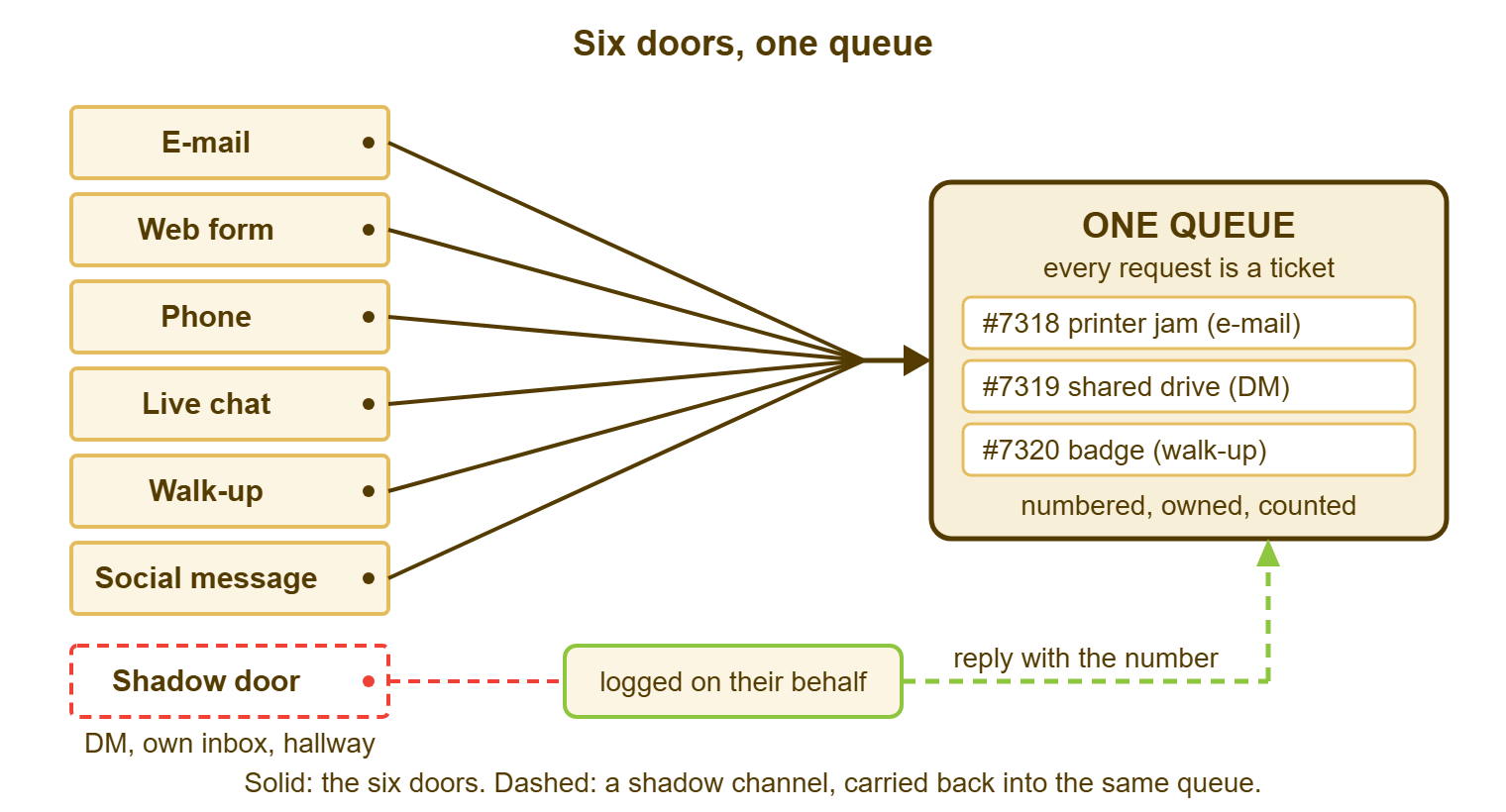
The diagram shows the shape: six solid doors on the left, one queue on the right holding numbered tickets. The tickets record the channel each came through, and a seventh door is drawn dashed. That is the shadow channel, the direct message or the hallway, which has no wire of its own. It is carried into the queue by the technician who opens the ticket on the requester's behalf and replies with the number. The dashed door never closes. It gets routed.
Why One Queue Matters
One queue matters for five reasons, and the first is counting. The desk's volume is the number of requests in the queue. Every number built on it, from the backlog to the staffing case, is wrong by the number of requests that never got there. A desk that logs half its work will be told, with evidence, that it is half as busy as it is.
The second reason is ownership. A ticket in the queue has a name on it. A message in a mailbox has a name on it only in the sense that everyone saw it. Ownership is what lets the desk know who is working on what and what is waiting for nobody. Three queues means three places where a request can be waiting for nobody, and nobody checks all three.
The third is history. The answer to "has this happened before?" lives in the queue if the previous request got there. It lives in a personal mailbox, a chat thread or a memory if it did not. Full-text search across old tickets can only search what the queue holds.
The fourth is fairness between users. When the queue is the only path, the person on the third floor with a form is in the same line as the person next to the desk with a question. That line is ordered by priority rather than by proximity. When there are shadow paths, the people who know a technician get served first. The people who do not learn that the official door is the slow one. They are right.
The fifth is the staffing case, which is the first reason wearing a suit. The only argument for more people that survives a budget meeting is a count, and the count has to be the whole count. I lost that argument once with a dashboard showing ninety tickets a week when the real figure was closer to two hundred. The dashboard was accurate. It was counting the wrong thing.
E-mail: The Mailbox Feeds the Tool
E-mail is routed into the queue by pointing the support mailbox at the ticket tool and taking the humans out of the mailbox. Most tools either poll a mailbox or receive forwarded mail. Either way, every message becomes a ticket with the sender as the requester and the subject as the title. Set it up, confirm the receipt goes back to the sender with the ticket number, and then stop reading the mailbox directly.
Stopping is the hard part. The mailbox has habits. There is a technician who keeps it open "just to see", and a manager who was copied on everything. There is a folder structure someone built over three years. Each habit keeps a second queue alive. Close the mailbox client, remove the shared mailbox from everyone's profile except the tool's service account, and let the tool be the only reader. The mailbox will survive. It just stops being a place where work happens.
Two things to watch are replies and loops. A requester's reply to the receipt must thread onto the same ticket rather than opening a new one. Most tools handle that by message identity and the ticket number in the subject. And the tool's receipt must not answer an out-of-office that answers it back, which is a loop that can fill a queue overnight. Check both on day one with a test message, before announcing anything.
The Form Is the Tool
The web form needs no routing because it is the tool's own front door, and that is the whole case for it. A request opened on the form is a ticket from the first keystroke. It is numbered and timestamped, with the fields the desk asked for and a page where the requester can watch it move. The form's only job in the one-queue plan is to be easy enough to reach that people reach it.
Make it the nearest door: the link on every desktop, in every signature, on the voicemail greeting, and in the chat tool's support space. Remove the login if the tool allows it, because a form behind a forgotten password is a form behind a wall. The requester needs an e-mail address for the receipt. They do not need an account to ask for help.
Phone and Walk-Up: Logged While They Are Still There
Phone calls land in the queue when the technician opens the ticket while the caller is still on the line, and not a minute later. The habit is to answer, open a new ticket, and type the caller's name and the problem as they describe it. Read the number back before the call ends. "That's ticket 7318, I'll update you by three." The caller now has a number, the queue has a request, and the technician has nothing to remember.
Walk-ups are the same habit with the person standing there. The technician opens the ticket on the user's behalf, in front of them, as the first thing that happens, and says the number out loud. This feels slower than just fixing it. It costs forty seconds, and those are the forty seconds that make the desk's busiest hour show on the report as busy rather than quiet. If the problem is fixed in the next two minutes, the ticket is resolved in the next two minutes, and that is fine. The record was the point.
The failure here is always the same: the technician means to log it afterward, and afterward is where tickets go to die. Afterward has a phone ringing in it. Call handling in full, including voicemail that becomes a ticket within the hour, is in Phone Support in a Ticket World.
The Chat Tool and Social Messages
The chat tool's direct messages are routed into the queue by one sentence, and the sentence contains a ticket number. When a technician receives "quick one, the shared drive has gone again", the reply is not the fix. The reply is "Logged as 7319, looking now", sent after the technician has opened the ticket on the user's behalf. Opening it takes about as long as typing the sentence. The user gets help exactly as fast as before, plus a number. The desk gets a record it would never otherwise have had.
Do not ask users to stop sending DMs. It does not work, and it makes the desk the people who said no. Ask the desk, instead, never to answer a DM without a ticket number in the reply. And give the chat tool a support space with the form link pinned to the top. That makes the nearest door inside the chat tool a door into the queue. Over a few months the DMs thin out on their own, because the number arrives either way and the form skips a step.
Social direct messages are routed in by the tool if it supports them. In that case, a message on a social platform becomes a ticket and the reply posts back through the same conversation. If the tool does not, whoever watches the platform opens the ticket on the requester's behalf and pastes the reply back. That is the walk-up habit with a longer walk.
The Shadow Channels That Refuse to Die
A shadow channel is a route into the desk that the desk did not open and cannot see: the personal mailbox, the direct message, the hallway. They are not going away, because they are made of relationships, and relationships outlast policies. The aim is not to close them. It is to make each one a short detour into the queue, with a redirect that keeps the relationship and loses nothing but the silence.
The personal mailbox is the request sent to a technician's own address because the user knows them. The redirect is to forward the message into the support address, which creates the ticket with the user as requester. Then reply from the ticket: "Opened this as 7320 so it's tracked while I'm out Thursday." The user learns that the technician's address still works and that it leads to the same place as the form. They learn that the technician was thinking of them.
The direct message was covered above: reply with a ticket number, or do not reply. The hallway is the hardest, because it has no text to forward. The redirect is spoken: "Let me get that in so it doesn't get lost." Then the technician opens the ticket at the nearest keyboard, in front of the user if possible. Said warmly, it is care. The version that fails is "please open a ticket", which sounds like a door closing, because it is.
A shadow channel that has grown large enough to need a formal shutdown, with an announcement and an auto-reply, is the subject of Retiring a Support Channel Without a Revolt. Most are not that big. Most are one technician's inbox and a habit.
The "Ticket on Their Behalf" Habit
The habit that bridges every channel is the technician opening the ticket for the user. And it deserves its own name because it is the whole plan in one motion. On their behalf means the technician creates the ticket with the user as the requester. That way, the receipt and every update go to the user exactly as if they had used the form. The user did not have to find anything. The desk did not have to lose anything.
It works because it moves the cost to the person with the tool open. A user asked to open a ticket has to find the form and remember what the desk wants to know. They have to go back to a problem they wanted to hand off. A technician has the tool in the next tab and knows which fields matter. Thirty seconds for the technician replaces five minutes for the user, and the ticket is better for it.
Make it the default for phone, walk-up, DM and hallway, and make it visible. The user should receive the receipt with the number within a minute of asking, whatever door they used. That receipt is what trains people, not the policy. A number that arrives every time, by every route, teaches the organization that the desk is one place with many doors. A number that arrives sometimes teaches it that the desk is a lottery.
Remember: the rule binds the desk. Any door is fine for the user; the technician carries the request into the queue and replies with the number.
Measuring Whether It Holds
The measure is requests seen versus requests logged, by channel, for two weeks. "Seen" is every request a technician became aware of by any route, ticked on a tally sheet as it arrives. "Logged" is the count of tickets created with that channel recorded. The ratio per channel is the one-queue score, and the first run is always humbling.
Here is a real-shaped example. Priya runs Bluewater Bank's internal desk, three technicians for three hundred and sixty staff across head office and eight branches. For two weeks every technician kept a tally. E-mail: two hundred and six seen, two hundred and four logged, ninety-nine percent. Form: sixty-one seen, sixty-one logged. Phone: a hundred and eighteen seen, forty-seven logged, forty percent. Walk-up: seventy-four seen, nine logged, twelve percent. Chat-tool DMs: ninety seen, eleven logged, twelve percent. Social: none, because the desk is internal. In total, five hundred and forty-nine requests were seen and three hundred and thirty-two logged. So the dashboard was showing sixty percent of the truth. The three worst channels were the three that depend on a habit rather than a wire.
Priya's response was not a policy. It was the number read back on every call, the ticket opened in front of every walk-up, and the ticket-number reply on every DM. These were measured again a month later. The second run came to five hundred and sixty seen and five hundred and twelve logged, ninety-one percent. And the phone line was the only channel still under ninety. The staffing case she took to the budget meeting used the second number. It was approved, because for the first time it was true.
Measurement works only if the tool treats every channel's ticket identically: same numbering, same fields, same timestamps, same reports. If chat tickets live in one place and e-mail tickets in another, the comparison compares nothing. QuerySolv's channel comparison report depends on exactly that property. A ticket created by the web form, e-mail, live chat, a social message or the API is numbered, stored and tracked the same way. So volume and response time by channel are like against like. On any tool, check that before trusting the chart.
Eleven Open Requests at Kestrel Payroll
Kestrel Payroll's desk had two technicians. When Tomas went on three weeks of leave, Lena took over his half of the queue. It looked manageable at nineteen open tickets. On the second day she opened the chat tool to answer a question and found Tomas's direct messages. There were eleven open requests, three of them about the month-end payroll export, none of them in the queue. The newest was from the afternoon before he left. She logged all eleven that morning on the users' behalf. She replied to each thread with a ticket number and an honest note that she was picking them up. Two of the eleven had already been quietly fixed by the users themselves. The other nine were worked in the queue like any other ticket, and the payroll export went out on time. When Tomas came back, the desk did not have a conversation about blame, because the problem was not Tomas. It wrote one rule on the whiteboard, where it still is: reply with a ticket number, or do not reply.
I keep that rule for myself, and I break it about once a month, always when I am busiest. The DM I answered without a number is the one I will be asked about in a week. The person asking thinks I am still working on it.
The One-Queue Rules Card
The card below is the rule and the redirects on one page, for pinning next to each technician's screen. The redirect sentences are written to be said, not read. And each gives the user something (a number, a promise) before it asks for anything. Change the names. Keep the shape.
ONE QUEUE, MANY DOORS: DESK RULES CARD
Desk: ____________________   Tool: ____________________   Reviewed: ________

THE RULE
  Every request goes in the queue before it is worked.
  A request that is not in the queue does not exist to the desk.
  The rule binds the desk, not the user. Any door is fine. We carry it in.

THE REDIRECT PER DOOR (say it, then do it)
  E-mail (support address)  Nothing to say; the tool makes the ticket.
                            Reply from the ticket, never from the mailbox.
  Web form                  Nothing to say. Keep the link one click away.
  Phone                     "Let me get that in while we talk."
                            Open the ticket during the call. Read the number back.
  Walk-up                   "Let me get that in so it doesn't get lost."
                            Open the ticket in front of them. Say the number.
  Chat-tool DM              "Logged as #____, looking now."
                            Open the ticket on their behalf, then reply.
                            Never answer a DM without a number in the reply.
  Personal mailbox          Forward to the support address; reply from the ticket:
                            "Opened this as #____ so it's tracked while I'm out."
  Hallway                   "Let me get that in." Nearest keyboard. Then help.
  Social message            Routed by the tool, or opened on their behalf;
                            reply where they asked.

THE RECEIPT
  Every requester gets the number within a minute, by every door.

THE MEASURE
  Two weeks, tally sheet per technician: requests seen vs logged, by door.
  Target: nine in ten logged on every door. Re-run quarterly.

Signed: _____________________________________
Three queues do not become one when the mailbox is closed or the chat tool is banned. They become one when the desk carries every request through whichever door it arrived at and into the same room, every time, with a number. The doors stay open. The room is where the work is. If Marcus's fourteen direct messages had each been answered with a ticket number, the organization would have had one queue all along, and a dashboard that was right.
Frequently Asked Questions
Does one queue mean we refuse requests that do not come through the form?
What if the same request arrives by three channels from the same person?
How long should opening a ticket on someone's behalf take?
Should we switch off the shared mailbox entirely?
Our chat tool has a support room where people post questions. Is that a queue?
How do we handle requests from people outside the organization?
From the QuerySolv team: we build self-hosted help desk software for Windows. QuerySolv runs as one Windows service on your own network. It takes requests by web form, e-mail, live chat, social messages and REST API. It is licensed once per installation rather than per agent per month. The free trial runs the full product for 30 days.