
Shipping and Swapping Hardware for People Who Work From Home
Monday, 08:20, at Bellweather Logistics. Kemi is a dispatcher who works from a town three hours north of the depot. Her laptop shows a line of white text and then nothing. She has sent a photo of it, which is more than most people manage. Theo on the desk recognises the fault from the photo and knows the answer is a swap. Then he starts looking for the pieces. There is a spare laptop, but it was imaged in the spring and has not been switched on since. There is no box; the last one went out in June and nobody ordered more. The courier account is in the name of a technician who is on leave. And the address the directory holds for Kemi is the one she lived at before she moved. The spare leaves on Wednesday. Kemi is working again on Friday, from a laptop that took five days to travel what a van could have driven in three hours.
None of that was Theo's fault, and all of it was preventable on any afternoon in the previous six months. Shipping and swapping hardware is the routine by which the desk gets a working device to a remote worker and the failed one back. The box, the spare, the label, the courier account and the dates are all prepared before the fault happens. That makes the swap a dispatch rather than a project. This article is part of our Supporting Remote Workers series. The decision to swap, and the threshold that triggers it, belong to Remote-First Support Design. This is the article about the box.
It covers why the swap is the remote desk's corridor, then the box that is always ready and the pre-imaged spare. Next comes the swap-by-post step by step, with a picture, followed by the courier and the account. It covers the tracking number on the ticket, then the return label and the chase. The user who is never home follows, along with what comes back and what happens to it. It finishes with a short war story and the shipping runbook to copy, in that order.
The Swap Is the Remote Desk's Corridor
In the building, a failed laptop was a walk down the corridor with a spare. The diagnosis happened later, at the desk, with the technician's hands on the machine. A swap is the same move done by post. A working device goes out, the failed one comes back, and the diagnosis still happens at the desk, where it is cheapest. The alternative is diagnosing the failed device in the user's kitchen by phone. That is the most expensive way to find out what the desk would have seen in a minute with the lid open. Swap first. Diagnose when it arrives.
The swap therefore has to be fast at the desk's end, because the courier's end is slow and the desk cannot change that. A parcel takes a day or two each way whatever the desk does. So a swap that is dispatched the same afternoon is a user working again in two days. And a swap that takes two days to dispatch is a user working again in four. The only part of that timeline the desk controls is its own, and the whole of this article is about making that part take an hour. How many spares the pool needs, and the case for keeping them at all, is in The Loaner and Spares Strategy, which this article assumes. The remote addition is that the pool must be sized from the round trip. A spare is away for the round trip plus the time it spends being wiped and checked on return.
The Box That Is Always Ready
The ready box is a courier box that already contains everything except the laptop, assembled and sitting on the shelf. That makes dispatch a matter of putting the device in and closing the lid. Inside is padding that fits the standard model and a pre-paid and pre-addressed return label. There is the one-page card that tells the user what to do when the box arrives, a charger, and a network cable. Half of the next ticket is a laptop at the edge of a wireless signal, and the cable costs nothing to include. The outer box is the right size for the standard laptop and sturdy enough to make the return journey. The user will send the old unit back in the same box.
Keep more than one assembled. A small desk keeps two or three ready boxes at all times and assembles a new one the day one goes out. Assembling one takes ten minutes and never happens if it is left for "when we have a moment". The test of a ready box is whether a technician who has never shipped anything could dispatch a swap in ten minutes with it. The honest answer at most desks before they build one is no. The label is on a laptop that needs a login, the padding is in another room, and the card has not been written. Build the box on a quiet afternoon and the dispatch is no longer a project. (Boxes do not order themselves. Put the reorder on the stock sheet, or June comes round again.)
The card deserves a paragraph, because it is the only thing the user reads. It is one page in large type, written for someone holding it in a kitchen with a dead laptop beside them. It says what is in the box, how to start the new laptop and sign in, and what to do if the sign-in fails. It says how to pack the old laptop in this same box with the enclosed label, where to take it and by when. It gives the desk's phone number and portal link in case any of that fails. Put the ticket number on it. The user who phones with the card in their hand and the ticket number on it has saved the first three minutes of the call.
The Pre-Imaged Spare
A pre-imaged spare is a device of the standard model, already loaded with the standard build and applications. It has been signed in once to prove that the sign-in works, charged, and then shut down and shelved. The sign-in test is the step that gets skipped and the one that matters most. A spare that reaches the user and cannot sign in has turned a two-day swap into a four-day one with a phone call in the middle. Sign it in at the desk, confirm the VPN connects and the mail opens, sign out, shut down, charge, shelve. Write the date on a label on the lid.
Spares go stale. A build that was current in the spring has missed updates by the autumn. A laptop that has been shut down for months will spend its first hour at the user's house catching up, if it manages to at all. The monthly spares check is a fixed appointment. Every spare on the shelf is powered on, updated, signed in, signed out and shut down again. And the date on the lid is changed. Half an hour a month. The alternative is Theo's spring laptop, which nobody had switched on since it was imaged and which, when he finally did, wanted most of a morning to itself.
Each spare has a name and a place in the record. The desk needs to know, at any moment, which spares are on the shelf, which are out, with whom, against which ticket, and which are on their way back. Most small desks have no asset system, and do not need one for this. A line on the ticket naming the spare that went out, and a one-page sheet listing the spares and their state, is enough. The method for tying a device to a ticket without an asset module is in Linking Devices Without an Asset System. The day someone asks where spare number four is, the answer should be a filter on the tickets, not a search of memories.
The Swap-by-Post, Step by Step
The swap-by-post is one ticket, two parcels and five dates. The picture below lays it out in two lanes, the desk above and the user below, with time running left to right. On the morning of day zero the desk confirms the fault from the phone-and-photo checks. It decides the swap under the threshold it agreed in advance and checks the address with the user rather than with the directory. That afternoon a spare comes off the shelf and is signed in once more to be sure. It goes into a ready box with the return label and the card, and is handed to the courier. The tracking number goes on the ticket. The parcel travels. On day two it arrives, and the user follows the card, signs in, and is working again. That is the green box. It is the moment the ticket is resolved, because the user's problem has ended. On day three the user packs the old unit in the same box with the enclosed label and hands it to the courier. That tracking number goes on the ticket too. On day five the old unit reaches the desk. It is wiped or examined according to the organisation's rule for devices that may hold work data. It is diagnosed with the lid open and goes back on the shelf or off to the vendor. The ticket closes.
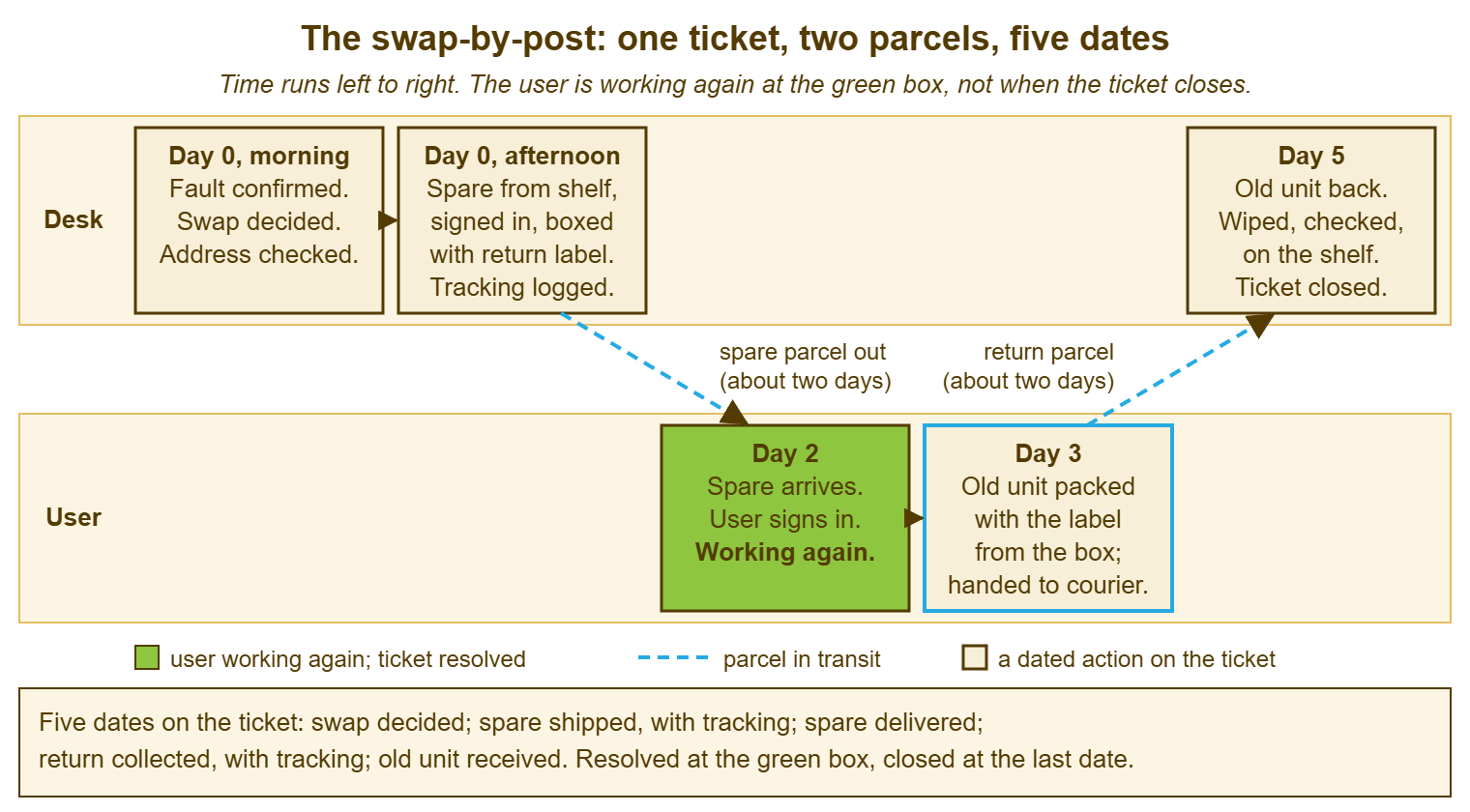
Two things in the picture are rules rather than decoration. The first is that the ticket is resolved at the green box and closed at the end, not resolved at the end. The user's outage ended on day two and the measurement should say so. The remaining three days are the desk's logistics, not the user's wait. The article on Measuring Remote Support depends on the two dates being separate. The second is that every one of the five dates is written on the ticket as it happens. If you run QuerySolv, the event history on the ticket already carries the time of every note and reply. In that case, the dates are there without a separate log. In any tool, the rule is that a stranger opening the ticket can see where both parcels are and when each moved. The day the picture is not followed is the day the ticket says "spare sent" with no date, no number and no way to answer "where is it".
One step happens before the picture starts and is easy to forget: the data on the failing device. If the laptop still starts, the swap decision includes a check that the user's work is saved somewhere other than the laptop. The old unit will be wiped on return. If it does not start, say so in the ticket and in the card. That tells the user the desk will try to recover what is on the drive when the unit arrives and will not promise more. A swap that quietly wipes a fortnight of unsaved work is a swap the user will remember longer than the fault.
The Courier and the Account
Use one courier, on an account held by the desk, with two people who can use it. The account is in the desk's name, not a technician's, because the technician goes on leave; the second person exists because the first does too. The desk knows the courier's collection window, the last time of day a parcel can be booked for next-day dispatch, and what "signed for" means in practice. And those three facts are on the runbook rather than in anyone's head. Everything ships tracked and signed-for, both ways, every time. A laptop left on a doorstep is a laptop the organisation no longer controls. And the saving on the cheaper service is not worth the first one that goes missing.
Three edges to settle before they arrive. For insurance, find out what the courier covers for a device of the laptop's value and what the organisation's own cover does. Write the answer on the runbook so nobody has to find it out on the day a parcel is crushed. The parcel that crosses a border needs paperwork the desk should not improvise. So the runbook names the person in finance or shipping who owns that. For that cross-border parcel, the lead time is longer and the user is told so. Then there is the ship-by time. A swap decided at 15:00 ships today if the courier collects at 16:30 and the box is ready. A swap decided at 16:45 ships tomorrow, and the user is told that honestly rather than hopefully.
The Tracking Number on the Ticket
The tracking number goes on the ticket the moment the parcel is booked, and the desk watches it, not the user. Both numbers, outbound and return, go on the ticket with the date each parcel was handed over. The technician who owns the ticket checks them the morning after dispatch and daily until delivery. That takes a minute and prevents the message every remote worker has sent at least once: "any idea where my laptop is?" The user is told the number in the public reply, so they can watch if they like. The desk does not rely on them to.
A parcel that stops moving gets a move from the desk the same day. The runbook says what the move is: the courier's tracking page first, the courier's phone line second. In both cases, a note tells the user what the desk knows and when it will look again. The follow-up discipline is the ordinary one for a ticket waiting on a third party. The nudge may be to the courier or to the user who has not confirmed the box arrived. Wording that gets an answer is in Follow-Up Messages That Get Replies. The remote-specific point is that a stuck parcel is a stuck user. And a day lost at the depot is a day the person cannot work.
Remember: the desk controls only its own end of the swap, so make that end take an hour. That needs a box that is always assembled and a spare that is signed in and charged. It needs a courier account two people can use, and both tracking numbers on the ticket with their dates. The parcel's time is the courier's; the dispatch time is yours.
The Return Label and the Chase
The return label is in the box before it leaves the desk, pre-paid and pre-addressed. A user asked to print a label, find a box and pay for postage is a user who will do it next week. The card says: put the old laptop and its charger in this box and seal it with the tape enclosed. Stick the label over the old one. Hand it to the courier or drop it at the named place by the date on the card. The date is two working days after delivery, which is long enough to be fair and short enough to be remembered. Most people do it the same day. The process exists for the rest.
The chase for a return that has not moved is a sequence, not an argument. The day after the drop-off date, send a friendly note on the ticket: "the return has not been collected yet, is there anything stopping it?" Include the desk's phone number for the box that is too small or the courier that never came. A week later, send a second note, copied to the manager. Say plainly that the spare is a shared resource and the next remote colleague with a failed laptop is waiting on it. After that, the manager owns the conversation, and the desk records that it does. The leaver's return, which has different stakes because the person is no longer an employee, has its own routine in Getting the Equipment Back. For a current employee, the chase is about the spare pool, and it is worth saying so. Nobody holds a laptop hostage once they know whose turn it is next.
The User Who Is Never Home
Signed-for delivery needs someone to sign, and the remote worker who is never in when the courier calls is the commonest failure of the whole routine. The parcel goes back to the depot, and the user is told to collect it from a place forty minutes away. And the two-day swap becomes a five-day one with a drive in the middle. The fix is almost entirely at the start, on day zero, when the address is checked. The technician asks when the user is in and whether a pickup point near them would suit better, and books accordingly. The courier's pickup points and lockers, where they offer them, are the answer for the person with a shift pattern or a flat with no reception. A neighbour is not, for the organisation's device, because the organisation's device goes to the organisation's person.
Agree the delivery day in the ticket and tell the user what the courier will do if nobody is in. The user who knows the second attempt is tomorrow stays in tomorrow. A parcel that has gone back to the depot twice is redirected to a pickup point on the desk's instruction rather than tried a third time. And that rule is on the runbook so nobody has to decide it. The office, where the user is near one, is the simplest pickup point of all. The user who passes the building weekly may prefer a swap across the counter to a swap through a letterbox. Ask. The address in the directory is a starting point, and at Bellweather it was not even that.
| What went wrong with the parcel | What the desk does the same day | What the user is told |
|---|---|---|
| Tracking has not moved since dispatch | Check the courier's page, then phone the courier; note the answer on the ticket | What the desk knows and when it will look again |
| Marked delivered; user says it has not arrived | Ask the courier for the proof of delivery and the signature; check with the user's household and reception | That the desk is tracing it and a second spare ships if it is not found by tomorrow |
| Nobody was in; parcel back at the depot | Rebook for an agreed day, or redirect to a pickup point; after two failures, always the pickup point | The new day or the pickup point, and the collection reference |
| Arrived damaged | Photos from the user on the ticket; claim with the courier; dispatch the next spare without waiting for the claim | That a replacement is already on its way |
| Delivered to the wrong address | Report to the courier; trace; treat the device as out of the organisation's control until it is recovered | That a replacement ships and the first one is being traced |
| Return not collected by the drop-off date | Friendly note the day after; manager copied a week later; manager owns it after that | Whose turn it is next for that spare, kindly |
What Comes Back, and What Happens to It
The old unit arrives, and three things happen in a fixed order. It is received on the ticket, it is handled according to the organisation's rule for devices that may hold work data, and only then is it diagnosed. The receipt is a note with the date and the condition on arrival. That gives the question "did it ever come back" an answer in the ticket. The data rule is whatever the organisation has decided about recovery and wiping, and the desk follows it rather than improvising. The usual shape is that anything the user asked for is recovered first, if the drive allows. In that usual routine, the device is then wiped before it is touched for anything else. Then the lid comes up and the diagnosis that was impossible by phone takes ten minutes.
What happens next depends on what the desk finds. The decision is between repairing the unit, sending it to the vendor under warranty, or retiring it. It is the ordinary one for any failed laptop, made at the desk with the device in hand. A unit that is fixable is fixed, re-imaged, signed in, charged and shelved as a spare, with the date on the lid. A unit going to the vendor leaves on a ticket of its own, linked to the swap. That lets the user's ticket close while the repair runs. The linked ticket is the right shape for this, since the user's problem ended on day two and the vendor's timetable is not their concern. And the spares sheet is updated the same day, because the pool is only as real as the sheet says it is.
A Short War Story: The Laptop That Went to the Old Address at Stonebridge Insurance
At Stonebridge Insurance, a claims handler called Imogen had moved house in the spring and told HR. HR updated her payroll record and not the directory, which the desk used for shipping. When her laptop failed in the autumn, a technician called Sol dispatched a spare the same afternoon to the address the directory held. It was tracked and signed-for, and it was signed for, by the new occupant of her old flat. The occupant was not expecting it and put it in a cupboard. Imogen waited, and Sol watched tracking say "delivered". It took four days of calls to the courier and a visit by Imogen's husband to the old flat to recover the laptop. It had been forty minutes from her front door the whole time. The cost was five working days of a claims handler's time, and a device outside the organisation's control for four of them. It also included a conversation with the security lead about what had been on the spare's drive, which was fortunately nothing. The runbook that followed had a line in section A that nobody at Stonebridge has skipped since. Confirm the address with the person, today, in the ticket, before anything is booked. The directory is where the address lives; the user is where the truth lives.
The Shipping Runbook
The template below is the runbook, pinned beside the ready boxes and followed in order every time a swap is dispatched, by whoever is dispatching it. Section A is the dispatch, done on day zero. B covers the dates and numbers that go on the ticket. C covers the watch and the chase. D covers the return and what happens to it. E covers the standing facts about the courier, the account and the edges, filled in once and kept current. The runbook is deliberately a list a tired technician can follow at 16:20 without thinking. The thinking was done when it was written.
SHIPPING RUNBOOK — SWAP BY POST
Desk: ______________________   Owner: ______________________   Reviewed: ____________

A. DISPATCH (day zero; aim for the same afternoon)
   [ ] Swap confirmed under the threshold; fault and photo noted on the ticket
   [ ] Address confirmed WITH THE USER today, in the ticket (not from the directory)
   [ ] Delivery day agreed; pickup point offered if the user is rarely in
   [ ] Data check: user's work saved off the device, or the recovery limits explained
   [ ] Spare taken from the shelf; signed in once; VPN and mail confirmed; signed out; charged
   [ ] Spare named on the ticket and marked "out" on the spares sheet
   [ ] Ready box: padding, charger, cable, return label, tape, the card with the ticket number
   [ ] Booked tracked and signed-for; handed to the courier before the cut-off time

B. ON THE TICKET, AS EACH ONE HAPPENS
   Swap decided ........ date ______   Spare shipped ...... date ______  tracking ______________
   Spare delivered ..... date ______   (ticket RESOLVED here: the user is working again)
   Return collected .... date ______  tracking ______________
   Old unit received ... date ______   (ticket CLOSED here)

C. WATCH AND CHASE
   [ ] Tracking checked the morning after dispatch, then daily until delivered
   [ ] Parcel not moving: courier's page, then courier's phone line; user told what is known and when you will look again
   [ ] Two failed delivery attempts: redirect to a pickup point; do not try a third
   [ ] Return not collected by the drop-off date: friendly note next day; manager copied after a week

D. THE RETURN
   [ ] Received on the ticket with date and condition
   [ ] Data recovery as requested, within the organisation's rule; then wiped
   [ ] Diagnosed with the lid open; repair / vendor / retire decided at the desk
   [ ] Repaired unit re-imaged, signed in, charged, shelved, date on the lid; spares sheet updated
   [ ] Vendor repair raised on its own linked ticket; the user's ticket closes

E. STANDING FACTS (fill in once; check at the review)
   Courier: ______________   Account holder: the desk   Can use it: ______________ and ______________
   Collection window: ______   Last booking time for next-day: ______   Pickup points available: yes / no
   Cover for a device in transit: ______________________   Cross-border parcels handled by: ______________
   Ready boxes kept assembled: ____   Reorder boxes when: ____ left   Spares check: monthly, on the ______
Theo built Bellweather's first three ready boxes the week after Kemi's laptop came back. The spring spare was updated, signed in, and put on the shelf with a date on its lid. The next swap, in November, was decided at 10:15 and handed to the courier at 15:40 the same day. The address had been confirmed in the ticket. Both tracking numbers were on it by the end of the week. The dispatcher who received it was working again in two days, which is as fast as a parcel goes. The desk's end took fifty minutes.
Frequently Asked Questions
Should the user get a loaner back and their own repaired laptop later, or keep the spare permanently?
How many ready boxes and spares does a small desk need?
What if the user needs the laptop faster than the courier can deliver?
The user says the returned laptop has personal files on it. Do we recover them?
Who pays for the shipping, and does it come out of the desk's budget?
Does the ticket really resolve before the old laptop is back?
From the QuerySolv team: we build self-hosted help desk software for Windows. QuerySolv runs as one Windows service on your own network. It takes requests by web form, e-mail, live chat, social messages and REST API. It is licensed once per installation rather than per agent per month. The free trial runs the full product for 30 days.