
Writing a Template That Does Not Sound Canned
Tuesday, 14:20, at Redbrook Engineering. Marta has been asked by her manager to "write up some standard replies" after a drawing-office supervisor complained that the desk's messages were "all over the place". She opens a blank document and titles it Standard Replies. The first thing she types is "Dear Valued Colleague, Thank you for reaching out to the IT Service Desk." Marta has never said "reaching out" in her life. Yesterday she replied to the same supervisor with "Hi Dev, the plotter's back, it was the spool again, shout if it jams before Friday", and he thanked her. Something about writing for a template made her write like a lobby.
A template that does not sound canned is one the requester reads as a message from a person about their ticket, even though most of its words were written months ago for someone else. The trick is not in disguising the template. It is in building it with gaps in the right places and writing the fixed parts in the words you would say out loud. It also means keeping it short enough that the gaps are most of what the requester sees. This article is part of our Templates & Canned Responses Done Right series. This article is about writing the template itself. The decision about which messages get one is in What Canned Responses Are For, and Not For.
It covers why templates go corporate the moment someone sits down to write one. Next comes the personal slot, which is the mechanism that does the work, with a picture. Then it covers plain voice, keeping it to five lines, and one ask per message. The corporate filler list and what to write instead come next, followed by good and bad pairs for the same purpose. It then covers how to test a template before it goes in the library. A short war story and the template skeleton with its slots marked finish the article.
Why Templates Go Corporate
A template goes corporate because the author is writing to a crowd. Marta, replying to Dev, was writing to Dev, so she wrote the way she talks to Dev. Marta, writing a Standard Reply, was writing to everyone who might ever raise a ticket at Redbrook, which is several hundred people she cannot picture. A message to several hundred people you cannot picture is a speech. Speeches have openings. They thank people for coming. They are careful, general and slightly formal, because the speaker does not know who is in the room. That is where "Dear Valued Colleague" comes from. Nobody chose it. The blank document did.
The fix is to never write to the crowd. Open a real ticket, one the desk answered last week in a shape that comes up often. Write the reply to that one person about that one problem, as you would have on the day. Then take out the parts that belonged only to them, the name, the problem, the time, and leave a marked gap where each one was. What remains is a template written by a person to a person, with holes. The holes are the point, and the next section is about them. I have tried the other order, writing the general version first and adding personality later. That order produces a speech with a name stapled to it.
The second cause is fear of getting it wrong in front of everyone. A hand-written reply is seen by one requester. A template is seen by every requester for a year, and the author knows it. The instinct is to hedge: "may", "should", "at this time", "please be advised". Hedging reads as evasion to the person receiving it, and a template that evades on every line is the robotic failure in its purest form. Write the template as confidently as you would write to Dev. If a sentence turns out to be wrong, the library has an owner and the sentence gets changed. That is a far smaller risk than a year of messages that sound frightened.
The Personal Slot
A personal slot is a marked gap in the template that must be filled before the message is sent. The template is fixed text with slots in it; the message is the template with the slots filled. Every template that works has at least three slots, and the good ones have five. The requester's name, as they signed it, not as the directory spells it. Their words for the problem, quoted back, so they know which ticket this is and that someone read it. One sentence that could only have been written about this ticket: what you noticed, what you have already checked, what you are about to try. The single ask, if there is one. And the time or date they will next hear from you.
Mark the slots so that an unfilled one is ugly. Upper-case words in square brackets do it: [NAME], [THEIR WORDS FOR THE PROBLEM], [TIME]. A message that goes out with [NAME] still in it is embarrassing, and embarrassing is the correct amount of pressure. Lower-case placeholders in a polite shade of grey are a trap. They look like text, the eye slides past them, and the requester gets "Hi name". Some tools fill certain slots automatically from the ticket, the requester's name and the ticket number most often. That is useful and it is not personalisation. That is because the directory's "Robert" is not the signature's "Bob", and no tool can fill the sentence that proves you read the ticket. An automatically filled slot still has to be read.
The picture below shows a five-line template with its slots marked, using a missing-information reply as the example. The fixed text sits on the cream background and is short. It includes a greeting, "thanks for reporting", "to look into it I need", "either way, I will update you by", and a sign-off. The five amber slots, numbered, are the name, their words for the problem, the sentence that proves the ticket was read, the one ask, and the clock time. Read it once with the slots filled as shown and it is a message from Sam to Dana. Read it again imagining the slots empty and it is nothing at all, which is the right way round. The template should be unable to stand on its own.
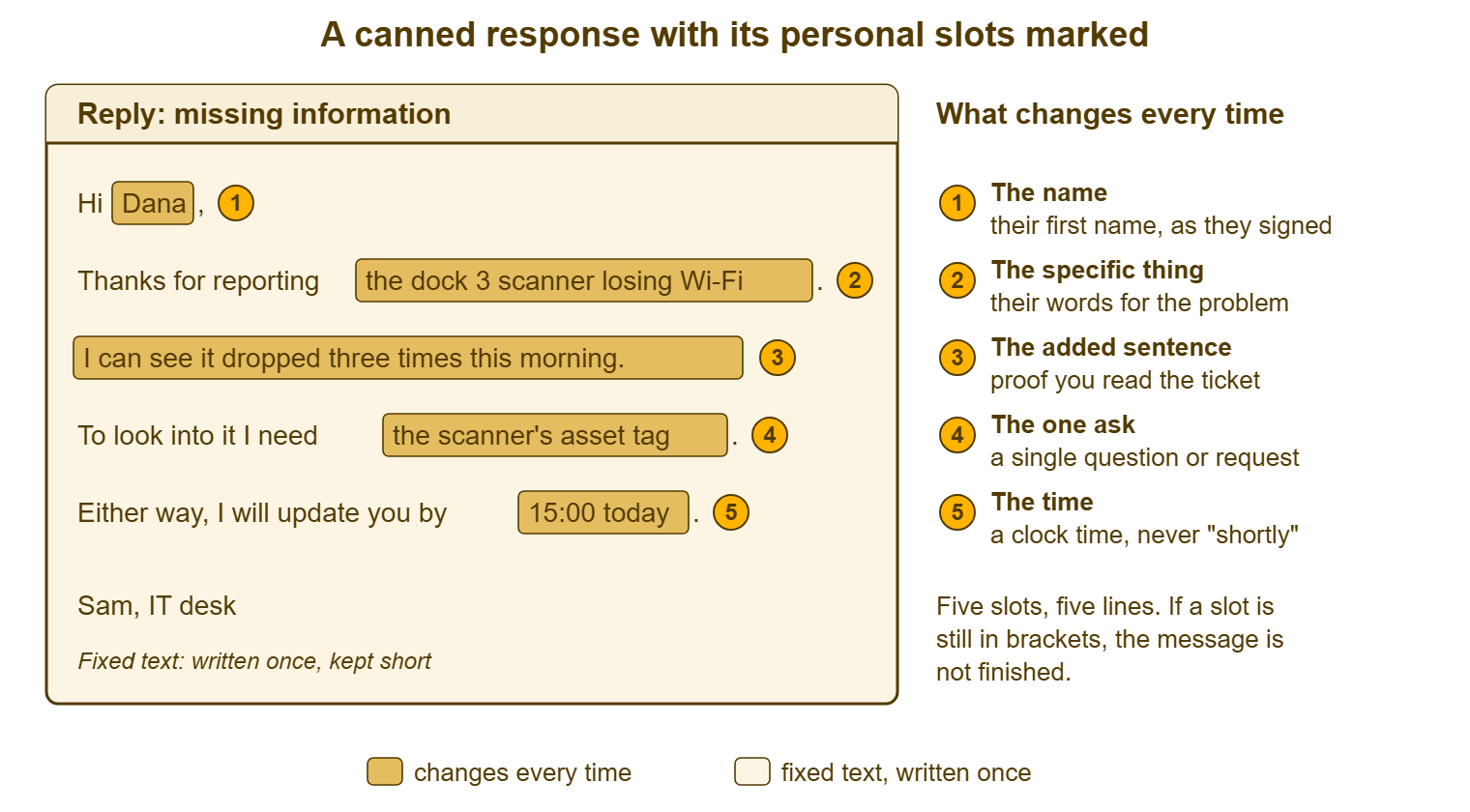
Notice the proportion. In the filled example, more than half the words the requester reads are slot words. That is what makes the message feel written rather than selected, and it is a useful test for any template. If the fixed text outweighs the slots two to one, the template is doing the talking and the technician is doing the typing. In that case, the requester can tell. Cut fixed text until the slots are most of the message.
Plain Voice: Words You Would Say at Their Desk
Plain voice means the fixed text uses the words you would use if you walked to the requester's desk and said it. "Thanks for reporting the scanner." "I need the asset tag." "I will update you by three." Nobody standing at a desk says "please be advised that your request has been received and is being processed". If a sentence in the template would make you feel silly saying it out loud to a colleague, it is not plain voice. In that case, it will read as canned however carefully the slots are filled. The wider case for writing like a person is made in Writing Like a Person, Not a Policy. This is the same rule applied to text that will be sent a thousand times.
Plain voice also means plain words for technical things. A template that says "the authentication token has expired" will be sent to people who do not know what a token is. A template is the worst place for jargon because it is repeated to everyone. "You were signed out and need to sign in again" is the same fact in words the requester has. The method for finding those words is in Skipping the Jargon. A template is a good place to apply it once and benefit for a year.
Decide who is speaking and keep to it. "I" is right when one named technician is doing the work and will be the one who replies next. "We" is right when the desk is speaking as a desk, in a maintenance notice or an outage update. The failure is the template that switches halfway, "I have looked at this and we will be in touch", which reads as a person hiding behind a department. Most desks settle on "I" for the ticket conversation and "we" for announcements, and that is a reasonable default. Whatever you choose, the sign-off matches it: a first name under an "I" message, the desk's name under a "we" message.
Short: Five Lines, First and Last Do the Work
Five lines is the right length for nearly every routine message, and the reason is how requesters read. They read the first line to find out whether the message is about their problem and whether anything is happening. They read the last line to find out what they have to do and when they will hear more. The middle gets skimmed. A template that puts the ask in line four of eight has hidden it. A template that puts the time in a closing paragraph has lost it. So line one names the thing. The last full line gives the time, the ask sits just above it, and there is nothing else to skim.
Shortness is also what makes the slot proportion work. A five-line template has room for about forty fixed words and five slots, and once the slots are filled the message reads as mostly written-for-you. A fifteen-line template has a hundred and twenty fixed words and the same five slots, and reads as a form. Every line you add to a template is a line the requester has seen before. Templates get longer the way policies get longer: someone adds a sentence after an incident, and nobody removes one. After two years the acknowledgment has a paragraph about the desk's opening hours and a paragraph about how to escalate. Both are true and neither is what the requester asked about. Cut back to five at every review.
Some messages genuinely need more. A planned-maintenance notice carries required content, start, end, what is affected, who to contact, and it may run to eight lines. A resolved message that includes a three-step workaround is longer than five lines by the length of the steps. The rule is not five lines as a limit; it is five lines plus whatever is required, and nothing that is merely nice. If you cannot say what a line is for, it is not required.
One Ask Per Message
An ask is anything the message needs the requester to do: send something, try something, confirm something, choose something. A template should contain one. A message with two asks gets one answered, nearly always the last one. The technician then sends a second message asking again for the first, which is the back-and-forth that templates were supposed to remove. "Could you send me the error message, and also let me know if this happens on the other computer, and are you able to come by the desk this afternoon?" is three asks dressed as a sentence. The requester answers "yes, this afternoon is fine" and the technician has learned nothing about the error.
One ask can have several parts if the parts are one action. "To look into it I need three things: the exact words on the error, the time it last happened, and whether anyone else at your desk sees it" is a single ask. That is because the requester does one thing, which is reply with three facts. A numbered or lettered list makes that plain. The test is whether the requester has to do two different kinds of thing. Send information and also try a fix is two asks. Send three pieces of information is one. When you genuinely need two kinds of thing, send the first, wait, and send the second, or make it clear that step two follows step one. The desk-side discipline of asking once and asking well belongs to Gathering the Right Information Up Front. The template's job is to carry the one ask in one place.
Put the ask where it will be seen, and say why. "I need the asset tag" is an ask. "To look into it I need the asset tag, on the white label under the battery" is an ask with its reason and its location. It gets answered the first time far more often, because the requester knows why they are being asked and where to look. A template that explains its one ask in one clause is doing more for reply rates than any amount of politeness around it.
Remember: a template is fixed text with marked gaps. Write the fixed text to one real person about one real ticket, in words you would say at their desk, in five lines with one ask. Leave gaps for the name, their words for the problem, one sentence that proves you read it, the ask and the time. The message should not be able to stand without the gaps filled.
No Corporate Filler
Corporate filler is the set of phrases that appear in a message because it is written to a crowd and that carry no information for the person reading it. Every requester has learned to skip them. That means every word of filler at the top of a message pushes the real content further down, below the point where the reading stops. The table lists the common ones, why they appear, and the plain alternative. Most of the alternatives are shorter. Several are "delete it".
| Filler phrase | Why it appears | Write instead |
|---|---|---|
| "I hope this message finds you well" | Written to a crowd; an opening for a speech | Nothing. Start with their name and the thing. |
| "Thank you for reaching out to the IT Service Desk" | Sounds polite; names the sender, not the problem | "Thanks for reporting [the thing]." |
| "Please be advised that" | Sounds official; delays the fact by five words | Delete it. State the fact. |
| "At this time" / "currently" | Hedging; leaves the door open to change | "Today", "now", or nothing |
| "Your request is important to us" | Written because the message otherwise shows no sign of it | Show it: quote their words for the problem |
| "A member of our team will be in touch shortly" | Avoids naming a person or a time | "I will update you by [time]." |
| "We apologise for any inconvenience this may have caused" | Avoids naming the inconvenience | Name it, or say nothing |
| "Please do not hesitate to contact us" | Padding before the sign-off | "Reply to this message if [specific thing]." |
| "As per your request" / "as per policy" | Sounds procedural | "As you asked" / "because [reason]" |
| "Kindly" | Borrowed formality | "Please", once, or nothing |
| "Going forward" / "moving forward" | Meeting language | "From now on", or nothing |
| "Thank you for your patience" | Assumes patience that may not exist | Give the time instead |
Two of the rows do real damage rather than mere padding. "We apologise for any inconvenience this may have caused" tells a requester whose screens were down all morning that the desk is not sure anything happened. "A member of our team will be in touch shortly" tells a requester that nobody in particular has their problem and no time has been set. Both sentences are in nearly every inherited template library, and both are usually in the acknowledgment, which is the one message every requester reads. Remove them first. The rest of the table can wait for the quarterly review.
Good and Bad Pairs for the Same Purpose
The pairs below are the same message written twice: once as a typical inherited template and once as a five-line template with its slots filled. Read each pair as the requester would, which means read the first line and the last line and skim the rest. The bad versions are not exaggerated; each is a lightly edited copy of a template I have seen in a working library. The good versions use the skeleton at the end of this article. Both versions in each pair are joke-free and are shown as sent, with the slots already filled for a requester called Dana.
ACKNOWLEDGMENT

  Sounds canned:
  Dear Valued Colleague,
  Thank you for contacting the IT Service Desk. Your request has been received
  and logged under reference 7724. Your request is important to us and a member
  of our team will be in touch shortly. We apologise for any inconvenience this
  may have caused and thank you for your patience.
  IT Service Desk

  Sounds like a person:
  Hi Dana,
  Thanks for reporting the dock 3 scanner losing Wi-Fi. I have your ticket, 7724,
  and I can see it dropped three times this morning.
  I am looking at the access point on that dock first.
  I will update you by 15:00 today either way.
  Sam, IT desk

STATUS UPDATE WITH NO NEWS

  Sounds canned:
  Dear Colleague,
  Please be advised that your ticket is currently being worked on by our team.
  We will provide a further update as soon as more information becomes available.
  Thank you for your continued patience.
  IT Service Desk

  Sounds like a person:
  Hi Dana,
  Still on the dock 3 scanner. I replaced the access point this morning and it
  has held for four hours, which is longer than before but not long enough to
  call it fixed.
  I will leave it until tomorrow and update you by 12:00 Thursday.
  Sam, IT desk

RESOLVED, PLEASE CONFIRM

  Sounds canned:
  Dear Colleague,
  We are pleased to inform you that your ticket has been resolved. If you have
  any further issues please do not hesitate to contact the IT Service Desk.
  This ticket will now be closed.
  IT Service Desk

  Sounds like a person:
  Hi Dana,
  The dock 3 scanner has held its connection for two days since the new access
  point went in, so I am calling it fixed.
  Could you reply to confirm it is behaving for you? If it drops again, reply
  to this message and the ticket reopens with all the history.
  If I do not hear back I will close it on Friday.
  Sam, IT desk
The good versions are not longer in any way that matters; they are longer in slot words and shorter in fixed words. Each opens with the thing, has one ask or none, and ends with a time. Each has one sentence that could only have been written about this ticket. The bad versions could be sent, unchanged, to every ticket the desk will ever receive. That is the whole difference, and it can be seen from across the room.
Testing a Template Before It Goes in the Library
Test a new template three ways before it is shared. First, fill the slots for a real ticket and send it to yourself. Then read it on a phone, because that is where most requesters read the desk's messages. A five-line message that looks fine on a wide screen can be three screens of scrolling with the time at the bottom. Second, read it aloud, under your breath, as if standing at the requester's desk. Any sentence that makes you wince is filler or jargon, and it goes. Third, give the filled version to a colleague outside IT, with no explanation, and ask one question: "What do you do next?" If they answer in one sentence that matches the ask, the template works. If they hesitate, or answer with a question, the ask is buried or there are two of them.
Write the purpose and the trigger at the top of the template before it is saved, in one line each. State what this message is for, and the moment in a ticket's life when it is the right one. "Missing information: send after first read, when one specific thing is needed before work can start." A template without a trigger gets sent at the wrong moment by someone in a hurry. The acknowledgment sent in reply to a requester's third message is the usual casualty. Where the tool separates the public reply from the internal note, as most do and QuerySolv does, the template's lines go in the reply. In that setup, the reasoning for sending it, if any is worth keeping, goes in the note. That way, the requester sees five lines and the next technician sees why.
Then send it for a week before calling it finished. The first week of a new template finds the slot nobody fills and the line that turns out to be wrong for a third of tickets. It also finds the ask that gets answered with a question. Fix those, and only then add it to the shared library with a name the rest of the desk will find. The naming, the owner and the review are the subject of a later article in this series. For now the point is that a template is a draft until real requesters have read it.
A Short War Story: The Inconvenience at Harbourview Clinic
At Harbourview Clinic, the appointment-display screens in the main reception went dark on a Monday at 08:10 and stayed dark until 12:15. During that time the reception staff answered "when am I being seen?" roughly once a minute by hand. The technician who fixed it, Kofi, did good work quickly and then closed the ticket with the inherited resolved template, which ended: "We apologise for any inconvenience this may have caused and thank you for your patience." The practice manager, Ruth, forwarded it to the clinic director with one line of her own: "Four hours of patients at the desk, and this is what we get." The director asked for a formal review, which cost the desk lead a full day to write. For the following two months every message to the reception team had to be read by the lead before it was sent. That added half a day to replies that should have taken a minute. Kofi had not written the sentence, had not read it before sending, and agreed with Ruth entirely when he finally did. A filler phrase is read as the desk's considered opinion, because it arrived on the desk's letterhead. The only safe filler is none.
The Template Skeleton With Its Slots Marked
The skeleton below is the five-line shape every routine template on the desk can be built from. It has its slots marked and its rules written on it so they travel with every copy. Fill the purpose and trigger lines first. Then write the fixed text in each line to one real ticket. Then replace the specifics with the bracketed slots. The filled example underneath is the missing-information message from the picture earlier, so the two can be compared. Keep the rules at the bottom in every template that is built from this. They are short, and a new technician who reads them once will not need to read them twice.
TEMPLATE SKELETON — FIVE LINES, FIVE SLOTS
Template name: ______________________________   Owner: ______________
Purpose (one line): _____________________________________________________
Trigger (when this is the right message): ______________________________

LINE 1  Name         Hi [NAME],
LINE 2  The thing    Thanks for [THEIR WORDS FOR THE PROBLEM]. [ONE SENTENCE THAT COULD
                     ONLY BE ABOUT THIS TICKET: what was noticed, checked or tried.]
LINE 3  What now     [WHAT IS BEING DONE NOW, or THE ONE ASK with its reason and
                     where to find it. Required content, if any, goes here.]
LINE 4  When         Either way, [WHO] will update you by [CLOCK TIME OR DATE].
LINE 5  Who          [FIRST NAME], IT desk

RULES WRITTEN ON EVERY TEMPLATE BUILT FROM THIS
  Slots are upper-case in square brackets so an unfilled one is visible.
  Fixed text uses words the sender would say at the requester's desk.
  Nothing from the filler list. No sentence that hedges.
  One ask. Two asks is two messages, or one numbered list of parts.
  The time is a clock time or a date, never "shortly" or "as soon as possible".
  Required content is marked DO NOT REMOVE and stays on line 3.
  Fixed text is under forty words. Slot words should be most of the message.

FILLED EXAMPLE — MISSING INFORMATION
  Hi Dana,
  Thanks for reporting the dock 3 scanner losing Wi-Fi. I can see it dropped
  three times this morning.
  To look into it I need the scanner's asset tag, on the white label under
  the battery.
  Either way, I will update you by 15:00 today.
  Sam, IT desk
Marta, at Redbrook, deleted Standard Replies on the Wednesday and started again from a reply she had already sent to Dev. She wrote eight templates that week from the skeleton, each one from a real ticket, each one tested on her brother-in-law in accounts with the one question. The drawing-office supervisor who had complained received the first of them on the Thursday. It was a missing-information message about a licence that would not check out. He replied in four minutes with the one thing it asked for. He did not notice it was a template. That is the standard, and it is reachable by anyone who starts from a real message to a real person and resists the lobby.
Frequently Asked Questions
Should templates use "I" or "we"?
Our tool fills the requester's name automatically. Is that enough personalisation?
Is it ever right to include a greeting like "I hope you are well"?
How do we handle a template that needs several pieces of information from the requester?
Can a template be longer than five lines?
What is the quickest way to improve an inherited template library?
From the QuerySolv team: we build self-hosted help desk software for Windows. QuerySolv runs as one Windows service on your own network. It takes requests by web form, e-mail, live chat, social messages and REST API. It is licensed once per installation rather than per agent per month. The free trial runs the full product for 30 days.