
What Triage Actually Is (and Is Not)
It is 08:52 on a Monday and Sam has been running the Redbrook Engineering desk for exactly one week. The queue holds twenty-three new tickets from the weekend. The first one says "Printer broken!!" and nothing else. So Sam opens it, works out which printer, and walks to the second floor. Sam finds a paper jam behind a panel that needs a screwdriver, clears it, walks back, and writes a careful reply. It is now 09:40. Twenty-two tickets have not been opened. The fourteenth one, logged at 07:15 by the warehouse supervisor, says that none of the handheld scanners can connect and the morning's deliveries are being written on paper.
Sam did good work on the printer. Sam also did the wrong job. The job at 08:52 was not to fix the first ticket. It was to look at all twenty-three and decide, quickly, what each one was, who should have it, and how badly it was hurting someone. That job is called triage, and it is the subject of this article.
Triage is the act of sorting new tickets so that each one has a type, an owner and a priority, before anyone starts fixing anything. The word comes from the French for sorting, and that is all it means: sort, then work. This article is part of our Ticket Intake & Triage series. The series covers how tickets get into the desk and what happens to them in their first few minutes.
It covers why triage is sorting and not solving, then the three questions every new ticket gets, one section each. Next comes the first-touch rule, then the line between triage and diagnosis and how to notice when you have crossed it. It explains the arithmetic of why a desk that solves during triage falls behind. Then come a worked example on a real-looking ticket, a short war story, and a triage card you can copy.
Triage Is Sorting, Not Solving
The single most useful thing to understand about triage is that it produces no fixes. It produces decisions. A ticket goes into triage with nothing but a requester and some words. And it comes out with a type, an owner and a priority. The printer is still jammed. The scanners are still offline. But now the desk knows that the scanner ticket matters more than the printer ticket. It knows that the scanner ticket belongs to the person who knows the warehouse network. It knows that both of them are incidents rather than requests. Everything after that is work, and the point of triage is that the work happens in the right order.
The analogy that fits is the person at the door of a busy emergency department. They do not treat anyone. They look at each arrival for a minute. They decide how urgent the case is and which part of the building it belongs in. They write it on a card and turn to the next arrival. If they stopped to set a broken wrist, the next twenty people would wait in the corridor with nobody looking at them. One of those twenty might be the one who cannot wait. The person at the door is not being unhelpful by not treating anyone. Not treating anyone is the help.
A desk without triage does not have a queue; it has a pile. In a pile, the ticket that gets worked is the one on top, which is the newest, the loudest, or the one a technician happens to like. In a queue, the ticket that gets worked is the one that should be. The difference between the two is about a minute of attention per ticket, spent before the work starts rather than during it. That minute is triage.
Triage is also where the desk first speaks to the requester. The first touch is the moment a person, not an auto-reply, reads the ticket and does something with it. And it is covered in its own article, First-Touch Discipline. This article is about what the triager decides. That one is about what the triager does with the decision, including the reply.
The Three Questions
Every new ticket gets three questions, in a fixed order, and the answers are the whole output of triage. What is it? Who owns it? How bad is it? A triager who can answer all three in under two minutes has done the job. A triager who cannot answer one of them has found a ticket that is missing information. That is itself an answer, and the subject of Gathering the Right Information Up Front.
The order matters, because each question narrows the next. Knowing what a thing is tells you who might own it; knowing who owns it tells you whose scale of badness applies. A request for a new monitor and a report that the finance server is unreachable are both "IT tickets", and that label decides nothing. "A request, for the desktop team, Low" and "an incident, for the server owner, Urgent" decide everything. The picture below shows the three questions as a funnel. It is wide at the top where anything can arrive, and narrower at each band as a question is answered. It has three sorted outputs at the bottom. On the right is the box that most desks forget to draw, listing the things triage is not.
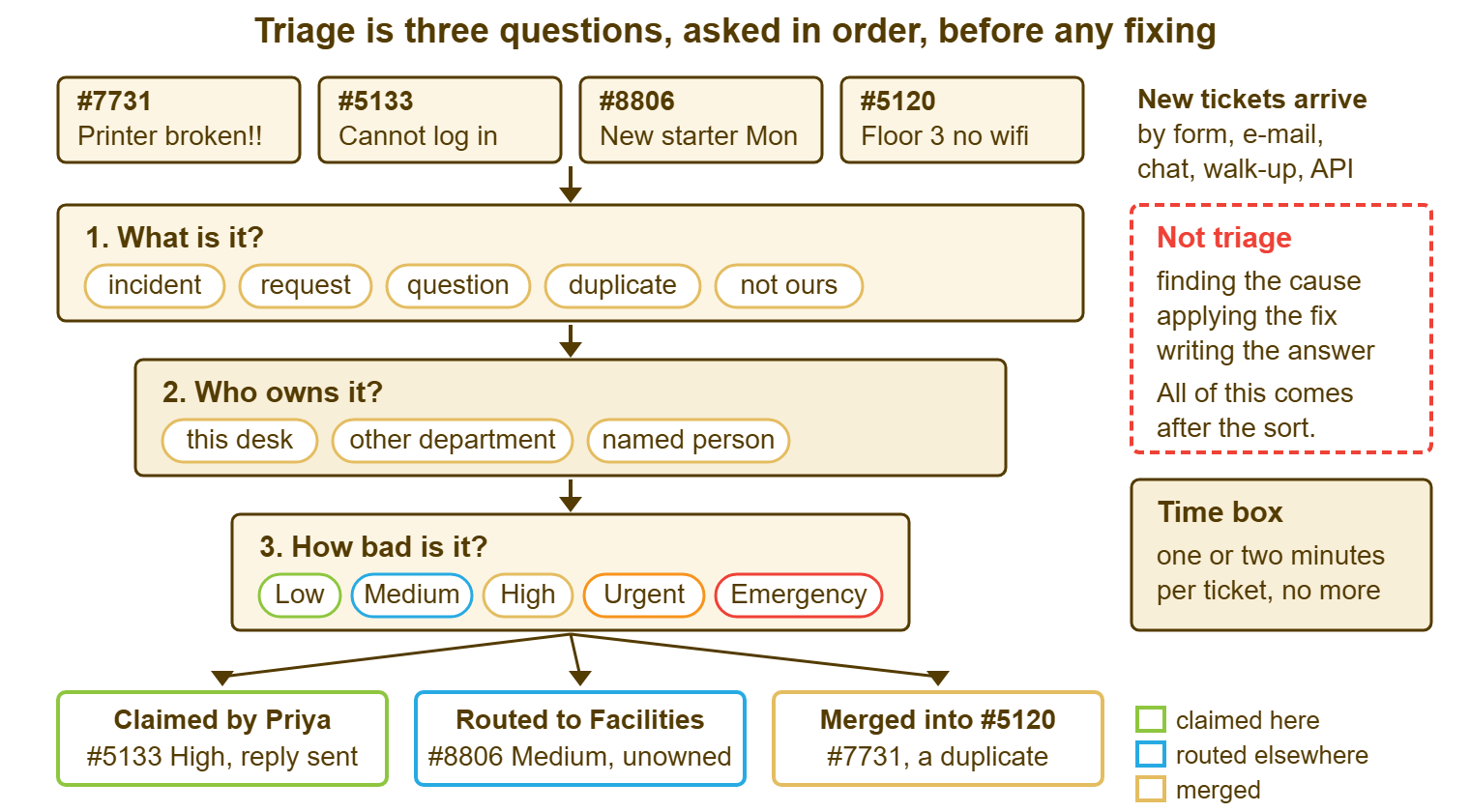
The funnel also shows that not every ticket comes out as work. One of the four at the top was a duplicate of another, and triage merged it. One was for a different department, and triage sent it there. A desk that only ever counts tickets in and tickets fixed misses this. And it is a large part of why triage pays for itself. Some tickets are sorted straight out of the queue.
Question One: What Is It?
The first question asks what kind of thing the ticket is, and the useful answers are few. An incident is something that worked and now does not: a printer that jams, a login that fails, a system that is slow. A request is something that never existed and somebody wants: a new account, a second monitor, access to a shared folder. A question is a request for information, with nothing broken and nothing to deliver: "how do I set an out-of-office?" The library's deep treatment of the types, including problems and changes, is in The Four Work Types in Plain Words. For triage, incident, request and question cover nearly everything that arrives.
Two more answers belong on the list because they sort a ticket out of the queue rather than into it. A duplicate is a ticket about something already logged, usually by someone else: the fourth "is the wifi down?" of the morning. "Not ours" is a ticket that belongs to another team entirely. An example is a request for a new desk chair that arrived at IT because IT has the only form anyone can find. Both get an answer and leave. Neither gets fixed, and that is correct.
The type is also where the category gets set, if the desk uses categories. A category is a label describing what the ticket is about, such as "Printing" or "Accounts", used for routing and reporting. The design of a category list is the subject of its own pillar. And the triager's only job with it is to pick the one that fits in a few seconds and move on. If picking the category takes longer than reading the ticket, the list is wrong, and Why Categories Exist is where to take that complaint.
When the triager cannot tell what a ticket is, the ticket is missing information, and the honest answer to question one is "cannot tell yet". The ticket still gets an owner and a provisional priority, and it gets one reply asking for what is missing, all at once. The thing it does not get is a guess dressed up as an answer. A guess at the type is cheap to make and expensive to live with, because every later decision inherits it.
Question Two: Who Owns It?
The second question asks which person will carry the ticket until it is done. The answer must be a name or a department, never a group that is really everyone. An owner is the one person responsible for the ticket's next step. A ticket assigned to "Support" is assigned to a word. Every technician in Support assumes someone else has it, and the ticket waits, politely, for a person who is never going to arrive. The black-hole failure described in The Seven Ways Support Quietly Fails is this question going unanswered, at scale.
Ownership during triage has three honest answers. The triager claims it, because it is quick or because they are the right person. The triager routes it to another department, because the ticket is about facilities or HR or a customer-facing team with its own queue. Or the triager assigns it to a named colleague, because that colleague owns the warehouse network or the finance server. In each case the ticket leaves triage with a name on it. Or at least it has a department whose own people will put a name on it inside the hour.
Routing to a department is not the same as assigning to a person, and small desks blur the two at their cost. A department is a queue with its own people; the ticket is now in their pile, and one of them must still claim it. Many tools route new tickets to a department automatically. The requester picks one on the form, each mailbox belongs to one, or a chat visitor chooses one. The tools then show the unclaimed work in an unassigned view that any agent of that department can take from. In some of them the first public reply claims the ticket for whoever sent it. In those tools, if two agents claim at once, one wins and the other is told. In others claiming is a separate button, and two people can quietly work the same ticket until one of them notices. Find out which yours does with two browsers and a test ticket. In the department-plus-claiming model the tool does not pick the person; a person does. The alternatives, round-robin and skill-based routing, are compared in Round-Robin vs Skill-Based Routing vs Just Claiming.
The ownership question has one trap, which is the triager claiming everything. It is fast, it feels generous, and at the end of the day the triager owns forty tickets and has fixed four. Claim what you will work on before the next triage pass. Route or assign the rest. The triage hat is not a bucket.
Question Three: How Bad Is It?
The third question asks how much the ticket is hurting and how soon that hurt grows, and the answer is a priority. A priority is the rank that decides how fast the desk promises to respond and resolve. Most tools have four or five levels, often with names like Low, Medium, High, Urgent and Emergency. In many small-team tools the set is fixed. In those tools, the triager picks from the list rather than inventing a sixth. Whether the list can be changed matters less than it sounds. The meaning of each level lives in the desk's written definition of it, not in the label. The two ingredients of the decision are impact, how many people or how much business is affected, and urgency, how quickly the damage grows. One person who cannot print is Low. A whole floor that cannot print on invoice day is High. The warehouse that cannot scan deliveries on a Monday morning is Urgent at least, because every hour adds paper that someone will have to type in later.
Priority is decided by the triager, not the requester, and this is the part of triage that takes nerve. The requester will often set a priority on the form. And they will often set it high, because the form asked and the problem is theirs. The triager reads what the requester said, looks at what is actually affected, and sets the priority the desk's own scale says. The requester's choice is evidence. It is not the verdict. How to build a scale that makes this decision defensible is in Priority Tiers That Are Realistic. The in-the-moment judgement is the whole of the Prioritization Frameworks pillar. So this article will not redo it.
Two things that look like priority are not. Escalation is one. In most tools, pressing Escalate flags a ticket for attention and marks it in the list. In those tools, it does not change the response or resolution targets. Only raising the priority does that, in every tool I have used. It is worth checking yours by escalating a test ticket and reading its due time afterwards. Age is the other. An old Low ticket is still Low, however embarrassing its age has become. The fix for its age is a follow-up routine, not a priority bump that makes the reports lie.
When the triager genuinely cannot tell how bad a thing is, the rule is to set the priority that the worst plausible reading would need. Then reply asking the question that would settle it, and lower the priority once the answer arrives. Lowering a priority with a one-line note costs nothing. Discovering at 16:00 that the "Low" from 09:00 was the payroll system is a different kind of afternoon.
Remember: a ticket leaves triage with a type, an owner and a priority, and with nothing fixed. If you have started fixing it, triage has stopped and the rest of the queue is waiting.
The First-Touch Rule
The first-touch rule says that the first person to read a new ticket properly does all three questions, every time, in one pass. Not one question now and the other two later; not "I'll just set the owner and someone can prioritise it". The rule exists because a half-triaged ticket is more dangerous than an untriaged one. An untriaged ticket is visibly new and someone will get to it. A ticket with an owner but no priority looks finished to everyone else, and sits in that owner's list at the default priority until the requester phones.
The rule also fixes who does the acknowledging. The first touch includes a short reply that tells the requester a human has read the ticket and what happens next. It does not promise a fix or a time the desk cannot keep. The content of that reply, the time box around the whole first pass, and the checklist for it are in First-Touch Discipline. Here the point is narrower: the first touch is one event, by one person, and it ends with three answers and one reply.
On a small desk the first-touch rule has a consequence worth stating plainly. Whoever is triaging is triaging, and nothing else, for the length of the pass. Suppose a triager is also answering the phone, also watching chat, and also finishing yesterday's ticket. That triager will triage the first six tickets well and the next seventeen by their subject lines. The rhythms that protect that time on a team of three are in Triage Rhythms for a Small Team. Protected time for triage is not a luxury the big desks have. It is a habit the good small ones have.
Where Triage Ends and Diagnosis Begins
Triage ends the moment you start trying to find out why. Diagnosis is the work of discovering the cause of an incident. It includes reading the logs, trying the login yourself, pinging the printer, and asking the requester to try a second browser. All of it is necessary. None of it is triage. The boundary is sharp and most people cross it without noticing, because the first diagnostic step is always small and the ticket is right there.
Here is how the crossing usually happens. The triager reads "cannot log in", and to decide how bad it is, checks whether the account is locked. That is a reasonable triage question, because a locked account is one person and a dead directory server is everyone. The account is not locked. So the triager checks whether the password expired. Then whether the user is on the right network. Then they call the user. Twenty minutes later they know a great deal about one ticket and nothing about the other twenty-two. Each step was sensible. The sequence was diagnosis.
The test is whether the step changes the answer to one of the three questions. Checking whether a login failure is one account or everyone changes the priority, so it belongs in triage. Checking which of four possible causes is behind one account's failure changes nothing about type, owner or priority. So it is diagnosis and belongs to the owner, after the pass. The triager is allowed one look, not an investigation. The table makes the line concrete for the steps that come up most.
| The step | Triage or diagnosis | Why |
|---|---|---|
| Reading the whole ticket, including the attachment | Triage | You cannot answer any of the three questions without it |
| Checking whether other tickets report the same thing | Triage | Changes the type (duplicate) and the priority (many affected) |
| Checking the monitoring page for a known outage | Triage | One glance; changes priority and may link the ticket to an incident |
| Asking the requester which printer | Triage | A missing fact; asked in the first reply with the other missing facts |
| Checking whether one account is locked | Triage, once | Separates one person from everyone; stop after the one check |
| Trying the login yourself, then with a test account | Diagnosis | Finds the cause; changes none of the three answers |
| Reading the application log for the error | Diagnosis | Finds the cause; the owner does this after triage |
| Walking to the printer | Diagnosis | Nothing learned on the walk changes type, owner or priority |
| Writing the answer to a how-do-I question | Solving | Allowed only if it is one sentence or a link to a knowledge article |
The last row is the one exception, and it has a strict edge. If the complete answer is one sentence or one link to an existing knowledge article, send it in the first reply and resolve the ticket. In that case, the reply costs the same as an acknowledgement and saves a round trip. If the answer is two paragraphs, it is work, and it gets an owner. The exception exists for "how do I set an out-of-office", not for "how do I set up the new laptop".
Why a Desk That Solves During Triage Falls Behind
The arithmetic is simple and worth doing once. Say a three-person desk receives thirty tickets a day, and a triage pass costs about ninety seconds per ticket. That is forty-five minutes of triage a day, spread across two or three passes. At the end of it every ticket has a type, an owner and a priority. And the worst thing in the queue has been found. Now say the triager instead fixes each ticket as they read it, at an average of fifteen minutes each. The triager gets through about four tickets an hour and the thirtieth ticket is read at about 16:30, assuming no lunch and no phone. Whatever was in ticket thirty has been waiting all day, unread, because the triager was busy being helpful.
The hidden cost is not the slow tickets; it is the unread ones. A ticket that has been read and prioritised Low can wait a day without harm, and the requester has been told so. A ticket that has not been read could be anything, and some of the time it is the one that could not wait. Solving during triage converts a queue of known things into a pile of unknown ones, and the pile is worst at exactly the moment the day is busiest. The warehouse scanners at Redbrook were in position fourteen.
There is a second cost, which is fairness. When the triager solves what they read, the tickets that get solved are the ones that arrived first or the ones the triager found interesting. The Urgent ticket from the quiet department then waits behind a font question from the loud one. The whole purpose of a priority is to let the desk work out of arrival order on purpose. Solving in arrival order makes the priority field decorative. (It will still appear in the reports, looking important.)
The third cost is the one that managers notice last and feel most. A desk that triages properly can say, at any moment, what is in its queue and what the worst thing in it is. A desk that solves during triage can only say what it has fixed. "What is the oldest thing nobody has looked at?" is a question the first desk answers in ten seconds from the unassigned view. The second desk goes quiet and starts scrolling.
Triage on a Real Ticket
Here is the pass on Sam's Monday morning, done the other way. Sam opens the queue at 08:52 and sorts by nothing. Sam reads the subject and first line of all twenty-three tickets in about six minutes, without replying to any of them. On that read alone three stand out. There are the warehouse scanners (ticket 7704, 07:15). There is a message from the finance manager that the month-end export "says error 500" (ticket 7712, 08:20). And there are four separate tickets about the second-floor printer.
Sam triages the scanner ticket first. What is it: an incident, many users, one site. Who owns it: Lena, who owns the warehouse network, and Lena is in at 09:00. How bad: Urgent, because deliveries are being written on paper and the paper grows by the hour. Sam assigns it to Lena, writes a two-sentence reply to the supervisor saying Lena will be in touch by 09:30, and moves on. Elapsed: three minutes. Nothing is fixed, and the most important ticket of the morning now has a name and a promise on it.
The finance export is next: an incident, one user but a month-end deadline, owned by Sam, High. Sam replies to say so and that they will look at it immediately after the pass. The four printer tickets become one: the earliest keeps its number, and the other three are merged into it. The one reply goes to all four requesters. It says the printer is known, it is a Medium, and it will be looked at before lunch. Sam will do that one personally, because it is a screwdriver job and Sam has the screwdriver. The remaining sixteen tickets are a mix of requests and questions, and by 09:35 each has a type, an owner and a priority. And each requester has one short reply.
At 09:35 the desk is in a completely different state from the one in the opening scene. No ticket has been fixed. Lena is already on the scanners. The finance manager knows someone is coming. Four people know about the printer, and the queue shows one printer ticket instead of four. Sam goes to the finance export, which turns out to be a certificate that expired overnight, and then to the printer with the screwdriver. The printer is cleared at 10:20, forty minutes later than in the opening scene. Nobody minded.
A Short War Story: The Forty-Minute Printer at Redbrook Engineering
The opening scene is the war story, so here is what it cost. Redbrook Engineering's warehouse ran on paper from 07:15 until 10:50. That was when Lena found the scanner ticket on her own, read the overnight switch alert, and restored the access point in nine minutes. Three and a half hours of deliveries, about 140 lines, were typed into the stock system that afternoon by two warehouse staff. Eleven of the lines were typed wrong and found the following week when a customer order came up short. Marta, the operations manager, asked the desk why a nine-minute fix had taken a morning. The honest answer was that the ticket had been fourteenth in a list nobody had read. The desk added a rule the next day that every morning begins with a read of the whole queue before anyone fixes anything. The lesson was not that Sam was slow with a screwdriver. It was that a queue nobody has sorted can hide anything, and usually does.
The Triage Card
The card below is the three questions and their possible answers on one side of a card, meant to sit beside the keyboard of whoever is triaging. Fill in the blanks once for your own desk. Add the names of your departments, the people who own particular systems, and the priority words your tool uses. Then use it as a prompt, not a form; after a fortnight nobody will need to read it, which is the point. It is plain text so it can be printed, pinned, or pasted into a knowledge article that only agents can see.
THE TRIAGE CARD — THREE QUESTIONS, ONE PASS
Desk: ________________   Triager today: ________________   Pass time: ______

READ THE WHOLE TICKET FIRST, INCLUDING ATTACHMENTS. THEN:

1. WHAT IS IT?
   [ ] Incident   (worked before, does not now)
   [ ] Request    (something new wanted)
   [ ] Question   (information only)
   [ ] Duplicate  (of ticket #________ ; merge, one reply to all)
   [ ] Not ours   (belongs to ____________ ; forward, tell requester)
   [ ] Cannot tell yet  (ask in the first reply; set provisional answers)
   Category, if used: ____________________

2. WHO OWNS IT?
   [ ] Claim it     (only if it will be worked before the next pass)
   [ ] Department:  ____________________
   [ ] Named person: ___________________  (tell them in the ticket)
   Systems with a known owner on this desk:
     ____________________ owns ____________________
     ____________________ owns ____________________
     ____________________ owns ____________________

3. HOW BAD IS IT?
   Affected:  [ ] one person  [ ] a team  [ ] a site  [ ] everyone / customers
   Grows by:  [ ] does not     [ ] the hour  [ ] the minute
   Deadline the requester named: ______________
   Priority set:  [ ] Low  [ ] Medium  [ ] High  [ ] Urgent  [ ] Emergency
   If unsure: set the higher one, ask the settling question, lower it later.

BEFORE MOVING TO THE NEXT TICKET
   [ ] Type, owner and priority are all set
   [ ] One reply sent: read by a person, what happens next, when they hear again
   [ ] Nothing fixed, nothing diagnosed beyond one look
   [ ] Under two minutes on this ticket
The card changes a little by desk. A one-person desk strikes the department line and the named-person line, because the answer to question two is always the same. That desk spends the saved time on question three. A desk with several departments in one tool puts the department list on the card and keeps it current, because "not ours" is only a useful answer when you know whose it is. A desk that uses linked tickets for incidents adds a line under the duplicate option: "or link to incident ________". That is for the morning when the fourth wifi ticket is not a duplicate of the first but a symptom of the same outage. Some tools can link related tickets under a shared incident name for exactly that case and keep merging for true duplicates from the same requester. Some only merge. And some merge anything into anything. That is how four different people's tickets end up as one ticket with one requester and three people who never hear back. Check what your tool does, and whether a merge can be undone, before you write the card.
Twenty-three tickets, three questions each, one pass. The printer still gets fixed. It gets fixed at 10:20 instead of 09:40, by the same person with the same screwdriver. And the warehouse does not spend the morning on paper. That is what triage buys, and it costs about forty-five minutes a day, spent before the work instead of hidden inside it.
Frequently Asked Questions
If a ticket takes two minutes to fix, should I fix it during triage?
Who should do triage on a desk of two or three people?
What if the requester has already set a priority on the form?
How is triage different from assignment?
Should the triager also diagnose, since they are already reading the ticket?
Do we need triage if the tool routes tickets to departments automatically?
From the QuerySolv team: we build self-hosted help desk software for Windows. QuerySolv runs as one Windows service on your own network. It takes requests by web form, e-mail, live chat, social messages and REST API. It is licensed once per installation rather than per agent per month. The free trial runs the full product for 30 days.