
Workflow Simplicity: Why Fewer States Win
There is a poster on the wall behind the desk at Acme, printed in colour on the big plotter. It shows the ticket workflow: twelve boxes, thirty-one arrows, a legend, and a revision number in the corner. It took a working group four meetings to agree. Lena, who has worked the queue for three years, uses four of the boxes. When a ticket needs to go somewhere the four do not cover, she picks whichever of the other eight is nearest the top of the drop-down. Then she writes what she actually means in a note. Nobody has looked at the poster since the week it went up. It is very well laminated.
A workflow is the set of states a ticket can be in and the moves allowed between them. Engineers call this kind of thing a state machine: a thing is always in exactly one state, and it moves to another state only when a defined event happens. A ticket workflow with six states and a dozen moves is one a new technician can learn on their second morning. One with twelve states and thirty-one arrows is one nobody learns. So everyone invents a private four-state version and the poster becomes a record of what the working group hoped. This article is part of our Ticket Workflow & Status Design series. This article is the argument for the smaller machine.
This article covers how a twelve-state workflow comes to exist, since nobody designs one on purpose. Next come what each extra state costs in moves, training and trust, and the six-state lifecycle drawn out, with every loop passing through one place. Then come the three-question test every move has to pass and the moves that should not exist at all. We cover how to remove a state without losing the tickets in it, then permissions as a simplifying force. Next comes what the ticket history tells you about the workflow you actually run. A text version of the lifecycle plus a transition table comes at the end to copy. What a status is for is argued in What a Status Is For. The one-sentence definitions are in Statuses That Mean Something. This article is about the shape they make together.
How a Twelve-State Workflow Happens
Nobody sets out to build a workflow with twelve states; they build one with five and then say yes eleven times. Each yes is reasonable on the day. A manager wants to see which tickets are waiting for approval, so Awaiting Approval is added. A technician wants to mark a ticket as needing a site visit, so Scheduled is added. The security team wants its tickets to pass a review, so In Review is added. Someone wants to distinguish a ticket that is being worked from one that has merely been picked up, so Assigned is added beside In Progress. A reorganisation adds Transferred. A vendor dispute adds Escalated to Vendor. None of these is absurd. All of them together are.
The tool helps. Most workflow editors make adding a state a two-click operation and make removing one a project. That is because removing a state means deciding what happens to the tickets in it and the reports that count it. So the list grows and never shrinks, like a kitchen drawer that only ever receives things. The states added for a situation that happened once stay for the situations that never happen again. The drop-down becomes a museum of past emergencies.
The working group makes it worse by being thorough. A room of five people asked to design a workflow will design one that covers every case any of them can remember. That is because leaving a case out feels like an error and adding a state feels like diligence. The result is a diagram that is correct in the sense that every ticket has a box. It is useless in the sense that no technician can hold it in their head while a requester is on the phone. A workflow is not a map of everything that can happen. It is a list of the few things a technician should be able to say about a ticket without thinking.
What Each Extra State Costs
The first cost is moves. A workflow with six states has at most thirty possible moves between them, six times five, and a sane design uses about a dozen. One with twelve states has a hundred and thirty-two possible moves. The working group now has to decide, for each, whether it is allowed, who may make it, and what it means. They will not decide all of them. The undecided ones become whatever the tool's default is, which is usually "allowed". The workflow acquires paths nobody designed. I have seen a ticket go from Closed to Awaiting Approval. Nobody could explain it, including the person who did it.
The second cost is the pause. Every time a technician changes a status, they scan the list and pick. A list of twelve makes them choose between states that differ in ways they cannot remember. Is this Pending or On Hold? Assigned or In Progress? The pause is only a second or two, but it happens dozens of times a day, and more importantly it ends in a guess. Two technicians guessing differently about the same situation is how a status stops meaning anything. Twelve states give them eleven ways to disagree.
The third cost is the filter and the report. A filter on a twelve-state list has twelve counts. The useful question, "what is the desk's move right now", is now the sum of four or five of them, which nobody adds up. A report of time in each state has twelve rows, several with three tickets in them, and the manager reading it sees noise. The whole point of a status is to make the queue readable at a glance. Twelve states make it readable only to the person who built the poster. They have moved to another department.
The fourth cost is the one that kills the workflow: trust. Once technicians have learned that half the states are decorative, they stop believing any of them. Then the private four-state convention takes over. The tool's statuses are then set for form's sake, approximately, and the real state of the ticket lives in the notes. A twelve-state workflow, in practice, is a four-state workflow with eight states of noise on top. The cheapest way to get to four is to start there.
The Lifecycle Drawn Out
Six states cover a help desk's tickets, and the picture below is the whole machine. A ticket arrives as New and is claimed into In Progress, which is the only state where the desk owes work on it. From In Progress it can go down to one of two waiting states. One is Awaiting Reply when the technician has asked the requester something. The other is On Hold when the desk is waiting on a supplier, another team or a date. Each waiting state has exactly one way back, which is to In Progress when the wait ends. From In Progress the resolving reply moves it to Resolved. From Resolved the requester's confirmation, or the end of a short confirmation window, moves it to Closed. One red path runs back from both Resolved and Closed to In Progress. It is a reply from the requester saying it is not fixed, which reopens the same ticket. Every loop in the diagram starts or ends at In Progress. New and Closed are each visited once.
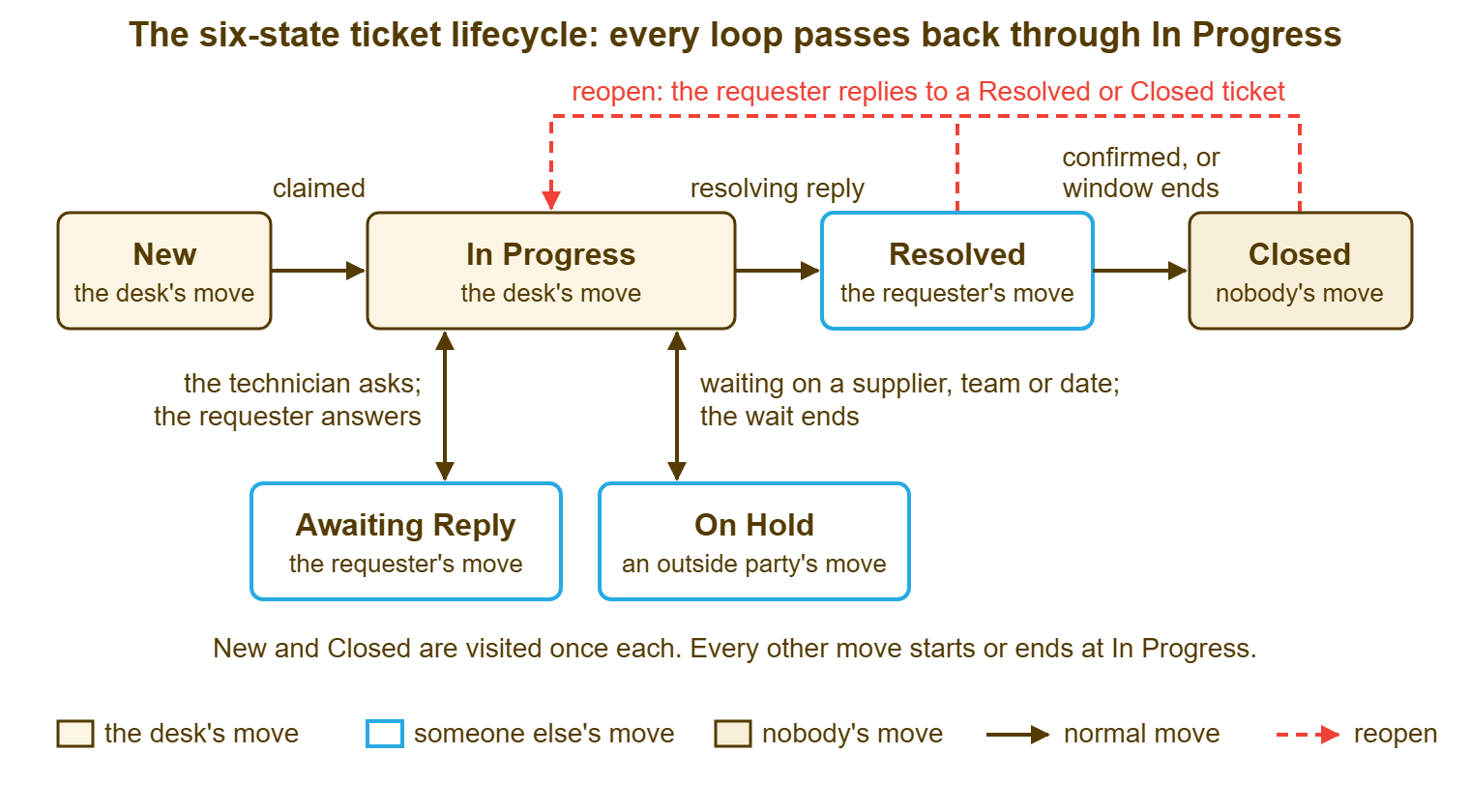
The shape matters more than the names. In Progress is the hub, and the hub is where the desk's attention lives. Everything that is not the hub is either not yet looked at, waiting on someone, or finished. A technician who understands that shape can answer "what do I do with this ticket" for any state in one sentence: if it is New, claim it; if it is In Progress, work it; if it is waiting, check whether the wait has ended; if it is Resolved, check whether the window has; if it is Closed, leave it alone unless the requester writes. That is the training. It takes about ten minutes.
Notice what is not in the picture. There is no Assigned, because a claimed ticket is In Progress and the owner's name is a field of its own. There is no Escalated, because an escalated ticket is still the desk's move and the escalation is a flag beside the status, not a replacement for it. There is no Scheduled, because a date belongs in a note or a due field. There is no Awaiting Approval, because an approval is a wait on an outside party or a date and goes to On Hold with the approver named. Each of those is a real situation. None of them is a new answer to "whose move is it", and so none of them earns a box.
Tools with fixed status lists tend to converge on this shape whether or not their authors drew it. A typical fixed list of eight or ten labels will include something like On Hold, Awaiting Reply, Resolved and Closed. A desk using one maps the six meanings in the picture onto the labels it has and leaves the rest alone. A tool with an editable list lets you draw any shape you like, which is a freedom best declined. Six boxes, drawn in ten minutes, beat twelve boxes drawn over four meetings, and they fit on a sheet of paper that is not laminated.
The Test of a Transition: Who, Why, What Next
Every arrow in a workflow must answer three questions, and an arrow that cannot is removed. Who may make this move? Why does it happen, meaning what single event triggers it? What happens next, meaning what travels with the move, what the requester is told, and which list the ticket appears on afterwards? Run every arrow through the three questions and the twelve-state diagram starts shedding arrows on its own. That is because most of the thirty-one were drawn to be complete rather than to be used.
Who is usually the owning technician, and the interesting cases are the exceptions. A New ticket is claimed by whoever picks it up, so "who" is anyone with sight of the unassigned view. A move out of Awaiting Reply happens when the requester replies. So "who" may be the tool itself if it does that automatically, and otherwise whichever technician sees the reply first. A move from Resolved to Closed may be the tool, at the end of the window, or the owner on a confirmation. A move from Closed back to In Progress is the requester's, by replying. Writing the "who" down is what turns a diagram into a procedure. An arrow with no owner is a thing that happens to tickets rather than a thing somebody does.
Why is the entry condition from the status card, and it must be a single event. "The technician decides the ticket should wait" is not an event; "the technician sends a reply asking the requester a question" is. "The ticket is finished" is not an event; "the technician sends the resolving reply" is. Arrows triggered by a judgement rather than an event are the ones technicians make differently from each other, and the difference is where meaning leaks out. If the only honest "why" you can write for an arrow is "when it seems right", the arrow is a habit, not a transition.
What next is the part working groups skip and technicians need most. The move to Awaiting Reply means the ticket leaves the desk's list and joins the nudge filter. The requester has been told what is needed. The move to On Hold means the ticket joins the chase filter, with a party and a date in the note. The requester has been told who the desk is waiting on. The move to Resolved means the rating request has gone out, if your tool sends one with the resolving reply. The ticket joins the confirmation-window list. If a move changes nothing about what anyone does next, the two states it joins are the same state. In that case, one of them can go.
Remember: a transition exists only if you can name who makes it, the single event that triggers it, and what changes afterwards. An arrow that fails any of the three is removed; a state with no arrows left is retired.
Moves That Should Not Exist
Some arrows fail the test so reliably that they should be struck from any workflow in advance. The first is New to Closed with no reply. A ticket closed before anyone has written to the requester is a ticket the requester believes is still open. The desk has simply decided to stop looking at it. Even a duplicate deserves one line: "This is the same problem as ticket 4471, which we are working on; closing this one so the updates stay in one place." If the tool allows New to Closed, the convention forbids it, and the ten-ticket test in the quarterly review looks for it.
The second is any waiting state straight to Resolved or Closed without passing through In Progress. A ticket waiting on a requester who never replied is resolved with a note, yes. But the resolve is a move the technician makes after a closing warning, and it carries a reply. A ticket waiting on a vendor cannot be resolved by the vendor's silence. In both cases the honest path is back to In Progress, where the technician does the small amount of work that resolving properly requires, and then to Resolved. The shortcut saves a click and costs the requester the only message they would have read.
The third is Closed to anything other than In Progress by reopen. A ticket does not go from Closed to On Hold, or Closed to Awaiting Reply, or Closed to New. If the tool lets it, somebody will do it at 16:55 on a Friday to make a number look different. Closed has exactly one exit, the requester's reply, and it leads to one place. Many tools draw this arrow for you. In those tools, a requester's reply to a resolved or closed ticket reopens it automatically and the reopen is counted. That is to say the tool draws exactly one arrow out of Closed and then counts how often it is used. Where yours does not, the technician reopens by hand the moment the reply lands, and the count is kept by a search for reopened tickets.
The fourth is any move the requester's reply does not trigger but should. Suppose a requester answers a question on an Awaiting Reply ticket and the ticket stays Awaiting Reply because nobody changed the field. In that case, the workflow has a missing arrow that the tool did not draw and the convention has to. Test what your tool does with a requester reply in each waiting state. Where it does nothing, the morning routine includes a look at waiting tickets with a newer requester message than technician message. In that case, the card for that state says so. A machine with a missing arrow is not simpler. It is broken in a quiet place.
Removing a State
Removing a state has five steps, and the order matters: define the replacement, map the tickets, announce, retire, watch. Define the replacement first. For each ticket that would have gone into the dying state, which of the surviving states does it go to, and what goes in the note instead? Scheduled becomes In Progress with a date in a note or a due field. Awaiting Approval becomes On Hold with the approver named. Assigned becomes In Progress, full stop. If you cannot write the replacement rule in one line, the state is doing something you have not understood yet. In that case, you should understand it before you remove it.
Map the tickets second, by hand, in one sitting. Filter for the dying state, open each ticket, and move it to its replacement with a one-line note saying why. This is tedious in proportion to how long the state has existed. It is the step everyone wants to skip by bulk-moving the lot. Do not bulk-move. The tickets in a dying state are precisely the ones whose real state nobody knows. The afternoon spent reading them is the afternoon that finds the dock station that was cancelled six weeks ago. Budget an hour per twenty tickets and be pleasantly surprised.
Announce third, to the desk, in one paragraph: the state is retired as of Monday, here is what to use instead, here is why. Retire fourth. In a tool with an editable list, remove or disable the state. In a tool with a fixed list, write "not used" beside it on the status cards and leave it in the drop-down. Watch fifth: for a month, check the filter count on the retired state every Monday. In a tool that shows a count beside each status in its filter, this is a glance; in one that does not, it is a saved search. A ticket in a retired state is a training note, not a crisis, and the training note is "did you see the page".
Removing a state is also the moment to check the reports that counted it. A monthly report with a row for Scheduled will show zero from now on, and someone will ask whether the site visits stopped. They did not; they moved to a note and a date field. Change the report before the question arrives, and the change becomes an improvement rather than an explanation.
Permissions as a Simplifying Force
Who may make each move is part of the design. Restricting it is one of the few ways to make a workflow simpler without changing the diagram. A desk where everyone may move any ticket to any state has as many workflows as it has people. Take a desk where a trainee may reply and add notes but may not change a status. A junior may claim and set priority, and a senior may move tickets between states and departments. That desk has one workflow, enforced by the tool rather than by the poster. The trainee learns the states by reading them for a few weeks before being trusted to set them, which is the right order.
Tools vary in how finely they let you do this. Some offer per-agent permission presets. In those presets, a trainee can reply and write private notes but not change a status. A junior can also set priority and escalate, and only a senior can move a ticket between states or to another department. Other tools have one role for everyone, and the restriction then has to live in the convention. Whatever your tool offers, write the "who" column of the transition table to match what it enforces. Where it enforces nothing, the card for each move names the role and the quarterly ten-ticket test checks whether the role was respected.
Restricting status changes has a cost, which is that the person holding the ticket at a given moment may not be the one allowed to say whose move it is. On a desk of three this is manageable. The trainee tells the senior "this one is waiting on the user now" and the senior moves it. In a month the trainee is a junior and in six months a mid-level. On a desk of ten with a trainee on every shift it becomes a bottleneck. The fix is to promote the permission, not to abandon the restriction. A workflow enforced by permissions is a workflow that survives the week the poster falls off the wall.
Reading the Workflow You Actually Run
The ticket history tells you which workflow the desk really follows, and it is rarely the one on the wall. Most tools record every status change in the ticket's history with who made it and when. Many can report how long tickets spent at each status and how often they changed hands. Pull a month of closed tickets and count the status changes per ticket. On a six-state desk the median is four or five: New to In Progress, one wait and back, Resolved, Closed. On a twelve-state desk I once reviewed, the median was nine, and one ticket had nineteen. That is a ticket that spent more of its life changing state than being worked.
Look for the moves that never happen and the moves that happen constantly. A state with arrows in the diagram and no transitions in a month of history is decorative, and the diagram should lose it. A move that happens constantly but is not in the diagram, Awaiting Reply straight to Closed, say, is the desk telling you what the shortcut is. You either forbid it with a card and a check or admit it with an arrow and a reason. The history is the only honest workflow document the desk has. The poster is what the working group hoped; the history is what Lena did.
Count the hand-changes too. A ticket that changed owner four times and state nine times is a ticket that was passed around. The pattern across a month says whether the states are helping the hand-offs or hiding them. Transferring a Ticket Between People or Departments is about doing the hand-off well. The workflow's job is to make sure a transferred ticket lands in a state the receiver recognises. On a six-state desk that is always In Progress or New, and on a twelve-state desk it is a guess.
A Short War Story: The Workflow Poster at Stonebridge Insurance
Stonebridge Insurance's five-person desk ran a thirteen-state workflow designed by a steering group two years before Kofi took it over. The first thing Kofi did was pull a quarter of closed tickets and count transitions. The median ticket had changed state eight times. Three states had not been entered once in three months, and a status called Pending Review had been used by exactly one technician, for everything. The expensive find was a laptop replacement that had moved Assigned, In Progress, Scheduled, Pending Review, Assigned again and then Awaiting Approval over five weeks. Meanwhile, the underwriter it was for worked from a loaner with a broken hinge and raised two more tickets about the hinge. Both were closed as duplicates of a ticket nobody could find. Kofi retired seven states in one afternoon, mapped forty-one tickets by hand, and replaced the poster with a six-box sketch and a transition table on one sheet. The median ticket changed state four times the following quarter, and the duplicate rate halved. The sheet, unlaminated, is still on the wall. The lesson Kofi wrote at the bottom of it was that a workflow is as simple as the newest person on the desk can draw from memory.
The Lifecycle as Text and the Transition Table
The block below is the diagram in plain text, so it can live in a knowledge base article, a shared document or an e-mail without a picture. Under it is the transition table: one row per arrow, with the three questions answered. Copy both, replace the state names with your tool's labels, fill in the "who" column from your permissions, and you have the workflow page's spine. The full one-page workflow document, with examples and training, is built in Writing the Workflow Down (One Page).
TICKET LIFECYCLE — SIX STATES, ELEVEN MOVES

  NEW ──claimed──► IN PROGRESS ──resolving reply──► RESOLVED ──confirmed or window ends──► CLOSED
                     │    ▲                              │                                   │
       asks requester│    │requester replies             └───── requester replies "not fixed" ──┘
                     ▼    │                                              (reopen, back to IN PROGRESS)
                 AWAITING REPLY

                 IN PROGRESS ◄──the wait ends──► ON HOLD
                             ──waits on supplier, team or date──►

  Whose move:   NEW, IN PROGRESS = the desk     AWAITING REPLY, RESOLVED = the requester
                ON HOLD = an outside party or a date     CLOSED = nobody
  Hub rule:     every move except NEW→IN PROGRESS and RESOLVED→CLOSED starts or ends at IN PROGRESS
  Not allowed:  NEW→CLOSED without a reply;  any waiting state→RESOLVED or CLOSED directly;
                CLOSED→anything except IN PROGRESS by a requester reply
| From | To | Who makes the move | Why (the single event) | What next |
|---|---|---|---|---|
| New | In Progress | Any agent who can see the unassigned view; the first public reply claims it | A technician claims the ticket | Owner named; first reply due within the response target; leaves the unassigned view |
| In Progress | Awaiting Reply | The owner | A public reply asking the requester a question the desk cannot proceed without | Joins the nudge filter; requester has been told what is needed |
| Awaiting Reply | In Progress | The tool if automatic, else whoever sees the reply | The requester replies by any channel | Back on the desk's list; owner reads the reply the same day |
| In Progress | On Hold | The owner | A note naming the outside party or date, plus a reply telling the requester | Joins the chase filter; chase date set; requester knows who is being waited on |
| On Hold | In Progress | The owner, or whoever runs the morning filter | The awaited thing arrives, or the date passes | Back on the desk's list; if the date passed without the thing, chase and re-hold with a new date |
| In Progress | Resolved | The owner | The resolving reply is sent, saying what was done and inviting objection | Confirmation window starts; rating request sent if the tool does that; joins the window list |
| Resolved | Closed | The owner on a confirmation; the tool or the owner at the end of the window | Requester confirms, or the window ends in silence | Leaves every open list; a requester reply reopens it |
| Resolved | In Progress | The requester, by replying; the tool records a reopen | Requester says it is not fixed | Back on the desk's list, flagged as reopened; owner replies the same day |
| Closed | In Progress | The requester, by replying; the tool records a reopen | Requester writes to the closed ticket | Same ticket, same history, back on the desk's list; the reopen is counted |
| Awaiting Reply | In Progress | The owner | The closing warning has gone unanswered and the owner picks the ticket up to resolve it | Owner writes the resolving note and moves it to Resolved in the same sitting |
| Any open state | New (in another department) | An agent with the transfer permission | The ticket belongs to a different department | Arrives as unassigned in the new department; requester told who has it now |
There are eleven rows, and the eleventh is the one most desks forget. A transfer between departments is a move, with a who and a why and a what-next. If the receiving department finds a ticket in a state it does not recognise, the transfer has failed quietly. On a six-state desk the transferred ticket arrives New or In Progress and the receiver knows what to do. On the thirteen-state desk at Stonebridge, it arrived in Pending Review, and nobody did.
Lena, back at Acme, still uses four states, and the point of this article is that she was right. The desk has since taken the poster down and replaced it with six boxes on a sheet of paper. Four are the ones she always used and two, Resolved and Closed, she had been using the notes to tell apart. The thirty-one arrows became eleven. The working group was not reconvened. The sheet is held up with tape, and that is fine. That is because a workflow that fits on one unlaminated page is a workflow that can be changed by the people who use it. That is the only kind that stays true.
Frequently Asked Questions
Is six states always the right number?
Our workflow has an approval step. Does that need its own state?
What do we do with tickets in a state we are removing?
Should trainees be allowed to change statuses?
How do we know which workflow the desk really follows?
Can a ticket skip In Progress and go from New straight to Resolved?
From the QuerySolv team: we build self-hosted help desk software for Windows. QuerySolv runs as one Windows service on your own network. It takes requests by web form, e-mail, live chat, social messages and REST API. It is licensed once per installation rather than per agent per month. The free trial runs the full product for 30 days.