
Why Documentation Day Never Comes, and What Does
Thursday, 16:45, at Redbrook Engineering. Joel has just closed ticket 6120. The drawing office's design software had been dropping its licence at about half past twelve every day. After forty minutes of looking in the wrong places he found the cause. The licence server's network adapter was going to sleep when the office went to lunch. The power-saving setting that did it was three dialogue boxes deep. He turned it off. The licences stayed put, and the ticket is closed with a resolution note that says "fixed power setting on licence server". Dana, the desk lead, looks over. "Nice. Add it to the list, we'll do it on documentation Friday." The list is on the whiteboard behind her, under the heading KB TO WRITE, in three different handwritings. It has thirty-one items. The oldest is from the spring.
Friday, 09:10. A switch stack in the machine shop reboots itself. Half the shop-floor terminals go dark, and documentation Friday is over before the kettle has boiled. It will be rebooked for the Friday after month-end, which is also the Friday the new starters arrive. Nobody is surprised. Nobody at Redbrook can remember a documentation day that actually happened, and the list has outlived two whiteboards.
A documentation day is a block of time set aside, away from the queue, to write down what the desk knows. That means the fixes, the workarounds, the "oh, that one" answers that live in people's heads. It is the most commonly proposed cure for a desk that keeps rediscovering its own fixes. In my experience it is the cure least likely to occur. This article is part of our Capture Knowledge While Solving series, and it is the argument for the whole series. The only knowledge a busy desk ever writes down is the knowledge it writes down while solving. Everything else stays on the whiteboard.
It covers the list of unwritten articles and why it grows, then why the Friday always gets eaten. Next comes why writing after the fact fails even when the Friday survives. Then it covers what capturing in the flow of the ticket means and the five-step loop it runs. After that come what it costs per ticket and what it saves, the three objections and their answers, and what to do with the thirty-one items. It finishes with a short war story and the capture habit card to pin above the desk.
The List of Unwritten Articles
Every desk has the list, whether it is on a whiteboard, in a spreadsheet, in a ticket titled "KB ideas" or in the lead's head. It starts well. A fix takes forty minutes. The technician thinks "someone should write this up", and the thought is captured as a line on the list so it is not lost. That is a sensible thing to do, and it is where the knowledge dies. The line on the list is not the knowledge. It is a reminder that the knowledge existed, at about four o'clock on a Thursday, in one person.
The list grows for the same reason the queue grows, except that nothing stops it. A ticket has a requester who will chase, a clock that is running and a status everyone can see. An item on the list has none of those. Nobody has ever phoned the desk to ask when "licence server power thing" will be written up. The list is the one queue on the desk with no requester, no clock and no breach. That is why it is the calmest place in the building and the least likely to be worked.
The list also lies about what is on it. "Licence server power thing" meant something precise on the Thursday. It meant a specific setting, on a specific adapter, for a specific symptom at a specific time of day. By the time the Friday arrives, if it arrives, the line means "something about the licence server". The person who wrote it is the only one who can decode it, if they still can. I kept a list like this for two years on a desk of four. It reached eighty-four items. I wrote up three of them, all in the first week I had the list, when hope was still available.
Why the Friday Always Gets Eaten
Scheduled writing time loses to anything with a requester attached, every time, and it is supposed to. The desk exists to restore service, and on the morning the switch stack reboots, writing an article about licence servers would be the wrong thing to do. The Friday is not eaten by bad luck. It is eaten by the desk doing its job. A plan that only works on a day when the desk has no job is a plan for a desk that does not exist.
The arithmetic makes it worse. Suppose the Friday survives, which happens perhaps one time in four, and suppose the desk gets three clear hours out of it. Three hours is six articles at half an hour each. That assumes the half hour includes finding the ticket, remembering the fix and checking it still works. That allowance also includes writing it in a form someone else can follow. Six articles a quarter, against a list that gains two or three items a week. The list is not a backlog waiting for a clear day. It is a backlog that grows faster than any clear day can drain it, and the clear day is a rumour.
There is a second reason the Friday fails even when it happens, and it is quieter. Nobody wants to spend it writing. The people on the desk became technicians because they like fixing things. A day of writing about things they fixed three months ago is a day of homework about a subject they have finished with. The articles that do get written on a documentation day are the ones the author still finds interesting. Those are rarely the ones the queue keeps asking about. The password-reset-for-the-old-finance-system article, needed weekly, is item nineteen and stays there.
None of this is an argument against a short, regular pass over the articles that already exist. Catching the stale and the wrong is a different job with a different shape. And Maintenance Without a Documentation Day describes how to do it without needing a clear Friday either. The subject here is the article that has never been written, and the method that gets it written.
Writing After the Fact: The Detail Is Gone
Even when the Friday survives and the technician sits down willingly, the article written three weeks after the fix is a worse article. It is worse than the one that could have been written in two minutes on the day. Memory keeps the wrong things. Memory keeps the shape of the story: there was a licence problem, it was a power setting, it took a while. Memory drops exactly the parts an article is made of. Those are the wording on the screen and the order of the steps. They are also which of the three similar settings was the right one, and the check that proved it had worked.
The parts that go first are the parts the next technician needs most. Ask Joel three weeks later what the licence error said and he will tell you "something about the server not responding". That is true of every licence error ever shown. Ask him which setting he changed and he will say "the power saving one on the adapter", which is one of four. Ask him how he knew it had worked and he will say "the licences stopped dropping". That took a day to be sure of, which he will not think to mention. The article he writes will be a summary of a fix he wishes he had done cleanly. The next person to follow it will spend twenty minutes finding the fourth setting.
The exact wording is the sharpest loss, because wording is how the article gets found. The next requester with the problem will search for the words on their screen, or the triager will. An article that says "licence error" will not match "The licence manager is not responding (error -15)". That is the whole argument of Notes for the Stranger Who Finds This Ticket Next Year. It applies with more force to an article than to a note. The note has the ticket's subject line to help it be found, and the article has only itself.
There is a version of after-the-fact writing that looks like it works and does not. The technician on the Friday opens the old ticket, reads their own resolution note, and writes the article from that. If the note was a good one, with the error text verbatim and the steps in order, this nearly works. In that case, the only question is why the note was not simply promoted to a draft on the day. All the words were there. If the note says "fixed power setting on licence server", the technician is writing from memory with a prompt. In that case, the prompt is not helping as much as it feels like it is.
Capture in the Flow: The Only Method That Survives a Busy Month
Capturing knowledge while solving means writing the article, or the first rough draft of it, inside the ticket. You do it at the moment the fix is proved and before the ticket is closed, using the words already on the screen. It takes about two minutes because nothing has to be remembered. The error text is in the ticket, the steps are in the working note, and the check was just done. The draft is saved where only the desk can see it. If you run QuerySolv, the knowledge base sits beside the ticket queue. Each QuerySolv article can be visible to agents only or to everyone, so the agents-only draft has a home from the first day. In any tool, the rule is the same: a place the desk can see and requesters cannot. The draft is not finished. It is good enough to save the next technician the forty minutes. That is the only standard it has to meet on the day.
The idea has a name in the frameworks and a programme of training behind it, neither of which this series requires. The idea itself fits in a sentence: the knowledge base is not a separate project worked on when the queue is quiet; it is a by-product of working the queue, and every ticket either uses an article or produces one. Capture is the producing half. The using half, searching before you solve and improving the article every time it is reused, is the rest of this series. The two halves only work together. A desk that captures and never searches builds an archive. A desk that searches and never captures runs out of things to find.
The picture below shows the loop that runs around every ticket once the habit is in place. The ticket arrives and the technician searches the knowledge base and the closed tickets for the symptom's words. If an article exists, they follow it, link the ticket to it and fix anything in it that was wrong. That is the dashed shortcut on the left of the picture. If nothing exists, they solve the ticket, noting as they go, and spend two minutes turning the note into a draft before they close. The next ticket with the same symptom finds the draft, uses it and improves it. Five steps, one ticket, and no Friday anywhere in it.
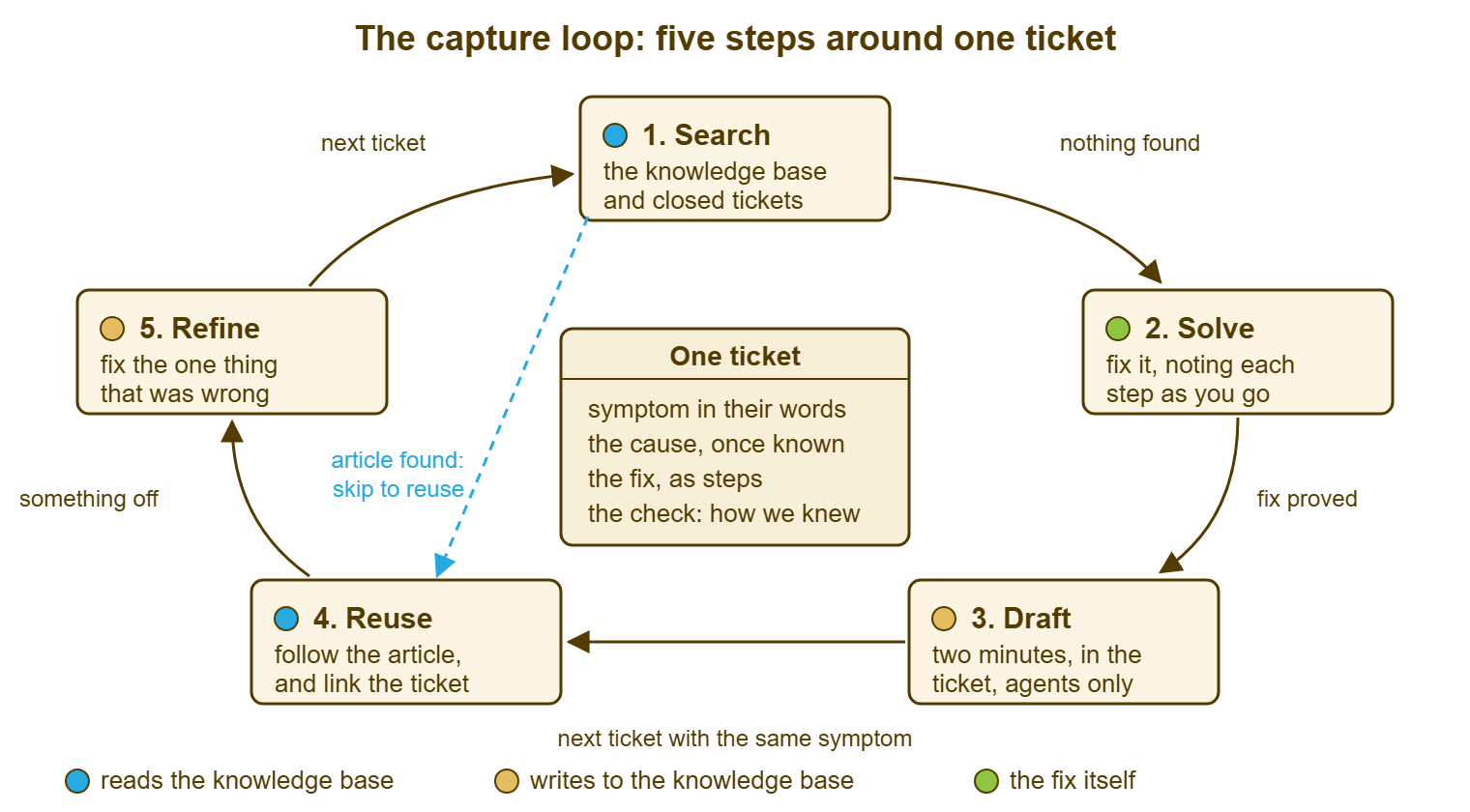
Notice what the loop asks of the technician at each step: not much, and only while the ticket is open. The search takes ninety seconds and is the subject of Search First, Before Solving. The draft takes two minutes and is the subject of The Capture Habit. The refinement on reuse takes under a minute and is in Refine on Reuse. None of them needs a clear day, a quiet week, or the author to remember anything. That is why the loop keeps turning in the month the switch stack reboots. The documentation day asked for the one thing the desk never has. The loop asks for four minutes the desk already spends thinking.
Remember: the only knowledge a busy desk reliably writes down is the knowledge it writes down while the ticket is still open. Two minutes inside the ticket beats thirty minutes on a Friday that does not come.
What It Costs Per Ticket, and What It Saves
The cost is two minutes on the tickets that produce a draft and about a minute on the tickets that reuse one. Most tickets do neither. A password reset, a new-starter account, a mouse replacement: these are routine, already documented or not worth documenting, and the habit does not touch them. The habit applies to the ticket where the technician had to work something out. On a desk of four closing a hundred and twenty tickets a week, that might be a dozen tickets. So the weekly cost of the capture half is about twenty-five minutes across the whole team. Nobody has to find twenty-five minutes. It is spent in two-minute pieces, each inside a ticket that is already open.
The saving is harder to see because it is spread across the future. So take the licence server as a worked example and keep it fictional. Joel's fix took forty minutes to find. The symptom came back five times over the following quarter. It came back twice on the same server after updates reset the setting. It came back three times on two other servers with the same adapter. Without a draft, each recurrence costs whoever picks it up something between ten minutes (Joel, who remembers roughly) and forty (anyone else). Call it two hours across the quarter, and that assumes Joel is in. With a two-minute draft, each recurrence costs the time to search, read and apply, perhaps five minutes, so twenty-five minutes in total. Two minutes bought about an hour and a half, on one article, in one quarter, and the article is still there next year.
Do not try to turn that into a programme-wide figure, and treat anyone who does with polite suspicion. The honest version is that the saving per article varies from nothing (the symptom never returns) to a great deal. That happens when the symptom returns weekly and the fix was obscure. Nobody can tell on the Thursday which kind the licence server will be. That is the strongest argument for making the draft a habit rather than a judgement. The judgement is unreliable, and the habit costs two minutes either way. A desk that needs to show the saving to a manager will find the method in The Time Saved by Technicians. For the desk itself, the count of tickets that used an article is evidence enough.
The Three Objections
"We don't have time." The desk that says this is already spending the time, on the fourth rediscovery of the licence setting. It has simply chosen to spend it in forty-minute pieces later rather than two-minute pieces now. The honest form of the objection is "we don't have time at the moment the ticket is open, because the next ticket is waiting". The answer is that the two minutes are shorter than the walk to the kitchen and the ticket is being closed anyway. The draft is written in the same window as the resolution note. On a desk that already writes resolution notes to the standard in Resolution Notes Worth Reading Later, half the draft is typed before the habit starts.
"It'll be messy." Yes. The draft written in two minutes is rough and has no screenshots. It may miss a step that was done without thinking, and is titled in the requester's slightly odd words. It is also better than the nothing it replaces by the full width of the forty minutes it saves. It is going to be improved by the next person who uses it, which is what the refine step is for. The clean article written on documentation day is tidier and does not exist. Choose the one that exists.
"I'm not a writer." Nobody on the desk is, and the draft does not need one. It needs the error text pasted, four or five steps in the order they were done, and a line saying how you knew it worked. That is a note, not prose, and the technician has just written the same thing in the ticket in a slightly different shape. The craft of turning that note into an article a frustrated user can follow is real and it is a separate skill. The article The Anatomy of a Followable Article teaches that skill. The skill is applied later, by whoever reviews the draft for publishing, and not at four o'clock on a Thursday by the person who just fixed the thing.
What to Do With the Thirty-One Items
Do not write them. This is the advice that meets the most resistance and matters the most, so here is the reasoning. The thirty-one items are a list of fixes whose detail has already gone. Writing them now means writing from memory, which produces the summary article described above. It also means spending the one clear afternoon the desk ever gets on the past instead of on installing the habit that stops the list refilling. Photograph the whiteboard, save the photograph somewhere, and wipe it.
The items that matter will come back. If the licence server drops its licences again, the ticket arrives and the search finds nothing. The technician then solves it and this time drafts it, with the detail fresh, in two minutes. If it never comes back, the article was never needed. In that case, the desk has saved half an hour of writing about a problem that solved itself. The list cannot tell the two kinds apart. The queue can, and it will, at the rate the symptoms actually recur. Over the first quarter of the habit, a desk will usually find that a good part of the old list has been rewritten from fresh tickets without anyone trying. The desk will usually also find that the rest was never worth the whiteboard space.
The exception is the handful of items on the list that are clearly weekly and clearly obscure, the fixes the lead knows are costing hours now. There are rarely more than five of those. Write them this week, from the most recent ticket about each rather than from memory, in the two-minute form. Treat them as the seed of the knowledge base rather than the clearing of a debt. A desk starting its knowledge base from nothing will find a longer version of that advice in The First Twenty Articles. The short version is that the first articles come from the queue, not the list, and the list goes in the bin.
A Short War Story: Four Fridays at Stonebridge Insurance
Stonebridge Insurance's desk of five kept its list of unwritten articles in a spreadsheet. Its lead, Marcus, booked a documentation Friday every quarter for a year. The first was lost to a phishing clean-up. The second was lost to a payroll deadline that needed the claims system up, and the third to a flood in the comms room. The fourth happened, produced seven articles about things that had interested their authors, and was not repeated. During that year a technician called Rob left for another job. He had been on the desk six years and had handled the claims system and the broker portal almost alone. The spreadsheet showed fifty-two items with his initials against them. In the month after he left, the desk logged a hundred and six tickets about the claims system and the portal. The three technicians who picked them up averaged about an hour each on symptoms Rob had been closing in ten minutes. Marcus later put that at roughly a hundred and forty hours of rediscovery before the fixes were relearned. Not one of the fifty-two items could be written up afterwards, because the detail had left with Rob. The lines in the spreadsheet said things like "portal cert thing" and "the Tuesday report". The desk started drafting inside the ticket the following month. By the end of the quarter those hundred and six tickets had produced twenty-three articles that nobody had to schedule. Knowledge that is scheduled to be written down later is knowledge that leaves with its owner.
The Capture Habit Card
The card below is the whole method on one page. It is meant to be printed and pinned where the desk can see it, or pasted into the team's chat channel as a reminder. It is deliberately short. The four moments on it are the only four moments the habit needs, and each has one question and one action. New starters get the card in their first week, and the lead uses it in the Friday ten minutes described in Making Capture Stick on a Team.
THE CAPTURE HABIT CARD — FOUR MOMENTS IN EVERY TICKET

MOMENT 1: BEFORE YOU TOUCH ANYTHING
  Question: has anyone seen this before?
  Action:   search the knowledge base and closed tickets for the
            requester's words, then the error text, then the device name.
  Limit:    ninety seconds, then stop searching and start solving.

MOMENT 2: WHILE YOU WORK
  Question: what did I just see, and what did I just do?
  Action:   write it in the ticket as you go, with the time.
            Paste the error text exactly as it appears.

MOMENT 3: WHEN THE FIX IS PROVED, BEFORE YOU CLOSE
  Question: would a second person ever meet this?
  Action:   if yes, two minutes: turn the note into a draft article.
            Title: the symptom in the requester's words.
            Body:  where it happens / cause if known / steps / the check.
            Save:  where only the desk can see it.
            If no, close the ticket and move on.

MOMENT 4: WHEN YOU USE AN ARTICLE
  Question: was anything in it wrong or missing?
  Action:   fix the one thing, or leave a note saying what was off.
            Write the article's number in the resolution note.

NOT ON THIS CARD
  A documentation day.   A list of articles to write later.
  A finished article.    A screenshot.
Dana wiped the whiteboard at Redbrook the following week and pinned the card in its place. Joel's licence server came back eleven days later, after an update reset the adapter. This time the ticket closed with a draft titled "Design software loses its licence at lunchtime". The draft took him two minutes, because the setting was still open on his screen. The draft was used four times over the next quarter, twice by people who had never seen the licence server. Someone added the name of the fourth setting on the second use. Documentation Friday is still on the calendar, in case anyone wants it. Nobody has needed it yet.
Frequently Asked Questions
We already have a list of forty things to write up. Are you really saying throw it away?
How long should the draft inside the ticket actually take?
What if I cannot tell whether a problem will ever come back?
Our tool has no knowledge base that only technicians can see. Where do drafts go?
Should the lead review every draft before it is saved?
Does drafting inside the ticket replace the resolution note?
From the QuerySolv team: we build self-hosted help desk software for Windows. QuerySolv runs as one Windows service on your own network. It takes requests by web form, e-mail, live chat, social messages and REST API. It is licensed once per installation rather than per agent per month. The free trial runs the full product for 30 days.