
The Anatomy of a Followable Article: Seven Parts in Order
Monday, 06:10, at Tollgate Foods. Dev runs the night shift in the chilled warehouse, and the payroll cut-off is 07:00. His team's hours have to be approved in the timesheet system by then or forty people get paid a week late, which is the kind of thing forty people remember. He has never approved hours before; his manager, who usually does it, is on leave and said "there's an article on the portal". There is. It is called "Timesheet System Guidelines". It opens with two paragraphs on why accurate timesheets matter to the business. It tells him to "approve outstanding entries in the usual way before the cut-off", and ends with "for further assistance, contact HR". HR starts at nine. Dev reads it twice, phones the IT on-call number at 06:25, and a technician who has also never approved hours talks him through it from a test account. The article was accurate in every word. It simply was not for anyone.
A followable article is a knowledge base article that a hurried stranger can take from the title to the finished result without asking anyone a question. Not an accurate article, not a complete one, not an approved one: a followable one. This is a different and harder standard, because it is judged by the reader at 06:10 rather than by the writer at their desk. This article is part of our Writing KB Articles People Can Actually Follow series. It is about the shape such an article takes: seven parts, in a fixed order, each answering a question the reader is asking at that moment.
It covers why articles get written for the wrong person, then the seven parts and the order they go in. Next come the title as the question, who it is for and what to have ready, and the steps and the result after each. Then come what to do when it fails and who to ask, followed by the same article shown badly and then well. A short war story and the article skeleton to copy finish the article, in that order.
Articles Are Written by the Person Who Already Knows
Every knowledge base article is written by someone who can do the thing, for someone who cannot, and that is the whole problem. The writer knows which menu the button is under, and knows that the system takes a few seconds to load. They know that "approve" means a tick box in the right-hand column, and know that none of it works until you pick the right week. None of that feels like knowledge to the writer. It feels like the way the system is. So the article says "approve outstanding entries in the usual way", because to the writer there is only one way and it is usual.
The reader has none of that, and arrives with three questions in a fixed order. Is this article for me? What exactly do I do? How do I know it worked? A reader who cannot answer the first question in ten seconds leaves. A reader who cannot answer the second at any step stops at that step. A reader who cannot answer the third finishes the steps and raises a ticket anyway, to check. Most unfollowable articles answer none of the three, not because the writer was careless but because the writer could not see the questions. You cannot un-know a thing in order to check whether your instructions survive without it.
The seven-part shape exists to do that checking for you. It is a set of boxes that force the writer to answer the reader's three questions whether or not they can feel them, in the order the reader asks them. Fill the boxes and the article is at least followable in structure; hand it to a stranger, which Testing Articles on Real Users covers, and it becomes followable in fact. Skip the shape and what you have is a memo from someone who knows to someone who does not. That is the most common document in any organisation and the least read.
The Seven Parts in Reading Order
The parts start with the title written as the reader's question, then a line saying who the article is for. Next come a "before you start" list of what to have ready, then the numbered steps, each followed by what the reader should see. Then come a line describing the finished result, a short "if it did not work" section, and who to contact. The order is not a style choice. It is the order in which the reader needs each thing. An article that has all seven in a different order is still unfollowable. The reader meets the prerequisite at step four when it should have stopped them at the top.
The picture below lays the seven parts out as one article, with a callout beside each saying what it does for the reader. Read it from the top as the reader would. The title tells them they are in the right place. The audience line confirms it or sends them away. The before-you-start list prevents the failure at step two. The steps carry them through with a check after each. The done line tells them to stop, and the last two parts catch the readers for whom it did not work. Nothing in the picture is decoration. Every band is a question answered.
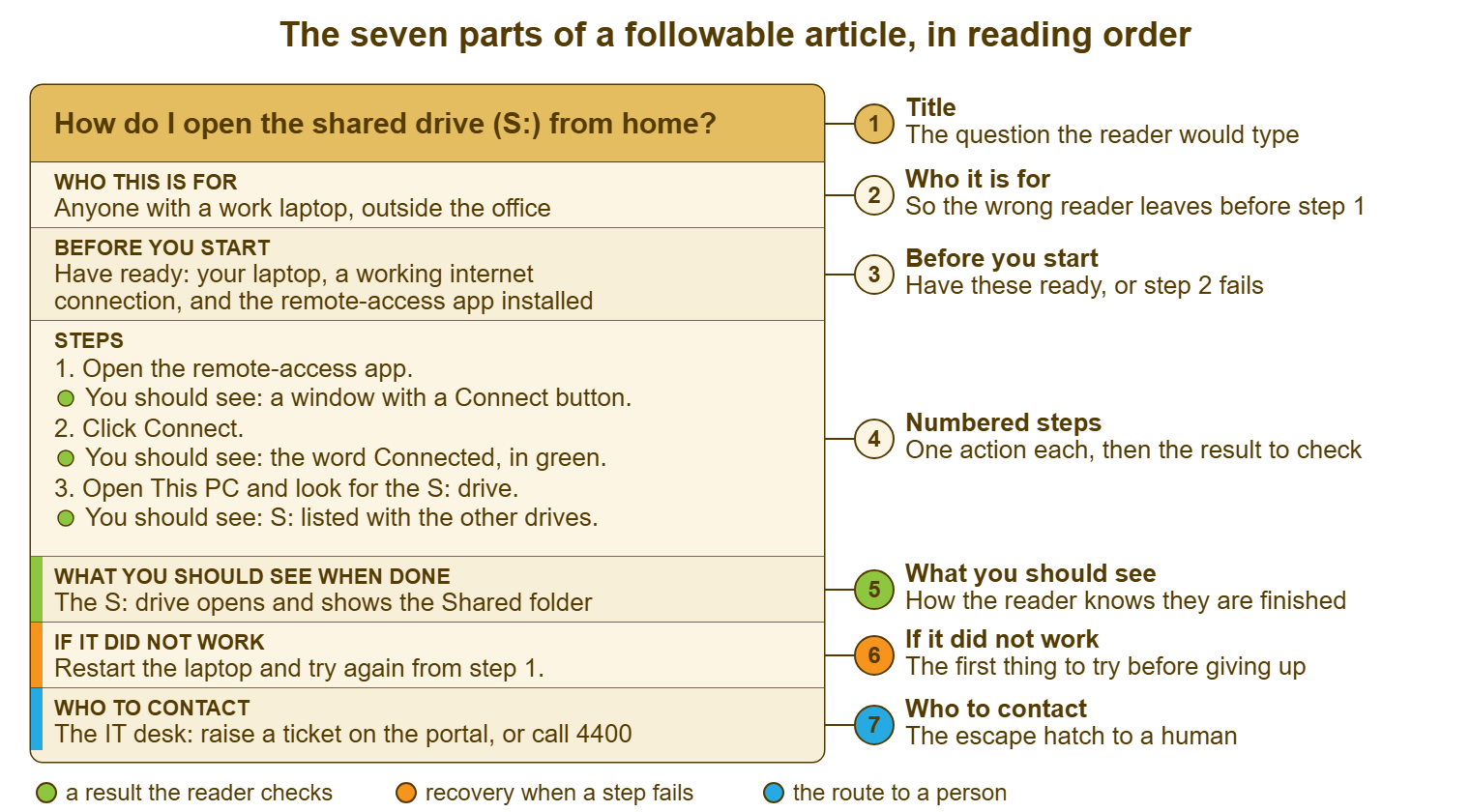
Two things about the shape are worth saying before taking the parts in turn. First, it is short. A seven-part article about approving timesheets is thirty lines, and the shape adds structure, not length. A part that is barely needed for a particular article gets one line, not a heading and a paragraph. Second, it is the same every time. A reader who has followed one article in this shape knows where to look in the next one. A knowledge base where every article has the same bones is one where the reader's eye goes straight to "before you start" without reading. Consistency is the one thing a knowledge base can offer that a search engine cannot.
The Title Is the Question the Reader Would Type
The title is the question the reader would type into the search box, in the reader's words, and nothing else. "How do I approve my team's hours in the timesheet system?" is a title. "Timesheet System Guidelines" is a filing label, and a reader who types "approve hours" will never find it, because the words are not in it. The reader does not know what the system is called internally, does not know the phrase "approval workflow", and does not know that the thing they want is a "guideline". They know what they are trying to do. The title says that, in their words.
Writing the title as a question also fixes the article's scope, which is the second thing it does. An article called "How do I approve my team's hours?" cannot drift into how to enter hours, how to correct a wrong entry and the history of the payroll cut-off. None of those answer the question in the title. The moment a writer finds themselves adding a section the title does not promise, that section is another article. This is why the shape produces many short articles rather than a few long ones. It is also why the knowledge base structure that works is flat, with good titles, as A Structure That Stays Navigable argues. Synonyms, the words users actually type and the failed-search log belong to Search That Answers Before the Ticket. The writer's share of that job is to put the reader's words in the title.
The table below shows titles from a plausible knowledge base before and after. The pattern is always the same. The system's name moves to the end or disappears, and a verb the reader would use moves to the front. The title becomes a sentence a person would say out loud at a desk. (If a title cannot be said out loud without embarrassment, it is not finished.)
| Filing-label title | Question title | What changed |
|---|---|---|
| Timesheet System Guidelines | How do I approve my team's hours in the timesheet system? | A verb the reader uses; the task first, the system last |
| Printer Setup | How do I add the second-floor printer to my laptop? | Which printer, which device |
| Remote Access Procedures | How do I open the shared drive (S:) from home? | The thing they want, not the mechanism that delivers it |
| Expenses: Receipts | How do I attach a receipt to an expense claim? | The action; "attach" is what people type |
| Password Policy | Why did my password stop working, and how do I reset it? | The symptom first, then the fix |
| Meeting Room AV | How do I show my laptop on the meeting-room screen? | Plain words; nobody searches for "AV" |
Who It Is For, and What to Have Ready
The audience line is one sentence under the title that says who the article is for, so that the wrong reader leaves before step one. "For supervisors and managers who approve hours for other people" tells a warehouse operative, who found the article by searching "timesheet", that they want a different article. A one-line link to it saves them reading nine steps that do not apply. The line costs nothing to write and is the part most often left out, because the writer knew who it was for. The reader did not.
The audience line also decides where the article lives. Most knowledge bases can mark an article as visible to everyone or to the support team only, and the audience line is the test. An article "for technicians resetting a locked account" is an internal one and should never appear in a user's search results. There, it will be followed by someone without the rights to do step three. If you run QuerySolv, the knowledge base lets an article be visible to agents only or to everyone. The audience line is the sentence that tells you which to pick. The deeper split between a technician's runbook and the user's guide is the subject of Two Audiences, Two Documents. Here, the rule is simply that the article says who it is for, and lives where that person will find it.
"Before you start" is the list of everything the reader must have, be, or have done before step one. It exists because the alternative is the failure at step two. The reader who reaches "enter the approval code from your manager" at step six, with no manager in the building, has lost ten minutes and all trust in the article. Put it at the top: "You need the timesheet system open in a browser; the supervisor role (if you cannot see the Approvals tab, you do not have it; ask the desk); and your team's hours entered." Three items, and the reader who lacks one knows before they begin, which is the only cheap time to find out.
The list has three kinds of entry, and a good one checks for all three. Things to have: a device, an app, a file, a code. Rights to hold: a role, a permission, membership of a group, with one line on how to tell whether you have it. The reader cannot see their own permissions and should not have to guess. Conditions to be true: the other person has entered their hours, the laptop is on the office network, it is before the cut-off. Add the time the task takes and any deadline it has, so that a reader with four minutes does not start a fifteen-minute task. All of this is one short list, and every line of it is a ticket that will not be raised.
The hard part of writing "before you start" is remembering what you have. The writer has the rights, the app, the shortcut and the habit, and none of them appear as prerequisites because none of them were acquired today. The trick I use is to do the task on a borrowed machine, signed in as someone with ordinary rights. I write down every moment I reach for something that is not there. It is humbling, which is the point. The prerequisites are the things I reached for.
Numbered Steps, and the Result After Each
A step is one action, in the exact words of the screen, followed by what the reader should see when it is done. "Click Approvals in the row of tabs. You should see a list of names with a tick box beside each." The result line is what makes the step followable rather than merely correct, because it is the reader's check. If they see the list, they are on course. If they see something else, they stop here. The article has caught the problem at the step where it happened rather than four steps later. The craft of the step itself, the exact wording, the trap step and the words to ban, is a whole article, Step-by-Step Clarity: One Action per Step. This one will not repeat it. What belongs here is where the steps sit in the shape and how many there are.
The steps start after "before you start" and end at the result. There are as many as there are actions, which for most help desk articles is between three and twelve. Fewer than three and the article is a sentence; more than twelve and the article is two articles, or a task that should not be the reader's to do at all. Number them, one per line, with the result after each, and never fold two actions into one step to make the count look smaller. The count is not the measure. A reader will follow fourteen short steps and abandon six long ones.
The last part of the steps is the result line for the whole article. For example: "When you have finished, the Approvals list is empty and the message 'All hours approved for this week' is shown." This is the line that tells the reader to stop. Without it, a reader who has done everything right keeps looking for the next step, assumes they have missed one, and raises a ticket to ask whether it worked. That ticket is the most avoidable one in the queue. It is raised by a person who has succeeded.
Remember: the reader has three questions, in order: is this for me, what exactly do I do, and how do I know it worked. Every part of the article answers one of them, and an article that leaves any of the three unanswered will be followed by a ticket.
If It Did Not Work, and Who to Contact
"If it did not work" is the one or two most likely failures and the first thing to try for each. It is written for a reader who has just failed and is deciding whether to give up. "If the Approvals tab is missing, you do not have the supervisor role; raise a ticket and say which team you cover. If a name has no tick box, that person has not entered their hours; ask them to, then refresh the page." Two failures, two fixes, four sentences. The section is not a troubleshooting guide; a long one is its own article. It is the recovery from the failures the writer already knows about, which, after a month of tickets, is most of them.
"Who to contact" is the escape hatch to a human, and every article has one, including the ones that always work. It names the route, not a person: "Raise a ticket on the portal, or call the desk if payroll is at risk." The route matters because the article will be read at 06:10 and at 15:00 and by a contractor, and "ask Priya" is useless to all three. Where the knowledge base and the request form live on the same portal, as they do in QuerySolv, "raise a ticket" can be a link rather than an instruction. The request arrives in the same queue as e-mail and chat rather than as a call to whoever happens to be in. The reader who reaches this line is, by definition, someone the article has failed. How the article speaks to them in that moment is the subject of Writing for the Reader Who Is Already Frustrated.
Leave both sections in even when they are short. An article with no "if it did not work" says, silently, that the writer has never seen it fail, and the reader does not believe that for a moment. An article with no "who to contact" says the reader is on their own. The two sections together take a minute to write and are the difference between an article that ends and an article that abandons.
One Article, Badly and Then Well
Here is the Tollgate article as Dev found it, lightly disguised. It is not a bad article by the standards of most knowledge bases. It is accurate, it was approved by HR, and it has a heading. It is also useless to anyone who does not already know how to approve hours, which is everyone who would ever search for it.
TIMESHEET SYSTEM GUIDELINES

Accurate and timely recording of working hours is essential to
the smooth running of payroll and to the company's compliance
obligations. All staff are reminded that hours must be entered
by the end of each shift.

Supervisors are responsible for ensuring that outstanding
entries are approved in the usual way before the weekly
cut-off. Entries not approved by the cut-off will be processed
in the following period.

For further assistance, contact HR.
Now the same article in the seven-part shape. Nothing has been added that the writer did not already know. It has been put in the order the reader needs it, with the reader's check after each step and the two exits at the end. It is longer by about twenty lines and shorter by one phone call.
HOW DO I APPROVE MY TEAM'S HOURS IN THE TIMESHEET SYSTEM?

Who this is for
  Supervisors and managers who approve hours for other people.
  To enter your own hours, see "How do I enter my hours?".

Before you start
  - The timesheet system open in a browser (the link is on
    the portal home page).
  - The supervisor role. If you do not see an Approvals tab
    after step 1, you do not have it; see "If it did not work".
  - Your team's hours entered. You cannot approve a blank day.
  - Payroll cut-off is 07:00 on Monday. Allow ten minutes.

Steps
  1. Sign in to the timesheet system.
     You should see: your name at the top right and a row of
     tabs, one of them called Approvals.
  2. Click Approvals.
     You should see: a list of your team's names, each with a
     week total and a tick box.
  3. Check that the week shown at the top is the week just
     ended. If it is not, click the left arrow beside the date.
     You should see: last week's dates.
  4. Tick the box beside each name whose hours look right.
     You should see: each ticked box turn green.
  5. Click Approve selected at the bottom of the list.
     You should see: the message "Approved" and the ticked
     names disappear from the list.

When you have finished
  The Approvals list is empty and the message "All hours
  approved for this week" is shown.

If it did not work
  - No Approvals tab: you do not have the supervisor role.
    Raise a ticket and say which team you cover.
  - A name has no tick box: that person has not entered hours.
    Ask them to, then refresh the page.
  - The wrong week is shown and will not change: sign out and
    sign in again, then start from step 2.

Who to contact
  Raise a ticket on the portal. If payroll is at risk, call the
  IT desk on 4400; it is staffed from 06:00.
Read the two side by side and notice what moved rather than what was added. The cut-off was in the first version, buried in a sentence about processing periods. It is now the last line of "before you start", where a reader at 06:10 will see it. "The usual way" became five steps with a check after each. "Contact HR" became a route that is open at six in the morning. Everything the second version knows, the first version knew. The first version simply knew it on the writer's behalf.
A Short War Story: The Expenses Article at Harbourview Clinic
Harbourview Clinic published an article called "Expenses: Submitting Claims" that explained the claim form in nine accurate steps. It left out that the expenses system would only accept a receipt as a single PDF file, the right way up. It also left out that the file had to be under a size the system did not mention until the upload failed. Nadia, who ran the desk, counted the tickets for one quarter: sixty-one, all variations of "the expenses system won't take my receipt". Each cost about ten minutes of a technician's time to explain the PDF rule by phone and talk the user through converting a photo. Six hundred minutes a quarter, every quarter, plus the month-end afternoon when eleven of them arrived together and the finance team's own deadline slipped by a day. The fix was four lines under a heading called "Before you start", naming the file type, the orientation and the size limit. It included a link to a one-step article on turning a phone photo into a PDF. The tickets fell to a handful the following quarter, mostly from people who had never opened the article at all, which is a different problem. The nine steps had been right the whole time; the article failed at a step it did not contain.
The Article Skeleton
The skeleton below is the seven parts as a fill-in form. Paste it into a new article, replace every blank, and delete nothing. A part that genuinely does not apply gets one line saying so ("Before you start: nothing; this works for everyone"). A missing heading looks like a forgotten one and the reader cannot tell the difference. The result lines are compulsory. If you cannot write what the reader should see after a step, you have not done the step recently enough to describe it. The fix is to go and do it.
KNOWLEDGE BASE ARTICLE — SKELETON
Title (the question the reader would type):
  How do I ____________________________________________?

Who this is for
  ______________________________________________________
  If you want to ______________ instead, see "__________".

Before you start
  - You need: _________________________________________
  - You need the right to: ____________________________
    How to check that you have it: _____________________
  - This must be true first: __________________________
  - This takes about ____ minutes. Do it before ________.

Steps
  1. ___________________________________________________
     You should see: ___________________________________
  2. ___________________________________________________
     You should see: ___________________________________
  3. ___________________________________________________
     You should see: ___________________________________
  (one action per step; add steps rather than lengthen them)

When you have finished
  You should see: ______________________________________

If it did not work
  - If __________________: _____________________________
  - If __________________: _____________________________

Who to contact
  Raise a ticket: ______________   Urgent: ______________
  Mention this article's title in the ticket.

Owner: ______________   Last checked on the live system: ________
Dev's manager rewrote the timesheet article in this skeleton the week she came back, working from the ticket the on-call technician had written up. The ticket had every step in it because he had been doing them for the first time too. The rewrite took her twenty minutes. At the next payroll cut-off two supervisors approved hours for the first time without a call. One of them sent the desk a message to say it was "the first article on there I've actually been able to use". The desk pinned the message above the printer. The new article knew nothing the old one did not. It had just been written for the person reading it.
Frequently Asked Questions
How long should a knowledge base article be?
Does a two-step article really need all seven parts?
Should a reference article, such as a list of printer names, also have a question title?
Who should write the article: the technician who knows the system or someone who does not?
What if the steps differ for two groups, such as laptops and desktops, or two versions of a system?
How do I find the "before you start" items when I cannot remember what I needed?
From the QuerySolv team: we build self-hosted help desk software for Windows. QuerySolv runs as one Windows service on your own network. It takes requests by web form, e-mail, live chat, social messages and REST API. It is licensed once per installation rather than per agent per month. The free trial runs the full product for 30 days.