
Two Audiences, Two Documents: Runbooks and User Guides
Tuesday, 09:40, at Redbrook Engineering. Priya in the drawing office has lost her shared drive. The folder she opens every morning is not in the list, and the deadline is Thursday. She does what the posters in the lift keep asking her to do: she searches the portal before raising a ticket. She finds an article called "Shared drive missing from a workstation". Step one tells her to confirm that the share service is running on the file server. Step two gives a command. Step three says "if the service is stopped, restart it and check the event log". Priya does not know what a share service is, has never seen a file server, and could not restart anything on it if she wanted to. She phones the desk, which is what the article was written to prevent.
The previous Thursday, at 02:10, Marcus had opened the same article from his kitchen table. He was on call, and the drive was missing for the whole night shift in the machine shop. He needed to know which server, which service, and what good looked like afterwards. Somebody had rewritten step four of the article the month before so that users could follow it. It said "if the drive does not come back, raise a ticket with IT". Marcus was IT. The article had been edited twice, by two kind people, in two directions, until it was a document for nobody.
A runbook is a document written for the technician: how to operate or repair one thing, complete and precise. It includes the commands, the checks, what the output should say, how to undo it, and when to stop and call someone. A user guide is a document written for the person who has the problem. It gives the safe steps they can take with their own account, in their own words, and the point at which they stop and raise a ticket. They describe the same procedure. They are not the same document, and most of the trouble in knowledge bases comes from pretending that they are. This article is part of our Technician Docs vs User Docs series, which is about keeping two documents for two readers without doubling the work.
It starts with the two readers and what each one brings to the page, what a runbook is, and what a user guide is. Then come the five reasons one document cannot serve both, and the compromise document and the way it fails everybody. Next is the agents-only and published split that most knowledge bases already offer. It then covers which procedures need both documents and which need only one. A short war story and the two-audience comparison table to copy finish the article.
The Reader at 02:00 and the Reader at 09:40
Every document has one reader, and the first job is to say who it is. Marcus at 02:10 knows the trade. He can read a command without being alarmed by it, and he has administrative rights on the file server. He wants three things in a hurry: what is wrong, how to fix it, and how to put it back if the fix makes things worse. He does not know this particular building. He joined four months ago, the file server was set up by someone who has since left, and the names of things are not in his head. He needs the document to be complete, because at 02:10 there is nobody to ask.
Priya at 09:40 knows her job. She can draw a pressure vessel to a tolerance Marcus could not pronounce. She has an ordinary account that lets her open her own files and nothing else. She wants one thing: to be back at work in two minutes. She does not want the cause, she does not want to learn what a share service is, and she would be alarmed, rightly, by a command. She needs the document to be short and safe, because every step it gives her is a step she will take on trust.
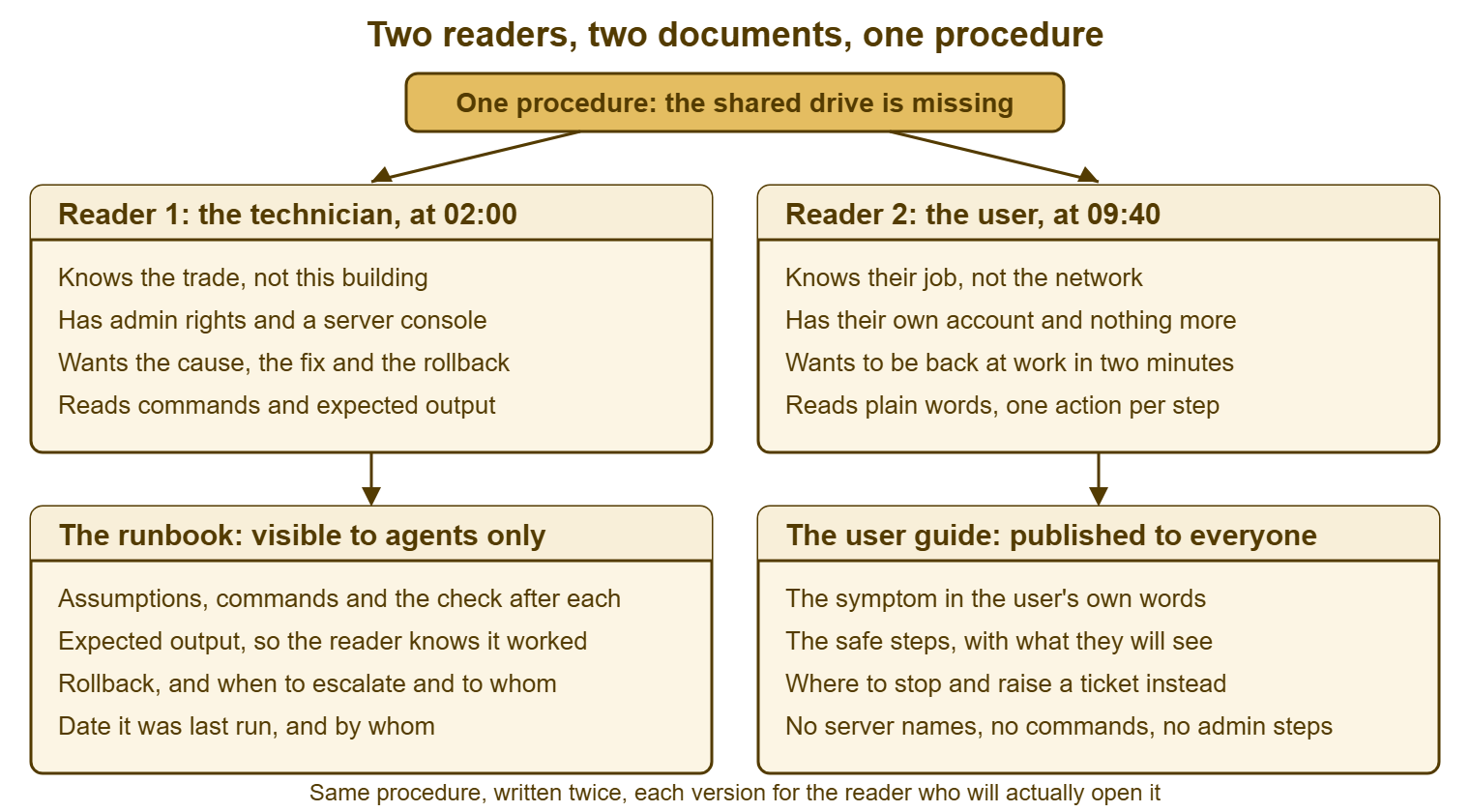
Both readers are competent. Neither is the other. The technician who writes "just restart the service" for Priya has forgotten what she knows and what she does not. The well-meaning editor who replaced Marcus's step four with "raise a ticket" has forgotten who reads the article at night. The picture below puts the two readers side by side with what each brings to the page, and the document each one needs underneath. It is the whole argument of this article in one diagram, and the rest is the reasoning.
What a Runbook Is
A runbook is the procedure written so that a competent stranger can run it, alone, under pressure, and know whether it worked. The phrase to hold on to is "competent stranger": someone who knows the trade but not this building. That describes every new hire and every on-call technician at night. It describes every member of the team eighteen months from now when the person who set the thing up has left. The runbook states what it assumes and names the systems involved. It gives each action with the check that follows it and says what the output should look like. It says how to undo the action, and when to stop and who to call. It is dull by design. Excitement in a runbook is a sign that something was left out.
A runbook is not a ticket note, and the distinction matters because the two get confused. The note is the record of what happened on one ticket, written while working, for whoever picks the ticket up next. It belongs to the ticket and is the subject of Why Ticket Notes Matter More Than the Fix. The runbook is the general procedure distilled from many tickets, written once, kept current, and opened from the next ticket of the same kind. A good note is where a runbook is born. It is not the runbook.
A runbook is also not the design document, the architecture diagram, or the vendor manual, and it should not try to be. It is one page, for one procedure, with the minimum the stranger needs and nothing they do not. The vendor manual explains every option; the runbook says which option this desk uses and why. The complete anatomy, with the skeleton to copy, is in Writing the Runbook. Here it is enough to say what the runbook is for: so that the fix does not depend on who is awake.
What a User Guide Is
A user guide is the same procedure cut down to what the user can safely do, written in words they already use, ending at the point where the desk takes over. For Priya, the guide for a missing shared drive is about four lines. It gives what the symptom looks like, then says to sign out and sign back in, and look again. If it is still missing, raise a ticket and say which drive letter is gone. Nothing in those lines needs rights she does not have. Nothing in them can make the situation worse. Every line is something she can check with her own eyes.
The guide earns its place by being read before the ticket. A user who finds the answer on the portal and fixes it in two minutes has saved the desk a ticket and saved themselves a wait. That is the whole case for self-service and the subject of several other series in this library. But the guide only works if the user can follow it to the end. That means the guide has to be written for the user's rights, the user's vocabulary and the user's patience. A guide that fails at step three has not deflected a ticket. It has delayed one, and added a phone call about what a server console is.
A user guide is derived from the runbook, never written from scratch, and the method for doing that is in Writing the User Guide From the Runbook. The reason to derive rather than invent is consistency: the runbook is the tested truth about the procedure. A guide that starts from the runbook inherits the truth. A guide written from memory by whoever was free that afternoon inherits the memory. The guide is the runbook's shadow. It should fall where the runbook stands.
Why One Document Cannot Serve Both
The two readers differ in five ways, and each difference on its own would be enough to need two documents. The first is vocabulary. Marcus needs "share service", "event log" and the server's name, because those are the handles he will use. Priya needs "the folder you open every morning", because that is the handle she has. A document that uses both vocabularies is twice as long and half as clear, and one that picks either vocabulary loses one reader at the first sentence.
The second difference is rights. The runbook's steps need administrative access to a server; the guide's steps need an ordinary account. A user who is given an admin step cannot do it. The result is a ticket that begins "the article told me to do something and it said access denied". That is a worse starting point than no article at all. A technician who is given only user steps has been handed a guide and will have to work out the rest at 02:10 from memory.
The third difference is risk. Every step in a runbook is a step that can make things worse, which is why the runbook carries a rollback. Every step in a user guide must be a step that cannot make things worse, because the user has no rollback and no way to tell that one is needed. Sign out and sign in is safe. Restart the share service is safe for Marcus, who can see the forty people connected to it, and not for anyone who cannot. The same action is safe or dangerous depending on who is standing at the keyboard, and a single document cannot know who that is.
The fourth difference is length. The runbook is complete, which makes it long; the guide is short, which makes it followable. A user will read four steps and attempt them. A user will read fourteen steps, decide the problem is bigger than they thought, and phone. The technician, meanwhile, needs all fourteen and will be let down by four. There is no length that serves both readers. There is only a length that annoys both equally.
The fifth difference is the ending. A runbook ends with the problem fixed and the fix confirmed, or with an escalation to a named person with what has been tried. A guide ends with either "it is back, you are done" or "raise a ticket and tell us this". The guide's ending is the beginning of the desk's work; the runbook's ending is the end of it. A document that tries to contain both endings tells Marcus to raise a ticket with himself, which is what happened at Redbrook. Marcus did not find it as funny at 02:10 as he did the following week.
The Compromise Document, and How It Fails
The compromise document is what you get when one article is edited to serve both readers. It is the most common failure in a knowledge base that has only one kind of article. It is born honestly. A technician writes a runbook. Someone notices users could use it and publishes it. A user cannot follow step three, so an editor softens step three. A technician cannot find the server name any more, so someone adds it back in a note. After six months the article is a technician's procedure with a user's apology attached, and each edit was reasonable.
It fails the user first and loudest. The user follows the safe steps, reaches the one that needs rights or knowledge they do not have, and either stops and phones, or, worse, tries it. "Worse" here is the user in accounts who found a procedure for clearing a stuck print queue. They followed it as far as the step that cleared every job for the whole floor, and were congratulated by nobody. The compromise document put a server step in front of a reader who had no way to know it was one.
It fails the technician second and more quietly. The technician opens the article at night, finds that the precise steps have been softened into "ask IT to check the service", and works from memory instead. Because they worked from memory, they stop trusting the article. Because they stop trusting it, they stop updating it. Because nobody updates it, it drifts further from the truth, and the next technician trusts it less. The compromise document does not merely fail to help. It teaches the desk that the knowledge base is where procedures go to become wrong.
It fails the desk third, in the reports. Tickets that should have been deflected arrive anyway, with the article's half-understood steps already attempted, so they take longer than tickets from users who never read anything. The knowledge base usage numbers look healthy, because the article is opened often. It is opened often because it does not work. An article that is opened a hundred times a month and fixes nothing is a very popular way of not helping.
Remember: a procedure that both a technician and a user will ever need is two documents, not one. The runbook is complete and precise and visible only to agents; the guide is the safe subset in the user's words and published. Edit neither to serve the other reader.
The Agents-Only and Published Split
Most knowledge bases already have the mechanism for keeping the two apart, and it is the visibility setting on an article. Some articles are visible to the support team only; some are visible to everyone who can reach the portal. That one flag is the natural home for the split: the runbook is an agents-only article and the guide is a published one. The two are linked to each other so a technician reading the guide can get to the runbook in one click. A technician writing the runbook knows there is a guide to keep in step. If you run QuerySolv, the knowledge base already draws this line, with articles visible to agents only or to everyone. In that case, the runbook and the guide live on opposite sides of it.
Where the tool has only a public knowledge base, the split still exists; it just needs a second place. The guides go in the knowledge base. The runbooks go in a shared folder or an internal document store that only the desk can reach. Each guide carries a reference to its runbook by number so the pair can be found. Where the tool has no knowledge base at all, both live in folders, one of which the users can see. The mechanism does not matter. What matters is that nothing in the user-visible place was written for a technician, and nothing in the technician-only place was softened for a user.
The split also gives the writing process a natural shape. New knowledge is written first as an agents-only draft, from the ticket, by the technician who just solved the problem. That draft becomes the runbook, or a note that feeds one. Only later, once the runbook is tested, does someone derive the guide and publish it. The light review that promotes a draft to a published article, and the question of which articles should never be promoted at all, is the subject of From Draft to Published: The Light Review. The point for this article is simply that the two visibilities are not an accident of the tool. They are the two readers, built in.
One caution about the word "published". It means visible to everyone who can reach the portal. For many organisations that is a wider group than the staff: contractors, students, tenants, patients, a search engine that found the page by accident. Anything in a published article should be fit for the least trusted reader who can reach it. The list of things that must therefore never be in one, with a test to run before publishing, is in the fifth article of this series. For now, treat "published" as "public", because sooner or later it is.
Which Procedures Need Both, and Which Need One
Not every procedure needs a pair. Many need only a runbook: rebuilding a workstation, rotating a service account's credentials, restoring a mailbox from backup. No user will ever perform those, and a guide for them would be a guide to nothing. Some need only a user guide: booking a meeting room, setting up an out-of-office reply, changing a desk phone's ringtone. The desk never does those on anyone's behalf, and a runbook would be a user guide with a more serious font.
The pair is needed where a procedure has a user-facing side and a technician-facing side, and most of the high-volume tickets on a small desk are exactly that. Think of a missing drive, a printer that has vanished from the list, or a password that will not work. Or an application that will not open, or a phone that will not ring. Each has a short list of things the user can safely try and a longer list of things only the desk can do. Those are the procedures where a single document does the most damage, and where the pair pays back fastest. Three questions decide it:
- Will a user ever meet this problem and look for help before raising a ticket? If yes, there is a guide.
- Will a technician ever need to do something the user cannot, with rights the user does not have? If yes, there is a runbook.
- Are both answers yes? Then it is a pair, linked, with the runbook as the source and the guide derived from it.
Run the three questions against the top twenty ticket types by volume. On most desks, about half are pairs, a third are runbook-only, and the rest are guides for things the desk should not be getting tickets about at all. Write the pairs first. They are where the user is currently reading the wrong document and the technician is currently reading none.
A Short War Story: The Hybrid Article at Tollgate Foods
Tollgate Foods ran a two-person desk for a food distribution business with three depots. Its most-opened knowledge base article was "Handheld scanner will not sync". It had started life as a runbook written by a technician called Dev. It had been published to the depot staff when the desk noticed how often it was being asked about. Over a year it was edited by both audiences into something neither could use. The depot staff followed it to step five, which told them to clear the device's cached credentials from the management console, and then phoned. The night technician, Anita, found that step five had later been softened to "contact IT to clear the device". She had to work out the console steps from memory at midnight during a stock count. The desk counted forty-one tickets in one quarter that mentioned the article. Each one was longer than a ticket from someone who had read nothing, because the depot staff had already tried half the procedure in the wrong order. Dev split it into an agents-only runbook with the console steps, the expected output and a rollback, and a six-line published guide. The guide ended at "if it still will not sync, raise a ticket and tell us the scanner's label number". He linked the two. The next quarter had nine tickets about scanners, every one of them already carrying the label number. One article trying to serve two readers had served neither, and the fix had been to stop asking it to.
The Two-Audience Comparison Table
The table below is the template for this article: a one-page comparison. Pin it above the desk and hand it to anyone who is about to write or edit a procedure. Read down the middle column when you are writing for the technician and down the right column when you are writing for the user. Any sentence that would belong in the other column is in the wrong document. Copy it into your own knowledge base's style page so that it is there the next time someone kindly softens step four.
| Question | The runbook | The user guide |
|---|---|---|
| Who reads it | A technician who knows the trade but not this building | A user who knows their job but not the network |
| When they read it | While working a ticket, often alone, often out of hours | Before raising a ticket, in the middle of their own work |
| What rights they have | Administrative access to the systems named | Their own account and nothing more |
| What they want | The cause, the fix, the check, the rollback | To be back at work in a couple of minutes |
| Vocabulary | System names, service names, commands, exact error text | What they see on their own screen, in their words |
| Length | As long as completeness requires, on one page | Four to eight steps, each one action |
| What each step carries | The action, the check, the expected output | The action and what they will see afterwards |
| Risk allowed in a step | Any, because a rollback follows | None; every step must be harmless if done wrong |
| How it ends | Fixed and confirmed, or escalated to a named person | "You are done", or "raise a ticket and tell us this" |
| Where it lives | Agents-only article or internal folder | Published article on the portal |
| Who owns it | The technician responsible for the system | The same person, because it is derived from the runbook |
| What triggers a change | A change to the system, or a run that found a step wrong | A change to the runbook |
| What must never be in it | Nothing the technician needs is forbidden | Server names, commands, credentials, admin steps, bypasses |
Two rows of the table do more work than the others. "Risk allowed in a step" is the row that stops a server step being published. The question it asks, "what happens if the user does this wrong?", has an answer for every step. The answer is sometimes "forty people lose the drive". "How it ends" is the row that stops a technician being told to raise a ticket with themselves. Dev pinned the table above the desk at Tollgate, and the first article anyone wrote after that was two articles, which is the correct number.
Frequently Asked Questions
Is it not twice the work to keep two documents?
Our knowledge base has no agents-only setting. Where do runbooks go?
Can a technician use the user guide on a ticket?
Who should write the user guide: the technician or someone who writes well?
What about the ticket note? Is that a third document?
Should the published guide mention that a technician version exists?
From the QuerySolv team: we build self-hosted help desk software for Windows. QuerySolv runs as one Windows service on your own network. It takes requests by web form, e-mail, live chat, social messages and REST API. It is licensed once per installation rather than per agent per month. The free trial runs the full product for 30 days.