
A Knowledge Base Structure That Stays Navigable
Thursday, 14:10, at Northgate Retail. The manager of the Harbor Street store sends Aisha a chat message: "Where's that article about the till not scanning gift cards? You sent it last month and I can't find it." Aisha opens the knowledge base to find the link. The top level has seven categories: IT, Store Systems, Head Office, Policies, Archive, Archive (old) and Misc. She tries Store Systems, then Tills, then Software, then Scanning, and finds "Gift card tender: scanner read failure (POS-7)". She also remembers there is a second article, under IT, then Hardware, then Scanners, called "Gift Card Scanning Issues". It says something different about re-keying the terminal. Two hundred and twelve articles, sixty-one categories, six levels, two answers. Aisha sends the first one and makes a note to ask who wrote the second. The note will join the others.
The structure of a knowledge base is the set of decisions about how articles are grouped and what they are called. It also covers how a reader gets from a question to an answer. There are only three parts to it, categories, titles and search. And the trouble is that most knowledge bases get the proportions backwards: elaborate categories, careless titles, and a search box nobody designed for. This article is part of our Knowledge Base Fundamentals series. And it is about a structure that is still navigable after the first hundred articles, which is the point at which most stop being.
It covers why flat with good titles beats a deep tree and categories that mirror the ticket categories. Next come naming each article by the question the reader would type and the search-first assumption, with a picture. Then come the things that look like structure and are not, and what to do when the structure has already sprawled. It finishes with a short war story and the starter structure to copy.
Flat With Good Titles Beats a Deep Tree
A deep tree asks the reader to think the way the person who built it thought, and the reader has never met that person. Every level of the tree is a decision: is a gift card scanner "Store Systems" or "IT"? Is the problem "Hardware" because it is a scanner, or "Software" because the till rejects the read? The reader guesses, and a wrong guess at level two is not discovered until level five, when the branch runs out. A tree with six levels has five places to take a wrong turn. And the reader is standing at a till with a customer holding a gift card. They will try two turns and then phone the desk, which is what the tree was built to prevent.
A flat structure has one level of categories and relies on titles to do the rest. The reader opens the knowledge base, sees a dozen category names they recognise, and picks one. They read a list of titles written in the words they would have used. Or, more often, they do not pick a category at all; they type three words into the search box and read the first result. In a flat structure the category is a label on the article rather than a room it is locked in. The title is the thing that finds it. The tree's five decisions become one decision and one glance. Trees grow, and nobody has ever seen one get shallower on its own.
The writer suffers from the tree as much as the reader. Every new article must be filed. Filing means finding the right branch, discovering that two branches would do, and choosing one. Later, a colleague tells you that it is in the wrong place. The filing is friction. Friction is why articles do not get written. And the tree, which was meant to organise the knowledge base, ends up emptying it. In a flat structure the writer picks one category from twelve, types a title in the reader's words, and publishes. That takes thirty seconds, and thirty seconds is the budget. Structure should cost the writer almost nothing and the reader even less.
Categories That Mirror the Ticket Categories
The knowledge base's categories should be the ticket categories, with the same names. The desk already has a working set, and a second set is a translation nobody will maintain. When a ticket is categorised "Printing", the article that answers it is under "Printing". When the monthly report says the top ticket type is "Accounts and passwords", the knowledge base has a category called "Accounts and passwords". You can look at the two lists side by side and see which common tickets have no article. The technician thinks in one vocabulary for the queue and the knowledge base. The report on what the desk is asked and the shelf of what the desk has written line up. And the gaps are visible without a project.
This only works if the ticket categories are good. A desk with four hundred of them should fix that first. The method for a category list that stays useful is in Designing a Category Tree That Stays Useful, and the warning is in Avoiding the 400-Category Monster. A good list has ten to fifteen entries, each justified by a decision it changes, and the knowledge base inherits it as it is. Where the ticket categories have a second level, the knowledge base ignores it. The second level exists so that a report can split "Hardware" into laptops and printers. The knowledge base does not need the split, because the title "Despatch label printer shows offline" already says which it is.
Do not create a category called Other. Not "General". Not "Miscellaneous". Not "Uncategorised, for now". An "Other" category is where articles go to be unfindable. Once it exists it will be the largest category within a year, because it is the only one that never requires a decision. An article that fits no category may be a sign that a category is missing. You fix that by adding one and telling the queue. Or the article is a sign that it should not exist, which you fix by not writing it. The third possibility, that it is simply "other", has never once turned out to be true in my experience, though I have believed it several times.
The one split that is structural and is not a category is audience: who may read the article. The technician's article about the gift card scanner includes the terminal re-key procedure and the supplier's support line. The store manager's article does not, because the re-key procedure performed by a store manager at 17:00 on a Saturday is a different, longer ticket. Most tools handle this as a property of the article rather than a place in the tree, and that is the right way round. If you run QuerySolv, the knowledge base already separates articles visible to everyone from those visible only to agents. That is the whole split and all the split that is needed. Which content belongs on which side is the subject of Two Audiences, Two Documents. For structure, the rule is that audience is a property, never a folder.
Name the Article by the Question the Reader Would Type
A title is a search result before it is anything else. And a search result is judged in half a second by someone who did not write it. "Gift card tender: scanner read failure (POS-7)" was written by someone who knows the tender types, the scanner model and the internal code for the till software. The store manager knows none of those things. The store manager knows that the till will not scan gift cards. The title is "Till will not scan gift cards". And the search that finds it is the sentence the manager typed into chat at 14:10. Everything the author knows that the reader does not goes in the body, after the reader has arrived.
There are two shapes of good title, and both work. The question shape, "How do I connect my laptop to the office Wi-Fi?", suits tasks the reader wants to do. The symptom shape, "Laptop connects to Wi-Fi but no websites load", suits things that have gone wrong. The known-error articles in Known Errors and Workarounds use it for exactly this reason. What both shapes share is that the first three words are words the reader would type. What neither contains is the system's internal name, a version, a ticket code, the word "legacy", or anything in brackets that the author added to tell articles apart. If two articles need brackets to be told apart, they are one article or one of them is wrong.
The table below rewrites six real titles from the Northgate knowledge base. The left column is what was there; the middle is what replaced it. The right is the reason, which is nearly always the same reason. Read the left column and ask, for each, what a store manager would have typed to find it. Then read the middle column and notice that the answer is "most of the title".
| Title as written | Title as rewritten | Why |
|---|---|---|
| Gift card tender: scanner read failure (POS-7) | Till will not scan gift cards | The reader knows the symptom, not the tender type, the model or the code |
| WLAN onboarding procedure, corporate SSID | Connect a laptop to the office Wi-Fi | "WLAN", "onboarding" and "SSID" are the author's words; "Wi-Fi" is the reader's |
| AD account lockout remediation | Reset your password when you are locked out | The reader is locked out and has never heard of the directory |
| Mobile device mail profile configuration | Set up work e-mail on a phone | Six words the reader would type, in the order they would type them |
| Despatch print queue configuration (legacy) | Despatch label printer shows offline | Titled by what the reader sees; "legacy" told the reader nothing |
| Shared drive access request process v2 | Request access to a shared folder | "Drive" was the server's word; "folder" was the reader's; the version meant nothing to anyone |
One subject per title, and one title per subject. An article called "Printers" is a category wearing a title. An article called "Till will not scan gift cards, and gift card balance enquiries, and refunds to gift cards" is three articles in a trench coat. Split them, and give each the title of the one question it answers. Where the same question exists twice, as the gift card scanner did at Northgate, merge them that day. Keep the one that is right. Make the other's title a line in the survivor's first paragraph so that the search still finds it. Two answers to one question is worse than none, because the reader cannot tell which to trust and will trust neither.
The Search-First Assumption
Design for search, not for browsing, because that is how readers arrive. A reader with a question types it; a reader without a question does not open the knowledge base at all. Browsing happens, but it happens after search has failed, and a structure that works only for browsers is a structure for the reader's second attempt. The search-first assumption means every decision about structure is tested against one question. If the reader typed the words they would naturally use, would this article be the first result? If yes, the categories can be nearly anything. If no, the categories will not save it.
Search finds words, so put the reader's words where search looks. Most knowledge base search gives the title the most weight, then the first paragraph, then the rest, and some search only titles. That is why the title carries the reader's words. It is also why the first paragraph carries the other words readers use for the same thing: "Also called the card reader, the scanner gun, or the wand." A technician adding a synonym line to the top of an article is doing more for navigability than any amount of category work. It takes a minute. Whether the search also reaches the reader before they raise the ticket, from the form and the portal, is the subject of Search That Answers Before the Ticket. The structure's job is to make sure that when search looks, the words are there.
Test it with the top twenty ticket phrases. Take the twenty commonest ticket types. Write down the three or four words a requester typically uses for each. Type them into the knowledge base search, and record what comes first. Twenty searches take fifteen minutes. The result is a list of articles that are findable, articles that exist but come up fourth under a title nobody would type, and questions with no article at all. The second group gets retitled this afternoon. The third group is the list for the next writing week. If the tool keeps a log of what readers searched for, read it too. Searches with no result are the readers' own list of what they wanted and did not get, written in their words.
The picture below shows the same article in both structures. On the left it sits six levels down a tree under a title made of the author's words, and the reader's search finds nothing. On the right it is one of a flat list with one category tag each, titled by the symptom, and the search finds it first. The article is the same. The structure decided whether anyone read it.
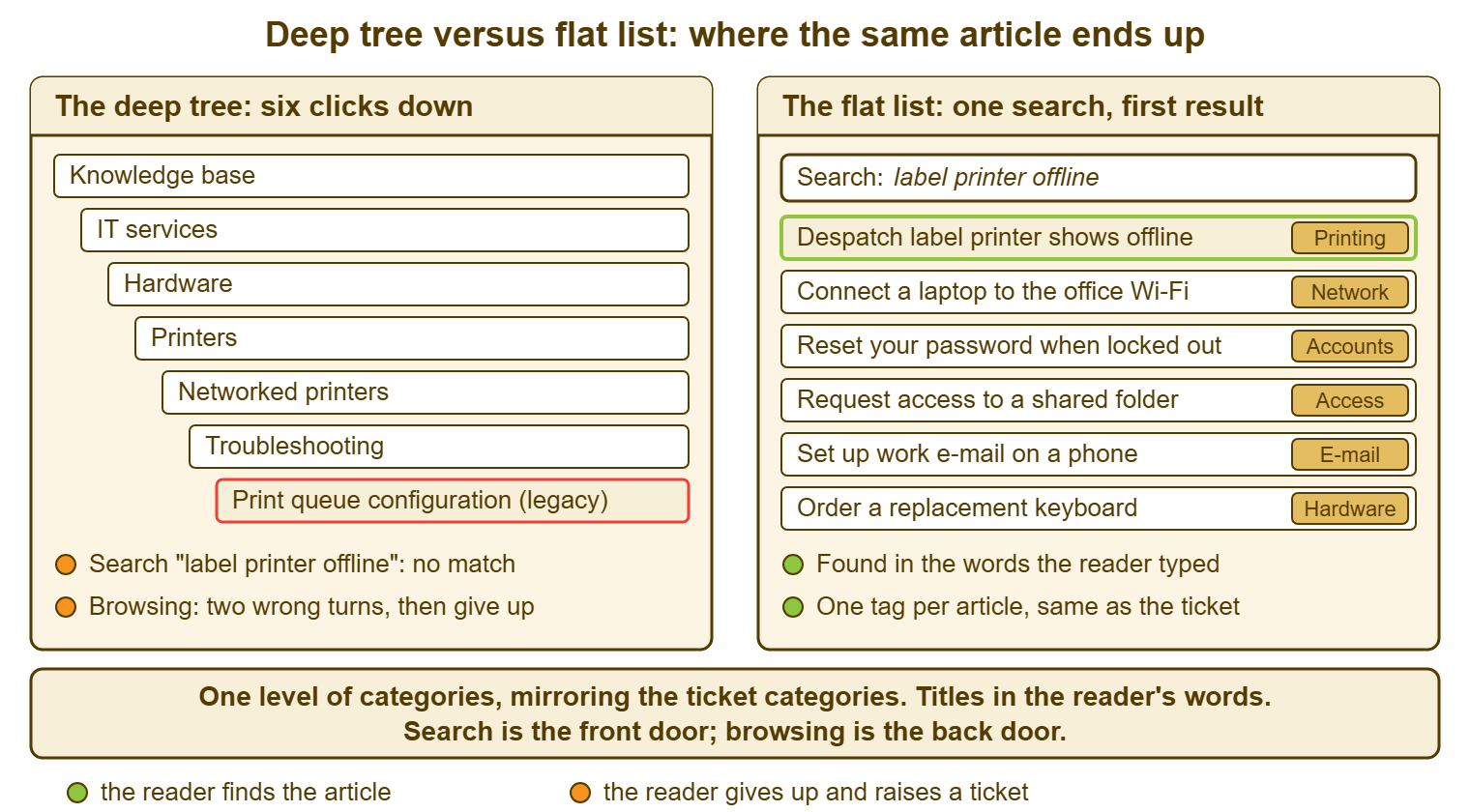
Remember: use one level of categories, taken from the ticket categories. Write every title in the words the reader would type. Test every structural decision by searching for the top twenty ticket phrases. If the search finds it first, the structure is working.
Things That Look Like Structure and Are Not
Tags are optional and should be treated as such. Some tools offer free-text tags on top of categories. A tag or two on an article can help search find a synonym. But tags are categories with no list and no owner. A knowledge base with three hundred tags has the sprawl problem twice. If you use them, use them for words readers type that the title does not contain, and nothing else. If the synonym line in the first paragraph does the same job, which it usually does, skip tags entirely.
Status is not structure either. Draft, published, stale and archived are states an article passes through. A reader should see at most two of them: published, and stale, the latter with a line at the top saying so. Drafts are invisible to readers. Archived articles are out of the search results or clearly marked, which is the subject of maintenance rather than structure. Putting "Archive" and "Archive (old)" in the category list, as Northgate had, offers the reader two rooms full of things known to be wrong. They are labelled as if they were places to look.
Departments are not categories. The temptation, usually arriving from above, is to give each department its own section, "so that finance can find their things". Finance's things are the same things as everyone's: passwords, Wi-Fi, printing, the shared folder, the phone. A department section means the Wi-Fi article exists in six places, five of which will be wrong by spring. If a department genuinely has a system of its own, the system is a category, named for what the system does. In that case, the articles under it are findable by anyone who types its name. That includes the new starter in finance who does not yet know which department owns it. (They will be told, repeatedly, once they ask.)
When the Structure Has Already Sprawled
A sprawled knowledge base is fixed in an afternoon. And the first step is to measure the sprawl so that the afternoon has a target. Count the categories and the levels. List the articles by views or by links from tickets over the last few months, if the tool can. If it cannot, the desk can name the thirty articles it actually uses in ten minutes. At Northgate the count was sixty-one categories across six levels, and the desk used twenty-eight articles. The other hundred and eighty-four were not unread by accident. They were unread because they answered questions nobody asked, in words nobody used, in rooms nobody visited.
Then draw the new list before touching anything. Write ten to fifteen categories, taken from the ticket categories, on one page. Beside each old category, write the new one it maps to, so that no article is moved by hand and no article is lost. This is the same move as retiring ticket categories, and the mapping table is the whole method. Every old name has a new name, "Archive" and "Misc" included. The mapping is applied in bulk if the tool allows it or by one person in an hour if it does not. Do not convene a workshop with sticky notes. The sticky notes always produce a tree, because trees are what sticky notes on a wall look like.
Retitle the thirty articles the desk uses, archive the rest, and run the twenty searches again. Retitling is the work that changes the result, because the thirty used articles are the ones readers are searching for and failing to find. A title in the reader's words fixes that for each in a minute. The hundred and eighty-four are archived rather than deleted, out of the search results, with a note that says when and why. That is because a few will turn out to be wanted and can be brought back and retitled on request. Then the twenty searches, before and after, give a number: eleven of twenty found first before the afternoon, nineteen of twenty after. That number is the report to whoever asks what the afternoon was for.
A Short War Story: One Article in Six Rooms at Greywater Marine
Greywater Marine built boats in two yards and had a knowledge base that Harriet, the desk lead, had reorganised at the operations director's request. Each department had its own section: Sales, Design, Yard One, Yard Two, Finance and Stores. Each section had a copy of the dozen articles everyone needed. The director wanted every department to "find their own things without wading through IT's". When the method for joining the guest Wi-Fi changed in the autumn, the technician who made the change updated the article under Sales and under Design. Those were the two he found. The four other copies kept the old method for three weeks. Forty-one tickets arrived from the yards, stores and finance in those weeks, each from someone who had followed the article exactly and failed. The desk closed each one by hand while the director asked why the knowledge base was not reducing tickets. Harriet flattened the six sections into one list with twelve categories over a single afternoon. Harriet merged the six Wi-Fi articles into one titled "Connect to the guest Wi-Fi". The tickets stopped the next day. Structure the knowledge base by what the reader asks, never by who the reader is. One question gets one article, and one article lives in one place.
The Starter Structure
The starter structure below is a one-page list of categories with example titles, the title rules, and the two properties every article carries. Rename the categories to match your ticket categories exactly. Drop any you have no tickets for, and add one only when the queue has a category the list lacks. The example titles are there to show the shape, not to be written; your first twenty come from your own queue. Fill in the audience and owner columns from the start, because adding them to two hundred articles later is the afternoon nobody has.
KNOWLEDGE BASE STARTER STRUCTURE — ONE PAGE
Rule 1: one level of categories, named exactly as the ticket categories
Rule 2: every title in the words the reader would type; one subject per article
Rule 3: audience is a property of the article, never a folder
Rule 4: no category called Other, General or Misc

CATEGORY (same as ticket category)   EXAMPLE TITLES (shape only)
  Accounts and passwords             Reset your password when you are locked out
                                     Request a new account for a starter
  E-mail and calendar                Set up work e-mail on a phone
                                     Share your calendar with a colleague
  Network and Wi-Fi                  Connect a laptop to the office Wi-Fi
                                     Wi-Fi connects but no websites load
  Printing and scanning              Despatch label printer shows offline
                                     Scan to e-mail from the office copier
  Laptops and desktops               Laptop will not turn on
                                     Request a loan laptop
  Phones and mobiles                 Forward your desk phone to a mobile
  Shared folders and access          Request access to a shared folder
  Business applications              (one category per major system if needed)
  Software requests                  Request software that is not installed
  Security and suspicious messages   Report a suspicious e-mail
  Starters, movers and leavers       Set up a new starter's equipment
  Known errors and workarounds       (titled by the symptom, in the reader's words)

EVERY ARTICLE CARRIES
  Category: ______________   Audience: [ ] everyone  [ ] desk only
  Owner: ______________   Last checked: ________   Review due: ________
  First paragraph includes the other words readers use for this: ________

THE TWENTY-SEARCH TEST (run before and after any change)
  Ticket phrase typed            Found first?  If not, retitle to:
  1. ____________________         [ ]          ____________________
  2. ____________________         [ ]          ____________________
  ...
  20. ___________________         [ ]          ____________________
  Score: ___ of 20 found first      Date: ________
Aisha flattened the Northgate knowledge base on a Friday afternoon, from sixty-one categories to twelve. The mapping table took her twenty minutes to write and an hour to apply. She retitled the twenty-eight articles the desk used, starting with "Till will not scan gift cards". She merged the second gift card article into it with a one-line note about re-keying the terminal, and archived the rest. The twenty-search test went from nine found first to eighteen. The following Thursday the Harbor Street manager searched "gift card" in the portal, found the article, and did not send a chat message. Aisha only knew because she had been waiting for it.
Frequently Asked Questions
Our tool only supports a folder tree. Can we still keep it flat?
How many categories is too many?
Should technician-only articles be in a separate knowledge base?
What if users search in different words from the title?
Can we reorganise gradually instead of in one afternoon?
Where do policies and long reference documents go?
From the QuerySolv team: we build self-hosted help desk software for Windows. QuerySolv runs as one Windows service on your own network. It takes requests by web form, e-mail, live chat, social messages and REST API. It is licensed once per installation rather than per agent per month. The free trial runs the full product for 30 days.