
Designing a Category Tree That Stays Useful
Friday, 15:30. Jonas has been handed the support desk at Northgate Retail and one instruction: "Sort out the categories by Monday." The current list has four entries and a monthly report that says the desk's biggest problem is Other. He opens a blank spreadsheet. Because the only structured thing he has to hand is the organisation chart, he starts there. Head office, eleven departments. Fourteen stores, each with a back office and a shop floor. The warehouse. By 16:10 he has sixty-one top-level entries, none of which describes a single thing that has ever gone wrong. He has not yet reached the second level.
He deletes it, which is the best decision he will make that day. A category list built from the organisation chart describes the company. A category list has to describe the work. The only reliable description of the work is the tickets that have already arrived. Jonas pulls the last two hundred and starts reading. By Monday he has sixteen top-level entries, a second level under six of them, and a list that will survive three years with only minor pruning. That is because it was built from the right material.
A category tree is a category list with structure: top-level entries that describe the broad kind of work, and under some of them a second level that narrows it. This article is part of our Ticket Categorization & Taxonomy series. This article is about building the tree once, well, so that it needs weeding rather than replanting. The reasons a category exists at all are in Why Ticket Categories Exist. This article assumes you want one and gets on with the design.
This article covers building the tree from real tickets, why two levels is the limit, and how many entries belong at the top. Next come which axis the top level should run along and naming rules that survive a year of use. Then come the Other bucket and why it is kept small on purpose, where the tree lives in the tool, and the fifty-ticket test before you ship it. We finish with writing the tree down on one page. A starter tree for a general IT desk is at the end, ready to copy and cut down.
Start From the Tickets, Not the Organisation Chart
The raw material for a category tree is a month of real tickets, and nothing else will do. Pull the last two hundred, or the last month if that is fewer, into a spreadsheet. Include the subject line, the first two lines of the description, and what the desk did about it. Then sort them into piles by hand. Not by who asked, not by which system was involved, but by what the desk did. The piles are the categories. Their names come later.
Sorting by hand sounds slow and takes about two hours for two hundred tickets. It is the most valuable two hours in the whole exercise. That is because the piles that form are the piles the desk actually has, not the piles someone imagines it should have. A tree designed from imagination has a category for "Server room environmental" and no category for "Cannot open the attachment", which is forty tickets a month. The tickets know what the work is. The designer only thinks they do.
Three things happen during the sort that are worth noticing. Some piles are enormous and will need splitting; that is where the second level goes. Some piles have two or three tickets in them; those merge into a neighbour, and the neighbour gets a slightly broader name. And some tickets refuse to go anywhere, which is the first honest measurement of how big the Other bucket will be. Write all three down. They are the design.
I once watched a committee design a category tree without looking at a single ticket. It took four meetings, produced thirty-eight top-level entries, and had a category for a system the company had decommissioned the previous spring. The tickets would have told them in an afternoon. Tickets are not invited to committees, which is a pity, because they are the only attendee with evidence.
Two Levels, and Why Not Three
A category tree has at most two levels, and the reason is the person filling it in. The triager has a ticket open and a pick list to choose from. One level means one choice. Two levels means a choice and a refinement, which a tired person can do in three seconds if the lists are short. Three levels means a decision tree, and nobody runs a decision tree forty times a day with care. They pick the first branch that fits and stop. The third level is filled in by accident or not at all, and either way the report built on it is fiction.
Two levels also match the two moments a ticket is categorized. The top level is what the triager can see at open: the ticket is about printing, or access, or e-mail. The second level is what the fixer knows at close: it was a driver, a permission, a full mailbox. A tree with a third level is usually trying to record the cause behind the cause, which belongs in the resolution note, not in a pick list. The split between open and close is the subject of Categorize at Close, Not Just at Open. The design rule it imposes here is simply that two levels are enough to hold both moments.
The picture below puts a two-level tree beside the kind of tree that grows when nobody enforces the rule. On the left, nineteen top-level entries, each with two or three children, fifty-four entries in all, and any entry reachable in two clicks. On the right are four hundred and eleven entries four levels deep, with Printers, Printing and Printer floor 3 as three separate branches. There is one entry for every application the company has ever bought, and two retired systems still on the list. An Other bucket holds forty percent of the tickets because it is the only entry the technicians can find quickly.
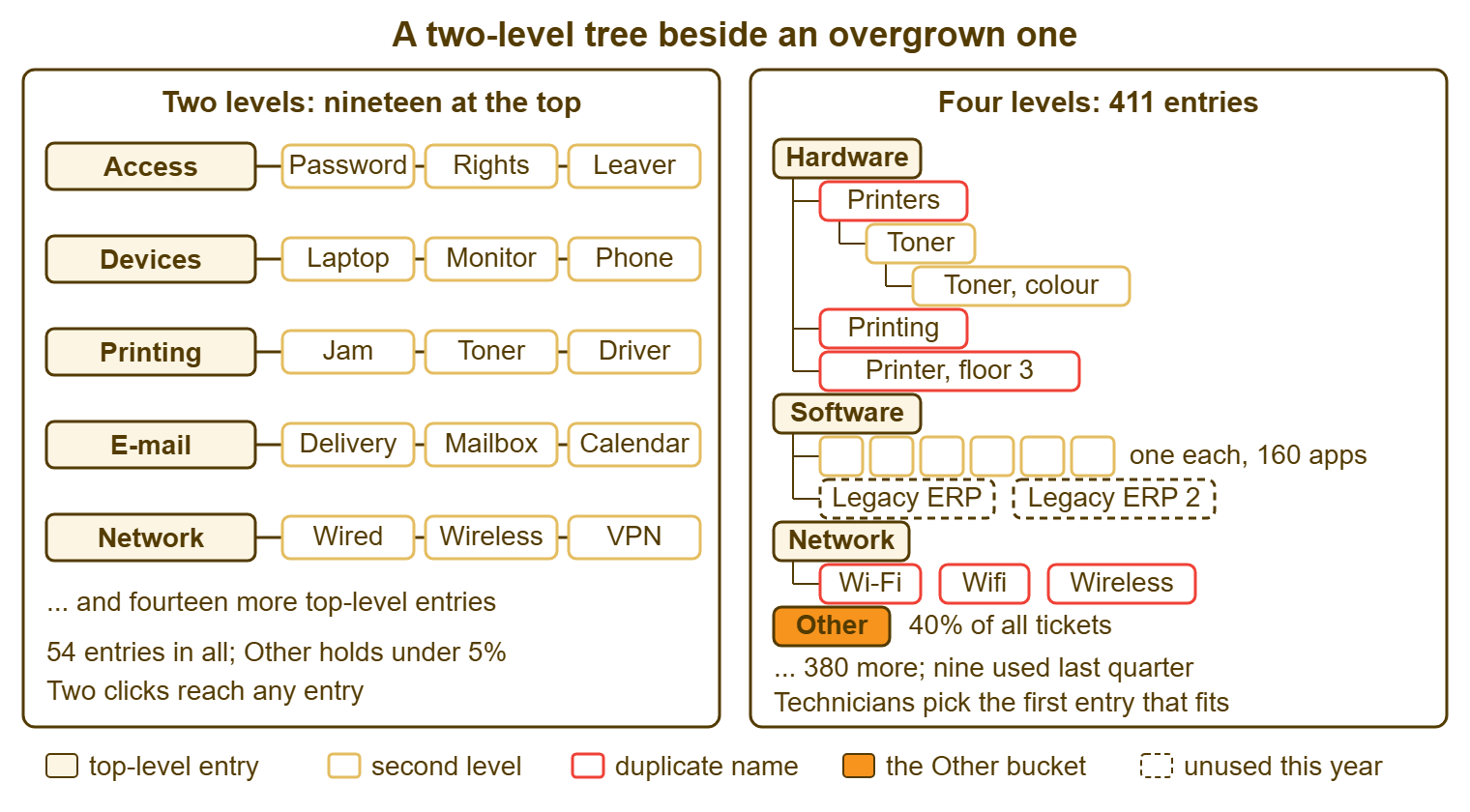
The right-hand tree is not a caricature. Trees like it exist on desks that started with the left-hand one and added an entry whenever anyone asked. How that happens, and how to stop it, is the subject of Avoiding the 400-Category Monster. The design decision here is to build the left-hand tree and to write down the rule that keeps it there. The rule is two levels. A third level request is answered with "that goes in the close note".
Twelve to Twenty-Five at the Top
The top level holds between twelve and twenty-five entries. The number comes from the pick list, not from the work. Below twelve, the entries are so broad that the report says "Software, 48 percent" and nobody can act on it. Above twenty-five, the pick list no longer fits on a screen without scrolling. The triager stops reading it, and the entries near the bottom of the alphabet quietly stop being used. Twenty-five is also roughly the number of distinct things a person can hold in mind as "the list". That matters, because a triager who knows the list picks correctly and a triager who has to read it picks the first plausible entry.
A small desk should aim for the bottom of that range. A desk of one to three people supporting under two hundred users will find that twelve to sixteen top-level entries cover everything they see. The second level goes under only the three or four busiest. A desk of ten supporting a thousand users might justify the full twenty-five. That is because the routing is real and the volume in each entry is large enough to show a trend. Nobody needs more. The instinct that says otherwise is the instinct to list everything that could go wrong rather than everything that does.
The second level follows the same logic, per parent. Under a busy top-level entry, three to six children. Under a quiet one, none; a second level with one child is a top-level entry with a longer name. The total across both levels for a general IT desk lands between forty and seventy entries. If the count is heading past a hundred, something on the list is a third level in disguise or a department wearing a category's name.
One Axis for the Top Level
The top level runs along one axis. The axis is the thing the ticket is about, as the triager can see it at open. Printing. E-mail. Access. Devices. Network. These are nouns for things the requester is trying to use. The triager can pick one from the description alone, without diagnosing anything. That is the test for a top-level entry: can it be chosen from what the requester wrote, before anyone has looked at the problem? If choosing it requires knowing the cause, it belongs at the second level or in the close field.
Mixing axes at the top level is the most common design fault after building from the org chart. Take a list with "Printing" (a thing), "Slow performance" (a symptom), "Expired certificate" (a cause), "Finance" (a department) and "Urgent" (a priority) on the same level. It cannot be filled in consistently. That is because a slow printer in finance that turns out to be a certificate is honestly five of them. Two triagers will pick two, both correctly. The report will then show that the desk has a lot of everything and not much of anything.
Symptom versus cause is the axis people argue about most, so settle it in writing. The top level is the thing or the symptom, whichever the requester can describe; the second level or the close category is the cause. "E-mail" at open, "E-mail: mailbox full" at close. "Slow computer" at open, "Devices: disk full" at close. A tree that puts causes at the top asks the triager to diagnose before reading. The triager will pick Other, reasonably, because they do not yet know.
Departments are not an axis at all, and the tree should not contain them. The requester's team is already on the ticket, in their address and usually in the first line. In tools that route by department it is a field of its own. In those tools the requester picks a department on the web form, each mailbox belongs to a department, and the queue filters by department alongside status, priority and assignee. The department, not the category, is what splits the queue, and the tree can stay about the work.
Naming Rules That Survive a Year
Names are where a good tree starts going wrong. That is because names are added by different people on different days and nobody checks them against each other. Six rules keep the names consistent. They are worth writing at the top of the taxonomy document so that whoever adds the next entry reads them first.
| Rule | Poor name | Better name | Why it matters |
|---|---|---|---|
| Nouns for things, not verbs or complaints | Fixing printers; Printer broken | Printing | The entry describes the subject, not the mood |
| No abbreviations the requester would not use | AD; Perms; LOB | Directory account; Permissions; Business applications | The triager and the report reader may not share the jargon |
| No overlap between siblings | Printers and Printing; Wi-Fi and Wireless | One of each | Two names for one thing halve the count of both |
| No vendor or product names at the top level | The brand name of the laptop | Laptop or desktop | Brands change; the kind of work does not |
| No departments, people or places | Finance; Sam's area; Floor 3 | The thing finance was using | Who asked and where is already on the ticket |
| No priority, status or type words | Urgent; Pending vendor; Request | Leave to their own fields | A category that duplicates another field will disagree with it |
| Same shape across the level | E-mail; Problems with the network; Can't log in | E-mail; Network; Access | A pick list of matching nouns reads in one glance |
| Short enough for the pick list | Issues relating to printing and scanning devices | Printing and scanning | Under about twenty-five characters, or it is cut off on screen |
The rule about vendor and product names deserves one qualification. A line-of-business application that generates real volume, the finance system or the warehouse management system, can have its own second-level entry. Name that entry for what the application does rather than what it is called: "Business applications: finance system". The brand name goes in the taxonomy document as the definition. That way, the entry survives when the company changes supplier and the tickets from both eras count together. It is a small discipline that saves a report from breaking every time procurement has a good year.
Names should read as the requester would say them, not as the engineer would. "E-mail delivery" rather than "SMTP relay". "Remote access" rather than the protocol. "Shared folder" rather than the server name. The triager is translating from a requester's words into a list. The shorter the distance between the two, the more consistent the translation. A list written in the engineer's vocabulary is a list that only the engineer fills in correctly. The engineer is not the one doing triage at 08:40.
The Other Bucket, Kept Small on Purpose
Every tree has an Other entry, and its job is to be small. Other is the category for tickets that genuinely fit nowhere, and its size is the single best measurement of whether the tree is working. Under five percent of tickets, the tree describes the work. Between five and ten, something is missing or something is badly named. Above ten, the tree has failed, either because it is incomplete or because it is so long that Other is the entry people can find. In the right-hand tree in the picture above, Other holds forty percent, and that number is doing all the talking.
Keep Other small by reading it, monthly, and asking what the tickets in it have in common. Twelve tickets about the meeting-room booking screen, filed under Other because the tree had no entry for it, are a new top-level entry called "Meeting rooms and AV" waiting to be created. Twelve tickets about twelve different things are the natural residue of a working desk and should stay where they are. The monthly reading takes ten minutes and is the only maintenance the tree needs between pruning reviews.
Do not give Other a second level, and do not create near-synonyms for it. "Miscellaneous", "General", "Not sure" and "Other" on the same tree are four Other buckets, each hiding a quarter of the problem. One bucket, one name, read monthly. The temptation to subdivide it is the temptation to make the residue look organised. The residue is more useful messy, because messy is what tells you a category is missing.
One more rule, which sounds harsh and is kind. Other is never the default value. If the form must have a default, make it the busiest honest category, or better, no default at all with the field optional at open and required at close. A form that defaults to Other produces a report in which Other is the biggest category. The report is then telling you about the form.
Where the Tree Lives in the Tool
Before building the tree, find out where it will live, because the tool constrains the shape more than the design does. Three questions. Does the tool have a category field with two levels, one level, or none? Can the field route a ticket, or does it only store a value? Does the report section cut by it, and does the export carry it? A tool with a single flat field means the two levels are flattened into one list with a separator, "Printing: driver". The top level is recovered in the spreadsheet by splitting on the colon. That works. It is less pleasant than a real two-level field and it is how most small desks actually run.
Where the tool routes by department, the department is level zero of the tree and the category starts underneath it. The requester, or the mailbox, or the chat widget has already decided that the ticket belongs to IT rather than Facilities. The IT tree only has to describe IT work. A category list that repeats the departments at its top level is doing the tool's job a second time and getting a different answer. Keep the departments in the department field and start the tree at Access, Devices, E-mail.
Where the tool has no category field, a custom field on the department's form can carry the category. That is the arrangement in tools where each department has its own form and custom fields but no category field as such. Do not repurpose the status or priority list for it, even where those lists can be edited. The custom field holds the flattened two-level list. The triager fills it at open, and the fixer corrects it at close. The monthly count is done in a spreadsheet. The arrangement is plain and it holds up, provided the list is short enough to pick from quickly, which is one more reason the list is short.
The Fifty-Ticket Test Before You Ship It
Test the tree before announcing it, and test it with the people who will fill it in. Take fifty tickets the designer has not seen, from the same month as the two hundred used to build the tree. Give them to two triagers separately with the new list. Each files all fifty. Then compare. Where both chose the same entry, the tree is clear. Where they chose different entries, the tree has an overlap, a missing entry, or a name that means two things. In that case, the ticket is the evidence. Fix the tree, not the triagers.
Agreement on about forty-five of fifty is a tree ready to ship. Agreement on thirty means the names are ambiguous or the axis is mixed, and another afternoon is needed. The disagreements cluster, which is the useful part. Three tickets filed as "Devices" by one person and "Network" by the other are all about docking stations that drop the wired connection. The tree needs to say where docking stations go. Write the answer into the definition, not into a new category.
The test also finds the entries nobody used. If fifty tickets in a typical month produce zero in "Telephony" and zero in "Security", those entries may still be right. That is because telephony failures are rare and security incidents should be. But each of those entries needs a sentence in the document saying why it is there. An entry that no ticket has visited by the end of the first quarter is a candidate for the first pruning. It is better to know that going in than to discover it in a year.
Run the test again a month after launch, with real tickets filed in real time rather than in a sitting. The second run shows what the tree does under load, when the triager has nine other tickets waiting and a phone ringing. Trees that pass the first test and fail the second have names that are clear when read carefully and ambiguous when skimmed. The fix is almost always shorter names.
Remember: build the tree from a month of real tickets. Keep it to two levels and twelve to twenty-five top-level entries. Name entries as nouns the requester would recognise, and read the Other bucket every month. The tree describes the work, not the company.
Writing the Tree Down on One Page
The tree lives in two places: the pick list in the tool, and a one-page document that says what each entry means. The pick list is not enough, because a name is a label and a label is interpreted differently by each reader. The document gives each entry four things: its name, a one-sentence definition, two example tickets that belong in it, and one ticket that looks like it belongs but goes elsewhere. The last one is the most useful line on the page, because it is where the ambiguity lives.
A definition line looks like this. "Printing: any ticket where the requester cannot get output from a printer or scanner, including quality and supplies. Examples: 'printer on floor 2 says offline', 'scans not arriving in my inbox'. Not here: requests for a new printer go to New equipment." Twenty entries at three lines each is a page. That page is what a new technician reads in their first hour and what the pruning review reads every quarter. It is also the only record of why the tree looks the way it does, which matters the day someone asks why "Telephony" exists.
Put the naming rules at the top of the page and the owner's name under them. The owner is the person who approves additions and runs the pruning review, usually whoever reads the monthly report. A tree without an owner is a tree that will be forty entries longer by spring. Tools rarely enforce any of this. The page is the enforcement, and it works to the extent that someone reads it before adding an entry. That is why it is one page and not eleven.
A Short War Story: The Org Chart Tree at Ashgrove Housing
Ashgrove Housing is a housing association with a desk of four. It inherited a category tree built from its own structure. There were twelve estates at the top level, then office, depot and tenant services under each, then systems under those. That meant a hundred and forty entries in four levels. Farah, who took the desk over, noticed that the monthly report said the biggest estate had the most tickets and nothing else, and that Other held forty-four percent. The repairs portal, which tenants used to report faults, started rejecting logins on Monday mornings. She could not say how often it had happened before, because portal tickets were spread across twelve estate branches under four different names. The vendor contract was renewed that quarter without the failure count anyone would have wanted at the table. She rebuilt the tree in two afternoons from three hundred real tickets: sixteen top-level entries, a second level under six of them, estates nowhere. The portal got its own second-level entry. Over the following quarter it recorded thirty-one login failures, which the next vendor conversation did not go well for. Other fell to six percent. The lesson Farah wrote on the first page of the new document was the one this article began with. The tree describes the work, not the organisation. A tree that describes the organisation cannot answer a question about the work.
A Starter Category Tree for a General IT Desk
The tree below is a starting point for a general IT desk supporting an office-based organisation. The top level is chosen at open and the second level confirmed at close. Copy it, then cut it down against your own two hundred tickets. Delete every entry your tickets do not visit, rename the ones your requesters would call something else, and add nothing until the Other bucket tells you to. Most desks that start here end up with twelve to fourteen top-level entries after the first pruning.
STARTER CATEGORY TREE — GENERAL IT DESK
Two levels. Top level at open; second level confirmed at close.
Owner: ______________   Last reviewed: ______________

Access
  Password reset
  Permissions and shared folders
  New starter or leaver
Accounts and licences
  Account creation or change
  Software licence
Devices
  Laptop or desktop
  Monitor, dock and peripherals
  Mobile phone or tablet
Printing and scanning
  Cannot print
  Print quality or supplies
  Scanning
E-mail and calendar
  Sending or receiving
  Mailbox size
  Calendar and shared mailboxes
Network
  Wired connection
  Wireless connection
  Remote access
Telephony
  Desk phone
  Softphone or headset
Business applications
  Finance system
  HR and payroll system
  Line-of-business application: ______________
Collaboration and files
  File shares
  Document collaboration
  Chat and meetings
Security
  Suspicious e-mail or message
  Lost or stolen device
  Malware or compromised account
New equipment
  New device
  Replacement device
Meeting rooms and AV
  Display or projector
  Conferencing equipment
Information request
  How do I
  Where is
Other
  (no second level; read monthly; keep under five percent)
Two features of the tree are deliberate and worth keeping when you cut it. "Information request" exists because questions that are not faults are a real share of every desk's work and otherwise land in Other. Counting them is how a desk discovers which knowledge articles to write. That connects this tree to Documentation as Your Second Person. And "Security" exists even on desks that see two such tickets a quarter. That is because those two tickets must be findable on the day somebody asks, and a search through Other is not an answer anyone wants to give.
Jonas's sixteen entries at Northgate Retail were close to this list with "Telephony" removed and "Store systems" added for the tills and scanners. "Meeting rooms" was merged into "Devices" because the company had two meeting rooms and one projector. The tree was built on a Saturday from two hundred tickets, tested on fifty, and documented on one page. Three years later it had gained two entries and lost one. The organisation chart, in the same period, had changed four times. Nobody had to update the tree.
Frequently Asked Questions
Our tool only has a single flat category field. Can we still have two levels?
Should the second level be required?
How do we handle a ticket that is about two things?
Where do requests for new things go, as opposed to faults?
Should requesters see the full tree on the form?
How often should the tree change?
From the QuerySolv team: we build self-hosted help desk software for Windows. QuerySolv runs as one Windows service on your own network. It takes requests by web form, e-mail, live chat, social messages and REST API. It is licensed once per installation rather than per agent per month. The free trial runs the full product for 30 days.