
Categorize at Close, Not Just at Open: Symptom In, Cause Out
Ticket 7316 arrives at the Bluewater Bank desk at 09:05 on a Monday: "Wi-Fi keeps dropping in the Dockside branch, all morning, everyone." Theo triages it in forty seconds, sets the priority to High, the category to Network: wireless, and takes it himself. By 11:20 he has found the cause, which is not the wireless at all. The certificate the branch uses to authenticate laptops to the network expired at midnight. Every laptop was refused at 08:00, and the symptom looked exactly like a flaky access point. He renews the certificate, replies, and closes the ticket at 11:35. The category still says Network: wireless. He does not change it, because he is already on the next ticket and nobody told him he should.
At the end of the month the category report says wireless is the desk's second biggest problem, with forty-one tickets, thirty-eight of them from Monday morning at Dockside. The network lead reads the report and orders a wireless survey of the branch. The survey finds nothing wrong, which is correct, and costs a day. The certificate will expire again in a year, at midnight, and the report will not have mentioned it. The report was built on what the requesters said rather than on what the desk found. The desk did find it. It just did not write it in the field the report reads.
Categorizing at close is the habit of setting, or correcting, the category when the ticket is resolved. It then records the cause the fixer found rather than only the symptom the triager saw. This article is part of our Ticket Categorization & Taxonomy series. It is about the second of the two moments a ticket gets a label. The first moment, triage, is where most desks stop. The second is where the information is.
It starts with the two moments and what each can know, and why the open category is a symptom and the close category is a cause. Then come what to do with one field or two, and the etiquette of changing a category someone else set, and why it is not an insult. Next is the thirty-second closing-category check and where it sits in the close routine. Then what the gap between open and close tells you, and what to do when the two disagree often. The open/close pairs table near the end is built to be copied and extended with your own pairs.
The Two Moments a Ticket Gets a Category
A ticket is categorized twice, whether or not the tool has a field for each moment. The first time is at open, when the triager reads the description and decides what the ticket is about. The second time is at close, when the person who did the work knows what it was actually about. The two answers are often the same. When they differ, the second one is right, and the difference between them is the most useful thing the category field can record.
The moments differ in what the person can know. At open, the triager has the requester's words and nothing else. "The Wi-Fi keeps dropping" is all they have, and Network: wireless is the honest category for it; the triager is not wrong, they are early. At close, the fixer has the whole story: what they checked, what they found, what they changed. Network: certificate is now the honest category, and it was not available at 09:05 to anyone. The field has to be set when the information exists, and for the cause, that is the close.
Most desks set the category once, at open, and leave it. The reason is not laziness; it is that the open category is required by the form and the close category is required by nobody. The form will not save without a value at 09:05. Nothing stops the ticket closing with the wrong value at 11:35. So the field is filled when the triager knows least and frozen when the fixer knows most, which is precisely backwards, and which no amount of better triage can fix. The fix is a close routine that asks the question.
Symptom at Open: What the Triager Can Know
The open category records the symptom, and that is the right thing for it to record. A symptom is what the requester experiences: the thing that will not work, as they describe it. The triager's job at open is to read the description, pick the entry that matches it, and move on, in under a minute. The reading matters more than the label and there are nine other tickets. How that first touch should go is the subject of First-Touch Discipline, and the category is one line of it.
The open category is useful even though it is provisional. It routes, where the tool routes by category, and it tells the rest of the desk roughly what is in the queue. It also records the requester's view of the problem, which is worth keeping, because the requester's view is what the next requester will write too. A desk that knows "slow computer" turns out to be a full disk a third of the time has learned something it can use at 09:05 tomorrow. It learned it by keeping both ends of the pair.
The open category should therefore be set from the top level of the tree and no deeper, unless the second level is clear from the description. The tree design in Designing a Category Tree That Stays Useful puts things and symptoms at the top level for exactly this reason. A triager can choose Printing from "the printer says offline". But they should not be asked to choose between driver, spooler and permissions before anyone has looked. A triager forced to pick a cause at open picks a guess, and the guess is remembered as a fact.
Cause at Close: What the Fixer Found
The close category records the cause, and the cause is what the report reader and the searcher wanted all along. A cause is what was actually wrong: the expired certificate, the full disk, the permission that was never granted. It is known only to the person who did the work, at the moment they finish it, and it evaporates within a day if it is not written down. The close category is the cheapest way to write it down, because it is a pick from a short list rather than a sentence, and it is countable.
The close category is where the three users of a category get paid. The report reader gets a count of causes rather than complaints. That is the difference between "wireless, forty-one tickets" and "certificate, thirty-eight tickets, all on one morning". The second one leads to a calendar reminder rather than a survey. The searcher gets a label that matches what they will find when they open the ticket, so a search for certificate tickets finds the certificate tickets. And the triager, next time, gets a pair they can learn from. Why all three matter is laid out in Why Ticket Categories Exist; the close category is where the matter happens.
The close category also belongs beside the resolution note, and the two support each other. The note says what was done in a sentence or two; the category says what it was in one pick. A note without a category is findable only by its own words, which were written in a hurry. A category without a note is a count with no explanation. Together they are a record, and a record is what the desk will wish it had next year. What a note worth reading later looks like is the subject of Resolution Notes Worth Reading Later; the category is its index entry.
One Field or Two
Whether you record both moments or only one depends on the fields the tool gives you, and the advice works either way. Some tools have a category tree with two levels; some have a flat list. Some have only custom fields on a form. A few have a separate "resolution category" or "cause" field built in. The question to ask of yours is simply: how many places can a category value live on a ticket, and which of them does the report read?
With one field, the close value wins. The triager sets it at open, the fixer corrects it at close, and the field at the end records the cause. The open value is not lost; it is in the ticket's history if the tool logs field changes, and in the subject line and description regardless. Make the correction part of the close routine, and accept that the report will show causes rather than symptoms, which is the better of the two things it could show. If the desk wants the symptom too, a one-word prefix in the resolution note ("opened as: wireless") keeps it searchable.
With two fields, record both and never let one overwrite the other. The open field is set at triage and frozen. The close field is empty until resolution and required then. The report reads the close field for "what is wrong" and the pair of fields for "what does the desk learn". The second of those is the reading list for the knowledge base. Two fields is the better arrangement by a distance, and if the tool lets you add a custom field, this is the one to add first.
With a flat list and no second field, the two-level tree flattens into "Thing: cause" entries. The open category is the thing with a general second half ("Network: unclassified"). The close replaces that with the specific one ("Network: certificate"). It is clumsy, it works, and the report built on it is the same report a two-field desk gets, provided the close routine does its part. The tool is rarely the obstacle here. The habit is.
Recategorization Hygiene: Who, When, and Why It Is Not an Insult
Changing the category someone else set is normal, expected, and part of closing a ticket well. It needs saying out loud because on many desks it feels like a correction of a colleague. It is not. The triager categorized at 09:05 with the requester's words; the fixer recategorizes at 11:35 with the facts. The triager was not wrong. They were early, and being early is their job. A desk where technicians hesitate to change the category because the triager might take it personally is a desk whose report records guesses, politely.
Three rules make recategorization clean. The person closing the ticket owns the close category, full stop; nobody else needs to be asked. The change is made at the moment of closing, not in a batch on Friday, because by Friday the cause has blurred. And the change is recorded, either by the tool or by a line in the close note: "recategorized from Network: wireless to Network: certificate". Some tools log a category change in the ticket's history with who made it; some do not; check yours by changing one and looking. If yours does not, the line in the note is the record, and it takes five seconds.
Recategorization is also how the triager gets better. A triager who sees, once a week, that their "wireless" became "certificate" and their "slow computer" became "disk full" learns the pairs. Their open categories drift toward the causes over a quarter without anyone running a training session. That only happens if the changes are visible. A desk where the fixer quietly corrects the field and nobody looks at the pairs has fixed the report and left the triage where it was. (The triage was fine. It could just be finer.)
There is one thing recategorization must never be, and that is a performance measure. Counting how often each triager's category was changed, and treating a high count as a problem, teaches triagers to pick vaguer categories that cannot be wrong. The whole system slides back to Other. The count of changed categories is a property of the tree and the work, not of the person. Read it to improve the tree. Do not read it to grade anyone.
Remember: the open category is what the requester said; the close category is what was wrong. The person closing the ticket sets the close category, at the moment of closing, every time. Changing the triager's value is part of the job, not a comment on it.
The Closing-Category Check in the Close Routine
The close routine is the short, fixed sequence a technician runs when a ticket is done, and the category check is one line of it, taking under thirty seconds. The full routine, the reply that tells the requester what was done, the confirmation, the note, is laid out in What a Proper Close Looks Like. The category line sits between the resolution note and the status change. By then the technician has just written what was wrong, and the category is the same fact in a shorter form.
The check is one question: does the category say what was actually wrong? If yes, leave it. If no, change it, and if the tool does not log the change, write the old value in the note. If no entry on the list says what was wrong, pick the nearest and write the real cause in the note. That is how the monthly reading of Other and of the notes discovers what the tree is missing. Three outcomes, thirty seconds, and the report at the end of the month is about causes.
Make it required, by the tool if the tool can, and by the written routine if it cannot. A close category field that is required at resolution is the single most effective setting a desk can change for the quality of its reports. It turns a habit into a gate. Where the tool has no such setting, the written close routine on one page, taped beside the screen for the first month, does the same job more slowly. Habits need about six weeks. The report gets honest in the second month and stays honest after that.
The routine also catches the ticket that was never categorized at all. A ticket opened from e-mail with no triage, a walk-up logged after the fact, a chat that became a ticket at 17:55. These arrive with an empty or default category, and the close is the only moment anyone will look at the field. A desk that categorizes at close catches all of them. A desk that categorizes only at open never does, and those tickets are the ones that make Other the largest bar.
What the Pairs Tell You
The gap between the open category and the close category is information in its own right, and a desk that keeps both ends of the pair can read it. The picture below shows five symptoms on the left as they were recorded at open. It shows six causes on the right as they were recorded at close, and lines between them for the pairings that actually occurred. Some symptoms lead to two causes. Some causes arrive from two symptoms. The red line is the one from the opening scene: a wireless complaint that was a certificate, and that a symptom-only report would have filed, forty-one times, under wireless.
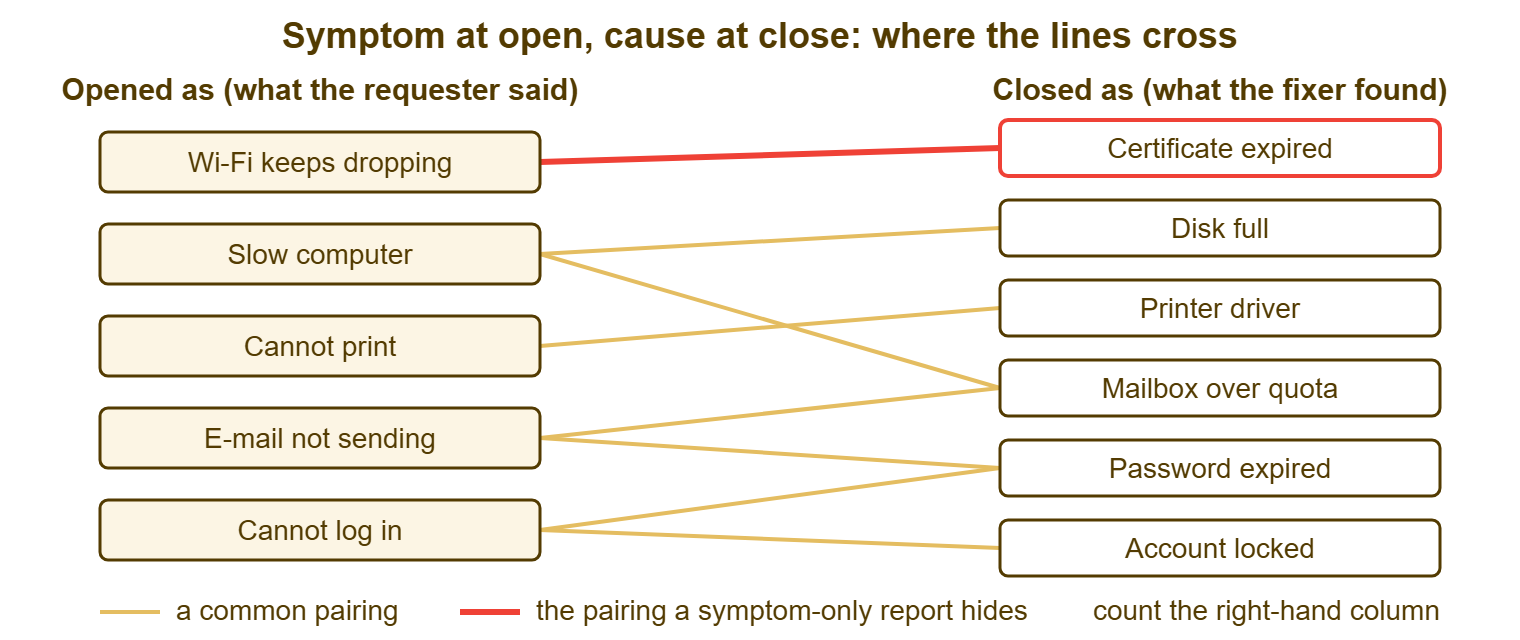
Read the pairs three ways. A cause that arrives from many symptoms is a candidate for a knowledge article or a fix at source. "Password expired" arriving from "cannot log in", "e-mail not sending" and "cannot print" is one cause wearing three complaints. A reminder e-mail five days before expiry removes all three. A symptom that leads to many causes is a triage question. "Slow computer" that splits into disk full, malware and a mapped drive to a dead server is a reason to ask one more question at intake. And a pair that appears for the first time is the one to write down, because it is the pair the next triager will not expect.
The pairs are also where problem management starts on a small desk. A problem, in help desk vocabulary, is the underlying cause behind several incidents. The way to find one without a module or a committee is to count close categories and look for the cause that keeps appearing. That count is only possible if the close category exists. Finding the repeat tickets, and what to do once found, is the subject of Finding the Repeat Tickets; this article's job is to make sure the field it counts has been filled in.
When Open and Close Disagree Often
A high rate of recategorization is a property of the tree, and it means one of two things. Either the tree is wrong, with top-level entries that are really causes and cannot be chosen at open, or the work is genuinely complicated and many symptoms have many causes. The way to tell them apart is to look at which pairs change. Suppose the same pair changes every time, "Software" to "Access: permissions" forty times a month. The tree has put a cause where a symptom should be, or has a missing entry. The design needs an afternoon. If the changes are spread across many pairs with no repeat, the desk is simply recording reality, and the rate is a feature.
About a quarter of tickets changing category between open and close is ordinary on a general IT desk. Under a tenth usually means the close category is not being set, and the report is symptoms with a thin coat of causes. Over half means the tree is asking the triager for things they cannot know, and the open category has become a formality. Neither number is a target. Both are a reading, and the reading is taken once a quarter at the pruning review, which is where the tree gets changed if it needs to be.
I ran a desk for a year where the open and close categories agreed almost perfectly, and was pleased with that until I noticed why. The tree was so coarse that "Software" at open became "Software" at close, every time, and told nobody anything. Agreement is not accuracy. A tree that is never corrected is usually a tree that is not saying much.
A Short War Story: The Wi-Fi That Was Not, at Harbourview Clinic
Harbourview Clinic's desk of three categorized every ticket once, at open, from a flat list of twenty entries. For most of a year the monthly report showed "Network: wireless" as the clinic's largest category, between fifty and seventy tickets a month. Niamh, who ran the desk, took the report to the practice manager and got approval to replace the access points on both floors. That took a contractor two days and the better part of a quarter's hardware budget. The tickets did not fall. Niamh finally read a month of close notes by hand. She found that most of the wireless tickets had been resolved by restarting a clinical application that lost its session whenever a laptop moved between the two floors. Two of her technicians had known this for months and had been writing it in the notes, under a category nobody changed. She added a close category and made it required. Within one month "wireless" fell to eleven tickets and "Clinical application: session" appeared at fifty-two. The vendor fixed the session handling in its next release, and the access points, which had been fine, stayed on the ceiling as a reminder. The lesson Niamh gave the team was one sentence: the fix was in the notes the whole time, and the report could not read notes.
The Open/Close Category Pairs Table
The table is a starter set of pairs for a general IT desk, with what the pair means and what the desk does about it. Copy it, keep it beside the tree, and add a row each time the close routine produces a pair you had not seen. After a quarter it is the most useful page in the taxonomy document, because it is the one that turns a count into an action.
| Opened as (symptom) | Closed as (cause) | What the pair tells you | Action when it repeats |
|---|---|---|---|
| Network: wireless | Network: certificate | Authentication, not radio | Calendar reminder before expiry; knowledge article for the symptom |
| Devices: slow computer | Devices: disk full | Storage, not performance | Monitor free space; article on clearing it |
| Devices: slow computer | Security: malware | Compromise, not performance | Triage question at intake; escalate immediately |
| Printing: cannot print | Printing: driver | Client side, not the printer | Deploy the driver centrally; article for self-service |
| Printing: cannot print | Access: permissions | Rights, not the printer | Fix the group membership at onboarding |
| E-mail: sending or receiving | E-mail: mailbox size | Quota, not delivery | Warn at eighty percent; article on archiving |
| E-mail: sending or receiving | Access: password expired | Credentials, not mail | Expiry reminder five days ahead |
| Access: cannot log in | Access: password expired | Routine expiry | Same reminder; self-service reset if available |
| Access: cannot log in | Access: account locked | Repeated bad attempts, often a saved old password on a phone | Article: update saved passwords after a change |
| Business application: error | Access: permissions | Rights, not the application | Role template at onboarding |
| Business application: error | Business application: vendor fault | Genuine defect | Count for the vendor conversation; known-error entry |
| Other | Any named entry | Triager could not place it; fixer could | Check the tree for a missing or unclear entry |
| Any named entry | Other | Fixer found nothing on the list for the cause | Read the note; candidate for a new entry on probation |
The last two rows are the ones to watch at the quarterly review. A ticket that opens as Other and closes as something specific is the tree working as designed: the triager did not know, the fixer did. A ticket that opens as something specific and closes as Other is the tree failing, because the fixer, who knew exactly what was wrong, could not find it on the list. Ten of those in a quarter with the same cause in the notes is a new entry, and the notes are the evidence.
The closing-category check itself fits on five lines, and belongs on the one-page close routine beside the reply and the note.
CLOSING-CATEGORY CHECK (part of the close routine; under thirty seconds)
  [ ] Does the category say what was actually wrong, not what was reported?
  [ ] If not: change it to the cause. Note the old value if the tool does not log it.
  [ ] If no entry fits the cause: pick the nearest; write the real cause in the note.
  [ ] Second level set (not left at the parent) where the tree has one.
  [ ] New pair not in the pairs table: add a row, or tell the owner.
Theo's ticket 7316, run through the check, would have closed as Network: certificate at 11:35 with "opened as wireless" in the note. The monthly report would have said "certificate, thirty-eight, one morning" instead of "wireless, forty-one". The network lead would have put a date in a calendar instead of a contractor on a ladder. The desk had the fact by mid-morning. The check is what moves a fact from the technician's head into the field the report reads, and it takes less time than the walk to the kitchen.
Frequently Asked Questions
Our tool has only one category field. Which value should it hold at the end?
What if the ticket was closed without a fix, or the cause was never found?
Should the triager be told when their category is changed?
Can we go back and set close categories on last year's tickets?
Does a reopened ticket keep its close category?
How do we make the check happen when the tool cannot require a field at close?
From the QuerySolv team: we build self-hosted help desk software for Windows. QuerySolv runs as one Windows service on your own network. It takes requests by web form, e-mail, live chat, social messages and REST API. It is licensed once per installation rather than per agent per month. The free trial runs the full product for 30 days.