
What a Proper Close Looks Like
It is 16:52 on a Thursday and Omar has eleven tickets he knows are done. The scanner in dispatch works again, and the two password resets were finished before lunch. The laptop for the new starter in finance went out at three. He opens each ticket and sets the status to Resolved. He types "Fixed" in the note box because the tool insists on something, and moves to the next. Eleven tickets in ninety seconds. The queue drops from thirty-eight to twenty-seven, and the dashboard looks better than it has all week. Omar goes home feeling, reasonably, that he has finished.
Four months later a different technician searches for "dispatch scanner" and finds Omar's ticket. It says "Fixed". The user of the finance laptop found out her ticket was closed when she replied to ask about a docking station. She got an answer under a new ticket number. Nobody rated anything, because nobody was asked. The eleven closes were real work recorded as nothing, which is the usual outcome of a close that takes ten seconds.
A close is the end of a ticket's life: the moment the desk says the request is finished and stops working on it. A proper close has four parts: the fix confirmed, the note written, the user told, and the category right. Each takes a sentence or a click, and the status change does none of them for you. This article is part of our Closing Tickets Properly series, and it is the overview. The other five articles each take one part further.
It covers why the close is where a ticket turns into a record, then the four parts, one at a time. We cover what each costs when skipped, then compare the ten-second close and the two-minute close on what happens afterwards. Next comes the difference between Resolved and Closed and who presses which. We cover how to make the two minutes a habit instead of a chore, then a close checklist you can pin beside the screen.
Closing Is Where the Ticket Becomes a Record
While a ticket is open, it is a conversation. Somebody asked, somebody is working, messages go back and forth, and everyone involved remembers what it is about. The moment it is closed, it stops being a conversation and becomes a record. A record is read by people who were not there. That includes the technician searching for the same fault next spring and the manager counting what the desk did this quarter. Those readers include the user checking what happened the last time this printer did this. The close is the last chance to make the record say anything.
Everything written before the close was written for the people in the conversation. "Tried the thing we discussed, no change" makes sense to the two people who discussed the thing. It makes no sense to the stranger. And the stranger is the one who will read it, because the people in the conversation do not need to. A ticket's history is written forwards and read backwards. The close is the only part written with the reader in mind, if it is written at all.
The tool records more than you think and less than you need. Most ticketing tools keep an event history: every reply, note, status change and assignment, with who made it and when. So the question "who closed this and when" always has an answer. What no tool records is why. The history shows that Omar set Resolved at 16:52; it cannot show what he did at 10:15 to earn it. That is the note's job, and it is the one part of the record only a person can write.
This is why the close matters out of all proportion to the time it takes. A ticket that took three days to work and ten seconds to close has three days of effort filed under one word. The two minutes a proper close takes are the most valuable two minutes in the ticket's life. That is an odd thing to say about the part everyone rushes. Tickets, like most things, are judged by how they end.
The Four Parts
A proper close has four parts, and they come in an order. The fix is confirmed, the note is written, the user is told, and the category is set to what the ticket turned out to be. The order matters because each part depends on the one before. You cannot write an honest note before you know the fix held. You cannot tell the user it is done until the note has made you say what "done" means. And you cannot set the category until you know what the ticket was really about, which you often learn only at the end.
Each part answers a question that somebody will ask later. Did it work? That is the confirmation. What was it and what did you do? That is the note. Does the user know? That is the reply. What kind of ticket was this? That is the category. A ten-second close answers none of them, and the questions do not go away when they are not answered. They wait, and they come back as reopens, duplicate tickets, bad reports and a knowledge base with nothing in it.
The four parts apply however the ticket was worked. A fix made at the user's desk, with the user watching, has the confirmation built in. It still needs the note, the reply and the category, and it needs them more. Nothing about an in-person fix is written anywhere until somebody writes it. A fix made over the phone is the same. The easier the fix was to do, the easier it is to close in ten seconds, and the more completely it vanishes when you do.
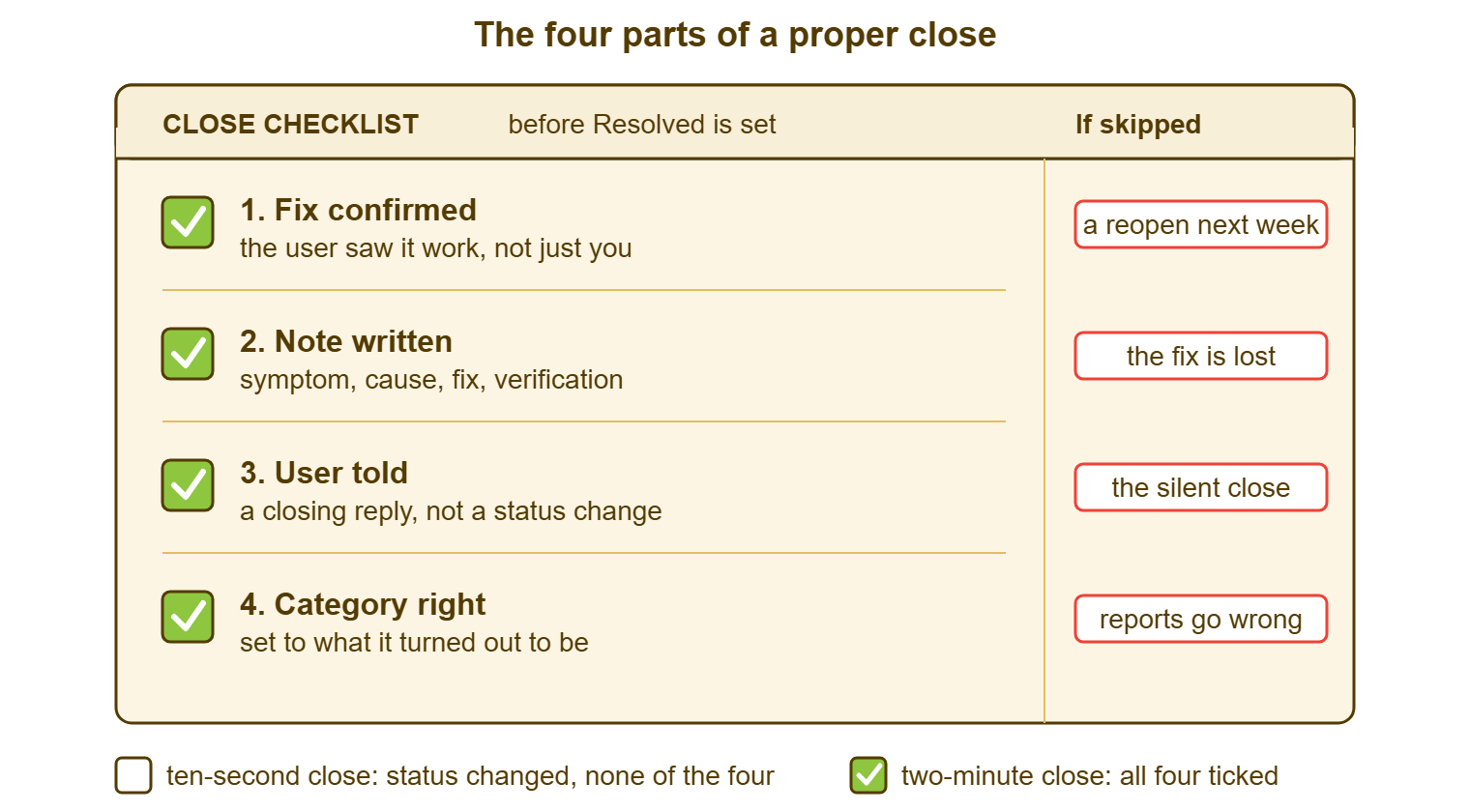
The picture below is the four parts as a card. The part is on the left, and what goes wrong when it is skipped is on the right. It is the whole article in one picture. And the checklist at the end is the same four lines in a form you can tick.
Part One: The Fix Confirmed
The fix is confirmed when the person who had the problem has seen it go away, not when you have. These are different events. You tested the printer from your desk; the user prints from a laptop on the other floor with a different driver. You reset the password and it worked for you in the directory tool. The user is still typing the old one into a saved profile on their phone. "Works for me" is a true statement about your desk. The ticket was about theirs.
Confirmation comes in three forms, and only one of them needs the user to do anything. The best is a reply from the user saying it works, or saying thank you, which is the same thing in fewer words. The second is you watching it work on their machine, in person or over a remote session, with them driving. The third is a check you can make on their behalf. For example, the mailbox is receiving again and you can see the messages landing. Or the account shows a successful sign-in from their workstation after your change. Any of the three counts. "I applied the fix" counts for nothing until one of them happens.
Confirmation needs a question, so the question goes in the reply that announces the fix, and it comes with a date. "I have cleaned the toner sensor; please try a print job and let me know by Friday if anything is still wrong. If I do not hear from you I will close this on Monday." That one sentence does three things: it asks, it sets a deadline, and it says what silence means. How long to wait, how many times to nudge, and when it is fair to close without hearing back are covered in User Confirmation Without Chasing Forever. That is the whole subject of the article. The short version is: ask once, nudge twice, close with notice.
What skipping confirmation costs is a reopen, and reopens are expensive in a specific way. A reopen is a ticket that was marked done and came back, because the user replied to say it was not. It costs the second round of work, which is the obvious part. It also costs the user's trust, because from where they sit the desk announced victory and left. And it costs the number: a desk that closes without confirming reports a fast resolution time and a high reopen rate. The second figure is the honest one.
Part Two: The Note Written
The resolution note is the short record of what the problem was, what caused it, what you did, and how you knew it worked. Four lines. It is not the whole ticket history; the history already holds every message. It is the summary a stranger reads instead of the history. And it goes in whatever your tool calls the closing comment, the solution field, or the final internal note. The next article in this series, Resolution Notes Worth Reading Later, is about writing it well; here the point is only that it exists.
The test of a note is whether a competent stranger could do the fix again from it. "Fixed" fails. "Printer fixed" fails. "Cleaned toner sensor" is close. "Dispatch printer reported toner low with a new cartridge; sensor was dirty; cleaned sensor and reseated the cartridge; user printed the shipping labels for the afternoon run and confirmed" passes. It took thirty seconds longer. The difference between those two notes is the difference between a desk that learns and a desk that rediscovers the same fault every quarter. Each time, the latter starts from scratch.
Notes are skipped for one reason, which is that the person writing them already knows what happened. Writing it down feels like telling yourself something. It is not for you. It is for the you of next year, who will have forgotten. It is also for the colleague who will search for it on the day you are off. I have searched my own old tickets and found "sorted" under my own name more times than I would like to say. It is a strange experience, being let down by yourself in writing.
Part Three: The User Told
The user is told when a reply goes out that says what was wrong, what was done, and what to do if it comes back. A status change is not a reply. In many tools, setting a ticket to Resolved or Closed sends nothing to the requester at all. There is no automatic "your ticket has been closed" message in those tools. Anyone who assumes the status is the message has told nobody anything. Check yours by resolving a test ticket raised from your own address and watching the inbox. The requester reads their inbox. The status is a word the ticket says to itself.
The closing reply is three sentences and is the same three sentences every time. That is why it belongs in a saved reply you can insert and edit. What was wrong, in the user's terms. What was done, in one line. What to do if it is not fixed or comes back: reply to this message. The last sentence matters more than it looks. It keeps the way back open, so that a user whose problem returns replies to the ticket that already has the history. They do not have to open a fresh one that starts from nothing.
Telling the user is also the only moment at which you can ask how it went. In many tools the satisfaction rating request, where the desk uses one, rides on the agent's resolving reply. That is the reply that sets the ticket to Resolved. In those tools, the rating request is not sent again. If the ticket is resolved by changing the status and nothing else, no rating is asked for. In that case, the desk's satisfaction report is built from whichever agents happened to reply. The whole failure, what it costs and what to say instead, is the subject of Avoiding the Silent Close.
Part Four: The Category Right
The category is the label that says what kind of ticket this was: password, printer, access request, software fault, hardware, new starter. It was set at the start by whoever triaged the ticket, from the first message, before anyone knew anything. "E-mail not working" was filed under e-mail; it turned out to be a full disk; the fix was a disk and the category still says mail. Every report built on that category now counts a disk problem as a mail problem. The person deciding whether to buy bigger disks or a better mail server will be reading those reports.
Setting the category at close is a two-second correction that most desks never make. By the time the fix is known the category field is three screens up and nobody looks at it. Look at it. The rule is simple: the category describes what the ticket turned out to be, not what it looked like when it arrived. A desk that categorises at open and never at close has a report about first impressions. The case for correcting it, and how to do it without a meeting, is in Categorize at Close, Not Just at Open.
Where the category lives depends on the tool. Some tools have a dedicated field, some a tree several levels deep, and in some it is a custom field on the request form. Wherever it is, it is a field the technician can change, and the close is the moment to change it. If your tool has no such field at all, the category is a word at the top of the resolution note. In that case, the monthly review reads it from there.
What a wrong category costs is slow and invisible. It is a report that is wrong in a direction nobody can see, because the tickets were counted, just in the wrong pile. The monthly review catches it, if there is one. By then it is the quarter's report, and the quarter's report has already been to a meeting.
The Ten-Second Close and the Two-Minute Close
Set the two closes side by side and the difference is small at the moment of closing and large afterwards. The ten-second close is a status change and whatever the tool forces you to type. The two-minute close is the four parts. The table follows one ticket through each, from the moment the fix is applied to the moment someone looks for it again.
| Moment | Ten-second close | Two-minute close |
|---|---|---|
| At the fix | Status set to Resolved; note says "Fixed" | Reply sent saying what was wrong, what was done, and please confirm by Friday; note written; category corrected |
| The user, same afternoon | Hears nothing; finds out when the thing works, or when it does not | Reads the reply, tries it, answers "works, thanks" or "still broken" |
| If it was not actually fixed | User opens a new ticket a week later, or gives up | User replies to the same ticket; it reopens with its history attached |
| Rating | Never asked for | Asked for on the resolving reply |
| Next quarter's report | Counted under the intake category; resolution time looks fast; the reopen is a separate ticket nobody connects | Counted under the right category; resolution time is honest; a reopen is counted as a reopen |
| Next year's search | "Fixed" | Symptom, cause, fix, verification; a knowledge article if it recurred |
| Time spent closing | Ten seconds | Two minutes |
| Time spent later | The second ticket, the search that found nothing, the report nobody trusts | None |
Two minutes against ten seconds is a hundred and ten seconds a ticket. On a desk closing forty tickets a day that is a little over an hour a day, spread across the team. It is the hour the desk would otherwise spend next month on the second ticket and the search that finds nothing. That hour would also go on the explanation of why the report says what it says. I have never met a desk that tracked that second hour. It is always spent, and it never appears on anyone's timesheet.
The ten-second close is not laziness. And it is worth saying so, because the people doing it are usually the busiest people on the desk. It is what happens when closing is the reward at the end of the work and every part of the close is optional. Make the four parts the definition of closed. Then the ten-second close stops being a shortcut and becomes a ticket that is not closed yet.
Resolved, Closed, and Who Presses Which
Resolved means the desk believes the problem is fixed and is waiting to hear otherwise. Closed means the conversation is over: the user confirmed, or the waiting period passed, and the ticket is now a record. Most tools have both, and the gap between them is the confirmation window. During those days the user can say "not fixed". In that case, the ticket goes back to work without anyone arguing about whether it was really closed. How wide that window should be and what happens at each end of it is owned by Resolved vs Closed: The Confirmation Window in the workflow series. The conversation inside the window is what this series covers.
The four parts split across the two statuses. The note, the reply and the category happen at Resolved. That is the moment the technician knows what was done and is talking to the user anyway. Confirmation is what moves the ticket from Resolved to Closed. A ticket at Resolved with no note, no reply and the intake category is not resolved; it is a ticket somebody stopped working on.
Who presses which depends on permissions, and on a small desk that is worth knowing in advance. Many tools let a desk restrict status changes to more experienced agents. That way, a new starter can reply on their own tickets and write notes but cannot set Resolved. The person who writes the resolving reply and the person who changes the status may be two people. That is a reasonable arrangement for a desk with a new starter. It works only if the reply and the note are done before the status is asked for. A trainee who writes the four parts and asks a senior to press the button has done the close. The senior pressing the button has done the formality.
Whatever tool you use, a reply must reopen the ticket. A user who answers a resolved ticket to say "still broken" must land in that ticket, with its history, and not in a new one. Many tools reopen a resolved or closed ticket on any requester reply and count the reopen. Some need the status changed by hand. Check which yours does. A tool that opens a new ticket for every reply after close turns each incomplete fix into two tickets that never meet.
Making the Two Minutes a Habit
The two-minute close becomes routine when the four parts are the only way to close and the cheapest way. Three things make it cheap. The first is a saved closing reply with the three sentences already in it and blanks for the specifics. That way, telling the user is an insert and an edit rather than a composition. Most tools have saved replies under one name or another, canned responses, macros, predefined replies. And many let one be shared across the team, so that every technician's closing reply asks for confirmation the same way. Find yours and put the closing reply in it on day one.
The second is writing the note while the fix is fresh. That means at the moment of the resolving reply and not in a sweep at 16:52. The note and the reply are the same information for two readers: the note for the stranger, the reply for the user. Write the note first, in four lines, then write the reply from it in the user's words. Done in that order, the reply takes thirty seconds, because the thinking was done in the note.
The third is a glance at the category before pressing Resolved, which takes the two seconds it takes. If the tool puts the category three screens up, that is what the checklist at the end of this article is for. It is four lines, it goes beside the screen, and it exists because the fourth line is the one everyone forgets.
Resist the end-of-day sweep. The sweep is where ten-second closes are made, because by 16:52 the fix from 10:15 is six hours old and the details are gone. Close at the fix, when the ticket is open in front of you and you still remember the cause. If a desk must sweep, sweep in the morning, with the tickets open, and allow two minutes each. A sweep that closes eleven tickets in ninety seconds has not closed anything. It has changed eleven statuses.
Remember: a ticket is closed when all four parts are done. The fix is confirmed, the note is written, the user has been told by a reply, and the category says what the ticket turned out to be. A status change does none of these.
A Short War Story: The Ninety-Second Sweep at Meridian Parts
Meridian Parts ran a three-person desk for a machine shop and two warehouses. For about a year its technicians closed tickets in an end-of-day sweep, status to Resolved and "done" in the note. That kept the queue under thirty and the resolution times looking brisk. The cost surfaced when a warehouse label printer failed for the fourth time in a quarter. Ana, who was new, searched the history and found three closed tickets reading "done", "fixed" and "sorted". None said what had been done, by whom, or whether the user had ever confirmed. She fixed it from scratch in a day and a half. She found a loose network cable behind the unit that every previous technician had probably also found. She wrote the first real note the printer had ever had. The desk added the four parts to its definition of closed the following week. And the next time the printer failed the fix took eleven minutes, most of it walking to the warehouse. The lesson was that three ten-second closes had cost a day and a half, and the receipt arrived four months late.
The Close Checklist
Pin this beside the screen, or paste it into the internal note on each ticket as you close it. It is four lines and a few sub-questions, and the point of it is the fourth line, which is the one nobody remembers. Tick it before setting Resolved, not after.
CLOSE CHECKLIST — BEFORE SETTING RESOLVED
Ticket: ____________   Technician: ____________   Date: __________

1. FIX CONFIRMED
  [ ] The user has seen it work: a reply, a remote session, or a check made on their behalf
  [ ] If not yet: the resolving reply asks them to confirm by __________
  [ ] The reply says what happens if they do not answer: closed on __________

2. NOTE WRITTEN
  [ ] Symptom: what the user saw, in one line
  [ ] Cause: what was actually wrong, or "cause not found" and what was ruled out
  [ ] Fix: what was done, in steps a stranger could repeat
  [ ] Verification: how it was shown to work

3. USER TOLD
  [ ] A reply was sent, not only a status change
  [ ] The reply says what was wrong, what was done, and "reply to this message if it comes back"
  [ ] The rating request went out with the resolving reply, if the desk asks for one

4. CATEGORY RIGHT
  [ ] The category says what the ticket turned out to be, not what it looked like at intake
  [ ] Any duplicate or related tickets are merged or linked, not left open

Then set Resolved.   Close after confirmation, or on the date stated above.
Adapt the sheet to the desk. A one-person desk can drop the technician line. A desk with no category field strikes the fourth block and keeps the other three. A desk with no rating request strikes that one line and nothing else. What should not be adapted away is the order: confirm, note, tell, categorise, then Resolved. Every shortcut through that order is a ticket that will be opened again, by someone, later, for the second time.
Omar's eleven tickets are still in the system. They are still marked Resolved, and they still say "Fixed". And one of them is still the only record the desk has of why the dispatch scanner stopped. Two minutes each would have made them eleven small pieces of documentation. Ten seconds each made them eleven places where a record should be. The close is the part of the ticket the future reads, and the future, it turns out, reads everything.
Frequently Asked Questions
Does the resolution note go in a public reply or an internal note?
Our tool has only Open and Closed, with no Resolved status. Does this still apply?
How long should we wait for the user to confirm before closing?
Who should set the category at close, the technician or a reviewer?
Is a two-minute close realistic on a desk closing sixty tickets a day?
What if the fix was done in person and the user already said thanks?
From the QuerySolv team: we build self-hosted help desk software for Windows. QuerySolv runs as one Windows service on your own network. It takes requests by web form, e-mail, live chat, social messages and REST API. It is licensed once per installation rather than per agent per month. The free trial runs the full product for 30 days.