
Resolved vs Closed: The Confirmation Window
Two technicians, one desk, two habits. Jonah closes a ticket the moment he has fixed the thing, because a fixed thing is finished and an open ticket is clutter. On Friday at 16:50 he closed eleven. Mei never closes anything. The one time she did, the requester wrote back on Monday to say it was still broken. The reply started a brand-new ticket with none of the history. That is why her Resolved list is ninety-four tickets long and some of them have been resolved since the spring. Monday, 08:05, the requester of one of Jonah's eleven replies "it's doing it again". The reply lands in a new ticket, number 5188. It says nothing about number 5120, which is closed, which Jonah did. Mei says "that is why I don't close them". Both of them are wrong, and the fix is the same for both.
Resolved is the state that means the desk believes the problem is fixed and has told the requester so. Closed is the state that means the requester agrees, or has had a fair chance to disagree and stayed silent, and no further work is expected. The confirmation window is the agreed stretch of time between the two. During it, the requester can say "yes, that did it" or "no, it did not". At the end, the desk closes the ticket on their behalf. One state for "we think it is done" and one for "it is done" is what lets Jonah stop leaving requesters stranded and Mei stop hoarding ninety-four tickets. This article is part of our Ticket Workflow & Status Design series. It is the state-machine view of the end of a ticket's life. The closing conversation itself belongs to the Closing Tickets Properly series. That covers what the resolving reply says and how to ask for confirmation without chasing forever. Here we draw the arrows and set the clock.
It covers why two end states are needed and what goes wrong with one. Next comes the confirmation window, how long it should be and when it starts. We draw out the three ways a ticket leaves the window, then cover automatic close, its timing and the notice it requires. We cover the reopen path from Resolved and the different reopen path from Closed. Then come what to count and how to read it, and what the window does to the queue. We finish with a one-page set of confirmation-window rules to copy.
Why Two End States
A ticket has two different ends because two different people decide when it is over. The technician decides when the work is done. The requester decides whether the problem is gone. Those are usually the same moment and sometimes not. For example, the fix was applied to the wrong machine, or the printer works but the second tray still jams. Or the password was reset and the requester has not tried it yet. A single end state forces the desk to pick one decider, and whichever it picks, it is wrong for some tickets.
Pick the technician as the only decider and you get Jonah's Friday. The ticket is Closed when the fix goes on, the requester is told nothing or told after the fact, and any disagreement arrives as a complaint or a new ticket. The desk's closed count looks healthy. The requester's experience is that the desk declares victory and leaves. Pick the requester as the only decider and you get Mei's ninety-four. Nothing closes until someone writes "thanks, all good", and most people never do. That is not because the fix failed but because thanking a ticket is not a thing anyone's day contains.
Two states with a window between them let both people decide, in order. The technician decides the work is done and says so; the ticket is Resolved. The requester gets a defined stretch to disagree. If they confirm, it closes early, and if they say nothing, it closes at the end of the window with the silence treated as consent. The desk is not waiting forever and the requester is not ignored. The window is the compromise, and it is a good one, because the length of it is the only thing anyone has to argue about.
Some tools have only one end state, and the window still exists; it just lives in the reply rather than the status. The resolving reply says "we will close this on Friday unless we hear from you", the ticket is closed on Friday, and a reply reopens it or starts a linked one. The two-state version is better because the Resolved list is visible and the window is enforceable, but the principle survives a one-state tool. The principle is that the requester always has a fair chance to say no before the desk says done.
How Long the Window Should Be
Three working days is the right window for most desks, and the arguments for longer or shorter are weaker than they sound. Three working days spans a weekend if the reply goes out on Thursday, covers a day off, and is long enough for someone to actually try the thing. A one-day window closes tickets on people who were in a meeting. A ten-day window keeps the Resolved list long enough that nobody reads it, which is Mei's problem on a timer. Count working days, not calendar days, because a window that runs over a public holiday is shorter than it says.
Adjust by the kind of requester, not the kind of ticket. An internal desk whose requesters sit in the same building and check their mail hourly can use two days. A desk supporting field staff, drivers, shop floors or clinics, where the requester might not see the reply until their next office day, should use five. A desk supporting external customers should also use five, because the requester owes you nothing and a short window reads as impatience. Pick one length for the whole desk, write it on the rules sheet, and change it only after a quarter of evidence. The table below is the decision in three rows.
| Who the requesters are | Window | Reminder | Why |
|---|---|---|---|
| Office staff at desks, same building, mail checked through the day | 2 or 3 working days | None, or one on the last morning | They will see the reply within hours and can try the fix the same day |
| Field, shop-floor, clinical or shift staff who reach a mailbox irregularly | 5 working days | One, on day 3 | The reply may not be read until their next office day; a short window closes on people who never saw it |
| External customers | 5 working days | One, on day 3 | They owe the desk no promptness, and the reminder is the only nudge that does not read as a chase |
Whatever the length, it starts at the resolving reply, not at the fix. If the technician applied the fix on Tuesday and wrote to the requester on Thursday, the window starts Thursday. Thursday is when the requester first had the chance to disagree. Tools that start the window from the status change rather than the reply are only correct if the two happen together, which is the rule anyway. Resolved is set by the resolving reply, in the same click where the tool allows it and in the same minute where it does not.
What Starts the Window
The resolving reply starts the window, and nothing else does, because a status change alone tells the requester nothing. In many tools a status set to Resolved sends no message at all. In some it sends a bare notification with the status word in it, which a requester reads as noise. Either way the requester has not been told what was done, has not been invited to object, and has not been told that silence will close the ticket. A window the requester does not know about is not a window. It is a countdown on a ticket they think is still open.
So the resolving reply carries three things, in two or three sentences. It says what was done and invites the requester to say if it is not fixed. It also gives the date the ticket will close if the desk hears nothing. "I have replaced the dock and tested both screens from your laptop. If anything is still wrong, just reply and this ticket reopens. Otherwise we will close it on Friday." That is the whole message. What a good resolution note says beyond that, for the next technician who searches for the problem, is covered in Resolution Notes Worth Reading Later. For the window, the three sentences are enough.
Where a tool sends a satisfaction rating request, it almost always rides on this reply, and that is the right place for it. A rating asked at the resolving reply is a rating of the fix as the requester experienced it, while they still remember. A rating asked at the automatic close three days later is a rating of a message they may not have read. If your tool asks for the rating on a reply, send the resolving reply as a reply and not as a status change with a note. If your tool asks at close, consider whether the close is early enough for anyone to remember what they are rating.
The Three Ways Out
A Resolved ticket leaves the window in one of three ways, and the picture below shows all three on one timeline. The resolving reply goes out on Tuesday at 14:00 and the window is three working days. So it ends on Friday at 17:00. On the first row, the requester replies on Wednesday morning that the fix worked, and the ticket closes that hour. There is no reason to wait for Friday once the requester has spoken. On the second row, the requester says nothing. A reminder goes out on Thursday morning, and still there is no reply. The ticket closes when the window ends on Friday, with the silence treated as consent because the reply said it would be. On the third row, the requester replies on Thursday morning that it is still broken. The ticket reopens to In Progress, same number, same history, back on the desk's list.
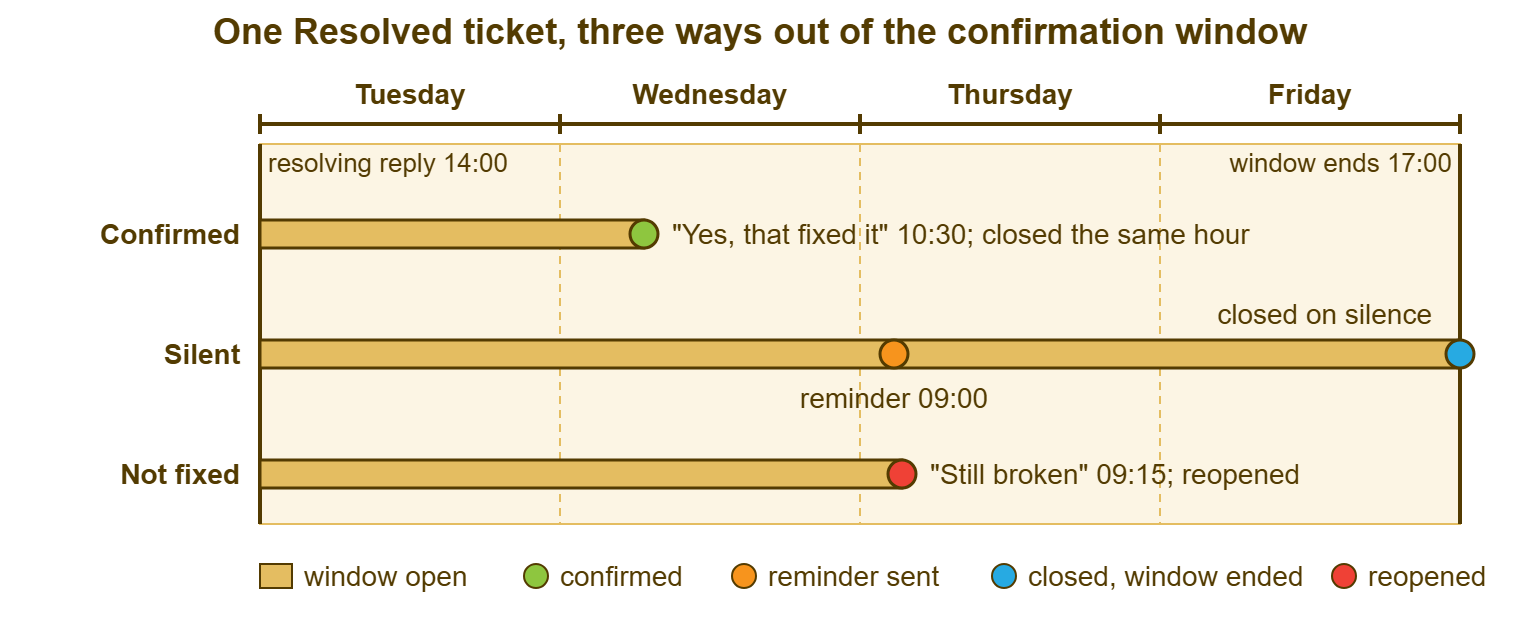
The three exits lead to two places, and that is the whole state machine. Confirmed and silent both lead to Closed; the only difference is the date and the reason recorded. Not fixed leads to In Progress, and it is the same ticket that goes there, not a new one. That is because the history of what was tried is the most useful thing the next attempt has. A tool that creates a new ticket when a requester replies to a resolved one has drawn the third arrow to the wrong place. The convention has to link the two by hand until the arrow is fixed.
Each exit is recorded with its reason, because the three mean different things in the monthly numbers. A desk whose tickets mostly close confirmed has requesters who read replies. A desk whose tickets mostly close silent has a window doing its job and should not worry about it. Silence is normal and the reply said what silence would mean. A desk whose tickets often exit not-fixed has a resolving-reply problem or a fix problem, and What a Reopen Is Telling You is the place to find out which.
Automatic Close: Timing and Notice
Many tools can close a Resolved ticket automatically when the window ends. The feature is safe exactly as long as the resolving reply said it would happen. An automatic close is a scheduled status change from Resolved to Closed after a set number of days with no reply from the requester. Set to the window length, counted in working days, it is the single most useful piece of automation a small desk can switch on. That requires using it only on tickets whose resolving reply named the date. Set to calendar days, or on tickets whose reply said nothing about closing, it is a silent close with a timer.
Check three settings before trusting it. First, does it count working days or calendar days? A three-day calendar close on a Friday reply closes the ticket on Monday morning before the requester has read it. Second, does it count from the status change or from the last reply? If a requester replies "let me try it tomorrow" and the counter does not reset, the close lands on a ticket that is in conversation. Third, does a requester reply on the Resolved ticket cancel the close, or does it fire anyway? A close that fires on a ticket the requester has just reopened is the kind of thing that gets screenshotted and sent to your manager.
Tools without an automatic close need a sweep instead, and the sweep is a daily filter: Resolved, last reply older than the window, no requester reply since. A technician runs it at a fixed time each morning and closes what qualifies. That takes five minutes on a desk of any size and can be done by the newest person on the team, because the resolving reply already made every decision. The sweep is also the one to run by hand even on tools that automate the close, once a week. That catches the tickets the automation skipped for reasons that will only be clear after you find them.
The reminder is optional for office desks and mandatory for everyone else. Sent on the morning of the second-to-last day, it says one thing: "We marked this as fixed on Tuesday; if it is still a problem reply here, otherwise it closes tomorrow." It is not a chase and should not read like one. Its only job is to make sure a requester who missed the resolving reply gets one more chance before silence is taken as consent. And it is the difference between a window the desk can defend and one it cannot.
Remember: the window starts at the resolving reply, never at the fix, and a ticket may close on silence only if that reply named the closing date. A close the requester was not warned about is a silent close, however long the timer ran.
The Reopen Path from Resolved
A requester reply on a Resolved ticket reopens it to In Progress, and the technician treats it as the most urgent thing on their list that morning. It is the same ticket, with the same number and the full history. And the status goes back to the hub because the move is the desk's again. Many tools do this automatically and count it; some need the technician to change the status by hand when the reply lands. Either way, the definition is the same: a reopen is any requester reply on a ticket in Resolved or Closed that says the problem is not gone. Decide now which category a reply of "thanks, but one more thing" falls into, because the rules sheet needs to say.
The reopened ticket gets a reply the same day, before any further work, saying the desk has it again. Nothing erodes trust faster than a requester who writes "still broken" into a resolved ticket and hears nothing for two days. That is because from where they sit the desk has now failed twice. The reply does not need the fix. "I have reopened this and I am looking at it now; I will update you by 15:00" is enough. Handling a Reopened Ticket Well takes it from there. For the state machine, the rule is that a reopen is a move to In Progress plus a same-day reply.
Do not send a second resolving reply until something has changed. A reopened ticket that goes straight back to Resolved with "please try again" and no new work is a ticket that will reopen a second time. And the count will show it. If the first fix was right and the requester has not tried it, the ticket goes to Awaiting Reply with a question, not back to Resolved with a hope. If the first fix was wrong, the ticket is In Progress until there is a new fix and a new resolving reply. In that case, the new reply starts a new window.
The Reopen Path from Closed
A reply to a Closed ticket should reopen the same ticket, and the main thing to check is whether your tool agrees. Tools differ here more than anywhere else in the lifecycle. Some reopen the closed ticket on any requester reply, forever. Some do it within a grace period, a week or a month, and start a new ticket after that. Some always start a new ticket and some reject the reply with an automated message. That is the worst of the options, because the requester's "it's doing it again" vanishes. Find out which yours is by replying to a closed test ticket, and write the answer on the rules sheet.
Where the tool starts a new ticket, the convention links it to the old one by hand, in the first minute. The new ticket gets the old number in its subject or first note. The old ticket gets a note pointing forward. If the tool can link tickets under a shared name, they are linked. Jonah's ticket 5188 should have carried "reopen of 5120" in its first line and been treated as a reopen in the count, not as new demand. Without the link, the desk sees two tickets, counts two resolutions, and never learns that one problem came back.
Set a cutoff after which a reply to a closed ticket is a new ticket by policy, whatever the tool does. Thirty days is reasonable. A requester who writes to a ticket closed four months ago about a problem that has come back is probably describing a new occurrence. It deserves fresh triage rather than a reopen of a ticket whose history is stale. The reopen is still linked to the old ticket, because the pattern matters, but it is counted as a new ticket with a related one. The resolution starts from the beginning. The cutoff goes on the rules sheet so that nobody argues about it on the day.
Counting and Reading Reopens
The reopen rate is the honest version of "does closed mean fixed", and the window is what makes it measurable. Define it as reopens divided by tickets resolved in the same period. A reopen is a requester reply on a Resolved or Closed ticket saying the problem is not gone. Most tools count it when the reopen is automatic. Where the reopen is by hand, a status change from Closed or Resolved back to an open state is the thing to count. In that case, a saved search on that transition gives you the number monthly. Measuring Reopens Honestly covers the traps, of which the largest is counting only reopens the tool noticed.
Read the rate beside the three exit counts. A desk with a low reopen rate and almost all silent closes may have a window that is too short, or resolving replies nobody reads. In that case, the low rate is a measurement of silence rather than of success. A desk with a low reopen rate and a healthy share of confirmed closes has requesters who read and reply, and the rate means what it says. A desk whose reopens cluster on one technician, one category or one week is being told something specific, and the ticket histories of the reopened tickets will say what.
I once ran a desk whose reopen rate was pleasingly low for a year. Then we noticed that the tool only counted a reopen when the requester replied within seven days of close, and our window was five. Anyone who wrote back on day thirteen started a new ticket, which we triaged as new. Our "closed means fixed" number was really a "nobody writes back within a week" number. We linked the new tickets by hand for a quarter. The honest rate was about twice the flattering one, and considerably more useful.
What the Window Does to the Queue
The Resolved list is not the desk's work, and the window is what lets it be ignored safely. A technician's morning list is New and In Progress, plus reopens. The Resolved list is read once a day by whoever runs the close sweep, and otherwise left alone. The queue filter should make this a glance. It should show a count beside Resolved that moves up as the day's fixes go out and down as the sweep closes yesterday's. It should also show a count beside In Progress that does not include any of it. On a desk without the window, the Resolved list is either empty, because everything closes at once, or enormous, because nothing does. In neither case is it telling anyone anything.
The window also gives the desk a clean definition of "open" for the backlog. A ticket is open if it is New, In Progress, or waiting. A Resolved ticket inside its window is finished-pending-confirmation and should be counted separately, because it is not work owed. A backlog number that includes ninety-four Resolved tickets is a backlog number that overstates the desk's debt by ninety-four. And the manager who sees it will staff for a problem the desk does not have. What a status is for, in the end, is making the numbers mean what they say, and What a Status Is For makes that case from the beginning.
The standing views, in any tool, are three. The first is Resolved with the window still open, which needs nothing. The second is Resolved with the window ended and no requester reply, which needs the sweep. The third is anything reopened in the last seven days, which needs attention first. If your tool can show a reopened flag or a recently-reopened count, use it. If it cannot, a saved search on tickets whose status went from Resolved or Closed to an open state in the last week does the same job. Three views, ten minutes a day, and the end of a ticket's life stops being a matter of personal habit.
A Short War Story: The Friday Closes at Tollgate Foods
Tollgate Foods ran a three-person desk for a food wholesaler. Its tool was set to close Resolved tickets automatically after three calendar days with no notice in the resolving reply. Nobody had thought about that because nobody had read the setting. Fixes sent out on a Friday afternoon closed themselves on Monday morning before the warehouse shift leaders, who read their mail on Mondays, had seen them. Replies to those closed tickets created new tickets, which were triaged as new. The desk's closed count rose while a shift leader called Dev raised the same label-printer problem four times in six weeks. Each time was from the beginning, with a different technician, none of whom could see the previous attempts. The fourth ticket reached the operations manager, who asked why a printer took six weeks. The honest answer was that it had taken about four hours, four times. The desk changed the close to three working days, and put the closing date in every resolving reply. It added a reminder on the second-to-last morning and linked reopened tickets by hand until the tool was reconfigured to reopen the original. The lesson the desk lead wrote on the rules sheet was that an automatic close the requester was never warned about is a silent close with a schedule.
The Confirmation-Window Rules
The sheet below is the end of the lifecycle on one page. It covers the window, what starts it, the three exits, the automatic close settings to check, and the reopen rules from each state. Fill in the lengths for your desk and the answers from your tool's test tickets, and keep it beside the status cards. The three sentences of the resolving reply are the only part a technician needs to memorise. The rest is for whoever runs the sweep and whoever reads the monthly numbers.
CONFIRMATION-WINDOW RULES — ONE PAGE
Desk: ________________   Owner: ________________   Reviewed: ________________

THE WINDOW
  Length: ____ working days (not calendar days)   Starts at: the resolving reply
  Reminder: [ ] none   [ ] one, on the morning of day ____
  Same window for every priority and department:  [ ] yes   [ ] no, exceptions: ______

THE RESOLVING REPLY (every Resolved ticket has one; the status alone starts nothing)
  1. What was done, in one or two sentences.
  2. "If anything is still wrong, reply here and this ticket reopens."
  3. "Otherwise we will close it on ____________."
  Rating request rides on this reply:  [ ] yes   [ ] no   [ ] tool asks at close instead

THE THREE EXITS
  Confirmed:  requester says it worked  -> Closed the same hour, reason "confirmed"
  Silent:     window ends, no reply      -> Closed by sweep or auto-close, reason "window ended"
  Not fixed:  requester says still broken -> In Progress, same ticket, reply the same day

AUTOMATIC CLOSE (tested on ________)
  Our tool closes Resolved tickets automatically:  [ ] yes, after ____ days   [ ] no, we sweep
  Counts:  [ ] working days   [ ] calendar days (set the length to match)
  Counts from:  [ ] the status change   [ ] the last reply
  A requester reply cancels the pending close:  [ ] yes   [ ] no (sweep by hand instead)
  Daily sweep at ____:____  filter: Resolved, last reply older than the window, no requester reply

REOPEN FROM RESOLVED
  Any requester reply saying the problem remains -> In Progress, flagged reopened.
  Reply to the requester the same day, before the fix.
  No second resolving reply until something has changed.

REOPEN FROM CLOSED (tested on ________)
  Our tool, on a reply to a closed ticket:  [ ] reopens it   [ ] reopens within ____ days
                                            [ ] starts a new ticket   [ ] rejects the reply
  If a new ticket is created: first line "reopen of #____", link both, count it as a reopen.
  Replies more than ____ days after close are a new ticket, linked to the old one.

THE NUMBERS (monthly)
  Resolved: ____   Closed confirmed: ____   Closed silent: ____   Reopened: ____
  Reopen rate (reopened / resolved): ____%   Oldest ticket still Resolved: ____ days
Jonah now sends three sentences with every fix and closes nothing by hand. The sweep closes his Friday tickets on the following Wednesday, after the shift leaders have had two office days to read them. Mei's ninety-four were closed over one afternoon with a reply apiece, and eleven of them reopened. That was eleven problems the desk had believed fixed and had not been. Her Resolved list now holds about a dozen at any time and none older than a week. Ticket 5188 was linked to 5120 and counted as a reopen. The desk's closed count fell slightly the following month. Its reopen rate appeared for the first time. And both numbers were true, which is the most a status can do for you.
Frequently Asked Questions
Our tool has only Closed, with no Resolved state. Can we still run a window?
Is closing a ticket on silence the same as a silent close?
Should the window be longer for low-priority tickets?
What if the requester replies "thanks" inside the window? Does that close it?
A requester replied to a ticket closed three months ago. Reopen or new ticket?
Should we send the satisfaction rating at resolve or at close?
From the QuerySolv team: we build self-hosted help desk software for Windows. QuerySolv runs as one Windows service on your own network. It takes requests by web form, e-mail, live chat, social messages and REST API. It is licensed once per installation rather than per agent per month. The free trial runs the full product for 30 days.