
What a Reopen Is Telling You About Your Desk
Ticket 7731 was closed on Tuesday at 16:52. Dev had remapped the drive, watched it appear in the file browser, and typed "Drive is back, let me know if anything else". He pressed Resolve with the quiet satisfaction of a person who is going home on time. On Wednesday at 09:14 the ticket came back. Hannah in accounts had replied "It's gone again", four words. The tool had done the rest: status back to open, a counter on the dashboard up by one, the ticket at the top of the list with yesterday's fix sitting underneath it like evidence. Dev read it the way most of us read a reopen the first few times. As a mark against him.
A reopen is a ticket that was marked resolved or closed and has been made active again. That is almost always because the requester replied to say the matter is not over. It is the only moment in a ticket's life when the person you were helping grades the work. They do it unprompted, for free, within a day or two of the close, on the same ticket, with the whole history attached. This article is part of our Reopened Tickets series. The series covers measuring reopens honestly, the root causes behind them, handling a reopened ticket well, preventing them, and the weekly review that turns them into fixes. This first article is about the signal itself.
It covers why a reopen is information rather than an insult. It explains how a reopen actually happens, in the tool and in the requester's head. It covers the four kinds of reopen and the one that is not really a reopen at all. It explains why the rate across a month matters more than any single case. It covers the thirty-second read before you reply and the classification card that sorts every reopen into one of four boxes. That way, the rest of this series has something to count.
A Reopen Is a Signal, Not an Insult
A reopen tells you exactly one thing: the requester does not think the matter is over. That is the whole message. It does not say the technician did bad work, because the requester cannot see the work. It does not say the fix was wrong, because sometimes the fix was right and something else broke. It says that what the desk believed and what the requester experienced have come apart. It says so on the record, with a timestamp, in the requester's own words. Everything else is inference, and the inference is your job.
Desks take reopens personally because of how they arrive. The counter goes up. The ticket carries the name of whoever closed it. The word the tool uses, "reopened", sounds like a reversal, and it lands on the person who was trying hardest to finish. So the reopen feels like a rebuke, and a technician who feels rebuked starts defending the fix instead of reading the reply. Hannah did not write "you failed". She wrote "it's gone again", which is a status report.
Consider the alternatives, because the reopen is the polite version of all of them. A requester who does not reply raises a new ticket a week later, with a different number, a different technician and none of the history. A requester who has given up asks a colleague. The colleague asks the one technician they know, who fixes it from memory in the hallway. A requester who is angry phones the manager. Every one of those is worse for the desk and every one of them is invisible to it. The reopen is the complaint that filled in the form.
A desk that punishes reopens gets fewer reopens and no fewer failed fixes. I have watched this happen three different ways. Technicians stop marking tickets resolved, because a ticket that never closes can never reopen. The open count climbs instead. Or they close in a way the requester cannot reply to. Their note says "please raise a new ticket if this recurs". The failed fixes come back as new tickets that nobody connects to the old ones. Or they reply to the reopen with a question the requester never answers, and close it again on silence. The number falls. The information leaves with it. You can get the reopen count to zero in an afternoon, if you disconnect the mailbox.
How a Reopen Happens
In most help desk tools a reopen is automatic. The requester replies to a ticket that is in a resolved or closed state. The tool changes the state back and marks the event. Some tools do this for any reply, forever. Some do it only inside a window after the close, say seven or fourteen days, and treat a later reply as a new ticket. Some do not do it at all, and the reply sits on a closed ticket until an agent notices and reopens it by hand. Check which of these yours does, because the rest of this series assumes you know. The test takes five minutes. Resolve a ticket raised from your own address, reply to it from that address, and watch what the tool does. Then repeat by each other channel the desk accepts. A tool that reopens on an e-mail reply does not always reopen on a web form or chat reply. Most tools that reopen automatically also count the reopen and show the recent ones somewhere, as a dashboard counter or a filter. Find that view, because the rest of this article leans on it.
Notice where the reopen does not go. In many tools a reopen e-mails nobody. The status changes, the ticket moves up a list ordered by last update, a counter ticks, and the assignee's inbox stays quiet. That is because the tool notifies agents only for a new assignment or a missed deadline. Some tools do e-mail the assignee on a reopen. The same test ticket tells you which kind you have. Where nobody is told, that is usually a design choice rather than an oversight. It has a consequence: a desk that lives in its inbox will miss reopens. A desk that looks at the queue will not. Decide which desk you are, then decide where the morning glance lands.
On the requester's side a reopen is a small decision made quickly. They read a reply that says the thing is fixed. They try the thing. It is not fixed, or it is fixed and something else is not, or it is fixed and they are the kind of person who says thank you. They press reply, because the reply box is right there and the ticket number is already in the subject line. The time between the close and the reply is the first clue to what they are about to tell you. That time is recorded in the history before you have read a word. A reply inside the hour says the fix did not take. A reply after a week says it took and then stopped. A reply after a month is usually about something else entirely.
Agents reopen tickets too, and those count. A requester phones to say the printer is doing it again. The technician finds last week's ticket and reopens it rather than starting a fresh one. That is the right instinct. A technician reviewing their own closed tickets notices a fix that could not have worked and reopens it to finish the job. That is a better instinct still. Both are reopens with a different doorway. The classification card near the end of this article has a line for who reopened the ticket. The only wrong answer is "nobody knows".
The Four Kinds of Reopen
Every reopen is one of four kinds, and the first job on any reopened ticket is to say which. The first kind is not fixed: the same fault, with no interval of working in between. That means the close came before anyone checked. The second is fixed, then broke again. The fault went away for a real stretch, hours or days, and came back. That usually means a workaround was recorded as a fix. The third is a different problem. The same requester writes a new fault on the old ticket because the old ticket was the address they had. The fourth is the thank-you reply: "Great, that did it". That reopened the ticket because the tool cannot tell gratitude from complaint.
Three of the four are signal. They each say something true about the desk, and they each need a different response. That is why sorting them is worth thirty seconds on every reopen. The fourth is noise, and it is noise that matters. That is because on a polite desk the thank-you replies can outnumber the real reopens and drown the rate in good manners. The picture below sorts the four. The requester's reply arrives at the top, and the desk reads it and sends it to one of four cards. The cards sit over two bands, signal and noise. Each card carries what the requester typically writes, what the reopen is saying about the desk, and what to do with the ticket.
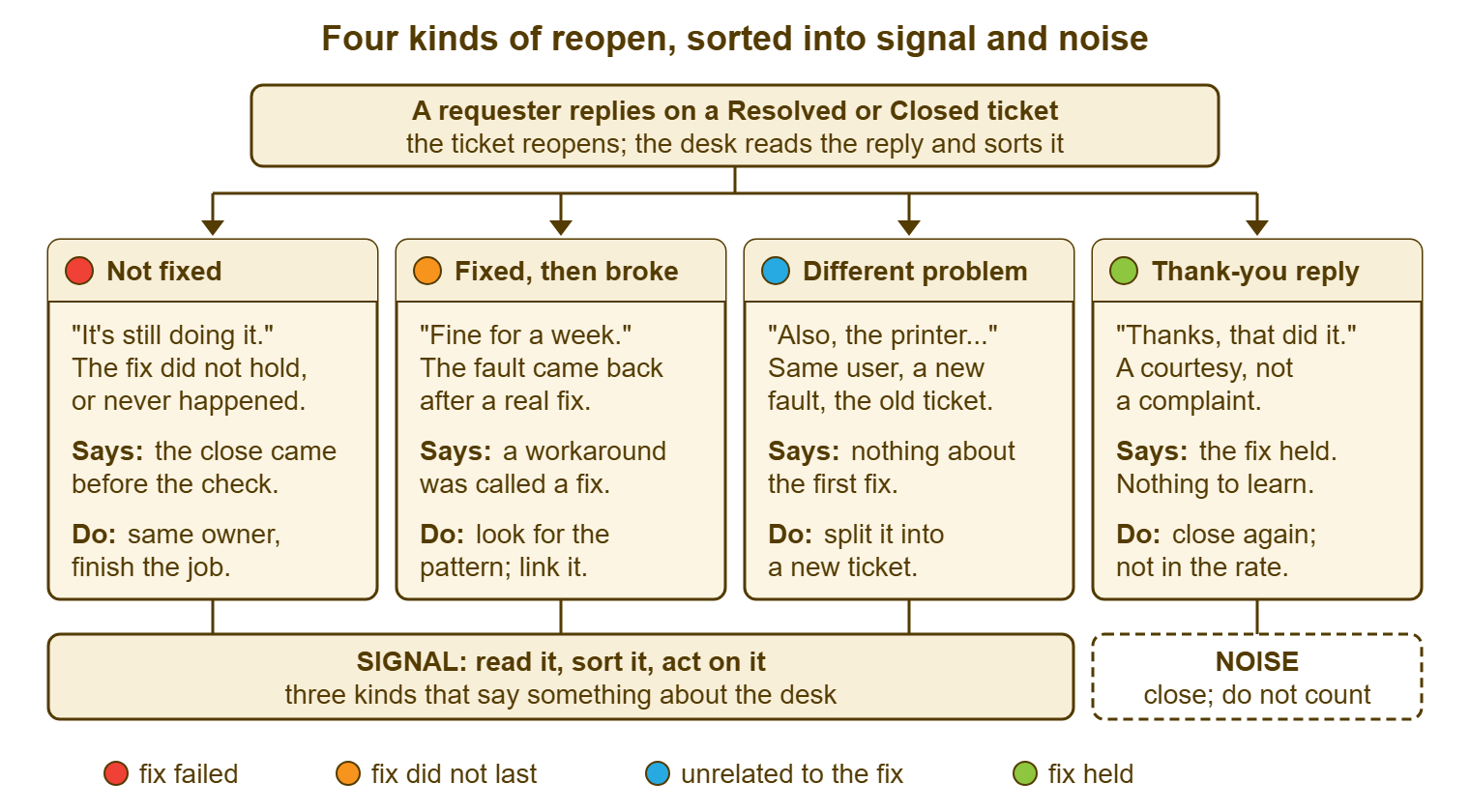
The table puts the same four kinds beside the questions that tell them apart. Read the second column first. The requester's words and the time since close are the two facts you will have before anything else. Between them they decide the kind nine times in ten.
| Kind | How to recognise it | What it says about the desk | What to do with the ticket | Counts in the rate? |
|---|---|---|---|---|
| Not fixed | Same symptom as the original; reply within hours or a day; no mention of it ever working | The close came before the check | Same owner carries on; acknowledge within the hour; verify before closing again | Yes |
| Fixed, then broke again | Same symptom; a clear interval of working ("fine until Thursday"); reply days or weeks later | A workaround was recorded as a fix; the cause is still there | Acknowledge; search for the same fault elsewhere; link related tickets; note it for the review | Yes |
| A different problem | New symptom, often introduced with "also" or "while you're here"; sometimes a different device | Nothing about the first fix; the requester used the address they had | Split into a new ticket; reply there; close the original again with a one-line note | No |
| Thank-you reply | Gratitude, confirmation, or an automatic out-of-office; nothing to do | The fix held | Close again; no reply required | No |
Not Fixed
The not-fixed reopen is the same fault, back inside a day, with no sign that it ever went away. "It's still doing it." "Same as before." A screenshot that looks exactly like the first screenshot, taken from a slightly different angle. The reply usually arrives the first time the requester tries the thing after reading your note. On a weekday that is within an hour, and after a Friday close it is Monday at 08:40. The distinguishing feature is the absence of an interval. The fix was never seen to work by the one person positioned to see it.
Nearly every not-fixed reopen is a close without a check. The technician did the thing that usually works, saw it work from their side, and resolved the ticket without watching the requester try it. Sometimes the thing was done to the wrong object: the wrong printer, the wrong account, the drive mapped on the old laptop rather than the new one. Sometimes the fix was correct and the requester's machine needed a sign-out that nobody mentioned. From the requester's chair these are identical. The causes are laid out in The Root Causes Behind Reopens; the point here is only to recognise the kind.
What a not-fixed reopen says about the desk is that resolving has become cheaper than verifying. That is a process fact, not a character fact, and it is one of the easiest things in this series to change. What to do with the ticket is simple and often skipped. The same technician picks it up, acknowledges it within the hour, and finishes the job. They do so without re-asking the questions the ticket already answers. Handing it to someone else, or starting from a blank screen, turns one small failure into a second one.
Fixed, Then Broke Again
The fixed-then-broke reopen has an interval of working in it, and the interval is the clue. "It was fine for a week." "Worked all day Wednesday, then this morning it was back." The requester is often apologetic, because they confirmed the fix at the time and feel they are going back on their word. They are not. They are reporting the single most useful fact a desk can get about a recurring fault. The fix addressed the symptom and the cause is still in the building.
The usual story behind this kind is a restart. A restart, a reconnect, a cache cleared, a service bounced, a cable reseated: all of them make the symptom go away. All of them are legitimate first moves. None of them is a fix unless the cause was a one-off. When the same requester comes back a week later with the same fault, the one-off theory has been tested and has failed. A restart is a fix the way a nap is a cure. It works, and then it is Tuesday again.
This kind says that a workaround, a step that makes the symptom stop without removing what caused it, has been recorded as a resolution. That is not a mistake on the first ticket; nobody can tell a one-off from a recurrence until it recurs. It becomes a mistake on the third. What to do with the ticket is to acknowledge it, then look sideways before looking down. Search the queue for the same fault on other tickets, link the ones that match, and write a line for the weekly review. This is the kind of reopen that feeds problem management, the practice of hunting the cause behind repeated incidents. The review article at the end of this series is the bridge.
A Different Problem on the Old Ticket
The different-problem reopen is a new fault written on an old ticket because the old ticket was the address the requester had. "Thanks, that's working. Also, my printer has started doing this." "While you're here, can you look at the shared calendar?" The ticket reopens, the counter ticks, and the history now holds two unrelated faults under one number and one subject line. That will confuse everyone who reads it later, including the search index.
This reopen says nothing at all about the first fix. The drive is mapped. The printer is a separate matter. The requester simply replied to IT, which from where they sit is the right and only thing to do. Counting it against the technician who closed the drive ticket would be unjust. Counting it in the reopen rate would make the rate measure how chatty your requesters are. It should not count, and the measuring article explains how to keep it out without hand-sorting every ticket.
What to do with the ticket is to split it. Most tools have a way to do this, usually called split or clone. This copies a ticket for the same requester so that the new fault gets its own number and its own history. Where yours has nothing of the kind, raise a new ticket on the requester's behalf and paste the relevant lines into it. Reply on the new ticket, so the requester learns the new number. Close the original again with a one-line note saying the printer question moved to the new one. Do not tell the requester they should have raised a new ticket. They do not know what a ticket is for. The desk has never told them. That is the desk's homework rather than theirs.
The Thank-You Reply
The thank-you reply is a reopen with no complaint in it. "Perfect, thanks." "That did it, much appreciated." On an e-mail-driven desk where any reply reopens the ticket, this is the most common reopen there is. It is noise of the purest kind: it tells you the fix held and the requester is courteous. The only thing it asks of the desk is to be closed again. The only thing it threatens is the reopen rate. The thank-you reply will inflate that until the number means nothing.
Its cousin is the automatic reply. The requester's mailbox sends "I am out of the office until Monday" to every incoming message, including your resolving reply. The tool reads that as a requester response. Some tools have heuristics that drop auto-replies, bounces and bulk mail before they reach a ticket. On those desks an out-of-office reopens nothing. Others pass every message through. On those desks the automatic reply is a thank-you reply with no gratitude in it. Check what yours does by resolving a test ticket to an address with an auto-responder switched on. It takes five minutes and settles an argument that otherwise runs for months.
Do not reply to a thank-you. It is tempting, it is polite, and it starts a loop in which the requester thanks you for thanking them. Close the ticket again, in the tool, without a message. The requester has already told you they are happy; the resolving reply they are replying to was the message. A desk that must say "you're welcome" can do it in the resolving reply itself, in advance. That is where avoiding the silent close says the whole closing conversation belongs.
Remember: read the reply and name the kind before you do anything else. Not fixed, fixed then broke, a different problem, or a thank-you. Each kind gets a different action, and only the first two belong in the reopen rate.
Why the Rate Matters More Than Any One Case
One reopen is an anecdote. Forty in a month is a description of the desk. A single reopened ticket can be explained by anything: a bad day, an odd machine, a requester who tried the fix on the wrong laptop. Forty cannot. The reopen rate, in plain words, is the share of tickets the desk marked resolved in a period that came back. The thank-yous and the different-problem replies are taken out. The exact definition, the window and the arithmetic are owned by Measuring Reopens Honestly. Here the point is what the rate can say that no single case can.
The rate's composition is a diagnosis. If most of the month's reopens are not-fixed, the desk is closing before it checks. In that case, the fix is a verification step at the close. If most are fixed-then-broke, the desk is restarting things that need a real repair. In that case, the fix is a problem review. If most are different-problem, the desk's requesters have no good way to raise a second ticket. In that case, the fix is on the form or the channel rather than on the technicians at all. Each of those is a different conversation, and a bare count cannot tell you which one to have.
The rate by category comes before the rate by technician, always. A technician with the highest reopen count is usually the one working the category with the hardest fixes, or the one who actually marks tickets resolved while colleagues leave them open. Cut the month by what kind of ticket it was before you cut it by who closed it. Then most of the differences between people disappear into differences between work. The measuring article makes the case in full. Read it before the first name goes on a slide, because names on slides are very hard to take off again.
The direction of the rate is the third thing. A rate that rises over three months means something changed: a new technician, a new kind of ticket, a system that started failing in a way restarts hide. A rate that falls to zero does not mean the desk got perfect. It means replies have stopped reopening tickets, and the reasons for that are all worse than a few reopens. Most tools can show a reopen rate over the last week, month or quarter, which is enough to see a direction. If yours cannot, export the month's tickets and count. The measuring article walks through that. Either way, look at the number on the same day each week.
The Thirty-Second Read Before You Reply
Before replying to a reopened ticket, read five things in order. They take about thirty seconds. First, read the time since close, which the history shows without arithmetic. Hours means not fixed, days means fixed-then-broke or a different problem, and weeks usually means different. Second, the requester's words, looking for the same symptom, a new symptom, an interval of working, or simply thanks. Third, the resolution note: what was actually done, as opposed to what the ticket title says was wrong. Fourth, who closed it, because the right next owner is usually that person. Fifth, how many times this ticket has reopened before, because a second reopen is a different situation from a first. The article Handling a Reopened Ticket Well treats it as one.
The third step is the one people skip, and it is the one that prevents the most embarrassment. The resolution note tells you whether the fix could have worked, whether it was checked, and what the requester was told to expect. A reply written without it tends to repeat the first reply, which the requester has just told you did not work. Read the resolution note before you answer. Yes, even if you wrote it. Especially then.
Then name the kind, on the card below or in an internal note, in a few words: "Reopen 1, not fixed, drive mapped to old profile". That line is for the weekly review and for whoever picks up the ticket next. It costs ten seconds. A desk that writes that line on every reopen for a month has, at the end of the month, the single most useful list it owns: every failed close, sorted by why. Most tools keep every status change in the ticket's history with who made it and when, so the reopens themselves are already recorded. The kind is the one fact only a person can add.
A Short War Story: The Scanner at Meridian Parts
Meridian Parts ran a two-technician desk for a parts warehouse. A ticket from Ruth on the packing line about a handheld scanner reopened three times in two weeks. Each time a different technician restarted the scanner's charging dock, replied "working again now", and resolved it. Each time the reopen was read as a one-off. That was because the restart had worked and the reply was polite. On the fourth occurrence the scanner died in the middle of a shift. The packing line of six people stood for forty minutes while the courier van waited at the dock. The shift lead went past the desk to the operations manager. The cause was a failing power supply on the dock, and a spare had been on the shelf the whole time. Three fixed-then-broke reopens on one ticket had been a pattern wearing a ticket number. The desk had read each one as new weather.
The Reopen Classification Card
The card below is one per reopened ticket, filled in before the first reply. It is deliberately short enough to live in an internal note. The top block is facts from the history. The middle block is the one decision: which kind. The bottom block is the action that follows from the kind, so that nobody has to remember it at 16:45 on a Friday. Keep the completed cards, or the internal notes that stand in for them. The weekly review at the end of this series reads a stack of them and nothing else.
REOPEN CLASSIFICATION CARD — ONE PER REOPEN
Ticket: __________   Reopened on: __________   Days since close: ____
Closed by: ____________   Reopened by: [ ] requester  [ ] agent
Reopen number on this ticket: ____

WHAT THE REQUESTER WROTE (their words, one line)
  ______________________________________________________________

KIND (tick one)
  [ ] 1. Not fixed            same fault, no interval of working
  [ ] 2. Fixed, then broke    worked for ____ days, then came back
  [ ] 3. Different problem    a new fault written on the old ticket
  [ ] 4. Thank-you reply      courtesy or auto-reply; nothing to fix

COUNTS IN THE REOPEN RATE?    kinds 1 and 2: yes    kinds 3 and 4: no

WHAT THE RESOLUTION NOTE SAID WAS DONE
  ______________________________________________________________
  Fix checked with the requester before the close?   [ ] yes  [ ] no

ACTION
  Kind 1: same owner; acknowledge within the hour; verify before closing
  Kind 2: acknowledge; search for the same fault; link related tickets
  Kind 3: split into a new ticket; close this one again with a note
  Kind 4: close again; no reply needed
  Any second reopen: raise it with the lead before replying

NOTE FOR THE WEEKLY REVIEW (one line)
  ______________________________________________________________
Two edges are worth stating. A reply that is a thank-you and a new problem in the same breath is kind 3, because the new problem is the part that needs work. The thanks is free. A reply that says "still broken" on a ticket closed as "cannot reproduce" is kind 1, not kind 2, however long it has been. That is because nothing was ever fixed. When a reopen genuinely fits two kinds, pick the one that costs more to ignore, which is always the lower number.
Dev's ticket, 7731, was a kind 1. He had mapped the drive on Hannah's old profile, which was still on the laptop beside the new one. He had watched it appear in his own session rather than hers. It took four minutes to put right on Wednesday morning, after he had read the resolution note and winced at it. He did not take the next one personally. He read it, named it, and wrote the line, which is all this article is asking.
Frequently Asked Questions
Should a reopen count against the technician who closed the ticket?
Our tool creates a new ticket when a requester replies to a closed one. Is that still a reopen?
How long after a close does a reply still count as a reopen?
Does an agent reopening a ticket count the same as a requester reopening it?
The requester replied "thanks" and the ticket reopened. Do I have to reply?
What is a normal reopen rate?
From the QuerySolv team: we build self-hosted help desk software for Windows. QuerySolv runs as one Windows service on your own network. It takes requests by web form, e-mail, live chat, social messages and REST API. It is licensed once per installation rather than per agent per month. The free trial runs the full product for 30 days.