
User Confirmation Without Chasing Forever
Theo's queue on a Tuesday morning has twenty-three tickets sitting at Resolved, every one of them waiting for a user to say the fix worked. The oldest has been waiting nineteen days. He has written to its requester four times, each message a little shorter and a little more apologetic than the last. This morning he writes a fifth: "Hi, just checking whether this is still an issue?" While he is typing it, a reply arrives on a different ticket, from a user he nudged yesterday: "Yes, it has been fine for two weeks, you can close it." The tone is polite. It is also, unmistakably, the tone of someone who has been asked the same question three times.
Across the office, Theo's colleague has the opposite problem. She closes every ticket the moment the fix is applied, with no question asked. Three of last week's closes have come back as new tickets from the same users about the same faults. One desk, two technicians, and between them the two ways confirmation goes wrong: asking forever, and never asking at all.
Confirmation is the user telling the desk that the fix worked, from where they sit, on the machine the problem was on. It is the first of the four parts of a proper close and the only one that depends on somebody outside the desk doing something. This article is part of our Closing Tickets Properly series. It is about getting that confirmation in a week without becoming the person whose messages people stop opening.
It covers why to ask at all, then the confirmation request as a part of the resolving reply rather than a separate message. Next come the two-nudge rule and why there is no third, the timeline on one page, and what counts as confirmation. Then it covers closing on a timer without it being a silent close, and the cases where you close without confirmation and how to say so. After that come what the user's silence does and does not mean, keeping the way back open, and the chasing trap. It finishes with the exact wording of the request and the nudges, ready to save as predefined replies.
Why Ask at All
You ask because the fix was applied at your end and the problem lived at theirs. You cleared the saved wireless profile and rejoined the network. The user is on a different floor with a different access point. You reset the password. The user has the old one saved on a phone that will lock the account again by lunchtime. "Works for me" is a report from the wrong location. The person who can say whether the fix worked is the person who had the problem. There is no test you can run from your desk that substitutes for them trying it from theirs.
Confirmation also protects the record. A ticket closed on your word alone has a verification line that says "should work". The stranger who reads that note next year does not know whether the fix held or whether the user quietly gave up. A ticket closed on the user's word says "worked". That is the difference between a note that can be trusted and a note that can be hoped about. The note's four lines are the subject of Resolution Notes Worth Reading Later. The verification line is the one that confirmation fills in.
What it costs to skip the question is a reopen, and the cheapest reopen is still dearer than the question. A reopen is a ticket marked done that comes back because the user says it is not. It costs a second round of work on a ticket that has already been counted as finished. It costs a particular kind of trust: the user learned that the desk declares victory from a distance. Ask the question. It takes one sentence and it is the sentence this article is about.
The Request Is Part of the Resolving Reply
The confirmation request is not a separate message. It is the last two sentences of the reply that tells the user the fix is in. It has three parts: a specific thing to try, a date to try it by, and what will happen if you hear nothing. "I have cleared the old saved network on your laptop and rejoined it with the current key. Could you connect from meeting room 2 at some point before Friday and let me know whether it stays connected? If I do not hear back I will take that as fixed and close the ticket next Wednesday; a reply at any time will reopen it." Three sentences, and every one of them does work.
The specific thing to try is what makes the request answerable. "Let me know if it's all okay now" asks the user to form a general opinion about their computer, which is a large question. They will put it off. "Try printing one page from the shared printer" is a thing they can do in thirty seconds, and the answer is yes or no. Match the test to the symptom. If the problem was a crash on large files, ask them to open a large file. If it was a drop every twenty minutes, ask them to stay connected for an hour. The test is the verification line of your note, phrased as a favour.
The date is what makes the request finite, for both of you. A request with no date is open-ended. The user, who has a job that is not replying to the help desk, will reasonably treat it as optional. A request with a date is a small commitment with an end. Make the date two working days out. That is long enough for someone who is in meetings all day tomorrow and short enough that the problem is still fresh. Never write "at your earliest convenience". The earliest convenience is a date that does not arrive.
The sentence about silence is the one most desks leave out, and it is the one that saves the chasing. It says, plainly, that no reply will be read as "fixed" and that the ticket will close on a named day. It says that a reply after that day will reopen it. The user now knows the rules. They can confirm, they can object, or they can do nothing, and nothing has a defined meaning. A confirmation request without that sentence is a question that can never be answered by silence, which is how a ticket ends up at Resolved for nineteen days.
The Two-Nudge Rule
A nudge is a short reminder, sent on the same ticket, that the confirmation request is still open. The rule is two of them, at fixed intervals, and never a third. The first goes out two working days after the resolving reply, when the date in the request has arrived and nothing has come back. The second goes out two working days after that, and it names the close date. Then the ticket closes, with a reply, on the day the second nudge said it would. Ask once, nudge twice, close with notice. The whole window is about seven working days.
Each nudge is one or two lines, on the same thread, below the original request so the user can see what they are being asked. "Quick reminder on this one: has the laptop stayed connected in meeting room 2? If I hear nothing by Friday I will close the ticket as fixed." It is a question, not an accusation, and it does not restate the fix, because the fix is two messages up. A nudge that re-explains everything is a second resolving reply. The user who did not read the first one will not read the longer second one either. The craft of writing a follow-up that actually gets a reply is covered in Follow-Up Messages That Get Replies. The nudge is the shortest member of that family.
Why two and not three? Because the third nudge has never once produced a reply that the second did not. A user who has not answered two short questions in four working days is not going to answer a third. They are either fine, gone, or ignoring the thread, and the third message only confirms to them that the thread is safe to ignore. I know this because I once nudged a user six times about a resolved ticket. On the sixth, her manager replied to say she had left the company in the spring, which, to be fair, explained the first five.
Why two and not one? One nudge, on its own, lands in the inbox of someone who was out on the day it arrived, or who meant to test it and forgot. Closing after a single unanswered reminder is close enough to a silent close that users experience it as one. The second nudge is the one that names the date, and the named date is what makes the close fair. Two is the number at which you have given a reasonable person a reasonable chance and the ticket has not yet become a correspondence.
The Timeline on One Page
The picture below is the whole rule as a timeline over seven working days. Day 0 is the resolving reply with the confirmation request. Day 2 is the first nudge. Day 4 is the second nudge, which names the close date. Day 7 is the close, with a reply, if nothing has come back. At any point along the band, a reply from the user ends the wait. "It works" closes the ticket as confirmed. "Still broken" reopens it and the work starts again. After the close, a reply still reopens the ticket, with its history, which is the line at the bottom.
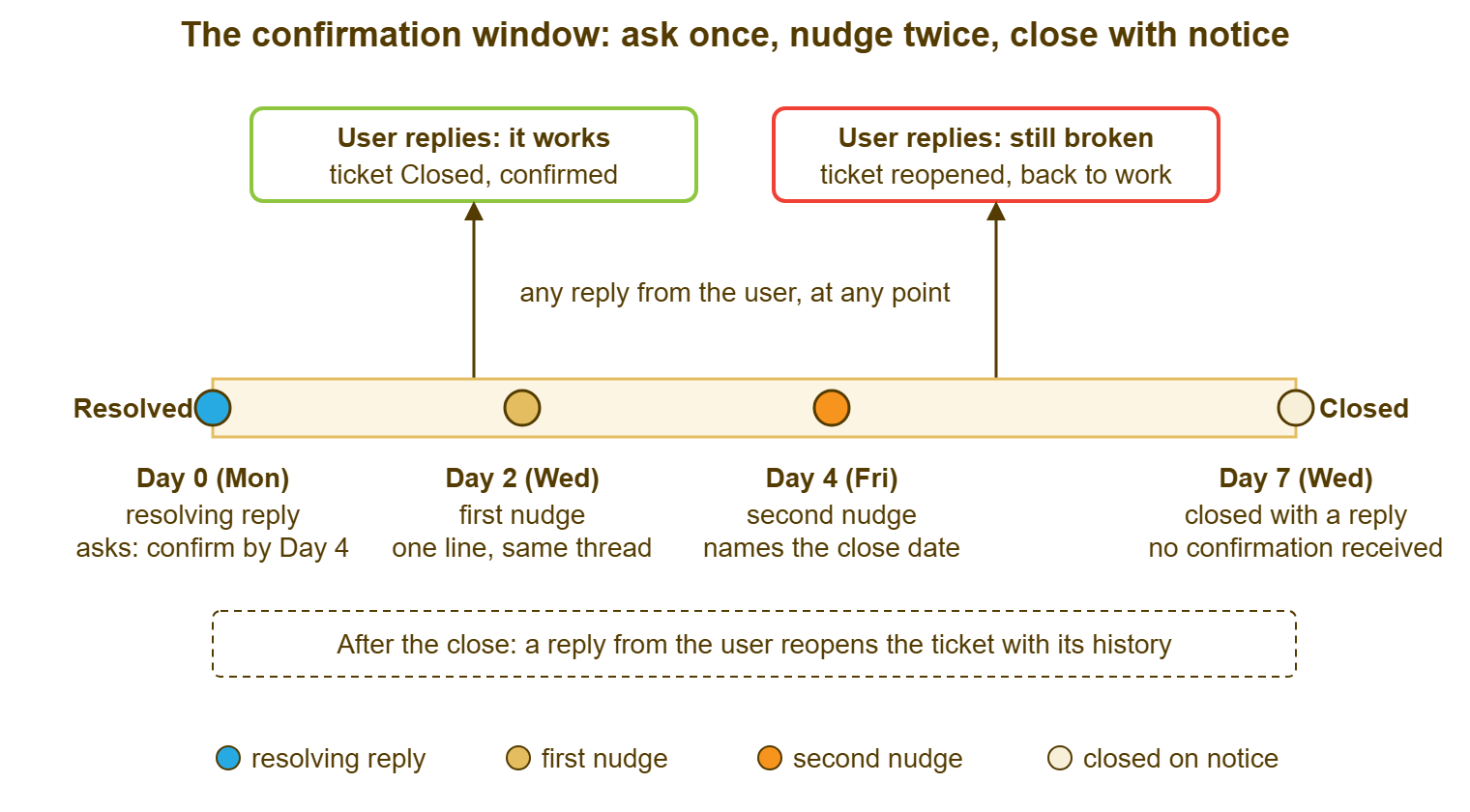
The days are working days, and the spacing is the point: two, two, three. The Monday-to-Wednesday gap at the end keeps the close date in the second nudge from being the next morning, which reads as a threat. The gap also keeps the close date from being a week away, which reads as optional. If your desk works a different week, keep the shape and move the days. A desk that supports shift workers who check e-mail twice a week stretches the window to ten days. A desk inside one building where everyone reads mail hourly can shorten it to five. Seven is the default because it is one working week plus a margin, and a working week is a unit people understand without being told.
How wide should the window between Resolved and Closed be as a matter of workflow design? What do the two statuses mean to the tool? Those are the subjects of Resolved vs Closed: The Confirmation Window. This article assumes a window exists and is about what you say inside it.
What Counts as Confirmation
Confirmation is any message from the user that says the fix worked, and users say it in more ways than "confirmed". "Thanks" is confirmation. "All good" is confirmation. A rating with a comment that says "sorted quickly" is confirmation. A reply that asks a different question without mentioning the original problem is almost always confirmation, because people who still have the problem lead with it. Take the yes in whatever form it arrives and do not write back asking for a clearer one. A user who said "thanks" and is then asked "so can I close this?" has been asked to confirm their confirmation.
Silence after the second nudge is not confirmation. It is the absence of an objection. The closing note should call it that: "closed on notice, no reply received after two nudges", never "user confirmed". The distinction matters to the stranger reading the note next year. They need to know whether the fix was seen to work or merely not seen to fail. The distinction also matters to the monthly review, which counts the two separately. The review will want to know why one technician's tickets are all confirmed and another's are all closed on notice.
A reply that says "still broken", however politely, is the other outcome, and it is a good one in its way. The question did its job. The ticket goes back to work with its history intact, and the user did not have to open a new one. Treat it as a reopen, record it as a reopen, and read it later as a reopen. A reopen that arrives through the confirmation question is a reopen caught early. How to handle it well is in Handling a Reopened Ticket Well, and the short version is: do not argue with it.
Auto-Close With Notice
Some tools will close a ticket for you after it has sat at Resolved for a set number of days. Some desks run that automation as a substitute for the whole conversation above. Done that way, it is a silent close on a timer. Done properly, it is the Day 7 step of the timeline carried out by a clerk instead of a technician. The difference is entirely in whether the user was told. An auto-close with notice means three things were true before the timer ran. The resolving reply named the close date, and the second nudge repeated it. The close itself sends a reply, not just a status change.
Check what your tool actually does, because the behaviours vary and the settings page does not always say. Some tools send a message at the automatic close. Some change the status and send nothing. Some reopen the ticket on a late reply. Some open a fresh ticket. Some bounce the reply because the ticket is closed. Test it with a ticket of your own. Resolve it, let the timer run, then reply to it as the requester, and watch what happens. Ten minutes of testing beats a year of not knowing what your users see. If you are not certain your tool mails the user at auto-close, assume it does not. In that case, have the second nudge carry the close date. That way, the notice has been given by a person before the timer gives it by nobody.
If your tool has no automatic close, a daily glance replaces it, and the glance is short. Filter the ticket list to Resolved and read it by last update. Anything untouched for seven working days is due its Day 7 close. Most tools can filter the queue by status and order it by last update. That puts the tickets whose window has run at one end of the list. Some need a saved view or a report to do it, and a few need an export to a spreadsheet. Look at it every morning and close what is due with a reply. The Resolved pile never grows past the week's work.
When to Close Without Confirmation
Some tickets should be closed without asking, and some should be closed after asking once, and the table says which. The principle is that the question is worth asking when the user can tell you something you cannot see for yourself. When you watched the fix work on their machine, or when the result is visible to you directly, the question has already been answered. In that case, asking it anyway is politeness at the cost of the user's time. When the user cannot answer, because they are away or gone, the question is unanswerable and the wait is a formality. In every case the closing reply says, honestly, why the ticket is closing without a yes.
| Situation | Ask for confirmation? | What the closing reply says | What the note records |
|---|---|---|---|
| Fix done at the user's desk or over a remote session, with the user watching it work | No; it was confirmed in the room | "You saw this working while I was connected, so I am closing the ticket now; reply if it comes back." | Verified by user in person at the time |
| Result visible to you directly: the mailbox is receiving, the account signed in from their machine after the change | No, but say what you saw | "I can see three messages have arrived since the change, so I am closing this; reply if anything is still wrong." | Verified by observation; state what was observed |
| User said thanks in a chat or in the corridor but not on the ticket | No; record the thanks | "As discussed this morning, closing this as fixed; reply here if it comes back." | Confirmed verbally, date and time |
| User is away: an automatic out-of-office reply came back | Ask once; do not nudge into an empty inbox | "I see you are away until the 14th. I will close this now so it is not waiting on you; reply when you are back if it is not fixed and it will reopen." | Closed on notice, user away until stated date |
| User has left the organisation | No; there is nobody to ask | No reply to the requester; one line to their manager if the fix affects a shared resource | Requester left; closed without confirmation; what was done |
| Request from a shared mailbox or a group with no named person | Ask once, naming a person if you can | "Closing this as fixed; whoever raised it, reply here if it is not." | Closed on notice; no named requester |
| Trivial fix the user has visibly used since: a password reset followed by a sign-in | No; the sign-in is the confirmation | "Your account signed in successfully this morning, so I am closing this." | Verified by sign-in record |
| Anything else | Yes: ask, nudge twice, close with notice | Day 7 reply: "No reply received, closing as fixed; a reply reopens this at any time." | Closed on notice after two nudges |
Notice that every row ends in a reply. Closing without confirmation is not closing without telling, and the two get confused because both skip the user's answer. The first skips the question because it is already answered. The second skips the question and the answer and the message. One is a judgement call. The other is the silent close, which has its own article in this series, Avoiding the Silent Close, and no defence.
Reading the Silence
A user who does not reply is telling you one of three things, and you cannot tell which. The fix worked and they moved on, which is the common case and the one everybody assumes. The fix did not work and they gave up on the desk, which is the case everybody forgets. Or they never saw the message, because it went to a folder, or arrived on a day they were out, or sat beneath forty others. Three silences, one inbox, no way to distinguish them from where you sit. Silence is data about the user's attention, not about the fix.
This is why the close on notice has to be safe for all three. For the user who moved on, the closing reply is a courtesy they will not read, and that is fine. For the user who gave up, it is an invitation back: "a reply reopens this at any time" is addressed to them, and it needs to be true. For the user who never saw anything, it is the third message in a thread they will eventually find. When they do, the whole story is there in order. A closing reply that serves the first case only is a reply written for the easy user. Write for the second one.
Do not, in the closing note, record silence as success. The verification line in the resolution note says "closed on notice, no reply after two nudges". The stranger next year reads that as what it is: unverified. A desk whose notes say "user confirmed" on tickets where the user said nothing has a reopen rate it cannot explain and a satisfaction figure it has not earned. The honest line costs nothing and keeps the record straight. The flattering line costs nothing today and something every month after.
Keeping the Way Back Open
Everything above depends on one mechanical fact: a reply to a closed ticket must reopen that ticket. If it does, the close on notice is safe. In that case, the user who was away, or who gave up, or who found the message late, replies and lands in the ticket with its history. The desk then sees a reopen rather than a stranger. If it does not, every closing reply that says "a reply reopens this" is a false statement. In that case, the user who tests it gets a bounce, a new ticket number, or nothing at all.
Many tools reopen a resolved or closed ticket whenever the requester replies and count the reopen. Often there is a counter on the dashboard so the desk can see the returns as they arrive. Some leave the ticket closed and need a person to reopen it, and a few start a new ticket. The rating request, when the desk uses one, usually rides on the resolving reply and is not repeated. So the nudges should not mention it. A user who has been asked to rate, then nudged twice, has had three messages. Only one of them should have asked for a score. Whatever tool you use, test the reply-after-close path once, as the requester, and read the result as your users will.
A reopen that arrives after a close on notice is not a failure of the two-nudge rule. It is the rule working: the user was given a way back, took it, and the ticket resumed with everything already in it. What it tells you, what it does not, and how to read reopens in bulk is the subject of What a Reopen Is Telling You. The one thing it should never tell you is that the user was wrong to use it.
The Chasing Trap
Desks chase forever for two reasons, and neither is the user. The first is a number: somewhere a report counts tickets at Resolved as open, or counts closes on notice against the technician. The technician learns that the only safe close is a confirmed one. So they ask, and ask again, and the ticket sits at Resolved for a month waiting for a yes that the report will accept. The second is fear of the reopen, which on some desks is treated as a mark against whoever closed the ticket. On those desks, nobody closes anything the user has not explicitly blessed. Both are the report's fault. The technician is behaving rationally inside a bad rule.
What chasing costs is the Resolved pile and the user's attention. The pile is visible: twenty-three tickets at Resolved, none of them being worked, all of them counted somewhere as unfinished. Each one is a small weight on the technician's morning. The attention is not visible, and it is the larger cost. A user who receives four reminders about a problem that went away three weeks ago learns that messages from the desk can be ignored without consequence. They carry that lesson to the next ticket, where the message they ignore is the one asking which error they saw. A fourth nudge is not a nudge. It is a correspondence, and it trains the user to skip the whole thread.
The fix is to make the close on notice a normal, countable, unremarkable outcome. It gets its own line in the note, its own column in the monthly review, and no penalty. A technician whose tickets are all confirmed and a technician whose tickets are mostly closed on notice are probably supporting different users, not working to different standards. The review should look at the users before it looks at the names. A ticket at Resolved is a ticket holding its breath. Let it breathe out on Day 7.
Remember: ask for confirmation in the resolving reply with a specific test, a date and what silence means. Nudge twice, two working days apart. Then close with a reply that says a reply will reopen the ticket. Never record silence as "user confirmed".
A Short War Story: The Nineteen-Day Wait at Harbourview Clinic
Harbourview Clinic's two-person desk supported a reception team that worked rotating shifts and read e-mail perhaps twice a week. When Theo inherited the queue it held forty tickets at Resolved, several of them months old. Each had a trail of "just checking" messages that nobody had answered. One ticket, for a label printer at the front desk, had sat at Resolved for thirty-one days through five reminders. During that time the printer failed again. The receptionist on shift, assuming the old ticket was "done with", raised a new one. So on a Thursday afternoon two technicians worked the same printer under two numbers without either knowing. The afternoon cost the desk a day of duplicated work. The receptionist, who had by then received seven messages about one printer, stopped replying to the desk at all. Theo introduced the two-nudge rule with a close on Day 7 and a closing reply that said a reply would reopen the ticket. Within two weeks the Resolved pile was under ten. The reception lead, Hannah, said the messages had become "short enough to answer". The lesson was that a confirmation request with no end date is a ticket nobody owns. The people it costs most are the ones who were never going to reply anyway.
Closing a Ticket Due to No Response: the Email Templates
These are the templates for closing a ticket due to no response: the request, the two nudges and the close itself. The four messages below are the whole conversation. They are the confirmation request that ends the resolving reply, the first nudge, the second nudge, and the Day 7 close. Save them as predefined replies, keep the blanks, and fill in the test and the dates on each ticket. The request sits at the end of the resolving reply, after the sentences that say what was wrong and what was done. The other three are complete messages on their own.
CONFIRMATION REQUEST — LAST PARAGRAPH OF THE RESOLVING REPLY
  Could you ____________________________ before __________ and let me know
  whether it is working for you? If I do not hear back, I will take that as
  fixed and close this ticket on __________. A reply at any time, even after
  that, will reopen it.

FIRST NUDGE — TWO WORKING DAYS LATER, SAME THREAD
  Subject: unchanged
  A quick reminder on this one: has ____________________________ been
  working since __________? If I hear nothing by __________ I will close the
  ticket as fixed. Reply here if anything is still wrong.

SECOND NUDGE — TWO WORKING DAYS AFTER THE FIRST, SAME THREAD
  Subject: unchanged
  Last check on this ticket before I close it. Unless I hear otherwise, it
  will close on __________ as fixed. If the problem is still there, or comes
  back later, just reply to this message and the ticket will reopen with
  its history.

DAY 7 CLOSE — WITH A REPLY, NOT ONLY A STATUS CHANGE
  Subject: unchanged
  I have not heard back, so I am closing this ticket on the basis that the
  fix is working. If that is not the case, reply to this message at any time
  and it will reopen. Thank you.

NOTE TO THE TICKET AT CLOSE
  Verification: closed on notice; no reply after two nudges on ______ and
  ______. Not confirmed by the user.
Two adjustments are allowed and one is not. You may change the intervals to suit your users, keeping the shape of two nudges and a close. You may drop the first nudge for a user whose out-of-office reply has told you they are away, and go straight to a close that names their return. You may not add a third nudge, and you may not close without the Day 7 reply. The messages are short on purpose. A user who reads only the first line of each has still been told everything they need, including the date.
Theo's twenty-three tickets at Resolved became six by the following Tuesday. Nine were confirmed, once the request named a test and a date. Two reopened, revealing problems the desk had not known about and was glad to learn of. And six were closed on notice, with a reply and an honest note. The nineteen-day ticket closed with a message that said a reply would reopen it. The user, when she eventually wrote back, said "oh, that, yes, fine", which is confirmation. The reply arrived on a closed ticket, which reopened and then closed again, confirmed, inside a minute. That is the system working. It is supposed to be slightly boring.
Frequently Asked Questions
Does closing on notice count against the SLA resolution target?
Should the nudges come from the technician or from the desk's shared address?
What if the user replies "still broken" after the Day 7 close?
Can we skip confirmation for all low-priority tickets to save time?
How do we handle a requester who never replies to anything?
Should the nudge remind the user to rate the ticket?
Is there a sample e-mail for closing a ticket due to no response?
From the QuerySolv team: we build self-hosted help desk software for Windows. QuerySolv runs as one Windows service on your own network. It takes requests by web form, e-mail, live chat, social messages and REST API. It is licensed once per installation rather than per agent per month. The free trial runs the full product for 30 days.