
Write the Requirements Before You Watch a Demo
Thursday, 10:00, the small meeting room at Tollgate Foods. Marta runs the three-person desk and has been asked to "look at some options" for replacing the ticketing tool. So a presenter is on the screen showing a workflow builder that draws boxes and arrows while the finance director nods. By 10:40 the room wants the workflow builder, a dashboard with a weather map on it, and a thing the presenter called sentiment scoring. The fleet team's shared mailbox produces a third of the desk's tickets. Nobody asks whether it can become its own queue with its own opening hours. Nobody asks because it is not on the screen, and there is no list in the room to say it should be. Marta writes "looks good" in her notes. It did look good. That was the problem.
A requirement is a sentence that says what the tool must do for your desk. It is written so that a stranger could test whether a given tool does it. A requirements list is the set of those sentences. They are sorted into what you cannot run the desk without, what you would score, and what would merely be pleasant. The list is written before anyone from any vendor has spoken to you. This article is part of our Choosing a Ticketing System series. And it is about writing that list from the queue you already have rather than from the brochure you are about to be sent.
It covers why a demo rewrites your requirements if you let it, then where real requirements come from. Next come the must, should and nice lists and the different rules each obeys. We cover the ten questions the desk answers before any vendor call and the path from a long list of candidates to one choice. Then come how to write a requirement that can be tested, and the requirements that look essential and are not. A short war story and the requirements worksheet to copy finish the article, in that order.
Why the Demo Rewrites Your Requirements
A demo is a presentation of the things the presenter chose to show, in the order that makes them look best. The data was prepared to behave. None of that is dishonest. It is what a demo is for. The presenter has done this two hundred times. They know which screen gets the nod from a finance director and which screen makes a room go quiet. And the quiet screens are not in the deck. You will see the workflow builder. You will not see what happens when a requester replies to a ticket that was resolved last Tuesday. That is not a screen; it is a behaviour, and behaviours do not demo well.
The damage is not that you see the wrong things; it is that you leave wanting them. A desk that walks into a demo without a list walks out with the presenter's list, and the presenter's list is the product's strengths. By the second demo you are comparing weather maps. By the third you have forgotten that the fleet mailbox exists, because no presenter has mentioned a fleet mailbox. The thing nobody mentions starts to feel unimportant. Six weeks later it is the only thing that matters, and it is the only thing nobody asked.
The defence is a list, written first, carried into every demo, and read from. With a list, the demo becomes a way of answering your questions instead of a way of generating new ones. You can still be impressed by the workflow builder. You write it down under "nice", where it belongs. You ask the presenter to open a resolved ticket and reply to it from a personal mailbox. The presenter will do it. Some of them will look briefly surprised, which is how you know the question was a good one.
If your desk is brand new and has no queue yet, the list is built differently, from the plan rather than the history. That case is covered in choosing the first tool. This article assumes you have a queue, a year or two of tickets, and a tool you are trying to leave. That history is the best requirements document you will ever own. It is also the only one that cannot be sent to you by a vendor.
Where Requirements Come From: The Queue, Not the Brochure
Every real requirement is standing in your queue right now, usually in the form of a complaint. The ticket that was answered twice because two technicians both picked it up is a requirement about ownership. The forty "any update?" replies that landed as new tickets are a requirement about threading. The report the operations manager asks for every month and nobody can produce is a requirement about reporting. The fleet mailbox is a requirement about departments. None of these need inventing. They need collecting.
Start with an afternoon and the last three months of tickets. Export them to a spreadsheet if your tool allows it, which most do, or page through them if it does not. You are not reading for content. You are reading for friction. Look for the places where the tool made somebody do something twice, do something by hand, do something in another tool, or not do it at all. Each piece of friction is a sentence on the list. Write it as the thing you wanted to happen, not as the thing that went wrong. "A reply to a resolved ticket reopens that ticket" is a requirement. "The old tool made duplicates" is a grievance, and grievances do not score well on a worksheet.
Then ask the people who touch the desk from outside. Ask the manager who reads the report, the requester who uses the portal, and the person in finance who approves the renewal. Ask the technician who was hired in the spring and still does not know where the templates live. Each has two or three sentences for the list, and they are rarely the sentences the desk would have written. The requester wants to know whether anyone has read their ticket. The manager wants one number a month. The finance person wants to know what happens in year three. Write all of it down, unsorted. Sorting is the next step, and it is the step that turns a pile of wishes into a decision.
Resist the urge to look at any brochure during this afternoon. A brochure is a list of answers. And a desk that reads the answers before it has written the questions will find that its questions have arranged themselves to match. You will have months to read brochures. You have one afternoon in which your requirements are still your own.
Must, Should and Nice: Three Lists With Different Rules
The sorted list has three bands, and each band obeys a different rule. A must is a requirement the desk cannot run without. A candidate that fails any must is out, however good the rest of it is. A should is a requirement that matters and can be scored. A candidate that misses several shoulds loses points but stays in the running. A nice is anything you would enjoy and could live without; it breaks ties and does nothing else. The bands are not a ranking of how much you want each thing. They are a statement of what happens to a candidate that lacks it.
The must list is short, and keeping it short is the hardest part of the whole exercise. Every requirement feels like a must to the person who wrote it. The test is brutal and simple. If a tool did everything else on the list perfectly and failed this one thing, would you refuse to buy it? If the honest answer is "well, we would work around it", it is a should. Eight musts is plenty for a desk of one to ten people. Fifteen musts is a list nobody has had the argument about yet. I once reviewed a must list with thirty-one entries, and the desk had unknowingly specified a tool that did not exist and never would.
A must also has to come from a ticket you can point at. "Must integrate with everything" is not a must; it is a mood. "A ticket must be creatable by e-mail to the fleet address and land in the fleet queue, because 140 of last month's 410 tickets arrived that way" is a must, with its evidence attached. The evidence matters later, when a director who liked the weather map asks why the weather-map tool was rejected. The answer is a ticket count rather than a preference.
The should list is where most of the work lives and where the scoring happens. And the companion article on evaluation criteria that actually matter turns the shoulds into a scoring sheet. The nice list is where the workflow builder goes, along with the weather map and the sentiment scoring. Write them down with respect. Nice things are nice. They are simply not the reason you are changing tools. And a list that forgets that will buy the nicest tool that cannot do the job.
Remember: a must is a requirement whose absence ends the candidate, and every must is backed by a ticket you can point at. If you would work around it, it is a should. Keep the must list to eight or fewer.
The Ten Questions the Desk Answers Before Any Vendor Call
The ten questions below are the ones a desk can answer from its own queue in a day. And they produce most of the requirements list without anyone having to be clever. Answer them in writing, with numbers where numbers exist, and keep the answers with the worksheet. Every question is one a presenter will eventually ask you. And a desk that already has the answer is a desk that cannot be steered. The table says where each answer lives and what it turns into.
| Question | Where the answer is | The requirement it produces |
|---|---|---|
| 1. How many requests arrive in a month, and through which doors? | The volume report, or a month of tickets sorted by source | Which channels must create tickets in one queue, and roughly what volume the tool must carry |
| 2. Who works them, and do they need separate queues? | The team list, the shared mailboxes, the forms in use | How many departments or queues, each with its own mailbox, form and hours |
| 3. What do we promise, and to whom? | The service-level document, or the informal promise everyone repeats | Response and resolution targets per priority, on a business-hours schedule |
| 4. What are the ten commonest ticket types? | Categories, or an afternoon of tallying subjects | Templates, knowledge articles and routing the tool must support for those ten |
| 5. Which reports does anyone read? | The ones that were asked for twice | The volume, backlog-by-age, response time and reopen reports the tool must produce |
| 6. What has to connect? | The mail system, the directory, monitoring, anything that opens tickets today | Mail intake, a sign-in method, and an API or webhooks for anything automated |
| 7. Who may see what? | Who complained about seeing too much or too little | Permissions for requesters, technicians, leads and managers, per department |
| 8. Where may the data live? | The policy, the contract, or the person who signs for data | Hosting constraints: on your own server, in a particular country, or no constraint |
| 9. How will we get our history out? | Ask the current tool to export; time how long it takes | An export of tickets and attachments in a plain format, available to you without asking |
| 10. What is broken today that we refuse to carry over? | The complaint list from the afternoon of reading | The two or three musts that started this project |
Question one deserves care because it is the one most desks get wrong by guessing. Count the doors: web form, e-mail, chat, phone calls logged by hand, walk-ups, social messages, anything a monitoring system opened by itself. If you run QuerySolv today, every one of those doors produces the same kind of ticket in one queue. In that case, the count is one list sorted by how each ticket arrived. In any tool, a month of tickets sorted by source gives you the same picture. The number tells you which channels are a must and which are a nice, and it is usually a surprise. The channel everyone argues about is rarely the one carrying the volume.
Question nine is the one desks skip and regret. Ask your current tool for a full export today, before you need one, and see what comes back. If the answer is a spreadsheet of tickets without their attachments, or a request to contact the account manager, you have learned two things. You have learned what migration will cost you this time. You have also learned what to require of the next tool so that it costs less next time. A tool you cannot leave is a tool you did not choose; you were merely the last person to decide.
From a Long List to One Choice
The requirements list is the top of a funnel, and knowing the shape of the whole funnel stops you doing too much work too early. The picture below shows the four narrowing steps this series follows. Every candidate you can name enters at the top and is checked against the must list. The survivors are scored on one sheet and three go forward to a trial. The trial runs two weeks on real tickets with five scenarios each. And one choice comes out of the bottom, signed and written down, with the rejected options named in the record. Each step removes candidates for a reason that is written down. That way, the person who asks "why not the other one?" in two years gets an answer rather than a shrug.
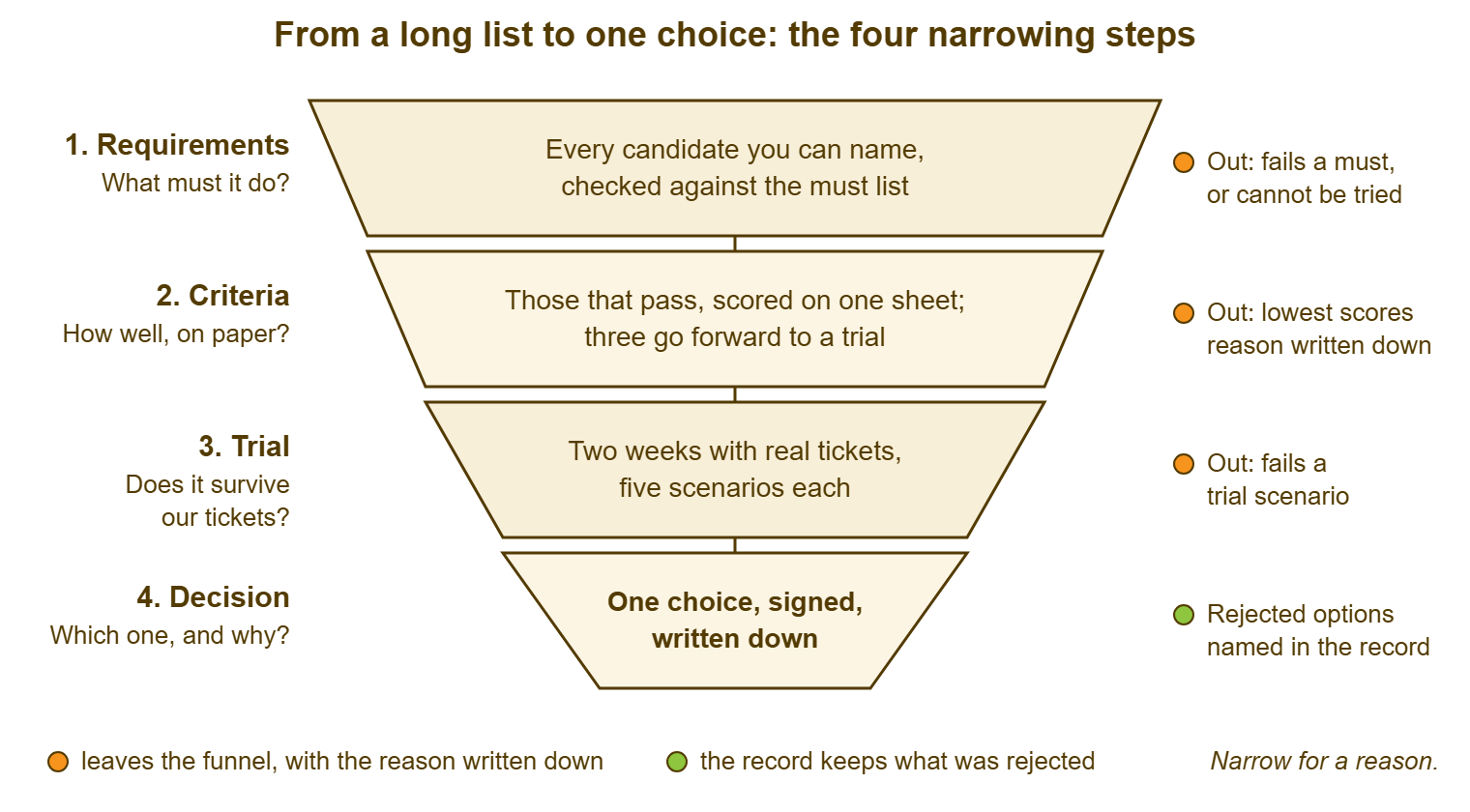
The must list does most of the narrowing, and it does it cheaply. Checking a candidate against eight musts takes an hour with the vendor's documentation and a short e-mail to their support address. It needs no demo, no trial and no meeting room. A long list of a dozen candidates becomes five or six in a day. This is the step that saves the trial for the tools that deserve one. A two-week trial of a tool that fails a must is two weeks spent learning something a paragraph in the documentation would have told you.
Notice what is not in the funnel. There is no step called "watch demos". Demos happen, and they are useful, but they are a way of checking the should list against a candidate, not a stage of their own. A desk that makes "demo" a stage will schedule six of them and spend a day and a half in the meeting room. It will come out with six lists of impressions and no scores. Put the demo inside the criteria step, with the sheet open on the table. And it does the job it is good at, which is letting you ask the presenter to click the thing you need to see clicked.
Writing a Requirement That Can Be Tested
A requirement is finished when a stranger could read it, sit down at a candidate tool, and say yes or no in under ten minutes. "Handles e-mail well" fails that test; everyone handles e-mail well in the brochure. "A reply from the requester's own address to a ticket that was resolved last week reopens that ticket, with its history, rather than creating a new one; test by resolving a ticket and replying to it from a personal mailbox" passes it. It passes it in a way that produces a result you can write on the sheet. The second version is longer. It is also the only one of the two that will ever change a decision.
The shape is always the same three parts: the situation, the behaviour you need, and how to check. Situation: a requester replies to a resolved ticket. Behaviour: the ticket reopens with its history. Check: do it, from a personal mailbox, and look. Write the check even when it seems obvious, because the person running the trial in three weeks may not be you. Also, writing the check is how you discover that the requirement was vague. If you cannot say how to test it, you have not finished saying what it is.
Numbers belong in requirements when the number is real. "Must support our volume" says nothing. The requirement "must carry 410 tickets a month with three technicians without the list becoming slow or unreadable" says something a trial can check. Pull the numbers from the queue you have: tickets per month, technicians, departments. Include the longest ticket thread anyone can remember and the largest attachment anyone ever sent. Where you have no number, say so rather than inventing one. "We do not know how many tickets the warehouse would raise if it had a form" is an honest line. It tells the trial where to look.
One more rule, learned the hard way: a requirement names a behaviour, never a feature name. "Must have a knowledge base" is a feature name, and every candidate will tick it. "A technician must be able to write an article from a ticket, mark it visible to agents only or to everyone, and link it in a reply" is a behaviour. Roughly half the candidates will do it the way you need. Feature names are the vendor's vocabulary. Behaviours are yours, and the gap between the two is where most buying regret lives.
Requirements That Look Essential and Are Not
Some requirements arrive on every list and belong on almost none, at least not in the must band. They are not bad things. They are things that feel essential in a meeting room and turn out, in a queue, to be rarely used or easily done another way. Moving them from must to nice is not cynicism. It is making room on the must list for the fleet mailbox.
The workflow builder is the first. A drag-and-drop canvas for routing rules and automatic actions looks like the future. For a desk of three, it is a way of spending a week building something. A department, a mailbox and a priority would have done that on the first morning. Most small desks need routing by department and service-level targets per priority, and little else that is automatic. Automation earns its place later, and when it does the subject has its own series in what to automate first, and what never. For now it is a nice. A handsome one.
The dashboard is the second. A screen with twelve live widgets is a thing to show a visitor. It is a thing nobody on the desk looks at after the second week, because the desk looks at the queue. What a desk needs is a handful of reports it can run when asked. They cover volume in and out, backlog by age, response and resolution times, reopens. Those are shoulds, and important ones. The live wall of widgets is a nice. And it is the single most frequent reason a desk buys a tool it later regrets. That is because it is the single most impressive thing a demo can show.
The third is "integrates with everything". A tool that lists two hundred integrations has two hundred things that can break and perhaps three you will use. Name the three. For most desks they are the mail system, the sign-in directory, and whatever opens tickets automatically. The right requirement for everything else is an API and webhooks, which let you connect the thing you have not thought of yet. The question is never how many integrations a tool has. It is whether it has the ones you can name and a plain way to build the one you cannot.
The fourth is customising everything: renaming every status, adding every field, redrawing every form. Some desks need a custom field or two; the department's form carrying an asset tag is a fair example. Few desks need every status and every rule between statuses to be editable. The ones that edit them tend to end up with eleven statuses and an argument about what "Pending" means. The question to ask is which three things you would actually change, and whether the tool does those three. The rest is a nice that will quietly become a maintenance job.
A Short War Story: The Workflow Builder at Redbrook Engineering
Redbrook Engineering replaced its ticketing tool after a single demo. The workflow builder was the headline and the site engineers' shared mailbox was never mentioned. That was because Owen, who ran the four-person desk, had gone into the room without a list. The new tool arrived, and the workflow builder was used once. In the second week Owen discovered that a reply from a requester to a resolved ticket created a brand-new ticket rather than reopening the old one. So sixty or so threads a month arrived in two pieces that a technician merged by hand every Friday afternoon. The operations director had asked, at the start of the project, for one number a month, the reopen rate. And the tool could not produce it, because in its view nothing ever reopened. Over the first four months the Friday merging consumed roughly ninety technician hours. During those months, the director received an estimate instead of a number. During those months, the fleet mailbox was eventually handled by a forwarding rule that broke twice. The requirement that failed was the one nobody had written down, which is the only kind that ever does.
The Requirements Worksheet
The worksheet below is one page, filled in before the first vendor call and carried into every one after it. The ten questions go at the top with their answers. The three bands follow, each requirement written as situation, behaviour and check, with the ticket or count that justifies it. The last block records what you decided not to require. That is the block that protects you when the weather map comes back round. Fill it in with the team in one sitting, argue the musts down to eight or fewer, and date it. A requirements list without a date is a list somebody will quietly edit after the demo.
REQUIREMENTS WORKSHEET — ONE PAGE
Desk: ______________________   Written by: ______________   Date: ____________
Tickets per month: ______   Technicians: ______   Departments or queues: ______

THE TEN QUESTIONS (answers in one line each, with the number where one exists)
  1. Requests per month and by which doors: _____________________________
  2. Who works them; separate queues needed: ____________________________
  3. What we promise, to whom, in which hours: __________________________
  4. The ten commonest ticket types: ____________________________________
  5. Reports anyone reads: ______________________________________________
  6. What has to connect (mail, directory, monitoring, other): ___________
  7. Who may see what: _________________________________________________
  8. Where the data may live: ___________________________________________
  9. How we get our history out today (tested on ________): _____________
 10. What is broken today that we refuse to carry over: _________________

MUST (eight or fewer; absence ends the candidate; each backed by evidence)
  M1. Situation: ______________  Behaviour: ______________  Check: ______________
      Evidence (ticket or count): ______________
  M2. Situation: ______________  Behaviour: ______________  Check: ______________
      Evidence (ticket or count): ______________
  M3. ...

SHOULD (scored; see the scoring sheet)
  S1. Situation: ______________  Behaviour: ______________  Check: ______________
  S2. ...

NICE (tie-breakers only)
  N1. ______________________________
  N2. ______________________________

DELIBERATELY NOT REQUIRED (and why)
  ______________________________  because ______________________________
  ______________________________  because ______________________________

Signed off by the desk: ______________   Seen by: ______________   Date: ________
Marta filled hers in the week after the Tollgate demo, late but not too late. The fleet mailbox went in as M1 with "140 of 410 tickets last month" beside it. The reopen behaviour went in as M2 with three ticket numbers. And the workflow builder went into the nice list in her own handwriting. Two of the three candidates she had liked in the meeting room failed a must by the following Tuesday. That was on the strength of a paragraph in their documentation and one e-mail each. The third passed and went to a trial. The weather map, it turned out, was on all three.
Frequently Asked Questions
How many must requirements should a small desk have?
We already watched two demos. Is it too late to write requirements?
Who should be in the room when the requirements are written?
What if the team cannot agree whether something is a must or a should?
Should the requirements name specific products we have heard of?
How often should the requirements be revisited during the evaluation?
From the QuerySolv team: we build self-hosted help desk software for Windows. QuerySolv runs as one Windows service on your own network. It takes requests by web form, e-mail, live chat, social messages and REST API. It is licensed once per installation rather than per agent per month. The free trial runs the full product for 30 days.