
What to Automate First, and What Never to Automate
Monday, 08:40, at Meridian Parts. Owen has run the desk for eleven days. The queue holds 61 tickets from the weekend, and he reads them in order. Fourteen say some version of "did you get my request?", sent to a mailbox that replied to nobody. Nine are about the warehouse scanners and sit in the general queue, where the two people who fix scanners never look. Six are overdue by a target nobody was told about. One, from Priya in finance, says "I know you're busy, so I'll just ask Marcus directly", which Owen reads twice. His manager stops at the desk at nine and says the sentence every new desk lead hears in their first month: "Can't we just automate all this?"
Some of it, yes. Workflow automation is a rule the ticketing tool runs on its own: when a ticket matches a condition, the tool does something to it without a person touching it. Reply with a number. Move it to a department. Flag it when a target is close. Run a known fix. Each of those is work shaped like a rule, and a rule does it faster, at three in the morning, the same way every time. The rest of the queue is work shaped like a judgement call, and a rule cannot make one, however confidently it tries. This article is part of our Ticket Workflow Automation series, and it is about telling the two kinds apart before you switch anything on.
It covers what a rule is and is not, then the three-question test for rule-shaped work. Next comes the automation ladder, which has four rungs and a line drawn above them. Each rung follows in turn: acknowledgment, routing, timers and remediation, with what it buys and how it misfires. Then come the things never to automate and why each one is tempting, and a table of the ladder. A short war story and the automation candidate list to copy finish the article, in that order.
What a Rule Is, and What It Is Not
A rule has three parts, and it helps to name them because every automation feature in every tool is some arrangement of the three. The trigger is the event that wakes the rule: a ticket is created, a ticket is updated, a clock reaches a time. The condition is the test the rule applies: the ticket came from this mailbox, the subject contains this word, the priority is High, nothing has happened for two days. The action is what the tool does when the test passes: set a field, move the ticket, send a message, add a note, call something outside the tool. When a ticket is created, if it arrived through the facilities mailbox, move it to the facilities department. Trigger, condition, action. That is the entire mechanism.
What a rule is not is a reader. It does not know what the requester meant or whether the problem is the one described or the one behind it. It does not know whether "the printer is down" is one printer or the one printer the payroll run needs today. It matches the text it was given against the test it was written with, and it does so with total confidence and no memory of being wrong last week. A technician who misreads a ticket feels a small doubt and looks again. A rule that misreads a ticket files it, logs the action, and moves on to the next one, pleased with itself.
This is why automation on a help desk is less about the tool and more about the shape of the work. Some tools offer a full rules editor with triggers, conditions and actions you combine freely. Some offer a fixed set of behaviours you switch on: an acknowledgment, a department per mailbox, a target per priority. Some offer a webhook or a REST API and leave the rules to you. Whatever yours offers, the deciding question is the same: is this work shaped like a rule, or shaped like a decision? The tool cannot answer that. You can, and the next section is how.
The Rule-Shaped Test
Ask three questions of any piece of work you are thinking of automating, and automate it only when all three come back yes. The first: can you write it as one sentence of the form "when this happens, if this is true, do this"? To pass, there must be nothing in the sentence that a person would have to interpret. "When a ticket arrives through the warehouse mailbox, move it to the warehouse department" passes. "When a ticket looks urgent, set it to Urgent" fails on the word "looks", which is a judgement wearing a verb's clothing.
The second question: would two competent technicians, given the same ticket, do the same thing every time? Sit two people down with twenty real tickets and the proposed rule, and have each one apply it by hand. If they agree on all twenty, the work is rule-shaped. If they argue about three, the rule will be wrong about three in every twenty, and it will not stop to argue. Routing by the mailbox the ticket arrived through gets near-perfect agreement. Setting priority from the words in the ticket gets a lively discussion that ends with "well, it depends", which is the sound of a judgement call being discovered.
The third question: when the rule is wrong, is the cost small and is the mistake visible? A wrong acknowledgment costs a slightly odd e-mail. A wrong routing costs a day in the wrong queue, which is visible to the team that receives it and recoverable in one move. A wrong close costs a requester who thinks the desk gave up on them. That close is visible to nobody on the desk, because closed tickets are the one list nobody reads. Automate freely where a mistake is cheap and loud. Automate carefully where it is cheap and quiet. Do not automate where it is expensive, whatever the volume. A rule that is right 95 times in 100 sounds good until you remember that it will be wrong five times a week, silently, forever.
Remember: automate work that is shaped like a rule: one sentence, two technicians would agree, and a mistake is small and visible. Everything that needs a person to read the ticket and decide stays with a person.
The Automation Ladder
The rule-shaped work on a help desk sorts itself into four kinds, and they form a ladder because each one is safer and simpler than the one above it. The bottom rung is acknowledgment: telling the requester the ticket exists. The second is routing: putting the ticket in front of the right people. The third is timers and triggers: watching the clock on a ticket and raising a flag when a target is close or missed. The top rung is remediation: having the tool, or something it calls, actually fix a known problem. Above the top rung there is a line, and above the line is everything that needs a person. That includes setting priority, deciding whether a request is in scope, saying no, closing a ticket, and anything that depends on reading one requester's situation.
The picture below draws it as a staircase, climbed from left to right. Each step names what the rule does and the way it most often misfires. The dashed red line across the top is the judgement line, with the human work written above it. The arrow is the order to climb in. A desk that has never automated anything starts on the bottom step and tests each rung on real tickets before putting weight on the next one. A desk that starts at the top, because remediation is the exciting rung, tends to learn the lower rungs by falling down them.
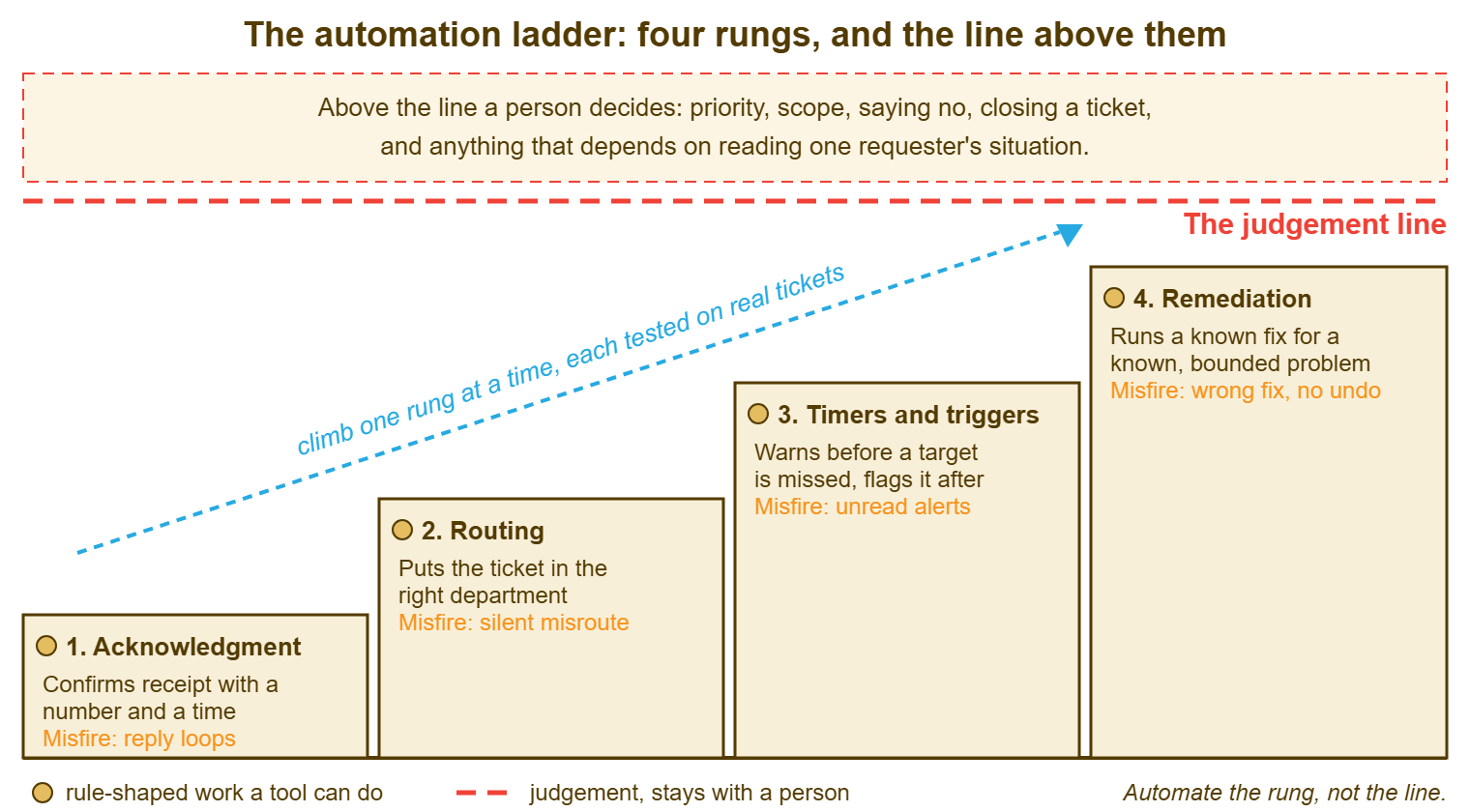
The ladder is an order, not a scorecard. A three-person desk with the first two rungs working and nothing above them is doing fine. A desk with scripted remediation and no acknowledgment has built the roof before the walls. Climb when the rung below is boring, which is the only reliable sign that it is working.
Rung One: The Acknowledgment
The acknowledgment is the automatic reply that says the ticket exists, gives its number, and says when a person will look at it. It is the safest automation on the desk. Its job is to replace fourteen "did you get my request?" messages with none. A wrong acknowledgment is a slightly odd e-mail rather than a lost ticket. Every tool that takes requests by e-mail can send one; the only design decisions are what it says and what it does not.
Say three things and stop. The ticket number, so the requester has something to quote. The time by which a person will reply, which is a real time from your service levels and not the word "shortly". And how to add information, which is "reply to this message" and nothing else. Do not promise a fix time, because the acknowledgment has not read the ticket. Do not include a paragraph about how much you value their request. (They can tell how much you value it by whether a person turns up at the time you said.) Do not sign it with a technician's name, because a rule did not write it.
The one way an acknowledgment misfires badly is the loop. Your automatic reply reaches another automatic reply, an out-of-office or another system's acknowledgment. That replies to yours, which replies to it. A quiet desk can generate several hundred tickets overnight this way, each politely acknowledging the last. The defences belong to the mail pipeline and are covered in Loops and Auto-Reply Storms. Read that before you switch the acknowledgment on for a shared mailbox that other systems write to.
Rung Two: Routing
Routing is putting a new ticket in front of the people who will work it. The rule-shaped version of routing is routing by the door the ticket came through. A ticket that arrives through the facilities mailbox is a facilities ticket. A ticket raised on the HR request form is an HR ticket. A ticket from an address at a partner's domain goes to the team that handles that partner. None of those rules reads the ticket; they read where it came from. Where it came from is a fact rather than an interpretation, which is why they almost never misfire. If you run QuerySolv, each department already has its own mailbox and web form. So the first and most reliable routing is something you get by giving a department its own door rather than by writing a rule at all.
Routing by words is the second kind, and it is where the trouble starts. "If the subject contains 'printer', move to desktop support" sounds like the first kind and is not. "Printer" appears in tickets about printing, about toner budgets, about a printer someone wants to buy, and about the print server, which belongs to a different team. Keyword routing works when the word is a label that a system put there, such as the fixed subject line of a monitoring alert. It fails when the word is one a person chose. The full treatment, including the default department that catches everything no rule claims and the ten-real-tickets test before any rule goes live, is in the next article in this series, Auto-Routing Rules That Do Not Misfire.
Routing's misfire is quiet, and that is what makes it the first rung that can actually hurt. A ticket sent to the wrong department sits in a queue where everyone who sees it has decided it is not theirs. The team that should have it does not know it exists. The requester waits, the clock runs, and nobody has done anything wrong. The guard is the one in Keeping Tickets From Hiding: one person in each department reads the unassigned list daily asking "is this ours?" Every routing rule has an owner who is told when it misfires.
Rung Three: Timers and Triggers
A timer is a clock the tool runs against a ticket. It usually measures the time since it was opened or since the last reply against a target that depends on priority. A trigger is the rule that fires when the clock reaches a point. It might warn the owner when a target is close or flag the ticket when the target is missed. It might send a note to the desk lead when a ticket has sat unowned too long. Together they are the desk's way of noticing, without anyone looking, that a ticket is about to become a complaint. Many tools offer service-level targets per priority on a business-hours schedule, and most of those can do something when a target is near or missed. What they do is yours to decide, and it should be less than you first think.
The rule-shaped part of a timer is the arithmetic: this ticket is High, High means a response within two business hours, it is one hour and forty minutes old, warn the owner. Nothing in that sentence needs interpreting. The judgement part is what the warning should cause, and here the ladder's rule applies. A trigger should tell a named person and mark the ticket. It should not change the priority, reassign the work, or send the requester a message. A timer that raises the priority of every ticket that gets old has, by the end of the quarter, made every ticket Urgent, which is the same as having no priorities with extra steps. The design of the targets themselves lives in Response vs Resolution Targets. What the triggers should and should not do is the subject of SLA Timers and Escalation Triggers later in this series.
Timers misfire by becoming noise. A warning that goes to a shared channel, for every ticket, at every threshold, is read for a week and then muted. The one warning that mattered is in there somewhere. Before you turn on any trigger, decide who receives it by name, what they are expected to do within what time, and how you will know whether they did. If you cannot answer the third, the trigger is a feeling of safety rather than a safeguard.
Rung Four: Remediation
Remediation is automation that fixes the problem rather than moving the ticket about. That could be a script that clears a stuck print queue, restarts a service known to hang, or frees disk space from a folder known to fill. It is the top rung because it is where the tool changes something outside itself, and where a misfire can break a thing that was working. It is also the rung with the largest payoff, because it removes the ticket's work rather than its paperwork. Climb it, but climb it last.
The rule-shaped test is harder here, so apply it harder. A fix qualifies only when all of these conditions hold. The problem has one cause you can detect reliably and one fix that has been run by hand many times without surprise. There is a way to check it worked and a way to undo it. "Restart the print spooler when the print-spooler alert fires" passes, provided the alert is specific. "Free up disk space when the disk is full" fails until you have said which folder, which files, how old, and what happens when it is not that folder. The method for turning a hand fix into a safe script is in Turning a Fix Into a Script Safely; this article only decides whether a fix is ready to be on the ladder at all.
Start remediation as a button a person presses, not a rule that fires on its own. The button does the same work, logs the same result, and has a human reading the ticket before it runs. That catches the one case in thirty where the alert fired for a different reason. After a few months of the button being pressed with no surprises, the case for letting the rule press it is made by the log rather than by optimism. A fix that has run itself a thousand times is trustworthy. A fix that has run itself three times is a sample.
What Never to Automate
Never automate priority from the words in a ticket. "Urgent", "down" and "critical" are words people use when they are worried, and worry is not impact. The first week the rule runs it looks clever. By the third month everyone has learned the word, and the priority field means "the requester knows the word". The one genuinely urgent ticket that was written calmly is at the bottom of the list. Priority is the clearest judgement call on the desk, which is why Who Decides the Priority is an article about people and not about rules.
Never close a ticket because the requester went quiet, without first warning them and waiting. The automatic close after a period of silence is one of the most commonly offered rules and one of the most commonly regretted. Silence has many causes and only one of them is "the problem went away". The requester is on leave. The requester gave up. The requester is waiting for you. A reminder at an agreed interval, a second one, and then a close that says plainly what happened and that a reply will reopen it, is a defensible routine. A silent close is a ticket that hid twice, and the second time the requester noticed.
Never automate anything that speaks to a requester as though a person wrote it. The acknowledgment says it is automatic and the requester knows where they stand. A rule that sends "Hi Priya, I've looked into this and it should be working now" has lied in the first four words. When it is wrong, as it will be, the requester has been lied to by someone with a name. Automated messages are fine. Automated messages pretending to be Marcus are a complaint with a delay on it.
Never automate the irreversible or the invisible. Deleting, merging, declining a request, moving a ticket to a final status, changing who the requester is: each is cheap to do and expensive to discover later. A rule that does them leaves no one to say "wait, are you sure?" And never automate a judgement because the judgement is slow. If triage takes an hour a day and the desk cannot spare it, that is a staffing or a rhythm problem. A keyword rule does not solve it; it hides it inside tickets filed quickly and wrongly. The triage routine that fits a small team is in Triage Rhythms for a Small Team, and it costs less than the clean-up.
The Ladder as a Table
The table below puts the four rungs beside the line above them, with what each rung buys, how it misfires, and the test to pass before switching it on. The last column is the one to read twice. Every rung has a test that costs an hour, and skipping the hour buys a month of clean-up, which is a poor trade even on a busy desk.
| Rung | What the rule does | How it misfires | Cost of a misfire | Test before switching on |
|---|---|---|---|---|
| 1. Acknowledgment | Replies with the ticket number and the time a person will respond | Replies to another automatic message and loops | A burst of junk tickets; one odd e-mail | Send it a message from an out-of-office address and from another system; confirm one reply, then silence |
| 2. Routing | Moves the ticket to a department by the mailbox, form or sender it arrived through | Keyword rule matches the wrong meaning; no default catches the rest | A ticket in a queue where nobody owns it, for days | Apply the rule by hand to ten real tickets from last month; two technicians must agree on all ten |
| 3. Timers and triggers | Warns a named person before a target is missed; flags the ticket after | Warnings go to a channel and become noise; trigger changes priority or owner | The real warning is missed among the false ones; priorities inflate | Name who receives each trigger and what they do within what time; run it on one priority for two weeks |
| 4. Remediation | Runs a known, tested fix for a known, specific problem | Fires for a different cause; no check that it worked; no undo | A working thing broken; a wrong fix logged as success | Run as a button pressed by a person for months; let the log, not optimism, make the case for a rule |
| Above the line | Nothing; a person reads the ticket and decides | A rule set priority, closed on silence, or spoke as a person | Trust, which comes back more slowly than it leaves | There is no test, because there is no rule; keep it off the ladder |
A Short War Story: The Quiet Close at Tollgate Foods
At Tollgate Foods, a desk lead called Imran switched on a rule that closed any ticket waiting on the requester after three days without a reply. The waiting list had grown to ninety and the quarterly report counted open tickets. The rule ran for a fortnight without complaint. Then the packing plant shut for its annual maintenance week, and every shift supervisor went on leave at once. The rule closed forty-one of their tickets while they were away. That included the one about the label printer that the first shift back would need at six in the morning. The supervisors returned to a clean queue and a printer that did not work. They re-raised the tickets as new ones with the history gone. The plant manager asked, in writing, why the desk had "given up on the shift floor". The report for that quarter showed the backlog falling and the reopen count climbing, and the second number was the honest one. Imran replaced the rule with a reminder at three days, a second at six, and a close at ten. The close said in plain words what had happened and that a reply would reopen it. The lesson he wrote at the top of the automation register was that a rule which closes tickets is a rule which decides the requester has finished. The requester had not been asked.
The Automation Candidate List
The list below is the sheet to fill in before you switch on any rule, one row per candidate. The first block is the three-question test; a candidate that fails any question stops there, and the sheet says so rather than letting it through on volume. The second block places the survivor on a rung and records what was tested, by whom, and what happened. The third block is the part most desks skip and most regret: who owns the rule, where its misfires get written down, and when it will be reviewed. Keep the completed sheets together; they are the register the review in Automating Without Losing Judgment is run from.
AUTOMATION CANDIDATE LIST — ONE ROW PER RULE
Desk: ______________________   Prepared by: ______________   Date: __________

CANDIDATE
  Work to automate (one sentence): ______________________________________
  How often it happens now:  ____ times a week    Minutes each by hand: ____
  Who does it by hand today: ______________

THE RULE-SHAPED TEST (all three must be yes)
  [ ] Written as "when ____, if ____, do ____" with nothing to interpret:
      When ______________________  if ______________________  do ______________________
  [ ] Two technicians applied it by hand to 20 real tickets and agreed on all 20
      Technicians: ______________ / ______________   Disagreements: ____  (0 to pass)
  [ ] A wrong result is small AND visible.  Cost if wrong: ____________________
      Who would notice, and how soon: ______________________________________
  Result:  [ ] passes, continue     [ ] fails: stays with a person   Reason: ______________

RUNG
  [ ] 1 Acknowledgment   [ ] 2 Routing   [ ] 3 Timer / trigger   [ ] 4 Remediation
  Rung below already running and boring:  [ ] yes   [ ] no: climb that one first
  Default or safety net if the rule does not match: ______________________________
  What the rule must NOT do (priority, owner, close, message as a person): ________

TEST BEFORE SWITCH-ON
  Test run on ____ real tickets, dated ________   Correct: ____   Wrong: ____
  Wrong cases, one line each: ______________________________________________
  For remediation only: run as a button by a person since ________; runs ____; surprises ____

OWNERSHIP
  Rule owner (name): ______________     Deputy: ______________
  Where misfires are written down: ______________________________
  Review date (within three months of switch-on): ________
  Switched on: ________ by ______________     Switched off: ________ reason: ____________
Owen filled in six sheets at Meridian Parts over the following fortnight. The acknowledgment and routing by mailbox passed in an afternoon and were running by Friday. The fourteen "did you get this?" messages became two the next week. The scanner tickets started arriving where the scanner people sat. Priority from keywords failed the second question, with the two technicians disagreeing on seven tickets in twenty, and the sheet still says so. The rules that survived were the dull ones, which is how you know they were the right ones.
Frequently Asked Questions
Our tool has no rules editor at all. Can we still automate anything?
Is automatic assignment to a technician a safe rung?
How many rules should a small desk run?
What is the difference between a rule and a scripted fix?
The requesters keep asking "did you get this?" even with an acknowledgment. Why?
We already have a rule that sets priority from keywords. Should we switch it off?
From the QuerySolv team: we build self-hosted help desk software for Windows. QuerySolv runs as one Windows service on your own network. It takes requests by web form, e-mail, live chat, social messages and REST API. It is licensed once per installation rather than per agent per month. The free trial runs the full product for 30 days.