
Keeping Tickets From Hiding: The Four Places They Go
Friday, 16:55, at Oakmoor College. Sam from the bursar's office phones the desk. "I raised this three weeks ago. Is anyone looking at it?" Dana searches by Sam's name and finds nothing. She searches by the words "payroll export" and finds ticket 6632. It is open. It is assigned to Lena, who has been on leave for nine working days. Its status is On Hold. It is in the facilities department, because Sam picked the wrong choice on the form. And the requester on it is not Sam at all but a shared address called bursary-team, which is why the search by name found nothing. The ticket had done nothing wrong. It had simply been in all four hiding places at once, which is a kind of achievement.
A hidden ticket is open, real, waiting on the desk, and absent from every list that anyone looks at. The tool has not lost it. Tickets do not get lost; they get filed, by the tool, with great care, somewhere nobody is looking. There are four such places on almost every desk. Once you know them you can look in each one every day in the time it takes a kettle to boil. This article is part of our Queues & Routing series, and it is about the four places and the look.
It starts with why a hidden ticket is filed rather than lost, then covers the four hiding places in turn. They are the wrong department, assigned to someone away, parked in a waiting status, and filed under the wrong requester. For each, it explains how a ticket gets in and how it gets out. Next come the counters and views that catch them, with a picture and a table. Then come the daily two-minute look and what to do when you find a hidden ticket. It ends with a short war story and the hiding-places sweep checklist to copy.
Tickets Don't Get Lost, They Get Filed
The tool always knows where the ticket is. It has a number, a requester, a department, an owner, a status and a history, and a search for the number finds it in a second. What the tool does not know is whether any human has a view that includes it. That is the whole difference between a ticket that is open and a ticket that is being worked. Hidden is not a property of the ticket. It is a property of the gap between the ticket's fields and the lists people read. Change a field, or change a list, and the ticket is visible again, unchanged.
This matters because the instinct, when a ticket turns up three weeks late, is to ask who lost it, and nobody did. Lena did not lose 6632; she went on leave. Sam did not lose it; he filled in a form. The facilities team did not lose it; they looked at it, decided it was not theirs, and left it, politely. Each field on the ticket was set by somebody doing something reasonable, and the sum of the reasonable things was a ticket in a drawer. The fix is not to find the culprit. The fix is to look in the drawers on a schedule.
A hidden ticket is never a deleted one, and it is worth saying so because the two get confused. Some tools allow tickets to be deleted and some never do. Either way, the ticket that the requester is asking about exists, with its history intact. The only question is which filter will show it. The structural argument, that a ticket can only hide in a place no standing view covers, is made in What a Queue Is For. This article is the field guide to the places.
Hiding Place One: The Wrong Department
A ticket in the wrong department is visible to the wrong people and invisible to the right ones. It got there by a form choice made in a hurry, by an address that two teams share, or by a transfer made to the wrong queue. Or it arrived through a routing rule that nobody has reviewed since it was written. The mechanics that put it there, and the fix for each, are in Routing by Department, Form and Mailbox. The hiding is what happens next.
It stays hidden because of politeness. The receiving team reads it, sees that it is not theirs, and leaves it, on the reasonable assumption that somebody will come for it. The sending team, if there was one, assumes it has gone. Nobody owns the act of moving it, so nobody moves it. The ticket sits in a queue where everyone who looks at it has decided it is somebody else's. In many tools only a higher permission level can move a ticket between departments. That adds a second reason for leaving it: the person who noticed cannot act, and the person who can act did not notice.
It is caught by reading each department's unassigned view with the question "is this ours?" rather than "what shall I take?" Also give one person in each department both the permission and the duty to move strays within a day. The check is quick: a misrouted ticket is nearly always unassigned, because nobody in the wrong department will claim what they cannot do. So the strays sit at the bottom of the unassigned view getting older. A ticket in the wrong department for more than a day is a ticket nobody in that department has been given the job of moving.
Hiding Place Two: Assigned to Someone Away
A ticket assigned to someone who is not here is in a locked drawer, and the person with the key is on a beach. It gets there by every ordinary route. The owner went on planned leave without releasing their tickets, fell ill on a Tuesday, went on a course, or moved to a project. Or they left the organisation and still, technically, have an account with tickets on it. Nothing about the ticket changes when the owner walks out of the building. It still says owned. Owned means everybody else has stopped looking.
It stays hidden because the tool has no idea who is in. The owner field is a name, and a name does not know it is on leave. Dashboards that show each person their own waiting tickets are showing them to the one screen in the building that is switched off. (The out-of-office reply is the only part of the system that reliably knows who is away. It is not consulted.) Requesters who reply to the ticket get the out-of-office, which tells them when Lena is back. It says nothing about who has their problem in the meantime, because nobody does.
It is caught by filtering the open list by owner for every person who is not in today. That takes thirty seconds if someone keeps a list of who is not in. Three rules also catch it. Before planned leave, the owner releases or hands over every active ticket; it is part of leaving, like the out-of-office. On unplanned absence, the lead opens the absent person's list by a fixed time that morning and reassigns everything active. And when somebody leaves the organisation, their tickets are reassigned on their last day. All of them. Even the one that is "basically done". A leaver's account is the most reliable hiding place on the desk, because nobody filters by a name that is no longer on the rota. The cover routine in full is in Vacation Coverage Without the Pile.
Hiding Place Three: Parked in a Waiting Status
A waiting status is any status whose meaning is "the next step belongs to somebody other than the desk": On Hold, Awaiting Reply, Pending, Waiting on Vendor, or whatever your tool calls them. A ticket in a waiting status is legitimately paused for as long as the thing it is waiting for is still coming, and then it is just paused. It gets there honestly, because the technician asked the requester a question or ordered a part. It stays there because a waiting status is a very comfortable place for a ticket. Nothing is expected of it. Nobody's daily view includes it. The requester, who answered the question a week ago, is waiting too.
It stays hidden because the status excuses it from every list that measures activity, and because the thing being waited for has no date. "Waiting on the requester" with no follow-up date is a ticket that will wait forever, since no view will ever say it has waited too long. Whether your tool's clock keeps running in a waiting status changes how loud the hiding is. Some tools pause the deadline clock on hold, some do not, and some pause on one status but not another. Test yours by putting a ticket on hold over a weekend and reading the due time on Monday. If the clock keeps running, a parked ticket goes overdue in plain sight, which for the purpose of finding it is a feature. If the clock pauses, the parked ticket is silent, and the waiting view is the only thing that will ever find it.
It is caught by reading the waiting view by last update, oldest at the top, and asking of each ticket "what are we waiting for, and since when?" Anything waiting on the requester past the follow-up interval gets a chase. Anything waiting on a supplier past its promised date gets a chase in the other direction. Anything with no answer to the question goes back to active. Check one more thing: many tools reopen a resolved ticket automatically when the requester replies. Fewer do anything beyond updating a ticket when a requester replies to it in a waiting status. So the reply can land and the status stay "waiting". Test that too, with a reply from a personal address. The distinction between the waiting statuses and what each should mean is in Pending User vs Pending Vendor vs On Hold.
Hiding Place Four: Filed Under the Wrong Requester
The requester on a ticket is who the desk talks to and who the ticket is looked up by. When it is the wrong person, the ticket is hidden from the one who is actually waiting. It gets there by forwarding: an assistant forwards a manager's problem and becomes the requester. A colleague sends in a problem for someone else. A shared team address is used because that is the one everybody knows. A form is filled in with a mistyped address. Most tools identify a requester by e-mail address, so whoever's address is on the From line is who the ticket belongs to, however the body begins.
It stays hidden because every message the desk sends goes to the wrong person. The reply goes to the assistant, who is busy, or to the shared address, which fifteen people ignore. The real requester checks their own tickets by their own address and sees nothing. They conclude the desk never received it and raise it again. That makes a duplicate under a different requester that cannot be merged with the first because they are not the same person. The desk now has two tickets, one hidden and one new, about the same thing, and it will solve the new one. I have personally replied to an assistant's address four times about a laptop the assistant did not own.
It is caught at first touch, which is the only cheap place to catch it. When the ticket is read for the first time, the triager checks the From line against the body. "My colleague Sam cannot export payroll" means the requester is Sam, and the field is corrected before the first reply, not after the fourth. Where a duplicate has already been raised, merge only after the requester field matches on both. In most tools a merge between different requesters is either refused or irreversible, and both outcomes are worse than a minute of correction. For the ticket that is already hidden, full-text search by the words in the body is the finder. A search by the requester's name will never find a ticket that was never theirs.
The Counters and Views That Catch Them
The picture below puts the four places side by side, with how a ticket gets into each and the look that gets it out. Read it as a map of the drawers. Wrong department is top left; assigned to someone away is top right. Parked in a waiting status is bottom left; filed under the wrong requester is bottom right. The orange mark on each card is the way in, the green mark is the way out, and the last line is the fix once the ticket is found. The point of drawing it is that there are only four, and four is few enough to check every day.
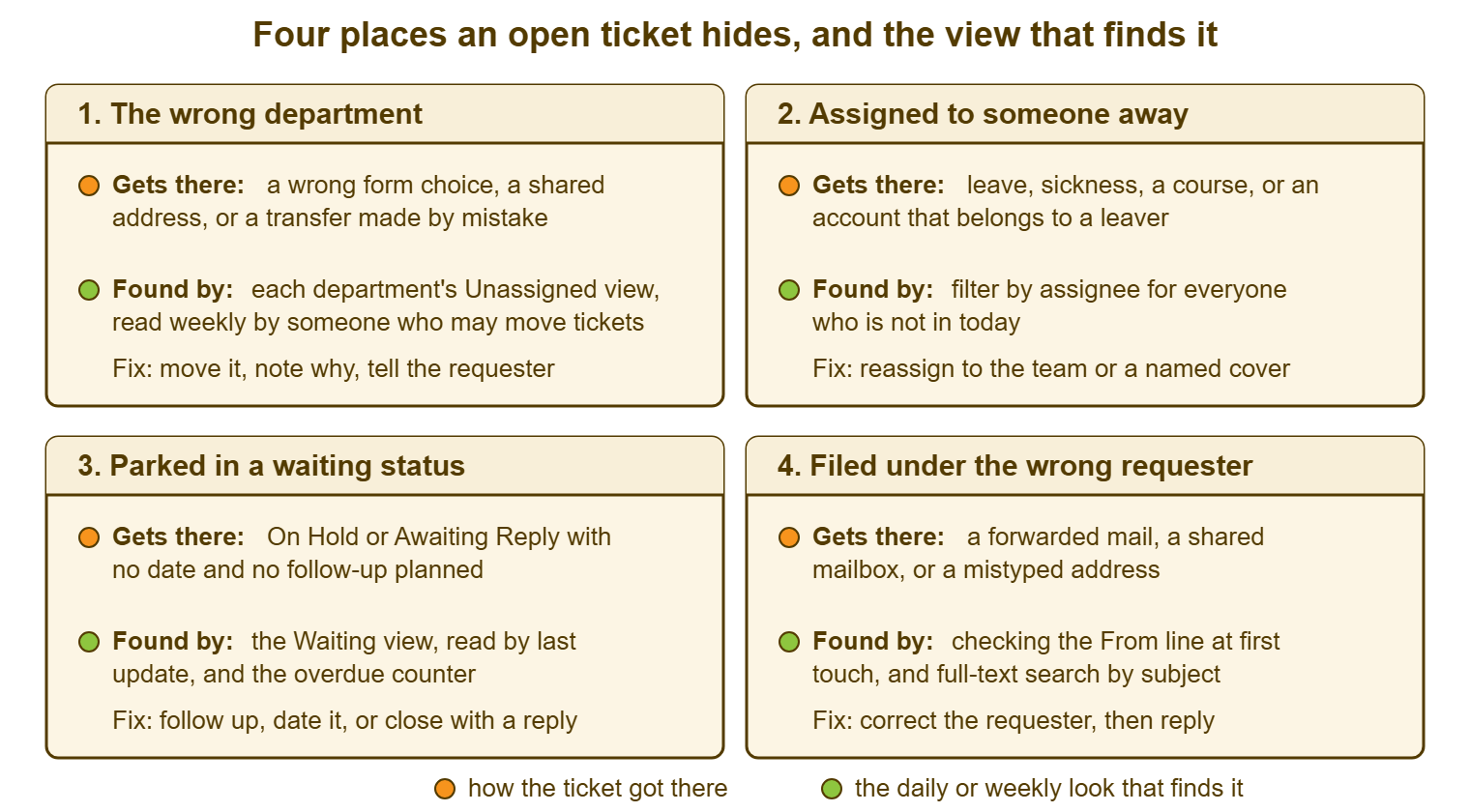
The table is the same map as a routine, with who looks and how often. The "how often" column is the discipline. Every one of these looks is a filter on the open list that takes seconds to apply. The only reason a desk does not do them is that nobody wrote down that it should. Most tools can produce every row from the standard filters: department, owner, status and requester. None of it needs a report.
| Hiding place | The view or counter that catches it | What to look for | Who looks | How often |
|---|---|---|---|---|
| Wrong department | Each department's unassigned view, bottom of the list | Anything unassigned for more than a day that the department cannot do | One named person per department with permission to move | Daily glance; weekly read in full |
| Assigned to someone away | Open list filtered by owner, one filter per absent person | Any active ticket owned by someone not in today; any ticket owned by a leaver | Desk lead | Every morning, from the absence list |
| Parked in a waiting status | Waiting view, oldest update first; overdue counter if the clock runs | Waiting longer than the follow-up interval; waiting with no date; a requester reply that did not change the status | Each technician for their own; lead for all | Daily for own; weekly for all |
| Filed under the wrong requester | The From line at first touch; full-text search by subject when a requester says "I never heard back" | A body that names a different person; a shared or assistant's address; a duplicate from a different requester | The triager | At first touch, every ticket |
Remember: a ticket can only hide in a place no standing view covers. There are four such places on most desks, and the daily sweep looks in all four, every working day, in two minutes.
The Daily Two-Minute Look
The look is four filters, in a fixed order, read for counts and ages rather than contents. First, the unassigned view in each department, bottom of the list: is the oldest unassigned ticket something this department can do, and how old is it? Second, the open list filtered by owner for each person on the absence list: do they hold anything active? Third, the waiting view by oldest update: is anything past its follow-up interval, or without a date? Fourth, the day's new tickets: does the From line match the body on each? Two minutes is honest for a desk of up to ten people. The sweep needs two minutes, four filters, and the nerve to open the list of tickets assigned to the person who left in March.
Do it at the same time every day, and make it one person's job on a rota rather than everybody's job in general. Everybody's job is the one that is not done. The fourth check, the From line, is the exception: it belongs to whoever triages, at first touch, on every ticket, because it is only cheap at that moment. The other three belong to the day's sweeper. The sweeper writes one line in the team chat when they are done: "Sweep done, two moved, one reassigned, nothing waiting past date." On a good day the line is "Sweep done, nothing found". A desk that can post that line most days has no hidden tickets, which is a sentence very few desks can say truthfully.
The daily look is the first half of a routine whose second half is weekly and whose third is monthly. The whole thing, with a card to pin above the desk, is in Queue Hygiene: A Weekly Routine. The weekly part is where the sweep reads the whole waiting view rather than the top of it. It is also where the age of everything on the desk gets looked at. That read catches the tickets a daily glance at counts never will.
When You Find One
When the sweep finds a hidden ticket, do five things in order, and do the first one before anything else. Reply to the requester, from the right requester field, with one honest line and a time: "Your request was filed in the wrong queue and I have just found it; I am looking at it now and will update you by 15:00." No explanation longer than that, no apology longer than the explanation. The requester has been waiting three weeks and the only thing they want is the next time they will hear from you.
Then fix the field that hid it: move it to the right department, reassign it to someone who is in, take it out of the waiting status, or correct the requester. Then re-triage it, because its priority was set three weeks ago by someone who thought it would be worked that afternoon. Then leave a one-line internal note saying where it was hiding and how. The fifth thing, at the monthly review, is to count hiding places by type. The count is what tells you which drawer to fix. Nine tickets found under the wrong requester in a month is a triage habit to change. Nine found assigned to leavers is a leaver checklist to write.
Resist the urge to close it quietly because the problem has gone away on its own. It often has; three weeks is long enough for most things to be fixed by someone else, replaced, or given up on. Reply anyway, say what happened, and ask whether it is still needed. A ticket that was hidden for three weeks and then closed without a word has hidden twice, and the second time the requester knows.
A Short War Story: The Repairs-Desk Ticket at Ashgrove Housing
At Ashgrove Housing, a housing officer called Nadia asked for access to the rent-arrears report by e-mailing repairs-desk@example.com. It was the only support address she had ever used. The ticket was created with repairs-desk as the requester, in the repairs department. At triage it was assigned to a technician called Owen who left the organisation the following Friday. Owen placed it On Hold on his last afternoon with a note that read "waiting on finance". It sat there for five weeks. The arrears letters that Nadia's team should have sent went out late for three hundred tenancies. A monthly compliance report was submitted late with an explanation. The housing manager spent a morning asking each department in turn whether they had "the report thing", because a search by Nadia's name found nothing. The desk found it by searching for the word "arrears". It had been in all four places at once, and each of the four had been set by a person doing something ordinary. Ashgrove wrote the sweep checklist that afternoon, put the leaver reassignment on the HR exit form, and made the From-line check part of first touch. A ticket can hide in four places at the same time, and a sweep that checks three of them will miss it.
The Hiding-Places Sweep Checklist
The checklist below is the daily look and the weekly read on one page. Print it, fill in the names and times, and keep it next to the screen the sweep is done from. The boxes are ticked by the sweeper, and the line in the chat is written from the bottom of the sheet. The monthly count at the end feeds the routing review. The whole sheet is deliberately dull. It is a sweep, and sweeps that are interesting are not being done often enough.
HIDING-PLACES SWEEP — ONE PAGE
Desk: ______________________   Sweeper today: ____________   Time: ____:____

1. WRONG DEPARTMENT (daily)
   For each department, open the unassigned view, read from the bottom:
   [ ] IT          oldest unassigned: ____ days   ours?  [ ] yes  [ ] no: moved to ________
   [ ] Facilities  oldest unassigned: ____ days   ours?  [ ] yes  [ ] no: moved to ________
   [ ] ________    oldest unassigned: ____ days   ours?  [ ] yes  [ ] no: moved to ________
   Person with permission to move, on duty today: ____________

2. ASSIGNED TO SOMEONE AWAY (daily)
   Absence list checked: [ ]   People not in today: ____________________________
   For each, filter open tickets by owner:
   [ ] ____________  active tickets held: ____   reassigned to: ____________
   [ ] ____________  active tickets held: ____   reassigned to: ____________
   [ ] Leavers' accounts checked (anyone who left in the last 90 days): ____ tickets found

3. PARKED IN A WAITING STATUS (daily top; weekly full)
   Waiting view, oldest update first:
   [ ] Oldest waiting on requester: ____ days   past follow-up interval of ____ days?  chased [ ]
   [ ] Oldest waiting on supplier: ____ days   past promised date?  chased [ ]
   [ ] Waiting with no date: ____ tickets   returned to active [ ]
   [ ] Requester replies that did not change the status: ____   fixed [ ]

4. FILED UNDER THE WRONG REQUESTER (at first touch, every ticket)
   [ ] From line matches the body on every new ticket today
   [ ] Shared or assistant's addresses corrected before the first reply: ____
   [ ] "I never heard back" calls today: ____   found by full-text search: ____

FOUND TODAY
   Tickets found hiding: ____   Replied to within the hour: [ ]
   Where:  dept ____   away ____   waiting ____   requester ____

LINE FOR THE TEAM CHAT
   "Sweep done: ____ moved, ____ reassigned, ____ chased, ____ requester fixes."

MONTHLY COUNT (last working day)
   Found this month by place:  dept ____   away ____   waiting ____   requester ____
   Biggest drawer: ____________   Fix agreed: ________________________   Owner: ________
Two lines of the sheet earn their place more than the rest. One is the leavers' line under section two, because nobody filters by a name that is no longer on the rota. The other is the From-line check under section four, because it is the only one of the four that cannot be done later for the same price. Dana ran the sheet at Oakmoor on the Monday after Sam's call. It found 6632, which she already knew about, and four others, which she did not. Sam's ticket was fixed by Tuesday lunchtime. The other four took the rest of the week, and none of their requesters had phoned yet.
Frequently Asked Questions
How do I find tickets assigned to someone who has already left?
Is a ticket in a waiting status hidden even if it is legitimately waiting?
Does the SLA clock keep running on a hidden ticket?
What should we say to a requester whose ticket was hidden for weeks?
We have a shared team mailbox that many people use to raise requests. How do we stop the wrong-requester problem?
How many hidden tickets a month is normal?
From the QuerySolv team: we build self-hosted help desk software for Windows. QuerySolv runs as one Windows service on your own network. It takes requests by web form, e-mail, live chat, social messages and REST API. It is licensed once per installation rather than per agent per month. The free trial runs the full product for 30 days.