
What a Queue Is For: One Honest List of What Is Waiting
Monday, 08:50. Dana was handed the support desk at Meridian Parts eight days ago. This is the first Monday she has opened the ticketing tool before anyone else arrived. The list says fourteen open tickets. Marcus comes in at 09:05, looks over her shoulder, says "quiet week", and she believes him, because the list is right there. At 09:20 a woman from accounts appears at the counter. "I sent this in on Wednesday. Is anyone looking at it?" Dana searches. The ticket exists. It is open. It is assigned to Lena, who has been on a course since Thursday. And it is not on the list Dana was reading. That list was Marcus's "my tickets" view, left behind on that screen by whoever used it last.
A queue is the list of every ticket that is open and waiting for someone on the desk to do something. Not the tickets assigned to you. Not the ones you remember. All of them, in one place, with the same facts shown about each, visible to everyone on the desk at once. The list Dana was reading was true about the fourteen tickets it showed. It was not the queue. This article is part of our Queues & Routing series, which covers how tickets find a person, how they hide, and how to keep the list honest.
It covers what a queue is for and the three properties it must have, then one list against many lists. Next come the unassigned view and why it matters more than any other, then why "my tickets" is not the queue. The article covers what a hidden ticket looks like, then the four standing views every desk needs, with a picture. It explains the order to read them in and how to set them up in a typical tool. It finishes with a short war story and a one-page template of the views to copy, in that order.
The Queue Is the Shared Truth About What Is Waiting
The queue exists to answer one question without anyone having to ask a person: what is waiting, for whom, and since when. A requester who wants to know whether their problem has been seen should be able to find out from the list. A technician who has finished something should be able to see what to pick up next from the list. A manager who wants to know whether the desk is coping should be able to tell from the list. If any of those three has to walk over and ask, the queue is not doing its job, and whoever they ask is doing it instead.
Think of a whiteboard in a workshop where every job card is pinned in one column, oldest at the top. Anyone walking past can see how much work is waiting and how long the top card has been there. Now imagine each mechanic keeps their own cards in their own pocket. The board is empty, and the workshop is full. And the only way to know what is waiting is to ask everyone to turn out their pockets. That is the difference between a queue and a collection of personal lists. And the whiteboard is the only analogy you need for this article.
A queue has to have three properties, and a list that lacks any of them is something else wearing the name. It must be complete: every request the desk has accepted is in it, from every channel, with no side lists in anyone's inbox. It must be visible: everyone on the desk can see all of it, not just their own slice. And it must be honest: what the ticket says about itself (who owns it, what state it is in, when it was last touched) is true. Complete, visible, honest. Lose completeness and the desk is working from a sample. Lose visibility and the desk is a set of strangers. Lose honesty and the list becomes a story the desk tells itself.
Honesty is the one that goes first, and it goes quietly. A ticket assigned to someone who is not working on it looks owned. A ticket parked in a waiting status with nobody waiting for anything looks paused. A ticket moved to the wrong department looks like somebody else's. The list is accurate about every field and wrong about the only thing that matters, which is whether anybody is going to do anything. Keeping the queue honest is most of what the rest of this series is about.
One List or Many Lists
The first decision about a queue is whether there is one of it, and the answer is one. Every new desk manager is tempted to make a list per person, a list per kind of problem, and a list for urgent things. They are tempted to add a list for the things the finance team sends, and a list called "Other". Each list is reasonable on its own. Together they are a set of places a ticket can be that nobody is looking at. Lists breed. Leave two alone over a quarter and you will come back to nine.
The alternative is one list and many ways of looking at it. A view is a saved narrowing of the single list. It might show me only the tickets with no owner, only mine, only the ones waiting on a requester, or only the ones due in the next hour. A view is a lens, not a drawer. The ticket stays in the one list whichever lens you hold up, and if you put every lens down, the whole list is still there. That is the property that makes the difference. A ticket can be in none of your drawers. It cannot be in none of your one list.
Some tools make this easy and some make it hard, and it is worth knowing which you have. The friendliest shape is a single list of every open ticket, ordered by last update, with a filter beside it. That filter narrows by owner, status, department, priority or deadline and shows a live count next to each choice. Some tools that work this way do not let you sort the columns, which is a limit you should know before you spend a morning looking for the button. (I spent a morning.) A tool that pages the list at twenty-five rows has a different trap: page four is a drawer that nobody opens.
There is one honest reason for more than one list, and that is a department that is really a separate team. Suppose the facilities team and the IT team never work each other's tickets, and have different requesters, different forms and different promises. Then they have two queues. Each of those two is still one list with many views. The test is whether a person on one team would ever pick up a ticket from the other. If never, two queues. If sometimes, one queue and a view. "We like our own list" is not a reason. It is a preference, and preferences are how the nine lists got there.
The Unassigned View Is the Most Important One
Of all the views you will build, the one that shows tickets with no owner matters most. An unassigned ticket is a request the desk has accepted and nobody has yet promised to work. Every ticket that arrives by form, mail, chat or any other door starts here, unless something routes it straight to a person. The unassigned view is where the desk's promise to the requester lives in the gap between "we have received it" and "someone has it". Every minute a ticket spends there is a minute the requester is waiting for a person who does not exist yet.
The rule that makes the unassigned view work is that unassigned means the team's. Anyone who can see a ticket with no owner may take it, and should, if it is the oldest or the most urgent thing in the view. Nobody waits for the manager to hand it out. Nobody leaves it "for whoever does printers". The rule, the taking, and what happens when people take too much are the subject of Team Queues vs Personal Queues. Here the point is only that the view exists, that everyone looks at it, and that it should be nearly empty most of the time.
The tool should give you this view without building it, and most do, under a name like Unassigned, Unowned or New. Check one more thing while you are there. In many tools a breached deadline on an unassigned ticket e-mails nobody, because there is nobody to e-mail. The tools that do send something send it to a shared address that is read about as often as the view. That is not a gap in the tool. It is the tool telling you, as plainly as software can, what unassigned means: the clock is running and no person has been told. The only reliable alarm for an unassigned ticket is a human looking at the view. Look at it when you sit down, look at it after lunch, and look at it before you leave.
Watch the age of the oldest unassigned ticket more closely than the count. Six unassigned tickets at 09:00 on a Monday is the weekend arriving, and it will be zero by ten. One unassigned ticket from last Tuesday is a requester who has been waiting a week for a person. The count tells you how busy the morning is. The age tells you whether the desk kept its promise.
Why "My Tickets" Is Not the Queue
The most used view on most desks is the one that shows a technician their own tickets. And it is the most dangerous view to mistake for the queue. "My tickets" answers a real question, which is what have I promised to do next. It does not answer what is waiting, because what is waiting includes everything nobody has promised, and everything other people have promised and not done. A desk where everyone works from "my tickets" is a desk where the shared list is nobody's. Every ticket in it is being looked at by exactly the people who already own it. That is a precise description of the ticket that is in trouble: owned by someone, looked at by nobody else.
The requester does not care whose list the ticket is on. From their side there is one desk, one request, and one question, and the queue is their request seen from the inside. When Dana's visitor from accounts asked "is anyone looking at it", she was not asking about Lena. She was asking about the desk. The right answer is only available from the whole list. It was never going to be available from Marcus's.
Each technician's own view is still worth having, as the second lens, not the first. Start the day with the whole list and pick what to take from the unassigned view. Then work from "mine" until the next time you look up. Those looks should be at fixed times rather than when you happen to remember. A technician who only ever sees their own tickets can be excellent and still be part of a desk that is quietly failing. And the failures of that kind are listed in The Seven Ways Support Quietly Fails. There, the black hole, the shadow channel and the hero are all things that look fine from inside one person's list.
The one-person desk is the exception that proves the point. When there is one technician, "my tickets" and the queue are the same list. The difference does not seem to matter until the day it does. That is the day the technician is off sick and the manager opens the tool. If the only view anyone has ever used is "mine", the manager sees an empty list, and the empty list is a lie. Set up the whole-queue view on day one even when there is nobody else to share it with. Running Support Solo has the rest of the solo case. The queue part is that you are building for the second person before they exist.
What a Hidden Ticket Looks Like
A hidden ticket is open, real, waiting on the desk, and absent from every list that anyone looks at. It is not lost. The tool has it, with a number and a history and a requester. And a search for the ticket number finds it in a second. It is hidden only in the sense that matters: nobody's daily view includes it, so nobody's day includes it. Dana's ticket from accounts was hidden in Lena's personal view, which was a perfectly good view that Lena was not looking at, from a hotel.
From the outside, a hidden ticket has a shape you learn to recognize. The last update is days old, and the last entry is often the requester asking whether anyone is there. The owner is somebody who is away, or has left, or has forty other tickets. The status is one that excuses inactivity, a waiting state with nothing being waited for. The department is one whose people assume it belongs to another. Any one of those is a warning. Two together is a ticket that has stopped moving. Three is a ticket that will be found by the requester before it is found by the desk.
The four places a ticket hides, and the two-minute daily look that drags them back into the light, are the subject of Keeping Tickets From Hiding. What matters here is the structural point: a ticket can only hide in a place no standing view covers. If your views together cover every open ticket, every day, there is nowhere to hide. If they do not, the gaps between them are where the tickets go. The requesters will map those gaps for you, one at a time, at the counter.
The simplest test of whether a ticket is hidden is to count. The total of open tickets in the whole list should equal the number you can reach by adding up the views you look at each day. Allow for tickets that appear in more than one. If the whole list says twenty-six and the views you read add up to fourteen, twelve tickets are living somewhere you never go. Do that sum once a week. It takes a minute and it is the single most reliable way to discover a view you forgot to build.
The Four Standing Views
A standing view is a saved view that is always available, named the same for everybody, and looked at on a schedule. Four of them cover nearly everything a small desk needs, and a fifth is useful where the tool allows it. Each one answers a different question, and together they should account for every open ticket on the desk. That is the counting test from the previous section applied on purpose.
The first is Unassigned: every open ticket with no owner, oldest first if the tool can do it. It answers "what has nobody promised to do?" The second is Mine: every open ticket owned by the person looking. It answers "what have I promised?" The third is Waiting on the requester. This view includes every open ticket whose next step belongs to the person who raised it. It uses whatever status your tool uses for that, usually something like Awaiting Reply. It answers "what are we waiting for, and for how long?" The fourth is Due soon and overdue: every open ticket with a promised time inside the next hour or already past. It answers "what will break a promise today?" The optional fifth is Oldest open: everything, by age, which is the view the weekly review is read from.
The picture below shows how the four views sit over one list. On the left is the queue, nine tickets in one list ordered by last update, with an owner, a status and a due time for each. On the right are four lenses, one per standing view, and inside each lens are the ticket numbers from the same list that it picks out. Ticket 4471 appears in two lenses, because it has no owner and it is due inside the hour. Ticket 9034 appears in none, because it is owned, active and not due until 16:30. The only place it shows is the full list. That is not a problem for 9034 today. It is a reminder that the lenses are not the list.
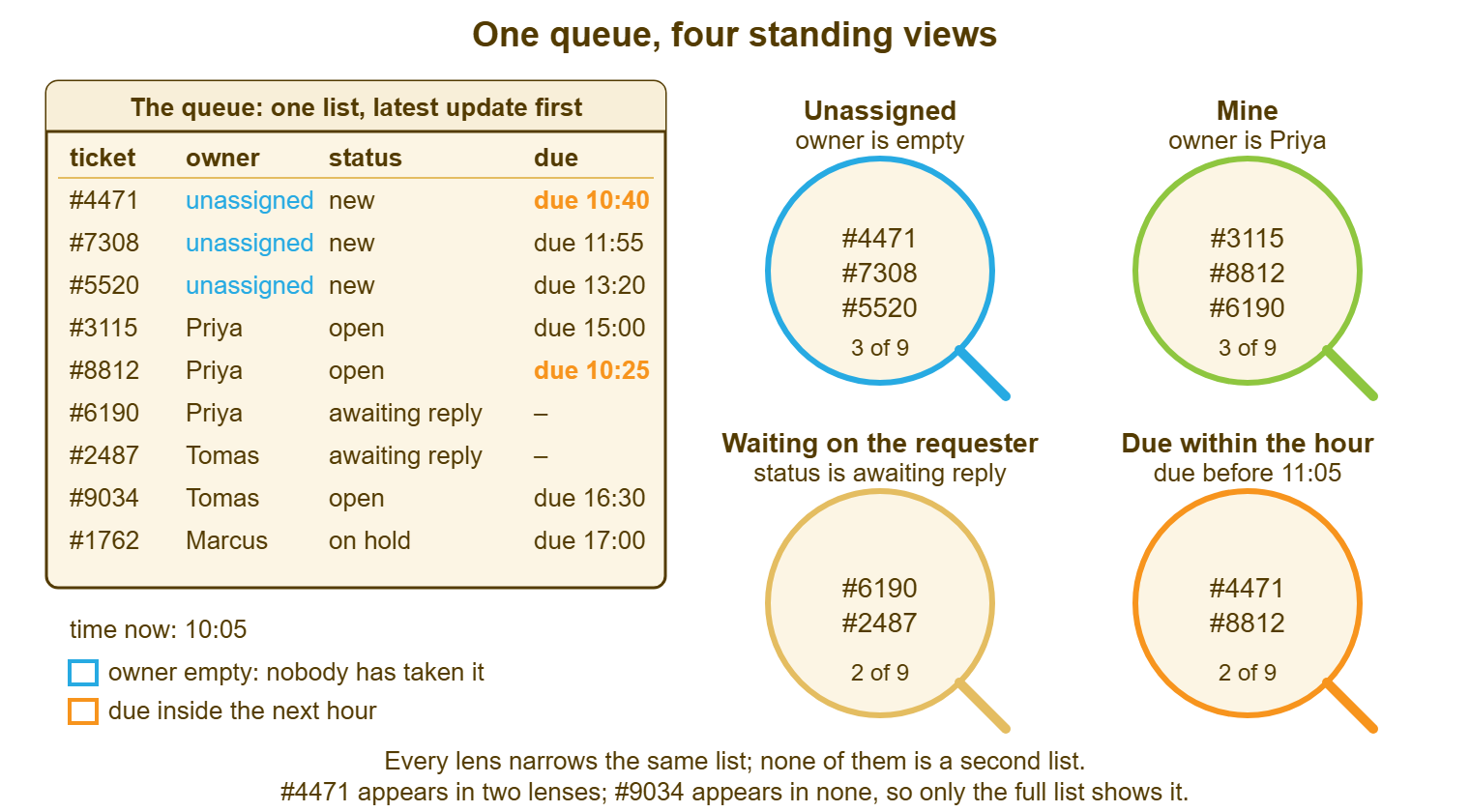
The table puts the same four views beside the question each answers, who reads it, and when. The "when" column is the part people skip, and it is the part that turns a saved filter into a habit. A view nobody reads on a schedule is a drawer with a nicer name.
| Standing view | What it shows | The question it answers | Who reads it | When |
|---|---|---|---|---|
| Unassigned | Open tickets with no owner, oldest first | What has nobody promised to do? | Everyone on the desk | On sitting down, after lunch, before leaving |
| Mine | Open tickets owned by the person looking | What have I promised? | Each technician | Between tickets, all day |
| Waiting on the requester | Open tickets whose next step is the requester's | What are we waiting for, and how long? | Each technician for their own; one person for all | Daily for own; weekly for all |
| Due soon and overdue | Open tickets due inside the hour or already past | What will break a promise today? | Everyone, with the desk lead watching the count | Hourly, or whenever the count is not zero |
| Oldest open (optional) | Everything open, oldest first | What has been waiting longest? | The desk lead | Weekly review |
Remember: every open ticket must appear in at least one standing view that somebody reads every working day. A ticket that appears in none is hidden, whatever the tool calls it.
Reading the Queue in Order
Read the views in a fixed order, because the order is where the judgment lives. Overdue first, because a broken promise costs more every minute it stays broken. Due soon second, because a warning sent at 10:40 turns a breach into a delay. Unassigned third, because a requester with no person is worse off than a requester with a slow one. Mine fourth, because that is where the actual work is. Waiting on the requester last, because those tickets are, by definition, not waiting on you, until they have been waiting long enough that they are. The whole read takes two minutes once the views exist. The order takes none.
Counts are enough for most of the read; you do not open tickets, you glance at numbers. The three numbers worth knowing by heart are the unassigned count, the age of the oldest unassigned ticket, and the overdue count. A desk that keeps those three small is a desk that is keeping its promises. And a desk that keeps them small without anybody chasing is a desk whose views are doing their job. A good dashboard shows the numbers without a click. Most tools can put counters for unassigned, overdue, due soon and waiting on the requester on the first screen. And some add a short list of what needs attention now, which is the same read in a different order. Whatever yours shows, the discipline of reading it is the part the tool cannot supply.
The two-minute read is a daily habit. And the daily habit is the first half of a routine that also has a weekly and a monthly part. The full routine, with a card to pin up, is in Queue Hygiene: A Weekly Routine. If you only ever do the daily part, you will still catch most of what goes wrong. If you only ever do the weekly part, you will catch it a week late, which on a help desk is the same as not catching it.
Setting Up the Views in Your Tool
Most ticketing tools call a saved narrowing of the list a view, a filter, a saved search, a queue or a board. They are all the same thing: a set of conditions applied to the one list, given a name. Build the four standing views on the first day the tool exists, name them exactly as the table does, and share them so everyone sees the same names. Do not let each technician build a private version. Private versions drift, and in six months "Unassigned" on one screen means something different from "Unassigned" on the next. Shared names are how a desk talks about the queue without pointing.
Check three things about your tool before you trust the views. First, does the list page, and if so how many pages does the full list run to? A view that is "page one of three" is a view with a hidden two thirds. Second, can the list be sorted by age, or only by last update? If only by last update, the oldest ticket is at the bottom, and you read the view from the bottom up once a week. Third, do the counts beside each view update live or only when you click? A stale count is a count you will stop trusting, correctly. None of these are deal-breakers. All of them change how you read.
Resist the view that would be nice. Every tool lets you build a view for tickets from finance, tickets about printers, or tickets raised on a Monday. You can build one for tickets with the word "urgent" in the subject. Each is harmless alone and each is a drawer. If a view does not answer a question somebody asks every day or every week, it does not need to exist. If such a view exists it will be where a ticket is when the requester comes to the counter. Four standing views, a fifth if the tool sorts by age, and nothing else until a real question demands one. Most "temporary" views are permanent. Treat them that way from the day you make them.
A Short War Story: The Eleven Lists at Meridian Parts
Before Dana, the Meridian Parts desk was run by Victor. He built a list for each of the three technicians, a list for each of six kinds of problem, and a list for the warehouse. He also built a list called "Later". There were eleven in all, each with its own name and its own colour. A ticket about the payroll export failing was filed in the "Finance apps" list, which was Lena's. It was filed in the week Lena moved to a project and stopped opening the tool. For six weeks nobody looked at "Finance apps", because it was Lena's, and Lena was busy. The ticket was found on the day payroll ran late, when the finance manager walked past the desk and into the managing director's office instead. The cost was an evening of overtime for three finance staff and a formal complaint. The desk also spent the next month being asked "has anyone looked at it?" about everything. Victor's handover notes described the ticket as in progress. The number of lists you keep is the number of places a ticket can be that nobody is looking.
The Standing Views Template
The template below is the set of views to build on day one, written so you can fill in what your tool calls each thing and who reads it. Print it, fill in the blanks, pin it next to the screen, and check it against the whole list once a week with the counting test. When the sum of the views no longer matches the list, you have found either a new kind of ticket or a new hiding place. Both are worth knowing about.
STANDING VIEWS — ONE PAGE
Desk: ______________________   Tool: ______________________   Set up by: ____________

THE ONE LIST
  Name of the full list in our tool: ______________________
  Does it page?  [ ] no  [ ] yes, ____ rows per page
  Can it sort by age?  [ ] yes  [ ] no (read from the bottom up)
  Open tickets in the full list right now: ____

VIEW 1: UNASSIGNED
  Condition: owner is empty, status is open
  Our tool calls it: ______________________
  Read by: everyone   When: on sitting down, after lunch, before leaving
  Target: oldest unassigned under ____ hours

VIEW 2: MINE
  Condition: owner is me, status is open
  Our tool calls it: ______________________
  Read by: each technician   When: between tickets

VIEW 3: WAITING ON THE REQUESTER
  Condition: status is ______________________ (our waiting status)
  Our tool calls it: ______________________
  Read by: own tickets daily, all tickets weekly by: ____________
  Follow up after: ____ working days

VIEW 4: DUE SOON AND OVERDUE
  Condition: due inside ____ minutes, or past due
  Our tool calls it: ______________________
  Read by: everyone   When: hourly, or whenever the count is not zero

VIEW 5 (OPTIONAL): OLDEST OPEN
  Condition: all open, oldest first
  Read by: desk lead   When: weekly review

THE COUNTING TEST (weekly)
  Full list: ____   Sum of views 1 to 4 (less overlaps): ____
  Difference: ____   Where are they? ______________________
Fill in the "our tool calls it" lines even when the name is the same as the heading. The day you change tools, that column is the migration plan. The counting test at the bottom is the one line that keeps the rest honest. Dana ran it on her second Monday at Meridian Parts: twenty-six in the full list, fourteen in the views, twelve in the gap. Marcus looked at the twelve and did not say "quiet week". The queue was finally telling the truth, which it had been trying to do all along. It just needed somebody to look at the whole of it.
Frequently Asked Questions
We have three technicians. Do we really need four views?
Should closed tickets be in the queue?
Our tool only sorts by last update, not by age. How do we find the oldest ticket?
Is it wrong for a technician to work mostly from "my tickets"?
How do I know whether to make a second queue for another team?
What is the single number to watch if I can only watch one?
From the QuerySolv team: we build self-hosted help desk software for Windows. QuerySolv runs as one Windows service on your own network. It takes requests by web form, e-mail, live chat, social messages and REST API. It is licensed once per installation rather than per agent per month. The free trial runs the full product for 30 days.