
SLA Timers and Escalation Triggers That Warn a Person
Friday, 16:50, at Acme. Marta, who has led the desk for a month, opens the team chat channel called "sla-alerts" for the first time. The finance director has just asked why nobody answered ticket 9120, a High priority payroll export failure raised at 09:15 on Wednesday. The channel has 1,140 unread messages. Every one of them is a breach notice. Ticket 9120's is message 1,097, posted at 11:15 on Wednesday, two hours after the ticket arrived. It reads exactly like the 1,096 above it. Every technician on the desk muted the channel within a fortnight of it being created, for the sensible reason that it never said anything they could act on. The timer worked perfectly. It told nobody.
An SLA timer is a clock the ticketing tool runs against each ticket, measuring how long the ticket has waited against a target that depends on its priority. An escalation trigger is the rule that fires when the clock reaches a point: a warning when the target is close, a flag when it is missed, an escalation when it stays missed. Together they are the third rung of the automation ladder, and the rung where the gap between "the tool did something" and "a person did something" is widest. This article is part of our Ticket Workflow Automation series. It is about closing that gap.
It covers what a timer measures and what it does not, then targets per priority, which are designed elsewhere and read here. Next come the three trigger points on one target, with a picture, and the warning before the breach. Then come what an automatic escalation should do and what it must never do, and why notifications go to a person rather than a channel. Next are what hold, business hours and weekends do to the clock, and testing the timers before trusting them. A short war story and the timer and trigger table to copy finish the article, in that order.
What a Timer Measures
A timer measures one interval on one ticket against one target. Nearly every tool offers two intervals. The response time runs from the ticket being created to the first reply from a person. The resolution time runs from creation to the ticket being marked resolved. Some tools add an update interval, the longest the requester should go without hearing something. Each interval has a target for each priority. A High ticket might have a response target of two business hours and a resolution target of one business day. A Low ticket has a response target of one business day and a resolution target of a week. The difference between the two intervals, and why promising the first is wiser than promising the second, is in Response vs Resolution Targets.
The timer does arithmetic and nothing else. It knows when the ticket was created, what its priority is, what the target for that priority is, and which hours count as business hours. From those it computes a due time and compares it with the clock. There is no judgement anywhere in the mechanism, which is what makes it safe to automate. Two technicians given the same ticket and the same targets will compute the same due time, every time, without discussion. The judgement lives in the targets, which were set by people, and in what happens when the due time passes, which is the rest of this article.
What a timer cannot measure is whether the ticket is being worked. A ticket with a reply at the one-hour mark and nothing since has met its response target and may be entirely stalled. A ticket with no reply yet may have a technician on the phone to the requester right now. The timer sees fields and times. It is a smoke detector, not a fire inspector, and the desk needs both.
Targets per Priority
The targets are set in the service level design, not in the automation. The article on Priority Tiers That Are Realistic is where the grid of priorities and times is worked out. The timer simply reads that grid. The one thing automation adds to the discussion is a sharp test of whether the grid is honest. Switch the timers on and count how many tickets breach in the first week. If it is most of them, the targets were aspirations rather than commitments, and the timer is about to generate a thousand notices that say so. Fix the targets before you fix the triggers. A trigger wired to an impossible target is a machine for producing noise.
Many tools, QuerySolv among them, let you set service-level targets per priority on a business-hours schedule. That means a ticket opened late on Friday is not already breached by the time anyone arrives on Monday. Confirm that the business hours in the tool match the hours the desk is actually staffed, including the half-day before a public holiday and the site that works a different shift. A clock set to hours nobody works will breach tickets at midnight and warn an empty room.
Keep the number of priorities small, because every priority needs its own row of targets and its own set of triggers, and every row is something to test. Three or four priorities with targets people can keep is a timer design a desk of five can run. Seven is a design that will be switched off by the second month, with a shrug.
The Three Trigger Points
On any one target there are three moments worth a trigger, and the picture below lays them along the clock. The first is the warning, when a fixed fraction of the time has gone, usually three quarters. The ticket's owner is told by name that the target is close. The second is the miss, when the due time passes. The ticket is flagged so that any list can find it and the desk lead is told in a note. The third is the escalation, when the ticket has stayed untouched for a further interval past the miss. An escalation flag is raised and a named deputy is told. Three points, three named people, three visible marks on the ticket. The two boxes beneath the timeline list what every trigger does and what no trigger ever does, and the second box is the one to pin above the desk.
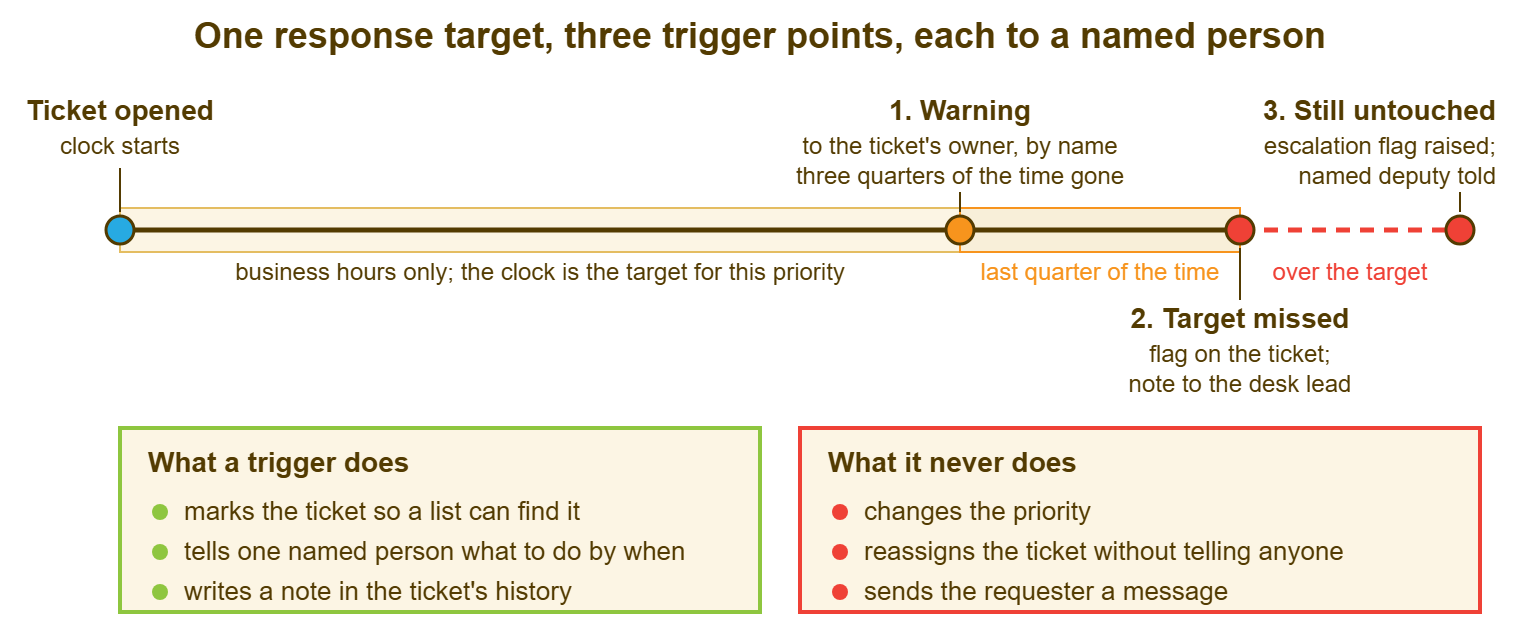
Three is enough. Desks that add a fourth trigger at half time and a fifth to a manager an hour after the miss find that the owner receives six messages about one ticket and stops reading any of them. Each trigger should cause a different person to do a different thing. If two triggers cause the same person to do the same thing, one of them is noise with a timestamp.
The Warning Before the Breach
The warning is the trigger that earns its keep, because it is the only one that fires while there is still time to meet the target. It goes to the ticket's owner, by name, through whatever reaches them fastest. It says three things: the ticket number, how much time is left, and what the target is. "Ticket 9120, High, response due in thirty minutes" is a warning. "An SLA event has occurred on a ticket in your queue" is a riddle, and the owner has not got time for riddles at twenty to eleven.
Set the warning at a fraction of the target rather than a fixed interval, so that it scales with the priority. Three quarters of the way works for most desks. On a two-hour target the owner hears at ninety minutes, with half an hour to send a reply. On a two-day target they hear with half a day to spare. A warning at a fixed fifteen minutes before every target is useless on a long target, where fifteen minutes is nothing, and panicky on a short one. One warning per target, not a countdown. The owner's correct response is one of two things: reply to the requester now, or hand the ticket to someone who can, with a note saying why.
If the ticket has no owner when the warning would fire, the warning goes to whoever is on triage duty. An unowned ticket near its target is a triage failure rather than a technician's. Many desks find that this one trigger, the unowned-and-close warning to the triager, removes most of their response breaches on its own. The others were never about slow technicians. They were about tickets nobody had picked up.
What an Automatic Escalation Should Do
Escalation, in the sense used in What Escalation Means, is getting a ticket in front of someone who can move it when its current owner cannot. An automatic escalation does the mechanical part of that: it marks the ticket and tells one named person. It writes a note in the ticket's history saying that it did so and why. That is the complete list. The person it tells then does the human part, which is to read the ticket, find out why it has stalled, and decide what should happen. The trigger raises the hand. It does not decide what the hand is for.
Marking the ticket matters because a flag is something a list can filter on and a note is not. Where the tool keeps an escalation flag separate from priority, as QuerySolv does, "this ticket has stalled" can be marked without touching the priority. In that case, the desk lead can open a list of escalated tickets that is distinct from the list of urgent ones. Where the tool has no such flag, a tag or a custom field does the same job. What matters is that "this ticket has stalled past its target" is a visible property of the ticket, found by a filter. It is not a message that scrolled past in a channel at eleven on Wednesday.
Telling one named person matters because escalation is a handover of attention, and attention cannot be handed to a group. The person is usually the desk lead for the first escalation and a named deputy for the second, taken from a rota so that leave does not break it. The message says the ticket number, the priority, how long past the target it is, and who owns it. It asks for one action: look at this ticket within an hour. Anything more is a report, and reports are for Monday.
What an Escalation Must Never Do
Never let a trigger change the priority. The tempting rule is "if a ticket breaches, raise its priority one level", and it is tempting because it feels like the system taking the breach seriously. What it does is make every old ticket Urgent by the end of the quarter. The priority field records how long tickets have been ignored rather than how much they matter. The one genuinely urgent ticket that arrived this morning is indistinguishable from the forty that have simply aged. Priority is a judgement about impact. Age is a fact about time. A trigger that converts one into the other has destroyed the field it was trying to defend.
Never let a trigger reassign a ticket silently. "If breached, reassign to the desk lead" sounds like escalation and is actually a disappearance. The ticket leaves the technician's list and arrives in the lead's list among forty others. Nobody tells the technician it has gone or the lead it has come. The technician assumes someone took it. The lead assumes it was always theirs. The ticket is now hidden in plain sight with a fresh owner who has not read it. Flag it, tell the lead, leave the owner in place until a person decides otherwise, and write the decision in the ticket.
Never let a trigger send the requester a message. A requester who receives "We're sorry your ticket has exceeded its target response time" has learned two things. The desk has missed a target, which they already knew. The desk has a machine that apologises for it, which they did not need to know. The apology, if there is one, comes from the person who picks the ticket up, in their own words, with what happens next. An automated apology is a confession with no plan attached. And never page the whole team for one ticket. A trigger that wakes six people to find out which one should act has arranged for all six to wait for someone else.
Remember: a trigger marks the ticket, tells one named person, and writes a note. It never changes the priority, never reassigns silently, and never messages the requester. Every breach notice goes to a name, not a channel.
Notifications to a Person, Not a Channel
A shared channel is where notifications go to be unread. The first week it is created, everyone looks at it. The second week, the people who are not on triage stop. By the end of the month it has been muted by everyone who could mute it. Nothing in it was addressed to them and most of it was not actionable by anyone. The one message that mattered is in there with the same formatting as the rest. Marta's 1,140 messages were not a failure of attention. They were the correct response to a channel that had never once said "you, do this, by then".
Address every notification to a named person who has agreed to act on it within a stated time. The owner for the warning. The desk lead for the miss. The deputy on the rota for the escalation. If the tool cannot address a person directly, it can usually send an e-mail. An e-mail to one person with the ticket number in the subject is addressed in a way a channel post never is. Where the tool offers a webhook or a REST API, a small script can turn a trigger into a direct message to the right name. That is more work to build and the only version that scales past three people.
Decide what happens when the named person is away before the first trigger fires, not after. The rota names a deputy, the deputy knows they are the deputy, and whoever maintains the rota changes the trigger's recipient when the lead goes on leave. A trigger that notifies someone on a beach has notified nobody with extra steps. If your tool can only send to one fixed recipient, make it a small distribution address with the lead and the deputy on it. Agree a rule about who acts. Two people who both believe the other has it is the oldest failure on the desk, and a notification does not cure it.
On Hold, Business Hours and the Clock
The clock's behaviour outside business hours and during a hold decides what the triggers will do to you on a Monday morning, and it is different in different tools. Nearly every tool stops the clock outside the business hours you set. So a High ticket opened at 16:55 on Friday with a two-hour target is due at about 10:00 on Monday, not at 18:55 on Friday. Test that it does. A clock that runs through the weekend will have breached and escalated every Friday ticket by Saturday lunchtime. Your deputy will have had a memorable weekend.
Whether the clock stops when a ticket is placed on hold or in a waiting status varies. Some tools stop it, some do not, and some stop it for one status and not another. Find out by putting a test ticket on hold over a weekend and reading its due time on Monday. The result changes your trigger design. If the clock stops on hold, a ticket waiting on the requester will never breach, so the triggers will never find it. In that case, you need the waiting-status sweep from Pending User vs Pending Vendor vs On Hold to catch tickets that have waited too long. If the clock runs through hold, a legitimately waiting ticket will breach and the lead will be told about tickets that are nobody's fault. In that case, the triggers should either exclude waiting statuses or the lead should read the flag as "check why" rather than "someone failed". Neither design is wrong. Not knowing which you have is.
Resolution timers and reopened tickets are the other edge. In most tools a reply from the requester on a resolved ticket reopens it, and whether the resolution clock then resumes or starts again depends on the tool. A ticket reopened twice may show a resolution time that is either enormous or misleadingly short, and a trigger wired to it may fire at odd moments. Read the reopened ticket as a person, not as a timer; the lessons breaches teach about targets, in SLA Breaches and What They Teach, apply to reopens with extra force.
Testing the Timers
Test every trigger with a real ticket at each priority before switching it on for the queue. Do the test on a Friday afternoon, because Friday afternoon is where the clock's edge cases live. Create a test ticket at each priority, note the due time the tool computes, and check it against the business hours by hand. Let one run to the warning and confirm that the right person received it, that the message named the ticket, and that it arrived once. Let one run past the target and confirm the flag appears in the filtered list and the lead's note arrived. Let one run to the escalation and confirm the deputy heard. Then put one on hold over the weekend and read its due time on Monday.
Then switch the triggers on for one priority only, usually High, for two weeks, and keep a tally. Count how many warnings fired, how many were acted on within the stated time, and how many misses were flagged. Count how many escalations were raised, and how many of those the deputy could do anything about. If the warnings are being acted on and the escalations are rare and useful, extend to the next priority. If the warnings are being ignored, the problem is not the trigger and more triggers will not fix it. It is either the target, which is unrealistic, or the recipient, who has not agreed to act. Two weeks on one priority tells you which.
- Create one test ticket per priority; check the computed due time against the business hours by hand.
- Run one to the warning; confirm the owner received it once, with the ticket number and time left.
- Run one past the target; confirm the flag shows in a filtered list and the lead's note arrived.
- Run one to the escalation; confirm the named deputy received it and could find the ticket.
- Put one on hold over a weekend; read the due time on Monday and write down what the clock did.
- Switch on for one priority for two weeks; tally warnings acted on, misses flagged, escalations raised.
- Extend to the next priority only when the warnings are being acted on.
A Short War Story: The Muted Channel at Westgate Removals
At Westgate Removals, the desk wired every timer event to a shared chat channel because it was the quickest thing the tool could do. Within a month the channel carried several hundred notices a week. It had been muted by all four technicians and the desk lead, a woman called Siobhan who had created it. On a Thursday afternoon the payroll clerk raised a High ticket because the export to the payroll bureau was failing. The technician who claimed it went home sick an hour later without handing it over. The warning, the breach and the escalation all posted to the channel in turn on Thursday and Friday, read by no one. The bureau's deadline passed on Friday at noon. Three hundred and ten drivers and packers were paid a day late the following week. The operations director, who learned about the channel for the first time at the review, asked why the desk had "built an alarm and then put it in a drawer". The fix took an afternoon. The warning now goes to the owner by direct message. The breach flags the ticket and e-mails Siobhan. The escalation e-mails whoever is deputy on the rota, and the channel was deleted. Siobhan's note at the end of the review said that a breach notice sent to a channel is a breach notice sent to nobody, and that the tool had never once pretended otherwise.
The Timer and Trigger Table
The table below is the whole timer and trigger design on one page, one row per priority. The first rows are a worked example from Acme after Marta rebuilt the triggers. The targets are hers and should be replaced by the ones from your own service level design. The important columns are the three recipients, each of which must be a name or a rota. The last column also matters. It is the same in every row because it is the rule. Fill in the blank rows, pin it beside the desk, and read it again whenever the rota changes.
| Priority | Response target (business hours) | Warning fires at | Warning to | On miss: flag and note to | Escalation after a further | Escalation flag and message to | Trigger never does |
|---|---|---|---|---|---|---|---|
| Urgent | 1 hour | 45 minutes | Owner by name; triager if unowned | Desk lead (Marta) | 30 minutes untouched | Deputy on the weekly rota | Change priority, reassign silently, message requester |
| High | 4 hours | 3 hours | Owner by name; triager if unowned | Desk lead (Marta) | 2 hours untouched | Deputy on the weekly rota | Change priority, reassign silently, message requester |
| Normal | 1 business day | 6 hours | Owner by name; triager if unowned | Desk lead (Marta) | 1 business day untouched | Deputy on the weekly rota | Change priority, reassign silently, message requester |
| Low | 3 business days | 2 business days | Owner by name; triager if unowned | Weekly aging report, not a trigger | none | none; reviewed in the weekly sweep | Change priority, reassign silently, message requester |
| ________ | ________ | ________ | ________________ | ________________ | ________ | ________________ | Change priority, reassign silently, message requester |
| ________ | ________ | ________ | ________________ | ________________ | ________ | ________________ | Change priority, reassign silently, message requester |
Marta's row for Low deliberately has no trigger beyond the warning, because a Low ticket a day late is a matter for the weekly aging review and not for anyone's phone. After two weeks on High alone, the desk had eleven warnings, nine acted on inside the half hour, two misses flagged, and one escalation. The deputy resolved that escalation by phoning the technician who had forgotten the ticket was theirs. The channel is gone. The finance director has not asked about a ticket since.
Frequently Asked Questions
Our tool can only send trigger notifications by e-mail. Is that good enough?
Should the resolution target have triggers as well as the response target?
What should a technician do when the warning fires and they cannot reply yet?
How do we stop the lead being told about breaches that are nobody's fault?
Is it ever right to let a trigger raise the priority?
How many breaches a month is normal once the triggers are working?
From the QuerySolv team: we build self-hosted help desk software for Windows. QuerySolv runs as one Windows service on your own network. It takes requests by web form, e-mail, live chat, social messages and REST API. It is licensed once per installation rather than per agent per month. The free trial runs the full product for 30 days.