
Missing Mail, Junk Folders and 'I Never Got It'
Friday, 15:50, at Acme. Tom in sales has phoned the desk rather than raised a ticket, which tells Ines how he feels about it. "The customer says they've sent the purchase order twice and I never got it. Our email is losing messages." Ines raises the ticket herself, asks who sent it, to which address and when, and has Tom open his junk folder while they talk. The first copy is there, sent on Tuesday. It was filed as junk because the customer's purchasing system sends from an address that has never written to Acme before. The second copy was sent to tom.harris instead of tom.harries and bounced back to the customer, who did not read the bounce. Nothing was lost. Two messages went to two places, and neither was Tom's inbox.
A missing-mail ticket is about one message, or one sender, that did not arrive while everything else did. It is different from "I cannot receive email". That is about the mailbox and belongs to the diagnostic order in Can't Send, Can't Receive. A missing message is almost never lost. It is in one of six places, each of which can be checked. The whole skill is checking them in the right order. It is also giving the honest answer when the last place turns out to be the sender's own outbox. This article is part of our Email Problems series.
It covers why mail is almost never lost, and the six places, in order of cost. Then come the junk folder, the rule the user forgot, and the filter's quarantine and the blocked sender. Next come the wrong address and the bounce that went to the sender, then the sender's outbox and the message never sent. It ends with the honest answer when it was the sender, a short war story, and the missing-mail checklist to copy, in that order.
Mail Is Almost Never Lost
Mail is almost never lost because every hop on its journey either keeps the message or sends it back, and nothing in between is allowed to shrug. The sender's client keeps it until the sender's mail service takes it. That service keeps it until the recipient's service accepts it. If the recipient's service refuses, the sender's service writes a bounce and sends that back. The recipient's service, having accepted the message, puts it somewhere: the inbox, the junk folder, a quarantine, or wherever a rule says. At every stage the message is in a definite place with a definite owner. "Lost" is the word people use for "in a place nobody looked", and the desk's job is to look.
The honest exceptions are rare and worth naming so that the desk does not reach for them first. A mail service can fail in the middle of accepting a message and neither keep it nor bounce it. That happens, but seldom, and never to one message from one sender while everything else arrives. A filter can discard a message silently without quarantining it, which some organisations configure for the most plainly dangerous mail. The desk should know whether its own does. Everything else is a place. Six of them, and the next section puts them in order.
The Six Places, Cheapest First
The six places are checked cheapest first, and cheapest means who can look and how long it takes, not how likely the place is. The user can look in the junk folder and at their rules in a minute, without the desk doing anything. The desk can look in the filter's quarantine and the blocked-sender lists in a few minutes. The sender's side covers the bounce, the outbox and whether the message was sent at all. It cannot be looked at from here and can only be asked about, which takes a message and a wait. So the order runs from the user's own mailbox outward to the sender's, and most tickets stop at the first or second place.
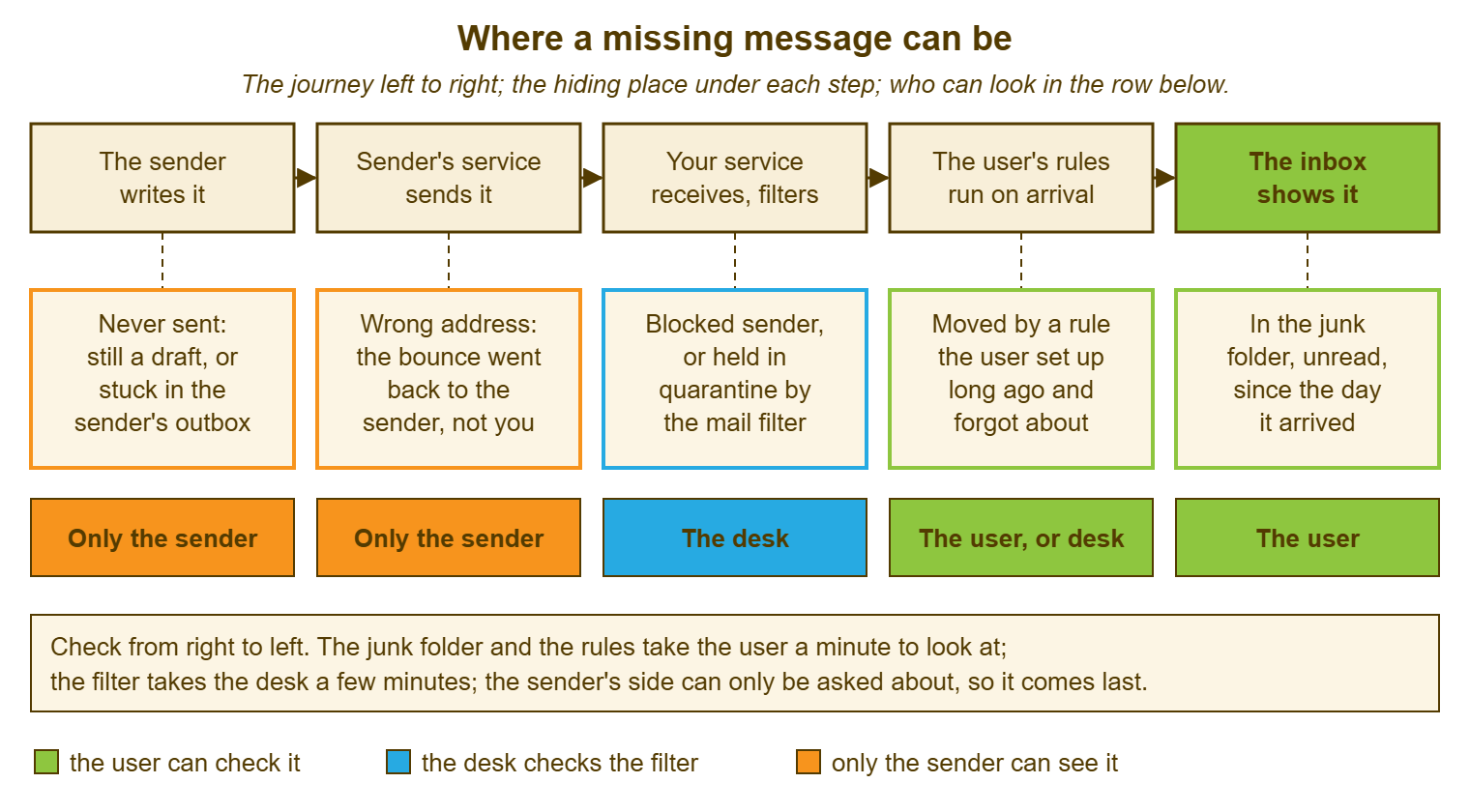
The picture below draws the six places along the message's journey from the sender's computer to the user's inbox. Under each step of the journey is the hiding place that step can produce. Under that is who can check it: the sender alone for the first two, the desk for the filter, and the user for the rule and the junk folder. The note at the bottom is the order: right to left, cheapest first, the sender last.
| Place | Who checks | How long | What you usually find |
|---|---|---|---|
| The junk folder | The user | A minute | A first-time sender, an automated system, or a newsletter the filter did not trust |
| A rule the user forgot | The user, or the desk with them | Two minutes | A rule from an old project moving mail by a word in the subject, or deleting it |
| The filter's quarantine or a block | The desk | Five minutes | A sender whose mail setup the filter distrusts, or an address someone blocked |
| A bounce that went to the sender | Only the sender | A message and a wait | A wrong or old address; the bounce says which |
| The sender's outbox | Only the sender | A message and a wait | A message that never left their client, often behind a large attachment |
| Never sent | Only the sender | A message and a wait | A draft, or a reply the sender composed in their head |
The Junk Folder
The junk folder is where the mail service puts messages its filter judged unwanted. It is the first place to look because it is where most missing messages are. The user can also look in it before the desk has finished reading the ticket. The filter's judgement is a guess, made in a fraction of a second. It uses the sender's address, the sender's mail setup, the words in the message and what other recipients did with similar mail. It is right most of the time, which is why nobody looks in the folder. It is wrong occasionally, which is why the folder exists instead of a bin. A first-time sender, an automated system with an odd address, or a newsletter can land there. So can a legitimate message that happens to contain the words of an unwelcome one. All of them land there sometimes.
Ask the user to sort the junk folder by date and look around the day the message was sent. Ask them to search it for the sender's address. Then, if the message is there, have them mark it as not junk. That moves it and teaches the filter a little. In that case, also have them add the sender to their own safe-sender list if the service has one. That prevents a repeat from that sender. That is the whole fix for most missing-mail tickets, and it takes the user under two minutes. The desk's part is to say so without a trace of "did you look in your junk folder?". The user has heard that tone before and it is why Tom phoned instead of raising a ticket.
An organisation-wide allowance for a sender, so that the filter trusts a supplier for everyone, is a different decision. It belongs to whoever owns the filter, because it weakens the filter for every mailbox at once. Ask for it when the sender is a known business partner whose mail lands in junk for several users, and write the business reason on the request. Do not promise a user that a sender will never go to junk again. The filter keeps learning, and the sender may change their setup. The honest promise is "for you, from that address, it should now arrive". The junk folder is also worth a weekly glance as a habit, which is a knowledge article rather than a ticket and belongs in Reducing Email Tickets.
The Rule the User Forgot
A rule is an instruction the user gave the mail service or the client to do something automatically with messages that match a condition. It may move them to a folder, mark them, forward them, or delete them. Rules are written during projects, for senders who were noisy once, for a manager who is no longer the manager. They go on running long after the reason for them has gone. A rule that moves everything with "invoice" in the subject to a folder called "Project Falcon" will do so for years. The user will raise a ticket about missing invoices with perfect sincerity, because they wrote the rule in another job. Rules do not expire. They do not even get bored.
Have the user open their list of rules and read it with the desk, looking for three things. First is any rule that moves messages by a word that could match the missing one. Next are any rule that deletes, and any rule that forwards mail anywhere. The first two explain most missing mail that was not in junk. Search the mailbox for the sender's address while the list is open. If the message turns up in a folder the user did not expect, the rule that put it there is usually one line above or below. Delete or fix the rule with the user, and write its text in the ticket so that the next technician does not rediscover it.
The third thing, the rule that forwards, is where the ticket may stop being a mail ticket. A forwarding rule the user wrote for themselves, to a personal address during leave, is a policy conversation at most. A rule the user did not write, forwarding or deleting mail, is a sign that someone else has been in the mailbox. In that case, the desk stops the missing-mail work at that moment and changes nothing in the rules list so that the evidence survives. It raises a security ticket under the flow in Phishing Reports and Security Tickets. The user's missing message is still missing; it is no longer the most important thing about the mailbox.
The Filter's Quarantine and the Blocked Sender
The quarantine is the holding area where the organisation's mail filter keeps messages it judged too risky to deliver even to the junk folder. It is the desk's place to look, not the user's. The filter writes a log of what it held and why, searchable by sender, recipient and date. Whoever runs the mail service can read it and release a message that was held wrongly. Search it for the sender's address around the day the message was sent, and if the message is there, read the reason before releasing it. The reason is usually one of these things. The sender's mail setup does not match what the filter expects of that sender's organisation. Or the message carried an attachment of a type the filter holds on principle. Or the sender's service has a poor reputation that week.
Releasing a message is a judgement. The desk should make it with the reason in front of it rather than on the user's say-so. The user wants the message and the filter's job is to doubt it. A purchase order from a known customer, held because that customer's mail setup is misconfigured, is released and the customer is told, so that their IT can fix it. Most are grateful and a few are surprised to learn they have been landing in quarantines across the country. A message with an attachment the filter holds on principle is not released on the user's assurance that it is fine. The user cannot know that. In that case, the desk asks the sender for the file another way. That line is a security line and the desk holds it.
The blocked sender is the simpler case. It is an address or a whole organisation that someone, the user or the desk, blocked once. Mail from it has been going nowhere ever since. Check the user's own blocked list and the organisation's, and expect the entry to have been reasonable at the time. The commonest version is the user who blocked a sender's automated address during a noisy week and now needs the same system's output. The lists, like rules, remember everything and explain nothing.
The Wrong Address and the Bounce That Went to the Sender
When the message is in none of the three places on the user's side of the line, the question moves to the sender. The first thing to ask is whether anything came back to them. A message sent to an address that does not exist, or that belonged to someone who has left, or that has one letter wrong, produces a bounce. The bounce goes to the sender, not to the person who was supposed to receive it. From the user's chair this looks exactly like a message that vanished. From the sender's chair it looks like an automated message with a frightening subject line, which they deleted. Ask for it, forwarded whole, and the bounce will say which address was tried and why it failed.
The wrong address has three common forms. The typo, like tom.harris for tom.harries, which the bounce reveals in one line. The old address, from a sender's address book that was last updated when the user had a different surname or the organisation a different domain. And the leaver's address, where the sender wrote to the person who used to hold the role. What happens to a leaver's address is decided in the offboarding process, and the mail desk's part is only to tell the sender the current one. In each case the message can be resent in a minute. The fix that lasts is the sender updating their address book, which the desk can ask for and cannot do.
Ask the user for the address the sender used, character by character, before asking the sender for anything. Users quote their own address from memory and senders copy it from wherever they first got it. The two are not always the same address. If the user cannot say what the sender used, the bounce can.
The Sender's Outbox and the Message Never Sent
The last two places are the sender's outbox and nowhere. They are more common than any desk would guess from the confidence of the person saying "I definitely sent it". A message in the sender's outbox never left their client. That may be because their connection dropped or their client was not signed in. Or a large attachment ahead of it in the queue has been failing for a day and holding everything behind it. The sender's own desk can find that in a minute with the diagnostic order from the second article in this series. From this side it can only be asked about. The question is "could you check your outbox and your sent items for it?". That is a question the sender can answer without feeling accused.
The message never sent is the draft, or the reply that was composed and closed without sending. It is the attachment that was meant to go with a message that went without it. It is also the message the sender remembers writing because they thought about it carefully. None of this is anyone's fault and all of it is ordinary. The way to raise it is to ask for the date and time from the sender's sent items. That produces a time, in which case the message exists and the bounce or outbox question is next. Or it produces a pause, in which case the ticket is about to close. People do not enjoy discovering that they did not send the thing. They enjoy it rather more than discovering it a week later.
The Honest Answer When It Was the Sender
When the message turns out to have been in the sender's outbox, or addressed wrongly, or never sent, the user needs an answer. It must be one they can give the sender without a row, and the desk writes it for them. The answer states what was found, what the sender can do, and what would prevent a repeat, in three sentences, with no blame in any of them. "The message was sent to tom.harris rather than tom.harries, and the automatic reply saying so went back to your purchasing system. Resending it to the correct address will work straight away. Updating the address in your system will stop it happening again." The sender's organisation is not told it was careless, because it was not. It had an old address, which is the commonest thing in the world.
Write the three sentences so that the user can forward them unchanged, because the user will otherwise paraphrase. The paraphrase is where "your email is broken" becomes "their IT says you did it wrong". The craft of saying a technical thing in three sentences a non-technical reader will accept is in The Three-Sentence Explanation. The missing-mail reply is a daily use for it. The desk's own tone matters too. Take a resolution that says "sender error" in the note. In the reply it says "it looks like the message did not leave their outbox; here is a note you can send them". It has told the truth twice, once for the record and once for the relationship.
Resist the urge to be right at length. The user does not need to know how bounces work, and the sender does not need to know what quarantine is. Both need the message to arrive, which it now will. If the same sender's mail goes missing again and the user replies to the resolved ticket to say so, that reply reopens the ticket. That is how QuerySolv and many other tools work. A reopened missing-mail ticket is a sign of a rule or a filter decision rather than a one-off. That changes where the desk looks first.
Remember: a missing message is in one of six places. Check the user's junk folder and rules, then the desk's quarantine and block lists, then the sender's bounce, outbox and sent items. Stop at the first place it turns up. Write where it was in the ticket, and give the user an honest three-sentence note they can forward.
A Short War Story: The Valuation Reports at Bluewater Bank
Niall, a mortgage adviser at Bluewater Bank, raised a ticket saying that valuation reports from a surveying firm had stopped arriving. He had been chasing the firm for three weeks while two applications waited on reports that, the firm insisted, had been sent. The desk asked who sent them, to which address and when. It had Niall open his junk folder, which held nothing, and then his rules. The rules held one he had written during a system migration two jobs ago in the same bank. It moved everything with the word "valuation" in the subject into a folder named after a project that had ended. Sixty-one reports were in the folder, the oldest from the week the rule was written. The two applications had missed a lender's deadline by four days. The cost was two customers kept waiting, a fortnight of Niall's chasing, and perhaps nine hours between him and the surveying firm's office. It also cost an apology to the firm, which had been telling the truth throughout. The desk deleted the rule with Niall, wrote its text in the ticket, and added a line to the missing-mail checklist that reads "rules before quarantine, every time". The lesson Niall himself put in his reply was the better one. The message you are certain was never sent is usually in a folder you made.
The Missing-Mail Checklist
The checklist below is the six places in the order of cost, split into the user's side, the desk's side and the sender's side. The outcome is at the bottom so that the ticket records where the message was found and what stops it recurring. Work it from the top on every missing-mail ticket, with the user on the phone for the first section if they will stay. Stop at the first box that finds the message. The one line in capitals is the one that turns a mail ticket into a security ticket, and it is not optional.
MISSING-MAIL CHECKLIST — ONE MESSAGE
Ticket: ________   Requester: ____________________
Sender: ____________________   Sent to: ____________@____________
Sent on: ________ at ______   Sender is: inside / outside the organisation

THE USER'S SIDE, in order, a minute each
  [ ] Junk folder, sorted by date around the day it was sent
  [ ] Junk folder searched for the sender's address
  [ ] Deleted items, in case it was swiped away on the phone
  [ ] Whole mailbox searched for the sender's address
  [ ] Rules list read: anything that moves, deletes or forwards
      A RULE THE USER DID NOT CREATE: STOP. CHANGE NOTHING. RAISE A SECURITY TICKET.
  [ ] Other folders: a rule's target, or filed by hand and forgotten

THE DESK'S SIDE
  [ ] Filter quarantine and log, searched by sender and date; reason read before release
  [ ] Blocked-sender lists, the user's own and the organisation's
  [ ] The address the sender used, character by character: current, spelled right, not a leaver's
  [ ] Message tracking on the mail service, where it exists: did the message arrive at all

THE SENDER'S SIDE, asked, not checked
  [ ] Did an automatic reply come back: ask for it forwarded whole
  [ ] Is the message in their outbox or drafts
  [ ] Date and time from their sent items

OUTCOME
  Found in: ____________________   Cause: ______________________________________
  Fix applied: ____________________________   Rule or block removed: yes / no / n.a.
  Three-sentence note sent to the requester to forward: yes / no
  Prevents a repeat: yes / no   If no, what would: ______________________________
Tom's ticket at Acme closed on the first and the third sections. One copy was in junk, marked as not junk with the customer's purchasing address added as a safe sender. One copy bounced for a typo, with a three-sentence note for the customer that Tom forwarded unchanged. Ines wrote "found in: junk; second copy: wrong address, bounce with sender" in the outcome. That took fifteen seconds and will save the next technician the phone call. The purchase order was in Tom's inbox by four. Acme's email had not lost anything, and had not, for the record, been broken at any point in the afternoon.
Frequently Asked Questions
The user says they have already checked the junk folder. Do I ask again?
Can the desk see whether a message ever reached our mail service?
How do I ask a customer or supplier for the bounce without sounding as if I am blaming them?
Should I release everything in quarantine that a user asks for?
What if I find a forwarding rule the user did not create?
The same sender's mail keeps going to junk for one user. What is the lasting fix?
From the QuerySolv team: we build self-hosted help desk software for Windows. QuerySolv runs as one Windows service on your own network. It takes requests by web form, e-mail, live chat, social messages and REST API. It is licensed once per installation rather than per agent per month. The free trial runs the full product for 30 days.