
How a Mailbox Becomes a Queue: E-mail to Ticket in Plain Words
Monday, 08:40, at Redbrook Engineering. Marcus leaves on Friday, and this morning he is handing Nadia the thing he has run for six years. It is a shared mailbox called IT Help, open on his second screen. It holds 1,380 messages. Some are flagged red, some orange, some blue. Red means Marcus is on it, orange means Dev is on it, blue means "waiting on the user". And the ones with no flag are either done or new, depending. There are folders named after people who no longer work there. "Unread means not done," Marcus says, "except Dev reads everything on his phone, so his are read even when they're not." Nadia asks how many of the 1,380 are open. Marcus looks at the screen for a while and says it is hard to say.
It is hard to say because a mailbox cannot say it. E-mail-to-ticket is the arrangement in which the ticketing tool, rather than a person, reads the desk's mailbox. Every new message becomes a ticket with a number. Every reply to that message is attached to the same ticket. Every answer the desk sends goes out from the desk's address rather than from a technician's own. The mailbox stops being the place where the work lives and becomes a door the work comes through. This article is part of our Email-to-Ticket Done Right series. And it is the first one, about the plain mechanics, written for the reader who has just been handed the second screen.
It covers why a shared inbox is not a queue, then the five steps a message goes through, with a picture. We cover who reads the mailbox and who must not, and what the ticket takes from the message. Next we cover why replies come from the desk and not from you, and one mailbox per department. We cover moving people off the old addresses and what changes for the requester. A short war story follows, then the mailbox setup checklist to copy, in that order.
Why a Shared Inbox Is Not a Queue
A shared inbox has exactly one piece of state per message, and it is the read flag. Read or unread; that is all the mailbox knows. The desk needs to know everything else about a request: who owns it, what has been done, whether the requester has been answered, how long it has waited. All that is carried in people's heads, in colours that mean something to two people, and in folders that mean something to one. The mailbox is not lying about any of this. It was never asked to track work. It was asked to hold letters, and it holds them beautifully.
The failures follow from the single flag. Two technicians answer the same message because each saw it unread. A message is marked read by someone glancing at it on a phone and is never seen again. A requester replies with "any update?" and the reply lands as a new unread message at the top. It is three screens away from the original at the bottom. When Marcus leaves, the red flags leave with him, and nobody can say which of his were finished. A queue, by contrast, is a list of pieces of work that can be sorted and counted. Each has an owner, a status, a history and an age. The argument for why a desk needs one, rather than a very organised inbox, is made in What a Queue Is For. The point here is that a mailbox can feed a queue but can never be one.
The hardest part of the change is not technical. It is that the shared inbox feels like control, because everyone can see everything. The ticket queue feels like a layer in the way, because now there is a number and a form. The feeling is backwards. The inbox shows everyone the same 1,380 messages and tells nobody anything. The queue shows each person their own nine tickets and tells the lead the age of the oldest. One of these is control. It is not the one with the colours.
The Five Steps, in Order
Every message that reaches the desk address goes through the same five steps, in every tool I have set up. Knowing the steps is most of knowing how to fix the pipeline when it breaks. First, the message arrives in the desk's mailbox, exactly as it would in anyone's. Second, it is screened. Bounces, out-of-office replies, bulk mail and junk are blocked outright or held for a person to look at. Only what looks like a request goes on. Third, it is matched. The tool looks for a ticket number in the subject or a hidden reference in the message headers. If it finds one the message joins that ticket as a reply. If it finds none, this is a new request. Fourth, the ticket is created or updated in the queue, with a number, a requester, a title and the message as its first entry. Fifth, a reply goes out from the desk's address, carrying the ticket number in its subject. That way, the requester's answer comes back in at step one and threads onto the same ticket.
The picture below puts the five steps on one strip. The two outcomes of screening hang off step two, and the two outcomes of matching hang off step three. The dashed line along the bottom makes the whole thing a conversation rather than a one-way chute. Read it left to right once, then follow the dashed line back to the start. The strip is the entire mechanism. Every later article in this series is about one box on it going wrong.
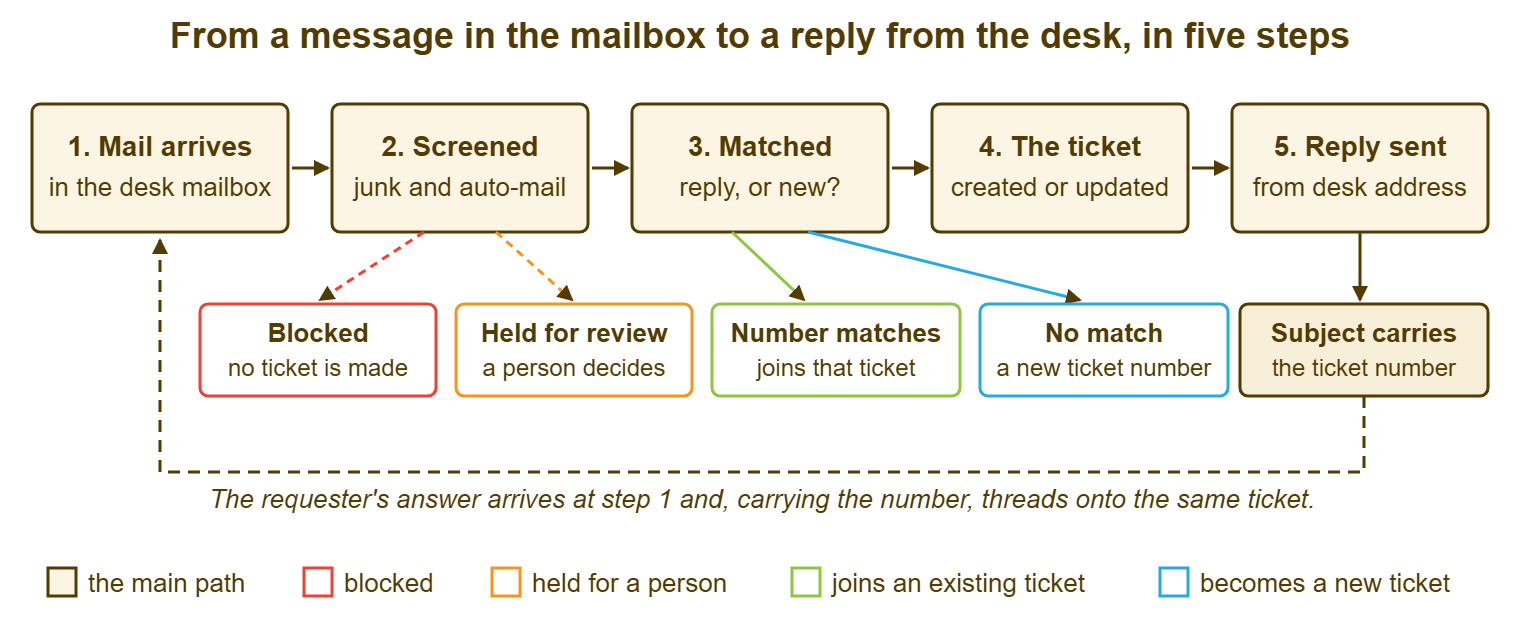
Screening and matching each have their own article, because each has its own ways of failing. See Spam, Junk and the Review Queue for step two, and Threading Replies to the Right Ticket for step three. The rest of this article is about the boxes at either end and in the middle. It covers who reads the mailbox, what the ticket takes from the message, and where the reply comes from.
Step One: The Tool Reads the Mailbox, and Nobody Else Does
The ticketing tool reads the desk's mailbox the way a mail program on a laptop would. It is given the mailbox's address and credentials, connects to the mail server, and fetches whatever is new. It does so on a schedule, over and over, for as long as it runs. Some tools can also receive mail directly, acting as the mail server for the desk's address. But most small desks give the tool an ordinary mailbox on the organisation's ordinary mail system and let it read that. What the tool does with a message after reading it varies. Some mark it read and leave it, some move it to a processed folder, some delete it once the ticket exists. Find out which yours does, because it decides whether the mailbox is a backup of the queue or an empty room.
The mailbox belongs to the tool, and the rule that follows is the most important one in this article: nobody else reads it. Not the lead "just to keep an eye", not a technician on a phone, not a mail program left open on the old shared screen out of habit. Two readers on one mailbox is the shared-inbox failure wearing a new badge. A person who opens a message before the tool does may mark it read. Some tools only fetch unread messages. In that case, the request is now sitting in a mailbox the tool believes is empty. A person who drags a message into a folder has hidden it from the tool entirely. The desk's mailbox is a letterbox the tool empties, and a letterbox with two people's hands in it loses letters.
Give the mailbox its own account, used for nothing else, and treat that account like a service account rather than a person's. Its password does not expire on the schedule that people's passwords do. If the organisation insists it must, the expiry date is in the desk's calendar with a reminder two weeks before. Its credentials are stored in the tool and in the desk's password store, and nowhere else. It is not a technician's own mailbox with a forwarding rule; it is not the lead's. It is not the old shared mailbox with Marcus's flags still in it, unless that mailbox has first been emptied of everything that is not a live request. The account that reads the mailbox is the single point on which every e-mailed ticket depends. And the afternoon its password expires is the afternoon the desk goes quiet without noticing, which is the subject of Testing the Mail Pipeline Before You Trust It.
Step Four: What the Ticket Takes From the Message
A new ticket is built from the parts of the message, and each part lands in a field. The sender's address becomes the requester, the person the ticket belongs to and the person every reply will go to. The subject line becomes the ticket's title. The body becomes the first entry in the ticket's history, usually with the quoted text of any earlier messages trailing below it. Attachments are carried across and stored with the ticket. The time the message was sent, or the time the tool read it, becomes the ticket's opening time. The tool issues a ticket number, a short unique identifier that everything else will refer to from now on. Anyone copied on the message may become a watcher who receives updates, in tools that have the idea; check yours.
Most of that mapping is right most of the time, and the exceptions are where triage earns its keep. The sender is not always the person with the problem. A manager forwarding a colleague's complaint becomes the requester, and the colleague becomes a name three paragraphs down. The subject is rarely a summary: "Re: Fwd: Monday" tells the queue nothing. And the queue will display it for the rest of the ticket's life. The body may be two lines above forty lines of quoted history, in which the real question sits. The triager's fixes for each, rewriting the subject, correcting the requester, reading to the bottom, belong to Triage by Channel. The point of the table below is to know which field each part of the message lands in. That way, you know which field to correct.
| Part of the message | Where it lands on the ticket | What to check at first touch |
|---|---|---|
| From address | Requester | Is the sender the person with the problem? If not, correct it before the first reply. |
| To address | Department, through the mailbox it arrived in | Did it reach the right department's address? Move it if not. |
| Cc addresses | Watchers, in tools that have them | Should these people receive every update? Remove any distribution list. |
| Subject | Ticket title | Rewrite it as the one-line summary a stranger could triage from. |
| Body | First entry in the ticket's history | Read to the bottom; the question may be under the quoted text. |
| Quoted earlier messages | Part of the body | Is this really a reply to an older ticket that failed to thread? |
| Attachments | Files attached to the ticket | Did they all arrive? Is one of them the whole ticket? |
| Sent time | Opening time, or the time the tool read it | Does your tool use the send time or the read time? The response clock cares. |
| Signature block | Part of the body | The phone number and site are often here and nowhere else. |
The number is the part the requester will remember, so it should appear in the first message the desk sends back. Most tools send an automatic acknowledgment when a new ticket is created from mail: "We have received your request; its number is 5123; reply to this message to add to it." That acknowledgment is the hinge of the whole mechanism. It puts the number into a subject line the requester will reply to, and the reply then threads. The acknowledgment is also, as Loops and Auto-Reply Storms explains at length, the message most capable of talking to another automatic message forever. Send it once per new ticket, never in answer to a reply, and never to a message that was itself automatic. What it should say is the subject of Ticket Acknowledgement Templates.
Step Five: Replies Come From the Desk, Not From You
When a technician answers a ticket, the answer leaves the building as a message from the desk's address, with the ticket number in the subject. That single fact is what keeps the conversation in one place. The requester sees a message from helpdesk@example.com and replies to it. And the reply arrives in the mailbox the tool reads, carrying the number, and lands on the ticket. Had the technician answered from their own mailbox, the requester would reply to the technician. The reply would then land in a mailbox the tool never sees. The ticket would show the desk's last message as the end of the story. Every reply from a personal mailbox is a small door out of the queue, and requesters, reasonably, walk through it.
This is also where the two kinds of writing on a ticket part company. A public reply is the message that goes to the requester, by mail, from the desk's address. An internal note is written on the ticket for other technicians and never leaves it. The requester does not receive it and cannot see it. The distinction is only safe when the mail pipeline respects it. So the first test of any new setup is to write a note on a test ticket and confirm that no message went out. If you run QuerySolv, both kinds sit on the ticket's history in order, with every reply threaded onto it. In that setup, the mailbox is simply the road the public half travels. The habit, in any tool, is the same. Write to the requester from the ticket, write to colleagues in a note, and never open your own mailbox to do either.
The technician's own address stops being a support channel on the day the pipeline goes live. And it takes about a month to make that true. People who have Dev's address will keep using it, because Dev was fast once, and Dev will keep answering, because he is kind. The fix is not to stop answering. It is for Dev to forward the message into the desk address. He replies from the resulting ticket with "I've opened ticket 5140 for this so it doesn't get lost". He lets the requester discover that the ticket was answered faster than the direct message used to be. The shape of this problem, a shadow channel attached to a helpful person, is one of the seven in The Seven Ways Support Quietly Fails. E-mail is where it lives most comfortably.
One Mailbox Per Department
Each department that handles tickets gets its own address, and each address feeds exactly one department's queue. IT has helpdesk@example.com; facilities has facilities@example.com; HR, if HR takes requests through the desk, has its own. The address a requester chose is the most reliable routing signal the desk will ever get. That is because the requester chose it with the problem in mind. A message to the facilities address is about the building far more often than any keyword rule could tell you. Most tools support this directly: a department has a mailbox the tool reads and a sending identity it replies from. That way, a facilities ticket is answered from the facilities address and the thread stays whole. Departments with their own mailbox, form and service levels are a durable part of how QuerySolv is organised. The same shape exists in most tools under one name or another.
The rule has two halves and both bite. One department, one mailbox: a department without its own address has to share one and sort by hand, which is triage pretending to be routing. One mailbox, one department: an address that feeds two queues puts every message in front of two teams, each of which assumes the other has it. What happens next, the catch-all department, the misrouted ticket and how to move it, and how to count misroutes, is in Routing Tickets by Department, Form and Mailbox. The mail-side job is simpler: one mailbox account per department. Each is read by the tool and by nobody else. Each has its own sending identity and its own line on the setup checklist.
Resist the second mailbox for the same department. "Can we have urgent@example.com for the important ones?" is asked within the first month, and the answer is no. The requester's opinion of urgency is not the desk's priority. Two addresses for one queue means two acknowledgments, two sending identities and twice the testing for no routing gain. Priority is a decision the desk makes after reading the ticket, and who makes it is settled in Who Decides the Priority. An address called urgent is a priority the requester sets by choosing a word. Everyone will choose the word.
Remember: use one mailbox account per department, read by the ticketing tool and by nobody else. It has its own sending identity and a password that will not silently expire. Nothing else forwards into it or reads out of it. Everything else in the mail pipeline rests on that.
Moving People Off the Old Addresses
The pipeline is live when the tool is reading the mailbox; the desk is live when people stop writing to Marcus. Between the two is a fortnight of deliberate work. Skipping it is how a desk ends up with a ticket queue and a shared inbox running side by side for a year. Start by listing every address that currently receives requests. Include the shared mailbox, each technician's own address, the old alias on the posters, the one in the staff handbook that nobody updated. Each one gets a fate. It becomes the desk's mailbox, or it forwards into it. Or it is answered for two weeks with a short message pointing at the new address and then stops being used for support.
Forwarders are the honest route for the old addresses and the dishonest route for people's own. The old alias on the posters should forward into the department's mailbox and nowhere else, so that a message to it becomes a ticket without the requester learning anything new. A technician's own address should not forward, because then every personal message Dev receives becomes a ticket, including the one from his dentist. Dev forwards by hand, one message at a time, with the requester's address kept visible. That way, the ticket's requester can be corrected to the right person. Dev replies from the ticket. After a month, most of his correspondents have replied to an acknowledgment at least once, have the desk's address in their recent list, and use it without thinking. The ones who do not are a short list, and a short list can be visited.
Announce the change once, briefly, to everyone, and say what stays the same before what changes. "You can still e-mail IT. The address is helpdesk@example.com, you will get a reply with a ticket number, and replying to that reply adds to your request." Three sentences, no diagram. The temptation is to send a page explaining tickets, statuses and service levels. And the page will be read by the four people who were already going to do it right. The announcement that works is the acknowledgment itself, arriving within a minute of the first message, with a number in it. That is the tutorial, and it teaches one person at a time, exactly when they need it.
What Changes for the Requester
Almost nothing changes for the requester, and the setup should be judged by how little they notice. They still write an e-mail. They still get an answer by e-mail. There are two new things. One is a number in the subject line of the reply. The other is the quiet expectation that they reply to that message rather than start a fresh one. Everything else, the queue, the owner, the priority, the status, is the desk's business and stays behind the address. A requester who has to learn the desk's vocabulary to send an e-mail has been handed a form with extra steps.
The one habit worth teaching is to reply rather than start again, and the acknowledgment does most of the teaching if its wording is right. "Reply to this message to add information" is an instruction a person can follow. "Please do not change the subject line" is a request the requester will forget. A tool that depends on the subject line alone will punish them for forgetting. Most tools also match replies by hidden message headers, so a requester who clears the subject is usually still threaded. The forward by a third party is the case that loses both, and the threading article deals with it. Tell requesters the one habit, forgive them when they break it, and merge the second ticket into the first without comment. The number exists for the desk's convenience, not as a test the requester must pass.
Set expectations in the acknowledgment and nowhere else, and keep them to what the desk will always meet. The acknowledgment says the request was received and gives the number. It may say when a person will first reply, if the desk is sure of that. It does not promise a fix time, name a technician, or describe the priority. An acknowledgment that says "a technician will respond within one working hour" is a promise made by a machine. It speaks on behalf of people who have not read the ticket yet. Promise only the receipt. The people will promise the rest, having read it, in the first real reply.
A Short War Story: The Four Colours of Flag at Tollgate Foods
Tollgate Foods ran IT support for three factories from a shared mailbox read by two technicians, Joel and Priya. They used four colours of flag to show who had what. A night-shift supervisor called Ruth e-mailed about a failed handheld barcode scanner on the loading dock at 22:10 on a Tuesday. Joel flagged it orange on his phone at breakfast, meaning his. Priya flagged it red at nine, meaning hers, because the phone had not yet synchronised and she saw it unflagged. Each saw the other's colour an hour later and assumed the other had taken it. Ruth's two follow-ups over the next fortnight landed unread at the top of a mailbox holding nine hundred messages. For sixteen night shifts the dock counted pallets by hand and keyed them in the next morning. Two deliveries went out short, which the customer noticed before Tollgate did. The scanner took eleven minutes to replace once anyone opened the message. Two technicians, four colours of flag and a mailbox is a system that can lose a request while both people believe they have it.
The Mailbox Setup Checklist
The checklist below is the one-page record of a department's mail pipeline. It is filled in once when the pipeline is set up and read again whenever anything about mail is changed. Fill in one per department. The first block is the mailbox account itself; the second is what the tool does with it. The third is the identities and addresses around it. The fourth is the old addresses and their fates; the last is the handful of tests to run before telling anyone. Keep the completed sheet with the desk's other setup records. It answers the question "what account reads the facilities mailbox and when does its password expire". That question is always asked at the worst possible time.
MAILBOX SETUP — ONE PAGE PER DEPARTMENT
Department: ______________   Set up by: ______________   Date: ________

THE MAILBOX ACCOUNT
  [ ] Address: ____________________@example.com
  [ ] Dedicated account, used for nothing else, not a person's
  [ ] Password stored in the tool and in the desk password store only
  [ ] Password expiry:  [ ] never   [ ] on ________ (reminder set two weeks before)
  [ ] Mailbox storage limit known: ________   Who is told when it fills: __________
  [ ] No mail program, phone or person reads this mailbox

WHAT THE TOOL DOES WITH IT
  [ ] Tool reads the mailbox: confirmed with a test message
  [ ] After reading, messages are:  [ ] marked read  [ ] moved to ________  [ ] deleted
  [ ] Processed folder, if any, is emptied by: ____________  every ________
  [ ] Acknowledgment sent for new tickets only, never for replies
  [ ] Acknowledgment includes the ticket number and "reply to add to this request"
  [ ] Acknowledgment promises receipt only; no fix time, no technician name

IDENTITIES AND ADDRESSES
  [ ] Replies go out from: ____________________@example.com (the department address)
  [ ] Display name on outgoing mail: ______________________
  [ ] Internal notes confirmed NOT to send mail: tested on ticket ________
  [ ] This address feeds exactly one department; no other address feeds it

OLD ADDRESSES AND THEIR FATES
  Address                          Fate (forward / announce and retire / keep)   Done
  ______________________________   ___________________________________________   [ ]
  ______________________________   ___________________________________________   [ ]
  ______________________________   ___________________________________________   [ ]
  [ ] Technicians' own addresses: forward by hand into the desk, reply from the ticket
  [ ] Announcement sent (three sentences) on ________

FIRST TESTS BEFORE ANYONE IS TOLD
  [ ] New message from inside becomes a ticket; acknowledgment received with number
  [ ] New message from an outside address becomes a ticket
  [ ] Reply to the acknowledgment lands on the same ticket, not a new one
  [ ] Technician reply arrives from the department address, number in the subject
  [ ] Internal note sends nothing
  Full test script: see Testing the Mail Pipeline Before You Trust It
Nadia filled in one sheet for IT on the Tuesday and one for facilities on the Wednesday. That was when she discovered that the facilities address had been forwarding to a person who left in the spring. The old IT Help mailbox was emptied over a week. Every message that was still a live request was forwarded into the new address and became a ticket with a number. Every one that was finished was left where it lay. On the Friday Marcus took his flags with him. The queue, that afternoon, held thirty-one tickets. Nadia could say so.
Frequently Asked Questions
Can the tool read the shared mailbox we already have, or do we need a new one?
Should the mailbox keep a copy of every message after the tool has read it?
I am the only IT person. Do I still need a department mailbox rather than my own address?
How quickly should a message become a ticket after it is sent?
Should the acknowledgment go to everyone copied on the original message?
What happens to messages sent while the tool is stopped or cannot reach the mailbox?
From the QuerySolv team: we build self-hosted help desk software for Windows. QuerySolv runs as one Windows service on your own network. It takes requests by web form, e-mail, live chat, social messages and REST API. It is licensed once per installation rather than per agent per month. The free trial runs the full product for 30 days.