
The Offboarding Checklist: Disable First, Delete Later
Friday, 15:50, at Harbourview Clinic. Marcus runs a desk of two and has a ticket from HR that reads, in full: "Sarah (practice nurse) leaves today at 17:00. Please delete her account and mailbox. Thanks!" He has had this ticket before, with a different name on it, and the last time he did exactly what it said. Three weeks later the practice manager stood at his desk asking for a referral letter that had only ever existed in the leaver's sent items. Marcus spent most of a day learning what the backup could and could not give back. (It could give back the mailbox. It could not give back the day.) This time he reads the ticket, writes "disable at 17:00, hold, delete later" on a sticky note, and opens the checklist.
The offboarding checklist is the ordered list of things the desk does to a leaver's access, mailbox, devices, shared secrets and licences. The order is the point. Everything that stops access happens first, at an agreed minute. Everything that destroys information happens last, after a hold, with a signature. Disable first, delete later is the short form of that rule. This article is part of our Employee Offboarding series. The reasons an exit is a security event before it is an admin task are in Why Offboarding Is a Security Ticket First. This article is the list that follows from them.
It covers why disable and delete are different acts, then the six steps on the last day in order. They start with disabling sign-in, revoking sessions and tokens, handling the mailbox, and taking back the device. Next come changing the shared passwords the leaver knew and reclaiming licences. Then it covers the hold period before anything is deleted, the three bands of the exit as a picture, and the proof that goes in the ticket. It ends with a short war story and the checklist to copy, in that order.
Why Disable and Delete Are Different Acts
To disable an account is to tell the directory to refuse its sign-in while keeping everything the account owns exactly as it was: the mailbox, the files, the group memberships, the history. To delete it is to remove the account and, depending on the system and its settings, some or all of what it owned. The first is a switch. The second is a shredder. A switch can be flipped back in the minute it takes the practice manager to say "actually, there was one letter". A shredder cannot be run in reverse, and the backup, where there is one, is a slow and partial reverse at best.
The two acts also protect against different risks. Disabling protects the organisation from the account being used. Deleting protects nobody from anything on the day; it reclaims storage and a licence, tidies the directory, and satisfies a tidy-minded instinct that is entirely reasonable and entirely premature. Every benefit of deleting is still available in two months. Every cost of deleting too early lands this week, usually on a Thursday, with a manager standing at the desk.
So the rule splits the exit into three bands. The disable band is the last day, when every route into the organisation that the leaver held is shut, in minutes, and proved. The hold band is the weeks after, when the account stays disabled, the mailbox and files stay where they are, the manager has what they need, and nothing is destroyed. The delete band is the end of the hold, when a named person confirms in writing that nothing further is needed. Then the account and its data are removed or archived according to the organisation's retention policy. The picture further down draws the three bands; the next six sections walk the first band in order.
Step One: Disable Sign-In at the Agreed Minute
The first act on the last day is to disable the directory account at the minute HR and the manager agreed. The word "minute" is doing real work. "End of day" is not a time. A leaver whose access stops "at the end of the day" may be working until six, or may have left at three. The desk disabling at half past four is either locking out a colleague who is still finishing handover notes or leaving a window open for ninety minutes after they walked out. Ask for a time. For a planned leaver on good terms it is usually the end of the last working day, by the clock. For the same-day exit it is the minute the meeting starts, which is the subject of Same-Day and Immediate Exits and not repeated here.
Disable the account itself, in the directory, rather than changing its password as a substitute. A password change stops the leaver, but leaves the account looking live to every report, every audit and every colleague who glances at it. It will be mistaken for an active account by the next person who looks. Disabled is a visible state that says what happened. Some directories also offer an expiry date on the account. Setting it to the last day in advance is a sensible belt to go with the braces, provided somebody still checks at the minute. An expiry that was set wrong is the same as one that was never set.
Then prove it. Open the account afterwards and confirm its state. Write a note in the ticket with the time and your name: "Directory account disabled 17:02, confirmed." That sentence is dull, and it is the sentence the desk will be glad of on the day somebody asks. A technician who disables an account and writes nothing has done the work and kept none of the credit.
Step Two: Revoke Sessions and Tokens, in Plain Words
Disabling an account does not reliably end what the account had already started. So the second act is to revoke the leaver's open sessions and stored tokens on every device they used. A session is a sign-in that is still open: the mail app on the phone, the browser tab that was logged in to the intranet this morning, the file-sync client on the laptop. A token is a stored proof of an earlier sign-in that a device presents instead of a password. It is what lets a phone show new mail every morning without asking who you are. Some services check the directory on every request and shut the session the moment the account is disabled. Many check only occasionally, or only when the token expires, which can be hours, days or longer. Check yours, and assume the worst until you have.
Revocation is done in the service that issued the session, not in the directory. The mail service has a way to end all of a user's active sessions. The file service has one. The identity system that handles the organisation's single sign-on has one that covers everything behind it. Use each of them, and list them in the checklist by name so the next technician does not have to remember which ones exist. The VPN deserves its own line. A remote-access client with a saved certificate or profile will keep connecting until that certificate is revoked or that profile is removed. The desk does that deliberately. The second factor deserves its own line too: the authenticator registration tied to the account comes off, so that the app on the leaver's own phone stops being a key to anything.
Two things that look like revocation are not. Removing the account from a group does not end a session that was opened while it was a member. Wiping the laptop ends the sessions on that laptop and none on the phone, the tablet or the home computer that the leaver also used. Revoke centrally, in each service, and then write it in the ticket with the time. On the day a phone turns out to have still been reading mail a week later, the note is the difference between "we revoked and the service failed" and "we assumed".
Step Three: The Mailbox
The mailbox is handled on the last day, not deleted. The handling has three parts: check its rules, set the auto-reply, and grant whatever access the manager is entitled to, with an end date. The rules check comes first because it is the security part. Open the mailbox's forwarding and inbox rules and remove any that send mail outside the organisation. Review any that forward or copy internally and ask the manager whether they should stay. A forwarding rule to a personal address is not always sinister, and it is always removed, because the desk does not get to judge which personal addresses are fine.
The auto-reply says the person has left and names who to contact instead. It is set on the last day so that the first customer to write on Monday gets an answer. Then the manager's access: delegated access to read and reply, or the mailbox converted to a shared one the team can see, or nothing, depending on the organisation's policy and HR's written instruction. Each of those options, who may ask for them, how long they last and what to do about the manager who wants everything are the subject of The Leaver's Data and Mailbox. The mechanics of sharing a mailbox without sharing a password are in the shared mailboxes article of the e-mail series, which the leaver-data article links. On the checklist, the line is only this: rules checked, auto-reply on, access granted until a date, each with a note. The long conversation happens in the other article; the last day is not the time for it.
Step Four: The Device Comes Back
The device is collected on the last day, receipted, and put on a quarantine shelf. It is not wiped until the data hold is cleared. The collection is the manager's job in the office and the courier's job for a remote leaver. The receipt, the chasing when it does not arrive, and the decision about what to do when it never does are in Getting the Equipment Back. For the checklist, the point is the order. The device sits, labelled with the leaver's name and the ticket number, until the manager has confirmed that nothing on it is needed. Only then is it wiped and returned to stock. A laptop wiped on the last day because the shelf was full is the same mistake as a mailbox deleted on the last day, with a smaller audience and the same recovery problem.
Collecting the device does not end its sessions; step two did that. Collecting it does remove the most convenient place for the leaver's stored tokens to live. That is why it belongs on the same day. It is also why a device that cannot be collected on the day raises the priority of step two rather than lowering it.
Step Five: Shared Accounts and Passwords the Leaver Knew
Every shared secret the leaver knew is changed on the last day, and the hard part is not the changing but the knowing. A shared account is a sign-in used by more than one person. Examples include the social media login, the courier portal, the generic reception mailbox or the test account on the website. A shared password is any password known to more than one person whether or not it belongs to an account. That includes the warehouse wireless key, the alarm code, the safe, the door entry number, and the "team password" for the booking system that nobody admits still exists. None of these is disabled when the leaver's own account is, because none of them is the leaver's own account.
The only way to know what to change is to keep a list. The only way to keep the list honest is to ask the manager at every exit: "What does your team share that Sarah knew?" The first time this is asked of any team, the answer is longer than anybody expected, and the list grows. Keep it with the department's record, not in anyone's head, and in a place the desk controls. That could be a shared vault in a password manager if the organisation has one, or a sealed record with restricted access if it does not. On the day, work down the list and change each secret the leaver knew. Tell the people who still need it through a route that is not e-mail. Note the change in the ticket without the new value. The ticket records that the courier portal password changed at 16:40; it never records what it changed to. An internal note in a help desk ticket is not a vault, in any tool. The day somebody forgets that is the day the ticket history becomes the most interesting document in the building.
Shared accounts breed between exits, and each exit is the moment to cull them. If the social media login could be an individually-assigned account with the leaver's access removed instead of a shared password rotated, say so to the manager and raise it as a separate ticket. The checklist handles what exists; the conversation afterwards reduces what exists next time.
Step Six: Licences Reclaimed
Licences are reclaimed when the thing they licence is no longer needed. For most of them, that is the last day. For the mailbox licence, it is the day the mailbox is converted, archived or removed. A per-user licence for an application the leaver used is freed on the last day, once the sign-in is disabled. Keeping it assigned to a disabled account is paying for a chair nobody sits in. The mailbox is the exception. In many mail services a mailbox needs its licence to go on existing in a form the manager can be delegated into. Some services let a mailbox be converted to a shared form that needs no licence, while others need it kept until the archive is taken. Check yours, and put the answer on the checklist so nobody has to re-learn it.
Record each reclaim in the ticket and in whatever the desk uses to track licences. For a small desk, that is usually a spreadsheet and is perfectly adequate as long as it is kept. That method is described in Licence Tracking Without a Tool. Finance will ask about leaver licences eventually, and a desk that can answer "freed on the last day, here is the note" has saved itself a meeting. Finance notices a paid licence about one quarter after the desk stopped noticing the person.
The Hold Period Before Anything Is Deleted
The hold period is the agreed stretch of time after the last day during which the leaver's account stays disabled and nothing it owned is deleted. Its purpose is to let the organisation discover what it needs from the leaver before the chance is gone. Needs surface slowly. The manager finds the missing contract in week two, the auditor asks for the supplier correspondence in week six, and the customer who only ever dealt with Sarah writes in week nine. A hold that ends before those needs surface converts each of them into a recovery request, and sometimes into a loss.
How long is the hold? Long enough that the organisation's own experience says the questions have stopped, and set once as policy rather than per leaver. At Harbourview Clinic, Marcus landed on a window between one and three months depending on the role, with clinical staff at the long end because referral letters and results surface late. A desk at a retailer might settle at the short end for store staff and the long end for anyone who handled accounts. Those are one fictional desk's numbers, not a standard. The right ones for your organisation come from HR, whoever handles legal matters and the retention policy, with the desk proposing a figure and the others adjusting it. Where a legal matter is live, a legal hold overrides the ordinary window. In that case, nothing belonging to that leaver is deleted until the person responsible for the matter says so in writing, however long that takes.
The end of the hold is an event, not a drift. The checklist has a line for the date. The desk sets a reminder or a dated task against the ticket. When the date arrives the manager is asked, in writing, whether anything further is needed. Their reply, in the ticket, is the sign-off. Then the mailbox is archived or removed, the files are transferred or removed, and the account is deleted or archived. Each action follows the retention policy and is noted with a time. A hold with no end date is not a hold. It is a disabled account that will be found by the audit in two years, and the auditor will ask why.
The picture below puts the whole exit on one timeline. Time runs left to right, from before the last day through the hold to after it. The red line is the last day, where sign-in and sessions go from live to blocked and revoked and stay that way. Shared passwords change on the same line and licences start coming back. Through the hold, the mailbox, files and device are held in amber: kept, delegated, receipted, waiting. The dashed line is the end of the hold, after which the blue band shows the final actions that happen only with the manager's sign-off. Everything that stops access is on the red line. Everything that destroys information is past the dashed one.
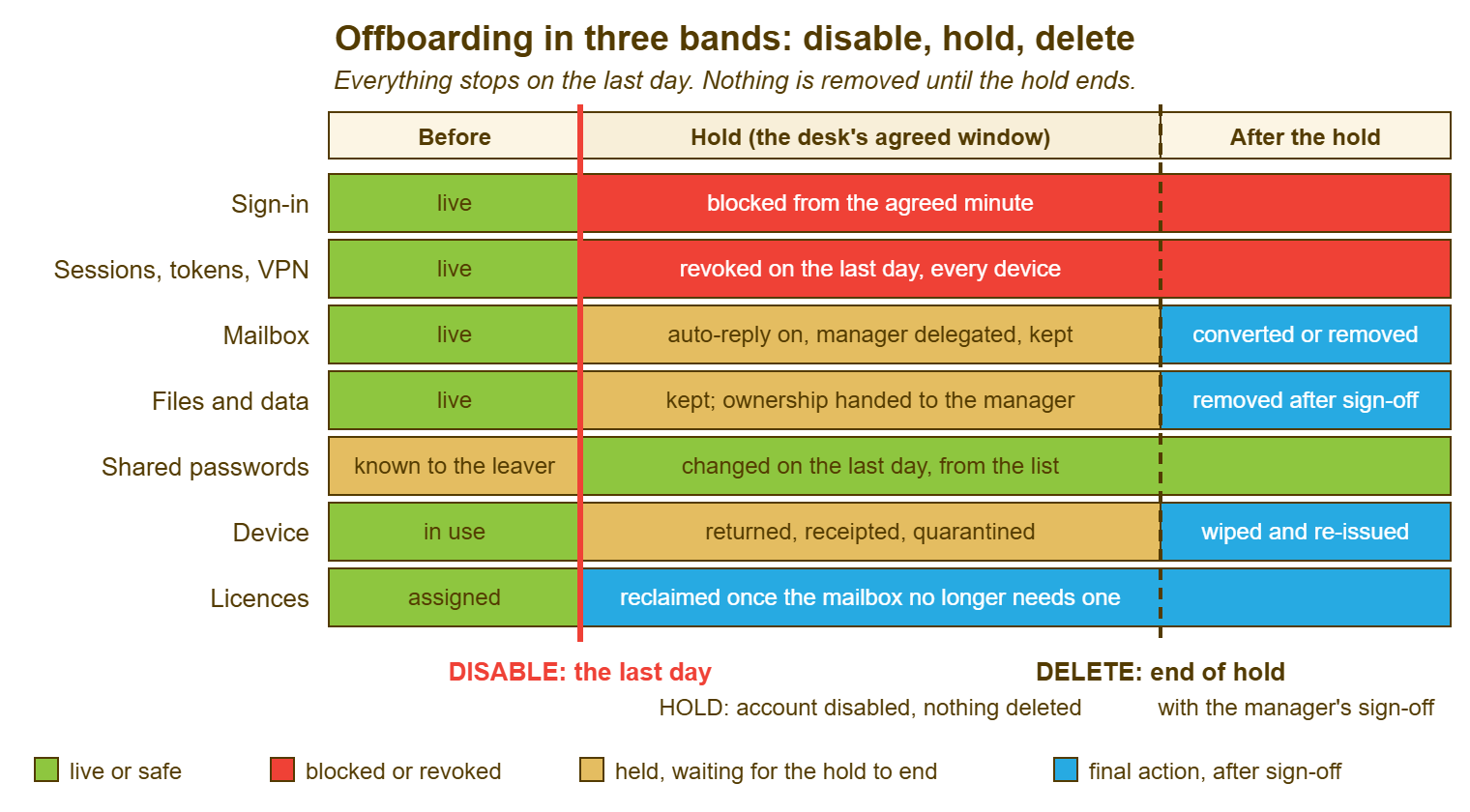
Remember: on the last day, disable the sign-in at the agreed minute, revoke every session and token, check the mailbox rules, and take the device. Change the shared passwords and free the licences. Prove each step in the ticket. Delete nothing until the hold ends and the manager has signed off in writing.
The Proof That Goes in the Ticket
Every step on the checklist ends with a note in the ticket that says what was done, when, and by whom. The checklist is not finished when the work is done. It is finished when a stranger could read the ticket and know the work was done. The notes are short and all the same shape: the step, the time, the name, and where it helps, what was seen. "Sessions revoked in the mail service and the identity system, 17:05, Marcus. Phone had an active session; now shown as ended." Nothing in a note is a secret: never a password, never a new shared code, never the contents of anything found in the mailbox.
The ticket also carries the structure. One parent ticket holds the HR trigger and the overall state. Each step that has its own owner or its own timescale, such as the device return and the end-of-hold deletion, has its own task. That way, a step taking three weeks does not sit in the same status as one that took three minutes. If you run QuerySolv, those tasks can be tickets linked to the parent, each claimed by the person doing it. In that setup, the parent's complete event history shows when each was opened, who took it, and when it closed. That is the audit trail without a separate document. In any tool, the test is the same: the parent is not closed while any task is open, and every tick has a name and a time next to it.
The table below is the order, the timing and the proof in one place. Read the right-hand column before deciding that any step can be skipped.
| Step | When | Note in the ticket | What goes wrong if skipped |
|---|---|---|---|
| 1. Disable sign-in | The agreed minute on the last day | "Account disabled HH:MM, confirmed", with the name | The leaver's password keeps working from anywhere |
| 2. Revoke sessions, tokens, VPN, second factor | Immediately after step 1 | Each service named, with the time; anything seen as still active | The phone keeps reading mail for days or weeks |
| 3. Mailbox: rules, auto-reply, access | Last day | Rules found and removed; auto-reply set; who has access until when | Mail forwards outside; customers write into silence |
| 4. Device collected and quarantined | Last day, or courier kit sent | Items received, condition, receipt attached; shelf label | Data wiped before anyone checked it; device never returns |
| 5. Shared passwords changed | Last day, from the list | Each secret named as changed, time; never the new value | The courier portal still opens to the leaver |
| 6. Licences freed | Last day, or when the mailbox is converted | Which licences, when; spreadsheet updated | Finance finds it in a quarter's time |
| 7. Hold | From the last day to the agreed end date | End date set as a dated task; any legal hold noted | Needs surface after the data is gone |
| 8. Sign-off and deletion | End of hold | Manager's written confirmation; what was archived or removed, when | Disabled accounts pile up until the audit asks why |
A Short War Story: The Supplier Correspondence at Tollgate Foods
Tollgate Foods let an accounts clerk called Ivan go at the end of a notice period. The desk, working from a ticket that said "remove Ivan's account", deleted the account and its mailbox at five o'clock on his last day and freed the licence with some satisfaction. Nineteen days later the external auditors asked for the full correspondence with a packaging supplier over the previous year, all of which had gone through Ivan's mailbox. The finance director asked the desk for it the same afternoon. The mail service's own recovery window for deleted mailboxes had closed, and the backup system held monthly copies. So the desk spent two and a half days restoring a copy of the mailbox from the previous month's backup into a temporary account and searching it. It still could not produce the final three weeks of messages, which had existed only in the live mailbox. The auditors noted the gap in their report. The finance director spent a morning explaining it to the board's audit committee. The desk's own estimate of the cost was about twenty-five hours of technician time plus a line in an audit report that will be read for years. The ticket had said "remove", and the desk had removed. The lesson Tollgate wrote into its checklist the following week was that the desk disables on the day, holds for a stated window, and deletes only when a named manager has confirmed in writing that nothing is needed, whatever the ticket's first line says.
The Checklist
The checklist below is the one Marcus keeps pinned next to the HR form. It is organised by band and then by step. That lets a technician on a Friday at ten to five see at a glance which lines must be done in the next ten minutes and which can wait for Monday. The top block is filled from the HR trigger before the last day. Band one is done at the agreed minute and in the hour after it. Band two runs for the length of the hold and has one dated line. Band three is done only after the sign-off line is signed. Every tick has a name and a time, and no tick ever contains a secret.
OFFBOARDING CHECKLIST — DISABLE FIRST, DELETE LATER
Leaver: ______________________   Directory name: ______________________
Manager: ______________   HR contact: ______________   Parent ticket: ________
Last working day: __________   Access stops at: ________   Hold ends on: __________

BEFORE THE LAST DAY
  [ ] HR trigger received with the fields above; parent ticket opened
  [ ] Accounts and services the leaver holds listed: ______________________________
  [ ] Shared secrets the leaver knew listed with the manager: ______________________
  [ ] Devices on loan listed: ______________________   Return route: office / courier
  [ ] Mailbox handling agreed with the manager, within policy, with an end date
  [ ] Retention policy and any legal hold checked with HR

BAND ONE — THE LAST DAY (at the agreed minute, then within the hour)
  [ ] Directory account disabled at ________              by ________
  [ ] Sessions revoked: mail service ____  file service ____  identity system ____
  [ ] VPN certificate or profile revoked                   by ________
  [ ] Second-factor registration removed                   by ________
  [ ] Other sign-ins the leaver held disabled: ______________________________
  [ ] Mailbox rules checked; outside forwards removed       by ________
  [ ] Auto-reply set, naming ______________ as the contact
  [ ] Manager access to mailbox granted until __________   by ________
  [ ] Device received: ______________________  Receipt attached: Y / N
  [ ] Device labelled with name and ticket; placed on quarantine shelf
  [ ] Shared secrets changed, each noted by name only, never by value
  [ ] Application licences freed; mailbox licence handled per the service
  [ ] Each line above has a note in the ticket with a time and a name

BAND TWO — THE HOLD (last day to the hold end date)
  [ ] Account remains disabled; nothing deleted; dated task set for the end
  [ ] File and folder ownership transferred to ______________ on __________
  [ ] External accounts in the leaver's name transferred: ______________________
  [ ] Access granted to the manager reviewed and removed on its end date
  [ ] Device wiped and returned to stock only after the manager clears the data

BAND THREE — THE END OF THE HOLD
  [ ] Manager confirmed in writing that nothing further is needed, on __________
  [ ] Mailbox archived / converted / removed per policy    by ________ on ________
  [ ] Files archived / removed per policy                  by ________ on ________
  [ ] Account deleted / archived per policy                by ________ on ________
  [ ] Remaining licences freed; licence record updated
  [ ] Parent ticket closed; all linked tasks closed
Marcus disabled Sarah's account at 17:01, revoked her sessions, found no forwarding rules, and set the auto-reply. He took the laptop from the practice manager with a receipt, changed the two shared passwords the practice team admitted to, and went home. The referral letter question came in week five this time. It took him four minutes, because the mailbox was exactly where he had left it. The practice manager, who remembered the previous occasion, said nothing at all, which Marcus took as the compliment it was.
Frequently Asked Questions
Is changing the leaver's password as good as disabling the account?
Does disabling the account end the sessions on the leaver's phone?
How long should the hold period be?
The manager wants the account deleted on the day "for security". Should we?
What about the shared passwords we did not know the leaver knew?
Can we record the new shared password in the ticket so the team can find it?
From the QuerySolv team: we build self-hosted help desk software for Windows. QuerySolv runs as one Windows service on your own network. It takes requests by web form, e-mail, live chat, social messages and REST API. It is licensed once per installation rather than per agent per month. The free trial runs the full product for 30 days.