
Licence Tracking Without a Tool: The Register
Wednesday, 11:15, at Stonebridge Insurance. Hugo, who has run the desk for eight months, opens a letter addressed to his predecessor from the supplier of the claims-modelling program. It is polite. It says that under the terms of the agreement the supplier is entitled to confirm the number of installations. It asks for that number, with machine names, within thirty days. Hugo has a purchase order for twenty-five seats. He has a spreadsheet called "licences FINAL v3" that his predecessor last touched some time before leaving. He has no idea how many copies of the program are installed. He asks the two technicians. One says "about twenty". The other says "more than that, the actuarial team had a batch". Hugo looks at the letter again. It is still polite.
A licence is the right to run a program under the supplier's terms. The organisation does not own the program. It owns permission, and the permission has a count. A seat is one unit of that count: one machine, one person, or one person using it at a time, depending on the terms. A licence register is the list of every licence the organisation holds. It records how many seats it owns, how many it has used, when it renews and who pays. It is the thing Hugo's predecessor did not keep. This article is part of our Software Installs & Licence Requests series. This article is about keeping that list in a spreadsheet, honestly, with no asset tool and no licence-management product. That is because a small desk does not need either to answer the letter.
It covers what a licence is in plain words, the register and its columns, and counting seats honestly as three numbers. Next comes reclaiming seats at offboarding, followed by reclaiming them from people who still work here. Then come the renewal calendar and the audit letter in plain words, including why a tidy register makes it boring. It finishes with a short war story and the licence register to copy, in that order.
What a Licence Is, in Plain Words
When the organisation buys software it buys permission, and the permission comes with a number and a set of conditions that the desk has to know. The number is the seat count. The conditions say what a seat is. A licence that is per device counts machines. One that is per user counts named people. And one that is concurrent counts how many people may be using it at the same moment, however many have it installed. The same program from the same supplier can be sold all three ways. And the register must say which, because the count the audit letter asks for depends on it. Twenty-five device seats with thirty installs is a problem; twenty-five concurrent seats with thirty installs may be fine.
The conditions also say how long the permission lasts. Some licences are bought once and run until the organisation stops using the program. Some are a subscription, paid yearly or monthly, that stops working, or stops being lawful, when the payment stops. Subscriptions are where the money leaks, because a seat that was bought for someone who left is still being paid for, every month, until somebody notices. The person most likely to notice is in finance, a year later, asking the desk a question it cannot answer. The register's renewal column is for that.
Read the terms of each licence once, when it is bought, and write the three facts into the register. Those are what a seat is, how long it lasts, and whether the supplier may audit. Nobody enjoys reading licence terms, and the desk does not need to read all of them. It needs those three answers, and they are usually on one page. (The other forty pages are for lawyers, who are paid for it.) A register with "seat type: unknown" in the column is a register that will have to be rebuilt the day the letter arrives. It will be rebuilt by reading the terms then, under a deadline, which is the worst time to read anything.
The Register Is a Spreadsheet With Eleven Columns
The register is one row per licence, not one row per copy, and it lives in a spreadsheet the desk lead owns and touches once a month. Each row carries the program's name as the supplier writes it, the supplier, and the seat type. It carries seats owned, copies installed, and copies in use. It carries the renewal date, the notice period for cancelling, and whether it renews automatically. It also carries the budget holder who pays and where the proof of purchase and the key are kept. Eleven columns, and the three in the middle, owned, installed and in use, are the ones the rest of this article is about. The others are facts copied once from the purchase and the terms.
One row per licence keeps the register readable, and the install records on the tickets carry the detail. A licence with twenty-five seats does not need twenty-five rows in the register. It needs one row that says twenty-five owned, twenty-two installed, and a note saying "machines: search the closed tickets for the program name". The install record from Installing It names the machine and the seat on every install ticket. And the register is the sum of those records, not a copy of them. If you run QuerySolv, the closed install tickets and the offboarding tickets carry the seat line in their notes. In that case, the monthly touch of the register is a search of the month's closed tickets rather than a walk round the building. In any tool with a searchable history, the same is true, provided the notes were written the same way every time.
Where the register lives matters less than who owns it. The owner is the desk lead by name, with the monthly touch in their calendar. A register owned by "the desk" is owned by nobody, and nobody's spreadsheet is called "licences FINAL v3". Keep it in the place the desk keeps its other working documents, with the proof-of-purchase files beside it. And keep the keys out of it entirely: a key goes in the secret store, and the register says so. A spreadsheet is e-mailed, copied and left open on screens. A list of licence keys should be none of those things.
Counting Seats Honestly: Owned, Installed, In Use
Every licence has three counts, and a desk that tracks only one of them is going to be surprised by the other two. Owned is the number of seats the organisation has paid for. It comes from the purchase records: the orders, the renewal invoices, the seats added mid-year that finance remembers and the desk does not. Installed is the number of copies that exist on machines, working or not, used or not. It comes from the install records and from the management tool's inventory where the desk has one. It comes from the walk round where it does not. In use is the number of copies someone actually opened recently. It comes from the program's own usage report if it has one, or from the sign-in record if the licence is per user. It comes from asking people if it is neither. The three numbers are different for every licence on every desk, and the gaps between them are the work.
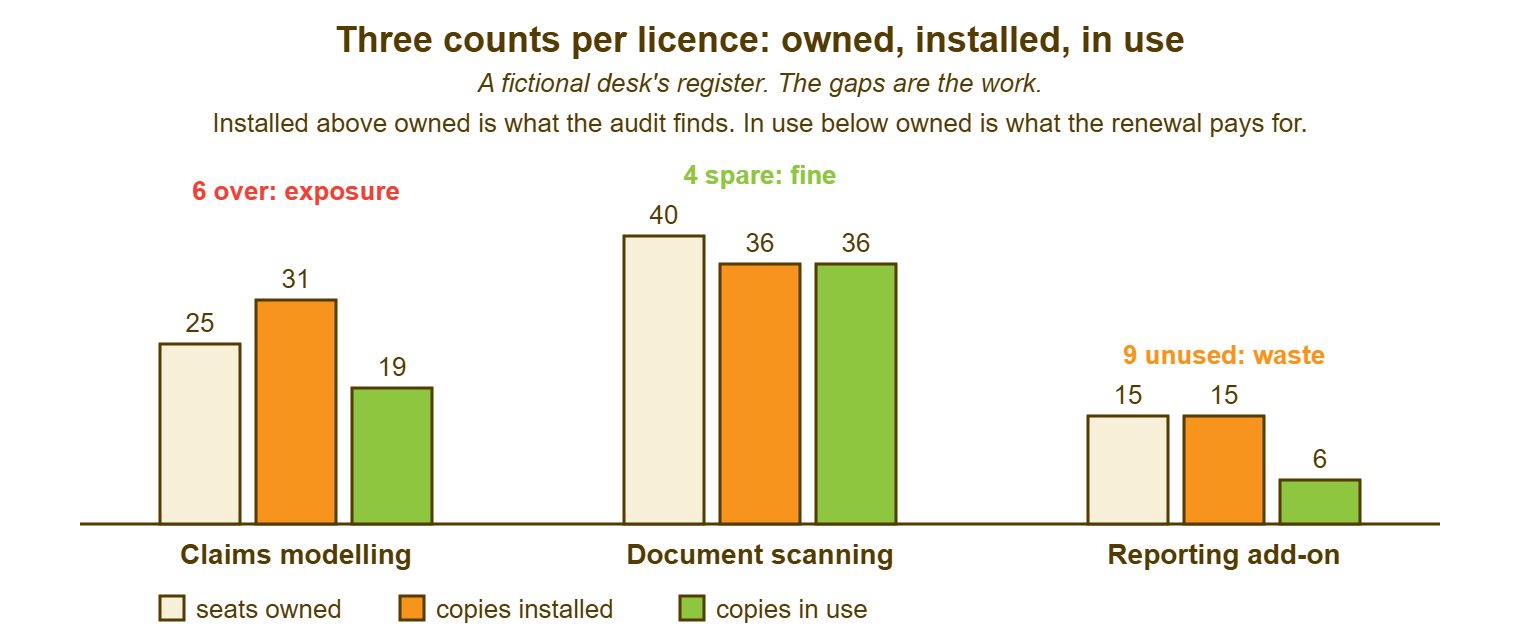
Installed above owned is exposure: the organisation is running more copies than it has permission for. The audit letter is a question about exactly this gap. It happens without anyone intending it. A machine is reimaged and the old one goes in a cupboard with the program still on it. A technician installs from a key that the installer does not stop reusing. A department gets "a batch" from a project budget that bought installs, not seats. In use below owned is waste: the organisation is paying for seats that nobody opens, and at renewal it will pay for them again. The picture below is the three counts for three licences at a fictional desk, and the two gaps are labelled for what they are.
Count installed from evidence, not from memory, and write down which evidence. "Thirty-one installed, from the management tool's inventory on the first of the month" is a count. "About twenty" is a feeling with a number attached. Where the desk has no inventory tool, the install records on the closed tickets are the count. That is why the record exists. In that case, walking round once a year finds the gap between what the tickets say and what the machines say. That gap measures how well the records are being written. A desk whose walk-round matches its tickets can stop walking round. A desk whose walk-round finds six copies the tickets do not know about has learned something about its install discipline, cheaply.
Count in use generously and act on it slowly. A copy that has not been opened in three months is probably unused, and probably is not the same as certainly. The person may use it quarterly, for the year-end, for the one client who sends files in that format. The register records the count and the date it was taken. And the reclaim conversation in the next section is what turns "probably unused" into a seat back in the pool. The count is the evidence; it is not the decision.
Reclaiming at Offboarding
The leaver's seats come back on the day they leave. And the mechanism is a line in the offboarding checklist that reads "licences: list the leaver's seats from the register and the install records; release each; update the register". The offboarding ticket, built the way The Offboarding Checklist builds it, already disables accounts and collects the machine. The licence line is the one that stops the organisation paying for a subscription seat for someone who has not worked there since spring. Per-user seats are released in the supplier's portal or by the desk's admin console. Per-device seats are released when the machine is wiped for the next person, and the register says so. Concurrent seats need nothing but the register updated.
The quiet leak is the subscription seat nobody releases. The leaver's account was disabled and the machine was wiped, but the subscription went on billing. It is a record at the supplier, not on the machine. Many suppliers bill for assigned seats, not used ones, and a disabled account with a seat still assigned is a seat paid for. The offboarding ticket's licence line catches this on the day. The leaver audit in The Leaver Audit catches the ones the ticket missed. The register's "in use" count, read against the current staff list once a quarter, catches the rest. Three nets, one leak, and it still gets through sometimes. (Subscriptions want to live. It is their only ambition.)
Returned seats go back into the pool. The pool is what makes the pre-approved route in the approvals article honest. A request for a program the organisation owns seats of is a no-decision install only while there are seats spare. The register is where "spare" is counted. A desk that reclaims at offboarding has spare seats most of the time and buys rarely. A desk that does not buys a new seat for every starter and renews every seat for every leaver. Finance notices eventually, usually in a meeting the desk lead was not expecting to be in.
Reclaiming From People Who Still Work Here
The reporting add-on in the picture has fifteen seats, fifteen installs and six people using it. And the nine unused seats belong to people who still work at the organisation and were given the program for a reason that has since passed. Reclaiming from the living is a conversation, not a checklist line, and it goes like this. The desk writes to each holder of an unused seat and says the register shows no use in three months. It asks whether they still need it and gives a date after which the seat will be released if they do not answer. Most answer "take it". A few say "I need it for year-end", and the register notes that so that the question is not asked again in the autumn. One or two do not answer at all, and the date does its work.
Do this once a quarter, for the licences with the biggest gap between installed and in use. Call it the seat harvest, because the name tells people what it is for. It takes an hour of the desk lead's time per quarter. On a desk with a dozen paid licences it is the difference between buying seats at renewal and not buying them. Tie it to the renewal calendar so that the harvest for each licence happens a couple of months before its renewal. That is when a released seat is worth the most. A seat released in the week after renewal is a seat paid for a year and used for none of it.
Removal is an install in reverse and gets the same record: a ticket, the machine, the seat released, the register updated, the holder told. A seat harvested in the spreadsheet and never uninstalled from the machine is a seat the audit will count as installed. That is the exposure gap being created by the waste gap's cure. Both counts move together or the register is lying in a new direction.
The Renewal Calendar
Every licence in the register has a renewal date. The desk's calendar holds a reminder for each, two to three months before. The decision at renewal is only a decision if there is time to make it. The reminder opens a ticket, assigned to the desk lead, with four questions. It asks how many seats are in use against how many are owned. It asks whether the organisation still needs this program at all. It asks whether the terms, the price and the seat type have changed. It asks whether the budget holder who paid last year is still the budget holder. The ticket waits on the budget holder's answer like any approval, and closes with the renewal placed, reduced, or cancelled, and the register updated.
Two columns in the register exist for this ticket alone: the notice period and the automatic-renewal flag. Many subscriptions renew on their own unless the organisation says otherwise, some distance before the date. A desk that opens the renewal ticket the week before has already renewed for a year, at last year's count, for the people who left in spring. The reminder has to fire before the notice period, not before the date. The calendar entry says both: "renews on the first of the month; notice by the first of the previous month; ticket opened two months before that". A calendar entry is the cheapest piece of licence management there is, and it is the one most desks do not have.
Put the image rebuild and the seat harvest on the same calendar, as the installing article in this series suggests. This lets the three reviews for a licence happen in one sitting. They cover what is on the image, who is not using it, and whether to renew it. A desk that renews with the register open and the harvest done renews the right number. A desk that renews from last year's invoice renews last year's organisation.
Remember: one row per licence, three counts per row, taken from evidence with the date beside them. Installed above owned is exposure; fix it before anyone asks. In use below owned is waste; harvest it before the renewal. Every seat comes back at offboarding, and every renewal gets a ticket two to three months out, before the notice period.
The Audit Letter in Plain Words
An audit letter is the supplier using a clause in the terms to ask the organisation to count its copies and report the count. And it is the single reason a small desk keeps a register at all. The letter usually asks for the number of installations, sometimes the machine names, sometimes the users, within a stated time. It usually offers to help, which means it offers to run a counting tool on the organisation's network. The organisation is usually obliged to answer honestly and in time. It is rarely obliged to accept the tool, to answer in a hurry, or to volunteer anything the letter did not ask for. Read the clause in the terms, which the register's "may audit" column pointed to when the licence was bought, before replying to anything.
Reply from the register, through one named person, with the count the letter asked for and nothing else. If the register is tidy, this is an afternoon. The owned count comes from the purchases, and the installed count comes from the install records and the inventory. The machine names come from the tickets. A covering note says what the count is and how it was taken. If the register is a guess, the afternoon becomes the two weeks Hugo is about to spend. The count at the end is still a count, only later and more expensive. The audit is not an exam. It is a question with a number for an answer. And a desk that already knows the number finds the letter boring, which is the correct way to find it.
Do not uninstall copies in a hurry after the letter arrives, and do not guess low. Count first, as the letter asks. If the count is over, tell whoever handles contracts and the budget holder before replying. An overage is a commercial conversation between the organisation and the supplier, and the desk's job in it is the count. Copies removed between the letter and the reply, without a record, look like what they are. Copies removed after the count, with a ticket each and the register updated, are housekeeping. Where the count is right, the reply is the count. Where it is over, the reply is the count plus a conversation the desk does not lead. Either way the desk's part is done in an afternoon, with the register open and the tickets behind it.
The letter will also ask, in its way, whether the desk's numbers can be trusted. And a register with dates beside the counts and tickets behind the installs answers that without the desk having to say anything. The same discipline, dated counts from named sources, is what keeps any inventory honest. Keeping Asset Data Honest covers the general case. A licence register is asset data about permissions, and it goes stale the same way for the same reasons.
A Short War Story: The Layout Program at Larkfield Media
Larkfield Media, a magazine publisher, received an audit letter about its page-layout program. The register, kept by a designer who had left, said thirty seats owned and thirty installed. A technician called Rosa spent nine working days counting and found forty-four copies. There were thirty on current machines and nine on reimaged old machines that had been kept in a cupboard "in case". There were five installed by an editor from a shared installer and the one key, which the installer had never refused. The supplier's reconciliation came to fourteen seats back-charged plus the cost of the counting. Rosa's manager put that counting at about sixty hours across the desk, the editorial team and the finance officer who had to explain it. The invoice was larger than the licence's ordinary yearly cost. The cupboard machines had been wiped by the end of the week, with a ticket each. And the register was rebuilt with three counts per row and a renewal column that had not existed before. Rosa wrote the lesson at the top of the new register, in the only row with no numbers. A licence count you have not taken is a count the supplier will take for you, at their rate.
The Licence Register
The register below is the layout Hugo built after the letter, as it looks in a spreadsheet. It has a header row of eleven columns, one row per licence, and a monthly routine written underneath. That routine lets whoever has the desk after him do the same four things on the first of each month. Two example rows show the shape, with fictional values. The keys are not in it, and the column that would hold them says where they are instead. Add columns only when a decision needs them. A register with thirty columns is a register nobody updates, and an out-of-date register with eleven is still worth more than it.
LICENCE REGISTER — ONE ROW PER LICENCE, OWNED BY ______________, TOUCHED MONTHLY

Program | Supplier | Seat type | Owned | Installed (date, source) | In use (date, source)
  | Renews on | Notice by | Auto-renew? | Budget holder | Proof and key kept at

Claims modelling | ______ | per device | 25 | 31 (1st, inventory tool) | 19 (1st, usage report)
  | ________ | ________ | yes | Head of Claims | purchases folder; key in secret store

Reporting add-on | ______ | per user | 15 | 15 (1st, install tickets) | 6 (1st, sign-in list)
  | ________ | ________ | no  | Finance Director | purchases folder; key in secret store

MONTHLY ROUTINE (first working day, about an hour)
  1. Add every licence bought or renewed last month; copy seat type, dates and notice from the terms.
  2. Update Installed from last month's install and removal tickets, or the inventory tool.
  3. Update In use from usage reports, sign-in lists, or the quarterly seat harvest.
  4. Open a renewal ticket for anything renewing within three months, before its notice date.

QUARTERLY
  [ ] Seat harvest on the three licences with the widest installed-to-in-use gap
  [ ] In-use count checked against the current staff list for per-user licences
  [ ] Cupboard check: any machine not in service still holding an installed copy is wiped, with a ticket

AT OFFBOARDING (line on the offboarding checklist)
  [ ] Leaver's seats listed from the register and install tickets; released; register updated

WHEN AN AUDIT LETTER ARRIVES
  [ ] Read the audit clause in the terms   [ ] One named person replies   [ ] Count from the register
  [ ] Over? tell contracts and the budget holder before replying   [ ] Nothing removed without a ticket
Hugo answered the letter in the fourth week with twenty-eight copies installed against twenty-five seats. The three extra were on reimaged machines in the actuarial team's cupboard. He had counted, ticketed and wiped them in that order and said so in the covering note. The supplier accepted the count and sold Stonebridge nothing. The register has been touched on the first of every month since. The renewal for the claims-modelling program was placed at twenty-two seats rather than twenty-five. The next letter, if one comes, will be answered on the afternoon it arrives, by whoever has the desk. The answer will come from a spreadsheet that is not called FINAL.
Frequently Asked Questions
We have no install records for the past. How do we get the first installed count?
Should free software go in the register?
Who should reply to an audit letter, the desk or management?
How do we count concurrent-user licences?
A manager refuses to give up unused seats "because the team might need them". What then?
At what point does a small desk need a real licence-management tool?
From the QuerySolv team: we build self-hosted help desk software for Windows. QuerySolv runs as one Windows service on your own network. It takes requests by web form, e-mail, live chat, social messages and REST API. It is licensed once per installation rather than per agent per month. The free trial runs the full product for 30 days.