
The Leaver Audit: Finding the Accounts Nobody Disabled
Tuesday, 14:00, at Oakfield Academy, in the quiet week after the summer term. Femi runs a desk of two and has, for the first time, two lists side by side on his screen. The left one came from HR that morning and holds every member of staff the academy currently employs: 212 names. The right one came out of the directory ten minutes ago and holds every account that can currently sign in: 243. Femi is not surprised that the numbers differ. He is surprised by how much, and he is about to spend the afternoon finding out who the other thirty-one are. By four o'clock he knows that eleven of them left the academy, some of them two summers ago. He knows that one of the eleven signed in last month.
Femi's afternoon is the leaver audit, a reconciliation done every quarter. It compares the organisation's own record of who has left against every list of who still has access. That way the accounts the offboarding process missed are found by the desk rather than by someone else. The offboarding checklist handles the leavers the desk was told about. The audit handles the rest, and on a desk that has never done one, the rest is a longer list than anybody expects. This article is part of our Employee Offboarding series. The reasons an orphaned account is a security problem rather than an untidiness are in Why Offboarding Is a Security Ticket First. This article is the quarterly habit that turns those reasons into a list of findings.
It covers what the audit is and why it is quarterly, then the four lists, starting with HR's. Matching the directory against HR's list and what each kind of mismatch means follow. Next come orphaned accounts and what to do with them, then service accounts tied to a person. The licence count as a third check and the external accounts HR never knew about follow. Next come the reconciliation drawn as a picture and measuring days-to-disable. A short war story and the quarterly leaver audit sheet to copy follow, in that order.
What the Audit Is and Why It Is Quarterly
The audit is a comparison, not an investigation. Every list of people who have access is laid beside the list of people who have left, name by name. Every row that does not match becomes a finding with an action. It does not require any special tool. It requires four exports, a spreadsheet, an afternoon, and the willingness to ask managers a short question about accounts they would rather not think about. The first audit on any desk takes longer than the afternoon, because it is clearing a backlog. The second takes an hour. The fourth takes twenty minutes and finds one thing, which is the point at which the offboarding process can be said to work.
Quarterly is the rhythm because it is often enough to catch a missed leaver before their account has been quiet long enough to be forgotten entirely. It is rare enough that a desk of two will actually do it. Monthly is better on a desk with high turnover and worse on a desk that will skip it in a busy month and then skip the next. Annually is the rhythm of an organisation that finds its orphaned accounts when the auditors do. Pick quarterly, put it in the calendar as a recurring ticket with the desk lead as owner, and treat the ticket like any other with a due date. An audit with no ticket is a good intention, and good intentions do not get reconciled.
Source One: The HR Leaver List
The HR leaver list is the list of everyone who stopped working for the organisation in the period, with their last working day. It is the list everything else is matched against. Ask HR for it as a standing arrangement, on the first working day of each quarter, covering leavers from the previous quarter. Ask for full name, department, last working day, and whether the person was an employee, a contractor, a temporary worker or a volunteer. Ask for the current staff list at the same time. That second list is how the desk finds accounts that belong to nobody at all rather than to a leaver.
The list will not match the directory cleanly, and most of the mismatches are names. HR holds legal names; the directory holds the name the person used at work. That may be a middle name, a shortened form, a maiden name or a spelling that somebody typed wrong on the first day and nobody corrected. The audit sheet has a column for "directory name as found" next to "HR name". The first audit fills it in by hand for every row that does not match automatically. Keep the column. By the third audit most names match because the desk has corrected the directory as it went. The ones that still need a human are the ones that always will.
HR's list also contains people the desk never heard of, and that is not a complaint about HR. Take the teacher who left at the end of term after a maternity cover, the contractor whose engagement simply ended, and the volunteer who stopped coming. None of those produced a leaver ticket because none of them felt like an exit to the person who knew. They all had accounts. Every one of those names on HR's list that has no corresponding leaver ticket on the desk is a finding of its own. That is separate from whether the account is still enabled, because it says the trigger failed. The trigger is the thing to fix.
Source Two: The Directory's Enabled Accounts
The second list is every account in the directory that is currently enabled, with its display name, when it was created, and when it last signed in. It is exported to the spreadsheet beside HR's list. Most directories can produce this list in a few minutes through their own administrative tools. The exact route differs. The desk writes its own route on the audit sheet so that the next technician does not rediscover it. The last sign-in date is the column that matters most; where the directory cannot provide it, the mail service's last-activity date is the usual substitute.
Matching the two lists produces three kinds of mismatch, and each is a different finding. The first is a name on HR's leaver list whose directory account is still enabled. That is the orphaned account, the finding the audit exists for, and the next section is about it. The second is an enabled account whose name is on neither the leaver list nor the current staff list. That account belongs to nobody HR knows about. It is usually a service account, a shared mailbox with a sign-in, a test account somebody created, or a contractor HR was never told about. The third is an enabled account that does match a current member of staff but has not signed in for months. That is not a leaver finding at all but is worth a line. A current employee who has not signed in since the spring is either on long leave or has an account they do not use. An unused enabled account is a smaller version of an orphaned one.
At Oakfield, Femi's thirty-one extra accounts split as follows. There were eleven leavers nobody disabled, nine service accounts, and four shared mailboxes that could sign in on their own. There were five contractors HR had no record of, and two generic accounts for the library terminals. Every one of the thirty-one was a finding. Only the eleven were urgent.
Orphaned Accounts and What to Do With Them
An orphaned account is an enabled account whose person has left. The action is the same as for any leaver: disable it today, revoke its sessions, and start the hold. Open a leaver ticket after the fact so the rest of the checklist can run. Disable first, exactly as if the leaver had walked out this afternoon, because in every way that matters they have. Do not delete it in a burst of tidiness. A leaver from two summers ago may still have a mailbox the finance office needs, and the hold exists for exactly this. The order of the checklist, and the hold, are in the checklist article and are not repeated here.
The last sign-in column decides how worried to be. An orphaned account that last signed in on the person's last working day is a process failure and nothing more. The account was never used after they left, and the desk disables it and moves on. An orphaned account that signed in after the last working day is a different finding. Something used it, and the desk does not know what. The action is still disable and revoke, immediately. Then the finding goes to the security function, or to HR and whoever handles legal matters where there is no security function. It goes with the dates and nothing else. The desk does not look through the mailbox to see what happened, and does not contact the leaver to ask. It does not decide that it was probably the person checking an old payslip. It contains, records, and refers, which is the desk's role in every security finding in this series.
Every orphaned account also tells the desk something about the trigger. Look at why the desk was never told: the department, the kind of worker, the month. If three of the eleven were summer-term contractors, the trigger needs a route for contractors. If four were from one department, that department's manager needs a conversation. The audit's findings are the offboarding process's defect list. A desk that only disables the accounts and never asks why they were missed will find the same number next quarter.
Service Accounts Tied to a Person
A service account is an account used by a system rather than a person. Examples are the one the backup job runs as and the one the scanner uses to deliver documents to a folder. Others are the one the website uses to send mail and the one the scheduled report signs in with at six every morning. Service accounts are supposed to belong to nobody, and the audit finds the ones that quietly belong to somebody. One sign is a service account named after the person who created it ("dave-backup"). Another is a service account whose password is known only to a person who has left. Another is a service account that is actually a person's own account being used by a scheduled job because it was there. Another is a real person's account that a system was set up to use "temporarily" three years ago.
The action for each is to give it an owner, not to delete it. That is because a service account deleted on a Tuesday afternoon is a backup job that fails on Tuesday night. The audit's job is to find problems rather than create them. For each service account in the mismatch list, record what it is for, which system uses it, and who owns it now (a named current person, with a deputy). Record whether its password is known to anyone who has left. Where the password is known to a leaver, change it in a planned window, with the system owner standing by to update the job that uses it. That is a change, with the small ceremony a change deserves. Where a real person's account is being used by a system, create a proper service account and move the job to it. Only then let the person's account be treated as a person's account. A service account that nobody owns is a leaver's account by another name.
Write the result on a service account register, which is a short list with four columns: account, purpose, owner and deputy, and the date the password was last changed. The register is reviewed at every audit and is the reason the second audit's service-account section takes five minutes. It will also, one day, be the document that lets the desk answer "what runs as this account?" before switching something off. That is a question every desk is asked eventually, usually at the worst moment.
The Licence Count as a Third Check
The third list is the licence assignments. It shows which named accounts hold a licence for the mail service, the office applications, the design tool, and the accounting system. It includes whatever else the organisation pays for per person. Matched against the HR leaver list and the directory's disabled accounts, it finds two things. First are licences assigned to disabled accounts, which are usually leavers whose mailbox is in hold. Those licences should be reclaimed when the hold ends. Second are licences assigned to leavers whose accounts were never disabled. Those accounts are a subset of the orphaned accounts. The licences are reclaimed as part of those findings. A licence held by a disabled account whose hold ended months ago is a reminder that the end-of-hold task was never done. That is a process finding, and the licence is the cheap part.
The licence list is also a cross-check on the other two, because the licence system sometimes knows about accounts the directory does not. An application with its own user list, licensed per person, may hold a leaver who was never in the directory at all. One example is a contractor who was given a login to one tool and nothing else. Export each per-person licence list, match it, and add the mismatches. The method for keeping those lists without buying anything is in Licence Tracking Without a Tool. The audit is the quarter's reason to keep them current. Finance's interest in this section is sincere, and it is a useful ally when the desk asks for the afternoon.
The External Accounts HR Never Knew About
The fourth list is the one the organisation does not have until the desk builds it: the external account register. That is a list of every account that lives outside the directory and was registered in a person's name. The courier portal, the social media logins, the domain registrar, the analytics tool, the vendor's support site, the payroll provider's portal, the online survey tool the marketing team signed up for with a work e-mail address. None of these is disabled when the directory account is. None appears on any export the desk can run. Every one of them still accepts the leaver's password the week after they go. The audit's hardest finding is the one it cannot see, and the register is how it learns to.
Build the register by asking, once per department, a short question: "Which websites and services does your team sign in to that are not the ones IT set up?" The first answers are long and the managers are faintly embarrassed, which is not the point; the point is the list. For each account record the service, what it is for, and which person it is registered to. Record whether the sign-in is individual or shared, and who else knows the password. Then, at each audit, match the register's "registered to" column against the HR leaver list. An external account in a leaver's name is transferred to a named current colleague, and its password is changed. Where the service allows it, the registered e-mail address is changed to a shared or team address. That way the next exit does not need the same step. The register grows at every audit and shrinks at none, which is the correct direction. The broader question of who should have access to what, and the manager-led review that keeps it honest, is the subject of Access Reviews Managers Actually Complete. The leaver audit feeds it, and the two reviews can share a quarter.
The Reconciliation as a Picture
The picture below draws the whole audit on one page. The four lists are on the left: HR's leavers, the directory's enabled accounts, the licence assignments, and the external account register. The middle step is the match, done by name against the HR list, one row at a time. The four findings are on the right, each with its colour and its action. A leaver whose account is still enabled is disabled today and held. An enabled account nobody owns is a service account to be given an owner or retired. A licence on a disabled account is reclaimed and recorded. An external account in a leaver's name is transferred and its password changed. The box along the bottom is the measure, which the next section explains.
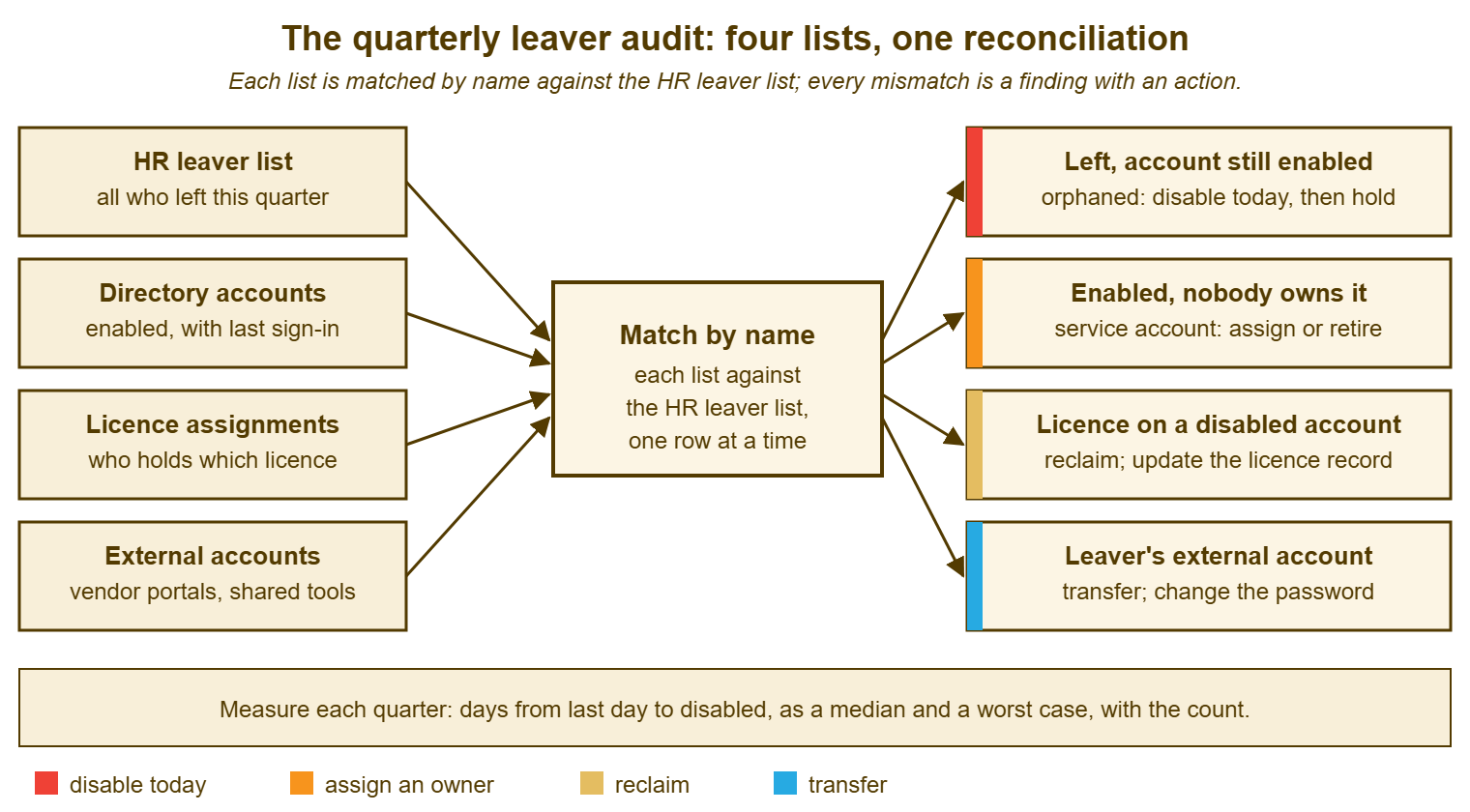
The table below is the same thing as a reference, with the column the desk fills in for each finding. Every row in the audit spreadsheet ends up in one of these five lines or in "matched, no action". A row that fits none of them is a row to think about rather than to force.
| What the match shows | What it means | Action | Record |
|---|---|---|---|
| On HR's leaver list; directory account enabled | Orphaned account; the trigger or the checklist failed | Disable and revoke today; open a leaver ticket; start the hold; note why the desk was not told | Ticket number; last sign-in date; whether it signed in after the last day |
| On HR's leaver list; account enabled; signed in after the last day | Something used the account after the person left | Disable and revoke now; refer to the security function or HR with the dates; do not investigate | Ticket number; referral date and to whom |
| Enabled account; on neither HR list | Service account, shared mailbox, test account or unknown contractor | Identify the purpose; assign an owner and deputy, or disable if nobody claims it within the quarter | Service account register line, or disable date |
| Licence assigned to a disabled or orphaned account | Reclaim missed, or hold still running | Reclaim when the hold ends; reclaim now if the hold has already ended | Licence record updated; date |
| External account registered to a leaver | Access outside the directory that no switch disabled | Transfer to a named colleague; change the password; re-register to a team address where possible | Register updated; date; new owner |
Measuring Days-to-Disable
Days-to-disable is the number of days between a leaver's last working day and the day their directory account was disabled. It is the audit's one number, reported each quarter as a median, a worst case and a count. The median says what the process normally does; the worst case says what it did when it failed; the count says how many leavers the two numbers describe. Together they tell a manager more than any single figure, and they are small enough to fit in one line of the quarterly report. The last day comes from HR's list. The disable date comes from the leaver ticket, or from the directory's own record of when the account was changed where the ticket does not exist. The missing ticket is itself a finding.
A worked example, from Femi's first proper quarter after the backlog was cleared. Fourteen people left Oakfield in the quarter. Twelve had their accounts disabled on the last working day, so their days-to-disable was zero. One was disabled after two days, because the leaver ticket arrived late from a department that had just learned the form existed. One was disabled after nineteen days, because the person was a contractor whose engagement ended without anyone telling the desk, and the audit found the account. The line in the report read: "Fourteen leavers; account disabled on the last day for twelve; median zero days; worst nineteen days (contractor, no leaver ticket; trigger for contractors now agreed with HR)." Everything the academy's leadership needed to know about offboarding that quarter is in that sentence, including what was fixed.
Two cautions, both borrowed from the measurement articles elsewhere in this library. The first is that the numbers are small. A desk with fourteen leavers a quarter should report counts and the worst case, not a rate. That is because a rate built on fourteen moves by seven points when one person changes sides. The thinking about honest counts at small volumes is in Counting Tickets Properly. The second is that days-to-disable measures the process and never a person. A worst case of nineteen days is a trigger that failed, not a technician who was slow, and the report says which. The one-page format the number belongs in, and how to write the line so a manager reads it, is in The Monthly Report They Will Read. The leaver line is one of the few security numbers a small desk can report with a straight face, which is a good reason to report it.
The disable date is the one that needs a record. It is the reason every leaver has a ticket with the disable step noted at the time. Where that habit exists, days-to-disable is a look-up rather than a reconstruction. If you run QuerySolv, the event history on the leaver's ticket already holds the note and its time. In that case, the quarter's figure comes from reading the tickets rather than from memory. In any tool, the rule is that the disable step is noted when it is done, with the time, and the audit simply collects the notes.
Remember: once a quarter, match every list of who has access against HR's list of who has left, name by name. Disable and hold every orphaned account the same day, and give every service account an owner. Reclaim every stranded licence and transfer every external account. Report the days-to-disable as a median, a worst case and a count. Then ask why each miss happened, and fix the trigger.
A Short War Story: The Wrong Account at Kestrel Marketing
Kestrel Marketing, a small agency, ran its first leaver audit after a new desk lead called Sunil arrived. The directory half of it was unremarkable: six orphaned accounts, all disabled by the end of the afternoon. The external account register, which Sunil built that week by asking each team, turned out to be the half that mattered. It showed that the agency's public social media account was registered to a designer called Freya who had left the previous autumn for a rival agency. It showed that the password had never been changed, and that her phone had been signed in to both agencies' accounts for seven months. Nobody had done anything deliberate. Freya had simply never noticed the old account was still on her phone, until the morning she posted a draft of the rival's campaign from the wrong one. The post was up for twenty-six minutes, long enough for two clients to see it and one to call. The cost to Kestrel was roughly fifteen hours of apology and explanation, and a conversation with the rival agency that both sides found uncomfortable. The cost also included a lesson about which accounts a directory can see. Sunil's register now has forty-one external accounts on it, every one with an owner. The audit matches it against HR's list every quarter. That is what he wishes somebody had written down a year earlier.
The Quarterly Leaver Audit Sheet
The sheet below is the one Femi keeps as the description of the recurring audit ticket, and it is filled in once per quarter. The top block is the four exports and where each came from, with the dates, so that the next technician can produce them. The middle blocks are the four matches with their counts and the findings as rows. The bottom block is the measure and the process findings, which are the part that changes next quarter's results. Keep each quarter's sheet with its ticket. The fourth sheet in a row with nothing in the findings blocks is the proof that offboarding works. It is worth more than any number of good intentions.
QUARTERLY LEAVER AUDIT — ONE SHEET PER QUARTER
Quarter: __________   Run on: __________   By: ______________   Audit ticket: ________

A. THE FOUR LISTS (where each came from, so it can be repeated)
   HR leaver list for the quarter, from ______________ on __________   rows: ____
   HR current staff list, from ______________ on __________           rows: ____
   Directory enabled accounts with last sign-in, exported how: ______________   rows: ____
   Licence assignments, per service: ______________________________              rows: ____
   External account register, last updated __________                         rows: ____

B. MATCH ONE — HR LEAVERS AGAINST THE DIRECTORY
   Leavers on HR's list: ____   With a leaver ticket on the desk: ____   Without: ____
   Orphaned accounts (left, still enabled): ____
     Name ______________  HR last day ________  Last sign-in ________  Disabled on ________  Ticket ______
     Name ______________  HR last day ________  Last sign-in ________  Disabled on ________  Ticket ______
   Signed in after the last day: ____   Referred to ______________ on __________

C. MATCH TWO — ENABLED ACCOUNTS ON NEITHER HR LIST
   Count: ____
     Account ______________  Purpose ______________  Owner assigned ______________ / disabled on ________
     Account ______________  Purpose ______________  Owner assigned ______________ / disabled on ________
   Service account register updated: Y / N   Passwords known to a leaver changed: ____ (planned windows)

D. MATCH THREE — LICENCES
   Licences on disabled accounts whose hold has ended: ____   Reclaimed on ________
   Licences on orphaned accounts: ____   Reclaimed with the finding above
   Per-service user lists holding a leaver not in the directory: ____   Removed on ________

E. MATCH FOUR — EXTERNAL ACCOUNTS
   Register rows registered to a leaver: ____
     Service ______________  Was ______________  Now ______________  Password changed ________
   New accounts added to the register this quarter: ____

F. THE MEASURE AND THE PROCESS FINDINGS
   Leavers this quarter: ____   Disabled on the last day: ____
   Days-to-disable: median ____   worst ____ (reason: ______________________)
   Why each miss happened (department, worker type, month): ______________________________
   Trigger change agreed with HR: ______________________________  on __________
   Report line sent to ______________ on __________
Femi disabled the eleven that afternoon and opened eleven leaver tickets dated honestly. He referred the one that had signed in last month to the academy's business manager with two dates and no theory. The contractor trigger was agreed with HR the following week. His fourth audit, a year later, took twenty-five minutes and found one shared mailbox that could still sign in on its own. He fixed it before the kettle boiled. Thirty-one to one in four quarters is not a statistic. It is the shape of a process that started working.
Frequently Asked Questions
HR will not give us the leaver list because it is confidential. What can we do?
We found an orphaned account that signed in last week. Should we look at what it did?
Can we just delete every account that has not signed in for six months?
How do we find external accounts if nobody kept a list?
Who should the days-to-disable number go to, and how often?
Our directory cannot show last sign-in dates. Is the audit still worth doing?
From the QuerySolv team: we build self-hosted help desk software for Windows. QuerySolv runs as one Windows service on your own network. It takes requests by web form, e-mail, live chat, social messages and REST API. It is licensed once per installation rather than per agent per month. The free trial runs the full product for 30 days.