
Requests, Approvals and Fulfilment on a Small Desk
Thursday, 16:10, at Marlow Veterinary Group, five practices and a two-person desk. Ticket 5120, from Aisha at the Riverside practice: "I asked for access to the client records folder two weeks ago. My manager says she approved it the same day. What is happening?" Sam opens the ticket. Status: Pending. Last entry, thirteen days ago, from Owen: "Sent to Helen for approval." Nothing since. Owen sent the approval request from his own mailbox, and Helen replied "fine" to his own mailbox. Owen has been on leave since Monday. So the approval exists, in writing, in a folder nobody else can open. The ticket has been waiting two weeks for a yes that arrived in an hour.
A request is a person asking for something they do not have yet. And its lifecycle is the sequence of states it passes through from logged to closed: approval, fulfilment, delivery and confirmation, in that order. The ticket is held by a different person at each one. The four work types are defined in The Four Work Types in Plain Words. And the request is the one with a step the others never have, which is somebody saying yes. This article is part of our Incidents, Requests, Problems & Changes series, and it is about that step and the ones around it.
It covers the six states of a request and who holds the ticket at each, with a picture. Next we cover why the approval has to live in the ticket and how to put it there. Then comes the chase, which is what the desk does instead of waiting, and fulfilment as a checklist that is the same every time. We turn to the standard request list, which is the small desk's catalog, and a mini request catalog to copy. We finish with the three numbers worth reporting and a short war story, in that order.
The Six States of a Request
A request passes through six states, and the useful thing about naming them is that each one has a different person holding the ticket. Logged: the desk has it, and owes a first reply that says what happens next. Waiting for approval: the approver has it, named in the ticket, and the desk's job is to chase. Being fulfilled: the desk has it again, and the expected time is running. Delivered: the desk has done the thing and told the requester what and how. Confirmed: the requester has it, and says so, or stays silent for long enough that silence counts. Closed: nobody has it, and the last message was from the desk.
The picture below lays the six out left to right with who holds the ticket under each, and two clocks above. The first clock, over logged and waiting for approval, is the chase clock. The desk is not counting this time against itself, because the approver owns it. But the desk is chasing on a fixed interval and reporting how long approvals take. The second clock, over fulfilment to confirmation, is the fulfilment clock, counted from approval. This is the one the desk is measured on. The declined branch leaves the approval state, because a request that is refused is finished, honestly, with a reason. And the note at the bottom right is the whole of the next section in one line.
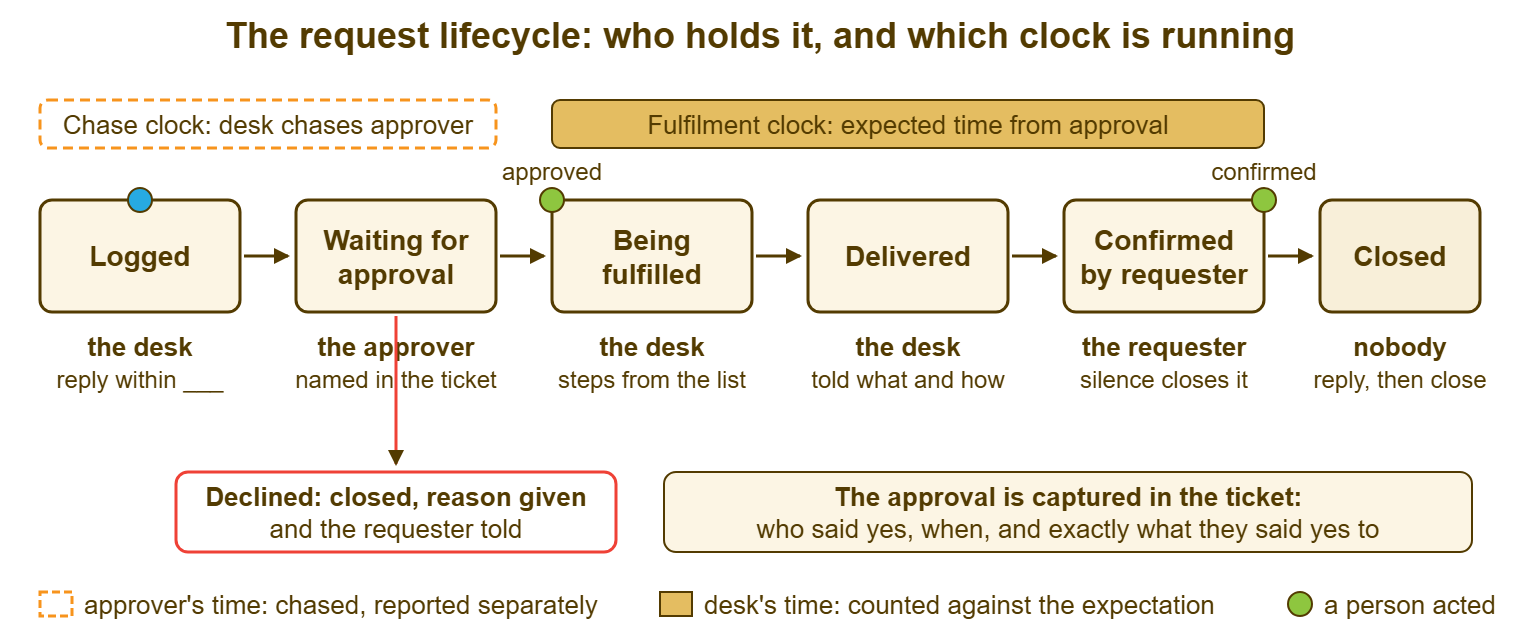
Your tool will not have six statuses with these names, and it does not need to. Most small-team tools ship a fixed set, something like New, Open, Pending, Resolved and Closed. The six states map onto them by written definition: "Pending on a request means waiting for approval, and the approver's name is in the last note." The meaning lives in the team's definition, not in the label. And the discipline of writing those definitions is in Pending User vs Pending Vendor vs On Hold. What matters is that anyone opening the ticket can tell, in five seconds, which of the six states it is in and who is holding it. Ticket 5120 failed that test. It said Pending, and Pending had been doing a lot of work.
The Approval Lives in the Ticket
An approval is a named person with the authority to say yes saying yes to a specific thing. It exists, for the desk's purposes, only when it is written in the ticket. Not in a technician's mailbox. Not in a chat thread. Not in the approver's memory, or the requester's account of the approver's memory. In the ticket, as a line that says who, when and what: "Approved by Helen (practice manager, Riverside) on Tuesday 14:05, for read access to the Riverside client records folder." That line is the evidence that the desk was allowed to do the thing. And it is the only evidence that survives a leave, a leaver or an audit.
The cheapest way to get the approval into the ticket is to ask for it from the ticket. Most tools can send a message to a third party from within a ticket. They do this by adding the third party as a participant, copying them on a reply, or forwarding the ticket. That way, their answer lands back in the ticket's history. Use that, every time, and never a technician's own mailbox. Where the tool cannot, forward the request from the desk's shared address with the ticket number in the subject. That way, the reply comes back into the queue rather than into a person. The test is simple: if the technician who asked for the approval left tomorrow, could the next person find it? If the answer is "it is in Owen's inbox", the answer is no.
When the approval arrives by phone or in a corridor, which it will, the technician writes it down in the ticket within the hour. It goes in an internal note, with the words above: who, when, what. "Helen said fine by phone, 14:05, read access to Riverside client records." That is a weaker record than a written yes and it is enormously stronger than nothing. In most organisations it is accepted as long as the approver was the right person and the note was made at the time. A note made three weeks later, from memory, after somebody asked, is a different document. It is a guess with a timestamp.
Declined is a valid end, and it should be recorded with the same care. "Declined by Helen on Tuesday 14:05: Aisha's role does not need write access; read access approved instead." The ticket then closes with a reply to the requester saying what was declined, by whom and why. The reply offers the way to appeal if there is one, which is usually "talk to Helen". The desk does not argue the decision and does not soften it into "we are looking into it". A clear no, with a name on it, is a service. A vague maybe that lasts three weeks is not.
Who can approve is a property of the request, not of the requester. It belongs on the standard request list later in this article. For most requests it is the requester's line manager. For access to data it is the owner of the data, who is often not a manager at all. For anything that costs money above a threshold it is a budget holder. Two traps are worth naming. The first is the manager approving their own request, which the list should say is not allowed above whatever threshold your organisation cares about. The second is the desk approving, which it never does; the desk fulfils. (The desk may think the request is silly. The desk's opinion is not an approval step.)
The Chase Replaces the Wait
While a request is waiting for approval, the desk does not wait; it chases. The difference is that waiting is a status and chasing is a calendar entry, and only one of them ever ends. The first chase goes out at a fixed interval after the approval request, two working days on most desks. It is a short message to the approver from the ticket: "Ticket 5120 is waiting for your approval for Aisha's folder access; a reply of yes or no to this message is all we need." The second chase goes out after another two days, copied to the requester. So the requester can see who is holding it and can nudge in person, which works far more often than a third e-mail.
After two chases with no answer, the desk tells the requester plainly: "We have asked Helen twice and heard nothing; the request stays open, and it will move the moment she replies. You may get a faster answer by asking her directly." That sentence is not the desk passing the buck. The approver's silence is a fact, and the requester is the person best placed to change it. The desk keeps the ticket, keeps chasing on the interval, and keeps the record of each chase in the ticket. At the monthly review the time spent waiting for approvals is reported, by approver. That report is the only thing that has ever made a slow approver faster.
The chase interval belongs on the request list, in the expected-time column, as "chased every two working days". It also belongs in the first reply to the requester, so that they know the desk will not be sitting on it. Most requesters who chase the desk are chasing because they do not know who has the ticket. Tell them it is Helen, tell them when you will next ask Helen, and the chasing moves to where it belongs.
One mechanical point: whether the clock pauses while a request waits for approval depends on the tool. Some tools pause the target clock in a pending or on-hold status, some run it regardless, and some pause on one status and not another. Put a test request into your waiting status over a weekend and read the due time on Monday. If the clock runs, the request will show overdue while the approver thinks. In that case, the report will need to separate "late because of us" from "late because of them". If it pauses, the waiting time disappears from the clock and the report needs to add it back. Either way, write down what the tool does, and report the approval wait as its own number.
Fulfilment Is a Checklist
Fulfilment is the part of the request the desk is measured on. The reason requests are measurable at all is that the steps are the same every time. A new starter needs an account, a mailbox, a laptop built from the standard image, and membership of four groups. They also need a phone and a welcome note with the first-day password instructions. It is the same six steps for every new starter, which means it is a checklist. A checklist can be given to the person who started last week with a reasonable expectation that step four will not be skipped. Where it is skipped, the day-one ticket "my account doesn't work" is the request process telling you which step. That is the point made in Incident or Request? The Daily Call.
Write one checklist per standard request, in the knowledge base, and put the link in the request list. The checklist is three to ten lines, each a step with a yes-or-no outcome. And the last line is always "told the requester what was done and how to use it". That last line is the difference between delivered and confirmed. A laptop left on a desk is delivered. Take a laptop left on a desk with a note saying how to sign in for the first time. With a reply in the ticket saying it is there, that laptop is on its way to confirmed. The reply is the close; the shape of a good one is in What a Proper Close Looks Like.
Where fulfilment includes ordering something, split the promise at the point where the desk's control ends. "Ordered within one working day of approval" is a promise the desk can keep; "delivered within five days" is a promise about a supplier's van. The expected time on the list says both: ordered within a day, supplier delivery usually three to five days. The requester is told the order date and the supplier's estimate in the same reply. When the van is late, the desk chases the supplier on an interval, exactly as it chased the approver, and tells the requester each time. The request is not late. The supplier is, and the ticket says so.
Confirmation is the requester saying the thing works for them. It should be asked for in the delivery reply and allowed to time out. "Please let us know if anything is missing; if we do not hear from you in three working days we will close this as done." Most tools can auto-close a resolved ticket after a set number of days. The silence-closes-it rule is honest as long as the reply said so and a later message reopens the ticket rather than starting a new one. Many tools reopen a closed ticket automatically when the requester replies; some need a status change by hand. Check which yours does, and count the reopens, because a request that is reopened twice is a checklist with a missing line.
Remember: an approval that is not written in the ticket, with who, when and what, did not happen as far as anyone can later prove. Ask for it from the ticket, write it in the ticket when it comes by phone, and chase it on a calendar rather than waiting on a status.
The Standard Request List
The standard request list is the small desk's catalog: the ten to twenty things people ask for most. Each has who can ask, who approves, what the desk needs to know, the expected time, and the checklist that fulfils it. The idea of a service catalog, and the larger thing it becomes on a larger desk, is in The Service Catalog Idea. For a desk of two the list is one page, built from a month of real requests rather than from an imagined menu. It is the single document that turns requests from arguments into procedures.
Build it from the tickets. Pull the last two or three months of requests, sort them by what was asked for, and name the piles. The top ten piles are the first ten rows. For each, the expected time comes from what the desk actually achieved on the last several, from approval to delivery. It is rounded up to something the desk meets nine times in ten. A target the desk already misses is not a target. It is a wish with a column. The approver comes from asking "who said yes last time, and should it have been them?", which produces at least one surprise per desk. Then the list goes to requesters, in the knowledge base or on the intake form. That way, the person asking for a laptop can see that it needs their manager's approval and usually takes five working days. They can see that before they have typed a word.
Pre-approved requests are the rows where the approver column says "none", because the organisation has decided in advance that anyone may have the thing. Examples are a password reset, a standard piece of software from an approved list, or a replacement mouse. These rows are the desk's fastest work, and the list is what makes them fast, because nobody has to ask whether approval is needed. Add a row to that group only when someone with authority has agreed in writing that it belongs there. "We usually just do it" is how pre-approval happens by accident. Accidental pre-approval is the thing the audit in the war story below was looking for.
Anything not on the list is a non-standard request, and it takes a different path. It goes to the desk lead, who finds the approver, estimates the time, and tells the requester both. If the same non-standard request arrives three times, it becomes a row. The list grows by evidence and shrinks by review, once a quarter, when rows nobody asked for in three months are removed. A list of sixty rows is a catalog nobody reads. A list of fifteen rows is a thing the triager has memorised by week two.
The Mini Request Catalog
The table below is a starting catalog of ten rows, with the columns a small desk needs and no more. The approvers and times are placeholders written in the shape yours should take; replace every one with your own, from your own tickets. The "what we need" column is what the intake form or the first reply should ask for. That way, fulfilment does not stall on a missing detail on day three. The last column names the checklist, which lives in the knowledge base, one page per row.
| Request | Who can ask | Approver | What we need to know | Expected time (from approval) | Fulfilled by |
|---|---|---|---|---|---|
| New starter setup | Line manager or HR | Line manager; HR confirms start date | Name, role, start date, site, which existing person to model access on | Ready one working day before start, given five working days' notice | New-starter checklist (6 steps) |
| Leaver | Line manager or HR | Line manager | Name, last day, who receives their mailbox and files | Access removed by end of last day; mailbox handed over within two days | Leaver checklist (5 steps) |
| Access to a shared folder or system | Anyone | The data or system owner (named per folder on the owners page) | Which folder, read or write, why, for how long | One working day | Access checklist (3 steps) |
| Password reset | The account holder | None (pre-approved); identity checked by the desk | Identity confirmed by call-back or in person | Within the hour, in working hours | Reset procedure (identity check first) |
| Standard software from the approved list | Anyone | None (pre-approved list); licence count checked | Which item, which device | One working day | Install checklist |
| Non-standard software | Anyone | Line manager; budget holder above the purchase threshold | What, why, cost, how many people, data it will hold | Ordered within one day; install within two days of licence arriving | Lead reviews; purchase procedure |
| New or replacement laptop | Line manager | Line manager; budget holder for anything above the standard model | Who, standard or exception model, why, when needed | Ordered within one day; built within two days of delivery; supplier delivery usually three to five days | Build checklist (standard image) |
| Mobile phone or SIM | Line manager | Line manager | Who, number to keep or new, device or SIM only | Two working days | Phone checklist |
| Equipment move (desk, monitor, phone) | Anyone | None for own desk; facilities for anything structural | From where, to where, when | Agreed date; within five working days | Move checklist, with facilities |
| Shared mailbox or distribution list | Team lead | Team lead; data owner if it will receive customer data | Name, members, who manages membership | One working day | Mailbox checklist (3 steps) |
Two columns in the table earn their place more than the rest. One is "approver", because it is the column that turns "who do I ask?" from a conversation into a lookup. Writing it forces the organisation to decide who owns each folder, which it has usually never done. The other is "what we need to know". Every request that stalls on day three stalls on a question the form could have asked on day one. The expected times are the least important column to get right first. They will be wrong for a quarter, and then they will be yours.
The Three Numbers Worth Reporting
Requests give the monthly report three numbers, and the rest of the request report is detail. The first is the approval wait, measured from the request for approval to the yes or no, and reported by approver. It is their number and they will not shorten it until they see it. The second is the fulfilment time, from approval to delivery, against the expected time on the list, by row. This is the desk's number, and the only one the desk should be judged on. The third is the count by row, which tells you what people actually ask for and which rows should be pre-approved, automated or removed. The whole monthly page, with the other three types beside it, is built in Reporting by Work Type.
Resist reporting a single "request resolution time" from logging to close. It adds the approver's week to the desk's day and reports the sum as the desk's. That number gets a desk asked why laptops take two weeks when the desk built every one of them in two days. Where the tool can only report from logging, export to a spreadsheet, subtract the approval wait from each ticket's elapsed time, and present both columns. It takes twenty minutes a month. It is the twenty minutes that stops the desk being measured on Helen's diary.
A Short War Story: The Audit at Greystone Legal
Greystone Legal was a law firm with eighty staff and a desk of three. For years it had granted access to client matter folders on the strength of a manager's say-so, usually by phone. The technician noted "approved" in the ticket and nothing else. The firm's annual compliance review asked for evidence of who had approved access to a sample of forty folders. Dev, the desk lead, could produce the word "approved" forty times and the name of an approver nine times. In no case could he produce what exactly had been approved or when. He spent four working days reconstructing the other thirty-one from old e-mails, chat history and the memories of partners. He could not reconstruct six at all. The review recorded a finding that took the firm a quarter and an external consultant to close. The desk had done nothing wrong with any of the forty, since every one had been approved by the right person. It simply could not prove it. Greystone's fix was one sentence on the triage card: "approval means who, when and what, in the ticket". The fix also included a request for approval sent from the ticket rather than a mailbox. And it included a folder-owners page so that the right approver was a lookup. An approval that is not in the ticket is a memory, and memories do not pass audits.
Sam, at Marlow, phoned Helen at 16:20 and got "yes, read access, I told Owen a fortnight ago". He wrote exactly that in ticket 5120 with the time, granted the access by 16:35, and replied to Aisha. His reply said what had been done and how to find the folder. The next morning he changed the desk's approval request to go out from the ticket. He added Helen and the other four practice managers to the owners page. He put "chased every two working days" in the first-reply template for requests. Owen came back from leave to find that the approval in his inbox was no longer needed by anyone. That is the correct fate for an approval in an inbox.
Frequently Asked Questions
Our tool has no approval workflow. Can we still do this?
Can the requester's manager approve by replying to the requester's ticket?
What if the approver is on leave for two weeks?
Should we fulfil urgent requests before approval and get it afterwards?
How long should the confirmation window be before a delivered request closes?
How many rows should the request list start with?
From the QuerySolv team: we build self-hosted help desk software for Windows. QuerySolv runs as one Windows service on your own network. It takes requests by web form, e-mail, live chat, social messages and REST API. It is licensed once per installation rather than per agent per month. The free trial runs the full product for 30 days.