
Tracking Changes Without a Change Module
Tuesday afternoon at Greywell Solicitors, a law firm with ninety staff and a desk of two. Bea has read about change records and weekly reviews, agrees with all of it, and has one question for Nikhil: "Where do we put them?" Their help desk tool has tickets, two departments called IT and Facilities, a handful of statuses, a knowledge base, and a search box. It does not have anything called a change. When Bea asked the tool's supplier, the answer was a quotation for a different product with a module in it. That was an answer to a question she had not asked. The answer she needed was a convention, and she built it before the end of the afternoon.
A change module is the part of a help desk tool built for change records: a change type with its own fields, an approval step, a calendar, and links to the systems and tickets involved. Full ITSM suites have one. Most help desk tools built for small teams do not, and pretending otherwise helps nobody. This article is part of our Lightweight Change Management series. It is about doing the whole job with the features every ticketing tool already has. Those are a department or queue, a subject line, a note, a search, and somewhere to keep a list.
It covers what a module gives you and the four things you actually need, then the change department or form and the subject prefix. Next comes linking a change to the tickets it fixed and the tickets it caused, with a picture. Then it covers the change log, the standing searches to save, and what to do when you do have a module. The five-minute honesty test, a short war story and the change log template to copy finish the article.
What a Module Gives You, and the Four Things You Need
A change module gives you a record type with the right fields, an approval workflow, a change calendar, links from each change to the systems and tickets it touches, and reports by change type. Those are good things, and a desk with hundreds of changes a week and several teams should want them. A desk of two to ten people needs four things from that list, and none of the four needs code. A record that can be found by date and by system in under a minute. A way to tell a change from every other ticket, at a glance and in a filter. A link between a change and the tickets it fixed and the tickets it caused. And a list of changes in date order that a human can read in two minutes.
Everything below is one of those four, done with a department, a subject line, a note and a page. The honest cost of the convention is that it relies on discipline where a module would rely on a mandatory field. A module will not let you save a change without a rollback; a convention will, and it is the weekly review that notices. That review, described in A Change Review That Takes Fifteen Minutes, is the enforcement, and a desk that runs it finds the convention holds. A desk that does not run it finds that neither the convention nor the module holds, because people can leave a mandatory field as "N/A" in any tool ever built.
The Change Department or Form
Most ticketing tools route tickets into departments, queues or groups: IT, Facilities, HR, whatever the organisation calls its teams. Make one more and call it Changes. A change ticket is created in that department by the technician making the change, with the change record pasted into the first note. Everyone who makes changes can see the department. The review opens it on Thursday morning. "All open tickets in Changes, sorted by planned date" becomes the review's list without anyone compiling it. How departments, forms and mailboxes route tickets in the first place is the subject of Routing by Department, Form and Mailbox. The change department is one more door, used only from the inside.
If the tool has web forms with custom fields, make a change form with the seven fields of the record. Submitting the form then creates a ticket in Changes with the record already structured. If the tool has neither departments nor forms, a category or a tag called "change" does the filtering. And if it has none of those, the subject prefix in the next section carries the whole load on its own, which is less comfortable and entirely workable. The convention degrades gracefully. That is the point of it.
The requester on a change ticket is the technician making the change, or the desk's own address, and never the person who asked for the thing the change delivers. That person's ticket is the request, and the change is a separate ticket linked to it. Keep the change department internal. Most tools can hide a department or a ticket from requesters, and the change department should be hidden. The record contains hostnames, rule names and rollback steps that have no business in a user's portal. Check yours by logging in as a test user and looking.
Use the statuses you already have and give them meanings in writing. Open means planned and not yet reviewed, or reviewed and waiting for its window. A waiting status, if you have one, means waiting for the review. Resolved means done, with the outcome line written. Closed means the following review has read the outcome. Do not ask the supplier for a change workflow. The meaning of a status lives in the convention your desk wrote down, not in the label. The article Implementing Four Types in an Ordinary Help Desk Tool shows the same trick applied to incidents, requests and problems.
The Subject Prefix
Every change ticket's subject starts with the kind, then the system, then the what in a few words. "CHG: Firewall: allow depot subnet to srv-booking." "EMG: Mail gateway: disable rule ATT-EXEC-2." A standard change made inside a request ticket gets a line in that ticket's notes beginning "STD:", because it does not need a ticket of its own. Three capital letters, a colon, the system, a colon, the change. The prefix makes the kind searchable and countable in any tool that can search a subject line, which is every tool. It makes the kind readable in any list at a glance, which is where the review and the triager will see it.
The rules are few and they matter more than they look. The prefix is always the first characters of the subject, never buried after a date or a name. The kind is always one of the same three codes, agreed once. The system is named the way the desk names it everywhere else. No dates in the subject, because the ticket has a date already. "CHG: Mail: quarantine executable attachments" is a subject the review can read in a column of twenty. "Mail change (CHG) re attachments, Tues" is a subject that needs opening to be understood, and the convention is dead the week people stop opening them.
The prefix is needed even with a department, and the reason is that tickets travel. They get moved between departments by mistake, merged, exported to a spreadsheet for a count, forwarded in an e-mail. The department is a field that can change; the subject goes with the ticket wherever it goes. The prefix is also what the monthly count searches for, and a count that depends on nobody having moved a ticket is a count that is wrong by Easter.
Linking the Change to the Tickets It Fixed and Caused
The mechanism is ticket numbers written in notes, in both directions. The change record's why line names what it fixes: "Fixes PRB 7001, REQ 7210." Each of those tickets gets a one-line note: "Fixed by CHG 7412, planned Tuesday 13:00." If the change then causes incidents, each incident's first note after triage says "Caused by CHG 7412". The change record gets a note listing them: "Caused 7430, 7431; both resolved by widening the rule, see CHG 7415." Four tickets, five notes, about two minutes of typing spread over two days. Every one of the four can be followed to the others by anyone with the search box.
Some tools have a related-tickets or link feature; use it, and write the number in the note as well. The note survives an export and the link sometimes does not. Some tools have merge; do not merge a change with an incident, because they are different kinds of work and a merged ticket answers neither question. The relationship between a problem record and the incidents that pointed at it is the same shape. The way a problem ticket collects its incidents is described in Problems vs Incidents. A change that fixes a problem links to the problem; the problem links to its incidents; the chain is three notes long and it is the whole history of a fault.
The picture below shows one change ticket in the middle, CHG 7412. The two tickets it was raised to fix are on the left. The two incidents it caused the next morning are on the right. Under them is the same change as one line in the change log. The arrows are the notes. A "fixes" note points at the change from each ticket on the left. A "caused by" note points back at the change from each incident on the right. The log line at the bottom carries all four numbers in its last column. That is how a reader who starts from the log gets to any of them in one step.
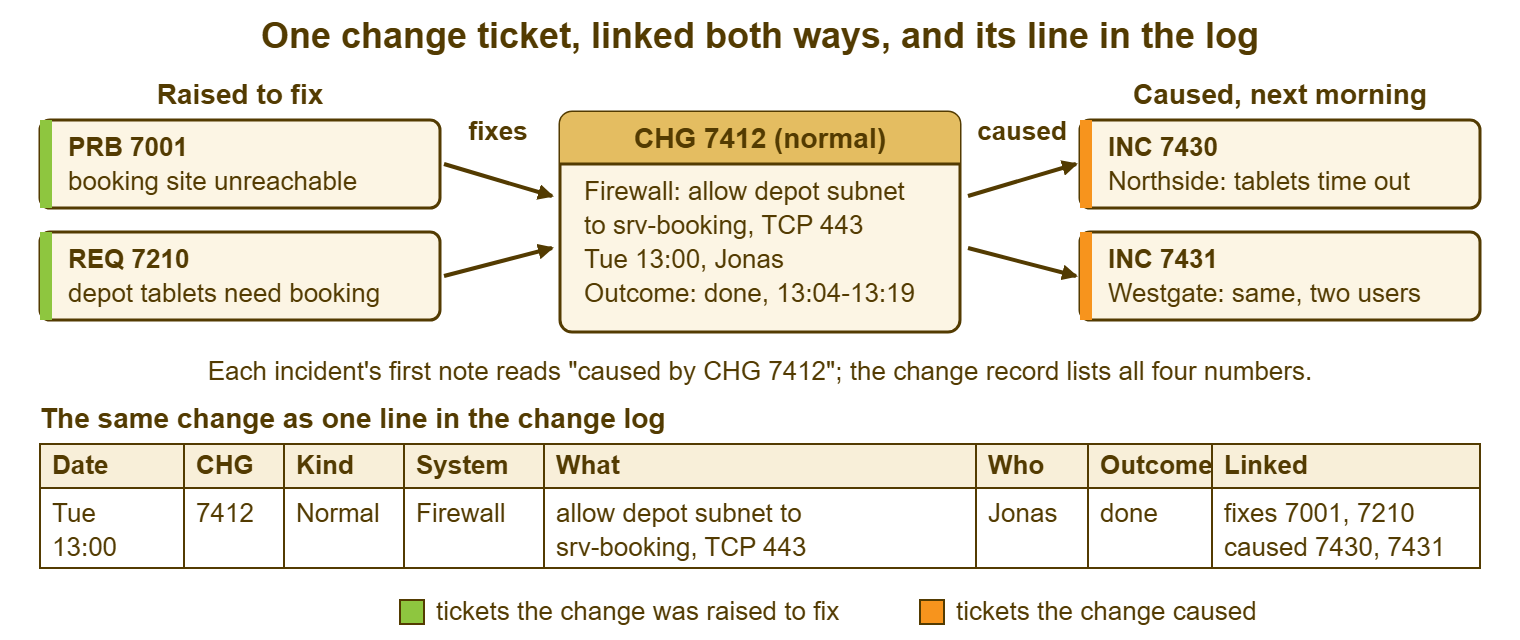
Both directions are needed because two different people ask two different questions. The technician triaging an incident asks "what changed?" and needs to get from the incident to the change. The review asks "what did this change cause?" and needs to get from the change to the incidents. A link written in one direction answers one of those and leaves the other person searching by hand. The person left searching is usually the one with an outage in front of them.
The link that pays for all the others is written at triage. When a ticket arrives that looks like an incident, the triager reads the change log for the last seven days against the system the ticket names. If there is a match, the first note on the incident reads "possibly caused by CHG ____, checking". That is the incident-after-change pattern reduced to a thirty-second habit, and it is the single cheapest thing in this whole series. It needs a log that is readable in thirty seconds, which is the next section.
The Change Log
The change log is a dated list, one line per change, newest first, that a human can read in two minutes. It is separate from the tickets, and it exists because the tickets are the detail and the log is the timeline. In an incident nobody reads twelve tickets. They read twelve lines, find the one that names the right system, and open that ticket. Keep the log as a page in the knowledge base if the priority is that everyone finds it. Use a spreadsheet if the priority is filtering and counting. Or use a spreadsheet that the knowledge base page links to, which is what most desks settle on. Do not keep two copies by hand; one of them will be wrong by the second week.
Each line has eight columns: date and time, change number, kind, system, what in a few words, who, outcome, and linked tickets. The first six are written when the change is planned; the last two when it is done. The doer writes the line, the same day, and the review checks on Thursday that every line from last week has an outcome. A log line with no outcome is the review's business, and it is asked about by name in the first two minutes.
Standard changes go in the log too, one line each, because the question the log answers is "what changed?", and a laptop swap or a group membership has broken things before now. If the volume is very high, twenty standard changes a day on a busy desk, the log holds only the normal and emergency changes. The standard ones are then found by searching the tickets for "STD:". Decide which your desk does and write it on the purpose card. A log that sometimes has standard changes in it and sometimes does not will be trusted exactly as much as it deserves.
If the log is a spreadsheet, three small things make it useful in an incident. Sort by date, newest at the top, and keep it that way. Put a filter on the system column, so that "everything that touched the mail gateway" is one click. And add a column called "days ago" with a formula that subtracts the change date from today. Then "what changed in the last seven days?" is a filter on one column rather than a calculation in someone's head at 08:40. If the log is a knowledge base page, newest at the top is the whole method, and a monthly heading keeps it scrollable.
The Searches to Save
Four standing searches do most of the work, and every one can be built from filters that any ticketing tool has: department, status, date, and subject text. Save them in the tool if it allows saved views. If it does not, write the filter steps on the purpose card so that anyone can rebuild them in thirty seconds. Each has a named reader and a time; a search nobody is named to read is a search nobody reads.
| Standing search | How to build it in most tools | Who reads it | When |
|---|---|---|---|
| Open changes, by planned date | Department is Changes; status is open or waiting; sort by the planned-date field, or by subject if there is none | The weekly review | Every review, minutes two to ten |
| Changes in the last seven days | Department is Changes; resolved or updated in the last seven days; or read the top of the change log | Whoever is triaging an incident | At first touch on any ticket that looks like an incident |
| Emergencies this month | Subject begins "EMG:"; created this calendar month | The desk lead | Monthly count, last working day |
| Planned changes with no outcome | Department is Changes; status is open; planned date is in the past | The weekly review | Every review, minutes zero to two |
Where a tool cannot save a view, the monthly export to a spreadsheet gives the lead the count, and the change log gives the triager the seven-day read. Neither needs the tool to know what a change is. The tool only needs to know what a department, a status and a subject are, and every tool knows that.
When You Do Have a Module
If your tool is an ITSM suite with a change module, use the module's change type, and keep every convention above anyway. Keep the seven fields as the content of the record, even if the module offers thirty. Keep the subject prefix, because the module's list view will be read by the same tired eyes as any other. Keep writing ticket numbers in notes, because the module links configuration items beautifully and incidents less reliably, and because notes survive the day the suite is replaced. Export the log monthly to something a human can read without logging in.
Resist the approval workflow with five steps. The module will offer it. A desk of six does not need a requester, an assessor, an approver, a scheduler and an implementer to agree that a firewall rule may be added on Tuesday. One step, "read at the review", is the approval, and the module can record it as such. A module is a convention with buttons. The buttons are pleasant, and the convention is what transfers when the buttons go.
Remember: keep a change ticket in its own department, with a subject that starts with the kind and the system. Write ticket numbers in notes in both directions, and keep one line per change in a dated log. Four conventions, no module. The weekly review is what enforces them, and the triage read of the log is what pays for them.
The Five-Minute Honesty Test
Pick an outage from the last quarter at random. Ask a colleague who was not there to find what changed in the seven days before it, on the systems involved, using only the tool and the log. Time them. Under a minute means the convention works. Under five means it works and the log wants tidying. Over five, or the answer "I'd ask Bea", means the convention is a plan rather than a practice. The thing to fix is whichever of the four parts the colleague got stuck on. Run the test once a quarter, with a different colleague and a different outage, and write the time on the purpose card.
Then run it the other way. Pick a change from last quarter and find what it caused. If the answer is "nothing" for every change you pick, either the desk is very good or the "caused by" notes are not being written. In my experience it is the second one about four times in five. The fix is the triage habit from the linking section, which costs thirty seconds a ticket and is the habit most desks drop first when the week gets busy. Put it on the triage checklist, where it is harder to drop.
A Short War Story: The Notebook at Pinecrest Academy
Pinecrest Academy, a secondary school with eleven hundred pupils, had one technician, Ravi. He kept every change he made in a paper notebook and a good memory. He left for another job at the end of the summer term. The notebook was packed, by accident, in a box of his own books. Lucia, his replacement, inherited a network with sixty-odd settings nobody could explain. She discovered one of them in the first week of the autumn exams. A scheduled task Ravi had written to clear a temporary folder nightly began deleting the working files of the exam-board software. An update had quietly moved them into that folder. Four exam sittings were disrupted over two days while Lucia hunted for a cause that had no ticket, no log line and no name. She found it on the second evening by listing the scheduled tasks on every server by hand. The cost was four disrupted sittings, two letters to the exam board, two days of one person's time and a very long autumn. Pinecrest's change log now lives in the knowledge base, with a department called Changes beside it. The first line in it is Ravi's scheduled task, entered a year late with the note "found the hard way". Lucia wrote the lesson under it: a convention which depends on one person's notebook is a notebook. A record that lives in a person leaves with them.
The Change Log Template
The log below is the eight columns as a plain-text header with two example lines and the rules underneath. Paste it into a knowledge base page or use the column names as the first row of a spreadsheet. Either way, keep the column order, because the review and the triager learn to read the log by position. The rules at the bottom are short enough to keep at the top of the page where new technicians will see them before they add their first line.
CHANGE LOG — ONE LINE PER CHANGE, NEWEST FIRST
Desk: ______________   Kept in: ______________   Standard changes included: [ ] yes  [ ] no

Date  Time   CHG     Kind       System         What (a few words)              Who      Outcome        Linked tickets
____  __:__  ______  _________  _____________  ______________________________  _______  _____________  __________________
____  __:__  ______  _________  _____________  ______________________________  _______  _____________  __________________

Example lines
Tue   13:00  7412    normal     firewall       allow depot subnet to            Jonas    done           fixes 7001, 7210
                                               srv-booking, TCP 443                                     caused 7430, 7431
Tue   14:14  7310    emergency  mail gateway   disable rule ATT-EXEC-2          Imani    done, temp     for 7308; fix 7311
Mon   09:30  7110    standard   laptop         reception laptop swapped,        Hana     done           in request 7098
                                               same model

Rules for this log
  1. The doer writes the line the day the change is planned: date, time,
     number, kind, system, what, who.
  2. The doer completes the line the day the change is done: outcome,
     linked tickets.
  3. Kind is one of: standard, normal, emergency.
  4. Outcome is one of: done, done temp (follow-up ticket named), rolled back,
     partial.
  5. Linked tickets: "fixes" the tickets it was raised for; "caused" the
     incidents that followed; "for" the incident an emergency change served.
  6. Changes made by a supplier are logged with "supplier" in Who and their
     reference in Linked tickets.
  7. The review checks every line from last week has an outcome.
  8. In any incident, read the last seven days of this log before anything else.
Bea made the department called Changes on that Tuesday afternoon. She made a knowledge base page called Change Log with the rules at the top, and a one-line note to Nikhil about the prefix. Nikhil's first change ticket, "CHG: Document management: raise upload limit to 200 MB", was created on the Wednesday. It was read at their first two-person review on the Thursday, and done on the Friday morning with its line in the log. The supplier's quotation for the suite with the module in it is in a folder, where it is doing no harm. Greywell may want it one day, when there are twenty people on the desk and six hundred changes a quarter. Until then the department, the prefix, the notes and the page do the job, and the test in the section above takes Nikhil about forty seconds.
Frequently Asked Questions
Should change tickets be visible to end users?
Should the change log be a spreadsheet or a knowledge base page?
Do standard changes belong in the log?
Our tool has no departments, forms or tags. Can we still do this?
How long should we keep the change log?
What about changes made by a supplier or managed service provider?
From the QuerySolv team: we build self-hosted help desk software for Windows. QuerySolv runs as one Windows service on your own network. It takes requests by web form, e-mail, live chat, social messages and REST API. It is licensed once per installation rather than per agent per month. The free trial runs the full product for 30 days.